Page 274 of 526
If you have ejected a disc and have not removed it within
10 seconds, it will be reloaded. If the CD is not removed,
the radio will reinsert the CD but will not play it.
A disc can be ejected with the radio and ignition OFF.
NOTE:Ejecting with the ignition OFF is not allowed on
convertible or soft-top models (if equipped).
SEEK Button
Press the right SEEK button for the next selection on the
CD. Press the left SEEK button to return to the beginning
of the current selection, or return to the beginning of the
previous selection if the CD is within the first second of
the current selection. Pressing and holding the SEEK
button will allow faster scrolling through the tracks in
CD and MP3 modes.
TIME Button
Press this button to change the display from a large CD
playing time display to a small CD playing time display.
RW/FF
Press and hold FF (Fast Forward) and the CD player will
begin to fast forward until FF is released or RW or
another CD button is pressed. The RW (Reverse) button
works in a similar manner.
AM/FM Button
Press the button to select either AM or FM mode.
SET/RND Button (Random Play Button)
Press this button while the CD is playing to activate
Random Play. This feature plays the selections on the
compact disc in random order to provide an interesting
change of pace.
Press the right SEEK button to move to the next ran-
domly selected track.
Press the SET/RND button a second time to stop Ran-
dom Play.
272 UNDERSTANDING YOUR INSTRUMENT PANEL
Page 278 of 526
Press and hold the INFO button again for three seconds
to return to�elapsed time�display.
Operation Instructions - Auxiliary Mode
The auxiliary (AUX) jack is an audio input jack which
allows the user to plug in a portable device such as an
MP3 player or cassette player and utilize the vehicle’s
audio system to amplify the source and play through the
vehicle speakers.
Pressing the AUX button will change the mode to auxil-
iary device if the AUX jack is connected.
NOTE:The AUX device must be turned on and the
device’s volume set to the proper level. If the AUX audio
is not loud enough, turn the device’s volume up. If the
AUX audio sounds distorted, turn the device’s volume
down.
TIME Button (Auxiliary Mode)
Press this button to change the display to time of day. The
time of day will display for five seconds (when the
ignition is OFF).
Operating Instructions - uconnect�phone (If
Equipped)
Refer to “uconnect�phone” in Section 3.
Operating Instructions - uconnect�studios
(Satellite Radio) (If Equipped)
Refer to “uconnect�studios (Satellite Radio)” in this
section.
UNIVERSAL CONSUMER INTERFACE (UCI) — IF
EQUIPPED
NOTE:This section is for sales code RES and REQ/
REL/RET radios only with uconnect�. For sales code
RER, REN, REP, REW or REZ touch-screen radio UCI
276 UNDERSTANDING YOUR INSTRUMENT PANEL
Page 291 of 526
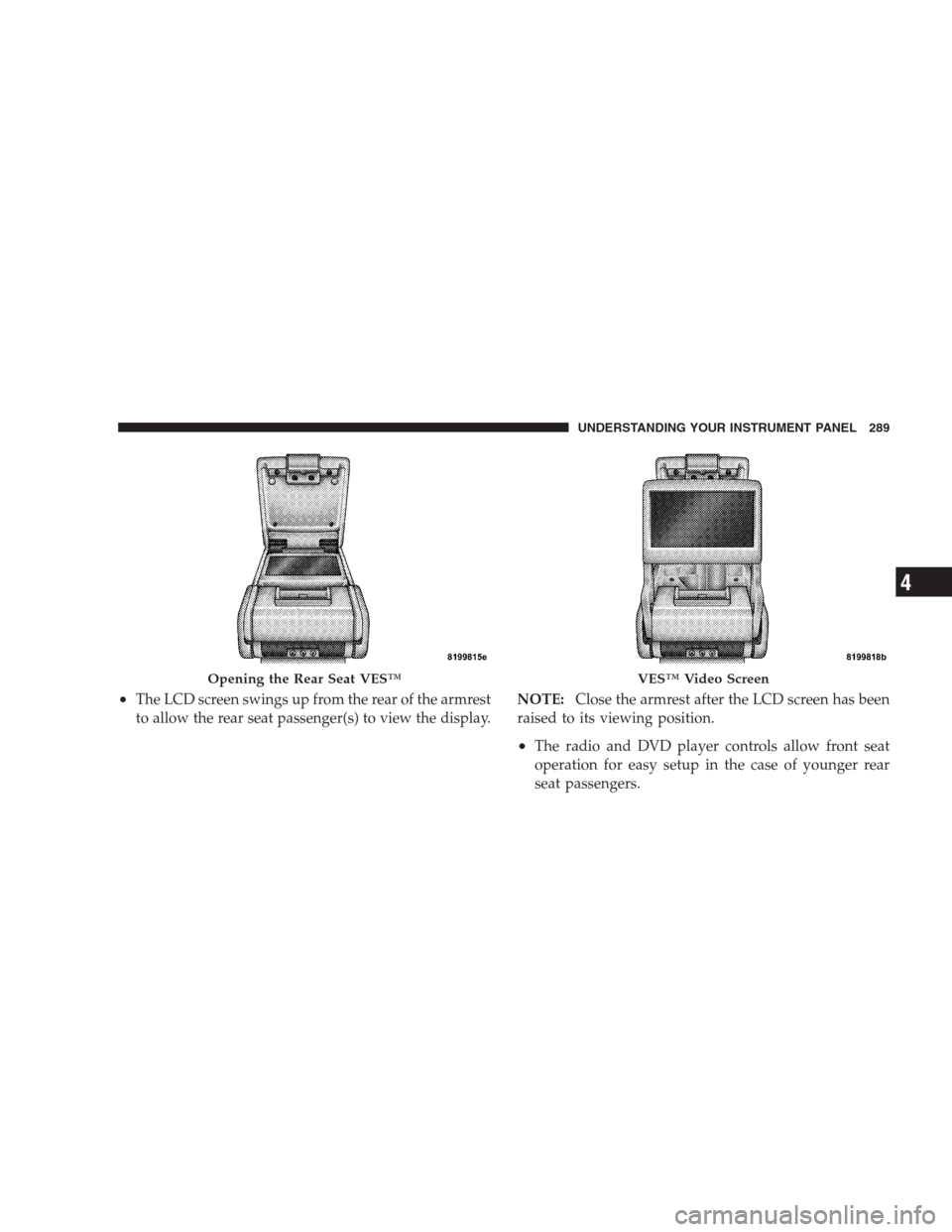
•The LCD screen swings up from the rear of the armrest
to allow the rear seat passenger(s) to view the display.NOTE:Close the armrest after the LCD screen has been
raised to its viewing position.
•The radio and DVD player controls allow front seat
operation for easy setup in the case of younger rear
seat passengers.
Opening the Rear Seat VES™VES™ Video Screen
UNDERSTANDING YOUR INSTRUMENT PANEL 289
4
Page 292 of 526
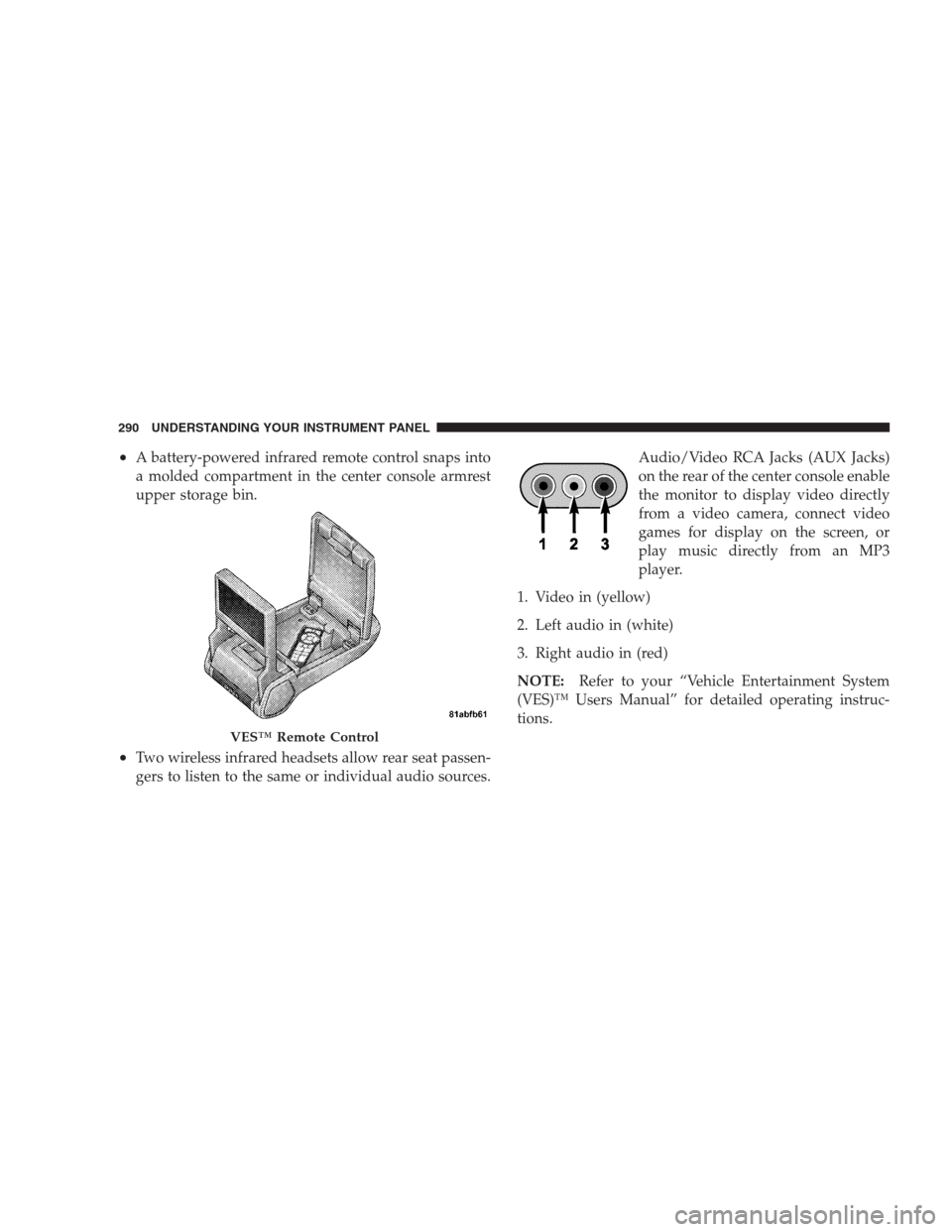
•A battery-powered infrared remote control snaps into
a molded compartment in the center console armrest
upper storage bin.
•Two wireless infrared headsets allow rear seat passen-
gers to listen to the same or individual audio sources.Audio/Video RCA Jacks (AUX Jacks)
on the rear of the center console enable
the monitor to display video directly
from a video camera, connect video
games for display on the screen, or
play music directly from an MP3
player.
1. Video in (yellow)
2. Left audio in (white)
3. Right audio in (red)
NOTE:Refer to your “Vehicle Entertainment System
(VES)™ Users Manual” for detailed operating instruc-
tions.
VES™ Remote Control
290 UNDERSTANDING YOUR INSTRUMENT PANEL
Page 295 of 526
5. Store the disc in its case after playing.
6. Do not expose the disc to direct sunlight.
7. Do not store the disc where temperatures may become
too high.
NOTE:If you experience difficulty in playing a particu-
lar disc, it may be damaged (i.e. scratched, reflective
coating removed, a hair, moisture or dew on the disc)
oversized, or have protection encoding. Try a known
good disc before considering disc player service.RADIO OPERATION AND CELLULAR PHONES
Under certain conditions, the cellular phone being on in
your vehicle can cause erratic or noisy performance from
your radio. This condition may be lessened or eliminated
by relocating the cellular phone antenna. This condition
is not harmful to the radio. If your radio performance
does not satisfactorily “clear” by the repositioning of the
antenna, it is recommended that the radio volume be
turned down or off during cellular phone operation.
UNDERSTANDING YOUR INSTRUMENT PANEL 293
4
Page 508 of 526
Daytime Brightness, Interior Lights........... 143
Daytime Running Lights................... 140
Dealer Service.......................... 422
Deck Lid, Emergency Release................ 40
Deck Lid, Power Release................... 39
Defroster, Rear Window................... 198
Defroster, Windshield................78,295,301
Delay (Intermittent) Wipers................. 144
Diagnostic System, Onboard................ 420
Dimmer Switch, Headlight................. 142
Dipsticks
Oil (Engine).......................423,424
Power Steering........................ 332
Disabled Vehicle Towing................... 412
Disposal
Antifreeze (Engine Coolant)............... 439
Engine Oil........................... 426
Door Locks............................. 28
Door Locks, Automatic.................... 30Door Opener, Garage..................... 181
Driving
On Slippery Surfaces................... 327
Through Flowing, Rising, or Shallow
Standing Water........................ 328
DVD Player (Video Entertainment System™).... 288
Electric Rear Window Defrost............... 198
Electric Remote Mirrors.................... 88
Electrical Power Outlets................... 191
Electronic Brake Control System............. 336
Anti-Lock Brake System................. 336
Brake Assist System.................... 337
Electronic Stability Program............... 338
Traction Control System................. 337
Electronic Power Distribution Center (Fuses).... 449
Electronic Speed Control (Cruise Control)....150,154
Electronic Stability Program (ESP)............ 338
Electronic Throttle Control Warning Light...... 216
506 INDEX
Page:
< prev 1-8 9-16 17-24