Page 66 of 526
NOTE:
1. A near-deployment event occurs when the airbag
sensor detects severe vehicle deceleration usually indica-
tive of a crash, but not severe enough to warrant airbag
deployment.
2. Under certain circumstances, EDR data may not be
recorded (e.g., loss of battery power).
In conjunction with other data gathered during a com-
plete accident investigation, the electronic data may be
used by Chrysler LLC and others to learn more about the
possible causes of crashes and associated injuries in order
to assess and improve vehicle performance. In addition
to crash investigations initiated by Chrysler LLC, such
investigations may be requested by customers, insurance
carriers, government officials, and professional crash
researchers, such as those associated with universities,
and with hospital and insurance organizations.In the event that an investigation is undertaken by
Chrysler LLC (regardless of initiative), the company or its
designated representative will first obtain permission of
the appropriate custodial entity for the vehicle (usually
the vehicle owner or lessee) before accessing the elec-
tronic data stored, unless ordered to download data by a
court with legal jurisdiction (i.e., pursuant to a warrant).
A copy of the data will be provided to the custodial entity
upon request. General data that does not identify par-
ticular vehicles or crashes may be released for incorpo-
ration in aggregate crash databases, such as those main-
tained by the US government and various states. Data of
a potentially sensitive nature, such as would identify a
particular driver, vehicle, or crash, will be treated confi-
dentially. Confidential data will not be disclosed by
Chrysler LLC to any third party except when:
64 THINGS TO KNOW BEFORE STARTING YOUR VEHICLE
Page 104 of 526
hold may not become active automatically. This is cell
phone-dependent. To bring the call back from hold, press
and hold the PHONE button until you hear a single beep.
Redial
•
Press the PHONE button to begin.
•After the�Ready�prompt and the following beep, say
�Redial.�
•The uconnect�phone will call the last number that
was dialed from your cellular phone.
NOTE:This may not be the last number dialed from the
uconnect�phone.
Call Continuation
Call continuation is the progression of a phone call on the
uconnect�phone after the vehicle ignition key has been
switched to OFF. Call continuation functionality avail-
able on the vehicle can be any one of three types:
•After the ignition key is switched to OFF, a call can
continue on the uconnect�phone either until the call
ends, or until the vehicle battery condition dictates
cessation of the call on the uconnect�phone and
transfer of the call to the cellular phone.
•After the ignition key is switched to OFF, a call can
continue on the uconnect�phone for a certain dura-
tion, after which the call is automatically transferred
from the uconnect�phone to the cellular phone.
•An active call is automatically transferred to the
cellular phone after the ignition key is switched to
OFF.
uconnect�phone Features
Language Selection
To change the language that the uconnect�phone is
using:
•Press the PHONE button to begin.
102 UNDERSTANDING THE FEATURES OF YOUR VEHICLE
Page 108 of 526

•Some paging and voice mail systems have system time
out settings that are too short and may not allow the
use of this feature.
Barge In - Overriding Prompts
The “Voice Recognition” button can be used when you
wish to skip part of a prompt and issue your voice
recognition command immediately. For example, if a
prompt is asking�Would you like to pair a phone, clear
a...,�you could press the VOICE RECOGNITION button
and say,�Pair a Phone�to select that option without
having to listen to the rest of the voice prompt.
Turning Confirmation Prompts ON/OFF
Turning confirmation prompts off will stop the system
from confirming your choices (e.g., the uconnect�phone
will not repeat a phone number before you dial it).
•Press the PHONE button to begin.
•After the�Ready�prompt and the following beep, say
�Setup Confirmations.�The uconnect�phone will play
the current confirmation prompt status and you will
be given the choice to change it.
Phone and Network Status Indicators
If available on the radio and/or on a premium display
such as the instrument panel cluster, and supported by
your cellular phone, the uconnect�phone will provide
notification to inform you of your phone and network
status when you are attempting to make a phone call
using uconnect�phone. The status is given for roaming,
network signal strength, phone battery strength, etc.
Dialing Using the Cellular Phone Keypad
You can dial a phone number with your cellular phone
keypad and still use the uconnect�phone (while dialing
via the cellular phone keypad, the user must exercise
caution and take precautionary safety measures). By
dialing a number with your paired Bluetooth�cellular
106 UNDERSTANDING THE FEATURES OF YOUR VEHICLE
Page 144 of 526
High Beam/Low Beam Select Switch
Push the multifunction lever away from you to switch
the headlights to high beam. Pull the multifunction lever
toward you to switch the headlights back to low beam.
Flash-to-Pass
You can signal another vehicle with your headlights by
lightly pulling the multifunction lever toward you. This
will cause the headlights to turn on at high beam and
remain on until the multifunction lever is released.
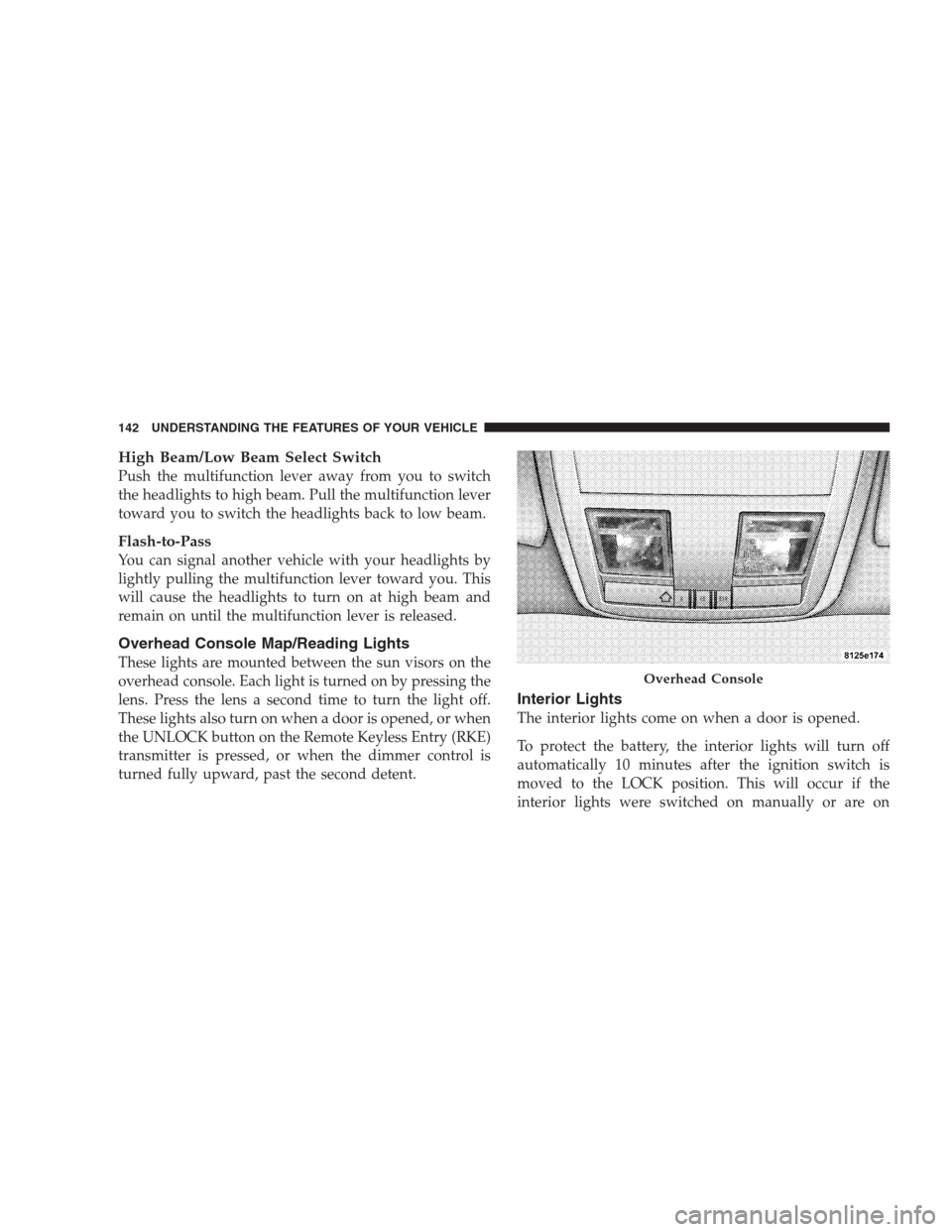
Overhead Console Map/Reading Lights
These lights are mounted between the sun visors on the
overhead console. Each light is turned on by pressing the
lens. Press the lens a second time to turn the light off.
These lights also turn on when a door is opened, or when
the UNLOCK button on the Remote Keyless Entry (RKE)
transmitter is pressed, or when the dimmer control is
turned fully upward, past the second detent.
Interior Lights
The interior lights come on when a door is opened.
To protect the battery, the interior lights will turn off
automatically 10 minutes after the ignition switch is
moved to the LOCK position. This will occur if the
interior lights were switched on manually or are on
Overhead Console
142 UNDERSTANDING THE FEATURES OF YOUR VEHICLE
Page 183 of 526
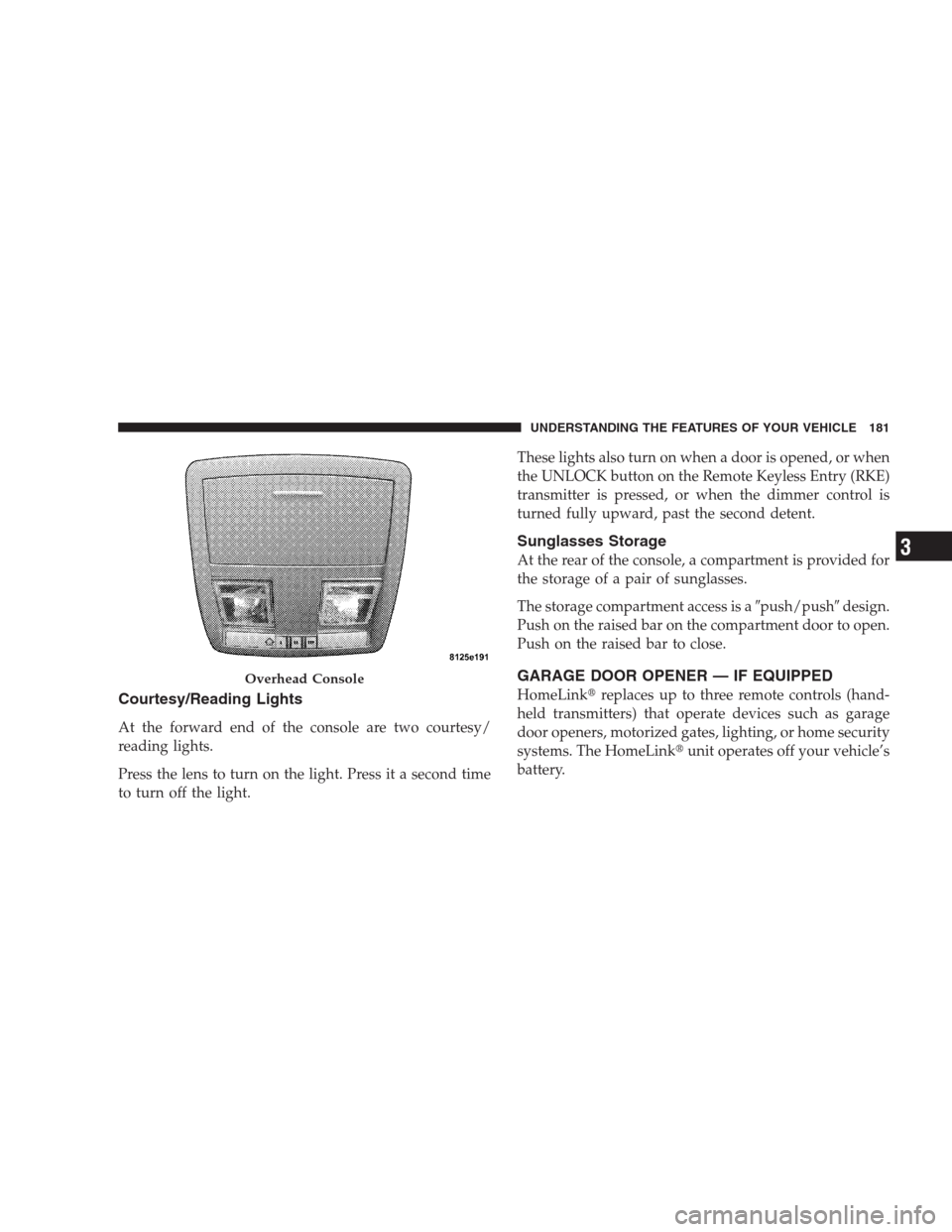
Courtesy/Reading Lights
At the forward end of the console are two courtesy/
reading lights.
Press the lens to turn on the light. Press it a second time
to turn off the light.These lights also turn on when a door is opened, or when
the UNLOCK button on the Remote Keyless Entry (RKE)
transmitter is pressed, or when the dimmer control is
turned fully upward, past the second detent.
Sunglasses Storage
At the rear of the console, a compartment is provided for
the storage of a pair of sunglasses.
The storage compartment access is a�push/push�design.
Push on the raised bar on the compartment door to open.
Push on the raised bar to close.
GARAGE DOOR OPENER — IF EQUIPPED
HomeLink�replaces up to three remote controls (hand-
held transmitters) that operate devices such as garage
door openers, motorized gates, lighting, or home security
systems. The HomeLink�unit operates off your vehicle’s
battery.
Overhead Console
UNDERSTANDING THE FEATURES OF YOUR VEHICLE 181
3
Page 185 of 526
Programming HomeLink�
Before You Begin
If you have not trained any of the HomeLink�buttons,
erase all channels before you begin training.
To do this, press and hold the two outside buttons for up
to 20 seconds. The EVIC will display “CLEARING
CHANNELS.” Release the buttons when the EVIC mes-
sage states “CHANNELS CLEARED.”
It is recommended that a new battery be placed in the
hand-held transmitter of the device being programmed
to HomeLink�for more efficient training and accurate
transmission of the radio-frequency signal.
Your vehicle should be parked outside of the garage
while training.
1. Turn the ignition switch to the ON/RUN position.2. Place the hand-held transmitter 1 to 3 in (3 to 8 cm)
from the HomeLink�buttons while keeping the EVIC
display in view.
For optimal training, point the battery end of the hand-
held transmitter away from the HomeLink�.
3. Simultaneously, press and hold both the chosen
HomeLink�button and the hand-held transmitter button
until the EVIC display changes from “CHANNEL #
TRAINING” to “CHANNEL # TRAINED.”
Then release both the HomeLink�and hand-held trans-
mitter buttons.
If the EVIC display states “DID NOT TRAIN” repeat
Step 3. If the signal is too weak, replace the battery in the
original hand-held transmitter.
It may take up to 30 seconds, or longer, in rare cases. The
garage door may open and close while you train.
UNDERSTANDING THE FEATURES OF YOUR VEHICLE 183
3
Page 189 of 526
Troubleshooting Tips
If you are having trouble programming HomeLink�, here
are some of the most common solutions:
•Replace the battery in the original transmitter.
•Press the learn button on the garage door opener to
complete the training for rolling code.
•Did you unplug the device for training, and remember
to plug it back in?
If you are having any problems or require assistance,
please call toll-free 1–800–355–3515 or, on the Internet at
www.HomeLink.com for information or assistance.
General Information
This device complies with FCC rules Part 15 and Industry
Canada RSS-210. Operation is subject to the following
two conditions:
1. This device may not cause harmful interference2. This device must accept any interference that may be
received including interference that may cause undesired
operation
NOTE:The transmitter has been tested and it complies
with FCC and IC rules. Changes or modifications not
expressly approved by the party responsible for compli-
ance could void the user ’s authority to operate the
device.
The term “IC:” before the certification/registration num-
ber only signifies that Industry Canada technical specifi-
cations were met.
UNDERSTANDING THE FEATURES OF YOUR VEHICLE 187
3
Page 194 of 526
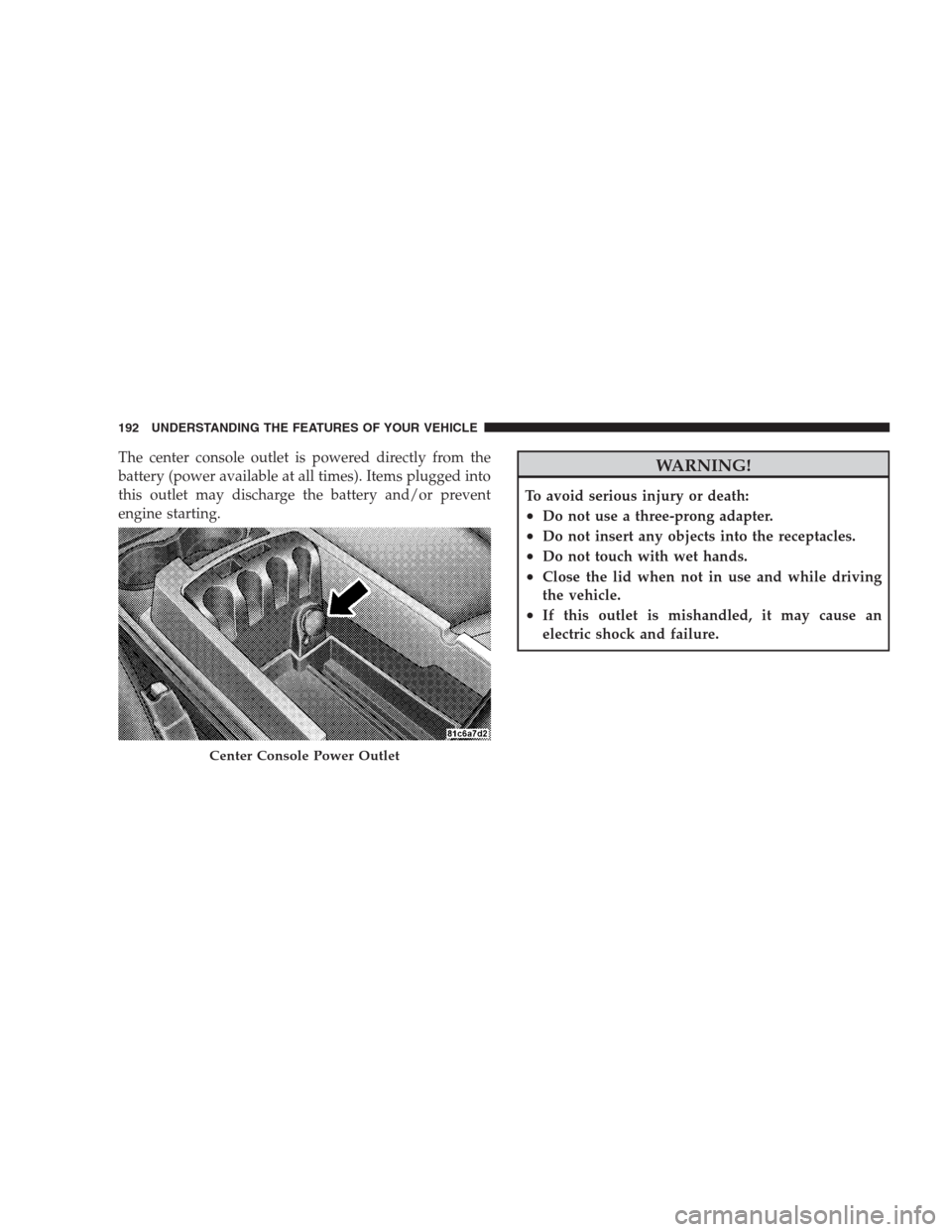
The center console outlet is powered directly from the
battery (power available at all times). Items plugged into
this outlet may discharge the battery and/or prevent
engine starting.WARNING!
To avoid serious injury or death:
•Do not use a three-prong adapter.
•Do not insert any objects into the receptacles.
•Do not touch with wet hands.
•Close the lid when not in use and while driving
the vehicle.
•If this outlet is mishandled, it may cause an
electric shock and failure.
Center Console Power Outlet
192 UNDERSTANDING THE FEATURES OF YOUR VEHICLE