Page 97 of 537

NOTE:The UConnect�system requires a cellular phone
equipped with the Bluetooth��Hands-Free Profile,�Ve r -
sion 0.96 or higher. See the UConnect�website for
supported phones.
NOTE:For UConnect�customer support, visit the
following websites:
•www.chrysler.com/uconnect
•www.dodge.com/uconnect
•www.jeep.com/uconnect
•or call 1–877–855–8400
UConnect�allows you to transfer calls between the
system and your cellular phone as you enter or exit your
vehicle and enables you to mute the system’s microphone
for private conversation.
The UConnect�system is driven through your
Bluetooth�“Hands-Free Profile” cellular phone.UConnect�features Bluetooth�technology - the global
standard that enables different electronic devices to con-
nect to each other without wires or a docking station, so
UConnect�works no matter where you stow your cellu-
lar phone (be it your purse, pocket, or briefcase), as long
as your phone is turned on and has been paired to the
vehicle’s UConnect�system. The UConnect�system
allows up to seven cellular phones to be linked to the
system. Only one linked (or paired) cellular phone can be
used with the system at a time. The system is available in
English, Spanish, or French languages.
Phone Button
The rearview mirror contains the microphone
for the system (depending on the type of
mirror and radio equipped), and either the
radio or the mirror has the two control buttons
(PHONE Button and VOICE RECOGNITION button)
that will enable you to access the system.
UNDERSTANDING THE FEATURES OF YOUR VEHICLE 95
3
Page 116 of 537

Voice Training
For users experiencing difficulty with the system recog-
nizing their voice commands or numbers, the UConnect�
system Voice Training feature may be used. To enter this
training mode, follow one of the two following proce-
dures:
From outside the UConnect�mode (e.g., from radio
mode):
•Press and hold the VOICE RECOGNITION button for
five seconds until the session begins, or,
•Press the VOICE RECOGNITION button and say the
�Setup, Voice Training�command.
Repeat the words and phrases when prompted by the
UConnect�system. For best results, the Voice Training
session should be completed when the vehicle is parked
with the engine running, all windows closed, and the
blower fan switched off.This procedure may be repeated with a new user. The
system will adapt to the last trained voice only.
To restore the Voice Recognition system to factory default
settings, enter the Voice Training session via the above
procedure and follow the prompts.
Voice Recognition (VR)
•
For best performance, adjust the rearview mirror to
provide at least12in (1 cm) gap between the overhead
console (if equipped) and the mirror.
•Always wait for the beep before speaking.
•Speak normally, without pausing, just as you would
speak to a person sitting a few feet/meters away from
you.
•Make sure that no one other than you is speaking
during a voice recognition period.
114 UNDERSTANDING THE FEATURES OF YOUR VEHICLE
Page 136 of 537

WARNING!
•Be certain that the seatback is securely locked into
position. If the seatback is not securely locked into
position, the seat will not provide the proper
stability for child seats and/or passengers. An
improperly latched seat could cause serious injury.
•The cargo area in the rear of the vehicle (with the
rear seatbacks in the locked-up or folded down
position) should not be used as a play area by
children when the vehicle is in motion. They could
be seriously injured in an accident. Children
should be seated and using the proper restraint
system.
DRIVER MEMORY SEAT — IF EQUIPPED
This feature allows the driver to store up to two different
memory profiles for easy recall through a memory
switch. Each memory profile contains desired position
settings for the driver seat, side mirror, adjustable pedals
(if equipped), and power tilt and telescopic steering
column (if equipped) and a set of desired radio station
presets.
NOTE:Only one Remote Keyless Entry (RKE) transmit-
ter can be linked to each of the memory positions.
The memory switch is located on the driver’s door trim
panel. The switch contains an (S) button to activate the
memory save function. It also contains a rocker switch
labeled with the number (1) and the number (2). The
rocker switch allows the driver to recall either of two
pre-programmed memory profiles by pressing the appro-
priate side of the switch.
134 UNDERSTANDING THE FEATURES OF YOUR VEHICLE
Page 137 of 537
Programming The Memory Feature
NOTE:Saving a new memory profile will erase an
existing profile from memory.
To create a new memory profile, perform the following:
1. Turn your ignition to the ON position.2. Adjust all memory profile settings to desired prefer-
ences (i.e., seat, side mirror, adjustable pedals [if
equipped], power tilt and telescopic steering column [if
equipped], and radio station presets).
3. Press and release the SET (S) button on the memory
switch.
4. Within five seconds, press and release the memory
button 1 or 2. The Electronic Vehicle Information Center
(EVIC) (if equipped) will display which memory position
has been set.
NOTE:
•Memory is not linked to Passive Entry (if equipped).
•Memory profiles can be set without the vehicle in
PARK, but the vehicle must be in PARK to recall a
memory profile.
Memory Switch
UNDERSTANDING THE FEATURES OF YOUR VEHICLE 135
3
Page 139 of 537

To recall the memory settings for driver one, press
MEMORY button number 1 on the driver’s door or the
UNLOCK button on the RKE transmitter linked to
memory position 1.
To recall the memory setting for driver two, press
MEMORY button number 2 on the driver’s door or the
UNLOCK button on the RKE transmitter linked to
memory position 2.
A recall can be cancelled by pressing any of the
MEMORY buttons (S, 1, or 2) on the driver’s door during
a recall. When a recall is cancelled, the driver seat, side
mirror, adjustable pedals (if equipped), and power tilt
and telescopic steering column (if equipped) stop mov-
ing. A delay of one second will occur before another recall
can be selected.Easy Entry/Exit Seat (Available with Memory Seat
Only)
This feature provides automatic driver seat positioning to
enhance driver mobility when entering and exiting the
vehicle.
The distance the driver seat moves depends on where
you have the driver seat positioned when you remove the
key from the ignition switch.
•When you remove the key from the ignition switch,
the driver seat will move about 2.4 in (60 mm)
rearward if the driver seat position is greater than or
equal to 2.7 in (67.7 mm) forward of the rear stop. The
seat will return to its previously set position when you
insert the key into the ignition switch and turn it out of
the LOCK position.
•When you remove the key from the ignition switch,
the driver seat will move to a position 0.3 in (7.7 mm)
forward of the rear stop if the driver seat position is
UNDERSTANDING THE FEATURES OF YOUR VEHICLE 137
3
Page 143 of 537

Headlights On with Wipers (Available with Auto
Headlights Only)
When this feature is active, the headlights will turn on
approximately 10 seconds after the wipers are turned on
if the headlight switch is placed in the AUTO position. In
addition, the headlights will turn off when the wipers are
turned off if they were turned on by this feature.
The Headlights On with Wipers feature can be turned on
or off through the Electronic Vehicle Information Center
(EVIC) (if equipped). Refer to ”Headlights On with
Wipers,” under “Personal Settings (Customer-
Programmable Features)” under “Electronic Vehicle In-
formation Center (EVIC)” in Section 4.
SmartBeams — If Equipped
The SmartBeam system provides increased forward light-
ing at night by automating high beam control through
the use of a digital camera mounted on the inside
rearview mirror. This camera detects vehicle specific lightand automatically switches from high beams to low
beams until the approaching vehicle is out of view.
To Activate
1. Select “Automatic High Beams — ON” through the
EVIC. Refer to “Automatic High Beams,” under “Per-
sonal Settings (Customer-Programmable Features)” un-
der “Electronic Vehicle Information Center (EVIC)” in
Section 4.
2. Rotate the headlight switch counterclockwise to the
AUTO (A) position.
3. Push the multifunction lever away from you to switch
the headlights to the high beam position. Refer to “Mul-
tifunction Lever” in this section.
NOTE:This system will not activate until the vehicle is
at or above 25 mph (40 km/h).
UNDERSTANDING THE FEATURES OF YOUR VEHICLE 141
3
Page 146 of 537
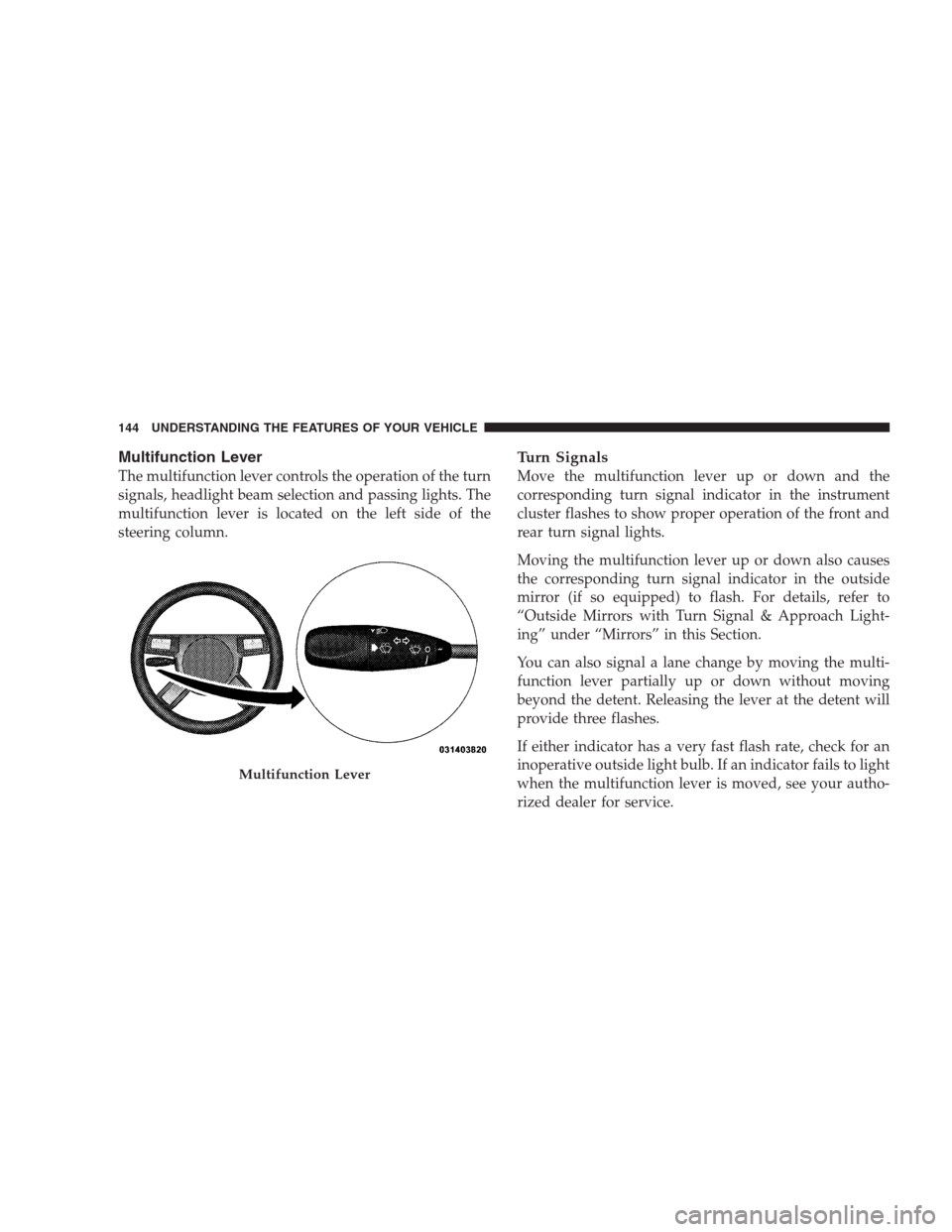
Multifunction Lever
The multifunction lever controls the operation of the turn
signals, headlight beam selection and passing lights. The
multifunction lever is located on the left side of the
steering column.
Turn Signals
Move the multifunction lever up or down and the
corresponding turn signal indicator in the instrument
cluster flashes to show proper operation of the front and
rear turn signal lights.
Moving the multifunction lever up or down also causes
the corresponding turn signal indicator in the outside
mirror (if so equipped) to flash. For details, refer to
“Outside Mirrors with Turn Signal & Approach Light-
ing” under “Mirrors” in this Section.
You can also signal a lane change by moving the multi-
function lever partially up or down without moving
beyond the detent. Releasing the lever at the detent will
provide three flashes.
If either indicator has a very fast flash rate, check for an
inoperative outside light bulb. If an indicator fails to light
when the multifunction lever is moved, see your autho-
rized dealer for service.
Multifunction Lever
144 UNDERSTANDING THE FEATURES OF YOUR VEHICLE
Page 183 of 537

The warning display contains two sets of yellow and red
indicators, one set to warn of obstacles behind the left
rear of the vehicle and the other set to warn of obstacles
behind the right rear of the vehicle. The driver can view
the indicators either through the rearview mirror or by
looking at the display above the rear window.The system dimly illuminates the two inner most yellow
indicators when it is ON and detecting no obstacles. The
following chart shows the warning display operation
when the system is detecting an obstacle:
WARNING DISPLAY DISTANCES
DISPLAY INDICA-
TOROBSTACLE DISTANCE FROM: INDICATOR
COLORAUDIBLE SIGNAL
REAR CORNERS REAR CENTER
Inner LED 79 in (200 cm) Yellow Yes, Half Second
1st LED 51.2 in (130 cm) Yellow No
2nd LED 45.3 in (115 cm) Yellow No
3rd LED 31.5 in (80 cm) 39.3 in (100 cm) Yellow No
4th LED 25.5 in (65 cm) 33.5 in (85 cm) Yellow No
5th LED 20 in (50 cm) 27.6 in (70 cm) Yellow No
6th LED 16 in (40 cm) 19.7 in (50 cm) Red Yes, Intermittent
7th LED 6 in (15 cm) 11.8 in (30 cm) Red Yes, Continuous
UNDERSTANDING THE FEATURES OF YOUR VEHICLE 181
3
