2009 CHEVROLET UPLANDER fuses
[x] Cancel search: fusesPage 120 of 464

To stop the door(s) immediately while the door(s)
is opening or closing, press the PSD override
(deactivation) part of the switch.
Pressing the PSD button(s) on the remote keyless entry
will open and close the door unless the door has
been manually locked using the mechanical slider.
Resetting the Power Sliding Door
The power sliding door may operate incorrectly or not at
all because of the following conditions:
A low voltage or dead battery
A disconnected battery
If the instrument panel PSD/fuse 21, LHPSD/
fuse 24 or RHPSD/fuse 25 are removed or blown.
SeeFuses and Circuit Breakers on page 5-98for more
information.
If any of these conditions occur, the power sliding door
may need to be reset. If your vehicle has the dual
power sliding doors, both doors will have to be reset. To
reset a door, do the following:
1. Check to be sure the power sliding door is unlocked
and securely closed.
2. Turn the ignition to LOCK.3. If the power sliding door overhead console switch is
in the override (deactivation) position, return to the
activation position.
4. Open the sliding door using the remote keyless
entry transmitter, overhead console switch, or
passenger switch. Allow the door to travel
fully open.
If the door does not travel to the fully open position,
press the overhead console switch to the override
(deactivation) position and slide the door fully open and
closed. Check for foreign objects in the tracks. Repeat
the procedure starting with Step 1. If the door resists
travel to the fully open position, see your dealer
for service.
Liftgate
To unlock or lock the liftgate from the outside, use the
remote keyless entry transmitter. For more information,
seeRemote Keyless Entry (RKE) System Operation
on page 2-5.
You can also use the power door lock switch to lock
and unlock the liftgate.
Open the liftgate using the handle located above the
license plate. Once slightly opened, the liftgate will rise
by itself. Lamps in the rear of the vehicle will come
on, illuminating the rear cargo area.
2-22
Page 167 of 464

Turn Signal/Multifunction Lever
The lever on the left side of the steering column
includes the following:
G:Turn and Lane-Change Signals
53: Headlamp High/Low-Beam Changer
N:Windshield Wipers
L:Windshield Washer
Z:Rear Window Wiper
=:Rear Window Washer
Flash-to-Pass Feature.
Information for these features is on the pages following.
Turn and Lane-Change Signals
An arrowGon the instrument panel cluster will ash
in the direction of the turn or lane change.
Move the lever all the way up or down to signal a turn.
Raise or lower the lever until the arrow starts to ash
to signal a lane change. Hold it there until the lane
change is completed.
The lever returns to its starting position whenever it is
released.
If after signaling a turn or a lane change the arrow
ashes rapidly or does not come on, a signal bulb may
be burned out.
Have the bulbs replaced. If the bulb is not burned out,
check the fuse. SeeBulb Replacement on page 5-41
andFuses and Circuit Breakers on page 5-98.
For vehicles with the trailer towing option with added
wiring for the trailer lamps, the signal indicator ashes at
a normal rate even if a turn signal bulb is burned out.
Check the front and rear turn signal lamps regularly
to make sure they are working.
3-7
Page 180 of 464
Accessory Power Outlet(s)
The accessory power outlets can be used to plug in
electrical equipment, such as a cellular phone.
The vehicle may have two accessory power outlets.
There may be one outlet located below the climate
controls on the instrument panel and one outlet
located in the rear compartment on the driver side.
Pull the cover down to use the accessory power outlet.
When not in use, keep the cover on.
To remove the rear accessory power outlet cover, pull
the tab on the cover. To put the cover back on, line up the
tabs at the back of the cover and put the cover in place.
Push down the tab to secure the cover. When not in use,
always cover the rear accessory power outlet with the
protective cap.
Notice:Leaving electrical equipment on for
extended periods will drain the battery. Always
unplug electrical equipment when not in use and do
not plug in equipment that exceeds the maximum
amperage rating of 20 amperes.Certain electrical accessories may not be compatible
with the accessory power outlet and could result in blown
vehicle or adapter fuses. If you experience a problem
see your dealer/retailer for additional information on
accessory power outlets.
Notice:Adding any electrical equipment to the
vehicle can damage it or keep other components
from working as they should. The repairs would not
be covered by the vehicle warranty. Do not use
equipment exceeding maximum amperage rating of
20 amperes. Check with your dealer/retailer before
adding electrical equipment.
When adding electrical equipment, be sure to follow
the proper installation instructions included with
the equipment.
Notice:Improper use of the power outlet can cause
damage not covered by your warranty. Do not hang
any type of accessory or accessory bracket from the
plug because the power outlets are designed for
accessory power plugs only.
3-20
Page 224 of 464

SERVICE BRAKE SYSTEM
This message displays when a problem with the brake
system has been detected. Have your vehicle
serviced by your dealer/retailer as soon as possible.
The brake system warning light also appears on the
instrument panel cluster when this message appears on
the DIC. SeeBrake System Warning Light on page 3-35.
This message only displays while the ignition is in
ON/RUN. Press any of the DIC buttons to acknowledge
this message and to clear it from the screen.
This message continues to display for two seconds if it
has not been acknowledged when the engine is turned
off. It also re-displays for two seconds if the message has
been acknowledged, but the condition still exists when
the engine is turned off.
If the condition still exists, the message re-appears
when the engine is turned on.
SERVICE PARK LAMPS
This message displays when there is a problem with the
park lamps. Check to see if the park lamp fuse is blown
and replace the fuse if necessary. SeeFuses and Circuit
Breakers on page 5-98andInstrument Panel Fuse Block
on page 5-98for more information. If changing the fuse
does not correct the problem, see your dealer/retailer.This message only displays while the ignition is in
ON/RUN. Press any of the DIC buttons to acknowledge
this message and to clear it from the screen.
This message continues to display for two seconds if it
has not been acknowledged when the engine is turned
off. It also re-displays for two seconds if the message has
been acknowledged, but the condition still exists when
the engine is turned off.
If the condition still exists, the message re-appears
when the engine is turned on.
SERVICE STABILITY SYSTEM
If your vehicle has StabiliTrak®, this message displays if
there has been a problem detected with StabiliTrak.
SeeStabiliTrak
®System on page 4-7.
If this message turns on while you are driving, pull off
the road as soon as possible and stop carefully.
Try resetting the system by turning the ignition off and
then back on. If this message still stays on or turns back
on again while you are driving, your vehicle needs
service. Have the StabiliTrak System inspected by your
dealer/retailer as soon as possible.
This message displays only while the ignition is in
ON/RUN. Press any of the DIC buttons to acknowledge
this message and to clear it from the screen.
3-64
Page 312 of 464

Tire Pressure Monitor Operation.....................5-58
Tire Inspection and Rotation...........................5-62
When It Is Time for New Tires.......................5-63
Buying New Tires.........................................5-64
Different Size Tires and Wheels......................5-66
Uniform Tire Quality Grading..........................5-67
Wheel Alignment and Tire Balance..................5-69
Wheel Replacement......................................5-69
Tire Chains..................................................5-70
Accessory Inator.........................................5-71
If a Tire Goes Flat........................................5-73
Changing a Flat Tire.....................................5-74
Removing the Spare Tire and Tools................5-75
Removing the Flat Tire and Installing the
Spare Tire................................................5-77
Secondary Latch System...............................5-84
Storing a Flat or Spare Tire and Tools............5-86
Compact Spare Tire......................................5-88
Appearance Care............................................5-89
Interior Cleaning...........................................5-89
Fabric/Carpet...............................................5-91
Leather.......................................................5-91
Instrument Panel, Vinyl, and Other
Plastic Surfaces........................................5-92
Child Restraint Pad.......................................5-92Care of Safety Belts and Built-in Child
Restraint Harness......................................5-92
Weatherstrips...............................................5-92
Washing Your Vehicle...................................5-93
Cleaning Exterior Lamps/Lenses.....................5-93
Finish Care..................................................5-94
Windshield, Backglass, and Wiper Blades.........5-94
Aluminum Wheels.........................................5-95
Tires...........................................................5-95
Sheet Metal Damage.....................................5-96
Finish Damage............................................
.5-96
Underbody Maintenance................................5-96
Chemical Paint Spotting.................................5-96
Vehicle Identication......................................5-97
Vehicle Identication Number (VIN).................5-97
Service Parts Identication Label.....................5-97
Electrical System............................................5-97
Add-On Electrical Equipment..........................5-97
Headlamp Wiring..........................................5-98
Windshield Wiper Fuses................................5-98
Power Windows and Other Power Options.......5-98
Fuses and Circuit Breakers............................5-98
Instrument Panel Fuse Block..........................5-98
Underhood Fuse Block................................5-100
Capacities and Specications........................5-104
Section 5 Service and Appearance Care
5-2
Page 382 of 464
{CAUTION:
Inating something too much can make it explode,
and you or others could be injured. Be sure to
read the inator instructions, and inate any object
only to its recommended pressure.
To use your accessory inator system:
1. Turn the ignition to ACCESSORY or RUN.
2. Attach the appropriate nozzle adapter, if required,
to the end of the hose that has the pressure gage.
3. Attach that end of the hose to the object you wish
to inate.
4. Remove the protective cap covering the outlet.
5. Attach the other end of the hose to the outlet.
6. Press the accessory inator switch. The light in the
switch will come on to show the system is working.
If the accessory inator system does not turn on or
the light does not come on, the fuse may be blown or
installed incorrectly. SeeFuses and Circuit Breakers
on page 5-98or see your dealer/retailer for service.Your accessory inator will automatically shut off after
about 10 minutes. The light in the switch will blink.
After about one minute you can use the system again.
Press the switch and the indicator light will come on.
Notice:If you run the accessory inator longer
than 30 minutes at a time, you could damage
the inator. The repairs would not be covered by
your warranty. Run the inator for short periods of
time only.
After running the accessory inator for 30 minutes,
wait at least 10 minutes before restarting the accessory
inator.
To turn off the inator:
1. Press the switch and detach the hose, rst from the
inated object, then from the outlet.
2. Put the protective cap back on.
3. Place the inator kit tools in the pouch, and store in
the rear compartment on the passenger’s side.
To put the cover back on, line up the tabs at the bottom
of the cover and put it in place. Push down the tab to
secure the cover.
5-72
Page 408 of 464

Headlamp Wiring
The headlamp wiring is protected by four internal fuses
in the underhood fuse block. An electrical overload
will cause the lamps to go on and off, or in some cases
to remain off. If this happens, have your headlamp
wiring checked right away.
Windshield Wiper Fuses
The windshield wiper motor is protected by an internal
fuse in the underhood fuse block. If the motor overheats
due to heavy snow, etc., the wiper will stop until the
motor cools. If the overload is caused by some electrical
problem, be sure to get it xed.
The rear washer pump is controlled by a relay located
in the engine compartment, behind the windshield
washer uid reservoir. The rear wiper motor is protected
by a fuse located in the instrument panel fuse block.
Power Windows and Other
Power Options
Circuit breakers in the instrument panel fuse panel
protect the power windows and other power accessories.
When the current load is too heavy, the circuit breaker
opens and closes, protecting the circuit until the
problem is xed.
Fuses and Circuit Breakers
The wiring circuits in the vehicle are protected from
short circuits by a combination of fuses, circuit breakers
and fusible thermal links. This greatly reduces the
chance of res caused by electrical problems.
Look at the silver-colored band inside the fuse. If the
band is broken or melted, replace the fuse. Be sure you
replace a bad fuse with a new one of the identical
size and rating.
Fuses of the same amperage can be temporarily
borrowed from another fuse location, if a fuse goes out.
Replace the fuse as soon as you can.
Instrument Panel Fuse Block
The instrument panel fuse block is located at the right
end of the instrument panel, on the passenger side
of the vehicle. Open the front passenger door,
and remove the cover, to access the fuse block.
Your vehicle may not have all of the fuses listed.
5-98
Page 409 of 464
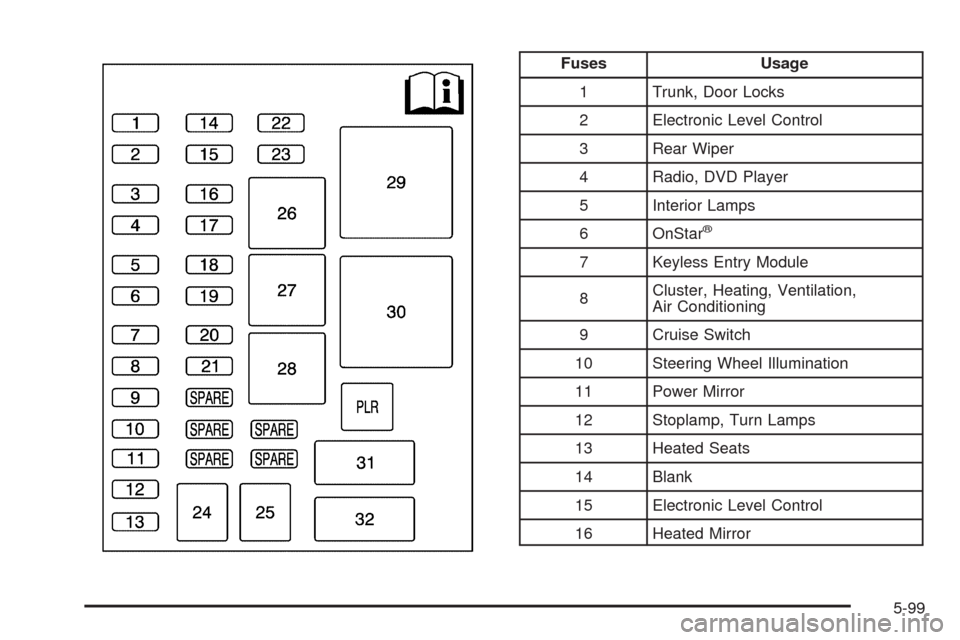
Fuses Usage
1 Trunk, Door Locks
2 Electronic Level Control
3 Rear Wiper
4 Radio, DVD Player
5 Interior Lamps
6 OnStar
®
7 Keyless Entry Module
8Cluster, Heating, Ventilation,
Air Conditioning
9 Cruise Switch
10 Steering Wheel Illumination
11 Power Mirror
12 Stoplamp, Turn Lamps
13 Heated Seats
14 Blank
15 Electronic Level Control
16 Heated Mirror
5-99