2009 CHEVROLET UPLANDER audio
[x] Cancel search: audioPage 252 of 464

RDM (Random):Press to hear the tracks in random,
rather than sequential order, on one CD, one folder,
or all of the loaded CDs.
To use random, do one of the following:
Press and release until RANDOM DISC PLAY
displays, to play the tracks on a CD in random order.
Press and release until RANDOM FOLDER displays,
to play the tracks in a folder in random order.
Press and release until RANDOM ALL DISCS
displays, to play the tracks on all of the CDs that are
loaded in random order.
Press and release the RDM button until RANDOM OFF
displays, to turn off random play.
RPT (Repeat):Press to hear a track, CD, or a folder
over again.
To use repeat, do one of the following:
Press and release until REPEAT displays, to repeat
a track.
Press and release until REPEAT ONE DISC
displays, to repeat a CD.
Press and release until REPEAT FOLDER displays,
to repeat a folder.Press and release the RPT button until REPEAT OFF
displays, to turn off repeated play.
4(Information):Press to display the artist name and
album contained in the ID3 tag.
XM Radio Messages
xL (Explicit Language Channels):These
channels, or any others, can be blocked by calling
1-800-852-XMXM (9696).
Updating:The encryption code in the receiver is being
updated, and no action is required. This process
should take no longer than 30 seconds.
No Signal:The system is functioning correctly, but the
vehicle is in a location that is blocking the XM signal.
When the vehicle is moved into an open area, the signal
should return.
Loading XM:The audio system is acquiring and
processing audio and text data. No action is needed.
This message should disappear shortly.
CH Off Air:This channel is not currently in service.
Tune in to another channel.
3-92
Page 254 of 464
Video Screen
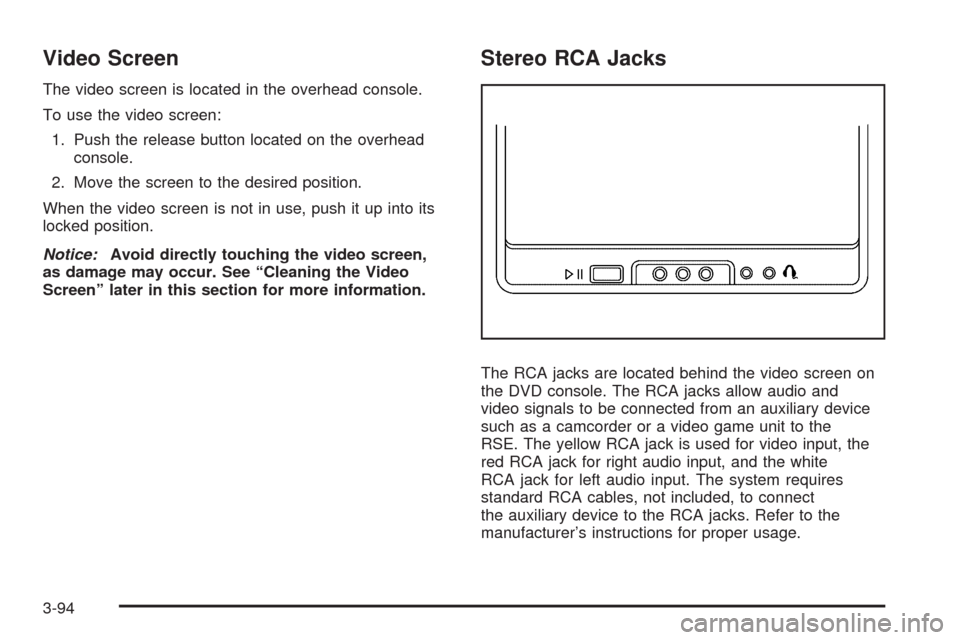
The video screen is located in the overhead console.
To use the video screen:
1. Push the release button located on the overhead
console.
2. Move the screen to the desired position.
When the video screen is not in use, push it up into its
locked position.
Notice:Avoid directly touching the video screen,
as damage may occur. See “Cleaning the Video
Screen” later in this section for more information.
Stereo RCA Jacks
The RCA jacks are located behind the video screen on
the DVD console. The RCA jacks allow audio and
video signals to be connected from an auxiliary device
such as a camcorder or a video game unit to the
RSE. The yellow RCA jack is used for video input, the
red RCA jack for right audio input, and the white
RCA jack for left audio input. The system requires
standard RCA cables, not included, to connect
the auxiliary device to the RCA jacks. Refer to the
manufacturer’s instructions for proper usage.
3-94
Page 255 of 464

To use the auxiliary audio and video inputs, connect an
external auxiliary device such as a camcorder to the
RCA jacks and turn on both the auxiliary device power
and the power on the front of the RSE player.
If a disc is present when the RSE power is turned on,
the player automatically begins playing the disc.
Press the AUX button on the remote control or the
DVD AUX button on the DVD player faceplate to switch
the system between the DVD player and the auxiliary
device. See “DVD Player” and “Remote Control” later in
this section for more information.
Parental Control
wj
(Parental Control):This button is located behind
the video screen next to the auxiliary and headphone
jacks. Press
wjwhile using RSA, or when a DVD or CD
is playing to blank the video screen and to mute the
audio. The power indicator lights on the DVD player
ashes. The parental control also disables all other button
operations from the remote control and the DVD player,
except for the eject button. Press
wjagain to restore
operation of the RSA, DVD player, and remote control.
wjcan also be used to turn the DVD player power on
and automatically resume play if the vehicle is on and a
disc is in the player. If a disc is not in the player then the
system powers up in auxiliary mode.
Audio Output
Audio from the DVD player or auxiliary inputs can be
heard through the following sources:
Vehicle Speakers
Wireless Headphones
Wired Headphones (not included)
Vehicle Speakers
Only one audio source can be heard through the
vehicle’s speakers at a time.
The RSE system or an auxiliary device can be heard
through all of the vehicle’s speakers when the following
occurs:
A DVD or auxiliary device is playing
The front audio system is on and the CD AUX
button is pressed to enable the RSE system
DVD appears on the radio display when the RSE
system is on.
To turn the vehicles speakers on and off, press the
CD AUX button on the radio. The audio from the RSE
system can be heard through the wireless headphones
and the vehicles speakers at the same time. The
volume on the radio varies when switching between the
radio, CD, DVD, MP3, or an auxiliary device.
3-95
Page 256 of 464
Headphones
Notice:Do not store the headphones in heat or
direct sunlight. This could damage the headphones
and repairs will not be covered by your warranty.
Storage in extreme cold can weaken the batteries.
Keep the headphones stored in a cool, dry place.
Wireless Headphones
The RSE system may include two sets of wireless
headphones (batteries may be included with the
headphone sets).
The wireless headphones have an ON/OFF switch, a
channel select switch, and a volume control. To use the
headphones, turn the ON/OFF switch to ON. An
indicator light on the headphones come on. If the light
does not come on, the batteries might need to be
replaced. See “Battery Replacement” later in this section
for more information. Switch the headphones to OFF
when not in use.
The headphones shut off automatically to save the
battery power if the RSE system is off or if the
headphones are out of range of the transmitters for morethan three minutes. The transmitters are located next to
the DVD faceplate. If the person using the headphones
moves too far forward or steps out of the vehicle, the
headphones lose the audio signal.
DVD and auxiliary audio are always found on channel
(CHA or CH1) of the wireless headphones. RSA audio is
dedicated to CHB or CH2 of the wireless headphones.
To adjust the volume on the wireless headphones,
use the volume control located on the headphones.
If there is a decreased audio signal during CD, MP3, or
DVD play, there could be a low hissing noise through
the speakers and/or headphones. If the hissing sound in
the wireless headphones seems excessive, make
sure that the headphone batteries are fully charged.
Some amount of hissing is normal.
Both sets of rear seat headphones could include foam
ear pads that can be replaced.
These foam ear pads can become worn or damaged if
they are not handled or stored properly. They can
be replaced separately from the headphone set. See
your dealer/retailer for more information.
3-96
Page 257 of 464

Battery Replacement
To change the batteries on the headphones:
1. Turn the screw to loosen the battery door located
on the left side of the headphones, then slide the
battery door open.
2. Replace the two batteries in the compartment.
Make sure that they are installed correctly using the
diagram on the inside of the battery compartment.
3. Replace the battery door and tighten the door
screw.
If the headphones are to be stored for a long period of
time, remove the batteries, and keep them in a cool,
dry place.
Wired Headphones
There is a right and left wired headphone jack located
behind the video screen next to the auxiliary jacks.
The wired headphones work as follows:
DVD on / RSA off: The wired headphones plays
RSE audio.
DVD off / RSA on: The wired headphones plays
RSA audio.
DVD on / RSA on: The wired headphones plays
RSA audio.
DVD Player
The DVD player is located in the overhead console and
can be controlled by the buttons on the DVD player
and/or by the buttons on the remote control. See “Remote
Control” later in this section for more information.
The RSE system DVD player is only compatible with
DVDs of the appropriate region code for the country that
the vehicle was sold. The DVD region code is printed
on the jacket of most DVDs.
The player is capable of playing the following media
formats:
DVD (single and dual layer)
DVD+R/RW
DVD-R/RW
DVD-ROM with MP3
DVD-ROM with WMA
CD-DA
CD-R/RW
CD-ROM with MP3
CD-ROM with WMA
Enhanced CD
SACD (CD player only)
3-97
Page 258 of 464

An error message could display if any other type of
media is inserted into the DVD player.
If an error message displays on the video screen, see
“DVD Messages” later in this section.
DVD Player Buttons
cY(Stop/Eject):Press and release to stop playing,
rewinding, or fast forwarding.
Press
cYtwice to eject a disc. If the player is
already stopped, then only press
cYonce.
DVD AUX (Disc Auxiliary):Press to switch the system
between the DVD player and an auxiliary device.
rj(Play/Pause):Press to start play of a disc. If the
disc is playing, press
rjto pause it. Pressrj
again to continue playing the disc.
43(Wired Headphone Volume):Press to select
the correct headphone, then press
rorqto increase
or decrease the headphone volume.
When a DVD is playing in the DVD player and the RSA
system is on,
cYandrjare the only buttons
that will work.
RSA SRC (Rear Seat Audio Source):Press and
release to turn on the RSA system and to switch
between AM, FM1, FM2, XM1, XM2, or the front CD
player. If one of the sources is not available, the system
skips over the source when this button is pressed.
Press and hold to turn off RSA.
q,Q,r,R(Directional Arrows):Press to navigate
through DVD menus.
QandRmove through MP3 folders.
g(Fast Reverse):Press to fast reverse the DVD and
CD. To stop reversing, press
rjorcY. While
the DVD is playing the copyright information or previews,
gmay not work. RSE Faceplate with Rear Seat Climate Controls
shown, RSE Faceplate without Rear Seat Climate
Controls similar
3-98
Page 262 of 464

r(Fast Reverse):Press to fast reverse the DVD
and CD. To stop reversing, press
rjorcY.
This button might not work while the DVD is playing the
copyright information or the previews.
[(Fast Forward):Press to fast forward the DVD and
CD. To stop fast forwarding, press
rjorcY.
This button might not work while the DVD is playing the
copyright information or the previews.
e(Sound):Press to display the current audio track.
Each press moves the DVD to the next language
or commentary. The format and content of this function
vary for each disc.
{(Subtitles):Press to display the current subtitles.
Each press of this button moves the DVD to the
next available subtitle option (English, Spanish, French,
etc., if available). The format and content of this
function vary for each disc.AUX (Auxiliary):Press this button to switch the system
between the DVD player and an auxiliary source.
d(Camera):Press to display the current camera
angle on DVDs that have this feature. Each press moves
the DVD to the next available camera angle. The
format and content of this function vary for each disc.
0 through 9 (Numeric Keypad):The numeric keypad
provides the capability of direct chapter or track
number selection.
\(Clear):To clear all numeric inputs press within
two seconds after entering a numeric selection.
}10 (Multiple Digit Entries):Press before entering a
number greater than 9 to select a chapter or track
number greater than 9.
3-102
Page 264 of 464
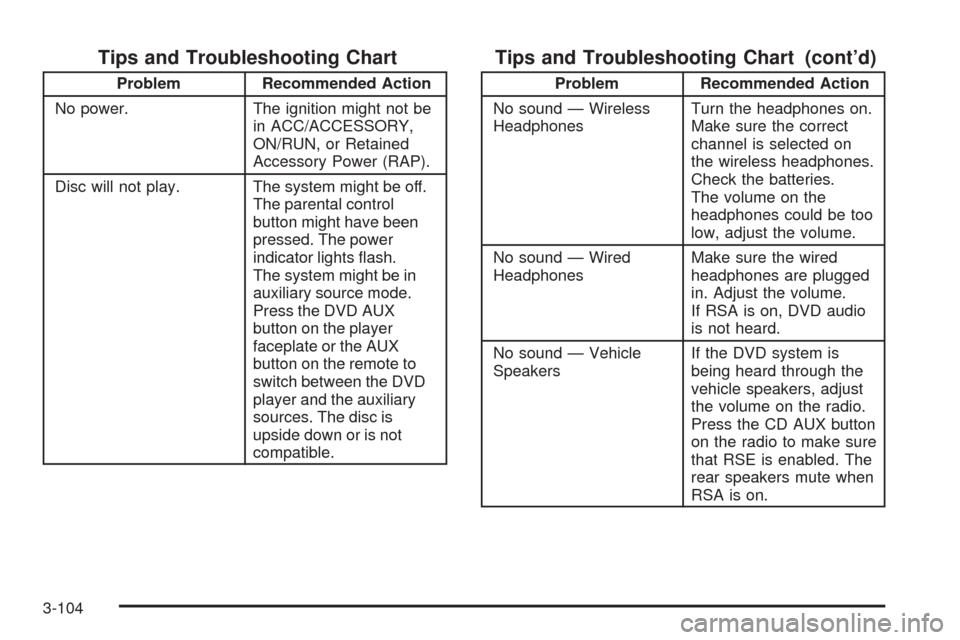
Tips and Troubleshooting Chart
Problem Recommended Action
No power. The ignition might not be
in ACC/ACCESSORY,
ON/RUN, or Retained
Accessory Power (RAP).
Disc will not play. The system might be off.
The parental control
button might have been
pressed. The power
indicator lights ash.
The system might be in
auxiliary source mode.
Press the DVD AUX
button on the player
faceplate or the AUX
button on the remote to
switch between the DVD
player and the auxiliary
sources. The disc is
upside down or is not
compatible.
Tips and Troubleshooting Chart (cont’d)
Problem Recommended Action
No sound — Wireless
HeadphonesTurn the headphones on.
Make sure the correct
channel is selected on
the wireless headphones.
Check the batteries.
The volume on the
headphones could be too
low, adjust the volume.
No sound — Wired
HeadphonesMake sure the wired
headphones are plugged
in. Adjust the volume.
If RSA is on, DVD audio
is not heard.
No sound — Vehicle
SpeakersIf the DVD system is
being heard through the
vehicle speakers, adjust
the volume on the radio.
Press the CD AUX button
on the radio to make sure
that RSE is enabled. The
rear speakers mute when
RSA is on.
3-104