2009 CHEVROLET UPLANDER AUX
[x] Cancel search: AUXPage 258 of 464

An error message could display if any other type of
media is inserted into the DVD player.
If an error message displays on the video screen, see
“DVD Messages” later in this section.
DVD Player Buttons
cY(Stop/Eject):Press and release to stop playing,
rewinding, or fast forwarding.
Press
cYtwice to eject a disc. If the player is
already stopped, then only press
cYonce.
DVD AUX (Disc Auxiliary):Press to switch the system
between the DVD player and an auxiliary device.
rj(Play/Pause):Press to start play of a disc. If the
disc is playing, press
rjto pause it. Pressrj
again to continue playing the disc.
43(Wired Headphone Volume):Press to select
the correct headphone, then press
rorqto increase
or decrease the headphone volume.
When a DVD is playing in the DVD player and the RSA
system is on,
cYandrjare the only buttons
that will work.
RSA SRC (Rear Seat Audio Source):Press and
release to turn on the RSA system and to switch
between AM, FM1, FM2, XM1, XM2, or the front CD
player. If one of the sources is not available, the system
skips over the source when this button is pressed.
Press and hold to turn off RSA.
q,Q,r,R(Directional Arrows):Press to navigate
through DVD menus.
QandRmove through MP3 folders.
g(Fast Reverse):Press to fast reverse the DVD and
CD. To stop reversing, press
rjorcY. While
the DVD is playing the copyright information or previews,
gmay not work. RSE Faceplate with Rear Seat Climate Controls
shown, RSE Faceplate without Rear Seat Climate
Controls similar
3-98
Page 259 of 464

l(Fast Forward):Press to fast forward the DVD and
CD. To stop forwarding, press
rjorcY. While
the DVD is playing the copyright information or previews,
lmay not work.
MENU (Disc):Press to view the main DVD menu. The
menu is different on every disc. Use
q,Q,r,or
Rto move the cursor around the menu. After making a
selection, press
r.
r(Enter/Select):Press to select the choice that is
highlighted in any menu.
z(Display Control Button):Press to open the RSE
On-Screen Display (OSD) menus to adjust the color,
tint, brightness, contrast, and display modes.
For vehicles without rear seat climate control,z
can take the place of9C.
For vehicles with rear seat climate control,zis
also found on the remote control.
Playing a Disc
To play a disc, insert the disc with the label side up into
the loading slot. The DVD player continues loading
the disc and the player automatically starts if the vehicle
is in ACC/ACCESSORY, ON/RUN, or RAP.
If a disc is already in the player make sure that the DVD
player is on, then press
rjon the player faceplate or
on the remote control. Press DVD AUX on the player
faceplate, or CD AUX on the radio faceplate until RSE
displays, to start playing a disc.
Some DVDs do not allow fast forwarding or skipping of
the copyright information or previews. Some DVDs
begins playing after the previews have nished. If the
DVD does not begin playing at the main title, refer to the
on-screen instructions.
To stop playing a disc, press
cYon the DVD player
faceplate or the remote control.
To resume playback, press
rjon the DVD player
faceplate or the remote control. The movie should
resume play from where it was last stopped if the disc
has not been ejected.
If the disc has been ejected, the disc resumes play at
the beginning of the disc.
3-99
Page 262 of 464

r(Fast Reverse):Press to fast reverse the DVD
and CD. To stop reversing, press
rjorcY.
This button might not work while the DVD is playing the
copyright information or the previews.
[(Fast Forward):Press to fast forward the DVD and
CD. To stop fast forwarding, press
rjorcY.
This button might not work while the DVD is playing the
copyright information or the previews.
e(Sound):Press to display the current audio track.
Each press moves the DVD to the next language
or commentary. The format and content of this function
vary for each disc.
{(Subtitles):Press to display the current subtitles.
Each press of this button moves the DVD to the
next available subtitle option (English, Spanish, French,
etc., if available). The format and content of this
function vary for each disc.AUX (Auxiliary):Press this button to switch the system
between the DVD player and an auxiliary source.
d(Camera):Press to display the current camera
angle on DVDs that have this feature. Each press moves
the DVD to the next available camera angle. The
format and content of this function vary for each disc.
0 through 9 (Numeric Keypad):The numeric keypad
provides the capability of direct chapter or track
number selection.
\(Clear):To clear all numeric inputs press within
two seconds after entering a numeric selection.
}10 (Multiple Digit Entries):Press before entering a
number greater than 9 to select a chapter or track
number greater than 9.
3-102
Page 263 of 464

RSE On-Screen Display (OSD) Menu
To use the RSE OSD menu when using a DVD or an
auxiliary device:
1. Press
zon the remote control or on the DVD
faceplate, if the vehicle does not have rear seat
climate control.
2. Use
q,Q,r,Randrto navigate the
screen.
This menu lets you select default preferences for video
format, language preference, brightness, color, contrast,
and tint. Not all DVDs support all the feature defaults in
the setup menus. If a feature is not supported, the
defaults are provided by the DVD media. To exit this
menu press
z,orqon the remote control, or
faceplate if there is no rear seat climate control, or wait
for the menu to time out.
The default language selection applies to all
future DVDs.To use the RSE OSD menu when using a CD or
an MP3:
1. Press
zon the remote control or on the DVD
faceplate, if the vehicle does not have rear seat
climate control.
2. Use
q,Q,r,Randrto navigate the
screen.
This menu lets you select default preferences for
language and playback settings. To exit this menu press
z,orqon the remote control, or faceplate if there
is no rear seat climate control, or wait for the menu
to time out.
Battery Replacement
To change the remote control batteries, do the following:
1. Slide the rear cover back on the remote control.
2. Replace the two batteries in the compartment. Make
sure that they are installed correctly using the
diagram on the inside of the battery compartment.
3. Replace the battery cover.
If the remote control is to be stored for a long period of
time, remove the batteries and keep them in a cool,
dry place.
3-103
Page 264 of 464
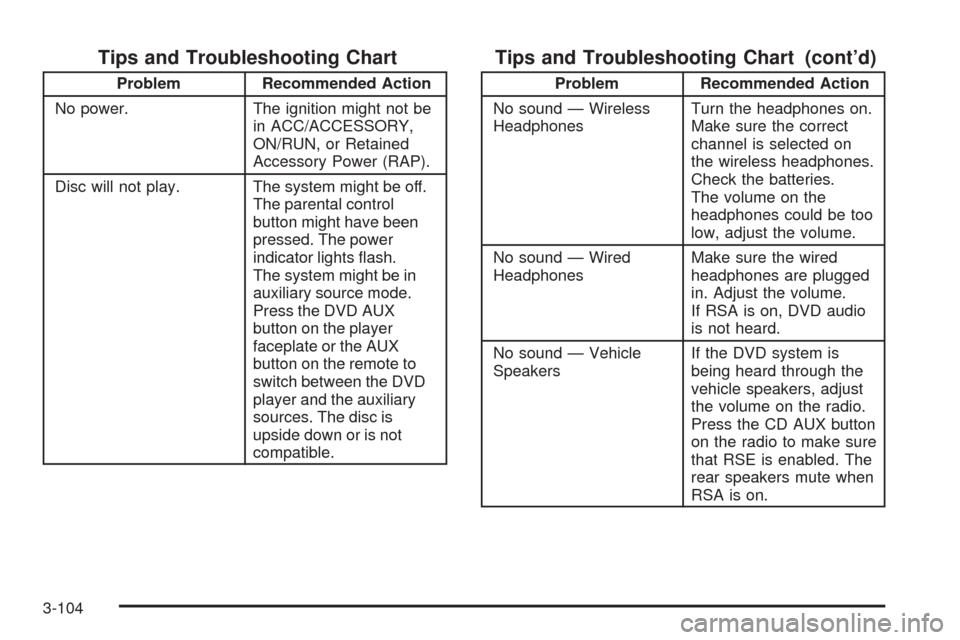
Tips and Troubleshooting Chart
Problem Recommended Action
No power. The ignition might not be
in ACC/ACCESSORY,
ON/RUN, or Retained
Accessory Power (RAP).
Disc will not play. The system might be off.
The parental control
button might have been
pressed. The power
indicator lights ash.
The system might be in
auxiliary source mode.
Press the DVD AUX
button on the player
faceplate or the AUX
button on the remote to
switch between the DVD
player and the auxiliary
sources. The disc is
upside down or is not
compatible.
Tips and Troubleshooting Chart (cont’d)
Problem Recommended Action
No sound — Wireless
HeadphonesTurn the headphones on.
Make sure the correct
channel is selected on
the wireless headphones.
Check the batteries.
The volume on the
headphones could be too
low, adjust the volume.
No sound — Wired
HeadphonesMake sure the wired
headphones are plugged
in. Adjust the volume.
If RSA is on, DVD audio
is not heard.
No sound — Vehicle
SpeakersIf the DVD system is
being heard through the
vehicle speakers, adjust
the volume on the radio.
Press the CD AUX button
on the radio to make sure
that RSE is enabled. The
rear speakers mute when
RSA is on.
3-104
Page 265 of 464

Tips and Troubleshooting Chart (cont’d)
Problem Recommended Action
The picture is distorted
during fast forward or
reverse.This is normal for this
operation.
The picture does not
ll the screen. There
are black borders on the
top and bottom or on
both sides or it looks
stretched out.Video mode might not be
correctly set. See “RSE
OSD” earlier in this
section.
I ejected the disc and tried
to take it out, but
it was pulled back into
the slot.Press the eject
button once.
The language in the audio
or on the screen is wrong.Press the main menu
button on the remote
control and change the
audio or language
selection on the DVD
menu. To change the
language preference,
press the display button to
access the RSE OSD
menu. See “RSE OSD”
earlier in this section.
Tips and Troubleshooting Chart (cont’d)
Problem Recommended Action
The remote control does
not work.Point the remote control
directly at the face of the
DVD unit. The batteries
could be weak or put in
wrong. The parental
control button might have
been pressed, the power
indicator lights ash.
How do I get subtitles on
or off?Press the subtitle button
on the remote control to
select subtitle option or
go to the DVDs main
menu and follow the
screen prompts.
The auxiliary source is
running but there is no
picture or sound.Press and release the
AUX button on the remote
control or the DVD AUX
button on the player
faceplate to get to
auxiliary input. Check to
make sure that the
auxiliary source is
connected to the inputs
properly.
3-105
Page 267 of 464

Tips and Troubleshooting Chart (cont’d)
Problem Recommended Action
The wireless headphones
have audio distortion.Verify that the
headphones are facing
to the front of the
vehicle, left and right
sides are indicated on
the headphones to
ensure that the signal
is received properly.
Verify that there is no
obstruction between
the headphone(s) and
the transmitter.
Verify that the batteries
have a full charge.
In auxiliary mode, the
picture moves or scrolls.Check the signal coming
from the auxiliary device
and make sure that the
connection and the signal
is good.
DVD Display Error Messages
The following errors could display on the video screen.
Disc Format Error:This message displays if a disc
is inserted upside down, if the disc is not readable, or if
the disc format is not compatible.
Disc Play Error:This message displays if the
mechanism cannot play the disc. Scratched or damaged
discs will cause this error.
Region Code Error:This message displays if the
region code of the DVD is not compatible with the region
code of the DVD player.
Load/Eject Error:This message displays if the disc is
not properly loaded or ejected.
No Disc:This message displays when you try to play
or eject a disc that is not in the player.
X:An X displays, in the upper left corner of the video
screen, if the operation that has been selected is
not currently available.
3-107
Page 269 of 464
The DVD or auxiliary device are always be available on
channel (CHA or CH1) of the wireless headphones. All
other RSA sources are available on channel (CHB or
CH2) of the wireless headphones or wired headphones.
If the RSA is off, the wired headphones provide DVD or
auxiliary device audio. The rear seat passengers are not
able to listen to XM on channel (CHB or CH2) if the front
seat passengers are listening to a DVD or an auxiliary
device.
The remote control does not operate any of the RSA
features.
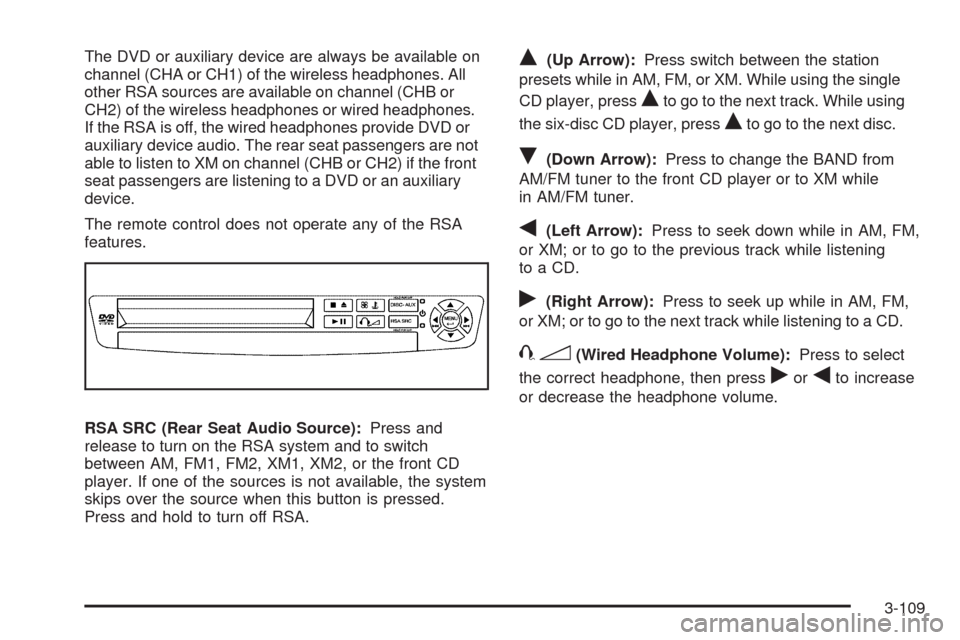
RSA SRC (Rear Seat Audio Source):Press and
release to turn on the RSA system and to switch
between AM, FM1, FM2, XM1, XM2, or the front CD
player. If one of the sources is not available, the system
skips over the source when this button is pressed.
Press and hold to turn off RSA.Q(Up Arrow):Press switch between the station
presets while in AM, FM, or XM. While using the single
CD player, press
Qto go to the next track. While using
the six-disc CD player, press
Qto go to the next disc.
R(Down Arrow):Press to change the BAND from
AM/FM tuner to the front CD player or to XM while
in AM/FM tuner.
q(Left Arrow):Press to seek down while in AM, FM,
or XM; or to go to the previous track while listening
to a CD.
r(Right Arrow):Press to seek up while in AM, FM,
or XM; or to go to the next track while listening to a CD.
43(Wired Headphone Volume):Press to select
the correct headphone, then press
rorqto increase
or decrease the headphone volume.
3-109