Page 122 of 422

Cruise Control Light.............3-43
Highbeam On Light..............3-43
Tow/Haul Mode Light...........3-43
Fuel Gage..........................3-43
Driver Information
Center (DIC)
Driver Information
Center (DIC).....................3-44
DIC Operation and Displays
(With DIC Buttons).............3-45
DIC Operation and Displays
(Without DIC Buttons).........3-51
DIC Compass.....................3-54
DIC Warnings and
Messages.........................3-56
DIC Vehicle Customization
(With DIC Buttons).............3-65
Audio System(s)Audio System(s)..................3-73
Setting the Clock.................3-74
Radio(s).............................3-75
Using an MP3
(Radio with CD).................3-92
Using an MP3 (Radio with
CD and DVD Player)..........3-96
XM Radio Messages..........3-102Navigation/Radio System.....3-103
Bluetooth
®........................3-103
Rear Seat Entertainment
(RSE) System..................3-114
Rear Seat Audio (RSA)......3-123
Theft-Deterrent Feature.......3-125
Audio Steering Wheel
Controls..........................3-125
Radio Reception................3-126
Multi-Band Antenna............3-127
3-2 Instrument Panel
Page 125 of 422

The main components of the
instrument panel are listed here:
A.Turn Signal/Multifunction
Lever on page 3-6.Windshield
Wipers on page 3-7.
B.Instrument Panel Cluster on
page 3-31.
C.Audio Steering Wheel Controls
on page 3-125.
D.Instrument Panel Storage on
page 2-52.
E.Audio System(s) on page 3-73
orNavigation/Radio System on
page 3-103(If Equipped).
F.Outlet Adjustment on page 3-27.
G.Exterior Lamps on page 3-11.
Fog Lamps on page 3-13
(If Equipped).
H.Dome Lamp Override on
page 3-14.Instrument Panel
Brightness on page 3-13. Heated
Windshield Washer Button. See
Windshield Washer on page 3-8.
I.Cruise Control on page 3-9.
J.Tilt and Telescopic Steering
Wheel on page 3-6.K.Horn on page 3-5.
L.Driver Information Center (DIC)
on page 3-44.
M.Climate Control System on
page 3-19orDual Automatic
Climate Control System on
page 3-22.
N. Shift Lever. SeeShifting Into
Park on page 2-28.
O.Accessory Power Outlet(s) on
page 3-17.
P.Rear Window Wiper/Washer
on page 3-9. Traction Control
System (TCS) Disable Button.
SeeStabiliTrak
®System on
page 4-5.Tow/Haul Mode
on page 2-26(If Equipped).
Power Liftgate on page 2-11
(If Equipped).
Q.Heated Seats on page 1-5.
R.Hazard Warning Flashers on
page 3-5.
S. Passenger Air Bag Status
Indicator.
T.Glove Box on page 2-52.
Hazard Warning Flashers
|
Hazard Warning Flasher:Press
this button located on the instrument
panel below the audio system, to
make the front and rear turn signal
lamps ash on and off. This warns
others that you are having trouble.
Press again to turn the ashers off.
The turn signals do not work while
the hazard warning ashers are on.
Horn
Press near or on the horn symbols
on the steering wheel pad to sound
the horn.
Instrument Panel 3-5
Page 155 of 422

When this light comes on, the
Driver Information Center (DIC) also
displays the SERVICE BATTERY
CHARGING SYSTEM message.
SeeDIC Warnings and Messages
on page 3-56for more information.
If a short distance must be driven
with the light on, be sure to turn off
all accessories, such as the radio
and air conditioner.
Voltmeter Gage
When the engine is not running, but
the ignition is on, this gage displays
the battery voltage in DC volts.When the engine is running, the
gage shows the condition of the
charging system. The gage can
transition from a higher to lower
or a lower to higher reading.
This is normal. Readings between
the low and high warning zones
indicate the normal operating range.
The voltmeter gage can also read
lower when in fuel economy mode.
This is normal.
Readings in the low warning zone
can occur when a large number of
electrical accessories are operating
in the vehicle and the engine is
left idling for an extended period.
This condition is normal since the
charging system is not able to
provide full power at engine idle.As engine speeds are increased,
this condition should correct itself
as higher engine speeds allow the
charging system to create maximum
power.
The vehicle can only be driven for a
short time with the reading in either
warning zone. If the vehicle must
be driven, turn off all unnecessary
accessories.
Readings in either warning zone
indicate a possible problem in
the electrical system. Have the
vehicle serviced as soon as
possible.
Instrument Panel 3-35
Page 193 of 422
Exiting the Feature
Settings Menu
The feature settings menu will be
exited when any of the following
occurs:
The vehicle is shifted out of
P (Park).
The vehicle is no longer in
ON/RUN.
The trip/fuel or vehicle
information DIC buttons
are pressed.
The end of the feature settings
menu is reached and exited.
A 40 second time period has
elapsed with no selection made.
Audio System(s)
Determine which radio the vehicle
has and read the following pages to
become familiar with its features.
{CAUTION
Taking your eyes off the road
for extended periods could cause
a crash resulting in injury or death
to you or others. Do not give
extended attention to
entertainment tasks while driving.
This system provides access to
many audio and non audio listings.
To minimize taking your eyes
off the road while driving, do the
following while the vehicle is parked:
Become familiar with the
operation and controls of
the audio system.
Set up the tone, speaker
adjustments, and preset
radio stations.For more information, seeDefensive
Driving on page 4-2.
Notice:Contact your dealer/
retailer before adding any
equipment.
Adding audio or communication
equipment could interfere
with the operation of the vehicle’s
engine, radio, or other systems,
and could damage them.
Follow federal rules covering
mobile radio and telephone
equipment.
The vehicle has Retained Accessory
Power (RAP). With RAP, the audio
system can be played even after the
ignition is turned off. SeeRetained
Accessory Power (RAP) on
page 2-22for more information.
Instrument Panel 3-73
Page 194 of 422

Setting the Clock
To adjust the time and date:
1. Turn the ignition key to
ACC/ACCESSORY or ON/RUN,
then press
O, to turn the
radio on.
2. Press
Gto display HR, MIN,
MM, DD, YYYY (hour, minute,
month, day, and year).
3. Press the pushbutton located
under any one of the labels to
be changed.4. To increase the time or date, do
one of the following:
Press the pushbutton below
the selected label.
Press¨SEEK.
Press\FWD.
Turnfclockwise.
5. To decrease the time or date,
do one of the following:
Press©SEEK.
PresssREV.
Turnfcounter-clockwise.To change the time default setting
from 12 hour to 24 hour or to
change the date default setting from
month/day/year to day/month/year:
1. Press
Gand then the pushbutton
located under the forward arrow
that displays on the radio screen
until the time 12H (hour) and
24H (hour), and the date MM/DD
(month and day) and DD/MM
(day and month) displays.
2. Press the pushbutton located
under the desired option.
3. Press
Gagain to apply the
selected default, or let the screen
time out.
3-74 Instrument Panel
Page 195 of 422
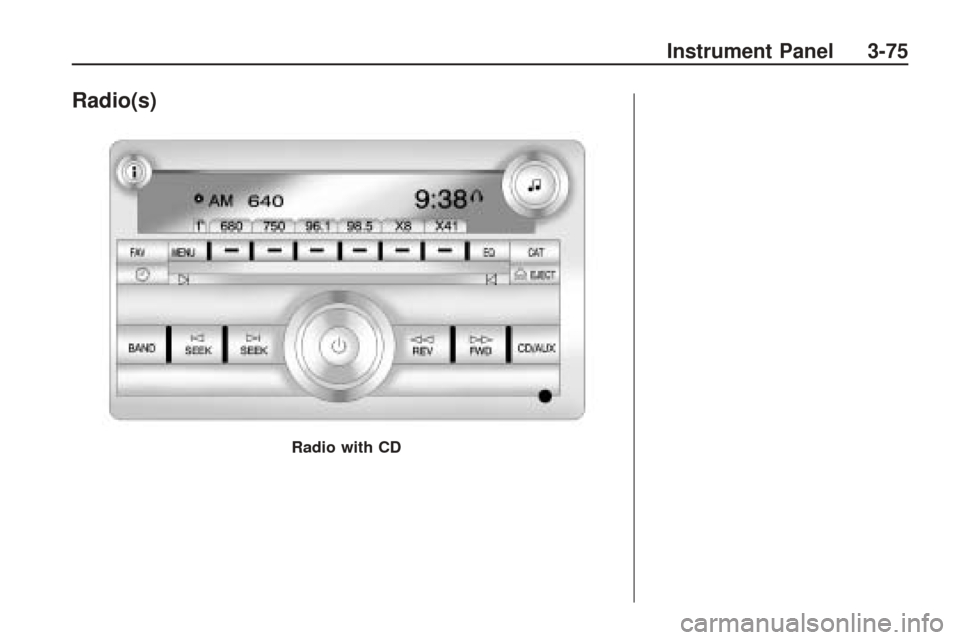
Radio(s)
Radio with CD
Instrument Panel 3-75
Page 196 of 422

The vehicle may have one of these
radios as its audio system.
Radios with CD and DVD
Radios with CD and DVD have a
Bose®Surround Sound System.
Some of its features are explained
later in this section under, “Adjusting
the Speakers (Balance/Fade)”. If the vehicle has a Rear Seat
Entertainment (RSE) system, it
has a CD/DVD radio. See
Rear
Seat Entertainment (RSE) System
on page 3-114 for more information
on the vehicle’s RSE system. The DVD player is the top slot
on the radio faceplate. The player
is capable of reading the DTS
programmed DVD Audio or DVD
Video media. DTS and DTS Digital
Surround are registered trademarks
of Digital Theater Systems, Inc.
Manufactured under license from
Dolby Laboratories. Dolby and
the double-D symbol are trademarks
of Dolby Laboratories.
Radio Data System (RDS)
The Radio Data System (RDS)
feature is available for use only on
FM stations that broadcast RDS
information. This system relies upon
receiving specic information from
these stations and only works when
the information is available. While the
radio is tuned to an FM-RDS station,
the station name or call letters
display. In rare cases, a radio station
could broadcast incorrect information
that causes the radio features to
work improperly. If this happens,
contact the radio station.
Radio with CD and DVD
3-76 Instrument Panel
Page 197 of 422

Playing the Radio
O(Power/Volume):Press to turn
the system on and off. Turn to
increase or decrease the volume.
For vehicles with a Rear
Entertainment System (RSE),
press and hold for more than
two seconds to turn off the entire
radio and RSE system and to start
the parental control feature. Parental
control prevents the rear seat
occupant from operating the Rear
Seat Audio (RSA) system or remote
control.
A lock symbol displays next to
the clock display while the parental
control feature is being used.
The feature remains on until
Ois
pressed and held for more than
two seconds, or the driver turns the
ignition off and exits the vehicle.
4(Information):Press to switch the
display between the radio station
frequency and the time. When
the ignition is in the OFF position,
press
4to display the time.
For vehicles with XM, MP3, WMA
or RDS features, press
4to display
additional text information related
to the current FM-RDS or XM
station; or CD, MP3 or WMA song.
If information is available during XM,
CD, MP3 or WMA playback, the song
title information displays on the
top line of the display and artist
information displays on the bottom
line. When information is not
available, “NO INFO” is displayed.
Speed Compensated Volume
(SCV):The Speed Compensated
Volume (SCV) feature automatically
adjusts the radio volume to
compensate for road and wind noise
as the vehicle speeds up or slows
down, so that the volume level is
consistent.To activate SCV:
1. Set the radio volume to the
desired level.
2. Press the MENU button to
display the radio setup menu.
3. Press the pushbutton under
the AUTO VOLUM (automatic
volume) label on the radio
display.
4. Press the pushbutton under the
desired Speed Compensated
Volume setting (OFF, Low, Med,
or High) to select the level of radio
volume compensation. Press the
pushbutton located below the
BACK label on the MENU SETUP
display or let the display time out
after approximately 10 seconds.
Each higher setting allows for
more radio volume compensation
at faster vehicle speeds.
Instrument Panel 3-77