Page 106 of 484

Four-Wheel Drive
If the vehicle has four-wheel drive, the engine’s driving
power can be sent to all four wheels for extra traction.
Read the following before using four-wheel drive,
to become familiar with its operation. You should use
Two-Wheel High for most normal driving conditions.
Notice:Driving on clean, dry pavement in
Four-Wheel-Drive High or Four-Wheel-Drive Low for
an extended period of time may cause premature
wear on your vehicle’s powertrain. Do not drive on
clean, dry pavement in Four-Wheel-Drive High or
Four-Wheel-Drive Low for extended periods of time.
Notice:If you continually drive your vehicle with
the transfer case in AUTO or Four-Wheel Drive, you
could shorten the life of the transfer case or the
Four-Wheel Drive system. The selector switch
should be left in Two-Wheel Drive High mode. Only
use AUTO and Four-Wheel Drive when you need
extra traction such as in wet or slippery road
conditions.
Automatic Transfer Case
If the vehicle has four-wheel drive, the transfer case
knob is located to the right of the steering wheel on the
instrument panel.
Use this knob to shift into
and out of four-wheel
drive.
2
m(Two-Wheel High):This setting is for driving in
most street and highway situations. The front axle is not
engaged in two-wheel drive. This provides the best
fuel economy.
2-30
Page 123 of 484
OnStar Virtual Advisor
OnStar Virtual Advisor is a feature of OnStar
Hands-Free Calling that uses minutes to access
location-based weather, local traffic reports, and
stock quotes. Press the phone button and give a
few simple voice commands to browse through the
various topics. See the OnStar Owner’s Guide for
more information. This feature is only available in the
continental U.S.
OnStar Steering Wheel Controls
This vehicle may have a Talk/Mute button that can
be used to interact with OnStar Hands-Free Calling.
SeeAudio Steering Wheel Controls on page 3-109for
more information.
On some vehicles, the mute button can be used to dial
numbers into voice mail systems, or to dial phone
extensions. See the OnStar Owner’s Guide for more
information.
How OnStar Service Works
The OnStar system can record and transmit vehicle
information. This information is automatically sent to an
OnStar Call Center when the OnStar button is pressed,
the emergency button is pressed, or if the airbags or
AACN system deploy. This information usually includes
the vehicle’s GPS location and, in the event of a crash,
additional information regarding the crash that the vehicle
was involved in (e.g. the direction from which the vehicle
was hit). When the Virtual Advisor feature of OnStar
Hands-Free Calling is used, the vehicle also sends
OnStar the vehicle’s GPS location so they can provide
services where it is located.
OnStar service cannot work unless the vehicle is in a
place where OnStar has an agreement with a wireless
service provider for service in that area. OnStar service
also cannot work unless the vehicle is in a place where
the wireless service provider OnStar has hired for that
area has coverage, network capacity and reception when
the service is needed, and technology that is compatible
with the OnStar service. Not all services are available
everywhere, particularly in remote or enclosed areas, or
at all times.
2-47
Page 136 of 484

Security Light...............................................3-44
Cruise Control Light......................................3-44
Reduced Engine Power Light.........................3-44
Highbeam On Light.......................................3-45
Service Four-Wheel Drive Warning Light..........3-45
Check Gages Warning Light...........................3-45
Gate Ajar Light.............................................3-46
Fuel Gage...................................................3-46
Low Fuel Warning Light.................................3-47
Check Gas Cap Light....................................3-47
Driver Information Center (DIC).......................3-47
DIC Operation and Displays...........................3-48
DIC Warnings and Messages.........................3-51
DIC Vehicle Customization.............................3-56Audio System(s).............................................3-62
Setting the Clock..........................................3-63
Radio(s)......................................................3-64
Using an MP3..............................................3-80
XM Radio Messages.....................................3-84
Navigation/Radio System...............................3-85
Bluetooth
®...................................................3-85
Rear Seat Entertainment (RSE) System...........3-96
Rear Seat Audio (RSA)................................3-108
Theft-Deterrent Feature................................3-109
Audio Steering Wheel Controls......................3-109
Radio Reception.........................................3-110
Fixed Mast Antenna....................................3-111
XM™ Satellite Radio Antenna System............3-111
Chime Level Adjustment...............................3-111
Section 3 Instrument Panel
3-2
Page 139 of 484

The main components of the instrument panel are the following:
A.Headlamps on page 3-13.
B. Air Outlets. SeeOutlet Adjustment on page 3-26.
C.Turn Signal/Multifunction Lever on page 3-7.
D. OnStar
®andAudio Steering Wheel Controls on
page 3-109(If Equipped).
E.Instrument Panel Cluster on page 3-29.
F.Ignition Positions on page 2-22.
G.Audio Steering Wheel Controls on page 3-109
(If Equipped).
H. Transfer Case Controls. See “Automatic Transfer
Case” underFour-Wheel Drive on page 2-30.
I. Rear Window Washer/Wiper. SeeWindshield
Washer on page 3-9.
J.Audio System(s) on page 3-62.
K.Dual Climate Control System on page 3-20.
L.Dome Lamp Override on page 3-17.
M.Fog Lamps on page 3-16(If Equipped).
Instrument Panel Brightness on page 3-16.N.Hood Release on page 5-11.
O. Driver Information Center (DIC) Steering Wheel
Controls (If Equipped). SeeDriver Information
Center (DIC) on page 3-47.
P. Ashtray. SeeAshtray(s) and Cigarette Lighter on
page 3-19.
Q. Shift Lever and StabiliTrak
®Button. SeeShifting
Into Park on page 2-35andStabiliTrak®System
on page 4-6.
R. Lighter. SeeAshtray(s) and Cigarette Lighter on
page 3-19.
S.Accessory Power Outlet(s) on page 3-19.
T. Rear Window Defogger. See “Rear Window
Defogger” underDual Climate Control System on
page 3-20andDual Automatic Climate Control
System on page 3-22.
U.Glove Box on page 2-53.
3-5
Page 140 of 484
Hazard Warning Flashers
|(Hazard Warning Flasher):Press this button
located on top of the steering column, to make the front
and rear turn signal lamps ash on and off. This warns
others that you are having trouble. Press again to turn
the ashers off.
When the hazard warning ashers are on, the vehicle’s
turn signals will not work.
Horn
To sound the horn, press the horn symbols on the
steering wheel pad.
Tilt Wheel
The tilt lever is on the
outboard side of the
steering column, under
the turn signal lever.
Hold the steering wheel and pull the lever toward you to
change the position, then release the lever to lock.
Do not adjust the steering wheel while driving.
3-6
Page 141 of 484
Turn Signal/Multifunction Lever
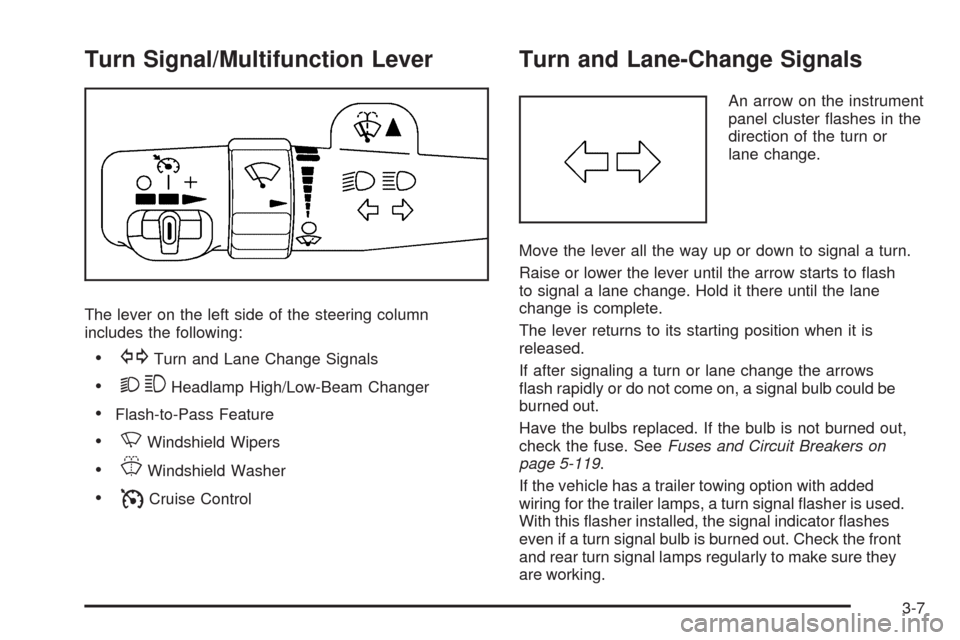
The lever on the left side of the steering column
includes the following:
GTurn and Lane Change Signals
23Headlamp High/Low-Beam Changer
Flash-to-Pass Feature
NWindshield Wipers
JWindshield Washer
ICruise Control
Turn and Lane-Change Signals
An arrow on the instrument
panel cluster ashes in the
direction of the turn or
lane change.
Move the lever all the way up or down to signal a turn.
Raise or lower the lever until the arrow starts to ash
to signal a lane change. Hold it there until the lane
change is complete.
The lever returns to its starting position when it is
released.
If after signaling a turn or lane change the arrows
ash rapidly or do not come on, a signal bulb could be
burned out.
Have the bulbs replaced. If the bulb is not burned out,
check the fuse. SeeFuses and Circuit Breakers on
page 5-119.
If the vehicle has a trailer towing option with added
wiring for the trailer lamps, a turn signal asher is used.
With this asher installed, the signal indicator ashes
even if a turn signal bulb is burned out. Check the front
and rear turn signal lamps regularly to make sure they
are working.
3-7
Page 144 of 484
Rear Window Wiper/Washer
{CAUTION:
In freezing weather, do not use your washer until
the windshield is warmed. Otherwise the washer
uid can form ice on the windshield, blocking
your vision.
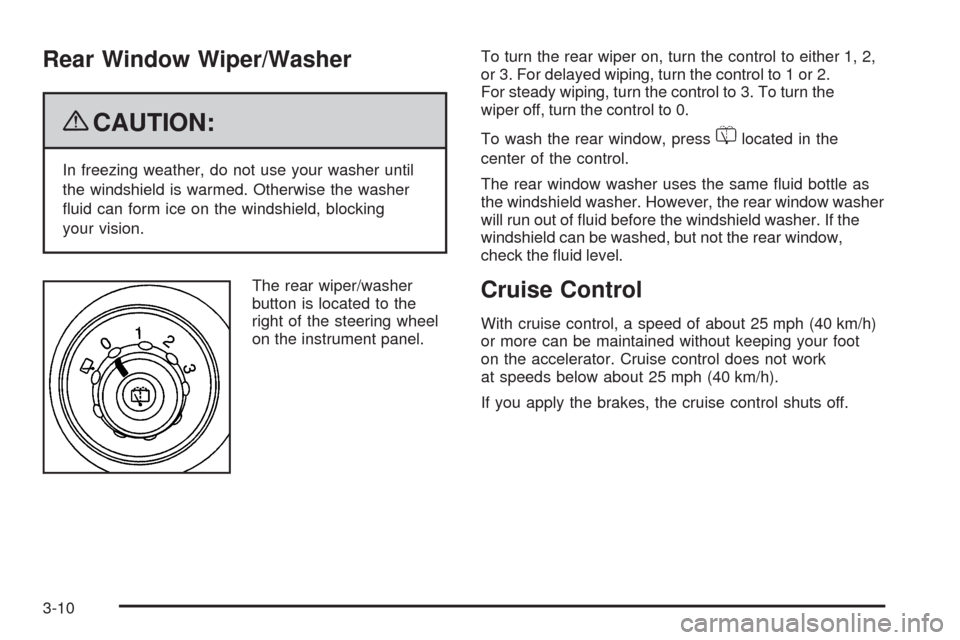
The rear wiper/washer
button is located to the
right of the steering wheel
on the instrument panel.To turn the rear wiper on, turn the control to either 1, 2,
or 3. For delayed wiping, turn the control to 1 or 2.
For steady wiping, turn the control to 3. To turn the
wiper off, turn the control to 0.
To wash the rear window, press
=located in the
center of the control.
The rear window washer uses the same uid bottle as
the windshield washer. However, the rear window washer
will run out of uid before the windshield washer. If the
windshield can be washed, but not the rear window,
check the uid level.
Cruise Control
With cruise control, a speed of about 25 mph (40 km/h)
or more can be maintained without keeping your foot
on the accelerator. Cruise control does not work
at speeds below about 25 mph (40 km/h).
If you apply the brakes, the cruise control shuts off.
3-10
Page 181 of 484

Low Fuel Warning Light
The light next to the fuel gage will come on briey when
you are starting the engine.
This light comes on when the fuel tank is low on fuel.
To turn it off, add fuel to the fuel tank.
Check Gas Cap Light
If your vehicle has this
light, it will come on if your
gas cap is not securely
fastened.
SeeMalfunction Indicator Lamp on page 3-39for more
information.
Driver Information Center (DIC)
Your vehicle may have this feature. The Driver
Information Center (DIC) display is located on the
instrument panel cluster, below the speedometer.
If your vehicle has DIC buttons, they are located on
the steering wheel. The DIC can display information
such as the trip odometer, fuel economy, customization
features, and warning/status messages.
If your vehicle does not have DIC steering wheel
buttons, you will not have all of the features listed.
Scroll through the odometer and trip odometer by
pressing the trip odometer reset stem located on the
instrument panel cluster. Turn off, or acknowledge, DIC
messages by pressing the trip odometer reset stem.
SeeSpeedometer and Odometer on page 3-30for
information on features for vehicles without DIC buttons.
3-47