2009 CHEVROLET TRAIL BLAZER CD player
[x] Cancel search: CD playerPage 214 of 484

Using an MP3
MP3/WMA Disc
MP3/WMA Format
If you burn an MP3 disc on a personal computer:
Make sure the MP3 les are recorded on a
CD-R disc.
Standard audio, MP3 les, and WMA les can be
mixed on one CD.
Make sure playlists have a .mp3 or .wpl extension,
other le extensions might not work.
Files can be recorded with a variety of xed or
variable bit rates. Song title, artist name, and album
is available for display by the radio when recorded
using ID3 tags version 1 and 2.
Create a folder structure that makes it easy to nd
songs while driving. Organize songs by albums using
one folder for each album. Each folder or album
should contain 18 songs or less.
Make sure to nalize the disc when burning an MP3
disc, using multiple sessions. It is usually better to
burn the disc all at once.
The player is able to read and play a maximum of
253 folders, 50 playlists, 20 sessions, and 949 les.
Long le names, folder names, or playlist namesmay use more disc memory space than necessary.
To conserve space on the disc, minimize the length of
the le, folder, or playlist names. An MP3 CD that was
recorded using no le folders can also be played. The
system can support up to 11 folders in depth, though,
keep the depth of the folders to a minimum in order to
keep down the complexity and confusion in trying to
locate a particular folder during playback. If a CD
contains more than the maximum of 253 folders,
50 playlists, 20 sessions, and 949 les, the player
allows access and navigates up to the maximum,
but all items over the maximum will not play.
Root Directory
The root directory is treated as a folder. If the root
directory has compressed audio les, the directory
displays as F1 ROOT. All les contained directly under
the root directory are accessed prior to any root directory
folders. However, playlists (Px) are always accessed
before root folders or les.
Empty Directory or Folder
If a root directory or a folder exists somewhere in the
le structure that contains only folders/subfolders and
no compressed les directly beneath them, the player
advances to the next folder in the le structure that
contains compressed audio les. The empty folder
does not display.
3-80
Page 216 of 484

Playing an MP3/WMA
Insert a CD partway into the slot, label side up. The
player pulls it in, and READING displays. The CD should
begin playing and the CD symbol displays. To insert a
CD while the ignition is off, rst press the
Zbutton
or the DISPL knob.
If the ignition or radio is turned off with a CD in the
player it stays in the player. When the ignition or radio
is turned on, the CD starts to play where it stopped,
if it was the last selected audio source.
As each new track starts to play, the track number and
song title displays.
1 FLD
x(Previous Folder):Press to go to the rst
track in the previous folder. Press 1 FLD
xwhile
in folder random mode to go to the rst track in the
previous folder and random the tracks in that folder.
2 FLD
w(Next Folder):Press to go to the rst track
in the next folder. Press 2 FLD
wwhile in folder random
mode to go to the rst track in the next folder and random
the tracks in that folder.3 REV (Reverse):Press and hold to reverse quickly
within a track. Press and hold 3 REV for less than
two seconds to reverse at 10 times the normal playing
speed. Press and hold 3 REV for more than two seconds
to reverse at 20 times the normal playing speed. Release
3 REV to play the passage. REV and the elapsed time of
the track displays.
4 FWD (Forward):Press and hold to advance quickly
within a track. Press and hold 4 FWD for less than
two seconds to advance at 10 times the normal playing
speed. Press and hold 4 FWD for more than two seconds
to advance at 20 times the normal playing speed.
Release 4 FWD to play the passage. FWD and the
elapsed time of the track displays.
6 RDM (Random):Press and release to play the
tracks of a current folder or playlist, in random order.
FLDR RDM displays. Once all of the tracks a current
folder or playlist have played the system moves on to
the next folder or playlist and play all of the tracks in
random order.
To play all tracks on the CD in random order, press and
hold 6 RDM for two seconds. A beep sounds and DISC
RDM displays. This feature does not work with playlists.
When in random, press and release either SEEK arrow to
go to the next or previous random track.
Press and release 6 RDM again to turn off random play.
NO RDM displays.
3-82
Page 230 of 484

Rear Seat Entertainment (RSE)
System
The vehicle may have a DVD Rear Seat
Entertainment (RSE) system. The RSE system
includes a DVD player, a video display screen,
two sets of wireless headphones, and a remote
control.
Before You Drive
The RSE system is for rear seat passengers only and is
not intended for the driver while driving.
Parental Control
This button is located behind the video screen. Press
this button while a DVD or CD is playing to freeze the
video and mute the audio. The video screen displays
Parental Control ON and the power indicator light on
the DVD player ashes. It also disables all other button
operations from the remote control and the DVD player,
with the exception of the eject button. Press this button
again to restore operation of the DVD player.
This button can also be used to turn the DVD player
power on and automatically resume play if the ignition
is in RUN, ACCESSORY, or if Retained Accessory
Power (RAP) is active.
Headphones
The RSE system includes two sets of wireless
headphones.
Each set of headphones has an ON/OFF control.
An indicator light illuminates on the headphones when
they are on. If the light does not illuminate, the batteries
may need to be replaced. See “Battery Replacement”
following for more information.
Each set of headphones has a volume knob. To adjust
the volume, adjust this knob.
The transmitters are located below the video display
screen. The headphones shut off automatically if
they lose the signal from the system after about
four minutes to save battery power. The signal can
be lost if the system is turned off or if the headphones
are out of range of the transmitters.
When using the wired headphones, if the front seat
passengers play a CD in the Radio with Six-Disc CD
or use XM Satellite Radio Service, audio is heard
from these sources, instead of the DVD or CD that
is currently playing through the RSE.
Notice:Do not store the headphones in heat or
direct sunlight. This could damage the headphones
and repairs will not be covered by the warranty.
Storage in extreme cold can weaken the batteries.
Keep the headphones stored in a cool, dry place.
3-96
Page 231 of 484

Both sets of rear seat headphones may include foam
ear pads.
The foam ear pads can become worn or damaged if
they are not handled or stored properly. They can
be replaced separately from the headphone set.
The headphone replacement foam ear pads can be
ordered in pairs. See your dealer/retailer for more
information.
Battery Replacement
To change the batteries on the headphones:
1. Loosen the screw to the battery door on the left
side of the headphones and slide open.
2. Replace the two batteries in the compartment.
Install correctly using the diagram on the inside
of the battery compartment.
3. Replace the battery door and tighten the door
screw.
If the headphones are to be stored for a long period of
time, remove the batteries and keep them in a cool,
dry place.
Stereo RCA Jacks
The RCA jacks are located behind the video screen.
The RCA jacks allow audio and video signals to be
connected from an auxiliary device such as a camcorder
or a video game unit to the RSE system. Standard RCA
cables, not included, are needed to connect the auxiliary
device to the RCA jacks. The yellow connector inputs
video and the red and white connectors input right and
left audio. Refer to the manufacturer’s instructions for
proper connection of the auxiliary device.
To use the auxiliary inputs on the RSE system, connect
an external auxiliary device to the color-coded RCA jacks
and turn both the auxiliary device and the RSE system
power on. If the RSE system had been previously in the
DVD player mode, pressing the SRCE button on the
faceplate or the remote control switches the RSE system
between the auxiliary device and the DVD player.
3-97
Page 232 of 484
How to Change the Video Format when in
the Auxiliary Mode
The auxiliary input video format is preset to NTSC.
In some countries, the video format may be in the
PAL system. To change the video format:
1. Press the
zdisplay menu button.
2. Press the down
qnavigation arrow to highlight the
Video Format option.
3. Press the
rbutton to select Video Format.
4. Press the left
por rightonavigation arrows to
select the desired video format.
5. Press the
rbutton to accept the change.
Audio Output
Audio from the DVD player or auxiliary inputs can be
heard through the following possible sources:
Wireless Headphones
Vehicle Speakers
Vehicle wired headphone jacks on the Rear Seat
Audio system (if equipped)The RSE system always transmits the audio signal to
the wireless headphones, if there is audio available.
See “Headphones” earlier in this section for more
information.
The RSE system is capable of outputting audio to the
vehicle speakers by using the radio. The RSE system can
be selected as an audio source on the radio if the RSE
system power is on. Once the RSE system is selected as
an audio source on the radio, adjust the speaker volume
on the radio, if necessary. If the RSE system power is not
on, the RSE system is not an available source on the
radio. See the vehicle’s radio information.
The RSE system is capable of outputting audio to the
wired headphone jacks on the rear seat audio system
(if equipped). The RSE system can be selected as
an audio source on the rear seat audio system if the
RSE system power is on. SeeRear Seat Audio (RSA)
on page 3-108for more information.
3-98
Page 233 of 484
Video Screen
The video screen is located in the overhead console.
To use the video screen:
1. Push forward on the release button located on the
DVD display console.
2. Pull the screen down, away from you, and adjust its
position as desired.
When the video screen is not in use, push it up into its
locked position.
If a DVD is playing and the screen is raised to its locked
position, the screen shuts off, but the DVD continues
to play through the previous audio or video source.
The video screen contains the IR transmitters for the
wireless headphones and the IR receivers for the remote
control. If the screen is in the closed position, the signals
are not available for the operation of the headphones or
the remote control.
Notice:Avoid directly touching the video screen,
as damage may occur. See “Cleaning the Video
Screen” later in this section for more information.
DVD Player
The DVD player is located in the overhead console and
is controlled by the buttons on the DVD player or on
the remote control. See “Remote Control” later in
this section for more information.
The DVD player power can be turned on while the
ignition is in ON/RUN, ACC/ACCESSORY, or when
Retained Accessory Power (RAP) is active.
The RSE system DVD player is only compatible with
DVDs of the appropriate region code in the country that
the vehicle was sold. The DVD region code is printed
on the jacket of most DVDs.
Standard audio CDs, CD-R, CD-RW, Video CD and
Photo CD/CD-R media are fully supported by this DVD
player. DVD-R and DVD-RW media is supported if
formatted as DVD-Video. DVD+R and DVD+RW media
may or may not be supported by the DVD player. The
DVD player does not support DVD-RAM, DVD-ROM,
and DVD Audio media. An error message displays if
this type of media is inserted into the DVD player.
When using the wired headphones, not included, if
the front seat passengers play a CD in the Radio with
Six-Disc CD (if equipped) or use XM™ Satellite Radio
Service (if equipped), the audio for these sources will be
heard, instead of the DVD or CD that is currently playing
through the RSE.
If an error message displays on the video screen, see
“DVD Messages” later in this section.
3-99
Page 234 of 484
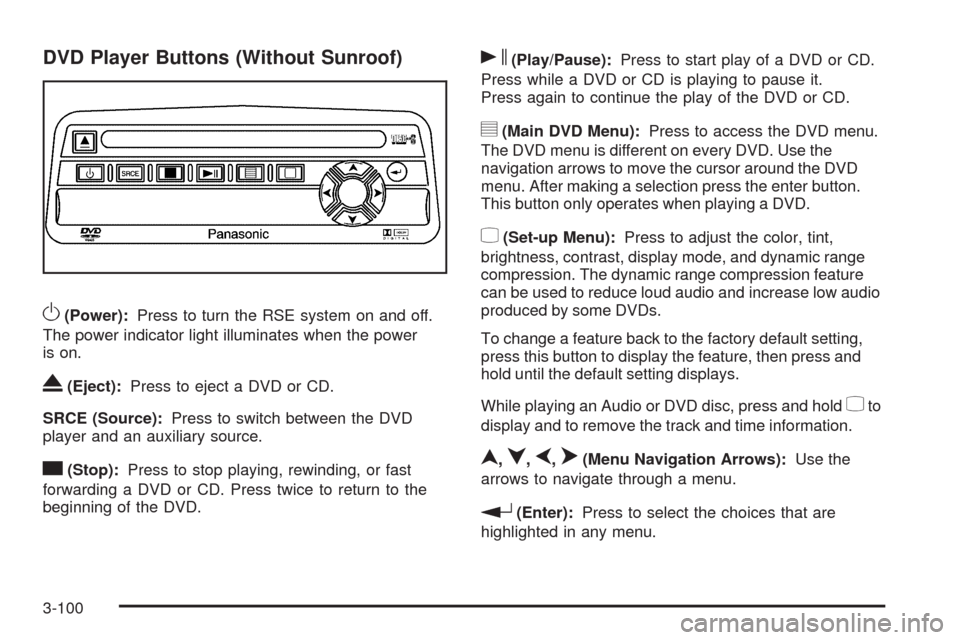
DVD Player Buttons (Without Sunroof)
O(Power):Press to turn the RSE system on and off.
The power indicator light illuminates when the power
is on.
X(Eject):Press to eject a DVD or CD.
SRCE (Source):Press to switch between the DVD
player and an auxiliary source.
c(Stop):Press to stop playing, rewinding, or fast
forwarding a DVD or CD. Press twice to return to the
beginning of the DVD.
s(Play/Pause):Press to start play of a DVD or CD.
Press while a DVD or CD is playing to pause it.
Press again to continue the play of the DVD or CD.
y(Main DVD Menu):Press to access the DVD menu.
The DVD menu is different on every DVD. Use the
navigation arrows to move the cursor around the DVD
menu. After making a selection press the enter button.
This button only operates when playing a DVD.
z(Set-up Menu):Press to adjust the color, tint,
brightness, contrast, display mode, and dynamic range
compression. The dynamic range compression feature
can be used to reduce loud audio and increase low audio
produced by some DVDs.
To change a feature back to the factory default setting,
press this button to display the feature, then press and
hold until the default setting displays.
While playing an Audio or DVD disc, press and hold
zto
display and to remove the track and time information.
n,q,p,o(Menu Navigation Arrows):Use the
arrows to navigate through a menu.
r(Enter):Press to select the choices that are
highlighted in any menu.
3-100
Page 235 of 484
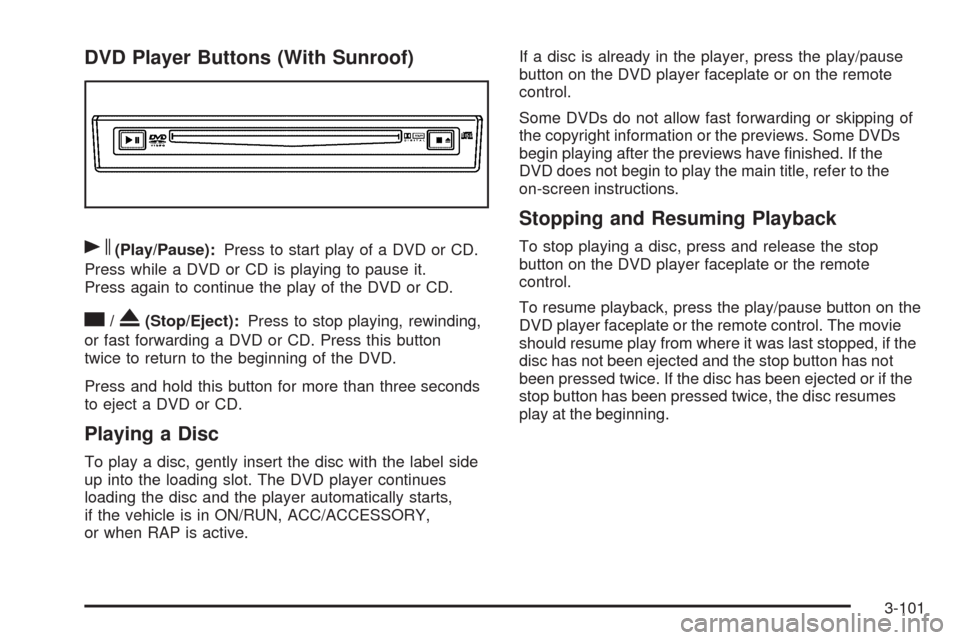
DVD Player Buttons (With Sunroof)
s(Play/Pause):Press to start play of a DVD or CD.
Press while a DVD or CD is playing to pause it.
Press again to continue the play of the DVD or CD.
c/X(Stop/Eject):Press to stop playing, rewinding,
or fast forwarding a DVD or CD. Press this button
twice to return to the beginning of the DVD.
Press and hold this button for more than three seconds
to eject a DVD or CD.
Playing a Disc
To play a disc, gently insert the disc with the label side
up into the loading slot. The DVD player continues
loading the disc and the player automatically starts,
if the vehicle is in ON/RUN, ACC/ACCESSORY,
or when RAP is active.If a disc is already in the player, press the play/pause
button on the DVD player faceplate or on the remote
control.
Some DVDs do not allow fast forwarding or skipping of
the copyright information or the previews. Some DVDs
begin playing after the previews have nished. If the
DVD does not begin to play the main title, refer to the
on-screen instructions.
Stopping and Resuming Playback
To stop playing a disc, press and release the stop
button on the DVD player faceplate or the remote
control.
To resume playback, press the play/pause button on the
DVD player faceplate or the remote control. The movie
should resume play from where it was last stopped, if the
disc has not been ejected and the stop button has not
been pressed twice. If the disc has been ejected or if the
stop button has been pressed twice, the disc resumes
play at the beginning.
3-101