2009 CHEVROLET SUBURBAN climate control
[x] Cancel search: climate controlPage 218 of 578

The interior temperature sensors located in the headliner
above the driver side seat and if equipped, in the
headliner above the second row seats measure the
temperature of the air inside the vehicle.
There is also an exterior temperature sensor located
behind the front grille. This sensor reads the outside air
temperature and helps maintain the temperature
inside the vehicle. Any cover on the front of the vehicle
could cause a false reading in the displayed
temperature.
The climate control system uses the information from
these sensors to maintain your comfort setting by
adjusting the outlet temperature, fan speed, and the air
delivery mode. The system may also supply cooler
air to the side of the vehicle facing the sun. The
recirculation mode will also be used as needed to
maintain cool outlet temperatures.
Outlet Adjustment
Use the air outlets located in the center and on the side
of the instrument panel to direct the airow.
Operation Tips
Keep the hood and front air inlets free of ice, snow,
or any other obstruction (such as leaves). The
heater and defroster will work far better, reducing
the chance of fogging the inside of the windows.
When you enter a vehicle in cold weather, press
the fan up button to the maximum fan level
before driving. This helps clear the intake ducts of
snow and moisture, and reduces the chance of
fogging the inside of the window.
Keep the air path under the front seats clear of
objects. This helps air to circulate throughout
the vehicle.
Adding outside equipment to the front of the
vehicle, such as hood-air deectors, may affect the
performance of the heating and air conditioning
system. Check with your dealer/retailer before
adding equipment to the outside of the vehicle.
3-30
Page 219 of 578
Rear Air Conditioning and Heating
System
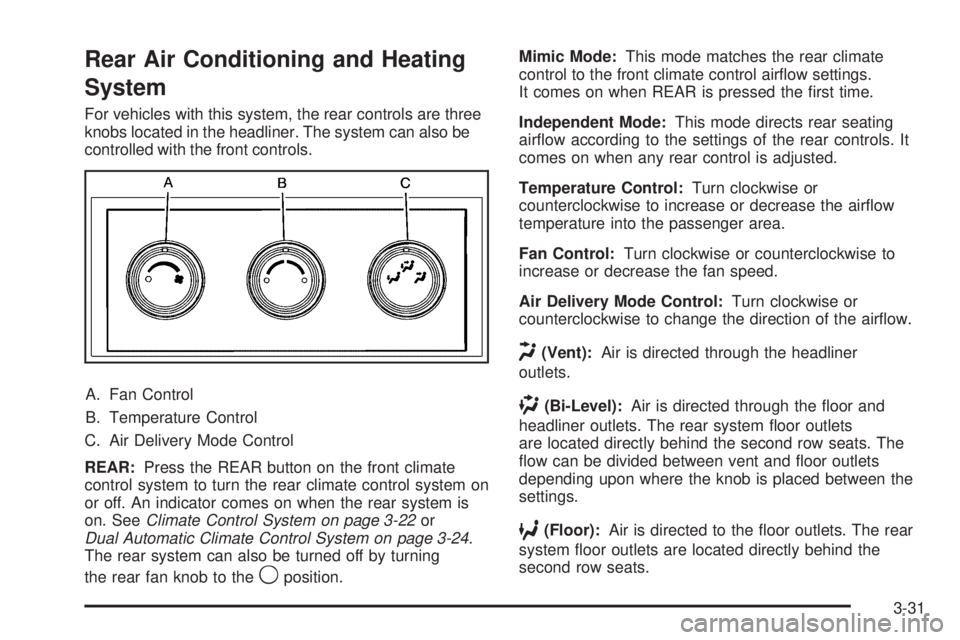
For vehicles with this system, the rear controls are three
knobs located in the headliner. The system can also be
controlled with the front controls.
A. Fan Control
B. Temperature Control
C. Air Delivery Mode Control
REAR:Press the REAR button on the front climate
control system to turn the rear climate control system on
or off. An indicator comes on when the rear system is
on. SeeClimate Control System on page 3-22or
Dual Automatic Climate Control System on page 3-24.
The rear system can also be turned off by turning
the rear fan knob to the
9position.Mimic Mode:This mode matches the rear climate
control to the front climate control airow settings.
It comes on when REAR is pressed the rst time.
Independent Mode:This mode directs rear seating
airow according to the settings of the rear controls. It
comes on when any rear control is adjusted.
Temperature Control:Turn clockwise or
counterclockwise to increase or decrease the airow
temperature into the passenger area.
Fan Control:Turn clockwise or counterclockwise to
increase or decrease the fan speed.
Air Delivery Mode Control:Turn clockwise or
counterclockwise to change the direction of the airow.
H(Vent):Air is directed through the headliner
outlets.
)(Bi-Level):Air is directed through the oor and
headliner outlets. The rear system oor outlets
are located directly behind the second row seats. The
ow can be divided between vent and oor outlets
depending upon where the knob is placed between the
settings.
6(Floor):Air is directed to the oor outlets. The rear
system oor outlets are located directly behind the
second row seats.
3-31
Page 220 of 578
Rear Air Conditioning and Heating
System and Electronic Climate
Controls
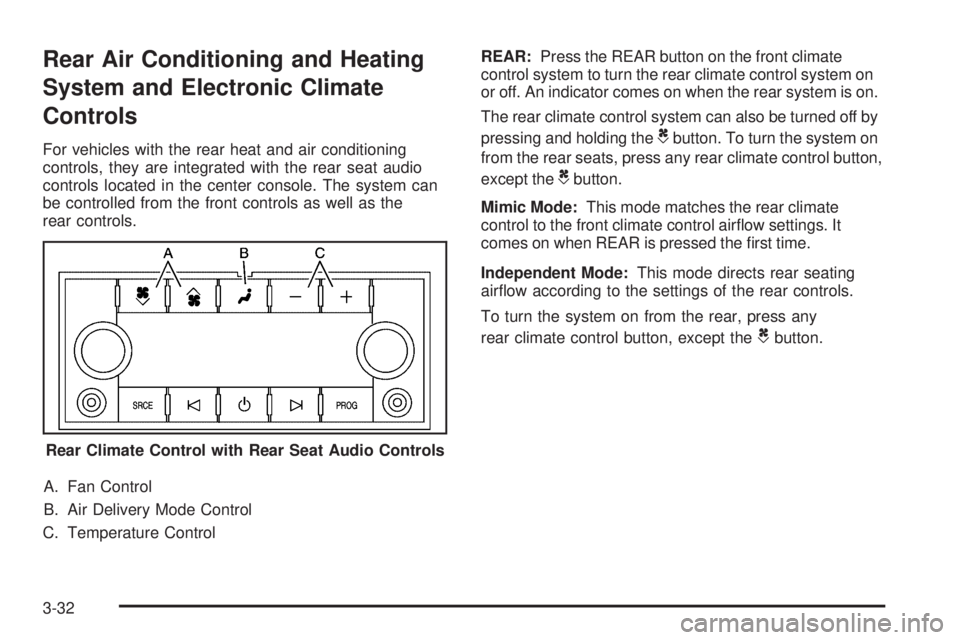
For vehicles with the rear heat and air conditioning
controls, they are integrated with the rear seat audio
controls located in the center console. The system can
be controlled from the front controls as well as the
rear controls.
A. Fan Control
B. Air Delivery Mode Control
C. Temperature ControlREAR:Press the REAR button on the front climate
control system to turn the rear climate control system on
or off. An indicator comes on when the rear system is on.
The rear climate control system can also be turned off by
pressing and holding theCbutton. To turn the system on
from the rear seats, press any rear climate control button,
except the
Cbutton.
Mimic Mode:This mode matches the rear climate
control to the front climate control airow settings. It
comes on when REAR is pressed the rst time.
Independent Mode:This mode directs rear seating
airow according to the settings of the rear controls.
To turn the system on from the rear, press any
rear climate control button, except the
Cbutton.
Rear Climate Control with Rear Seat Audio Controls
3-32
Page 221 of 578
Automatic Operation, If Equipped.
AUTO:Press the air delivery mode button until this
setting is selected to control the inside temperature, air
delivery, and fan speed. AUTO appears in the display
when automatic operation is active.
+/−(Increase/Decrease Temperature):Press the
+or−buttons to increase or decrease the cabin
temperature. The rear control temperature display will
show the temperature setting increasing or decreasing.
The display only indicates climate control functions when
the system is in rear independent mode.
Manual Operation
DC(Fan Control):Press these buttons on the rear
seat audio control panel to increase or decrease
the airow. Pressing the fan up button when the system
is off will turn the system on. The air delivery mode
will remain under automatic control.
+/−(Temperature Control):Press these buttons to
adjust the temperature of the air owing into the
passenger area. Press the + button for warmer air and
press the−button for cooler air.
N(Air Delivery Mode Control):Press the mode
button to change the direction of the airow in the
vehicle. Repeatedly press the button until the desired
mode appears on the display. Multiple presses will cycle
through the delivery selections.
3-33
Page 251 of 578
4. Press the trip/fuel button until the vehicle
heading, for example, N for North, is displayed
in the DIC. Or, if the vehicle does not have
DIC buttons, press and hold the trip odometer reset
stem for two seconds to select the next available
variance zone. Repeat this step until the appropriate
variance zone is displayed.
5. If calibration is necessary, calibrate the compass.
See “Compass Calibration Procedure” following.
Compass Calibration
The compass can be manually calibrated. Only calibrate
the compass in a magnetically clean and safe location,
such as an open parking lot, where driving the vehicle in
circles is not a danger. It is suggested to calibrate away
from tall buildings, utility wires, manhole covers, or other
industrial structures, if possible.
If CAL should ever appear in the DIC display, the
compass should be calibrated.
If the DIC display does not show a heading, for example,
N for North, or the heading does not change after making
turns, there may be a strong magnetic eld interfering
with the compass. Such interference may be caused by a
magnetic CB or cell phone antenna mount, a magnetic
emergency light, magnetic note pad holder, or any other
magnetic item. Turn off the vehicle, move the magnetic
item, then turn on the vehicle and calibrate the compass.To calibrate the compass, use the following procedure:
Compass Calibration Procedure
1. Before calibrating the compass, make sure the
compass zone is set to the variance zone in
which the vehicle is located. See “Compass
Variance (Zone) Procedure” earlier in this section.
Do not operate any switches such as window,
sunroof, climate controls, seats, etc. during
the calibration procedure.
2. Press the vehicle information button until
PRESS
VTO CALIBRATE COMPAS (Compass)
displays. Or, if the vehicle does not have DIC
buttons, press the trip odometer reset stem until
CALIBRATE COMPASS displays.
3. Press the set/reset button to start the compass
calibration. Or, if the vehicle does not have DIC
buttons, press and hold the trip odometer reset stem
for two seconds to start the compass calibration.
4. The DIC will display CALIBRATING: DRIVE IN
CIRCLES. Drive the vehicle in tight circles at less
than 5 mph (8 km/h) to complete the calibration. The
DIC will display CALIBRATION COMPLETE for a
few seconds when the calibration is complete. The
DIC display will then return to the previous menu.
3-63
Page 335 of 578
If the system fails to turn on or activate, the StabiliTrak
light along with one of the following messages will
be displayed on the Driver Information Center (DIC):
TRACTION CONTROL OFF, SERVICE TRACTION
CONTROL, STABILITRAK OFF, SERVICE
STABILITRAK. If these DIC messages appear, make
sure the StabiliTrak system has not been turned off
using the StabiliTrak on/off button. Then turn the steering
wheel clockwise from the nine o’clock position to the
three o’clock position. If this clears the message(s), the
vehicle does not need servicing. If this does not clear the
message(s), then turn the vehicle off, wait 15 seconds,
and then turn it back on again to reset the system. If any
of these messages still appear on the Driver Information
Center (DIC), the vehicle should be taken in for service.
For more information on the DIC messages, seeDriver
Information Center (DIC) on page 3-51.
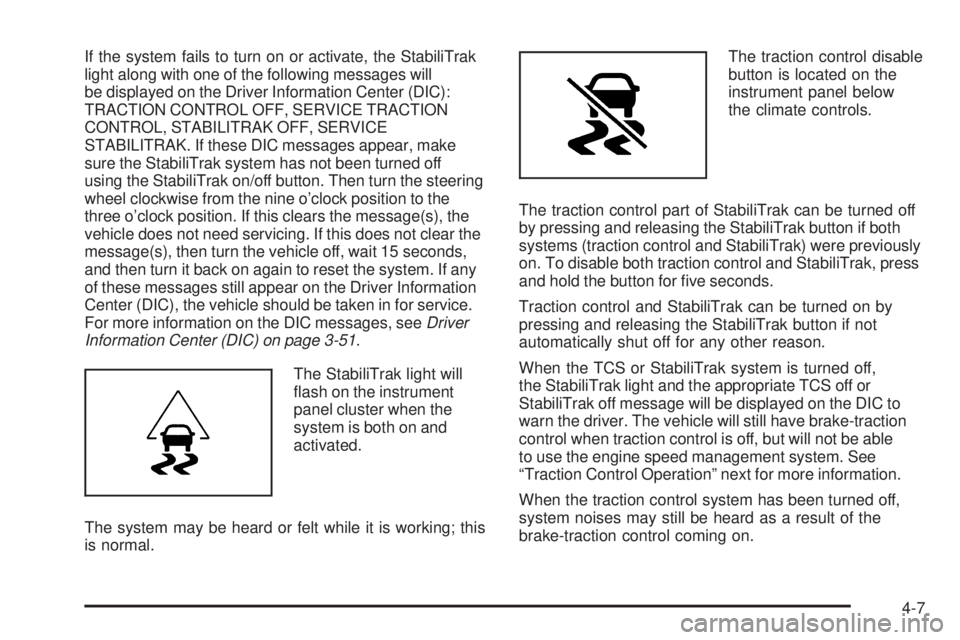
The StabiliTrak light will
ash on the instrument
panel cluster when the
system is both on and
activated.
The system may be heard or felt while it is working; this
is normal.The traction control disable
button is located on the
instrument panel below
the climate controls.
The traction control part of StabiliTrak can be turned off
by pressing and releasing the StabiliTrak button if both
systems (traction control and StabiliTrak) were previously
on. To disable both traction control and StabiliTrak, press
and hold the button for ve seconds.
Traction control and StabiliTrak can be turned on by
pressing and releasing the StabiliTrak button if not
automatically shut off for any other reason.
When the TCS or StabiliTrak system is turned off,
the StabiliTrak light and the appropriate TCS off or
StabiliTrak off message will be displayed on the DIC to
warn the driver. The vehicle will still have brake-traction
control when traction control is off, but will not be able
to use the engine speed management system. See
“Traction Control Operation” next for more information.
When the traction control system has been turned off,
system noises may still be heard as a result of the
brake-traction control coming on.
4-7
Page 358 of 578
Blizzard Conditions
Being stuck in snow can be in a serious situation.
Stay with the vehicle unless there is help nearby.
If possible, use theRoadside Assistance Program
on page 7-7. To get help and keep everyone in the
vehicle safe:
Turn on theHazard Warning Flashers on page 3-6.
Tie a red cloth to an outside mirror.
{CAUTION:
Snow can trap engine exhaust under the vehicle.
This may cause exhaust gases to get inside.
Engine exhaust contains carbon monoxide (CO)
which cannot be seen or smelled. It can cause
unconsciousness and even death.
If the vehicle is stuck in the snow:
Clear away snow from around the base of
your vehicle, especially any that is blocking
the exhaust pipe.
Check again from time to time to be sure
snow does not collect there.
CAUTION: (Continued)
CAUTION: (Continued)
Open a window about two inches (5 cm) on
the side of the vehicle that is away from the
wind to bring in fresh air.
Fully open the air outlets on or under the
instrument panel.
Adjust the Climate Control system to a setting
that circulates the air inside the vehicle and
set the fan speed to the highest setting.
See Climate Control System in the Index.
For more information about carbon monoxide, see
Engine Exhaust on page 2-50.
Snow can trap exhaust gases under your vehicle.
This can cause deadly CO (carbon monoxide) gas
to get inside. CO could overcome you and kill you.
You cannot see it or smell it, so you might not
know it is in your vehicle. Clear away snow from
around the base of your vehicle, especially any
that is blocking the exhaust.
Run the engine for short periods only as needed to
keep warm, but be careful.
4-30
Page 394 of 578
SERVICE TRAILER BRAKE SYSTEM – This message
will be displayed when there is a problem with the
ITBC system. If this message persists over multiple
ignition cycles there is problem with the ITBC system.
Take the vehicle to an authorized dealer/retailer to have
the ITBC system diagnosed and repaired.
If either the CHECK TRAILER WIRING or SERVICE
TRAILER BRAKE SYSTEM message is displayed while
driving the vehicle, power is no longer available to the
trailer brakes. When traffic conditions allow, carefully
pull the vehicle over to the side of the road and turn the
ignition off. Check the wiring connection to the trailer and
turn the ignition back on. If either of these messages
continues, either the vehicle or trailer needs service.
An authorized dealer/retailer may be able to diagnose
and repair problems with the trailer. However, any
diagnosis and repair of the trailer is not covered under
the vehicle warranty. Please contact your trailer dealer
for assistance with trailer repairs and trailer warranty
information.Driving with a Trailer
{CAUTION:
When towing a trailer, exhaust gases may collect
at the rear of the vehicle and enter if the liftgate,
trunk/hatch, or rear-most window is open.
Engine exhaust contains carbon monoxide (CO)
which cannot be seen or smelled. It can cause
unconsciousness and even death.
To maximize safety when towing a trailer:
Have the exhaust system inspected for
leaks and make necessary repairs before
starting a trip.
Never drive with the liftgate, trunk/hatch, or
rear-most window open.
Fully open the air outlets on or under the
instrument panel.
Adjust the Climate Control system to a setting
that brings in only outside air and set the fan
speed to the highest setting. See Climate
Control System in the Index.
For more information about carbon monoxide, see
Engine Exhaust on page 2-50.
4-66