2009 CHEVROLET SILVERADO buttons
[x] Cancel search: buttonsPage 176 of 600
Programming Universal Home
Remote — Rolling Code
For questions or help programming the Universal Home
Remote System, call 1-866-572-2728 or go to
learcar2u.com.
Most garage door openers sold after 1996 are Rolling
Code units.
Programming a garage door opener involves
time-sensitive actions, so read the entire procedure
before starting. Otherwise, the device will time out and
the procedure will have to be repeated.
To program up to three devices:
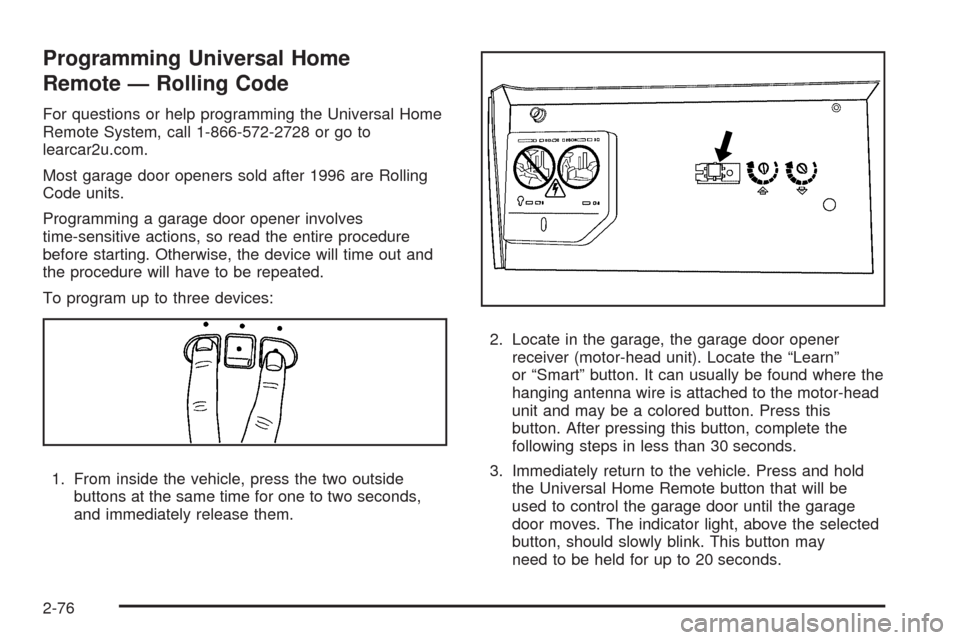
1. From inside the vehicle, press the two outside
buttons at the same time for one to two seconds,
and immediately release them.2. Locate in the garage, the garage door opener
receiver (motor-head unit). Locate the “Learn”
or “Smart” button. It can usually be found where the
hanging antenna wire is attached to the motor-head
unit and may be a colored button. Press this
button. After pressing this button, complete the
following steps in less than 30 seconds.
3. Immediately return to the vehicle. Press and hold
the Universal Home Remote button that will be
used to control the garage door until the garage
door moves. The indicator light, above the selected
button, should slowly blink. This button may
need to be held for up to 20 seconds.
2-76
Page 179 of 600
2. Write down the eight to 12 switch settings from left
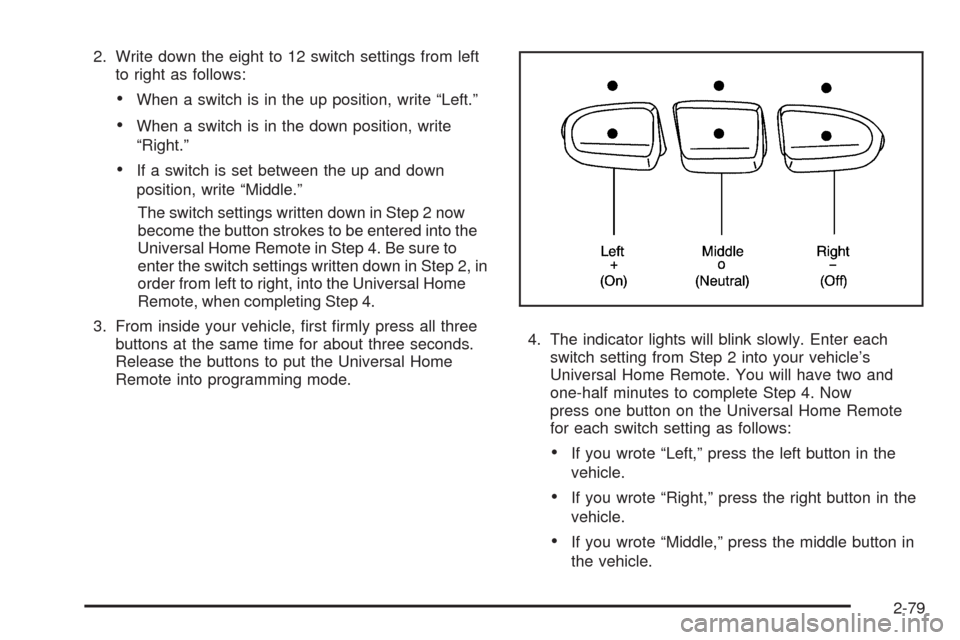
to right as follows:
When a switch is in the up position, write “Left.”
When a switch is in the down position, write
“Right.”
If a switch is set between the up and down
position, write “Middle.”
The switch settings written down in Step 2 now
become the button strokes to be entered into the
Universal Home Remote in Step 4. Be sure to
enter the switch settings written down in Step 2, in
order from left to right, into the Universal Home
Remote, when completing Step 4.
3. From inside your vehicle, rst rmly press all three
buttons at the same time for about three seconds.
Release the buttons to put the Universal Home
Remote into programming mode.4. The indicator lights will blink slowly. Enter each
switch setting from Step 2 into your vehicle’s
Universal Home Remote. You will have two and
one-half minutes to complete Step 4. Now
press one button on the Universal Home Remote
for each switch setting as follows:
If you wrote “Left,” press the left button in the
vehicle.
If you wrote “Right,” press the right button in the
vehicle.
If you wrote “Middle,” press the middle button in
the vehicle.
2-79
Page 180 of 600
5. After entering all of the switch positions, again,
rmly press and release all three buttons at the
same time. The indicator lights will turn on.
6. Press and hold the button that will be used to
control the garage door until the garage door
moves. The indicator light above the selected button
should slowly blink. This button may need to be
held for up to 55 seconds.
7. Immediately release the button when the garage
door moves. The indicator light will blink rapidly
until programming is complete.
8. Press and release the same button again. The
garage door should move, conrming that
programming is successful and complete.
To program another Fixed Code device such as an
additional garage door opener, a security device,
or home automation device, repeat Steps 1-8, choosing
a different button in Step 6 than what was used for
the garage door opener.
Using Universal Home Remote
Press and hold the appropriate button for at least half of
a second. The indicator light will come on while the
signal is being transmitted.
Reprogramming Universal Home
Remote Buttons
Any of the three buttons can be reprogrammed by
repeating the instructions.
Erasing Universal Home Remote
Buttons
The programmed buttons should be erased when the
vehicle is sold or the lease ends.
To erase either Rolling Code or Fixed Code on the
Universal Home Remote device:
1. Press and hold the two outside buttons at the same
time for approximately 20 seconds, until the
indicator lights, located directly above the buttons,
begin to blink rapidly.
2. Once the indicator lights begin to blink, release both
buttons. The codes from all buttons will be erased.
For help or information on the Universal Home Remote
System, call the customer assistance phone number
underCustomer Assistance Offices on page 7-6.
2-80
Page 188 of 600
StabiliTrak®Indicator Light.............................3-44
Engine Coolant Temperature Gage..................3-44
Tire Pressure Light.......................................3-45
Malfunction Indicator Lamp.............................3-45
Oil Pressure Gage........................................3-48
Oil Pressure Light.........................................3-49
Security Light...............................................3-50
Fog Lamp Light............................................3-50
Cruise Control Light......................................3-50
Highbeam On Light.......................................3-50
Four-Wheel-Drive Light..................................3-51
Tow/Haul Mode Light....................................3-51
Fuel Gage...................................................3-51
Low Fuel Warning Light.................................3-52
Driver Information Center (DIC).......................3-53
DIC Operation and Displays
(With DIC Buttons)....................................3-53
DIC Operation and Displays
(Without DIC Buttons)................................3-59
DIC Compass..............................................3-63DIC Warnings and Messages.........................3-66
DIC Vehicle Customization
(With DIC Buttons)....................................3-76
Audio System(s).............................................3-85
Setting the Clock..........................................3-86
Radio(s)......................................................3-88
Using an MP3 (Radio with CD or
Six-Disc CD Player).................................3-108
Using an MP3 (Radio with CD and DVD
Player)...................................................3-113
XM Radio Messages...................................3-118
Navigation/Radio System..............................3-119
Bluetooth
®.................................................3-119
Rear Seat Entertainment (RSE) System.........3-129
Rear Seat Audio (RSA)................................3-139
Theft-Deterrent Feature................................3-140
Audio Steering Wheel Controls......................3-141
Radio Reception.........................................3-141
Fixed Mast Antenna....................................3-142
XM™ Satellite Radio Antenna System..............3-142
Section 3 Instrument Panel
3-2
Page 200 of 600
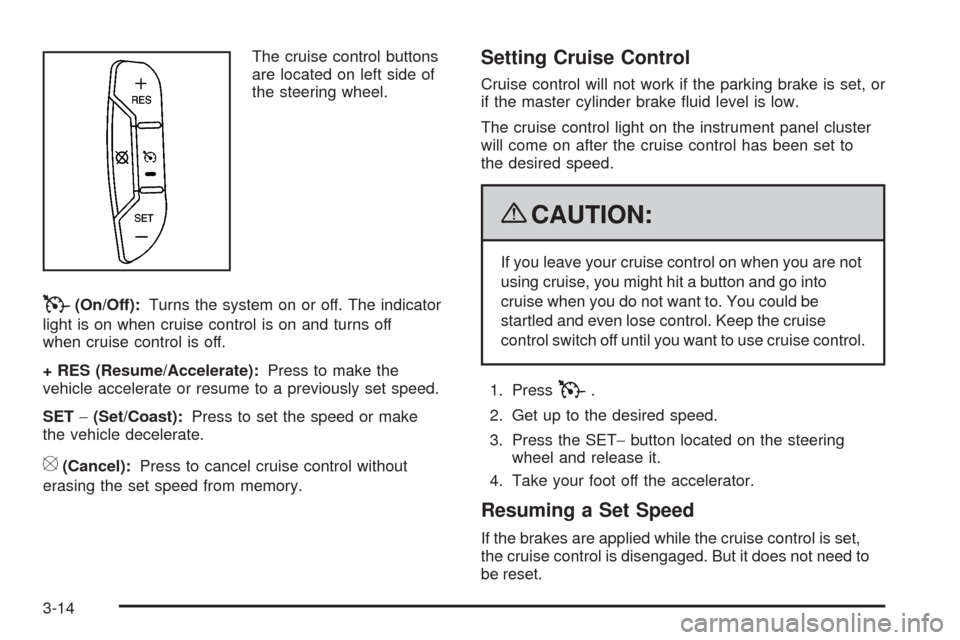
The cruise control buttons
are located on left side of
the steering wheel.
T(On/Off):Turns the system on or off. The indicator
light is on when cruise control is on and turns off
when cruise control is off.
+ RES (Resume/Accelerate):Press to make the
vehicle accelerate or resume to a previously set speed.
SET−(Set/Coast):Press to set the speed or make
the vehicle decelerate.
[(Cancel):Press to cancel cruise control without
erasing the set speed from memory.
Setting Cruise Control
Cruise control will not work if the parking brake is set, or
if the master cylinder brake uid level is low.
The cruise control light on the instrument panel cluster
will come on after the cruise control has been set to
the desired speed.
{CAUTION:
If you leave your cruise control on when you are not
using cruise, you might hit a button and go into
cruise when you do not want to. You could be
startled and even lose control. Keep the cruise
control switch off until you want to use cruise control.
1. Press
T.
2. Get up to the desired speed.
3. Press the SET−button located on the steering
wheel and release it.
4. Take your foot off the accelerator.
Resuming a Set Speed
If the brakes are applied while the cruise control is set,
the cruise control is disengaged. But it does not need to
be reset.
3-14
Page 204 of 600
Automatic Headlamp System
When it is dark enough outside, the automatic
headlamp system turns on the headlamps at the
normal brightness, along with the taillamps, sidemarker,
parking lamps, and the instrument panel lights.
The radio lights will also be dim.
To turn off the automatic headlamp system, turn the
exterior lamps switch to the off position and then release
it. For vehicles rst sold in Canada, the transmission
must be in the P (Park) position, before the automatic
headlamp system can be turned off.
The vehicle has a light sensor located on the top of the
instrument panel in the defroster grille that regulates
when the automatic headlamps turn on. Do not cover the
sensor or the headlamps will come on whenever the
ignition is on.
The system may also turn on the headlamps when
driving through a parking garage, heavy overcast
weather, or a tunnel. This is normal.
There is a delay in the transition between the daytime
and nighttime operation of the Daytime Running
Lamps (DRL) and the automatic headlamp systems so
that driving under bridges or bright overhead streetlights does not affect the system. The DRL and
automatic headlamp system is only affected when the
light sensor detects a change in lighting lasting
longer than the delay.
If the vehicle is started in a dark garage, the automatic
headlamp system will come on immediately. Once
the vehicle leaves the garage, it takes approximately
one minute for the automatic headlamp system to
change to DRL if it is bright enough outside. During that
delay, the instrument panel cluster may not be as
bright as usual. Make sure the instrument panel
brightness control is in the full bright position.
SeeInstrument Panel Brightness on page 3-20.
To idle the vehicle with the automatic headlamp
system off, turn the control to the off position.
The headlamps will also stay on after you exit the
vehicle. This feature can be programmed using the
Driver Information Center (DIC). SeeDIC Vehicle
Customization (With DIC Buttons) on page 3-76.
The regular headlamp system can be turned on
when needed.
3-18
Page 214 of 600
Dual Automatic Climate Control
System
The heating, cooling, and ventilation in the vehicle can
be controlled with this system. The vehicle also has a
ow-through ventilation system described later in this
section.
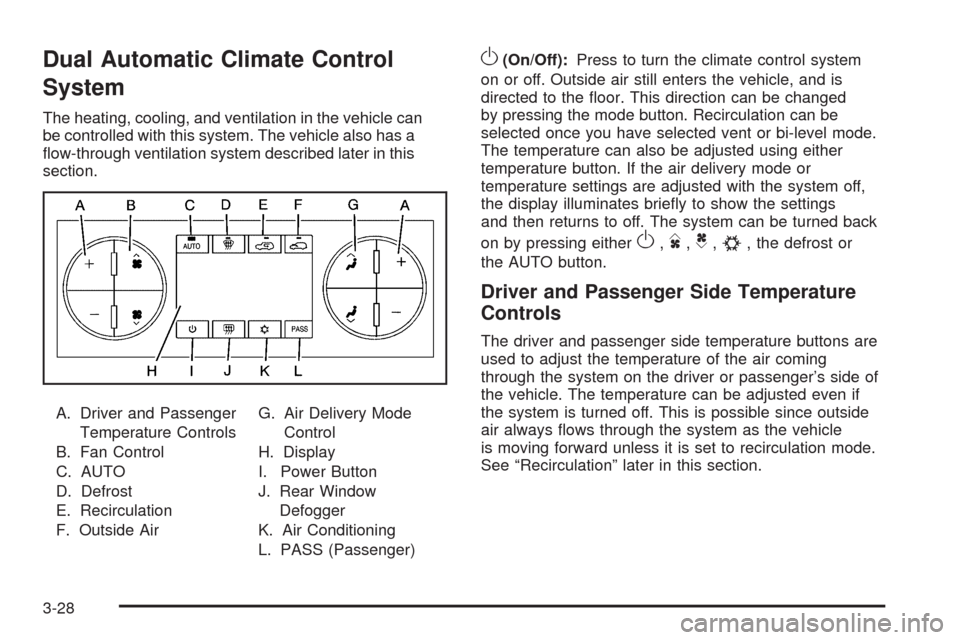
A. Driver and Passenger
Temperature Controls
B. Fan Control
C. AUTO
D. Defrost
E. Recirculation
F. Outside AirG. Air Delivery Mode
Control
H. Display
I. Power Button
J. Rear Window
Defogger
K. Air Conditioning
L. PASS (Passenger)
O(On/Off):Press to turn the climate control system
on or off. Outside air still enters the vehicle, and is
directed to the oor. This direction can be changed
by pressing the mode button. Recirculation can be
selected once you have selected vent or bi-level mode.
The temperature can also be adjusted using either
temperature button. If the air delivery mode or
temperature settings are adjusted with the system off,
the display illuminates briey to show the settings
and then returns to off. The system can be turned back
on by pressing either
O,D,C,#, the defrost or
the AUTO button.
Driver and Passenger Side Temperature
Controls
The driver and passenger side temperature buttons are
used to adjust the temperature of the air coming
through the system on the driver or passenger’s side of
the vehicle. The temperature can be adjusted even if
the system is turned off. This is possible since outside
air always ows through the system as the vehicle
is moving forward unless it is set to recirculation mode.
See “Recirculation” later in this section.
3-28
Page 215 of 600
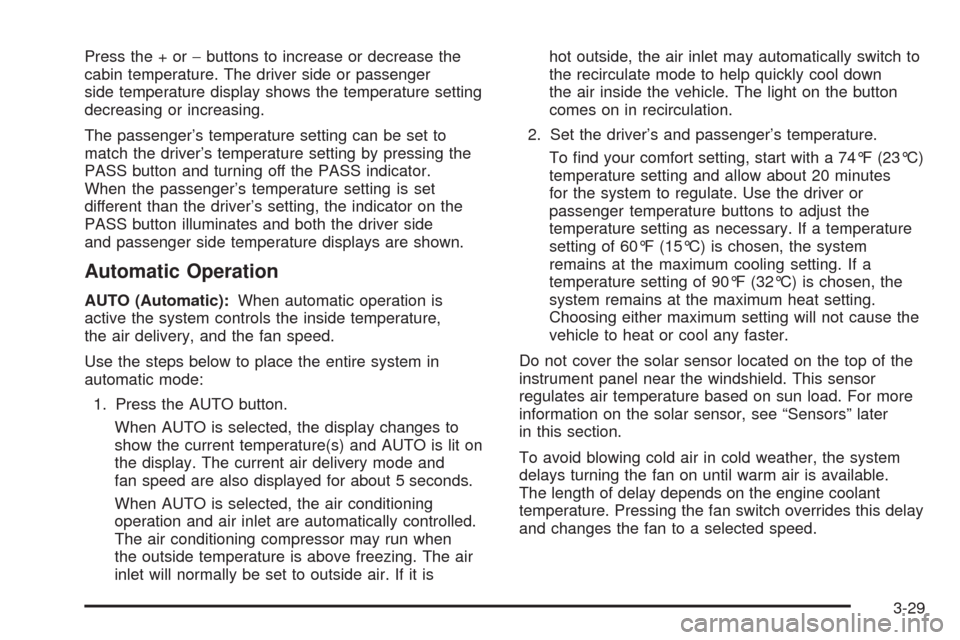
Press the + or−buttons to increase or decrease the
cabin temperature. The driver side or passenger
side temperature display shows the temperature setting
decreasing or increasing.
The passenger’s temperature setting can be set to
match the driver’s temperature setting by pressing the
PASS button and turning off the PASS indicator.
When the passenger’s temperature setting is set
different than the driver’s setting, the indicator on the
PASS button illuminates and both the driver side
and passenger side temperature displays are shown.
Automatic Operation
AUTO (Automatic):When automatic operation is
active the system controls the inside temperature,
the air delivery, and the fan speed.
Use the steps below to place the entire system in
automatic mode:
1. Press the AUTO button.
When AUTO is selected, the display changes to
show the current temperature(s) and AUTO is lit on
the display. The current air delivery mode and
fan speed are also displayed for about 5 seconds.
When AUTO is selected, the air conditioning
operation and air inlet are automatically controlled.
The air conditioning compressor may run when
the outside temperature is above freezing. The air
inlet will normally be set to outside air. If it ishot outside, the air inlet may automatically switch to
the recirculate mode to help quickly cool down
the air inside the vehicle. The light on the button
comes on in recirculation.
2. Set the driver’s and passenger’s temperature.
To nd your comfort setting, start with a 74°F (23°C)
temperature setting and allow about 20 minutes
for the system to regulate. Use the driver or
passenger temperature buttons to adjust the
temperature setting as necessary. If a temperature
setting of 60°F (15°C) is chosen, the system
remains at the maximum cooling setting. If a
temperature setting of 90°F (32°C) is chosen, the
system remains at the maximum heat setting.
Choosing either maximum setting will not cause the
vehicle to heat or cool any faster.
Do not cover the solar sensor located on the top of the
instrument panel near the windshield. This sensor
regulates air temperature based on sun load. For more
information on the solar sensor, see “Sensors” later
in this section.
To avoid blowing cold air in cold weather, the system
delays turning the fan on until warm air is available.
The length of delay depends on the engine coolant
temperature. Pressing the fan switch overrides this delay
and changes the fan to a selected speed.
3-29