2009 CHEVROLET EQUINOX reset
[x] Cancel search: resetPage 198 of 442
Storing a Radio Station as a Favorite
Drivers are encouraged to set up their radio station
favorites while the vehicle is parked. Tune to favorite
stations using the presets, favorites button, and steering
wheel controls, if the vehicle has them. SeeDefensive
Driving on page 4-2.
If the radio has XM, a maximum of 36 stations can be
programmed as favorites using the six pushbuttons
positioned below the radio station frequency tabs and
by using the radio favorites page button (FAV button).
FAV (Favorites):Press the FAV button to go through
up to six pages of favorites, each having six favorite
stations available per page. Each page of favorites
can contain any combination of AM, FM, or XM
(if equipped) stations. To store a station as a favorite,
perform the following steps:
1. Tune to the desired radio station.
2. Press the FAV button to display the page where the
station is to be stored.
3. Press and hold one of the six pushbuttons until a
beep sounds. When that pushbutton is pressed
and released, the station that was set, returns.
4. Repeat the steps for each pushbutton radio station
to be stored as a favorite.The number of favorites pages can be setup using the
MENU button. To setup the number of favorites
pages, perform the following steps:
1. Press the MENU button to display the radio
setup menu.
2. Press the pushbutton located below the
FAV 1-6 tab.
3. Select the desired number of favorites pages by
pressing the pushbutton located below the
displayed page numbers.
4. Press the FAV button, or let the menu time out, to
return to the original main radio screen showing
the radio station frequency tabs and to begin
the process of programming favorites for the
chosen amount of numbered pages.
Setting the Tone (Bass/Treble)
(Base Radio with CD)
EQ (Equalization):To adjust the bass or treble, press
the
fknob or EQ button until the desired tone
control tab displays. Turn the
fknob clockwise or
counterclockwise to increase or decrease the setting.
The display shows the current bass or treble level.
If a station’s frequency is weak, or if there is static,
decrease the treble.
3-70
Page 199 of 442
Setting the Tone (Bass/Treble)
BASS/MID/TREB (Bass, Midrange, or Treble):To
adjust bass, midrange, or treble, press the
fknob until
the tone control tabs display. Continue pressing to
highlight the desired tab, or press the pushbutton
positioned under the desired tab. Turn the
fknob
clockwise or counterclockwise to adjust the highlighted
setting. The highlighted setting can also be adjusted
by pressing the SEEK arrows,
\FWD (forward) or
sREV (reverse) button until the desired levels are
obtained. If a station’s frequency is weak, or if there is
static, decrease the treble.
To quickly adjust bass, midrange, or treble to the middle
position, press the pushbutton positioned under the
BASS, MID, or TREB tab for more than two seconds.
A beep sounds and the level adjusts to the middle
position.
To quickly adjust all tone and speaker controls to the
middle position, press the
fknob for more than
two seconds until a beep sounds.EQ (Equalization):Press to select preset equalization
settings.
To return to the manual mode, press the EQ button until
Manual displays or starts to manually adjust the bass,
midrange, or treble by pressing the
fknob.
EQ (Equalization) (Radio with CD and DVD):Press
to choose bass and treble equalization settings designed
for different types of music. The choices are pop,
rock, country, talk, jazz, and classical. Selecting
MANUAL or changing bass or treble, returns the EQ to
the manual bass and treble settings.
Unique EQ settings can be saved for each source.
If the radio has a Bose
®audio system, the EQ settings
are either MANUAL or TALK.
Adjusting the Speakers (Balance/Fade)
(Base Radio with CD)
`
BAL/FADE (Balance/Fade):To adjust the balance
or fade, press the
`button or thefknob until the
desired speaker control tab displays. Turn the
fknob
clockwise or counterclockwise to adjust the setting.
3-71
Page 224 of 442
XM Radio Messages
XL (Explicit Language Channels):These channels, or
any others, can be blocked at a customer’s request,
by calling 1-800-852-XMXM (9696).
XM Updating:The encryption code in the receiver is
being updated, and no action is required. This process
should take no longer than 30 seconds.
No XM Signal:The system is functioning correctly, but
the vehicle is in a location that is blocking the XM™
signal. When the vehicle is moved into an open area,
the signal should return.
Loading XM:The audio system is acquiring and
processing audio and text data. No action is needed.
This message should disappear shortly.
Channel Off Air:This channel is not currently in
service. Tune in to another channel.
Channel Unauth:This channel is blocked or cannot be
received with your XM Subscription package.
Channel Unavail:This previously assigned channel is
no longer assigned. Tune to another station. If this
station was one of the presets, choose another station
for that preset button.
No Artist Info:No artist information is available at this
time on this channel. The system is working properly.No Title Info:No song title information is available at
this time on this channel. The system is working properly.
No CAT Info:No category information is available at this
time on this channel. The system is working properly.
No Information:No text or informational messages are
available at this time on this channel. The system is
working properly.
CAT Not Found:There are no channels available for
the selected category. The system is working properly.
XM Theftlocked:The XM™ receiver in your vehicle
could have previously been in another vehicle. For
security purposes, XM™ receivers cannot be swapped
between vehicles. If this message is received after having
your vehicle serviced, check with your dealer/retailer.
XM Radio ID:If tuned to channel 0, this message
alternates with the XM™ Radio 8 digit radio ID label.
This label is needed to activate the service.
Unknown:If this message is received when tuned to
channel 0, there could be a receiver fault. Consult
with your dealer/retailer.
Check XM Receivr:If this message does not clear
within a short period of time, the receiver could have a
fault. Consult with your dealer/retailer.
XM Not Available:If this message does not clear
within a short period of time, the receiver could have a
fault. Consult with your dealer/retailer.
3-96
Page 255 of 442
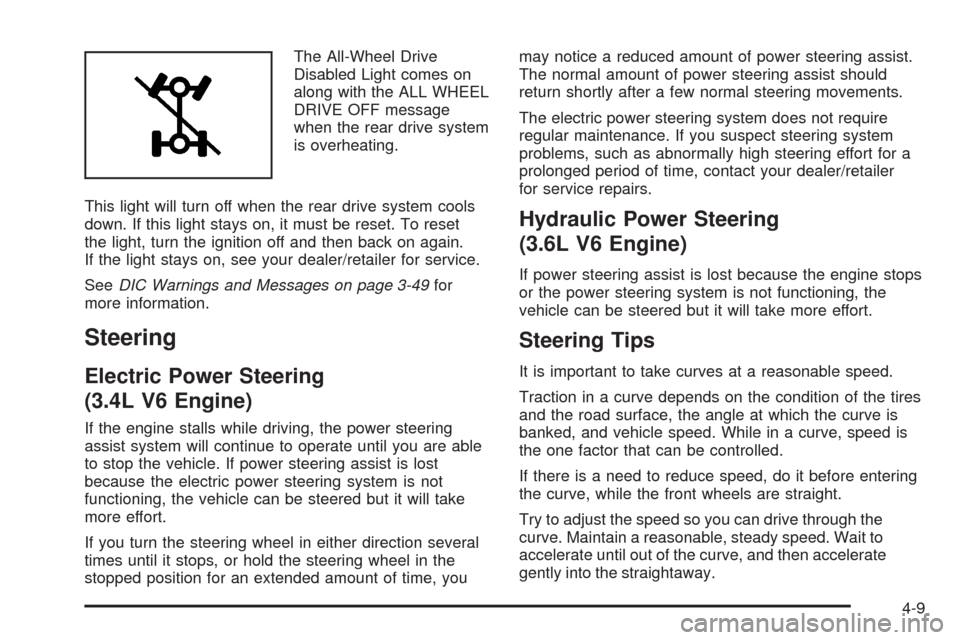
The All-Wheel Drive
Disabled Light comes on
along with the ALL WHEEL
DRIVE OFF message
when the rear drive system
is overheating.
This light will turn off when the rear drive system cools
down. If this light stays on, it must be reset. To reset
the light, turn the ignition off and then back on again.
If the light stays on, see your dealer/retailer for service.
SeeDIC Warnings and Messages on page 3-49for
more information.
Steering
Electric Power Steering
(3.4L V6 Engine)
If the engine stalls while driving, the power steering
assist system will continue to operate until you are able
to stop the vehicle. If power steering assist is lost
because the electric power steering system is not
functioning, the vehicle can be steered but it will take
more effort.
If you turn the steering wheel in either direction several
times until it stops, or hold the steering wheel in the
stopped position for an extended amount of time, youmay notice a reduced amount of power steering assist.
The normal amount of power steering assist should
return shortly after a few normal steering movements.
The electric power steering system does not require
regular maintenance. If you suspect steering system
problems, such as abnormally high steering effort for a
prolonged period of time, contact your dealer/retailer
for service repairs.
Hydraulic Power Steering
(3.6L V6 Engine)
If power steering assist is lost because the engine stops
or the power steering system is not functioning, the
vehicle can be steered but it will take more effort.
Steering Tips
It is important to take curves at a reasonable speed.
Traction in a curve depends on the condition of the tires
and the road surface, the angle at which the curve is
banked, and vehicle speed. While in a curve, speed is
the one factor that can be controlled.
If there is a need to reduce speed, do it before entering
the curve, while the front wheels are straight.
Try to adjust the speed so you can drive through the
curve. Maintain a reasonable, steady speed. Wait to
accelerate until out of the curve, and then accelerate
gently into the straightaway.
4-9
Page 304 of 442
Cold Temperature Operation
If in an area of extreme cold, where the temperature
falls below−20°F (−29°C), use either an SAE 5W-30
synthetic oil or an SAE 0W-30 engine oil. Both provide
easier cold starting for the engine at extremely low
temperatures. Always use an oil that meets the required
specication, GM6094M. See “What Kind of Engine
Oil to Use” for more information.
Engine Oil Additives / Engine Oil
Flushes
Do not add anything to the oil. The recommended
oils with the starburst symbol that meet GM Standard
GM6094M are all that is needed for good performance
and engine protection.
Engine oil system ushes are not recommended and
could cause engine damage not covered by the vehicle
warranty.
Engine Oil Life System
When to Change Engine Oil
This vehicle has a computer system that indicates when
to change the engine oil and lter. This is based on
engine revolutions and engine temperature, and not on
mileage. Based on driving conditions, the mileage at
which an oil change is indicated can vary considerably.
For the oil life system to work properly, the system
must be reset every time the oil is changed.
When the system has calculated that oil life has been
diminished, it indicates that an oil change is necessary.
A change engine oil light and a CHANGE ENGINE OIL
SOON message come on. Change the oil as soon as
possible within the next 600 miles (1 000 km). It is
possible that, if driving under the best conditions, the
oil life system might not indicate that an oil change is
necessary for over a year. However, the engine oil and
lter must be changed at least once a year and at this
time the system must be reset. Your dealer/retailer has
trained service people who will perform this work using
genuine parts and reset the system. It is also important
to check the oil regularly and keep it at the proper level.
If the system is ever reset accidentally, the oil must be
changed at 3,000 miles (5 000 km) since the last oil
change. Remember to reset the oil life system whenever
the oil is changed.
5-18
Page 305 of 442
How to Reset the Engine Oil Life
System
The Engine Oil Life System calculates when to change
the engine oil and lter based on vehicle use. Whenever
the oil is changed, reset the system so it can calculate
when the next oil change is required. If a situation occurs
where the oil is changed prior to a change engine oil light
or CHANGE ENGINE OIL SOON message being turned
on, reset the system.
1. Turn the ignition key to ON/RUN with the
engine off.
2. Fully press and release the accelerator pedal
three times within ve seconds.
The change engine oil light will ash while the
system is resetting.
3. When the light stops ashing, turn the key to
LOCK/OFF.
If the light or message comes back on and stays on
when the vehicle is started, the engine oil life system
has not reset. Repeat the procedure.
What to Do with Used Oil
Used engine oil contains certain elements that can be
unhealthy for your skin and could even cause cancer.
Do not let used oil stay on your skin for very long. Clean
your skin and nails with soap and water, or a good hand
cleaner. Wash or properly dispose of clothing or rags
containing used engine oil. See the manufacturer’s
warnings about the use and disposal of oil products.
Used oil can be a threat to the environment. If you
change your own oil, be sure to drain all the oil from the
lter before disposal. Never dispose of oil by putting it
in the trash, pouring it on the ground, into sewers, or into
streams or bodies of water. Recycle it by taking it to a
place that collects used oil.
5-19
Page 316 of 442
If the temperature overheat gage is no longer in the
overheat zone or an overheat warning no longer
displays, the vehicle can be driven. Continue to drive
the vehicle slow for about 10 minutes. Keep a safe
vehicle distance from the car in front of you. If the
warning does not come back on, continue to drive
normally.
If the warning continues, pull over, stop, and park the
vehicle right away.
If there is no sign of steam, idle the engine for three
minutes while parked. If the warning is still displayed,
turn off the engine until it cools down. Also, see
“Overheated Engine Protection Operating Mode”
later in this section.Overheated Engine Protection
Operating Mode
This emergency operating mode lets the vehicle
be driven to a safe place in an emergency situation.
If an overheated engine condition exists, an overheat
protection mode which alternates ring groups of
cylinders helps prevent engine damage. In this
mode, there is a signicant loss in power and engine
performance. The temperature gage indicates an
overheat condition exists. Driving extended distances
and/or towing a trailer in the overheat protection mode
should be avoided.
Notice:After driving in the overheated engine
protection operating mode, to avoid engine damage,
allow the engine to cool before attempting any
repair. The engine oil will be severely degraded.
Repair the cause of coolant loss, change the oil
and reset the oil life system. SeeEngine Oil
on page 5-15.
5-30
Page 330 of 442
Carrier Assembly-Differential
(Rear Drive Module)
When to Check and Change Lubricant
Refer to the Maintenance Schedule to determine how
often to check the lubricant and when to change it.
SeeScheduled Maintenance on page 6-4.
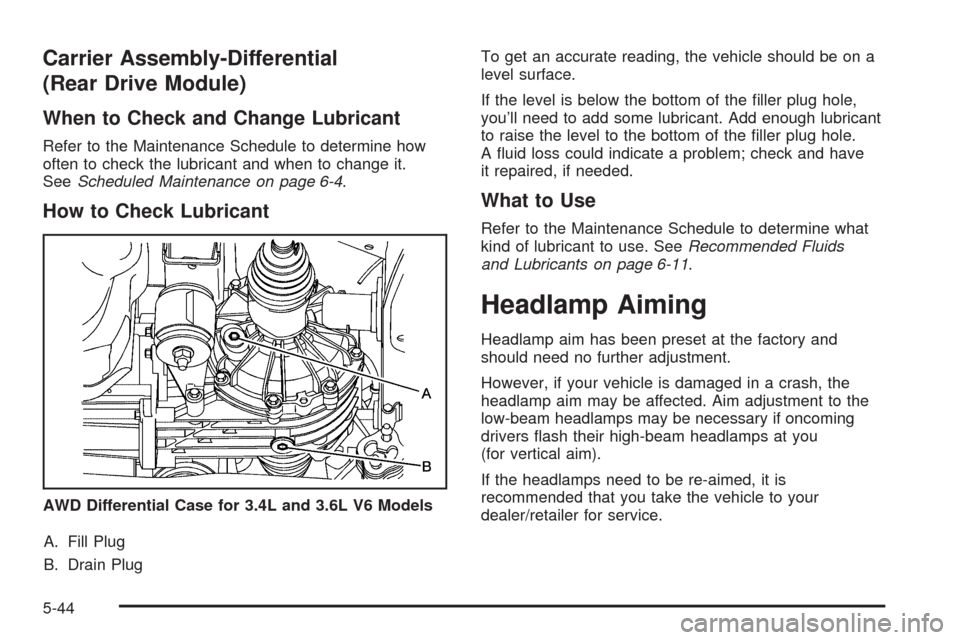
How to Check Lubricant
A. Fill Plug
B. Drain PlugTo get an accurate reading, the vehicle should be on a
level surface.
If the level is below the bottom of the ller plug hole,
you’ll need to add some lubricant. Add enough lubricant
to raise the level to the bottom of the ller plug hole.
A uid loss could indicate a problem; check and have
it repaired, if needed.
What to Use
Refer to the Maintenance Schedule to determine what
kind of lubricant to use. SeeRecommended Fluids
and Lubricants on page 6-11.
Headlamp Aiming
Headlamp aim has been preset at the factory and
should need no further adjustment.
However, if your vehicle is damaged in a crash, the
headlamp aim may be affected. Aim adjustment to the
low-beam headlamps may be necessary if oncoming
drivers ash their high-beam headlamps at you
(for vertical aim).
If the headlamps need to be re-aimed, it is
recommended that you take the vehicle to your
dealer/retailer for service. AWD Differential Case for 3.4L and 3.6L V6 Models
5-44