2009 CHEVROLET AVALANCHE steering
[x] Cancel search: steeringPage 127 of 550
When in M (Manual Mode) a number displays next to
the M, indicating the current gear that has been
selected. The number displayed in the gear indicator is
the highest gear that can be used. However, the
vehicle can automatically shift to lower gears as it
adjusts to driving conditions. This means that all gears
below that number are available. When 5 (Fifth) is
selected, 1 (First) through 5 (Fifth) gears are
automatically shifted by the vehicle, but 6 (Sixth) cannot
be used until the plus/minus button located on the
steering column lever is used to change to the gear.
Range Selection Mode controls the vehicle and engine
speed while driving down a hill or towing a trailer,
by allowing you to select a desired range of gears.
Grade Braking is not available when the Range
Selection Mode is active. SeeTow/Haul Mode on
page 2-41for more information.
While using the Range Selection Mode, Cruise Control
and the Tow/Haul mode can be used.Tow/Haul Mode
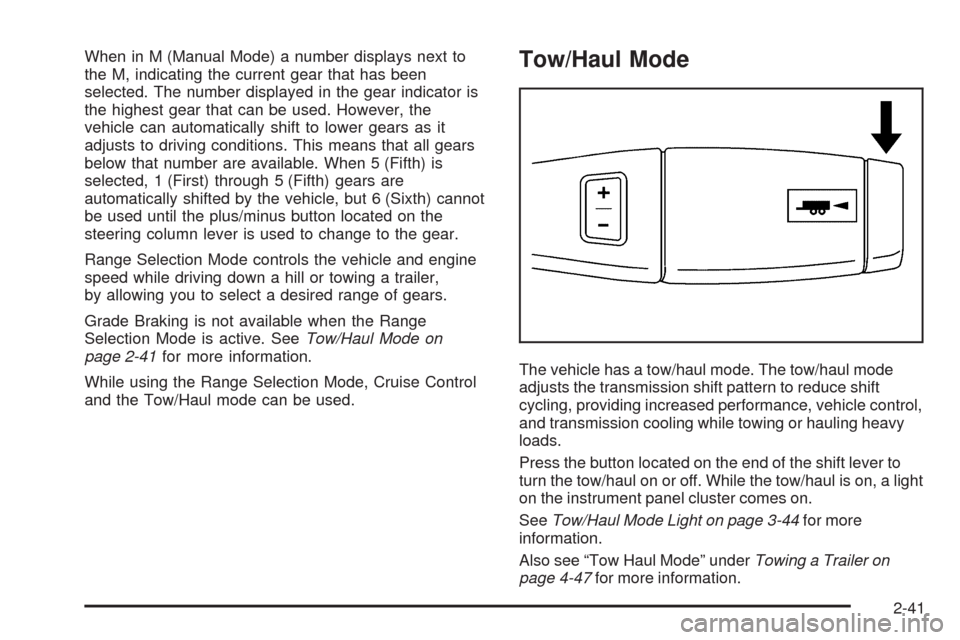
The vehicle has a tow/haul mode. The tow/haul mode
adjusts the transmission shift pattern to reduce shift
cycling, providing increased performance, vehicle control,
and transmission cooling while towing or hauling heavy
loads.
Press the button located on the end of the shift lever to
turn the tow/haul on or off. While the tow/haul is on, a light
on the instrument panel cluster comes on.
SeeTow/Haul Mode Light on page 3-44for more
information.
Also see “Tow Haul Mode” underTowing a Trailer on
page 4-47for more information.
2-41
Page 129 of 550
Four-Wheel Drive
If the vehicle has four-wheel drive, you can send the
engine’s driving power to all four wheels for extra
traction. Read the following before using four-wheel
drive.
Notice:Driving on clean, dry pavement in
Four-Wheel-Drive High or Four-Wheel-Drive Low for
an extended period of time may cause premature
wear on your vehicle’s powertrain. Do not drive on
clean, dry pavement in Four-Wheel-Drive High or
Four-Wheel-Drive Low for extended periods of time.
While driving on clean dry pavement and during tight
turns, you may experience a vibration in the steering
system.
The vehicle has StabiliTrak
®. Shifting into
Four-Wheel-Drive Low will turn Traction Control
and StabiliTrak
®off. SeeStabiliTrak®System on
page 4-6.
Front Axle
The front axle engages and disengages automatically
when you shift the transfer case. Some delay for
the axle to engage or disengage is normal.
Automatic Transfer Case
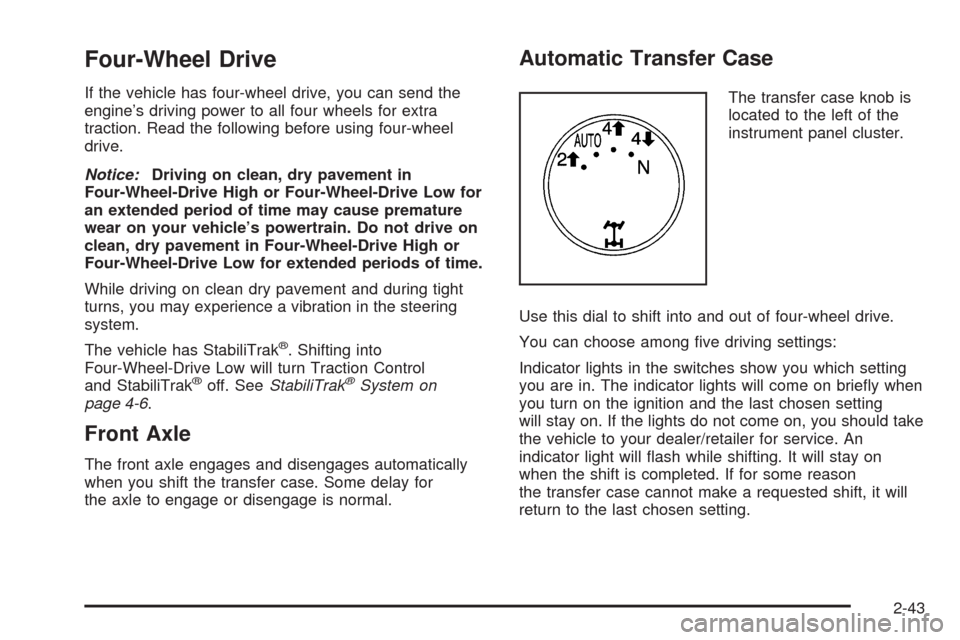
The transfer case knob is
located to the left of the
instrument panel cluster.
Use this dial to shift into and out of four-wheel drive.
You can choose among ve driving settings:
Indicator lights in the switches show you which setting
you are in. The indicator lights will come on briey when
you turn on the ignition and the last chosen setting
will stay on. If the lights do not come on, you should take
the vehicle to your dealer/retailer for service. An
indicator light will ash while shifting. It will stay on
when the shift is completed. If for some reason
the transfer case cannot make a requested shift, it will
return to the last chosen setting.
2-43
Page 154 of 550
OnStar Virtual Advisor
OnStar Virtual Advisor is a feature of OnStar
Hands-Free Calling that uses minutes to access
location-based weather, local traffic reports, and stock
quotes. Press the phone button and give a few
simple voice commands to browse through the various
topics. See the OnStar Owner’s Guide for more
information. This feature is only available in the
continental U.S.
OnStar Steering Wheel Controls
This vehicle may have a Talk/Mute button that can be
used to interact with OnStar Hands-Free Calling.
SeeAudio Steering Wheel Controls on page 3-130for
more information.
On some vehicles, the mute button can be used to dial
numbers into voice mail systems, or to dial phone
extensions. See the OnStar Owner’s Guide for more
information.
How OnStar Service Works
The OnStar system can record and transmit vehicle
information. This information is automatically sent to an
OnStar Call Center when the OnStar button is
pressed, the emergency button is pressed, or if the
airbags or AACN system deploy. This information
usually includes the vehicle’s GPS location and, in the
event of a crash, additional information regarding
the crash that the vehicle was involved in (e.g. the
direction from which the vehicle was hit). When
the Virtual Advisor feature of OnStar Hands-Free Calling
is used, the vehicle also sends OnStar the vehicle’s
GPS location so they can provide services where it is
located.
OnStar service cannot work unless the vehicle is in a
place where OnStar has an agreement with a wireless
service provider for service in that area. OnStar
service also cannot work unless the vehicle is in a place
where the wireless service provider OnStar has hired
for that area has coverage, network capacity and
reception when the service is needed, and technology
that is compatible with the OnStar service. Not all
services are available everywhere, particularly in remote
or enclosed areas, or at all times.
Location information about the vehicle is only available
if the GPS satellite signals are unobstructed and
available.
2-68
Page 182 of 550

Fuel Gage...................................................3-44
Low Fuel Warning Light.................................3-45
Driver Information Center (DIC).......................3-46
DIC Operation and Displays
(With DIC Buttons)....................................3-46
DIC Operation and Displays
(Without DIC Buttons)................................3-52
DIC Compass..............................................3-55
DIC Warnings and Messages.........................3-58
DIC Vehicle Customization
(With DIC Buttons)....................................3-67
Audio System(s).............................................3-76
Setting the Clock..........................................3-77
Radio(s)......................................................3-79Using an MP3 (Radio with CD or
Six-Disc CD Player)...................................3-96
Using an MP3 (Radio with CD and
DVD Player)...........................................3-101
XM Radio Messages...................................3-106
Navigation/Radio System..............................3-108
Bluetooth
®.................................................3-108
Rear Seat Entertainment (RSE) System.........3-119
Rear Seat Audio (RSA)................................3-128
Theft-Deterrent Feature................................3-130
Audio Steering Wheel Controls......................3-130
Radio Reception.........................................3-131
Fixed Mast Antenna....................................3-132
XM™ Satellite Radio Antenna System............3-132
Section 3 Instrument Panel
3-2
Page 185 of 550
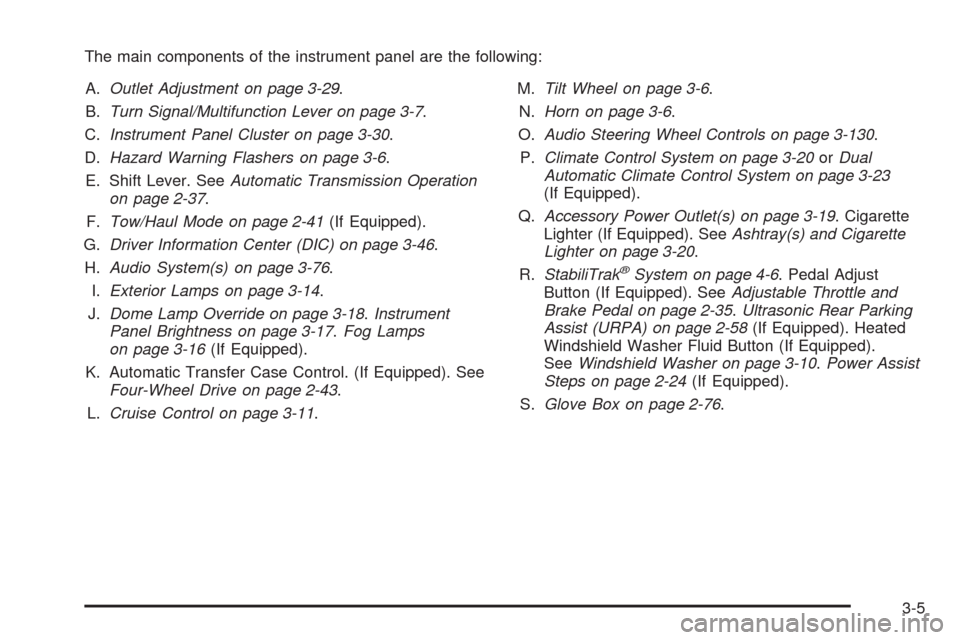
The main components of the instrument panel are the following:
A.Outlet Adjustment on page 3-29.
B.Turn Signal/Multifunction Lever on page 3-7.
C.Instrument Panel Cluster on page 3-30.
D.Hazard Warning Flashers on page 3-6.
E. Shift Lever. SeeAutomatic Transmission Operation
on page 2-37.
F.Tow/Haul Mode on page 2-41(If Equipped).
G.Driver Information Center (DIC) on page 3-46.
H.Audio System(s) on page 3-76.
I.Exterior Lamps on page 3-14.
J.Dome Lamp Override on page 3-18.Instrument
Panel Brightness on page 3-17.Fog Lamps
on page 3-16(If Equipped).
K. Automatic Transfer Case Control. (If Equipped). See
Four-Wheel Drive on page 2-43.
L.Cruise Control on page 3-11.M.Tilt Wheel on page 3-6.
N.Horn on page 3-6.
O.Audio Steering Wheel Controls on page 3-130.
P.Climate Control System on page 3-20orDual
Automatic Climate Control System on page 3-23
(If Equipped).
Q.Accessory Power Outlet(s) on page 3-19. Cigarette
Lighter (If Equipped). SeeAshtray(s) and Cigarette
Lighter on page 3-20.
R.StabiliTrak
®System on page 4-6. Pedal Adjust
Button (If Equipped). SeeAdjustable Throttle and
Brake Pedal on page 2-35.Ultrasonic Rear Parking
Assist (URPA) on page 2-58(If Equipped). Heated
Windshield Washer Fluid Button (If Equipped).
SeeWindshield Washer on page 3-10.Power Assist
Steps on page 2-24(If Equipped).
S.Glove Box on page 2-76.
3-5
Page 186 of 550
Hazard Warning Flashers
|(Hazard Warning Flasher):Press this button
located on top of the steering column, to make the front
and rear turn signal lamps ash on and off. This
warns others that you are having trouble. Press again to
turn the ashers off.
When the hazard warning ashers are on, the vehicle’s
turn signals will not work.
Horn
To sound the horn, press the center pad on the steering
wheel.
Tilt Wheel
The tilt steering wheel lets the steering wheel be
adjusted.
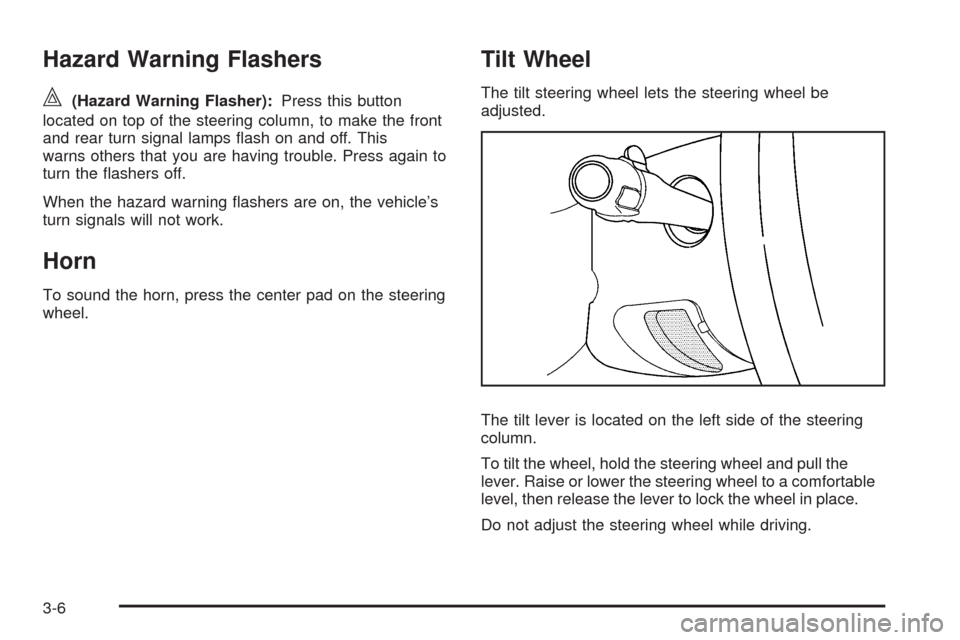
The tilt lever is located on the left side of the steering
column.
To tilt the wheel, hold the steering wheel and pull the
lever. Raise or lower the steering wheel to a comfortable
level, then release the lever to lock the wheel in place.
Do not adjust the steering wheel while driving.
3-6
Page 187 of 550

Turn Signal/Multifunction Lever
The lever on the left side of the steering column
includes the following:
G: Turn and Lane Change Signals
53: Headlamp High/Low-Beam Changer
N: Windshield Wipers
L: Windshield Washer
Flash-to-Pass.
Exterior Lamps.
Information for these features is on the pages following.
Turn and Lane-Change Signals
An arrow on the instrument
panel cluster ashes in the
direction of the turn or
lane change.
Move the lever all the way up or down to signal a turn.
Raise or lower the lever until the arrow starts to ash
to signal a lane change. The turn signals automatically
ash three times. It will ash six times if the tow-haul
mode is active. Holding the turn signal lever for
more than one second causes the turn signals to ash
until the lever is released.
The lever returns to its starting position when it is
released.
If after signaling a turn or a lane change the arrows
ash rapidly or do not come on, a signal bulb may be
burned out.
Have the bulbs replaced. If the bulb is not burned out,
check the fuse. SeeInstrument Panel Fuse Block
on page 5-109andUnderhood Fuse Block on
page 5-112.
3-7
Page 191 of 550
Cruise Control
{CAUTION:
Cruise control can be dangerous where you
cannot drive safely at a steady speed. So, do not
use the cruise control on winding roads or in
heavy traffic.
Cruise control can be dangerous on slippery
roads. On such roads, fast changes in tire traction
can cause excessive wheel slip, and you could
lose control. Do not use cruise control on slippery
roads.
With cruise control, a speed of about 25 mph (40 km/h)
or more can be maintained without keeping your foot
on the accelerator. Cruise control does not work
at speeds below about 25 mph (40 km/h).
When the brakes are applied, the cruise control turns off.
If your vehicle has the StabiliTrak
®system and begins
to limit wheel spin while you are using cruise control, the
cruise control will automatically disengage. See
StabiliTrak
®System on page 4-6. When road conditions
allow the cruise control to be safely used again, it
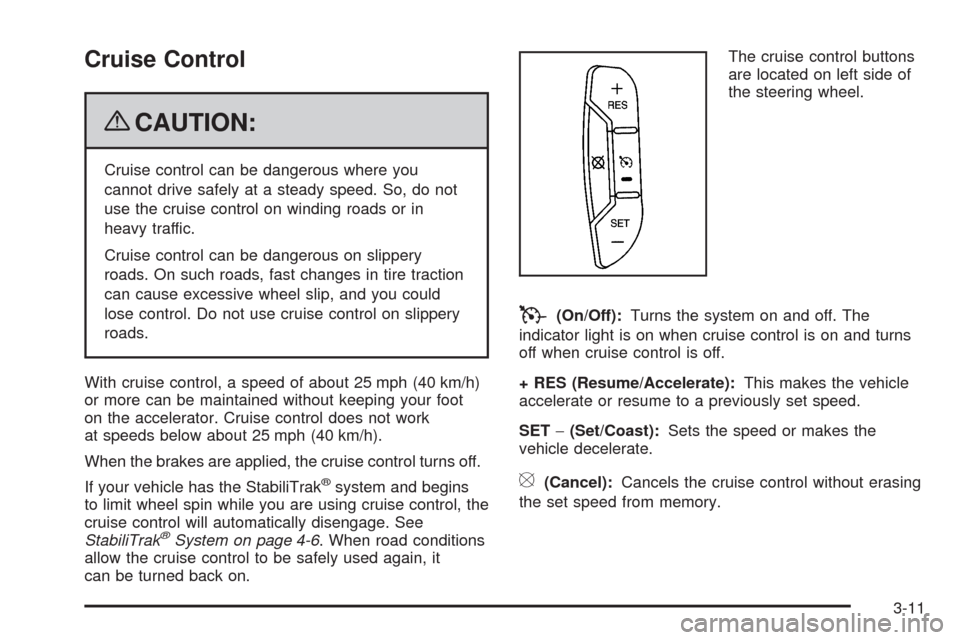
can be turned back on.The cruise control buttons
are located on left side of
the steering wheel.
T(On/Off):Turns the system on and off. The
indicator light is on when cruise control is on and turns
off when cruise control is off.
+ RES (Resume/Accelerate):This makes the vehicle
accelerate or resume to a previously set speed.
SET−(Set/Coast):Sets the speed or makes the
vehicle decelerate.
[(Cancel):Cancels the cruise control without erasing
the set speed from memory.
3-11