2009 CADILLAC SRX steering wheel
[x] Cancel search: steering wheelPage 163 of 442

Air Conditioning
#
(Air Conditioning):Press to turn the air
conditioning on or off, and override the automatic
system. When selecting the AUTO fan or AUTO mode,
the air conditioning comes on automatically, as
necessary.
The air conditioning system removes moisture from the
air, so water might drip underneath the vehicle while
idling or after turning off the engine. This is normal.
Sensors
There is a solar sensor
located on top of the
instrument panel, near the
windshield.There is an interior
temperature sensor
located below the climate
control system next to
the steering wheel.
An ambient sensor is located behind the grille in front
of the vehicle.
These sensors help the climate control system
automatically control the temperature setting.
The system can supply cooler air to the side of the
vehicle facing the sun. The recirculation mode will also
be used as needed to maintain cool outlet temperatures.
Do not cover any of the sensors or the climate control
system might not work properly.
3-25
Page 183 of 442
If the fuel supply gets low, the FUEL LEVEL LOW
message will appear on the Driver Information Center
(DIC) and a single chime will sound. SeeDIC Warnings
and Messages on page 3-51for more information.
All of the following situations are normal and do
not indicate that anything is wrong with the fuel gage:
At the gas station the gas pump shuts off before
the gage reads full.
The gage may change when you turn, stop quickly
or accelerate quickly.
It takes a little more or less fuel to ll the tank than
the gage indicated. For example, the gage may
have indicated that the tank was half full, but
it actually took a little more or less than half the
tank’s capacity to ll the tank.
Driver Information Center (DIC)
The Driver Information Center (DIC) gives you the status
of many of your vehicle’s systems. The DIC is also used
to display warning/status messages. All messages will
appear in the DIC display located at the bottom of the
instrument panel cluster, below the tachometer and
speedometer. The DIC buttons are located on the
instrument panel, to the left of the steering wheel.
The DIC comes on when the ignition is on. After a short
delay, the DIC will display the information that was
last displayed before the engine was turned off.
The top line of the DIC display shows the vehicle
system information and the warning/status messages.
The bottom line of the DIC display shows the odometer
on the left side, the outside air temperature on the
right side, and the shift position indicator in the center.
For more information on the shift position indicator,
seeAutomatic Transmission Operation on page 2-27.
When the sport mode is active, an S will appear next to
the shift position indicator on the center of the DIC
display. When the manual mode is active, an M will
appear on the DIC display. When the normal mode
is active, only the shift position indicator will appear.
3-45
Page 184 of 442

While the Driver Shift Control (DSC) feature is active,
the DIC will change to show the selected gear.
See “Driver Shift Control (DSC)” underAutomatic
Transmission Operation on page 2-27for more
information.
If a problem is detected, a warning message will appear
on the display. Be sure to take any message that
appears on the display seriously and remember that
clearing the message will only make the message
disappear, not correct the problem.
DIC Operation and Displays
The Driver Information
Center (DIC) has different
displays which can be
accessed by pressing the
DIC buttons located on
the instrument panel, to the
left of the steering wheel.
3Trip/Fuel:Press this button to scroll through the
trip and fuel displays. See “Trip/Fuel Display Menu
Items” following for more information on these displays.
TVehicle Information:Press this button to scroll
through the vehicle information displays. See “Vehicle
Information Display Menu Items” following for more
information on these displays.
UCustomization:Press this button to scroll through
each of the customization features. SeeDIC Vehicle
Customization on page 3-60for more information on the
customization features.
VSet/Reset:Press this button to reset certain DIC
features and to acknowledge DIC warning messages
and clear them from the DIC display.
yzMenu Up/Down:Press this button to scroll up
and down the menu items.
3-46
Page 196 of 442

SERVICE VEHICLE SOON
This message displays when a non-emissions related
malfunction occurs. Have your vehicle serviced by your
dealer/retailer as soon as possible.
SPEED LIMITED TO XXX MPH (km/h)
This message displays when your vehicle speed
is limited to 80 mph (128 km/h) because the vehicle
detects a problem in the speed variable assist steering,
magnetic ride control, or automatic leveling control
systems. Have your vehicle serviced by your
dealer/retailer.
STABILITRAK NOT READY
This message may display and the Traction Control
System and StabiliTrak®Warning Light on the
instrument panel cluster may be on after rst driving the
vehicle and exceeding 19 mph (30 km/h) for 30 seconds.
The StabiliTrak
®system is not functional until the
light has turned off. SeeStabiliTrak®System on
page 4-6for more information.
STABILITRAK OFF
This message displays when you turn off StabiliTrak®,
or when the stability control has been automatically
disabled. To limit wheel spin and realize the full benets
of the stability enhancement system, you shouldnormally leave StabiliTrak
®on. However, you should
turn StabiliTrak®off if your vehicle gets stuck in
sand, mud, ice, or snow and you want to rock your
vehicle to attempt to free it, or if you are driving
in extreme off-road conditions and require more wheel
spin. SeeIf Your Vehicle is Stuck in Sand, Mud,
Ice, or Snow on page 4-29. To turn the StabiliTrak
®
system on or off, seeStabiliTrak®System on page 4-6.
There are several conditions that can cause this
message to appear.
One condition is overheating, which could occur if
StabiliTrak®activates continuously for an extended
period of time.
The message also displays if the brake system
warning light is on. SeeBrake System Warning
Light on page 3-36.
The message could display if the stability system
takes longer than usual to complete its diagnostic
checks due to driving conditions.
The message displays if an engine or vehicle
related problem has been detected and the vehicle
needs service. See your dealer/retailer.
The message turns off as soon as the conditions that
caused the message to be displayed are no longer
present.
3-58
Page 212 of 442

Storing a Radio Station as a Favorite
Drivers are encouraged to set up their radio station
favorites while the vehicle is stopped. Tune to your
favorite stations using the presets, favorites button, and
steering wheel controls, if your vehicle has this
feature. SeeDefensive Driving on page 4-2.
FAV (Favorites):A maximum of 36 stations can be
programmed as favorites using the six pushbuttons
positioned below the radio station frequency labels and
by using the radio favorites page button. Press the
FAV button to go through up to six pages of favorites,
each having six favorite stations available per page.
Each page of favorites can contain any combination of
AM, FM, or XM stations. To store a station as a
favorite, perform the following steps:
1. Tune to the desired radio station.
2. Press the FAV button to display the page where
you want the station stored.
3. Press and hold one of the six pushbuttons until a
beep sounds. When that pushbutton is pressed
and released, the station that was set, returns.
4. Repeat the steps for each pushbutton radio station
you want stored as a favorite.The number of favorites pages can be setup using
the MENU button. To setup the number of favorites
pages:
1. Press the MENU button to display the radio
setup menu.
2. Press the pushbutton located below the
FAV 1-6 label.
3. Select the desired number of favorites pages by
pressing the pushbutton located below the
displayed page numbers.
4. Press the FAV button, or let the menu time out, to
return to the original main radio screen showing the
radio station frequency labels and to begin the
process of programming your favorites for the
chosen amount of numbered pages.
3-74
Page 228 of 442
PROG (Program):Press this button to go to the next
preset radio station or channel set on the main
radio. This function is inactive, with some radios, if the
front seat passengers are listening to the radio.
When a CD or DVD audio disc is playing, press this
button to go to the beginning of the CD or DVD audio.
This function is inactive, with some radios, if the
front seat passengers are listening to the CD or
DVD audio.
When a disc is playing in the CD or DVD changer,
press this button to select the next disc, if multiple discs
are loaded. This function is inactive, with some radios,
if the front seat passengers are listening to the disc.
When a DVD video menu is being displayed, press the
PROG button to perform the menu function, enter.
Theft-Deterrent Feature
THEFTLOCK®is designed to discourage theft of the
vehicle’s radio by learning a portion of the Vehicle
Identication Number (VIN). The radio does not operate
if it is stolen or moved to a different vehicle.
Audio Steering Wheel Controls
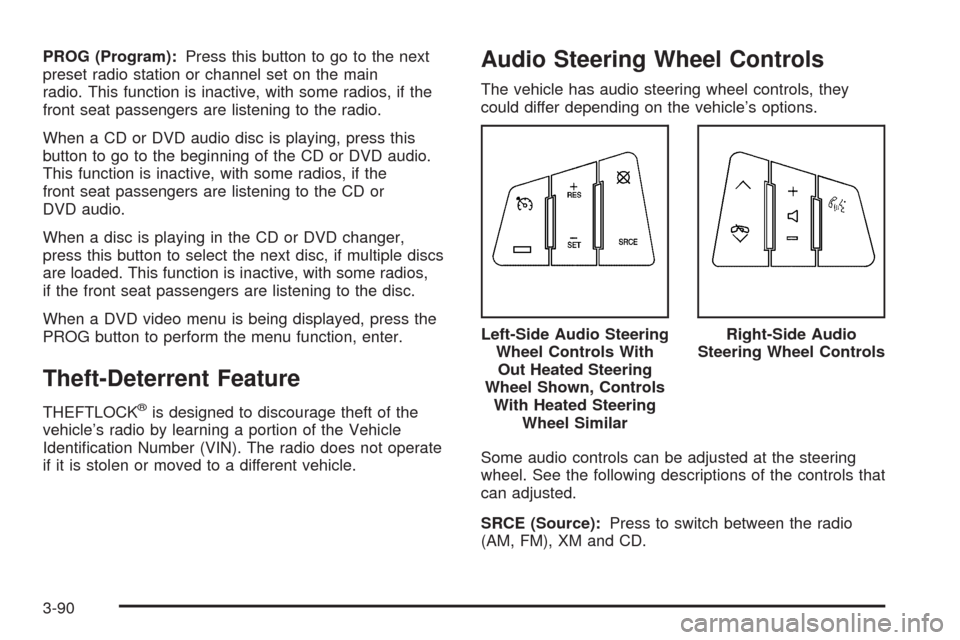
The vehicle has audio steering wheel controls, they
could differ depending on the vehicle’s options.
Some audio controls can be adjusted at the steering
wheel. See the following descriptions of the controls that
can adjusted.
SRCE (Source):Press to switch between the radio
(AM, FM), XM and CD.Left-Side Audio Steering
Wheel Controls With
Out Heated Steering
Wheel Shown, Controls
With Heated Steering
Wheel Similar
Right-Side Audio
Steering Wheel Controls
3-90
Page 231 of 442

Your Driving, the Road, and the Vehicle............4-2
Defensive Driving...........................................4-2
Drunk Driving.................................................4-2
Control of a Vehicle........................................4-3
Braking.........................................................4-3
Antilock Brake System (ABS)...........................4-4
Braking in Emergencies...................................4-5
StabiliTrak
®System........................................4-6
Traction Control System (TCS).........................4-6
Magnetic Ride Control™..................................4-8
Limited-Slip Rear Axle.....................................4-8
All-Wheel Drive (AWD) System.........................4-8
Steering........................................................4-8
Off-Road Recovery.......................................4-10
Passing.......................................................4-10
Loss of Control.............................................4-10Off-Road Driving...........................................4-11
Driving at Night............................................4-24
Driving in Rain and on Wet Roads..................4-25
Before Leaving on a Long Trip.......................4-26
Highway Hypnosis........................................4-26
Hill and Mountain Roads................................4-26
Winter Driving..............................................4-27
If Your Vehicle is Stuck in Sand, Mud,
Ice, or Snow.............................................4-29
Rocking Your Vehicle to Get It Out.................4-30
Loading the Vehicle......................................4-30
Towing..........................................................4-36
Towing Your Vehicle.....................................4-36
Recreational Vehicle Towing...........................4-36
Level Control...............................................4-38
Towing a Trailer...........................................4-39
Section 4 Driving Your Vehicle
4-1
Page 235 of 442

ABS can change the brake pressure to each wheel, as
required, faster than any driver could. This can help
you steer around the obstacle while braking hard.
As you brake, the computer keeps receiving updates on
wheel speed and controls braking pressure accordingly.
Remember: ABS does not change the time you need to
get your foot up to the brake pedal or always decrease
stopping distance. If you get too close to the vehicle in
front of you, you will not have time to apply the brakes
if that vehicle suddenly slows or stops. Always leave
enough room up ahead to stop, even though you
have ABS.
Using ABS
Do not pump the brakes. Just hold the brake pedal down
rmly and let antilock work for you. You might feel the
brakes vibrate or notice some noise, but this is normal.
Braking in Emergencies
With ABS, you can steer and brake at the same time.
In many emergencies, steering can help more than even
the very best braking.
Brake Assist
This vehicle has a Brake Assist feature designed to
assist the driver in stopping or decreasing vehicle speed
in emergency driving conditions. This feature uses the
stability system hydraulic brake control module to
supplement the power brake system under conditions
where the driver has quickly and forcefully applied the
brake pedal in an attempt to quickly stop or slow down
the vehicle. The stability system hydraulic brake control
module increases brake pressure at each corner of
the vehicle until the ABS activates. Minor brake pedal
pulsations or pedal movement during this time is normal
and the driver should continue to apply the brake pedal
as the driving situation dictates The Brake Assist feature
will automatically disengage when the brake pedal is
released or brake pedal pressure is quickly decreased.
4-5