2009 CADILLAC ESCALADE window
[x] Cancel search: windowPage 122 of 586

Testing the Alarm
To test the alarm:
1. From inside the vehicle, lower the driver’s window
and open the driver’s door.
2. Activate the system by locking the doors with the
power door lock switch while the door is open, or
with the RKE transmitter.
3. Get out of the vehicle, close the door and wait for
the security light to go out.
4. Then reach in through the window, unlock the door
with the manual door lock and open the door. This
should set off the alarm.
While the alarm is set, the power door unlock switch will
not work.
If the alarm does not sound when it should but the
headlamps ash, check to see if the horn works. The
horn fuse may be blown. To replace the fuse, seeFuses
and Circuit Breakers on page 6-103.
If the alarm does not sound or the headlamps do not
ash, the vehicle should be serviced by your
dealer/retailer.
PASS-Key®III+ Electronic
Immobilizer
The PASS-Key III+ system operates on a radio
frequency subject to Federal Communications
Commission (FCC) Rules and with Industry Canada.
This device complies with Part 15 of the FCC Rules.
Operation is subject to the following two conditions:
1. This device may not cause harmful interference.
2. This device must accept any interference received,
including interference that may cause undesired
operation.
This device complies with RSS-210 of Industry Canada.
Operation is subject to the following two conditions:
1. This device may not cause interference.
2. This device must accept any interference received,
including interference that may cause undesired
operation of the device.
Changes or modications to this system by other than
an authorized service facility could void authorization to
use this equipment.
PASS-Key III+ uses a radio frequency transponder in
the key that matches a decoder in the vehicle.
2-22
Page 126 of 586

Retained Accessory Power (RAP)
The following vehicle accessories can be used for up to
10 minutes after the engine is turned off:
Audio System
Power Windows
OnStar®System (if equipped)
Sunroof (if equipped)
These features work when the key is in ON/RUN or
ACC/ACCESSORY. Once the key is turned from
ON/RUN to LOCK/OFF, the windows and sunroof
continue to work up to 10 minutes until any door
is opened. The radio continues to work for up to
10 minutes or until the driver door is opened.
Starting the Engine
If the vehicle is a Two-mode Hybrid, see the Two-mode
Hybrid manual for more information.
Move the shift lever to P (Park) or N (Neutral). The
engine will not start in any other position. To restart the
engine when the vehicle is are already moving, use
N (Neutral) only.
Notice:Do not try to shift to P (Park) if the
vehicle is moving. If you do, you could damage
the transmission. Shift to P (Park) only when the
vehicle is stopped.
Starting Procedure
1. With your foot off the accelerator pedal, turn the
ignition key to START. When the engine starts,
let go of the key. The idle speed will go down as
the engine gets warm. Do not race the engine
immediately after starting it. Operate the engine
and transmission gently to allow the oil to warm
up and lubricate all moving parts.
The vehicle has a Computer-Controlled Cranking
System. This feature assists in starting the
engine and protects components. If the ignition
key is turned to the START position, and then
released when the engine begins cranking, the
engine will continue cranking for a few seconds
or until the vehicle starts. If the engine does not start
and the key is held in START for many seconds,
cranking will be stopped after 15 seconds to prevent
cranking motor damage. To prevent gear damage,
this system also prevents cranking if the engine
is already running. Engine cranking can be
stopped by turning the ignition switch to the
ACC/ACCESSORY or LOCK/OFF position.
Notice:Cranking the engine for long periods of
time, by returning the key to the START position
immediately after cranking has ended, can overheat
and damage the cranking motor, and drain the
battery. Wait at least 15 seconds between each try,
to let the cranking motor cool down.
2-26
Page 138 of 586

Parking Over Things That Burn
{CAUTION:
Things that can burn could touch hot exhaust
parts under the vehicle and ignite. Do not park
over papers, leaves, dry grass, or other things
that can burn.
Engine Exhaust
{CAUTION:
Engine exhaust contains Carbon Monoxide (CO)
which cannot be seen or smelled. Exposure to CO
can cause unconsciousness and even death.
Exhaust may enter the vehicle if:
The vehicle idles in areas with poor ventilation
(parking garages, tunnels, deep snow that
may block underbody airow or tail pipes).
The exhaust smells or sounds strange or
different.
CAUTION: (Continued)
CAUTION: (Continued)
The exhaust system leaks due to corrosion or
damage.
The vehicle’s exhaust system has been
modied, damaged or improperly repaired.
There are holes or openings in the vehicle
body from damage or after-market
modications that are not completely sealed.
If unusual fumes are detected or if it is suspected
that exhaust is coming into the vehicle:
Drive it only with the windows
completely down.
Have the vehicle repaired immediately.
Never park the vehicle with the engine running in
an enclosed area such as a garage or a building
that has no fresh air ventilation.
2-38
Page 142 of 586

Outside Heated Mirrors
<(Rear Window Defogger):Press to heat the
mirrors.
See “Rear Window Defogger” underDual Automatic
Climate Control System on page 3-24for more
information.
Object Detection Systems
Ultrasonic Rear Parking Assist
(URPA)
For vehicles with the Ultrasonic Rear Parking Assist
(URPA) system, it operates at speeds less than 5 mph
(8 km/h), and assists the driver with parking and
avoiding objects while in R (Reverse). The sensors on
the rear bumper are used to detect the distance to
an object up to 8 feet (2.5 m) behind the vehicle, and at
least 10 inches (25.4 cm) off the ground.
{CAUTION:
The Ultrasonic Rear Parking Assist (URPA)
system does not replace driver vision. It cannot
detect:
objects that are below the bumper,
underneath the vehicle, or if they are too
close or far from the vehicle
children, pedestrians, bicyclists, or pets.
If you do not use proper care before and while
backing; vehicle damage, injury, or death could
occur. Even with URPA, always check behind the
vehicle before backing up. While backing, be sure
to look for objects and check the vehicle’s mirrors.
2-42
Page 143 of 586

The display is located near
the passenger side rear
window and can be
seen by looking over your
right shoulder.
URPA uses three color-coded lights to provide distance
and system information.
How the System Works
URPA comes on automatically when the shift lever is
moved into R (Reverse). The rear display briey
illuminates to indicate the system is working.
URPA operates only at speeds less than 5 mph (8 km/h).
If the vehicle is above this speed, the red light on the rear
display will ash.
To be detected, objects must be at least 10 inches
(25.4 cm) off the ground and below liftgate level. Objects
must also be within 8 feet (2.5 m) from the rear bumper.
This distance may be less during warmer or humid
weather.A single beep will sound the rst time an object is
detected between 40 inches (1 m) and 8 feet (2.5 m)
away. Beeping will occur continously when the vehicle
is at 23 inches (0.6 m) or closer to an object.
The following describes what will occur with the URPA
display as the vehicle gets closer to a detected object:
Description English Metric
amber light 8 ft 2.5 m
amber/amber lights 40 in 1.0 m
amber/amber/red lights
and continuous beeping
for ve seconds23 in 0.6 m
amber/amber/red lights
ashing and continuous
beeping for ve seconds1 ft 0.3 m
The system can be
disabled by pressing the
rear park aid disable button
located next to the radio.
The indicator light will come on and PARK ASSIST OFF
displays on the Driver Information Center (DIC) to
indicate that URPA is off, seeDIC Warnings and
Messages on page 3-54for information about clearing
the message.
2-43
Page 167 of 586

Instrument Panel Overview...............................3-4
Hazard Warning Flashers................................3-5
Horn .............................................................3-5
Tilt Wheel.....................................................3-6
Heated Steering Wheel...................................3-6
Turn Signal/Multifunction Lever.........................3-7
Turn and Lane-Change Signals........................3-7
Headlamp High/Low-Beam Changer..................3-8
Flash-to-Pass.................................................3-8
Windshield Wipers..........................................3-9
Rainsense™ II Wipers.....................................3-9
Windshield Washer.......................................3-10
Rear Window Wiper/Washer...........................3-11
Cruise Control..............................................3-11
Exterior Lamps.............................................3-15
Headlamps on Reminder................................3-18
Daytime Running Lamps (DRL).......................3-19
Automatic Headlamp System..........................3-19
Fog Lamps ..................................................3-20
Instrument Panel Brightness...........................3-21
Dome Lamps ...............................................3-21
Dome Lamp Override....................................3-21
Entry Lighting...............................................3-21
Exit Lighting.................................................3-21
Reading Lamps............................................3-22
Electric Power Management...........................3-22Battery Run-Down Protection..........................3-23
Accessory Power Outlet(s).............................3-23
Ashtray(s) and Cigarette Lighter......................3-24
Analog Clock...............................................3-24
Climate Controls............................................3-24
Dual Automatic Climate Control System...........3-24
Outlet Adjustment.........................................3-29
Rear Air Conditioning and Heating System
and Electronic Climate Controls...................3-30
Warning Lights, Gages, and Indicators
............3-31
Instrument Panel Cluster................................3-32
Speedometer and Odometer...........................3-33
Trip Odometer..............................................3-33
Tachometer.................................................3-33
Safety Belt Reminders...................................3-33
Airbag Readiness Light..................................3-34
Passenger Airbag Status Indicator...................3-35
Charging System Light..................................3-36
Brake System Warning Light..........................3-37
Antilock Brake System (ABS) Warning Light.....3-38
StabiliTrak
®Indicator Light.............................3-38
Engine Coolant Temperature Gage..................3-39
Tire Pressure Light.......................................3-39
Malfunction Indicator Lamp.............................3-40
Oil Pressure Light.........................................3-43
Section 3 Instrument Panel
3-1
Page 168 of 586
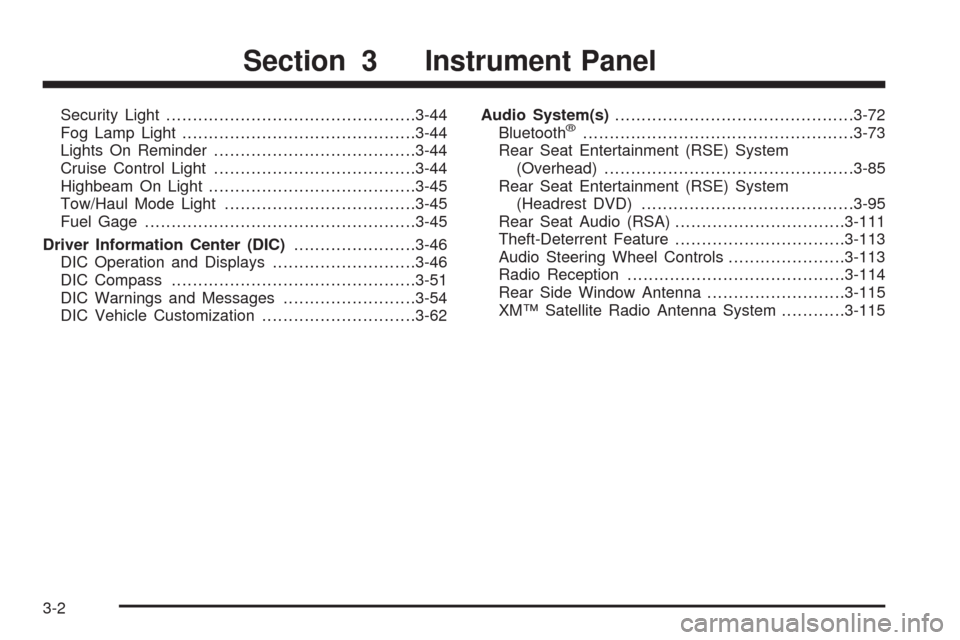
Security Light...............................................3-44
Fog Lamp Light............................................3-44
Lights On Reminder......................................3-44
Cruise Control Light......................................3-44
Highbeam On Light.......................................3-45
Tow/Haul Mode Light....................................3-45
Fuel Gage...................................................3-45
Driver Information Center (DIC).......................3-46
DIC Operation and Displays...........................3-46
DIC Compass..............................................3-51
DIC Warnings and Messages.........................3-54
DIC Vehicle Customization.............................3-62Audio System(s).............................................3-72
Bluetooth®...................................................3-73
Rear Seat Entertainment (RSE) System
(Overhead)...............................................3-85
Rear Seat Entertainment (RSE) System
(Headrest DVD)........................................3-95
Rear Seat Audio (RSA)................................3-111
Theft-Deterrent Feature................................3-113
Audio Steering Wheel Controls......................3-113
Radio Reception.........................................3-114
Rear Side Window Antenna..........................3-115
XM™ Satellite Radio Antenna System............3-115
Section 3 Instrument Panel
3-2
Page 176 of 586

When Rainsense™ II is active, the headlamps will turn
on automatically after approximately eight wipes.
The headlamps will turn off if the wiper switch is set
to a delay position, and there have been no wipes for
approximately three minutes, or if the wiper switch
is turned to the off position. If it is dark outside,
the headlamps will remain on.
Notice:Going through an automatic car wash with
the wipers on can damage them. Turn the wipers
off when going through an automatic car wash.
Windshield Washer
{CAUTION:
In freezing weather, do not use your washer until
the windshield is warmed. Otherwise the washer
uid can form ice on the windshield, blocking your
vision.
L(Washer Fluid):There is a paddle marked with the
windshield washer symbol at the top of the multifunction
lever. To spray washer uid on the windshield, push
the paddle. The wipers will clear the window and then
either stop or return to your preset speed.
_(Heated Windshield Washer):The button is
located in the switchbank under the climate controls.
Press while the ignition is turned on to activate the
heated windshield washer uid system. This activation
will initiate four heated wash/wipe cycles. The rst
heated wash/wipe cycle may take up to 40 seconds to
occur, depending on outside temperature. After the
rst wash/wipe cycle, it may take up to 20 seconds for
each of the remaining cycles to begin. Press the
button again to turn off the heated windshield washer
uid system or it will automatically turn off after four
wash/wipe cycles have been completed.
When the heated windshield washer uid system is
activated under certain outside temperature conditions,
steam may ow out of the washer nozzles for a short
period of time before washer uid is sprayed. This is a
normal condition.
HEATING WASH FLUID WASH WIPES PENDING is
displayed on the DIC when the washer system is heating
the uid. WASHER FLUID LOW ADD FLUID is
displayed when the washer uid is low. SeeDIC
Warnings and Messages on page 3-54.
3-10