Page 345 of 586
Sound Menu
e
(Sound):Press this key or press the CONFIG key to
access the Sound menu to adjust the treble, midrange,
bass, fade, balance, and Digital Signal Processing (DSP).
The system automatically stores audio adjustment
settings as changes are made for each audio source
including AM, FM, XM (if equipped), CD, and AUX.
Setting the Tone
TREBLE:Touch the plus (+) or minus (−) sign to
increase or decrease the treble. If a station is weak or
has static, decrease the treble.
MID (Midrange):Touch the plus (+) or minus (−) sign
to increase or decrease the midrange.
BASS:Touch the plus (+) or minus (−) sign to increase
or decrease the bass.
Adjusting the Speakers
L/R (Left/Right) (Balance):To adjust the balance
between the left and the right speakers, touch and hold
the L or R screen buttons.
Front/Rear (Fade):To adjust the fade between the
front and the rear speakers, touch and hold the Front or
Rear screen buttons.
4-63
Page 363 of 586

Do not add any label to a CD or DVD, it could get
caught in the player. If a CD or DVD is recorded on a
personal computer and a description label is needed, try
labeling the top of the recorded CD or DVD with a
soft marker.
Auxiliary Devices
The vehicle may have a rear entertainment system
(RSE) with a second and third row screen. The RSE has
audio adapters to allow you to connect auxiliary
devices. The audio can be heard through the speakers
or through the wireless or wired headphones. See
“Audio/Video Jacks” under,Rear Seat Entertainment
(RSE) System (Overhead) on page 3-85orRear
Seat Entertainment (RSE) System (Headrest DVD) on
page 3-95for more information.
Drivers are encouraged to set up any auxiliary device
while the vehicle is in P (Park). SeeDefensive
Driving on page 5-2for more information on driver
distraction.To switch the RSE system to use an auxiliary device:
1. Connect the auxiliary device to the RSE system, for
the second or third row.
2. Press the AUDIO key then press the AUDIO key
repeatedly until AUX (auxiliary) is selected or
touch the AUX screen button. An auxiliary device
must be connected for the AUX screen button
to appear as an option to select.
4-81
Page 364 of 586
3. For the second row display select the Rear AUX
screen button next to Rear Display 1 and for the
third row display select the Rear AUX screen button
next to Rear Display 2. Each screen works
independently of the other. The second row screen
can watch a DVD while the third row screen can
use the auxiliary device.
The rear seat passengers can also use the remote
control to change the functions of the RSE. SeeRear
Seat Entertainment (RSE) System (Overhead) on
page 3-85orRear Seat Entertainment (RSE) System
(Headrest DVD) on page 3-95for more information.
Voice Recognition
The navigation system’s voice recognition allows for
hands-free operation of the navigation system,
audio system, and OnStar
®features. The DVD map
disc must be installed in the navigation system for voice
recognition to work. See “Installing the DVD Map
Disc” underMaps on page 4-14for more information.
Voice recognition can be used when the ignition is on or
when Retained Accessory Power (RAP) is active. See
“Retained Accessory Power (RAP)” in the Index of
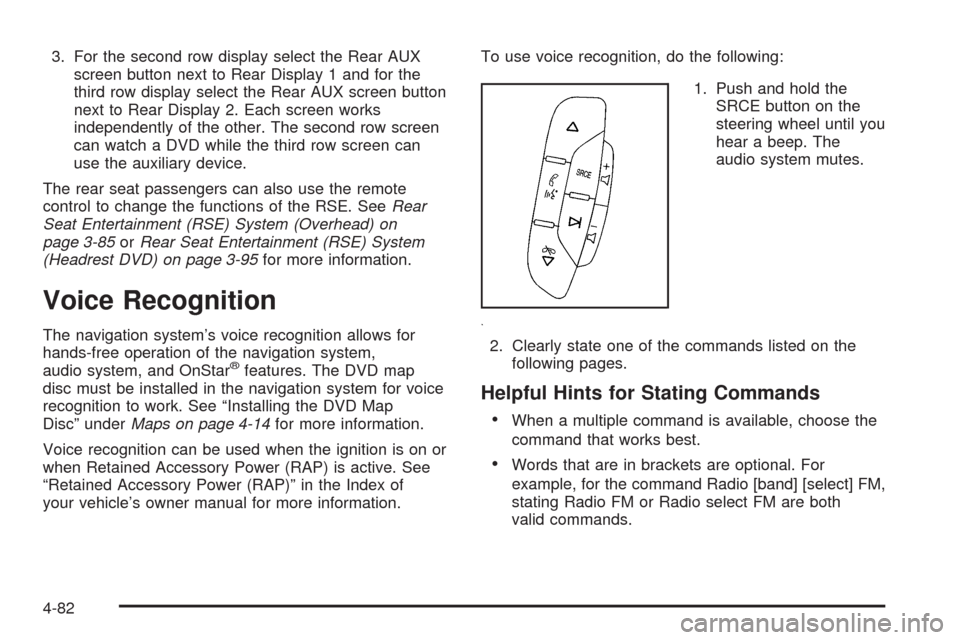
your vehicle’s owner manual for more information.To use voice recognition, do the following:
1. Push and hold the
SRCE button on the
steering wheel until you
hear a beep. The
audio system mutes.
2. Clearly state one of the commands listed on the
following pages.
Helpful Hints for Stating Commands
When a multiple command is available, choose the
command that works best.
Words that are in brackets are optional. For
example, for the command Radio [band] [select] FM,
stating Radio FM or Radio select FM are both
valid commands.
4-82
Page 367 of 586

CD Commands
The following are CD, MP3, and DVD commands that
can be accessed by clearly stating the commands
exactly as they are written.
CD, DVD, Disc:Use this command to select a CD,
DVD, or disc that is currently loaded.
CD, DVD, Disc, [select] track (one, two, three,
etc.):Instructs the system to select a specic track
number.
CD, DVD, Disc select next folder:Use this command
to select the next folder on the MP3 or audio DVD.
CD, DVD, Disc select previous folder:Use this
command to select the previous folder on the MP3 or
audio DVD.
CD help, DVD help, Disc help:Instructs the system to
assist with CD and DVD commands.
Auxiliary Commands
The following auxiliary commands can be accessed by
clearly stating the commands exactly as they are
written. The commands are available when the auxiliary
source is available.
Aux, Auxiliary:Use this command to select the
auxiliary device, when a device is connected.
Voice Help
Voice help:Provides a description of help commands
that can be used.
4-85
Page 423 of 586

Electric Brake Control Wiring
Provisions
These wiring provisions are included with the vehicle as
part of the heavy-duty trailer wiring package. These
provisions are for an electric brake controller. The
red/black stripe power feed will not be connected to the
battery until the ring terminal is unstowed and connected
to the underhood electrical center. The instrument panel
contains blunt cut wires near the data link connector for
the trailer brake controller. The harness contains the
following wires:
Dark Blue: Auxiliary
Red/Black: Battery
Light Blue/White: Brake Switch
White: Ground
The trailer brake controller should be installed by your
dealer/retailer or a qualied service center.
Trailer Recommendations
Subtract the hitch loads from the Cargo Weight Rating
(CWR). CWR is the maximum weight of the load
the vehicle can carry. It does not include the weight of
the people inside, but you can gure about 150 lbs.
(68 kg) for each passenger. The total cargo load must
not be more than the vehicles CWR.
Weigh the vehicle with the trailer attached, so the
GVWR or GAWR are not exceeded. If using a
weight-distributing hitch, weigh the vehicle without the
spring bars in place.
The best performance is obtained by correctly spreading
out the weight of the load and choosing the correct
hitch and trailer brakes.
For more information seeTowing a Trailer on page 5-42.
5-55
Page 532 of 586
Fuses Usage
25 Trailer Park Lamps
26 Driver Side Park Lamps
27 Passenger Side Park Lamps
28 Fog Lamps
29 Horn
30Passenger Side High-Beam
Headlamp
31 Daytime Running Lamps
32 Driver Side High-Beam Headlamp
33 Daytime Running Lights 2
34 Sunroof
35Key Ignition System, Theft Deterrent
System
36 Windshield Wiper
37 SEO B2 Uptter Usage (Battery)
38 Electric Adjustable Pedals
39 Climate Controls (Battery)
40 Airbag System (Ignition)
41 Amplier
42 Audio SystemFuses Usage
43Miscellaneous (Ignition), Cruise
Control
44 Liftgate Release
45 Airbag System (Battery)
46 Instrument Panel Cluster
47 Not Used
48 Auxiliary Climate Control (Ignition)
49Center High-Mounted Stoplamp
(CHMSL)
50 Rear Defogger
51 Heated Mirror
52 SEO B1 Uptter Usage (Battery)
53Cigarette Lighter, Auxiliary Power
Outlet
54Automatic Level Control Compressor
Relay, SEO Uptter Usage
55 Climate Controls (Ignition)
56Engine Control Module, Secondary
Fuel Pump (Ignition)
6-108
Page:
< prev 1-8 9-16 17-24

