2009 CADILLAC ESCALADE EXT high beam
[x] Cancel search: high beamPage 175 of 546

The vehicle’s speed drops below 15 mph (24 km/h).
The headlamp stalk is moved forward to the
high-beam position. SeeHeadlamp High/Low-Beam
Changer on page 3-7.
When either of these conditions occur, the
IntelliBeam
®feature will be disabled and the
IntelliBeam®light in the mirror will turn off until the
high-beam stalk is returned to the neutral position.
If IntelliBeam®was using low-beams prior to
this action, the IntelliBeam®feature will be
temporarily disabled until the stalk is returned
to the neutral position.
The exterior lamp control is turned to any setting
except AUTO.
When this occurs, IntelliBeam
®will be disabled until
the control is turned back to the AUTO position.
The IntelliBeam®system is turned off at the inside
rearview mirror.IntelliBeam
®may not turn off the high-beams if the
system cannot detect other vehicle’s lamps because of
any of the following:
The others vehicle’s lamp(s) are missing, damaged,
obstructed from view or otherwise undetected.
The other vehicle’s lamp(s) are covered with dirt,
snow and/or road spray.
The other vehicle’s lamp(s) cannot be detected due
to dense exhaust, smoke, fog, snow, road spray,
mist or other airborne obstructions.
Your vehicle’s windshield is dirty, cracked or
obstructed by something that blocks the view of the
IntelliBeam light sensor.
Your vehicle’s windshield is covered with ice, dirt,
haze or other obstructions.
Your vehicle is loaded such that the front end of the
vehicle points upward, causing the IntelliBeam
sensor to aim high and not detect headlamps and
taillamps.
You are driving on winding or hilly roads.
You may need to manually disable or cancel the
high-beam headlamps by turning the low-beam
headlamps on, if any of the above conditions exist.
3-15
Page 176 of 546

Disabling and Resetting IntelliBeam®at
the Rearview Mirror
IntelliBeam®can be disabled by using the controls on
the inside rearview mirror.
AUTO
3(On/Off):To disable the system, press this
button on the inside rearview mirror. The IntelliBeam®
indicator will turn off and will not come back on until the
IntelliBeam®button is pressed again.
(Stalk Disable):When IntelliBeam
®has turned on the
high-beams, pull or push the high-beam stalk. This
will disable IntelliBeam
®. The IntelliBeam®indicator on
the mirror will turn off. To re-enable IntelliBeam®,
press the IntelliBeam®button on the mirror.
A different sensitivity setting is available for dealer
diagnostics. This is done by pushing and holding this
button for 20 seconds until the IntelliBeam
®indicator
light ashes three times. If you accidentally activate this,
the vehicle’s setting will automatically be reset each
time the ignition is turned off and then on again.
Cleaning the IntelliBeam®Light Sensor
The light sensor is located
on the inside of the vehicle
in front of the inside
rearview mirror.
Clean the light sensor window, periodically, using glass
cleaner on a soft cloth. Gently wipe the sensor
window. Do not spray glass cleaner directly on the
surface of the sensor window.
Headlamps on Reminder
If a door is open, a reminder chime will sound when the
headlamps or parking lamps are manually turned on
and the key is out of the ignition. To turn off the chime,
turn the headlamp switch to off or AUTO and then
back on, or close and re-open the door. In the AUTO
mode, the headlamps turn off once the ignition is
in LOCK/OFF or may remain on until the headlamp
delay ends (if enabled in the DIC). See “Exit Lighting”
underDIC Vehicle Customization on page 3-56.
3-16
Page 178 of 546

If the vehicle is started in a dark garage, the automatic
headlamp system will come on immediately. Once
the vehicle leaves the garage, it takes approximately
one minute for the automatic headlamp system to
change to DRL if it is light outside. During that delay,
the instrument panel cluster may not be as bright
as usual. Make sure the instrument panel brightness
control is in the full bright position. SeeInstrument Panel
Brightness on page 3-18.
Fog Lamps
For vehicles with fog lamps, they can be used for better
vision in foggy or misty conditions. The parking lamps
and/or low-beam headlamps must be on for the fog
lamps to work.
The fog lamp button is located on the left side of the
instrument panel.
#(Fog Lamps):Press to turn the fog lamps on or off.
An indicator light comes on in the instrument panel
cluster to show that the fog lamps are on.
Remember, fog lamps alone will not give off as much
light as the headlamps. Never use the fog lamps in the
dark without turning on the headlamps.
The fog lamps will go off whenever the high-beam
headlamps come on. When the high beams go off,
the fog lamps will come on again.The fog lamps will be cancelled after the ignition is
turned off. To use the fog lamps after restarting
the vehicle, press the fog lamp button again.
Some localities have laws that require the headlamps to
be on along with the fog lamps.
Exterior Cargo Lamps
The cargo lamp can be used if more light is needed in
the cargo area of the vehicle or in the top-box
storage units. Some vehicles will only have a cargo
lamp in the driver side top box.
The cargo lamps come on by turning on the interior
dome lamps.
Instrument Panel Brightness
The knob for this feature is located next to the exterior
lamps control.
D(Instrument Panel Lights):Push the knob to
extend and then turn clockwise or counterclockwise to
brighten or dim the instrument panel lights and the radio
display. This only works if the headlamps or parking
lamps are on.
To turn on the dome lamps, with the vehicle doors
closed, turn the knob all the way clockwise.
3-18
Page 180 of 546
A high electrical load occurs when several of the
following are on, such as: headlamps, high beams, fog
lamps, rear window defogger, climate control fan at
high speed, heated seats, engine cooling fans, trailer
loads, and loads plugged into accessory power outlets.
EPM works to prevent excessive discharge of the
battery. It does this by balancing the generator’s output
and the vehicle’s electrical needs. It can increase
engine idle speed to generate more power, whenever
needed. It can temporarily reduce the power demands of
some accessories.
Normally, these actions occur in steps or levels, without
being noticeable. In rare cases at the highest levels
of corrective action, this action may be noticeable to the
driver. If so, a Driver Information Center (DIC)
message might be displayed, such as BATTERY
SAVER ACTIVE, BATTERY VOLTAGE LOW, or LOW
BATTERY. If this message is displayed, it is
recommended that the driver reduce the electrical loads
as much as possible. SeeDIC Warnings and Messages
on page 3-48.
Battery Run-Down Protection
This feature shuts off the dome lamps if they are left
on for more than 10 minutes when the ignition is
in LOCK/OFF. This helps to prevent the battery from
running down.
Accessory Power Outlet(s)
Accessory power outlets can be used to connect
auxiliary electrical equipment, such as a cellular
telephone.
One accessory power outlet is located inside the center
oor console. Lift up on the lower latch located at the
front of the console lid to access the accessory
power outlet.
There may also be an accessory power outlet located
on the rear of the center oor console above the
cupholder.
Remove the protective cap to use the accessory power
outlet. When not in use, always cover the accessory
power outlet with the protective cap.
Do not try to put the cigarette lighter in any of the
accessory power outlets.
Notice:If electrical devices are left plugged into a
power outlet, the battery may drain causing the
vehicle not to start or damage to the battery. This
would not be covered by the warranty. Always unplug
all electrical devices when turning off the vehicle.
Certain electrical accessories may not be compatible
with the accessory power outlet and could result
in blown vehicle or adapter fuses. If you experience a
problem see your dealer/retailer for additional
information on accessory power outlets.
3-20
Page 200 of 546

Fog Lamp Light
The fog lamp light comes
on when the fog lamps are
in use.
The light goes out when the fog lamps are turned off.
SeeFog Lamps on page 3-18for more information.
Lights On Reminder
This light comes on
whenever the parking
lamps are on.
SeeExterior Lamps on page 3-13for more information.
Cruise Control Light
The cruise control light
comes on whenever the
cruise control is set.
The light goes out when the cruise control is turned off.
SeeCruise Control on page 3-10for more information.
Highbeam On Light
This light comes on when
the high-beam headlamps
are in use.
SeeHeadlamp High/Low-Beam Changer on page 3-7
for more information.
3-40
Page 221 of 546

NO CHANGE:No change will be made to this feature.
The current setting will remain.
To select a setting, press the set/reset button while the
desired setting is displayed on the DIC.
AUTO HIGH BEAMS
If your vehicle has this feature, it allows you to select to
have the Intellibeam®system turned off or on. See
Exterior Lamps on page 3-13for more information.
Press the customization button until AUTO HIGH
BEAMS appears on the DIC display. Press the set/reset
button once to access the settings for this feature.
Then press the customization button to scroll through
the following settings:
OFF (default):The Intellibeam system will be
turned off.
ON:The Intellibeam system will be turned on.
NO CHANGE:No change will be made to this feature.
The current setting will remain.
To select a setting, press the set/reset button while the
desired setting is displayed on the DIC.
CHIME VOLUME
This feature allows you to select the volume level of the
chime.
Press the customization button until CHIME VOLUME
appears on the DIC display. Press the set/reset
button once to access the settings for this feature. Then
press the customization button to scroll through the
following settings:
NORMAL:The chime volume will be set to a normal
level.
LOUD:The chime volume will be set to a loud level.
NO CHANGE:No change will be made to this feature.
The current setting will remain.
There is no default for chime volume. The volume will
stay at the last known setting.
To select a setting, press the set/reset button while the
desired setting is displayed on the DIC.
3-61
Page 432 of 546

What to Use
Refer to the Maintenance Schedule to determine what
kind of lubricant to use. SeeRecommended Fluids
and Lubricants on page 7-13.
Headlamp Aiming
The vehicle has a visual optical headlamp aiming
system. The aim of the headlamps have been preset at
the factory and should need no further adjustment.
However, if the vehicle is damaged in a crash, the aim
of the headlamps may be affected and adjustment
may be necessary.
If oncoming vehicles ash their high beams at you, this
may mean the vertical aim of your headlamps needs
to be adjusted.
It is recommended that the vehicle is taken to your
dealer/retailer for service if the headlamps need to be
adjusted. It is possible however, to re-aim the
headlamps as described.The vehicle should:
Be placed so the headlamps are 25 ft. (7.6 m) from
a light colored wall or other at surface.
Have all four tires on a level surface which is level
all the way to the wall or other at surface.
Be placed so it is perpendicular to the wall or other
at surface.
Not have any snow, ice, or mud on it.
Be fully assembled and all other work stopped while
headlamp aiming is being performed.
Be normally loaded with a full tank of fuel and one
person or 160 lbs (75 kg) sitting on the driver seat.
Have the tires properly inated.
Have the spare tire is in its proper location in the
vehicle.
6-48
Page 433 of 546
Headlamp aiming is done with the vehicle’s low-beam
headlamps. The high-beam headlamps will be correctly
aimed if the low-beam headlamps are aimed properly.
To adjust the vertical aim:
1. Open the hood. SeeHood Release on page 6-13
for more information.
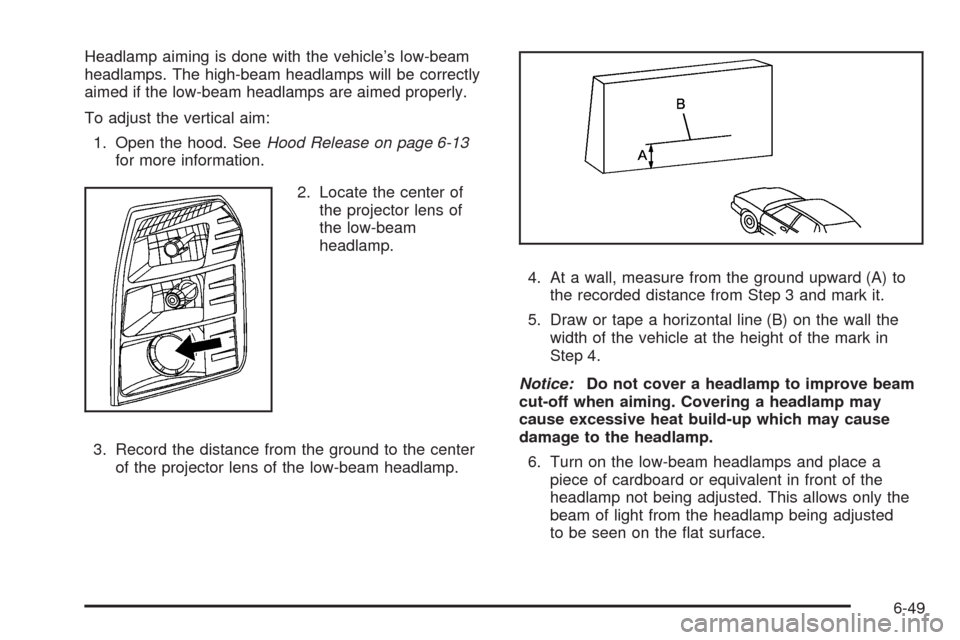
2. Locate the center of
the projector lens of
the low-beam
headlamp.
3. Record the distance from the ground to the center
of the projector lens of the low-beam headlamp.4. At a wall, measure from the ground upward (A) to
the recorded distance from Step 3 and mark it.
5. Draw or tape a horizontal line (B) on the wall the
width of the vehicle at the height of the mark in
Step 4.
Notice:Do not cover a headlamp to improve beam
cut-off when aiming. Covering a headlamp may
cause excessive heat build-up which may cause
damage to the headlamp.
6. Turn on the low-beam headlamps and place a
piece of cardboard or equivalent in front of the
headlamp not being adjusted. This allows only the
beam of light from the headlamp being adjusted
to be seen on the at surface.
6-49