Page 278 of 546
4. Select the route preference (Fastest, Shortest, or
Other). The system calculates and highlights the
route.
5. Select the Start Guidance screen button. The route
is now ready to be started.
See “Getting Started on Your Route” later in this
section for more information.
See “Adding Destinations to the Address Book”
later in this section.
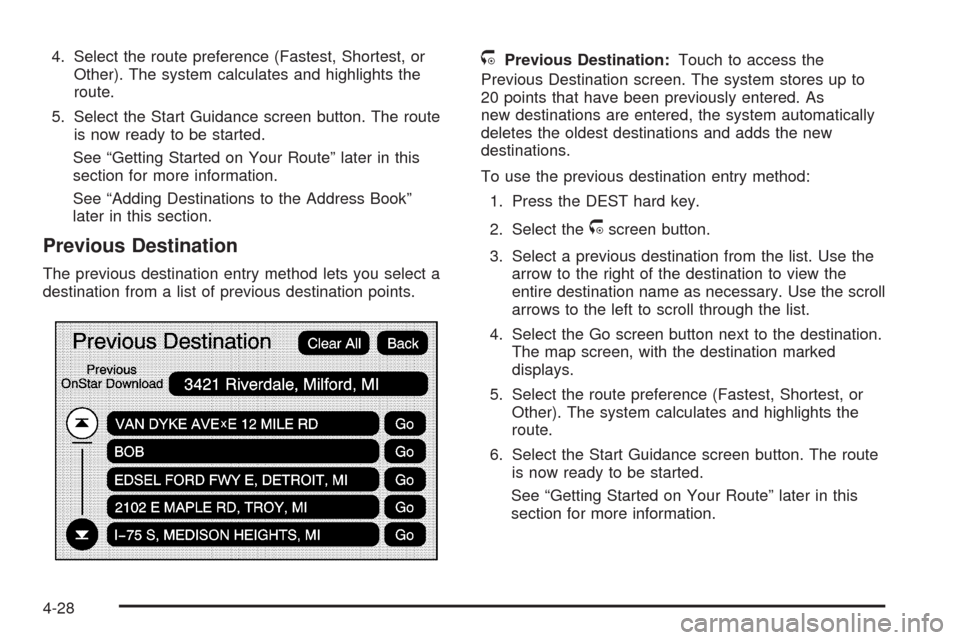
Previous Destination
The previous destination entry method lets you select a
destination from a list of previous destination points.
/Previous Destination:Touch to access the
Previous Destination screen. The system stores up to
20 points that have been previously entered. As
new destinations are entered, the system automatically
deletes the oldest destinations and adds the new
destinations.
To use the previous destination entry method:
1. Press the DEST hard key.
2. Select the
/screen button.
3. Select a previous destination from the list. Use the
arrow to the right of the destination to view the
entire destination name as necessary. Use the scroll
arrows to the left to scroll through the list.
4. Select the Go screen button next to the destination.
The map screen, with the destination marked
displays.
5. Select the route preference (Fastest, Shortest, or
Other). The system calculates and highlights the
route.
6. Select the Start Guidance screen button. The route
is now ready to be started.
See “Getting Started on Your Route” later in this
section for more information.
4-28
Page 279 of 546

From Map
This destination entry method allows you to select a
destination by scrolling on the map.
)From Map:Touch to enter the From Map
destination entry method.To use this destination entry method:
1. Press the DEST hard key.
2. Select the
)screen button. A map screen displays
with the scrolling symbol.
3. Use the
0/1screen buttons and touch on the
map to nd the area that you would like to select
as your destination.
Pressing/holding and dragging your nger on the
map activates fast scrolling.
4. Press/touch once on the area that you would like to
set as your destination.
The map screen displays the address information.
5. Select the Go screen button. The map screen, with
the destination marked displays.
6. Select the route preference (Fastest, Shortest, or
Other). The system calculates and highlights the
route.
7. Select the Start Guidance screen button. The route
is now ready to be started.
See “Getting Started on Your Route” later in this
section for more information.
4-29
Page 280 of 546

Map Coordinates
The coordinates destination entry method lets you
select a destination by entering latitude and longitude
coordinates.
Map Coordinates:Touch to access the Coordinates
Entry screen.To use the coordinates destination entry method:
1. Press the DEST hard key.
2. Select the From Map screen button.
3. Select the Map Coordinates screen button.
4. Select Latitude and select either N (north) or
S (south) to enter the direction of the latitude
coordinate. Enter the numeric portion of the latitude
coordinate.
5. Select Longitude and select either E (east) or
W (west) next to enter the direction of the longitude
coordinate. Enter the numeric portion of the
longitude coordinate.
6. Once both coordinates are entered, select the Go
screen button. The map screen, with the destination
marked displays.
7. Select the route preference (Fastest, Shortest, or
Other). The system calculates and highlights the
route.
8. Select the Start Guidance screen button. The route
is now ready to be started.
See “Getting Started on Your Route” later in this
section for more information.
4-30
Page 281 of 546

Preset Destination
The preset destination entry method lets you set a
destination by selecting from one of ve previously
stored destinations. Besides voice tagged destinations,
these are the only destinations available to set while
the vehicle is moving. If a destination is not set for one
of the screen buttons, the button is dimmed and not
available for use. See “Adding or Changing Preset
Destinations” later in this section for information on how
to add a preset destination.To use the preset destination entry method:
1. Press the DEST hard key.
2. Select the desired preset destination screen button.
The screen buttons are labeled with the name that
was selected for the destination when it was
stored. The map screen, with the destination
marked displays.
3. Select the route preference (Fastest, Shortest, or
Other). The system calculates and highlights the
route.
4. Select the Start Guidance screen button. The route
is now ready to be started.
See “Getting Started on Your Route” later in this
section for more information.
4-31
Page 288 of 546

To add a stopover:
1. Press the DEST hard key.
2. Select the Add Stopover screen button. This button
only appears if a route has been calculated.
3. Using the desired method of entering a destination,
enter the stopover. See “Destination” previously for
more information.
4. Select the route preference (Fastest, Shortest, or
Other). The system calculates and highlights the
route.
5. Select the Start Guidance screen button. The route
is now ready to be started.
6. To add the second and third stopovers, press the
DEST hard key, then select the Add screen button,
where the next waypoint should appear on the
route.
7. Select the route preference (Fastest, Shortest, or
Other). The system calculates and highlights the
route.
8. Select the Start Guidance screen button. The route
is now ready to be started.To delete a stopover from the current route:
1. Press the DEST hard key.
2. Select the Delete screen button for the desired
stopover to delete.
3. The system displays a pop-up conrmation
message. Touch Yes to delete the stopover; touch
No to cancel this operation.
4. Select the route preference (Fastest, Shortest, or
Other). The system calculates and highlights the
route.
5. Select the Start Guidance screen button. The route
is now ready to be started.
Suspend Guidance
Press this screen button, from the Route screen, to put
the current route on hold.
Resume Guidance
Press this screen button, from the Route screen, to
resume guidance on the current route.
Cancel Guidance
Press this screen button, from the Route screen, to
cancel the current route.
4-38
Page 293 of 546

4. Select the Add Voice Tag screen button.
5. The system will ask for you to state the name. You
will have four seconds to state the name. The
system will respond back with the name and prompt
you to repeat the name for conrmation.
To delete an address book entry:
1. Select the CONFIG hard key.
2. Select the NAV screen button.
3. Select the Edit/View Address Book screen button.
4. Select the address book entry to delete.
5. Press the Delete screen button to delete the
address book entry.
6. A conrmation pop-up will display. Select Ok to
delete; select Cancel to cancel the operation.
To delete the entire address book:
1. Select the CONFIG hard key.
2. Select the NAV screen button.
3. Select the Edit/View Address Book screen button.
4. A list of all the address book entries will display.
Press and hold the Clear All screen button.
5. A conrmation pop-up will display. Select Ok to
delete; select Cancel to cancel the operation.Map Database Information
Touch the Map Database Information screen button to
view the coverage areas of the map DVD.
Off-Road Mode
To turn the Off-road mode on or off, do the following:
1. Press the CONFIG hard key.
2. Press the Nav screen button.
3. Press the Off-Road mode screen button. The button
will be highlighted when the feature is on.
4-43
Page 295 of 546

Traffic information is delivered to the vehicle by the
XM™ Radio satellites. XM NavTraffic™ makes it
possible for the navigation system to provide
continuously updated traffic information personalized for
a driver’s needs.
XM NavTraffic™ currently broadcasts the traffic
information for many markets nationally, and the service
may be available in more cities in the future. Visit
xmnavtraffic.com for more details on local coverage.
A service fee is required in order to receive the
XM NavTraffic™ service.
Turning XM NavTraffic™ On and Off
To turn traffic on or off:
1. Press the CONFIG hard key, then press the
CONFIG key repeatedly until Nav is selected
or press the Nav screen button.
2. Touch the Traffic Options button.
3. Touch the Traffic button. This button is highlighted
when it is active.
Selecting Alert for Approaching Traffic Events
enables the system to show a pop-up screen that
noties of possible traffic issues ahead.
When this feature is highlighted, while traveling on
a route, accidents located on the route are
indicated and can be avoided.
Traffic Icon
The Traffic Icon appears on the Traffic Tab, next to the
word Traffic, when traffic is found in the local area.
The Traffic Icon has three different condition displays.
These are:
Condition Traffic Status Icon
No XM NavTraffic™
subscription.
No Traffic is found in
the local area.
The Traffic Feature is
turned off.
4-45
Page 298 of 546

Traffic Flow Status— This touch screen button is used
to enable or disable the green, yellow, red and
orange arrows shown beside the roads and used to
show the traffic ow or extent of a traffic event.
Black indicates a closed road segment
Red indicates signicantly impaired traffic ow with
average speed of less than 25 mph.
Yellow indicates slightly impaired traffic ow with
average speed between 25 and 45 mph.
Green indicates normal traffic ow with average
speed above 45 mph.
Orange indicates construction.
Traffic ow data arrows display on the map when scaled
up to eight miles.
Closed Road, Traffic Delays, Incidents, and
Advisories — These four touch screen buttons are used
to select the traffic event ICONS that appear on the
map screens.
Alert for Approaching Traffic Events:WhenOn,ifan
approaching traffic event is within the alert range, one
of two traffic alert pop-up screens display:
With no route planned, while on expressways,
Approaching Traffic Event without Avoid screen
displays.
With route planned, Traffic Event on Route screen
displays.
If the Alert for Approaching Traffic Events is Off, the
alert pop-up screen does not display.
4-48