2009 BUICK LUCERNE panel
[x] Cancel search: panelPage 90 of 436

Doors and Locks
Door Locks
{CAUTION:
Unlocked doors can be dangerous.
Passengers, especially children, can easily
open the doors and fall out of a moving vehicle.
When a door is locked, the handle will not open
it. You increase the chance of being thrown out
of the vehicle in a crash if the doors are not
locked. So, wear safety belts properly and lock
the doors whenever you drive.
Young children who get into unlocked vehicles
may be unable to get out. A child can be
overcome by extreme heat and can suffer
permanent injuries or even death from heat
stroke. Always lock your vehicle whenever you
leave it.
Outsiders can easily enter through an unlocked
door when you slow down or stop your vehicle.
Locking your doors can help prevent this from
happening.There are several ways to lock and unlock your vehicle.
From the outside, use either the key or the remote
keyless entry (RKE) transmitter.
From the inside, use the power door lock switches or
manual lock knobs. The manual lock knobs are located
at the top of the door panel near the window.
Push the manual lock knob down to lock the door.
To unlock the door, pull up on the knob.
Power Door Locks
On vehicles with power door locks the switches are
located on the front doors.
"(Unlock):Press to unlock the doors.
Q(Lock):Remove the key from the ignition and press
to lock the doors.
2-10
Page 93 of 436

Trunk
{CAUTION:
Exhaust gases may enter the vehicle if it is driven
with the liftgate, trunk/hatch open, or with any
objects that pass through the seal between the
body and the trunk/hatch or liftgate. Engine
exhaust contains Carbon Monoxide (CO) which
cannot be seen or smelled. It can cause
unconsciousness and even death.
If the vehicle must be driven with the liftgate, or
trunk/hatch open:
Close all of the windows
Fully open the air outlets on or under the
instrument panel
Adjust the Climate Control system to a setting
that brings in only outside air and set the fan
speed to the highest setting. See Climate
Control System in the Index.
If the vehicle is equipped with a power liftgate,
disable the power liftgate function.
For more information about carbon monoxide, see
Engine ExhaustEngine Exhaust on page 2-32.
Remote Trunk Release
On vehicles with this
feature, the remote trunk
release button
Fis
located on the instrument
panel. SeeInstrument
Panel Overview on
page 3-4.
Press the button to open the trunk. To use this feature,
your vehicle must be in (P) Park or (N) Neutral.
You can also press the remote trunk release button on
the Remote Keyless Entry (RKE) transmitter to open
the trunk. SeeRemote Keyless Entry (RKE) System
Operation on page 2-5.
2-13
Page 99 of 436

PASS-Key®III+ Electronic
Immobilizer Operation
Your vehicle is equipped with PASS-Key®III+
(Personalized Automotive Security System)
theft-deterrent system. PASS-Key
®III+ is a passive
theft-deterrent system.
The system is automatically armed when the key is
removed from the ignition.
You do not have to manually arm or disarm the system.
The security light will come on if there is a problem
with arming or disarming the theft-deterrent system.
When the PASS-Key
®III+ system senses that someone
is using the wrong key, it prevents the vehicle from
starting. Anyone using a trial-and-error method to start
the vehicle will be discouraged because of the high
number of electrical key codes.
When trying to start the vehicle if the engine does not
start and the security light on the instrument panel
cluster comes on, there may be a problem with your
theft-deterrent system. Turn the ignition off and try again.If the engine still does not start, and the key appears to
be not damaged, try another ignition key. At this time, you
may also want to check the fuse, seeFuses and Circuit
Breakers on page 5-101. If the engine still does not start
with the other key, your vehicle needs service. If your
vehicle does start, the rst key may be faulty. See your
dealer/retailer who can service the PASS-Key
®III+ to
have a new key made. In an emergency, contact
Roadside Assistance. SeeRoadside Assistance
Program on page 7-7.
It is possible for the PASS-Key
®III+ decoder to “learn”
the transponder value of a new or replacement key.
Up to 10 keys may be programmed for the vehicle.
The following procedure is for programming additional
keys only. If all the currently programmed keys are lost
or do not operate, you must see your dealer/retailer or a
locksmith who can service PASS-Key
®III+ to have keys
made and programmed to the system.
See your dealer/retailer or a locksmith who can service
PASS-Key
®III+ to get a new key blank that is cut
exactly as the ignition key that operates the system.
2-19
Page 102 of 436

Retained Accessory Power (RAP)
The following accessories can be used for up to
10 minutes after the engine is turned off.
Audio System
Audio Steering Wheel (if equipped)
Clock
Power Windows
Sunroof (if equipped)
Power to these accessories works up to 10 minutes or
until the driver door is opened.The instrument panel cluster lights stay on for a
few seconds, then will go out. Once the driver door
is opened, the power shuts off to these accessories.
The vehicle has a feature designed to protect the battery
against drainage. For more information seeInadvertent
Power Battery Saver on page 3-19andElectric
Power Management on page 3-19.
Starting the Engine
Move the shift lever to P (Park) or N (Neutral). The
engine will not start in any other position. To restart
the engine when the vehicle is already moving, use
N (Neutral) only.
Notice:Do not try to shift to P (Park) if the vehicle
is moving. If you do, you could damage the
transmission. Shift to P (Park) only when the
vehicle is stopped.
2-22
Page 107 of 436

2 (Second):This position reduces vehicle speed even
more than 3 (Third) without using the brakes. You
can use 2 (Second) on hills. It can help control vehicle
speed as you go down steep mountain roads, but
then you would also want to use the brakes off and on.
Notice:Driving in 2 (Second) for more than
25 miles (40 km) or at speeds over 55 mph (90 km/h)
may damage the transmission. Also, shifting into
2 (Second) at speeds above 65 mph (105 km/h) can
cause damage. Drive in 3 (Third) or D (Drive)
instead of 2 (Second).
1 (First):This position reduces vehicle speed even
more than 2 (Second) without using the brakes. You can
use it on very steep hills, or in deep snow or mud. If the
shift lever is put in 1 (First) while going forward, the
transmission will not shift into rst gear until the vehicle
is going slowly enough.
Notice:Spinning the tires or holding the vehicle in
one place on a hill using only the accelerator pedal
may damage the transmission. The repair will not be
covered by the vehicle warranty. If you are stuck, do
not spin the tires. When stopping on a hill, use the
brakes to hold the vehicle in place.Parking Brake
The parking brake pedal is
located to the left of the
regular brake pedal,
near the driver door.
To set the parking brake, hold the regular brake pedal
down, then push the parking brake pedal down.
If the ignition is on, the brake system warning light on
the instrument panel cluster should come on. If it
does not, you need to have the vehicle serviced.
2-27
Page 125 of 436
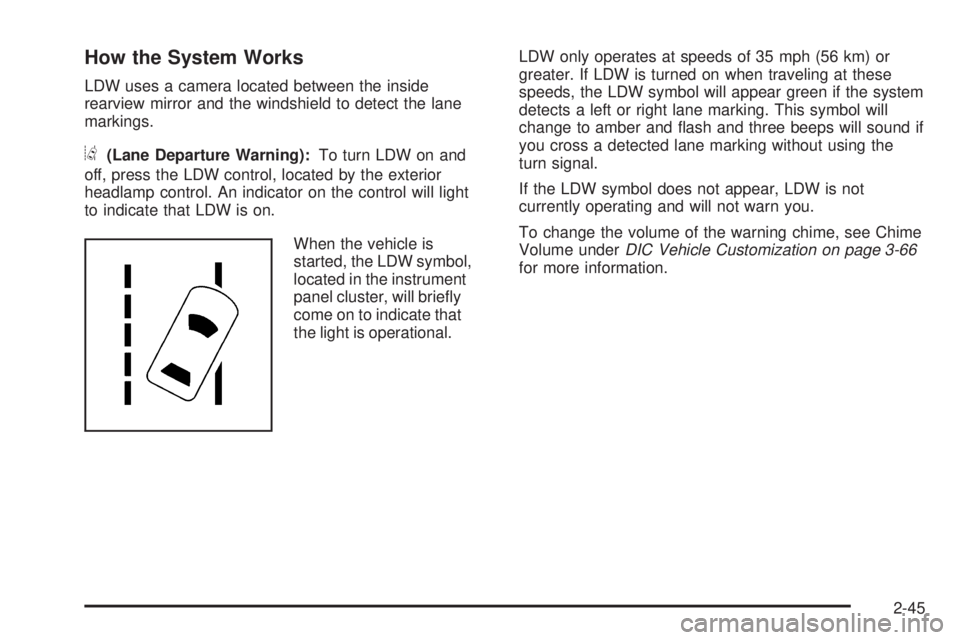
How the System Works
LDW uses a camera located between the inside
rearview mirror and the windshield to detect the lane
markings.
@(Lane Departure Warning):To turn LDW on and
off, press the LDW control, located by the exterior
headlamp control. An indicator on the control will light
to indicate that LDW is on.
When the vehicle is
started, the LDW symbol,
located in the instrument
panel cluster, will briey
come on to indicate that
the light is operational.LDW only operates at speeds of 35 mph (56 km) or
greater. If LDW is turned on when traveling at these
speeds, the LDW symbol will appear green if the system
detects a left or right lane marking. This symbol will
change to amber and ash and three beeps will sound if
you cross a detected lane marking without using the
turn signal.
If the LDW symbol does not appear, LDW is not
currently operating and will not warn you.
To change the volume of the warning chime, see Chime
Volume underDIC Vehicle Customization on page 3-66
for more information.
2-45
Page 134 of 436

The garage door opener receiver (motor head unit)
could also have a row of dip switches that can be
used when programming the Universal Home
Remote. If the total number of switches on the motor
head and hand held transmitter are different, or if the
dip switch settings are different, use the dip switch
settings on the motor head unit to program the
Universal Home Remote. The motor head dip switch
settings can also be used when the original hand
held transmitter is not available.
The panel of switches might not appear exactly as
they do in the examples above, but they should
be similar.
The switch positions on the hand-held transmitter
could be labeled, as follows:
A switch in the up position could be labeled as
“Up,” “+,” or “On.”
A switch in the down position could be labeled
as “Down,” “−,” or “Off.”
A switch in the middle position could be labeled
as “Middle,” “0,” or “Neutral.” Example of Eight Dip Switches with Two Positions
Example of Eight Dip Switches with Three Positions
2-54
Page 139 of 436

Instrument Panel Overview...............................3-4
Hazard Warning Flashers................................3-6
Horn .............................................................3-6
Tilt Wheel.....................................................3-6
Power Tilt Wheel and Telescopic Steering
Column......................................................3-7
Heated Steering Wheel...................................3-7
Turn Signal/Multifunction Lever.........................3-8
Turn and Lane-Change Signals........................3-8
Headlamp High/Low-Beam Changer..................3-9
Flash-to-Pass.................................................3-9
Windshield Wipers..........................................3-9
Rainsense™ II Wipers...................................3-10
Windshield Washer.......................................3-11
Cruise Control..............................................3-12
Exterior Lamps.............................................3-15
Wiper Activated Headlamps............................3-16
Headlamps on Reminder................................3-16
Daytime Running Lamps (DRL).......................3-16
Fog Lamps ..................................................3-17
Cornering Lamps..........................................3-17
Exterior Lighting Battery Saver........................3-17
Instrument Panel Brightness...........................3-17
Courtesy Lamps...........................................3-18
Entry Lighting...............................................3-18
Delayed Entry Lighting...................................3-18
Theater Dimming..........................................3-18Delayed Exit Lighting.....................................3-18
Perimeter Lighting.........................................3-18
Front Reading Lamps....................................3-18
Electric Power Management...........................3-19
Inadvertent Power Battery Saver.....................3-19
Battery Run-Down Protection..........................3-20
Accessory Power Outlet(s).............................3-20
Ashtray(s)....................................................3-21
Climate Controls............................................3-21
Climate Control System.................................3-21
Dual Automatic Climate Control System...........3-24
Outlet Adjustment.........................................3-30
Passenger Compartment Air Filter...................3-30
Warning Lights, Gages, and Indicators............3-32
Instrument Panel Cluster................................3-33
Speedometer and Odometer...........................3-34
Trip Odometer..............................................3-34
Tachometer.................................................3-34
Safety Belt Reminders...................................3-35
Airbag Readiness Light..................................3-36
Passenger Airbag Status Indicator...................3-37
Charging System Light..................................3-38
Brake System Warning Light..........................3-38
Antilock Brake System (ABS) Warning Light.....3-39
Traction Control System (TCS) Warning Light . . .3-40
StabiliTrak
®Indicator Light.............................3-41
Section 3 Instrument Panel
3-1