2009 BMW Z4 SDRIVE35I phone
[x] Cancel search: phonePage 181 of 248
179
Entertainment
Reference
At a glance
Controls
Driving tips
Communications
Navigation
Mobility
TeleService*
TeleService supports commu nication with your
BMW center.
> Data on the vehicle's service requirements
can be sent directly to the BMW center. In
this way, the BMW center can plan its work
in advance. This shortens the duration of
the service appointment.
> In the event of a breakdown, data on the
vehicle's condition can be sent directly to
Roadside Assistance.
> The offer varies by country.
> Connection costs may ensue.
> Services may be restricted abroad.
Requirements
>BMW Assist is activated.
> Wireless reception is available.
> The engine is running.
Concierge service*
When you call the BMW Assist Concierge, you
can obtain information about, for example, res-
taurants, emergency pharmacy services, gas
stations or hotels, as well as receive the corre-
sponding telephone numbers and addresses.
You can then dial a phone number directly or
use an address for destination guidance
*.
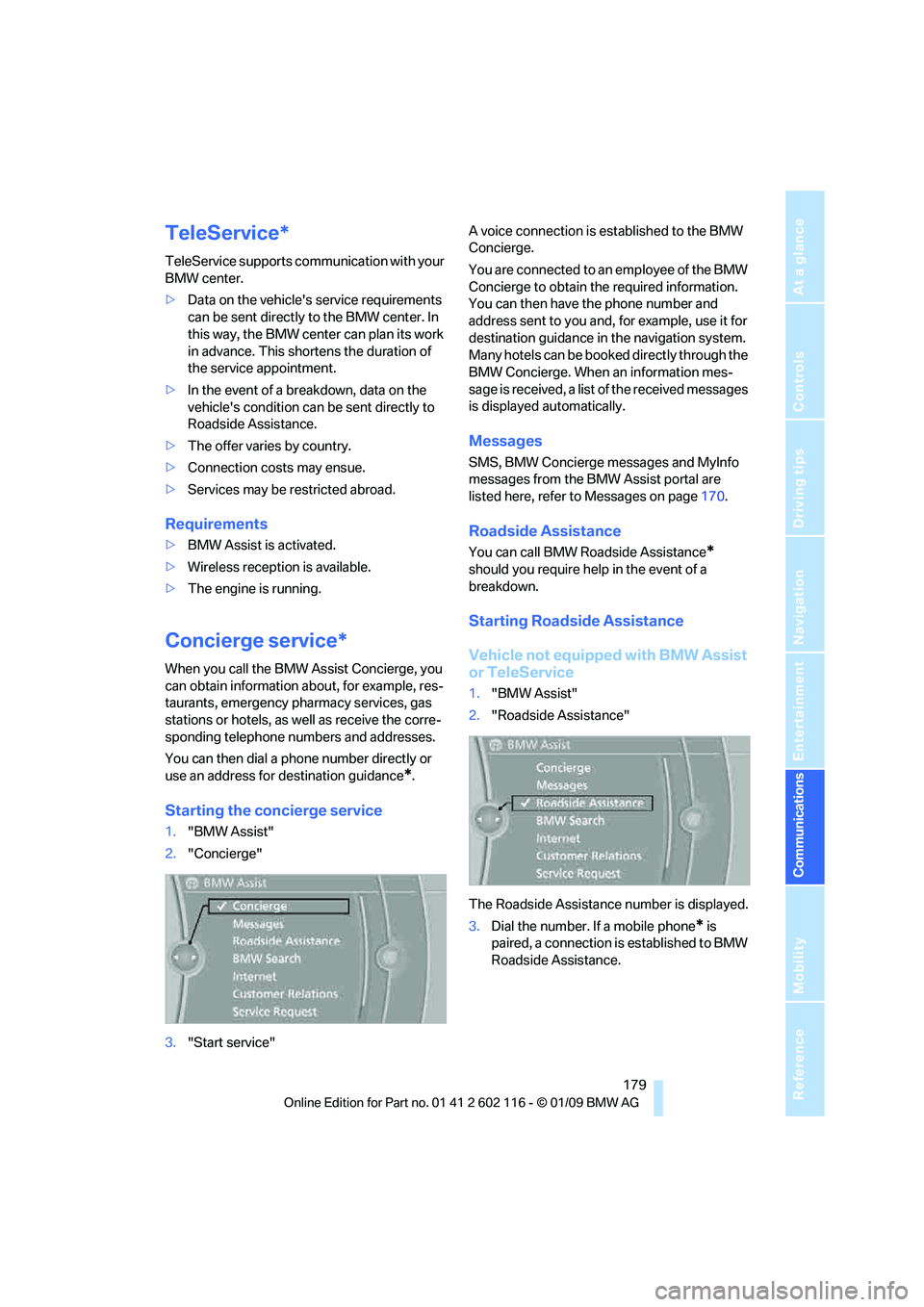
Starting the concierge service
1."BMW Assist"
2. "Concierge"
3. "Start service" A voice connection is established to the BMW
Concierge.
You are connected to an employee of the BMW
Concierge to obtain the required information.
You can then have the phone number and
address sent to you and, for example, use it for
destination guidance in
the navigation system.
Many hotels can be book ed directly through the
BMW Concierge. When an information mes-
sage is received, a list of the received messages
is displayed automatically.
Messages
SMS, BMW Concierge messages and MyInfo
messages from the BMW Assist portal are
listed here, refer to Messages on page 170.
Roadside Assistance
You can call BMW Roadside Assistance*
should you require help in the event of a
breakdown.
Starting Roadside Assistance
Vehicle not equipped with BMW Assist
or TeleService
1. "BMW Assist"
2. "Roadside Assistance"
The Roadside Assistance number is displayed.
3. Dial the number. If a mobile phone
* is
paired, a connection is established to BMW
Roadside Assistance.
Page 185 of 248
183
Entertainment
Reference
At a glance
Controls
Driving tips
Communications
Navigation
Mobility
3. "Delete bookmark"or" Delete all book-
marks"
Defining a bookmark as the start page
1. Select the symbol.
2. Open "Options".
3. "Set as home URL"
Settings
Suppressing cookies
1.Open "Options".
2. "Suppress cookies"
Suppressing pop-ups
1.Open "Options".
2. "Suppress pop-ups"
Suppressing safety warnings
1.Open "Options".
2. "Block HTTPS pop-ups"
Activating TeleService*
If the services are not displayed, they may need
to be activated.
1."BMW Assist"
2. "Activate TeleService"
Customer Relations
Contact Customer Relations for information on
all aspects of your vehicle.
Vehicle equipped with BMW Assist or
TeleService
1."BMW Assist"
2. "Customer Relations"
3. "Start service"
A voice connection is established to Customer
Relations.
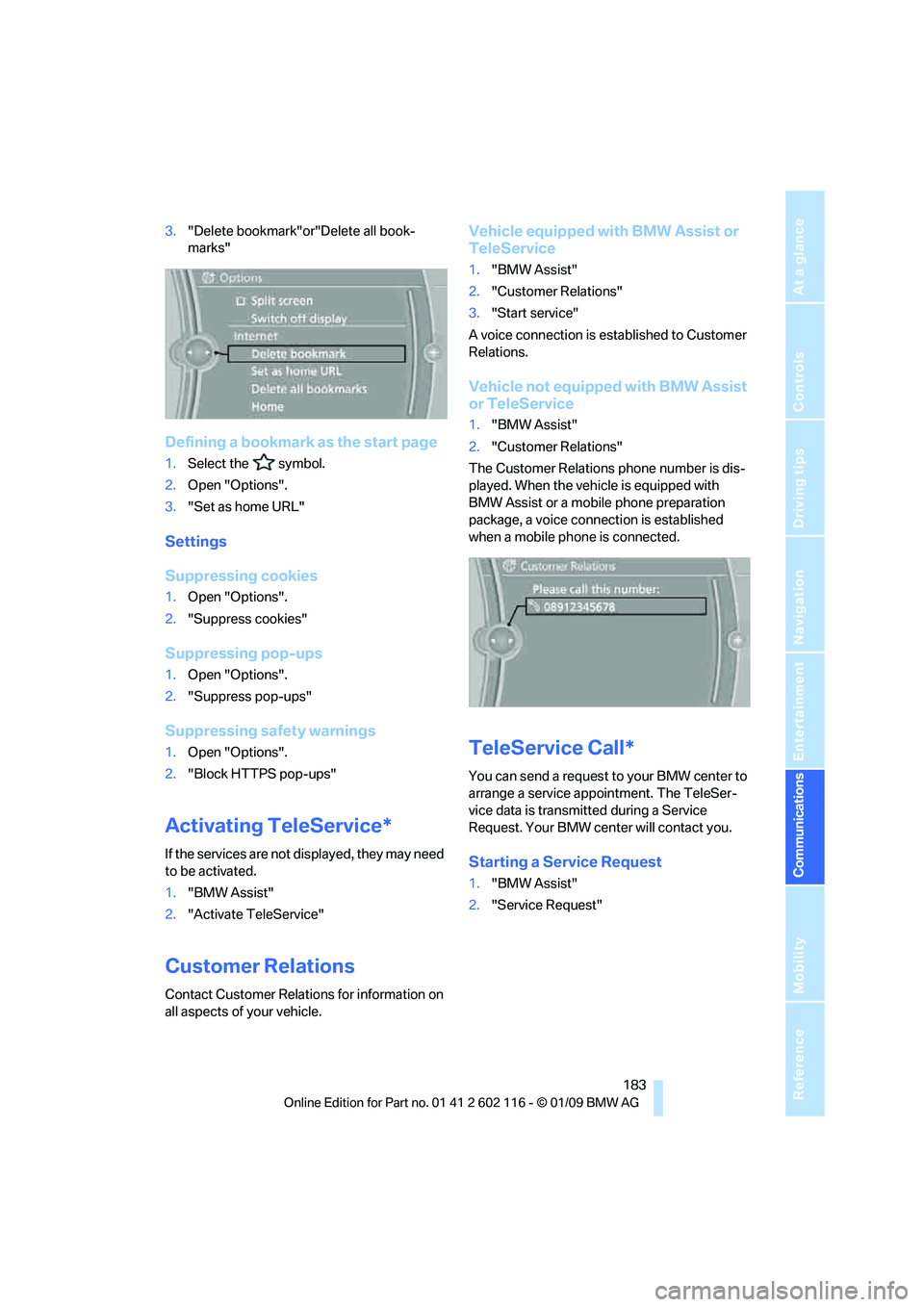
Vehicle not equipped with BMW Assist
or TeleService
1. "BMW Assist"
2. "Customer Relations"
The Customer Relations phone number is dis-
played. When the vehicle is equipped with
BMW Assist or a mobile phone preparation
package, a voice connection is established
when a mobile phone is connected.
TeleService Call*
You can send a request to your BMW center to
arrange a service appointment. The TeleSer-
vice data is transmitted during a Service
Request. Your BMW center will contact you.
Starting a Service Request
1. "BMW Assist"
2. "Service Request"
Page 206 of 248

Care
204
Care
Care products
Regular cleaning and care contributes signifi-
cantly to the value retention of your BMW.
BMW recommends cleaning and caring for your
vehicle with products that are approved by
BMW for this purpose.
Your BMW center will be happy to advise you on
the products and services available for cleaning
and caring for your BMW.
Original BMW CareProducts have been
material tested, labo ratory checked and
proven in the field, and offer optimal care and
protection for your vehicle. <
Do not use cleaners that contain alcohol
or solvents as these may result in
damage. <
Cleaning agents can contain substances
that are dangerous or hazardous to your
health. Therefore, follow the warning and safety
instructions on the packaging. When cleaning
inside the vehicle, always open the doors or
windows of the vehicle. In enclosed areas, pro-
vide for sufficient ventilation. Only use products
designed for cleaning vehicles. <
Exterior care
Washing the vehicle
Especially during the winter months,
ensure that the vehicle is washed more
frequently. Heavy soiling and road salt can lead
to vehicle damage. <
After washing the vehicle, apply the
brakes briefly to dry them, otherwise
water can reduce braking efficiency over the
short term and brake discs can corrode. <
Automatic car washes
Preference should be given to cloth car washes.
Do not use high-pressure car washes,
otherwise water may drip into the vehicle
around the windows. <
Before driving into a car wash, ensure that it is
suitable for your BMW. Check the following:
> Dimensions of your vehicle, refer to
page 221.
> If necessary: fold in the exterior mirrors,
refer to page 45.
> Maximum permissible tire width.
Avoid car washes with guide rail heights
over 4 in/10 cm, otherwise there is danger
of damaging chassis parts. <
Preparations before driv ing into an automatic
car wash:
> Unscrew the rod antenna
*
>Deactivate the rain sensor* to avoid unin-
tentional activation of the wipers.
> Remove additional attachments, e.g.
spoiler or telephone an tennas, if there is a
possibility that they could be damaged.
Automatic transmission
Before driving into an automatic car wash, per-
form the following steps to ensure that the vehi-
cle can roll:
1. Insert the remote cont rol, even with conve-
nient access, into the ignition lock.
2. Move the selector lever to position N.
3. Release the parking brake.
4. Switch off the engine.
5. Leave the remote control in the ignition lock
so that the vehicle can roll.
Page 215 of 248

Mobility
213Reference
At a glance
Controls
Driving tips
Communications
Navigation
Entertainment
Giving and receiving assistance
Emergency Request*
Conditions for an Emergency Request:
>BMW Assist is activated. Activating
BMW Assist, refer to page 180.
> Radio readiness is on.
> The BMW Assist system is logged on to a
wireless network.
> The Emergency Request system is
operable.
> Equipment version with full preparation
package mobile phone. This equipment
makes it possible to send an Emergency
Request even if no mobile phone is paired
with the vehicle.
Once your service contract for BMW Assist
expires, the BMW Assist system can be deacti-
vated by a BMW center without you having to
visit a workshop. Once the BMW Assist system
has been deactivated, Emergency Requests
are not possible. The BMW Assist system can
be reactivated by a BMW center after a new
contract has been signed.
Sending an Emergency Request
1. Briefly press the cover flap to open.
2. Press the SOS button until the LED in the
button lights up.
As soon as the voice connection to the BMW
Assist Response Center has been established,
the LED flashes.
Once the BMW Assist Response Center has
received your Emergency Request, the BMW Assist Response Center contacts you
and takes further steps to help you. Even if you
are unable to respond, the BMW Assist
Response Center will be ab
le to initiate further
steps to assist you under certain conditions.
If the circumstances allo w this, remain in the
vehicle until the connection has been estab-
lished. You will then be able to provide a
detailed description of the situation.
In a BMW Assist Emerge ncy Request, data for
determining the necessary rescue measures
are transmitted to the BMW Assist Response
Center, e.g. the current po sition of your vehicle,
if it can be determined.
If the LED is flashing but the BMW Assist
Response Center cannot be heard over the
hands-free system, it is possible that the
hands-free system is malfunctioning. You may
still be heard by the BMW Assist Response
Center, however.
Under certain conditions, an Emergency
Request is sent automati cally immediately after
a severe accident. Th is Automatic Collision
Notification is not affected by the button being
pressed.
For technical reasons, the Emergency
Request service cannot be guaranteed
for the most unfavorable conditions. <
Roadside Assistance
The BMW Roadside Assistance is there to
assist you around the clock in the event of a
breakdown, including on weekends and public
holidays.
The phone numbers of the Roadside Assis-
tance in your home country can be found in the
Contact brochure.
In vehicles equipped with BMW Assist, you can
establish contact with BMW Roadside Assis-
tance for breakdown assistance directly via
iDrive, refer to page184.
Page 225 of 248
Reference 223
At a glance
Controls
Driving tips
Communications
Navigation
Entertainment
Mobility
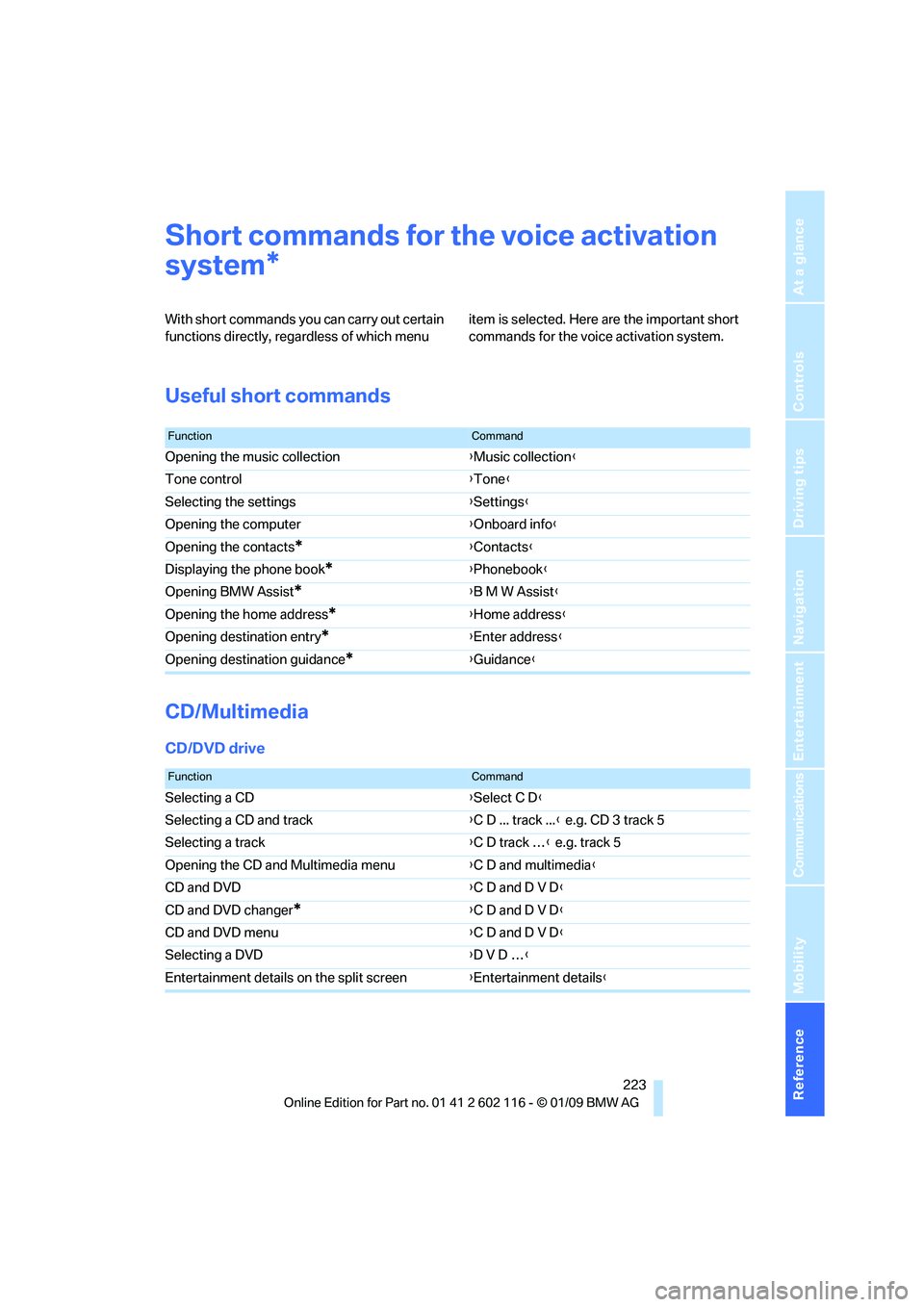
Short commands for the voice activation
system
With short commands you can carry out certain
functions directly, rega rdless of which menu item is selected. Here are the important short
commands for the voice activation system.
Useful short commands
CD/Multimedia
CD/DVD drive
*
FunctionCommand
Opening the music collection
{Music collection }
Tone control {Tone }
Selecting the settings {Settings }
Opening the computer {Onboard info }
Opening the contacts
*{ Contacts }
Displaying the phone book
*{ Phonebook }
Opening BMW Assist
*{ B M W Assist }
Opening the home address
*{ Home address }
Opening destination entry
*{ Enter address }
Opening destination guidance
*{ Guidance}
FunctionCommand
Selecting a CD {Select C D }
Selecting a CD and track {C D ... track ... } e.g. CD 3 track 5
Selecting a track {C D track … } e.g. track 5
Opening the CD and Multimedia menu {C D and multimedia }
CD and DVD {C D and D V D }
CD and DVD changer
*{ C D and D V D }
CD and DVD menu {C D and D V D }
Selecting a DVD {D V D … }
Entertainment details on the split screen {Entertainment details }
Page 227 of 248
Reference 225
At a glance
Controls
Driving tips
Communications
Navigation
Entertainment
Mobility
Satellite radio
Presets
Telephone
Navigation
General information
FunctionCommand
Calling up the satellite radio{Satellite radio}
Switching on the satellite radio {Satellite radio on }
Selecting a satellite radio channel {Satellite radio channel } e.g. channel 2
FunctionCommand
Calling up the stored stations {Presets }
Choosing a stored station {Select preset }
Selecting a stored station {Preset … } e.g. stored station 2
FunctionCommand
Opening the Telephone menu {Telephone }
Displaying the phone book {Phonebook }
Redialing {Redial }
Displaying accepted calls {Received calls }
Dialing a phone number {Dial number }
Displaying the list of messages {Messages}
Displaying Bluetooth {Bluetooth }
FunctionCommand
Navigation menu {Navigation }
Opening destination entry {Enter address }
Opening destination guidance {Guidance}
Starting destination guidance {Start guidance }
Ending destination guidance {Stop guidance }
Opening the home address {Home address }
Opening the route criteria {Route preference }
Opening the route {Route information }
Switching on the voice instructions {Switch on voice instructions }
Repeating a voice instruction {Repeat voice instructions }
Page 232 of 248

Everything from A to Z
230
Everything from A to Z
Index
"..." Identifies Control Display texts used to select
individual functions and
refers you to the page where
these texts can be found.
A
ABS Antilock Brake System 78
Acceleration assistant, refer to Launch Control 58
Accident, refer to Sending an Emergency Request 213
Activated-charcoal filter for
automatic climate
control 97
Adaptive Head Light 89
Additional connection of the music player in the mobile
phone 158
Additives
– coolant 200
Address for navigation,
entering 119
Adjusting temperature inside the car, refer to Air
conditioner 93
Adjusting temperature inside the car, refer to Automatic
climate control 95
Adjusting the thigh support 42
Adjusting the tone during audio operation, refer to
Tone control 138
Airbags 85
– indicator/warning lamp 87
– sitting safely 41
Air conditioner 92 Air conditioning mode
– air conditioner
93
– automatic climate control 95
– ventilation 94,97
Air distribution
– automatic 96
– individual 93
– manual 93
Air flow rate 93,96
Airing, refer to Ventilation 94
Airing, refer to Ventilation 94,97
Air outlets, refer to Air vents 92
Air pressure, refer to Tire
inflation pressure 190
Air recirculation, refer to Recirculated-air
mode 93,97
Air supply
– air conditioner 93
– automatic climate control 95
– ventilation 94,97
Air vents 92
AKI, refer to Fuel specifications 189
Alarm system 33
– avoiding unintentional alarms 34
–
interior motion sensor 34
– switching off an alarm 34
– tilt alarm sensor 34
Albums of music
collection 155
All-season tires, refer to Winter tires 196
AM, waveband 141
Ambient air, refer to Recirculated-air
mode 93,97
Antenna for mobile phone 164Antifreeze
– coolant
200
– washer fluid 61
Antilock Brake System ABS 78
Anti-theft alarm system, refer
to Alarm system 33
Anti-theft system 29
– for lug bolts, refer to Lug bolt
lock 211
Approved axle loads, refer to Weights 222
Approved gross vehicle weight, refer to Weights 222
Armrest, refer to Center
armrest 102
Arrival time, refer to Computer 66
Ashtray
– front 104
Assistance systems, refer to
Driving stability control
systems 78
AUC automatic recirculated-
air control 97
Audio 138
– controls 138
– switching on/off 138
– tone control 138
– volume 138
Audio device, external 102
Automatic
– air distribution 96
– air flow rate 96
– cruise control 61
– headlamp control 88
Automatic car washes 204
Automatic climate control 92
– automatic air distribution 96
Automatic curb monitor 46
Automatic recirculated-air control AUC 97
Page 233 of 248
Reference 231
At a glance
Controls
Driving tips
Communications
Navigation
Entertainment
Mobility
Automatic Service Request 184
Automatic transmission with Steptronic 53
– interlock 53,54
– overriding selector lever lock 55
– shiftlock, refer to Changing
selector lever position 54
– sport program 54
– towing 215
– tow-starting 215
AUTO program for automatic
climate control 96
AUX-IN
– port 102
AUX-IN port 158
Average fuel consumption 66
– setting the units 68
Average speed 66
Avoiding unintentional alarms 34
Axle loads, refer to Weights 222
B
Backrest contour, refer to
Lumbar support 43
Backrests, refer to Seat adjustment 42
Backrest width adjustment 43
Backup lamps
– replacing bulb 210
Backup lamps, refer to Tail lamps 210
Band-aids, refer to First-aid
pouch 214
Bar, refer to Towing methods 216
Base plate for telephone or mobile phone
– refer to Snap-in adapter 174
– refer to Snap-in adapter in the center armrest storage
compartment 102
Bass, tone setting 138Battery
212
– charging 212
– disposal 36,212
– jump starting 214
– remote control 28
– temporary power failure 212
Battery for mobile phone 175
Battery renewal
– remote control 36
– remote control for vehicle 36
Being towed 216
Belts, refer to Safety belts 44
Belt tensioner, refer to Safety
belts 44
Beverage holders, refer to Cup holders 103
Blower, refer to Air flow rate 93,96
Bluetooth, activating/
deactivating 166
Bluetooth, refer to separate Owner's Manual
BMW
– car shampoo 207
BMW Assist, activating 180
BMW Assist 178
BMW center 184
BMW Homepage 4
BMW Maintenance System 202
BMW Search 180
BMW webpage 4
Bottle holders, refer to Cup holders 103
Brake
– parking brake 52
Brake assist, refer to Dynamic
Brake Control DBC 78
Brake fluid, refer to Service requirements 69
Brake lamps
– replacing bulb 210
Br
ake pads 110
– breaking in 110
Brake rotors 112
– brakes 110
– breaking in 110 Brakes
– ABS
78
– BMW Maintenance System 202
– breaking in 110
– service requirements 69
Brakes, refer to Braking safely 112
Brake system 110
– BMW Maintenance System 202
– breaking in 110
– disc brakes 112
Breakdown services, refer to Roadside Assistance 213
Breaking in the clutch 110
Breaking in the differential, refer to Engine and
differential 110
Break-in period 110
Brightness of Control Display 76
Bulb changing, refer to Lamps and bulbs 208
Button for starting the engine,
refer to Start/stop button 50
Buttons on the steering wheel 11
Buttons on the steering wheel 11
C
California Proposition 65
warning 6
Call
– accepting 167
– ending 168
– rejecting 168
Calling, refer to Phone
numbers, dialing 168
Can holders, refer to Cup holders 103
Capacities 222
Capacity of the cargo bay 222
Car battery, refer to Vehicle
battery 212
Car care, refer to Care 204