2009 BMW M3 SEDAN CD player
[x] Cancel search: CD playerPage 152 of 246

CD player and CD changer
150 DVDs cannot be played or can only be played to
a limited extent.
Care
Clean the reflective signal side of CDs/DVDs as
needed by wiping it with a commercially avail-
able cleaning tissue in straight lines from the
center of the disc outwards.
ba8_E90M3_cic.book Seite 150 Dienstag, 19. August 2008 11:51 11
Page 153 of 246
Navigation
Entertainment
Driving tips
151Reference
At a glance
Controls
Communications
Mobility
Music collection
Storing music
Music tracks from CDs and DVDs can be stored
in the music collection in the vehicle and played
from there.
>Audio CD: tracks are converted into a com-
pressed audio format when they are stored.
The CD is stored in the vehicle as an album.
If available, information on the album, such
as the artist, is stored as well.
>CDs with compressed audio files: the entire
CD is stored in the vehicle as an album.
After storing, the tracks and directories can
be deleted individually. Files are only stored
in the WMA, MP3, and AAC formats. Tracks
with DRM copy protection can be stored in
the vehicle but cannot be played back.
Storing files from CDs/DVDs
1.Insert the CD into the CD player.
2."CD/DVD"
3. Select the symbol for the CD/DVD
player.
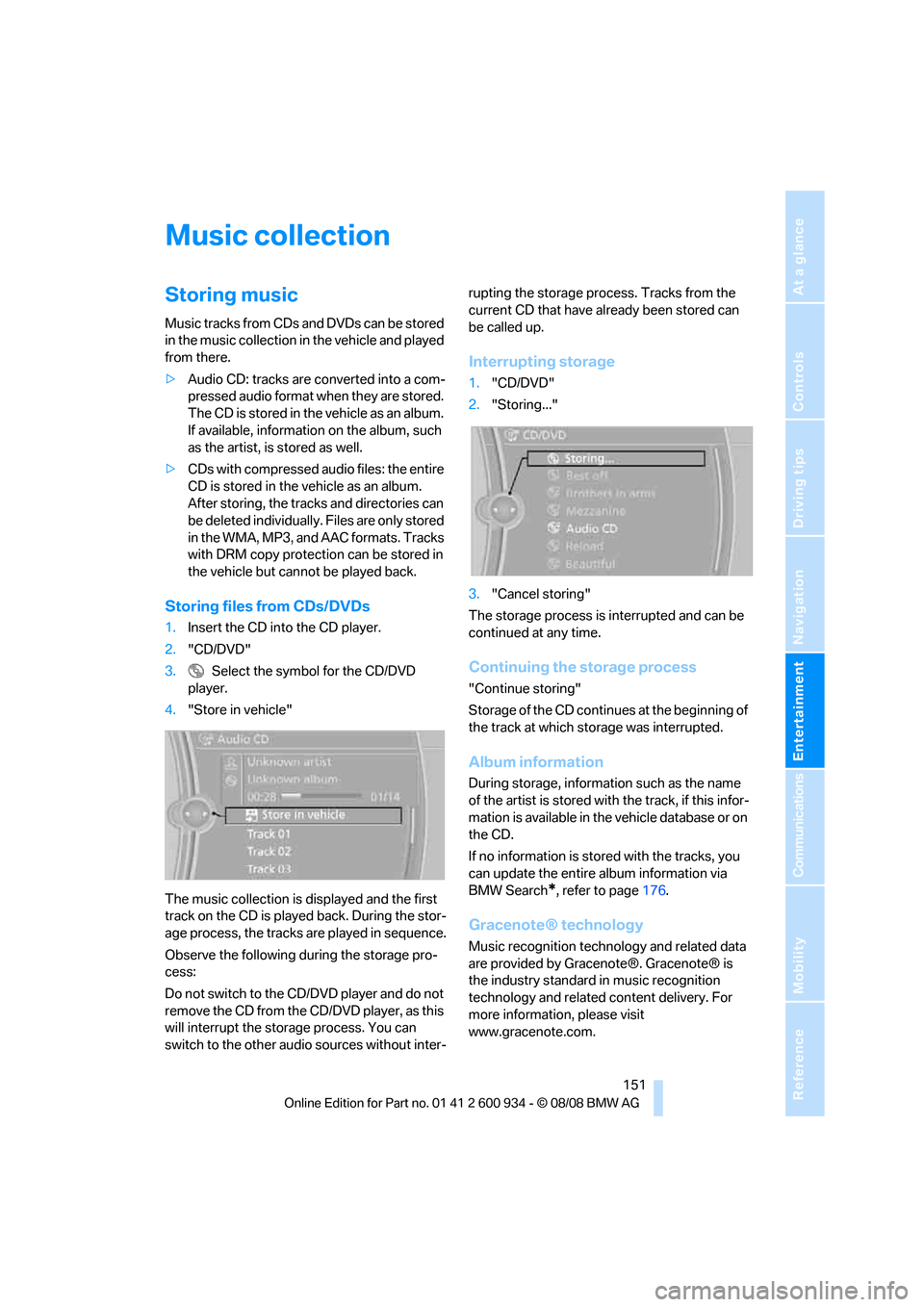
4."Store in vehicle"
The music collection is displayed and the first
track on the CD is played back. During the stor-
age process, the tracks are played in sequence.
Observe the following during the storage pro-
cess:
Do not switch to the CD/DVD player and do not
remove the CD from the CD/DVD player, as this
will interrupt the storage process. You can
switch to the other audio sources without inter-rupting the storage process. Tracks from the
current CD that have already been stored can
be called up.
Interrupting storage
1."CD/DVD"
2."Storing..."
3."Cancel storing"
The storage process is interrupted and can be
continued at any time.
Continuing the storage process
"Continue storing"
Storage of the CD continues at the beginning of
the track at which storage was interrupted.
Album information
During storage, information such as the name
of the artist is stored with the track, if this infor-
mation is available in the vehicle database or on
the CD.
If no information is stored with the tracks, you
can update the entire album information via
BMW Search
*, refer to page176.
Gracenote® technology
Music recognition technology and related data
are provided by Gracenote®. Gracenote® is
the industry standard in music recognition
technology and related content delivery. For
more information, please visit
www.gracenote.com.
ba8_E90M3_cic.book Seite 151 Dienstag, 19. August 2008 11:51 11
Page 157 of 246
Navigation
Entertainment
Driving tips
155Reference
At a glance
Controls
Communications
Mobility
AUX-IN port
You can connect an external audio device, for
instance an MP3 player, and play audio tracks
over the car's loudspeaker system. You can
adjust the tone using iDrive.
Connecting
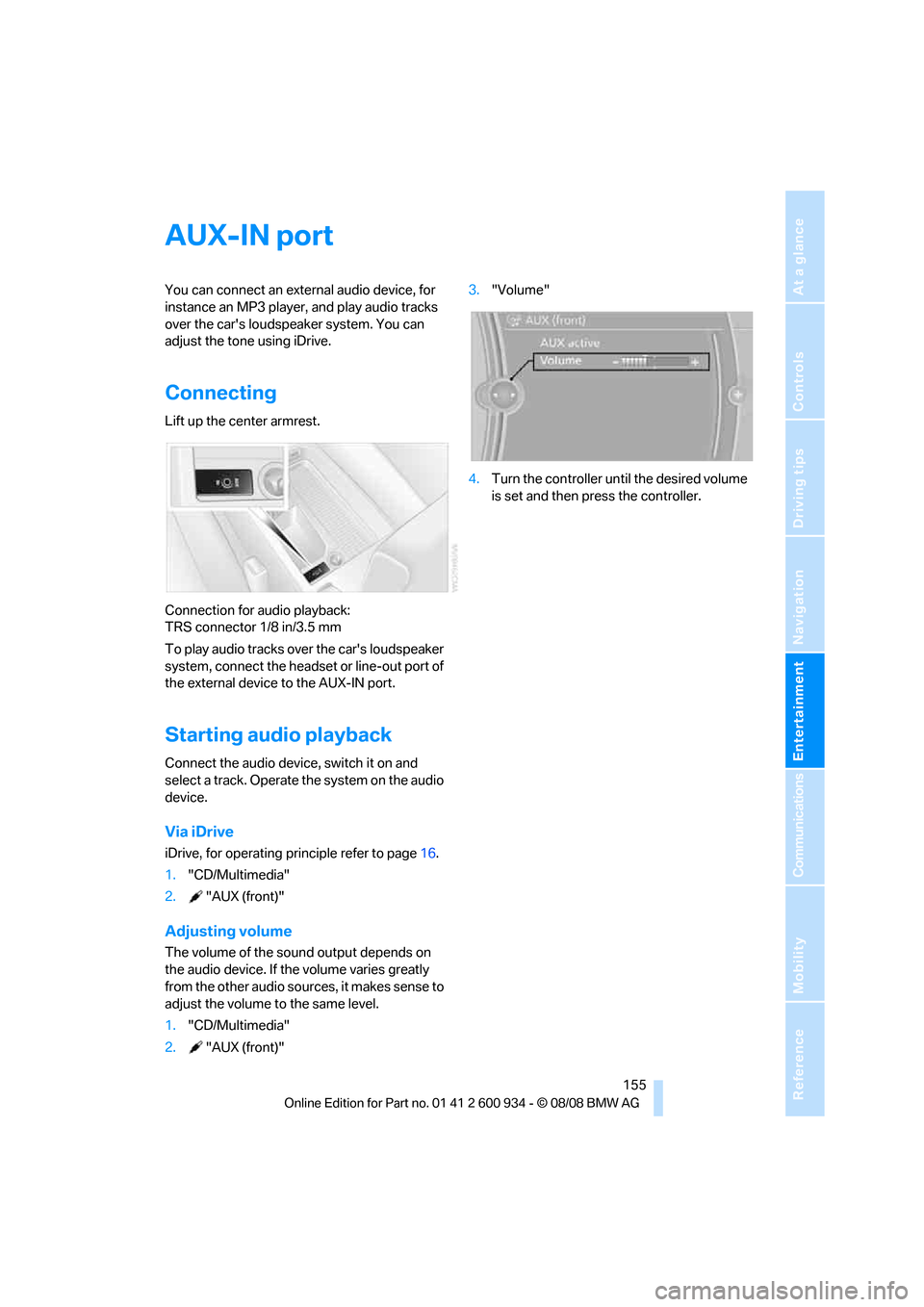
Lift up the center armrest.
Connection for audio playback:
TRS connector 1/8 in/3.5 mm
To play audio tracks over the car's loudspeaker
system, connect the headset or line-out port of
the external device to the AUX-IN port.
Starting audio playback
Connect the audio device, switch it on and
select a track. Operate the system on the audio
device.
Via iDrive
iDrive, for operating principle refer to page16.
1."CD/Multimedia"
2."AUX (front)"
Adjusting volume
The volume of the sound output depends on
the audio device. If the volume varies greatly
from the other audio sources, it makes sense to
adjust the volume to the same level.
1."CD/Multimedia"
2."AUX (front)"3."Volume"
4.Turn the controller until the desired volume
is set and then press the controller.
ba8_E90M3_cic.book Seite 155 Dienstag, 19. August 2008 11:51 11
Page 158 of 246
USB-audio interface/mobile phone audio interface
156
USB-audio interface/mobile phone audio
interface
Connectable devices
iPod / iPhone, mobile phone or USB devices
(MP3 player, USB flash drive). They can be
operated via iDrive.
Standard audio formats, e.g. MP3, WMA, WAV
(PCM) and AAC, and playlists in the M3U format
can be played.
Due to the large number of different audio
devices/mobile phones available on the market,
it cannot be ensured that every audio device/
mobile phone is operable on the vehicle.
Ask about suitable audio devices/mobile
phones at your BMW center.
Connecting
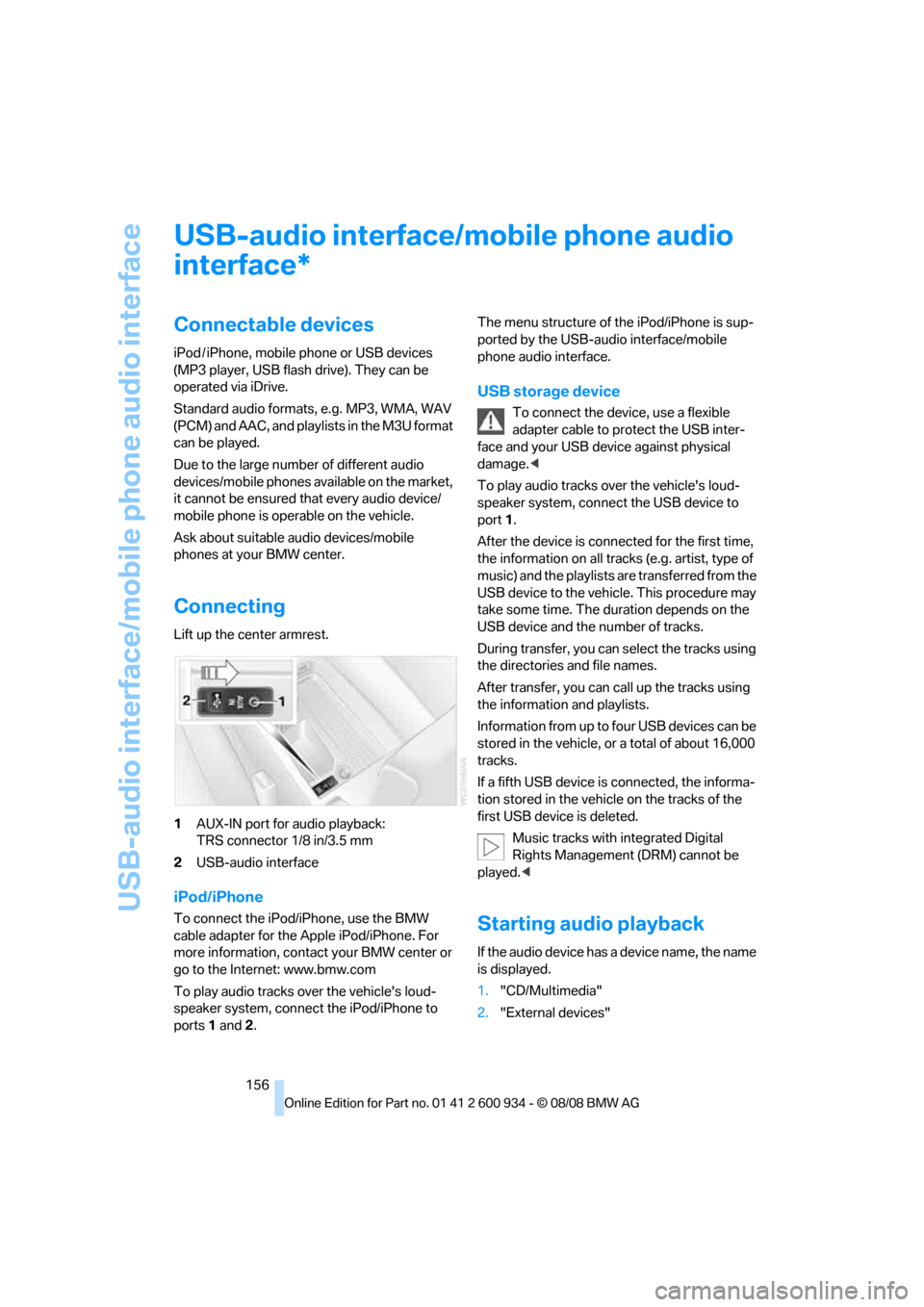
Lift up the center armrest.
1AUX-IN port for audio playback:
TRS connector 1/8 in/3.5 mm
2USB-audio interface
iPod/iPhone
To connect the iPod/iPhone, use the BMW
cable adapter for the Apple iPod/iPhone. For
more information, contact your BMW center or
go to the Internet: www.bmw.com
To play audio tracks over the vehicle's loud-
speaker system, connect the iPod/iPhone to
ports 1 and 2.The menu structure of the iPod/iPhone is sup-
ported by the USB-audio interface/mobile
phone audio interface.
USB storage device
To connect the device, use a flexible
adapter cable to protect the USB inter-
face and your USB device against physical
damage.<
To play audio tracks over the vehicle's loud-
speaker system, connect the USB device to
port1.
After the device is connected for the first time,
the information on all tracks (e.g. artist, type of
music) and the playlists are transferred from the
USB device to the vehicle. This procedure may
take some time. The duration depends on the
USB device and the number of tracks.
During transfer, you can select the tracks using
the directories and file names.
After transfer, you can call up the tracks using
the information and playlists.
Information from up to four USB devices can be
stored in the vehicle, or a total of about 16,000
tracks.
If a fifth USB device is connected, the informa-
tion stored in the vehicle on the tracks of the
first USB device is deleted.
Music tracks with integrated Digital
Rights Management (DRM) cannot be
played.<
Starting audio playback
If the audio device has a device name, the name
is displayed.
1."CD/Multimedia"
2."External devices"
*
ba8_E90M3_cic.book Seite 156 Dienstag, 19. August 2008 11:51 11
Page 232 of 246

Everything from A - Z
230 Cargo bay
– capacity220
– convenient access33
– folding up the floor
panel101
– lamp, refer to Interior
lamps87
– opening from inside30
– opening from outside30
Cargo loading
– securing cargo109
– stowing cargo109
– vehicle108
Car jack
– jacking points208
Car key, refer to Remote
control26
Car phone
– installation location, refer to
Center armrest98
– refer to separate Owner's
Manual
Car phone, refer to
Telephone162
Car radio, refer to Radio139
Car shampoo201
Car wash
– before entering51
Catalytic converter, refer to
Hot exhaust system106
CBS Condition Based
Service197
CD, audio playback144
CD changer144
– controls136
– fast forward/reverse146
– installation location148
– random play sequence145
– selecting a track144
– switching on/off136
– tone control136
– volume136CD player144
– controls136
– fast forward/reverse146
– random play sequence145
– selecting a track144
– switching on/off136
– tone control136
– volume136
Center armrest98
Center brake lamp, replacing
bulb206
Center console, refer to
Around the center
console14
Central locking
– from inside29
– from outside27
Central locking system27
– convenient access32
– hotel function31
Changes, technical, refer to
For your own safety5
Changing bulbs, refer to
Lamps and bulbs203
Changing gears54
Changing the language on the
Control Display73
Changing the measurement
units on the Control
Display65
Changing wheels208
Chassis number, refer to
Engine compartment193
Check Control70
Check Gas Cap184
Child-restraint fixing system
LATCH47
Child-restraint systems46
Child-safety lock48
Child seats, refer to
Transporting children
safely46
Chrome parts201
Chrome polish201
Cigarette lighter, refer to
Lighter99
Cleaning headlamps59
– washer fluid60Cleaning your BMW, refer to
Care199
Clock62
– 12h/24h mode69
– setting the time and date69
– setting time68
Closing
– from inside29
– from outside27
Clothes hooks98
Cockpit10
Cold start, refer to Starting the
engine50
Combined instrument, refer to
Instrument cluster12
Comfort access, refer to
Convenient access32
Comfort area, refer to Around
the center console14
Compartment for remote
control, refer to Ignition
lock49
Compass96
Computer63
– displays on Control
Display64
Computer, refer to iDrive16
Concierge service175
Condensation, refer to When
the vehicle is parked108
Condition Based Service
CBS197
Configuring settings, refer to
Personal Profile
26
Confirmation signals for
locking/unlocking the
vehicle28
Congestion
– refer to Route, bypassing
sections128
Connecting vacuum cleaner,
refer to Connecting
electrical appliances100
Consumption, refer to
Average consumption64
Consumption indicator, refer
to Average consumption64
Control Center, refer to
iDrive16
ba8_E90M3_cic.book Seite 230 Dienstag, 19. August 2008 11:51 11
Page 234 of 246

Everything from A - Z
232 Driving lamps, refer to Parking
lamps/low beams85
Driving notes106
Driving off on hills, refer to
Drive-off assistant78
Driving stability control
systems76
Driving through water107
Driving tips, refer to Driving
notes106
Dry air, refer to Cooling
function91
DSC Dynamic Stability
Control76
DVD
– country codes146
– settings147
– video playback146
DVD menu147
DVD video146
Dynamic Stability Control
DSC
– indicator/warning lamp77
– M Dynamic Mode MDM76
E
EDC, refer to Electronic
Damper Control77
Eject button, refer to Buttons
on the CD player136
Electric
– seat adjustment38
Electrical malfunction
– door lock29
– driver's door29
– fuel filler door184
– glass roof36
– M dual clutch transmission
with Drivelogic54
Electric seat38
Electric seat adjustment38
Electric steering wheel lock
– with convenient access33
Electronic brake-force
distribution76
Electronic Damper Control
EDC77
Electronic oil level check193Electronic Stability Program
ESP, refer to Dynamic
Stability Control DSC76
Emergency operation
– fuel filler door, manual
release184
Emergency operation, refer to
Closing manually
– glass roof36
Emergency operation, refer to
Manual operation
– door lock29
Emergency release
– luggage compartment lid
from inside31
Emergency Request210
Emergency services, refer to
Roadside Assistance210
Engine
– breaking in106
– data218
– overheated, refer to Coolant
temperature63
– speed218
– starting50
– starting, convenient
access32
– switching off50
Engine compartment193
Engine coolant, refer to
Coolant196
Engine oil
– adding195
– BMW Maintenance
System197
– checking level193
– intervals between changes,
refer to Service
requirements66
– possible displays194
Engine output, refer to Engine
data218
Engine speed, refer to Engine
data
218
Engine starting, refer to
Starting the engine50
Entry lamps, refer to Interior
lamps87
Entry map for destination122Equalizer, tone setting137
Error messages, refer to
Check Control70
Event data recorders198
Exhaust system, refer to Hot
exhaust system106
Exterior mirrors42
– adjusting42
– automatic dimming
feature43
– automatic heating43
– folding in and out42
External audio device98
Eyes
– for tow-starting and towing
away212
– for tying down loads109
F
Failure messages, refer to
Check Control70
Failure of an electrical
consumer209
False alarm
– avoiding unintentional
alarm32
– switching off an alarm32
Fastening safety belts, refer to
Safety belts41
Fastest route for
navigation127
Fast forward
– CD changer146
– CD player146
Filter
– refer to Microfilter/activated-
charcoal filter for automatic
climate control92
First aid pouch211
Fixture for remote control,
refer to Ignition lock49
Flash when locking/
unlocking28
Flat tire
– Tire Pressure Monitor
TPM79
Flat tire, repairing206
ba8_E90M3_cic.book Seite 232 Dienstag, 19. August 2008 11:51 11
Page 237 of 246

Reference 235
At a glance
Controls
Driving tips
Communications
Navigation
Entertainment
Mobility
Lock buttons, doors, refer to
Locking30
Locking
– adjusting confirmation
signal28
– from inside30
– from outside28
– without remote control, refer
to Convenient access32
Locking and unlocking doors
– confirmation signals28
– from inside29
– from outside27
Low-beam headlamps85
– automatic85
Lower back support, refer to
Lumbar support38
Luggage compartment lid30
– convenient access33
– emergency release31
– locking or unlocking
separately31
– opening from inside30
– opening from outside30
– remote control28
Luggage rack, refer to Roof-
mounted luggage rack109
Lumbar support38
LW, waveband139
M
M+S tires, refer to Winter
tires190
Maintenance, refer to Service
Booklet
Maintenance system197
Malfunction
– tires79
Malfunction warnings, refer to
Check Control70
Managing music153
Manual car wash200
Manual operation
– door lock29
– driver's door29
– fuel filler door184
– glass roof36
– transmission lock54Manual transmission51
– tow-starting214
Map display129
Map for navigation
– changing scale129
– entering destination122
Master key, refer to Remote
control26
Maximum cooling90
Maximum speed
– with winter tires190
MDM, refer to M Dynamic
Mode76
"MDrive"44
MDrive44
M dual clutch transmission
with Drivelogic52
– kick-down53
– Launch Control57
– neutral53
– reverse gear53
– sequential mode53
– Shift Lights56
– shiftlock53
– tow-starting214
– unlocking transmission lock
manually54
M Dynamic Mode MDM76
– indicator lamp77
Measurements, refer to
Dimensions219
Memory, refer to Seat and
mirror memory40
M Engine Dynamics
Control58
MENU button16
Menus, refer to iDrive16
Microfilter
– BMW Maintenance
System197
– for automatic climate
control92
Microfilter/activated-charcoal
filter
– BMW Maintenance
System197
Microphone
– telephone14
– voice commands14Mirror dimming feature43
Mirrors42
– automatic curb monitor43
– exterior mirrors42
– heating43
– interior rearview mirror43
– memory, refer to Seat and
mirror memory40
Mirrors, folding in before
entering a car wash42
M Mobility System206
Mobile phone
– adjusting volume165
– connecting, refer to Mobile
phone, pairing162
– installation location, refer to
Center armrest98
– operation via iDrive165
– pairing162
– refer to separate Owner's
Manual
Mobile phone, installation
location, refer to Center
armrest98
Mobile phone, refer to
Telephone162
Mobile phone, refer to the
separate Owner's Manual
Modifications, technical, refer
to For your own safety5
Monitor, refer to iDrive
controls16
Monitoring system for tire
pressures, refer to Flat Tire
Monitor78
MP3 player, connecting, refer
to AUX-IN port155
MP3 player, connecting, refer
to USB-audio interface156
Multifunctional steering
wheel, refer to Buttons on
the steering wheel11
Multifunction switch
– refer to Turn signals/
headlamp flasher58
– refer to Wiper system59
Multimedia screen, refer to
iDrive16
Music, playing152
ba8_E90M3_cic.book Seite 235 Dienstag, 19. August 2008 11:51 11
Page 238 of 246

Everything from A - Z
236 Music collection151
– backup154
– importing154
Music player, connecting,
refer to AUX-IN port155
Music player, connecting,
refer to USB-audio
interface156
Music search152
N
Navigation announcements,
refer to Switching voice
instructions on/off128
Navigation data116
Navigation drive, location116
Navigation DVD116
Navigation system116
– address book119
– bypassing a route
section128
– continuing destination
guidance127
– destination entry117
– displaying current
position133
– entering a destination by
voice123
– entering a destination
manually117
– route list128
– selecting destination via
map122
– selecting route criteria127
– special destinations120
– starting destination
guidance127
– terminating destination
guidance127
– voice instructions128
– volume adjustment129
Neck support, refer to Head
restraints39
Nets, refer to Storage
compartments98
Neutral53
New tires189
North-facing map129Nozzles89
Number of cylinders, refer to
Engine data218
Nylon rope, refer to Tow
rope213
O
OBD socket, refer to Socket
for On-Board Diagnosis198
Octane ratings, refer to Fuel
specifications184
Odometer62
Oil, refer to Engine oil193
Oil consumption193
Oil level193
Old batteries, refer to
Disposal208
Onboard tool kit203
Opening and closing
– convenient access32
– from inside29
– from outside27
– using the door lock29
– via the remote control27
Options, selecting for
navigation127
Orientation menu, refer to
Start menu17
Outlets
– refer to Ventilation92
Output, refer to Engine
data218
Outside-air mode
– automatic climate control91
Outside temperature
display62
– changing units of
measure65
– in computer65
Outside temperature
warning62
Overheated engine, refer to
Coolant temperature63
Overview
– radio control136
P
Paintwork care200
Park assistant, refer to Park
Distance Control75
Park Distance Control PDC75
Parked car ventilation92
– preselecting switch-on
times93
– switching on and off
directly93
Parking
– vehicle50
Parking aid, refer to Park
Distance Control PDC75
Parking brake51
– indicator lamp51
Parking lamps85
Parking lamps/low beams85
Passenger-side mirror tilt
function43
Pathway lighting86
Personal Profile26
Phone book165
Phone numbers
– dialing166
Pinch protection system
– glass roof, electric36
– windows35
Placing a call, refer to
telephone owner's manual
Polish201
Pollen
– refer to Microfilter/activated-
charcoal filter for automatic
climate control92
Position, refer to Current
position, displaying133
Postal code, entering for
navigation118
Power failure209
Power windows34
– safety switch35
Power windows, refer to
Windows34
Pressure, tires186
Pressure monitoring, tires78
– Flat Tire Monitor78
ba8_E90M3_cic.book Seite 236 Dienstag, 19. August 2008 11:51 11