2009 BMW M3 lock
[x] Cancel search: lockPage 56 of 246

Driving
54 resistance point. This provides maximum accel-
eration.
P Park
P engages automatically when you switch
off the engine unless N is engaged and
the remote control remains in the ignition lock,
refer to page49. As soon as you remove the
remote control from the ignition lock, P
engages regardless of the position of the selec-
tor lever.<
Displays in the instrument cluster
1Engaged gear 1 to 7, R, N, P
2Selected drive program,
corresponds to the number of illuminated
fields, refer to Drivelogic, page55
3The gear currently engaged is displayed
together with a D in drive mode
At very low outside temperatures, this display
may not be functional. The engaged driving
direction is indicated by the LEDs on the selec-
tor lever.
Changing gears
Via the selector lever
>To shift up, pull back the selector lever.
>To shift down, push it forward.
Via the shift paddles on the steering
wheel
>To shift up, pull the right-hand shift paddle
+ briefly.
>To shift down, pull the left-hand shift paddle
– briefly.
Unlocking the transmission lock
manually
If a power failure occurs, e.g. if the battery
is discharged or disconnected, the trans-
mission lock must be released manually, other-
wise the rear wheels are blocked and the vehi-
cle cannot be towed.<
Release the transmission lock manually for tow-
ing only and forcefully apply the parking brake
beforehand to prevent the vehicle from rolling.
After parking the vehicle, lock the transmission
lock again.
Releasing
1.Unclip the sleeve of the selector lever.
2.Pull the sleeve up over the selector lever
until the sleeve is inside out.
3.Push the black cover forward using the
screwdriver from the onboard tool kit, refer
to page203.
ba8_E90M3_cic.book Seite 54 Dienstag, 19. August 2008 11:51 11
Page 57 of 246

Controls
55Reference
At a glance
Driving tips
Communications
Navigation
Entertainment
Mobility
4.Insert the screwdriver into the opening of
the white lever, arrow 1.
5.Pull the screwdriver back all the way, arrow
2. The transmission lock is released.
6.Carefully remove the screwdriver, for exam-
ple to avoid accidentally engaging the
transmission lock during towing.
After parking the vehicle, lock the trans-
mission lock again. Otherwise there is a
danger of the vehicle rolling.<
Locking
1.Insert the screwdriver into the opening of
the white lever and press forward.
The transmission lock is locked again.
2.Fold back the black cover until it engages
audibly.
3.Clip the sleeve of the selector lever back
into place.
Jump-starting and towing, refer to page212.
Drivelogic
Various drive programs are available to you via
Drivelogic.
After every change between sequential and
drive mode, the program selected last in each
case is active. Exception: after the first change from sequential to drive mode, drive program 3
is active.
In drive mode
Five drive programs are available for selection,
from winter program/balanced 1 to sporting and
highly dynamic 5.
In sequential mode
You can choose between six drive programs,
from winter program/balanced 1 to sporty
puristic 6.
Program 6 is available when Dynamic Stability
Control is deactivated, refer to page76. If DSC
is activated, the program changes from 6 to 5.
To maintain driving stability, activate DSC
whenever possible.<
Selecting the drive program via the
button in the center console
Press the button repeatedly until the desired
drive program is displayed in the instrument
cluster, refer to page54.
Selecting the drive program via the
button on the steering wheel
You can also activate your preferred drive pro-
gram via the button on the steering wheel,
refer to MDrive on page44.
You can set MDrive on the Control Display
when the ignition is switched on.
iDrive, for operating principle refer to page16.
1."Settings"
2."MDrive"
ba8_E90M3_cic.book Seite 55 Dienstag, 19. August 2008 11:51 11
Page 64 of 246

Everything under control
62
Everything under control
Odometer, outside
temperature display, clock
1Knob in the instrument cluster
2Outside temperature and clock, refer to
Computer on page63
3Odometer and trip odometer
Knob in the instrument cluster
>To reset the trip odometer while the ignition
is switched on
>To display the time, outside temperature
and odometer briefly while the ignition is
switched off
Units of measure
To select the respective units of measure, miles
or km for the odometer as well as 7 or 6 for
the outside temperature, refer to page65.
The setting is stored for the remote control cur-
rently in use.
Time, outside temperature display
Setting the time, refer to page68.
Outside temperature warning
When the displayed temperature sinks to
approx. +377/+36, a signal sounds and a
warning lamp lights up. There is an increased
risk of black ice.
Black ice can also form at temperatures
above Select the symbol. +377/+36.
You should therefore drive carefully on bridges and shaded roads, for example, otherwise there
is an increased risk of an accident.<
Odometer and trip odometer
Resetting trip odometer:
With the ignition switched on, press button1 in
the instrument cluster.
When the vehicle is parked
If you still want to view the time, outside tem-
perature and odometer reading briefly after the
remote control has been taken out of the igni-
tion lock:
Press button 1 in the instrument cluster.
Tachometer
The prewarning field, arrow 1, and the red warn-
ing field, arrow2, change in relation to the
engine temperature. The permissible engine
speed increases with increased engine temper-
ature. Avoid engine speeds in the prewarning
field, if possible.
ba8_E90M3_cic.book Seite 62 Dienstag, 19. August 2008 11:51 11
Page 70 of 246

Everything under control
68
Entering deadlines for legally required
inspections*
Make sure the date on the Control Display is set
correctly, refer to page69, otherwise the effec-
tiveness of CBS Condition Based Service is not
ensured.
iDrive, for operating principle refer to page16.
1."Vehicle Info"
2."Vehicle status"
3."Service required"
4."§ Vehicle inspection"
5.Open the menu for entering the deadline.
6."Date:"
7.Create the settings.
8.Press the controller to apply the setting.
The year is highlighted.
9.Turn the controller to make the adjustment.
10.Press the controller to apply the setting.
The date entry is stored.
To exit from the menu:
Move the controller to the left.
More information on the BMW Maintenance
System can be found on page197.
Automatic Service Request*
Data regarding the maintenance status or
legally mandated inspections of the vehicle are
automatically transmitted to your BMW center
prior to a service due date.
You can check when your BMW center was
notified.
iDrive, for operating principle refer to page16.
1."Vehicle Info"
2."Vehicle status"
3."Options"
4."Last Service Request"
Clock
The settings are stored for the remote control
currently in use, refer also to Personal Profile on
page26.
Setting the time
In the instrument cluster
To set the 12h/24h format, refer to Date below.
1.Push button 1 in the turn indicator lever up
or down repeatedly until the appropriate
ba8_E90M3_cic.book Seite 68 Dienstag, 19. August 2008 11:51 11
Page 78 of 246
Technology for driving comfort and safety
76
Driving stability control
systems
Your BMW has a number of systems that help
to maintain the vehicle's stability even in
adverse driving conditions.
Antilock Brake System ABS
ABS prevents locking of the wheels during
braking. Safe steering response is maintained
even during full braking. Active safety is thus
increased.
The ABS is operational every time you start the
engine. Braking safely, refer to page107.
Electronic brake-force distribution
The system controls the brake pressure in the
rear wheels to ensure stable braking behavior.
Brake assist
When you apply the brakes rapidly, this system
automatically produces the maximum braking
force boost and thus helps to achieve the short-
est possible braking distance during full brak-
ing. This system exploits all of the benefits pro-
vided by ABS.
Do not reduce the pressure on the brake for the
duration of the full braking application.
Dynamic Stability Control DSC
DSC optimizes driving stability and traction. In
addition, the system recognizes unstable driv-
ing situations such as understeering and over-
steering, and helps keep the vehicle on a safe
course within physical limits by reducing engine
power and applying the brakes on individual
wheels.
The laws of physics cannot be repealed,
even with DSC. An appropriate driving
style always remains the responsibility of the
driver. Therefore, do not reduce the additional
safety margin again by taking risks, as this could
result in an accident.<
M Dynamic Mode MDM*
M Dynamic Mode is a mode of the Dynamic
Stability Control DSC that permits greater lon-gitudinal and lateral acceleration when driving
on dry surfaces, yet with reduced driving stabil-
ity. Only at the absolute limit of stability does
the system intervene to stabilize the vehicle by
reducing engine power and applying the brakes
on the wheels. In such situations, additional
corrective steering maneuvers may be neces-
sary.
M Dynamic Mode is switched off every time the
engine is restarted.
When the M Dynamic Mode is on, stabi-
lizing measures are performed to a limited
degree only. Take action yourself, otherwise
there is a risk of an accident.<
To maintain vehicle stability, drive with
the DSC activated and the
MDynamicMode deactivated whenever possi-
ble.<
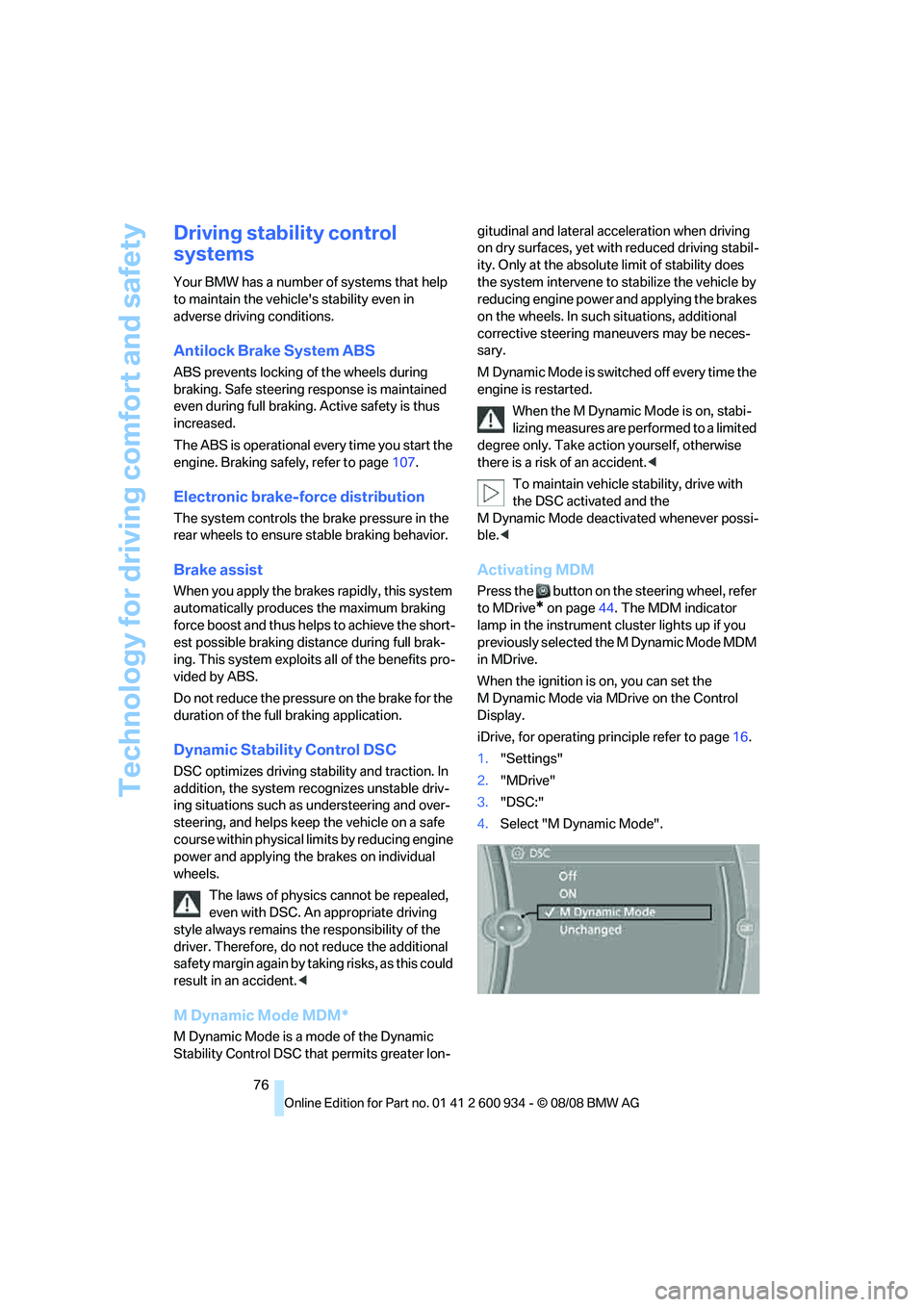
Activating MDM
Press the button on the steering wheel, refer
to MDrive
* on page44. The MDM indicator
lamp in the instrument cluster lights up if you
previously selected the M Dynamic Mode MDM
in MDrive.
When the ignition is on, you can set the
M Dynamic Mode via MDrive on the Control
Display.
iDrive, for operating principle refer to page16.
1."Settings"
2."MDrive"
3."DSC:"
4.Select "M Dynamic Mode".
ba8_E90M3_cic.book Seite 76 Dienstag, 19. August 2008 11:51 11
Page 87 of 246

Controls
85Reference
At a glance
Driving tips
Communications
Navigation
Entertainment
Mobility
Lamps
Parking lamps/low beams
0Lamps off,
daytime running lamps
1Parking lamps and daytime running lamps
2Low-beam headlamps and welcome lamps
3Automatic headlamp control
*, daytime run-
ning lamps, welcome lamps and Adaptive
Head Light
*
When you open the driver's door with the igni-
tion switched off, the exterior lighting is auto-
matically switched off if the light switch is in
position 0, 2 or 3.
Switch on the parking lamps if necessary,
switch position 1.
Parking lamps
In switch position1, the front, rear and side
vehicle lighting is switched on. You can use the
parking lamps for parking.
When the ignition is switched off and the switch
is in position 1, only the outside sections of the
rear lamps are illuminated, refer to page205.
The parking lamps will discharge the bat-
tery. Therefore, do not leave them on for
unduly long periods of time, otherwise the bat-
tery might not have enough power to start the
engine. It is preferable to switch on the left-
hand or right-hand roadside parking lamps,
refer to page87.<
Low beams
The low beams light up when the light switch is
in position 2 and the ignition is on.
Automatic headlamp control*
When the switch is in position3, the low beams
are switched on and off automatically depend-
ing on ambient light conditions, e.g. in a tunnel,
in twilight, or if there is precipitation. The Adap-
tive Head Light
* is active. The LED next to the
symbol is illuminated when the low beams are
on. You can also activate the daytime running
lamps, refer to page86. In the situations
described above, the lamps then automatically
switch from daytime running lamps to low
beams.
The headlamps may also come on when the
sun is sitting low on a blue sky.
The automatic headlamp control cannot
serve as a substitute for your personal
judgment in determining when the lamps
should be switched on in response to ambient
lighting conditions. For example, the system
cannot detect fog or hazy weather. To avoid
safety risks, you should always switch on the
low-beam headlamps manually under these
conditions.<
Welcome lamps
If you leave the light switch in position 2 or 3
when you park the car, the parking lamps and
the interior lamps light up briefly when you
unlock the vehicle.
Activating/deactivating welcome
lamps
iDrive, for operating principle refer to page16.
1."Settings"
2."Lighting"
ba8_E90M3_cic.book Seite 85 Dienstag, 19. August 2008 11:51 11
Page 93 of 246

Controls
91Reference
At a glance
Driving tips
Communications
Navigation
Entertainment
Mobility
Adjusting air flow rate manually
Press the left side of the button to
reduce airflow. Press the right side
of the button to increase it.
You can reactivate the automatic mode for the
air flow rate with the AUTO button.
The air flow rate may be reduced or the blower
may be switched off entirely to save on battery
power. The display remains the same.
Switching the system on/off
With the blower at its lowest setting, press the
left side of the button to switch off the auto-
matic climate control. All displays are cleared
except for the rear window defroster if it is
switched on.
Press any button except REST or rear window
defroster to reactivate the automatic climate
control.
The recirculated-air mode is switched on
when you switch off the automatic cli-
mate control. If the air quality deteriorates or the
window fogs over, switch the system back on
and increase the air volume.<
Automatic recirculated-air control
AUC/Recirculated-air mode
Switch on the desired operating
mode by pressing this button
repeatedly:
>LED off: outside air flows in continuously.
>Left-hand LED on, AUC mode: a sensor
detects pollutants in the outside air. If nec-
essary, the system blocks the supply of out-
side air and recirculates the inside air. As
soon as the concentration of pollutants in
the outside air has decreased sufficiently,
the system automatically switches back to
outside air supply.
>Right-hand LED on, recirculated-air mode:
the supply of outside air is permanently
shut off. The system then recirculates the
air currently within the vehicle.
If condensation starts to form on the
inside window surfaces during operation
in the recirculated-air mode, you should switch it off while also increasing the air flow rate as
required.
The recirculated-air mode should not be used
continuously for lengthy periods, otherwise the
quality of the air inside the car will gradually
deteriorate.<
Via the button on the steering wheel
You can switch quickly between the recircu-
lated-air mode and the previous mode using an
individually programmable button
on the steer-
ing wheel, refer to page44.
Residual heat
The heat stored in the engine is
used to heat the passenger com-
partment, e.g. while stopped at a
school to pick up a child.
The function can be switched on when the fol-
lowing conditions are met:
>Up to 15 minutes after the engine has been
switched off
>While the engine is at operating tempera-
ture
>As long as battery voltage is sufficient
>At an outside temperature below 777/
256
The LED is lit when the function is on.
As of radio readiness, you can set the interior
temperature, the air flow rate and the air distri-
bution.
Defrosting windows and removing
condensation
Quickly removes ice and conden-
sation from the windshield and
front side windows.
Switch on the cooling function as well.
Switching cooling function on/off
The cooling function cools and
dehumidifies the incoming air
before reheating it as required,
according to the temperature setting. This
function is only available while the engine is
running.
ba8_E90M3_cic.book Seite 91 Dienstag, 19. August 2008 11:51 11
Page 100 of 246

Practical interior accessories
98
Locking
To lock the glove compartment, use the inte-
grated key of the remote control, refer to
page26.
USB interface for data transmission
Port for importing and exporting data on USB
devices, e.g. music collections, refer to
page154.
Observe the following when connecting:
>Do not forcibly connect the plug to the USB
interface.
>Do not connect devices such as fans or
lamps to the USB interface.
>Do not connect USB hard disks.
>Do not use the USB interface to recharge
external devices.
Center armrest
Storage compartment
The center armrest between the front seats
contains either a compartment or the cover for
the snap-in adapter
*, depending on the equip-
ment version. For more information about this
mobile phone base plate refer to the separate
Owner's Manual.
Opening
Press the button, see arrow.
Settings*
Slide the center armrest into the desired posi-
tion on the driver's side.
Connection for external audio device
You can connect an external audio device such
as a CD or MP3 player and play audio tracks
over the car's loudspeaker system:
>AUX-IN port, refer to page155
>USB-audio interface
*, refer to page156
Storage compartments inside
the vehicle
Depending on your vehicle's equipment, you
will find compartments beside the steering col-
umn
*, in the front doors and in the center con-
sole
*.
There are nets
* on the front-seat backrests.
Clothes hooks
There are clothes hooks on the grab handles in
the rear passenger compartment.
ba8_E90M3_cic.book Seite 98 Dienstag, 19. August 2008 11:51 11