2009 BMW M3 engine
[x] Cancel search: enginePage 64 of 246

Everything under control
62
Everything under control
Odometer, outside
temperature display, clock
1Knob in the instrument cluster
2Outside temperature and clock, refer to
Computer on page63
3Odometer and trip odometer
Knob in the instrument cluster
>To reset the trip odometer while the ignition
is switched on
>To display the time, outside temperature
and odometer briefly while the ignition is
switched off
Units of measure
To select the respective units of measure, miles
or km for the odometer as well as 7 or 6 for
the outside temperature, refer to page65.
The setting is stored for the remote control cur-
rently in use.
Time, outside temperature display
Setting the time, refer to page68.
Outside temperature warning
When the displayed temperature sinks to
approx. +377/+36, a signal sounds and a
warning lamp lights up. There is an increased
risk of black ice.
Black ice can also form at temperatures
above Select the symbol. +377/+36.
You should therefore drive carefully on bridges and shaded roads, for example, otherwise there
is an increased risk of an accident.<
Odometer and trip odometer
Resetting trip odometer:
With the ignition switched on, press button1 in
the instrument cluster.
When the vehicle is parked
If you still want to view the time, outside tem-
perature and odometer reading briefly after the
remote control has been taken out of the igni-
tion lock:
Press button 1 in the instrument cluster.
Tachometer
The prewarning field, arrow 1, and the red warn-
ing field, arrow2, change in relation to the
engine temperature. The permissible engine
speed increases with increased engine temper-
ature. Avoid engine speeds in the prewarning
field, if possible.
ba8_E90M3_cic.book Seite 62 Dienstag, 19. August 2008 11:51 11
Page 65 of 246

Controls
63Reference
At a glance
Driving tips
Communications
Navigation
Entertainment
Mobility
Never drive at engine speeds in the red warning
field. In this range, the engine speed is limited to
protect the engine.
Coolant temperature
A warning lamp will come on if the coolant, and
therefore the engine, becomes too hot. In addi-
tion, a message will appear on the Control Dis-
play.
Check coolant level, refer to page196.
Engine oil temperature
When the engine is at normal operating temper-
ature, the engine oil temperature is between
approx. 1757/806 and approx. 2507/
1206.
If the engine oil temperature is too high, a mes-
sage appears on the Control Display.
Fuel gauge
Fuel tank capacity: approx. 16.6 US gal/
63 liters.You can find information on refueling on
page184.
If the tilt of the vehicle varies for a longer period,
when you are driving in mountainous areas, for
example, the indicator may fluctuate slightly.
Reserve
Once the fuel level has fallen to the reserve
zone, a message briefly appears on the Control
Display and the cruising range for the remaining
amount of fuel is displayed on the computer.
Under a cruising range of approx. 30 miles/
50 km, the message remains in the Control Dis-
play.
Refuel as soon as possible once your
cruising range falls below 30 miles/
50 km, otherwise engine functions are not
ensured and damage can occur.<
Computer
Displays in the instrument cluster
Calling up information
Press the button in the turn indicator lever.
The following items of information are dis-
played in the order listed:
>Cruising range
>Oil level, refer to Checking oil level on
page193
>Average fuel consumption
>Speed
>No information
M dual clutch transmission:
Outside temperature, time, cruising
ba8_E90M3_cic.book Seite 63 Dienstag, 19. August 2008 11:51 11
Page 66 of 246

Everything under control
64 range, oil level, average fuel consumption and
speed appear in the top display.<
To set the corresponding units of measure,
refer to Units of measure on page65.
Cruising range
Displays the estimated cruising range available
with the remaining fuel. The range is calculated
on the basis of the way the car has been driven
over the last 18 miles/30 km and the amount of
fuel currently in the tank.
Refuel as soon as possible once your
cruising range falls below 30 miles/
50 km, otherwise engine functions are not
ensured and damage can occur.<
Average fuel consumption
The average fuel consumption is calculated for
the time during which the engine is running.
You can have the average consumption for
another trip displayed, refer to Displays on the
Control Display below.
To reset average fuel consumption: press the
button in the turn indicator lever for approx.
2seconds.
Displays on the Control Display
You can also call up the computer via iDrive; for
operating principle refer to page16.
1."Vehicle Info"
2."Onboard info" or "Trip computer"Displays on the "Onboard info":
>Cruising range
>Distance from destination
>Estimated time of arrival if:
>A distance was manually entered into
the computer, refer to information
below.
>A destination was entered in the naviga-
tion system
*, refer to page117.
Displays on the "Trip computer":
>Departure time
>Trip duration
>Trip distance
Both displays show:
>The average speed and
>the average fuel consumption.
Resetting the fuel consumption and
speed
You can reset the values for average speed and
average consumption:
1.Select the respective menu item and press
the controller.
2.Press the controller again to confirm your
selection.
ba8_E90M3_cic.book Seite 64 Dienstag, 19. August 2008 11:51 11
Page 67 of 246

Controls
65Reference
At a glance
Driving tips
Communications
Navigation
Entertainment
Mobility
Resetting the Trip computer
1."Vehicle Info"
2."Trip computer"3.Select
>"Reset" all values are reset
>"Automatically reset" all values are reset
approx. 4 hours after the engine is
switched off
Settings and information
Operating principle
1Button for:
>Selecting display
>Setting values
2Button for:
>Confirming selected display or set val-
ues
>Calling up computer information633When the lights are on: instrument lighting
brightness87
4Calling up Check Control70
5Setting the time68
6Setting the date69
7Viewing service requirement display66
8Switching Shift Lights
* on/off56
Exiting displays
The outside-temperature reading and the time
reappear when you press button2 or if you
make no entries within approx. 15 seconds. If
required, complete the current setting first.
Units of measure
Setting the units of measure
You can change the units for fuel consumption,
route/distance, temperature and pressure.
iDrive, for operating principle refer to page16.
ba8_E90M3_cic.book Seite 65 Dienstag, 19. August 2008 11:51 11
Page 68 of 246

Everything under control
66 1."Settings"
2."Language/Units"
3.Select the desired menu item.
4.Select the desired unit.
The settings are stored for the remote control
currently in use.
Service requirements
The remaining driving distance and the date of
the next scheduled service are displayed briefly
immediately after you start the engine or switch
on the ignition.
The extent of service work required can
be read out from the remote control by
your BMW Service Advisor.<
For certain maintenance operations, you can
view the respective distance remaining or due
date individually in the instrument cluster.1.Switch on the ignition, refer to page49.
2.Push button 1 in the turn indicator lever up
or down repeatedly until the appropriate
symbol appears in the display, accompa-
nied by the words "SERVICE-INFO".
3.Press button 2.
4.Use button 1 to scroll through the individual
service items.
ba8_E90M3_cic.book Seite 66 Dienstag, 19. August 2008 11:51 11
Page 69 of 246

Controls
67Reference
At a glance
Driving tips
Communications
Navigation
Entertainment
Mobility
Possible displays
1Button for selecting functions
2Service requirements
3Engine oil
4Roadworthiness test
*
5Front brake pads6Rear brake pads
7Brake fluid
The sequence of displayed service items may
vary. The data for the next service appointment
is shown first.
More information
Detailed information on service
requirements
You can call up detailed information about the
maintenance regimen on the Control Display.
iDrive, for operating principle refer to page16.
1."Vehicle Info"
2."Vehicle status"3."Service required"
Required maintenance procedures and legally
mandated inspections are displayed.
You can request more detailed information on
every entry:
Select the entry and press the controller.
To exit from the menu:
Move the controller to the left.
Symbols
No service is currently required.
The deadline for service or a legally man-
dated inspection is approaching. Please
schedule a service appointment.
The service deadline has already passed.
ba8_E90M3_cic.book Seite 67 Dienstag, 19. August 2008 11:51 11
Page 77 of 246

Controls
75Reference
At a glance
Driving tips
Communications
Navigation
Entertainment
Mobility
Technology for driving comfort and safety
Park Distance Control PDC*
The concept
The PDC assists you with maneuvering in tight
parking spaces. Acoustic signals and a visual
indicator
warn you of the presence of an object
behind your vehicle. To measure the distance,
there are four ultrasonic sensors in the
bumpers.
These sensors have a range of approx. 6.5 ft/
2 m. However, an acoustic warning does not
sound until an object is approx. 24 in/60 cm
from the corner sensors, or approx. 5 ft/1.50 m
from the center sensors.
PDC is a parking aid that can indicate
objects when they are approached
slowly, as is usually the case when parking.
Avoid approaching an objec t a t h i g h s p e e d , o t h -
erwise physical circumstances may lead to the
system warning being issued too late.<
Switching on automatically
With the engine running or the ignition switched
on, the system is activated after approx. 1 sec-
ond when you engage reverse gear. Wait this
short period before driving.
Switching off automatically
After approx. 165 ft/50 m of driving or over
approx. 20 mph/30 km/h, the system switches
off and the LED goes out.
Signal tones
When nearing an object, its position is indicated
correspondingly by an interval tone. As the dis-
tance between vehicle and object decreases,
the intervals between the tones become
shorter. If the distance to the nearest object
falls to below roughly 1 ft/30 cm, then a contin-
uous tone sounds.
An interval tone is interrupted after approx.
3seconds>i f y o u s t o p i n f r o n t o f a n o b j e c t t h a t h a s b e e n
detected by only one of the corner sensors
>if you are driving parallel to a wall.
Malfunction
The indicator lamp in the instrument
cluster comes on. PDC is malfunc-
tioning. A message appears on the
Control Display. Have the system checked.
To avoid this problem, keep the sensors clean
and free of ice or snow in order to ensure that
they will continue to operate effectively. When
using a high-pressure cleaner, do not spray the
sensors for extended periods of time and only
from a distance of at least 4 in/10 cm.
PDC with visual warning
The approach of the vehicle to an object is
shown on the Control Display. Objects that are
farther away are displayed on the Control Dis-
play before a signal tone sounds. The display
appears on the Control Display as soon as PDC
is activated.
System limitations
Even with PDC, final responsibility for
estimating the distance between the
vehicle and any obstructions always remains
with the driver. Even when sensors are pro-
vided, there is a blind spot in which objects can
no longer be detected. The system is also sub-
ject to the physical limits that apply to all forms
of ultrasonic measurement, such as those
encountered with trailer towbars and hitches,
thin or wedge-shaped objects, etc. Low objects
that have already been displayed, e. g. curbs,
can disappear again from the detection area of
the sensors before or after a continuous tone
sounds. Higher, protruding objects, e.g. ledges,
cannot be detected. Loud sound sources out-
side or inside the car can drown out the PDC
signal. Therefore, always drive cautiously, oth-
erwise there is a risk of personal injury or prop-
erty damage.<
ba8_E90M3_cic.book Seite 75 Dienstag, 19. August 2008 11:51 11
Page 78 of 246
Technology for driving comfort and safety
76
Driving stability control
systems
Your BMW has a number of systems that help
to maintain the vehicle's stability even in
adverse driving conditions.
Antilock Brake System ABS
ABS prevents locking of the wheels during
braking. Safe steering response is maintained
even during full braking. Active safety is thus
increased.
The ABS is operational every time you start the
engine. Braking safely, refer to page107.
Electronic brake-force distribution
The system controls the brake pressure in the
rear wheels to ensure stable braking behavior.
Brake assist
When you apply the brakes rapidly, this system
automatically produces the maximum braking
force boost and thus helps to achieve the short-
est possible braking distance during full brak-
ing. This system exploits all of the benefits pro-
vided by ABS.
Do not reduce the pressure on the brake for the
duration of the full braking application.
Dynamic Stability Control DSC
DSC optimizes driving stability and traction. In
addition, the system recognizes unstable driv-
ing situations such as understeering and over-
steering, and helps keep the vehicle on a safe
course within physical limits by reducing engine
power and applying the brakes on individual
wheels.
The laws of physics cannot be repealed,
even with DSC. An appropriate driving
style always remains the responsibility of the
driver. Therefore, do not reduce the additional
safety margin again by taking risks, as this could
result in an accident.<
M Dynamic Mode MDM*
M Dynamic Mode is a mode of the Dynamic
Stability Control DSC that permits greater lon-gitudinal and lateral acceleration when driving
on dry surfaces, yet with reduced driving stabil-
ity. Only at the absolute limit of stability does
the system intervene to stabilize the vehicle by
reducing engine power and applying the brakes
on the wheels. In such situations, additional
corrective steering maneuvers may be neces-
sary.
M Dynamic Mode is switched off every time the
engine is restarted.
When the M Dynamic Mode is on, stabi-
lizing measures are performed to a limited
degree only. Take action yourself, otherwise
there is a risk of an accident.<
To maintain vehicle stability, drive with
the DSC activated and the
MDynamicMode deactivated whenever possi-
ble.<
Activating MDM
Press the button on the steering wheel, refer
to MDrive
* on page44. The MDM indicator
lamp in the instrument cluster lights up if you
previously selected the M Dynamic Mode MDM
in MDrive.
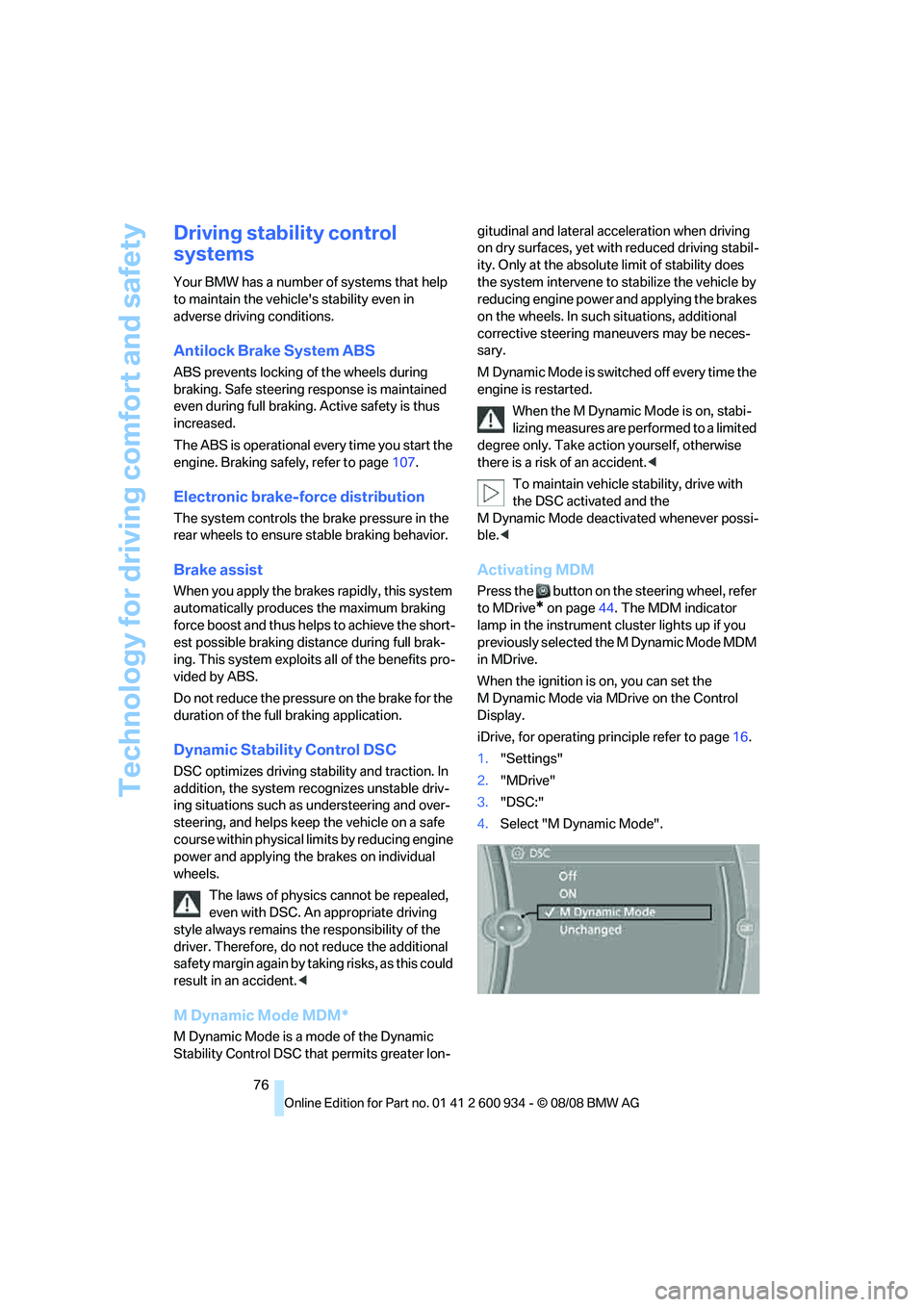
When the ignition is on, you can set the
M Dynamic Mode via MDrive on the Control
Display.
iDrive, for operating principle refer to page16.
1."Settings"
2."MDrive"
3."DSC:"
4.Select "M Dynamic Mode".
ba8_E90M3_cic.book Seite 76 Dienstag, 19. August 2008 11:51 11