2009 BMW 650I COUPE TELEPHONE
[x] Cancel search: TELEPHONEPage 8 of 272

Notes
6
For your own safety
Maintenance and repairs
Advanced technology, e.g. the use of
modern materials and high-performance
electronics, requires specially adapted mainte-
nance and repair methods. Therefore, have cor-
responding work on your BMW performed only
by your BMW center or a workshop that works
according to BMW repair procedures with cor-
respondingly trained personnel. If this work is
not carried out properly, there is a danger of
subsequent damage and related safety haz-
ards.<
California Proposition 65 Warning
California law requires us to issue the following
warning:
Engine exhaust and a wide variety of
automobile components and parts,
including components found in the interior fur-
nishings in a vehicle, contain or emit chemicals
known to the State of California to cause cancer
and birth defects and reproductive harm. In
addition, certain fluids contained in vehicles and
certain products of component wear contain or
emit chemicals known to the State of California
to cause cancer and birth defects or other
reproductive harm.
Battery posts, terminals and related accesso-
ries contain lead and lead compounds. Wash
your hands after handling.
Used engine oil contains chemicals that have
caused cancer in laboratory animals. Always
protect your skin by washing thoroughly with
soap and water.<
Parts and accessories
For your own safety, use genuine parts
and accessories approved by BMW.
When you purchase accessories tested and
approved by BMW and Genuine BMW Parts,
you simultaneously acquire the assurance that
they have been thoroughly tested by BMW to
ensure optimum performance when installed
on your vehicle.
BMW warrants these parts to be free from
defects in material and workmanship.
BMW will not accept any liability for damage
resulting from installation of parts and accesso-
ries not approved by BMW.
BMW cannot test every product made by other
manufacturers to verify if it can be used on a
BMW safely and without risk to either the vehi-
cle, its operation or its occupants.
Genuine BMW Parts, BMW Accessories and
other products approved by BMW, together
with professional advice on using these items,
are available from all BMW centers.
Installation and operation of non-BMW
approved accessories such as alarms, radios,
amplifiers, radar detectors, wheels, suspension
components, brake dust shields, telephones,
including operation of any mobile phone from
within the vehicle without using an externally
mounted antenna, or transceiver equipment
such as CBs, walkie-talkies, ham radios or the
like may cause extensive damage to the vehicle,
compromise its safety, interfere with the vehi-
cle's electrical system, or affect the validity of
the BMW Limited Warranty. See your BMW
center for additional information.<
Maintenance, replacement, or repair of
the emission control devices and sys-
tems may be performed by any automotive
repair establishment or individual using any cer-
tified automotive part.<
Page 9 of 272

7Reference
At a glance
Controls
Driving tips
Communications
Navigation
Entertainment
Mobility
Service and warranty
We recommend that you read this publication
thoroughly.
Your BMW is covered by the following warran-
ties:
>New Vehicle Limited Warranty
>Rust Perforation Limited Warranty
>Federal Emissions System Defect Warranty
>Federal Emissions Performance Warranty
>California Emission Control System Limited
Warranty
Detailed information about these warranties is
listed in the Service and Warranty Information
Booklet for US models or in the Warranty and
Service Guide Booklet for Canadian models.
Reporting safety defects
For US customers
The following applies only to vehicles owned
and operated in the US.
If you believe that your vehicle has a defect
which could cause a crash or could cause injury
or death, you should immediately inform the
National Highway Traffic Safety Administration
(NHTSA) in addition to notifying BMW of North
America, LLC, P.O. Box 1227, Westwood, New
Jersey 07675-1227, Telephone (800) 831-
1117.
If NHTSA receives similar complaints, it may
open an investigation, and if it finds that a safety
defect exists in a group of vehicles, it may order
a recall and remedy campaign. However,
NHTSA cannot become involved in individual
problems between you, your dealer, or BMW of
North America, LLC.
To contact NHTSA, you may call the Vehicle
Safety Hotline toll-free at 1-888-327-4236
(TTY: 1-800-424-9153); go to
http://www.safercar.gov; or write to: Adminis-
trator, NHTSA, 400 Seventh Street, SW.,
Washington, DC 20590. You can also obtain
other information about motor vehicle safety
from http://www.safercar.gov
For Canadian customers
Canadian customers who wish to report a
safety-related defect to Transport Canada,
Defect Investigations and Recalls, may call 1-
800-333-0510 toll-free from anywhere in Can-
ada or 1-613-993-9851 from the Ottawa region
and from other countries, or contact Transport
Canada by mail at: Transport Canada, ASFAD,
Place de Ville, Tower C, 330 Sparks Street,
Ottawa, ON, K1A 0N5.
You can also obtain other information about
motor vehicle safety from http://www.tc.gc.ca
Page 17 of 272

At a glance
15Reference
Controls
Driving tips
Communications
Navigation
Entertainment
Mobility
1Coupe: glass sunroof, electric with raise
function
*42
2Coupe: microphone for hands-free mode
for telephone
* and voice command
system
*24
Convertible: microphone on steering col-
umn
3Reading lamps109
4Interior lamps108
5Coupe: initiating SOS emergency
request235
6Indicator lamp
for front passenger
airbags97
7Convertible: initiating SOS emergency
request
*235
8Control Display16
9Hazard warning flashers
10Central locking system34
11Automatic climate control11012Changing
>radio station164
>track175
13Ejecting
>navigation DVD
*134
>audio CD174
14Programmable memory buttons22
15Drive for navigation system DVD with Pro-
fessional
* navigation system134
16Drive for audio CDs174
17Entertainment sound output on/off
and adjusting volume161
19Bracket for cup holder120
20Controller16
Can be turned, pressed, or moved in four
directions
21Opening start menu on Control Display18
22Dynamic Driving Control64
23Selecting AM or FM waveband
24Selecting radio, CD and CD changer Temperature setting, left/
right111
Automatic air distribution and
volume111
Cooling function113
AUC Automatic recirculated-air
control113
Recirculated-air mode113
Maximum cooling113
Residual heat mode114
Switching off automatic climate
control114
Air volume112
Defrosting windows and removing
condensation112
Rear window defroster112
18
Heated seats*55
PDC Park Distance Control
*87
DTC Dynamic Traction Control89
Convertible: opening the convert-
ible top44
Convertible: closing the convertible
top44
Page 19 of 272

At a glance
17Reference
Controls
Driving tips
Communications
Navigation
Entertainment
Mobility
ButtonFunction
MENU Opens the main menu
RADIO Opens the Radio menu
CD Opens the last Entertainment menu, e.g. CD or
AUX
NAV Opens the Navigation menu
From the Navigation menu: opens the main
menu
TEL Opens the Telephone menu
BACK Opens the previous menu
Not available from the main menu
OPTION Opens the Options menu
Page 20 of 272
iDrive
18
Menu overview
Communication
>Telephone*
>BMW Assist* or BMW TeleServices*
Navigation or onboard information
>Navigation system*
>Onboard information, e.g. for displaying
the average fuel consumption
Entertainment
>Radio
>CD player and CD changer
*
>USB-audio interface* for external audio
device
Climate
>Vent settings
>Automatic programs
>Parked car operation
menu
>Switching off Control Display
>Tone and display settings
>Settings for your vehicle, e.g. for the central
locking system
>Display of maintenance intervals and dead-
lines for legally mandated inspections
>Settings for telephone
Basic operation
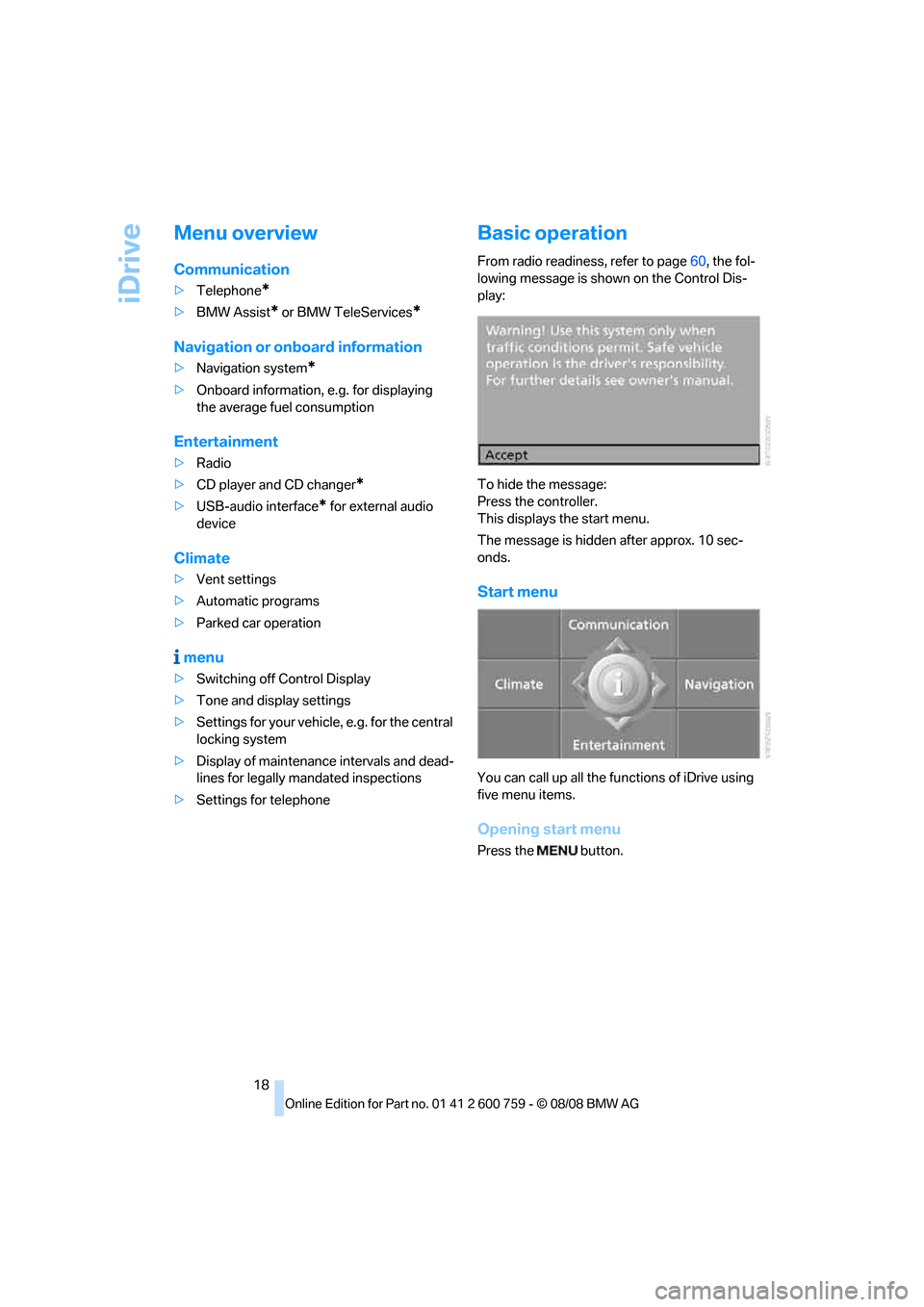
From radio readiness, refer to page60, the fol-
lowing message is shown on the Control Dis-
play:
To hide the message:
Press the controller.
This displays the start menu.
The message is hidden after approx. 10 sec-
onds.
Start menu
You can call up all the functions of iDrive using
five menu items.
Opening start menu
Press the button.
Page 23 of 272
At a glance
21Reference
Controls
Driving tips
Communications
Navigation
Entertainment
Mobility
Status information
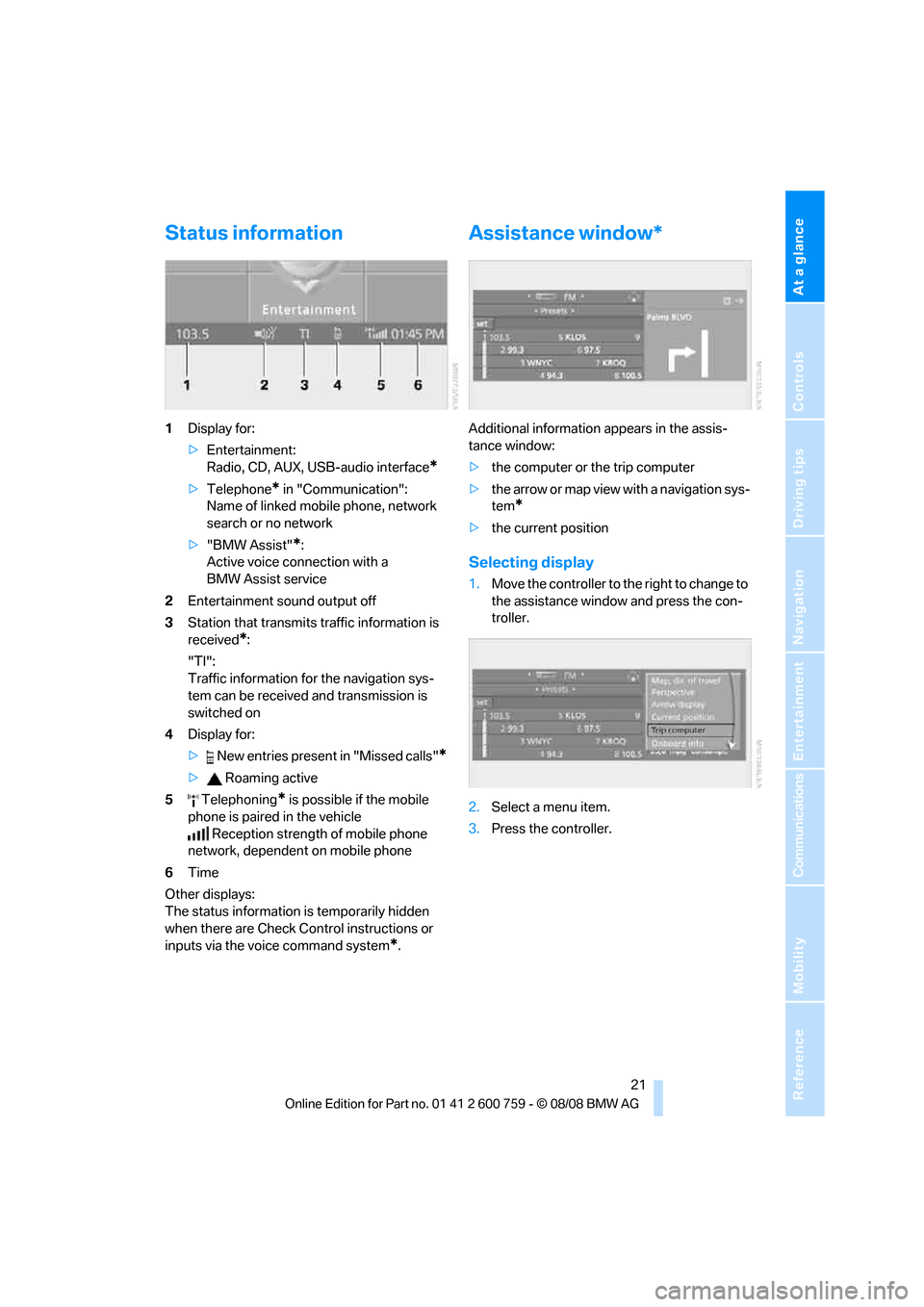
1Display for:
>Entertainment:
Radio, CD, AUX, USB-audio interface
*
>Telephone* in "Communication":
Name of linked mobile phone, network
search or no network
>"BMW Assist"
*:
Active voice connection with a
BMW Assist service
2Entertainment sound output off
3Station that transmits traffic information is
received
*:
"TI":
Traffic information for the navigation sys-
tem
can be received and transmission is
switched on
4Display for:
> New entries present in "Missed calls"
*
> Roaming active
5 Telephoning
* is possible if the mobile
phone is paired in the vehicle
Reception strength of mobile phone
network, dependent on mobile phone
6Time
Other displays:
The status information is temporarily hidden
when there are Check Control instructions or
inputs via the voice command system
*.
Assistance window*
Additional information appears in the assis-
tance window:
>the computer or the trip computer
>the arrow or map view with a navigation sys-
tem
*
>the current position
Selecting display
1.Move the controller to the right to change to
the assistance window and press the con-
troller.
2.Select a menu item.
3.Press the controller.
Page 24 of 272
iDrive
22
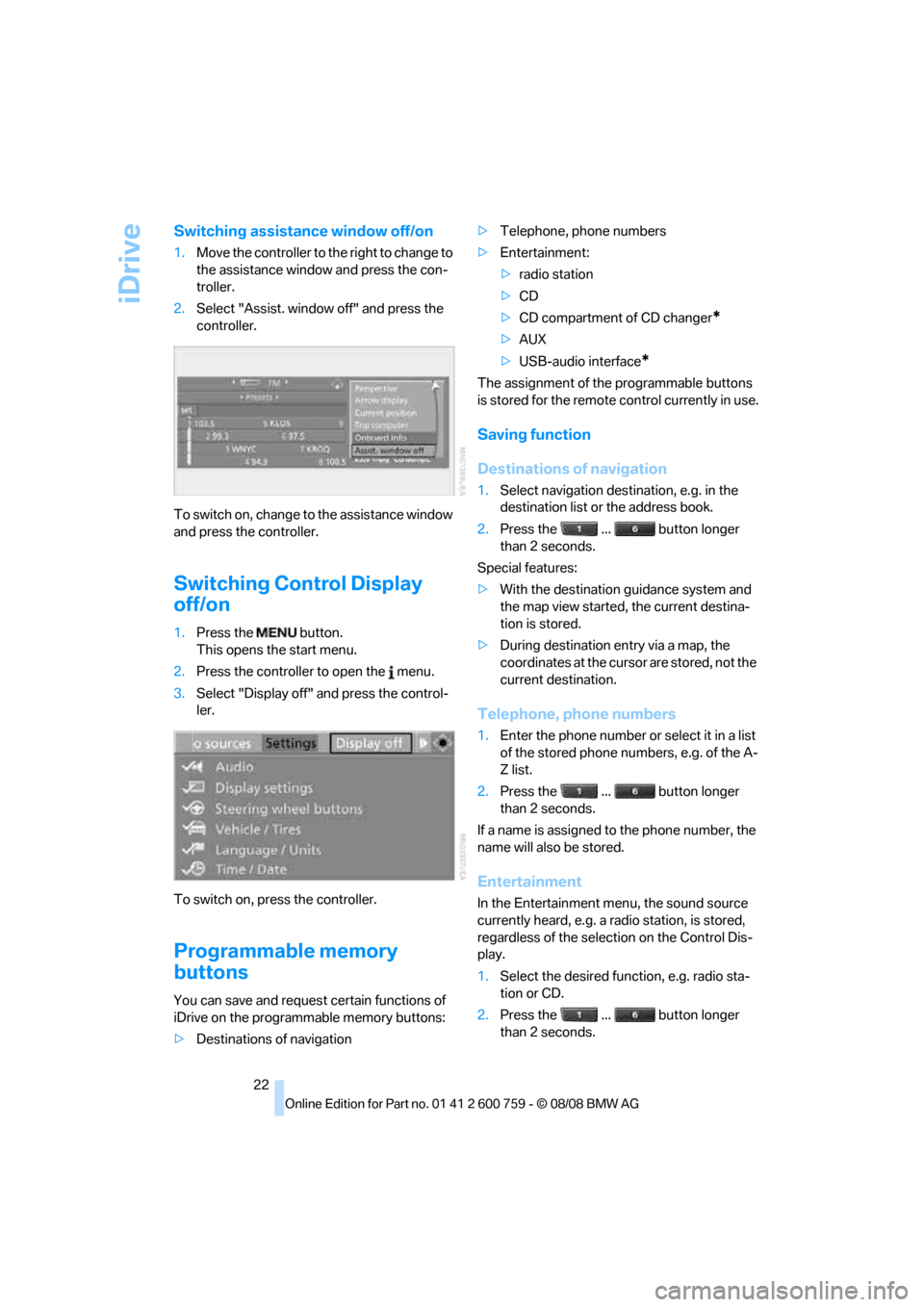
Switching assistance window off/on
1.Move the controller to the right to change to
the assistance window and press the con-
troller.
2.Select "Assist. window off" and press the
controller.
To switch on, change to the assistance window
and press the controller.
Switching Control Display
off/on
1.Press the button.
This opens the start menu.
2.Press the controller to open the menu.
3.Select "Display off" and press the control-
ler.
To switch on, press the controller.
Programmable memory
buttons
You can save and request certain functions of
iDrive on the programmable memory buttons:
>Destinations of navigation>Telephone, phone numbers
>Entertainment:
>radio station
>CD
>CD compartment of CD changer
*
>AUX
>USB-audio interface
*
The assignment of the programmable buttons
is stored for the remote control currently in use.
Saving function
Destinations of navigation
1.Select navigation destination, e.g. in the
destination list or the address book.
2.Press the ... button longer
than 2 seconds.
Special features:
>With the destination guidance system and
the map view started, the current destina-
tion is stored.
>During destination entry via a map, the
coordinates at the cursor are stored, not the
current destination.
Telephone, phone numbers
1.Enter the phone number or select it in a list
of the stored phone numbers, e.g. of the A-
Z list.
2.Press the ... button longer
than 2 seconds.
If a name is assigned to the phone number, the
name will also be stored.
Entertainment
In the Entertainment menu, the sound source
currently heard, e.g. a radio station, is stored,
regardless of the selection on the Control Dis-
play.
1.Select the desired function, e.g. radio sta-
tion or CD.
2.Press the ... button longer
than 2 seconds.
Page 25 of 272
At a glance
23Reference
Controls
Driving tips
Communications
Navigation
Entertainment
Mobility
If the vehicle is equipped with two drives,
the current track is stored for CDs with
compressed audio files.<
Running function
Press the ... button.
When selecting a phone number, the connec-
tion is also established, or the destination guid-
ance is started when a navigation destination is
selected.
Displaying button assignment
You can display the assignment of the buttons
by touching them with your finger. Please do
not wear gloves when doing so. Touching with
an object, e.g. a pen, does not function.
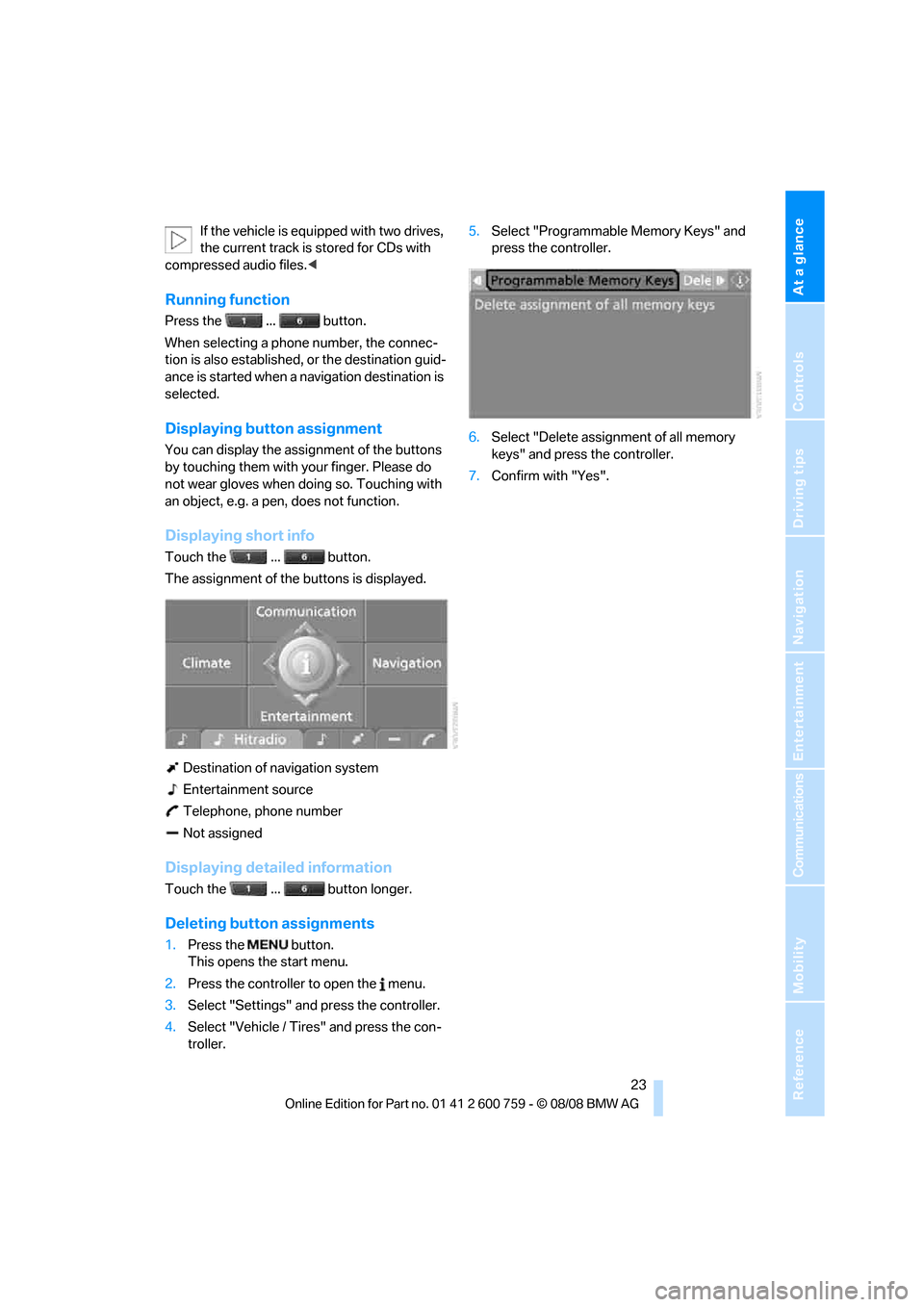
Displaying short info
Touch the ... button.
The assignment of the buttons is displayed.
Destination of navigation system
Entertainment source
Telephone, phone number
Not assigned
Displaying detailed information
Touch the ... button longer.
Deleting button assignments
1.Press the button.
This opens the start menu.
2.Press the controller to open the menu.
3.Select "Settings" and press the controller.
4.Select "Vehicle / Tires" and press the con-
troller.5.Select "Programmable Memory Keys" and
press the controller.
6.Select "Delete assignment of all memory
keys" and press the controller.
7.Confirm with "Yes".