2009 AUDI S8 change time
[x] Cancel search: change timePage 150 of 408
• ..__A_ d_a...: p:,..._ ti_v _ e_ C_ ru_ is_ e_ C_ o_n_ t_ r_ o _ l ___________________________________________ _
If Adaptive Cruise Control is turned off or no speed is set, no vehicle
is shown.
@ Status
• The text OFF appears in white letters when Adaptive Cruise
Control is turned off.
• The text
AVAILABLE appears in white letters when the system is
turned on but no requested speed has been set.
• The text
OVERRIDE appears in white letters when you exceed the
requested speed by accelerating.
• The text
DISTANCE! appears in red letters when the interval to a
vehic le traveling ahead is too short and you also have to slow your
vehicle with the foot brake.
• The text messages
DISTANCE 1, DISTANCE 2, DISTANCE 3 or
DISTANCE 4
appear in green letters to indicate the time interval
(distance) you have set and ACC is active.
© Distance
A pointer (arrow) is shown in this area. When slowly approaching a
moving vehicle detected ahead in your lane of travel, this pointer
represents the distance to that vehicle . When approaching that
vehicle rapidly, it serves as early warning of an impending request
for the driver to assume ful l vehicle control. The pointer moves on a
scale from right to left.
Open road: With an open road and no moving vehicle detected up
ahead, no pointer is shown.
Driving in traffic: If a vehicle traveling up ahead in your lane of travel
is detected, the pointer moves to the center area of the scale. This
area represents the time interval (distance) set. It is shown in
green
to make it easier to see.
Driver intervention prompt: Whenever the selected time interval
(distance) to the vehicle moving up ahead in your lane of travel is
less than the time interval (distance) set, the pointer moves into the
red area of the display. When the pointer reaches the farthest posi
tion on the left, the driver intervention prompt is disp layed to indi -cate that the driver must now assume full vehicle control in order to
prevent
a collision. •
Applies to vehicles : with Adapt ive Cru ise Contro l
Messages
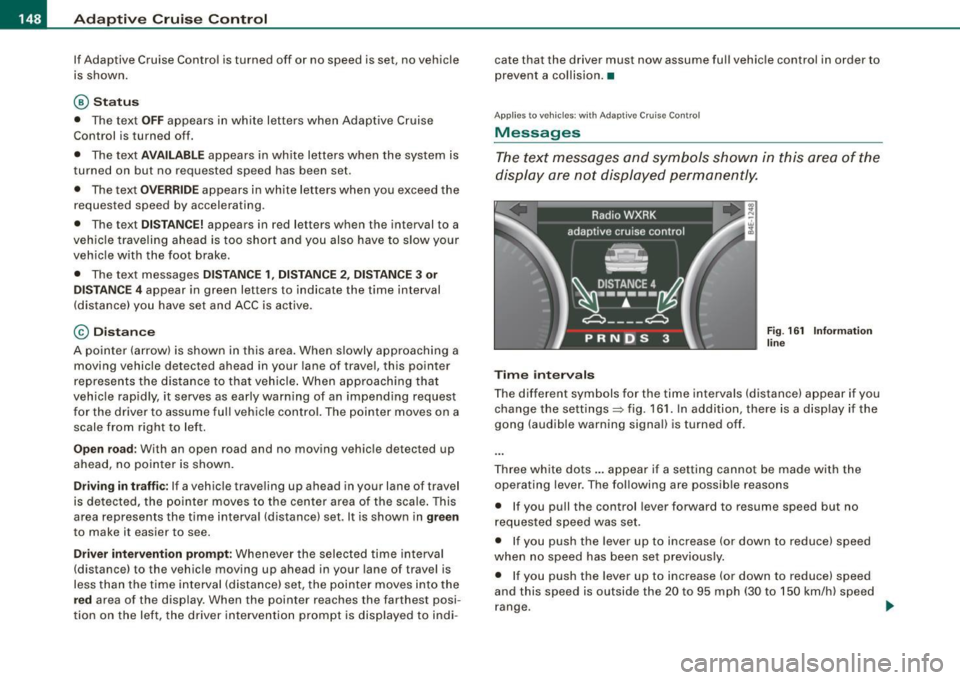
The text messages and symbols shown in this area of the
display are not displayed permanently.
Time intervals
Fig. 161 Information
line
The different symbols for the time intervals (distance) appear if you
change the settings=> fig. 161. In addition, there is a disp lay if the
gong (audible warning signal) is turned off.
Three white dots ... appear if a setting cannot be made with the
operating lever. The following are possible reasons
• If you pull the control lever forward to resume speed but no
requested speed was set.
• If you push the lever up to increase (or down to reduce) speed
when no speed has been set previously.
• If you push the lever up to increase (or down to reduce) speed
and this speed is outside the 20 to 95 mph (30 to 150 km/h) speed
range. .,
Page 158 of 408

• ..__A_ u_ d_ i _s _i_d _e_ a_ s_ s _ is_ t __________________________________________________ _
Audi side assist
Lane Change Assistant
Applies to vehicles: with side ass ist
Description
The side assist helps you when changing lanes.
[ Audi AS J
Fig. 173 Rear bumper:
Position of radar
sensors (not visible on
outside)
Fig . 174 Signal light
on the outside mirror -
driver's side
Side assist uses radar sensors (not visible on outside) => fig. 173 to
help the driver check blind spots, and see what is happening in
traffic behind the vehicle =>
page 158, fig. 176.
Signal lights are built into both outside mirrors=> fig. 174. The
signal light on the left outside mirror assists when moving over into the left lane and the signal light on the right outside mirror assists
when moving over into the right
lane.
The signal light comes on to tell you that side assist has detected a
vehicle on that side and that the position of this other vehicle
should be taken into account if you were to change lanes. This is
called the
informational stage signal=> page 158. The informational
stage signal is designed so that you notice it only when you are
looking in the outside mirror .
When you activate the turn signal and side assist detects a vehicle in a notable location, the corresponding signal on the outside
mirror flashes briefly and brightly several times. This is the
alert
stage signal
=> page 158. •
App lies to vehicles : with side ass ist
Activating and deactivating
-
Activating
Fig . 175 Cockpit : Side
assist button
Press the button=> fig. 175. The indicator on the button
lights up. ..,
Page 159 of 408

_________________________________________________ A_u_ d _ i _s ... i __ d _e:....: a.:..: s:.. s:.. i:..: s :..:t;___!II
Deactivating
- Press t he button again . T he ind icato r light on the butto n
goes out.
T he system works at speeds faster than 19 mph (30 km/h) .
& WARNING
• Improper reliance on the side assist system can cause colli
sions and seriou s per sonal injury:
- Never rely only on side assist when changing lanes .
- Always check rear view mirrors to make sure that it is safe to c hange lanes.
• Side assist cannot detect all vehicles under all conditions
danger of accident!
• Side assist cannot detect vehicles in time to alert you when
they approach from behind at very high speed , or fall drop back
very quickly.
• The radar sensor's
vision can be reduced or entirely blocked by
rain , snow, and heavy spray . This can result in side assist not
adequately detecting veh icles or , in some cases, not detecting
them at all . Always keep an eye on the direction you are traveling
and the relevant area around the vehicle.
• Please note that side assi st indicates there are approaching
vehicles, or vehicles in your bl ind spot , only after your vehicle has
reached a driving speed of at lea st 19 mph (30 km /h).
• S ide assist signal does not work around tight corners (turning
radiu s less than 328 feet or 100 m ).
• Side assist is no replacement for the driver's full attention . The
d river alone is responsible for lane changes and similar driv ing
maneuvers. Always keep an eye on the d ire ction you are travel ing
and the relevant area around the vehicle .
Controls and equip
ment
0 Note
• To e nsu re t hat you do not adverse ly a ffect s ide assist, do not
b lock the area on the rear bumper where the radar sensors are
located w it h f oreign objects (s uch as st ickers or bicycle rac ks).
• M ake su re that the signal light on the o utside mi rror is not
b loc ked by st ic ke rs or ot her items.
[ i ] Tips
• Side ass ist automaticall y deact ivates i f it detects t hat t he ra dar
sensors are blocked=> page
163. The indicator light on the button
goes out.
• The area on the bumper whe re the rada r sen so rs a re loca ted
must cons iste ntly re mai n fr ee o f snow, ice, and heavy so iling so t hat
side assist can function properly. Follow the additiona l notes on
=> page
164.
• Additiona l tinting on the front side windows can make it ha rder
t o see and co rrect ly unde rsta nd the s ignal light o n the outs ide
mirror.
• For Declaratio n of Comp liance to Un ited Sta tes FCC a nd I ndus try
Canada regulations => page
385. •
I • •
Page 166 of 408

• .___A_ u_ d_ i_s_ i_ d _e_ a_ s_ s_is _ t __________________________________________________ _
objects (such as stic kers o r bicyc le rac ks) shou ld no t be attach ed to
th e ar ea on the rea r bump er where t he sen so rs ar e loca ted. I f side
assist functions are adve rsely aff ect ed, you will see this m essage in
th e ins trum ent clu ster dis pla y. Remove an ything that may be
blocking the sensors.
If no veh ic le is detected for a longer period of time while d riving,
s id e ass ist w ill a lso sw itc h off aut omat ica lly.
Audi side assist currently not available
If th ere is a tem porary prob le m (such as the veh ic le 's battery char ge
being low), side ass ist cannot be activated tem porar ily .
Audi side assist: system fault
Have the sys te m chec ked by an a uthorize d A udi dea ler o r qua lified
wor ks h op. •
App lies to veh icles : wi th side ass is t
Safety tips
The side ass is t de tect io n m ay be limi ted whe n driving a round
narrow s treet corners, on hilly streets, and under poor w eat he r
condit ions.
It is possibl e that the r ad ar sen so rs may also d etect oth er obje cts,
such as high or staggered guardrails.
Sid e assis t does no t measure ac tual lane w idth. The sys te m
assu mes a fixed lane widt h. D etect ion in the left and right lanes is
based on thi s assumed lane width . When driving on na rrow roads or
when driv ing to th e left or right of the c enter o f a trav el lane, it is
possible that veh ic les wi ll be detected that are
not in the lane next
to the l ane y ou are us ing .
& WARNING
• Improper reliance on the side assist system can cause colli
sions and serious personal injury:
& WARNING (continued)
- Never rely only on side assist when changing lanes .
- Always check rear view mirrors to make sure that it is safe to
change lanes .
• Side assist cannot detect all vehicles under all conditions
danger of accident !
• Side assist cannot detect vehicles
in time to alert you when
they approach from behind at very high speed , or fall drop back
very quickly.
• The radar sensor's
vision can be reduced or entirely blocked by
rain , snow , and heavy spray. This can result in side assist not
adequately detecting vehicles or, in some cases, not detecting
them at all . Always keep an eye on the direction you are traveling
and the relevant area around the vehicle .
• Please note that side assist indicates there are approaching
vehicles , or vehicles in your blind spot , only after your vehicle has
reached a driving speed of at least 19 mph (30 km /h) .
• Side assist signal does not work around tight corners (turning
radius less than 328 feet , or 100
ml.
• Side assist is no replacement for the driver's full attention. The
driver alone is responsible for lane changes and similar driving
maneuvers . Always keep an eye on the direction you are traveling
and the relevant area around the vehicle .
0 Note
To ensure that s ide assist is not adversely affected , you s hou ld not
block the area on the rea r bumper where the radar sensors a re
l ocated with fo rei gn ob jec ts (such as w ith sti ckers or b icycl e rac ks!. .,,_
Page 176 of 408

• .___A_ d_v_ a_ n_c_ e_ d_ P _a_r_k _i_ n -=g,_ S-=y"- s_ t_ e_ m __________________________________________ _
-Press the sw itch PJJJ! in the cente r console ~ page 173,
fig . 194 t o activate the A udi pa rking system m anually .
Activation of the acoustic parking system is confirmed by
a brief acknowledgement sound . The indicator lig ht in
the switch lights up.
D ea ctivation
If you drive forwards faster tha n approx. 6 mph (10 km/h),
or
- if you switch the ign ition off, the entire acoustic parking
assist is automatically deactivated, or
- you can press the sw itch
P111! i n the center console
=> page 173, fig. 194 to deact ivate the Audi parking
system. The indicator light in the switch goes out.
You have to turn on the acoustic parking assist m anuall y if you wish
to park the vehicle forwards or if you w ish to approach an obstacle
forwards and want a distance warning .
The range at which the sensors start to measu re is
about:
Front
Rear
W arning ton es side
cen
te r
side
cen ter 3 ft (0
.90 ml
4ft
(1.20 ml
2 ft (0.60 ml
5 .2 ft (1.60 ml
Distance warning is given by chimes which are generated by a
signal generator . The volume and the pitch of the chimes can be
adjusted in the MMI => page
183.
Mute
In the case of vehic les with automa tic transmission, an acoustic
distance warning is discontinued when the transmission selector l
ever is moved to the P position. However, the system remains
active . As soo n as the selector lever is moved from the
P posi tion
and the vehicle approaches an obstacle, the acoustic distance
warning resumes .
Dri ving fo rward/ba ckvv ard
Distance warning when driving forward/backward is based o n
detection of an obstacle in the range of the parking assist . As the
distance dec reases, the time interval between the audible tones
becomes shorter.
When the distance is less than approx . 1 ft (0.30 m), the tone
becomes continuous. At this point you shou ld s top backing up or
driving forward .
If the distance to an obstac le remains the same, the vo lume of the
distance warning is gradually reduced after about
4 seconds (does
not app ly to the zone for the cont inuous tone). If you sta rt to
approach the detected obstacle again, the distance warning will
sound at the normal volume again .
P a rk ing
When you selec t ano ther gear when parki ng (e .g . reverse/forward),
the warning tones are temporarily suppressed, but the visual display remains on the MMI display . If you start approaching a
detected obstacle again, the distance warning wi ll sound at the
normal vo lume again .
Visual disp lay
T he segments on the MMI display indicate a change in the distance
between the vehicle and an obstacle . The number of segments
displayed depends on the obstacles in front of or behind the
vehic le. The c loser the vehic le comes to the obstacle, the closer the
segments approach the vehic le => page
173 , fig. 195. When the
segment before last is disp layed, the veh icle has reached the colli
sion zone. At this point you should stop backing up or driving
forward =>
&,. ..,.
Page 188 of 408

• .___A_ d_v_ a_ n_c_ e_ d_ P _a_r_k _i_ n -=g ,_ S-=y"- s_ t_ e_ m __________________________________________ _
"Off" sett ing
If you have set the off function, both the rear -view camera and the
visual display will be deac tiva ted . The acous tic pa rking assist
remains active .
[ i J Tip s
If you change the sett ings in the MM I, the new settings do not
become active unti l the parking assist is switched on aga in. •
Safety tips
Applie s to ve hic le s: wit h Advance d Par king Sy ste m wit h re ar vie w ca me ra
Acoustic parking system error message
If you hear a continuous tone for several seconds while the front
and back parking assist with visual display is activated and the LED
in the switch
P wA flashes when you engage the reverse gear , there is
a malfunction in the acoustic parking assist .
This system error is immediately output after: • Every manual activation via the switch
P wA ~ pag e 173,
• Reverse gear is engaged for the first time during an ign ition
cycle, or
• An error is detected during operation.
[ i J Tips
If the system reports an error, have an Audi dea ler or an authorized
dea le rship corr ect this system error. •
Applies to vehicles: w it h A dvanced Par king S ystem w it h rea r view ca mera
Rear-view camera tips
We recommend that you practice park ing with the rear -view camera
in a traffic -free location , or parking lot , to become familiar with the
system, the orientation lines, and their function . When doing this,
there should be good light and weather conditions .
I n the MM I Display, objects or vehicles appea r c loser or further away
if :
• you are driving in reverse g ear from a level surface onto an
incline, or a downward slope,
• you are driv ing in reverse gear toward protruding objects,
• the vehic le is carrying too much load in the rear.
T he accuracy of the orientation lines and b lue surfaces diminishes
if :
• the Adaptive Air Suspension is defective, or the dynamic or lift
mode is switched on,
• the rear -view camera does not provide a reliable image, for
example, in poor visibility condit ions or if the lens is d irty,
• the image on the screen is not visible due to sun glare and reflec
tion .
Car ing for the rear- vie w c amera l en s:
• Damp en the lens with a hous ehold a lcohol -based glass cleaner,
and c lean the lens w ith a dry cloth.
• Remove snow with a hand brush.
• Remove ice , preferably with de -icing spray~
0.
ln. WARNING
• The rear-view ca m era doe s not replace the view to the rear and
the rear view mirror s.
• The rea r-view camer a - be cause of t echni cal limit ation s - does
not show the ent ire area behind the vehicle
~ page 17 7, fig. 199. ~
Page 190 of 408

-L~A~d~a~ p~ t~iv~ e~A~ ir~ S~u~ s ~p~ e~n~ s~io~n ~-------------------------------------------
Adaptive Air Suspension
Adaptive Air Suspension and
Damping
Description
Adaptive Air Suspension and damping can be regulated and they adapt automatically t o a request from the driver
and the driving situation at the time.
Adaptive Air Suspension is an electronica lly controlled springing
and damping system. This chassis system makes it easier on the
driver by adapting to the particular situation through imperceptible
control processes.
The
Ad aptiv e Ai r Suspen sion component regulates ground clear
ance depending on vehic le speed, load condition and driver input.
Accelerating to a speed above a predetermined limit wil l make the
vehic le lower itself. On the other hand, driving more slowly results
in the vehicle raising aga in at specific speeds.
The
damping component provides individual control of the
damping forces . For example, with damping c haracteristics set to
provide greater comfort, damping is set somewhat harder for a brief period only as required, for example, when going around a curve or
over rough road surfaces as well as when braking.
Settings
Adaptive Air Suspension provides the driver w ith the opportunity to
set the chassis characteristics also to their individual preference .
With the driving modes
standard, automatic and dynamic the driver
has three chassis settings available, ranging from comfort to sporty.
In addition,
lift provides a fourth mode which can be selecting for
driving over poor stretches of road=>
page 189, "Chassis Controls".
The modes are set in MMI =>
page 191.
On vehicles equipped with the s port su spen sio n Adaptive Air
Suspension -Sport*, there is generally more emphasis on a sporty
chassis setting. Settings range from comfortable to firm
=>
page 190, "Sport Chassis Contro ls".
0 Note
• Whenever you park your vehicle, always make sure there is
adequate c learance
above and below the vehic le . The height of the
parked vehicle can change as the result of temperature fluctuations,
changes in load conditi on and changes in the driving m ode (gro und
clearance).
• Mount the tie -down chains/cables over the running surface
(circumference) of the tires . Never secure the vehicle by the axle, the
suspension stru ts or the front or rear towline eye. For technical
reasons, the pressure in the suspension struts may change during
the transport and this wi ll adversely affect vehicle handling.
• To prevent damage to the vehicle underbody, remember that
you r veh ic le is not an off -road vehicle, even in the lift mode. The
ground c learance is insufficient for this type of operation.
• If you are going to tow a trai ler, you must activa te the trai ler oper
ation mode=>
page 792.
[ i ] T ip s
Before you can raise your vehic le using the vehicle jack (for
example, when changing a flat tire) you must activate the jacking
mode=>
page 191 . •
Page 236 of 408

llffll,___A_ ir_ b_ a.::g <-- s--
• A tight tether or other strap on a rearward-facing child restraint
attached to the front passenger seat c an put too much p res su re
on the weight-sensing mat in the seat and reg ister more weight
than is actually on the seat . The heavier weight registered can
make the system work as though an adult were on the seat and
deploy the Advanced Airbag when it mu st be suppre ssed causing
serious or even fatal injury to the child .
• If, in exceptional circumstances , you must install a forward
f ac ing child restraint on the front passenger seat , always move the
seat into its rearmost position in the seat's fore and aft adjust
ment range , as far away from the airbag as possible . The ba ckrest
must be adju sted to an upright position. Make sure that the
PASSENGER AIR BAG OFF light comes on and stays on all the time
whenever the ignition is switched on .
& WARNING
• If the PASSENGER AIR BAG OFF light does not go out when an
adult is sitting on the front passenger seat after tak ing the steps
described above, make sure the adult i s properly seated and
restrained at one of the rear seat ing positions .
• Have the airbag system inspected by your Audi dealer before
transporting anyone on the front passenger seat .
[ i ] Tips
If the we ight -sens ing mat in the front passenger seat detects an
e m pty s eat, th e front airbag on the passenge r side wil l be tur ned
off , and the PASSENGER AIR BAG OFF li ght wil l stay on .•
Repair, care and disposal of the airbags
Parts of the airbag system are insta lled at many different places on
yo ur Audi. Ins tal li n g, r em oving, s ervicing o r rep airi ng a part in an area of the vehicle can damage a part of an airbag system and
p revent that sys tem from wo rking pr operly in a c ollisi on.
Th ere are some important th ings you have to know to ma ke sure
that the effectiveness of the system will not be impai red and that
discarded co mponents do no t cause i njury or po llute the enviro n
ment.
& WARNING
Improper care , servicing and repair procedures can increase the
risk of personal injury and death by preventing an airbag from
deploying when needed or deploying an airbag unexpectedly :
• Never cover , obstruct , or change the steering wheel horn pad
or airbag cover or the instrument panel or modify them in any way.
• Never atta ch any objects su ch as cup holders or telephone
mountings to the surfaces covering the airbag units .
• For cleaning the horn pad or instrument panel , use only a soft ,
dry cloth or one moistened with plain water . Solvents or cleaners
could damage the airbag cover or change the stiffness or strength
of the material so that the airbag cannot deploy and protect prop
erly .
• Never repair , adjust, or change any parts of the airbag system .
• All work on the steering wheel , instrument panel , front seats or
electrical system (including the installation of audio equipment ,
cellular telephones and CB radios , etc .I must be performed by a
qualified technician who has the train ing and special equipment
necessary .
• For any work on the airbag system, we strongly recommend
that you see your author ized Audi dealer or qualified workshop .
• Never modify the front bumper or parts of the vehicle body .
• Always make sure that the side airbag can inflate without inter-
ference :
~