2009 AUDI S8 light
[x] Cancel search: lightPage 170 of 408

• ..__A_ u_ t _o_ m_ a_ t_ i_ c _ t_r _a _n_ s_ m_ is_ s_io _ n ________________________________________________ _
Select R only when the vehicle is at a full stop and the engine is
running at idle speed=>
& in "Driving the automatic transmission"
on
page 166.
Before you move the selector lever to R, press both the button in the
handle of the selector lever
and the brake pedal at the same time.
When the ignition is on, the backup lights illuminate when the
selector lever is moved into
R.
N -Neutral
The transmission is in neutral in this position. Shift to this position
for standing with the brakes applied =>
page 168 .
When the vehicle is stationary or at speeds below 3 mph (5 km/h),
you must always apply the footbrake before and while moving the
lever out of
N.
D -Normal position for driving forward
Position Dis for normal city and highway driving. It ranges from zero
to top speed and all six gears shift automatically, depending on
engine load, driving speed and automatically selected shift
programs.
When the vehicle is stationary or at speeds below 3 mph (5 km/h),
you must always apply the foot brake before and while moving the
lever to
D out of N.
In certain circumstances it may be advantageous to temporarily
switch to the manual shift program to manually select gear ratios to
match specific driving conditions=>
page 170.
S -Sport position
Select this position for sportier performance. In this position, the
transmission will not upshift as soon, allowing the vehicle to use the increased power available at higher engine speeds to achieve live
lier acceleration.
When the vehicle is stationary or at speeds below 3 mph (5 km/h),
you must always apply the foot brake before and while moving the lever to
S out of N.
& WARNING
Read and follow all WARNINGS => & in "Driving the automatic
transmission" on
page 166.
0 Note
Coasting downhill with the transmission in N and the engine not
running will result in damage to the automatic transmission and
possibly the catalytic converter. •
Automatic Shift Lock (ASL)
Automatic shift lock prevents you from accidentally
shifting into a forward gear or into reverse, thus causing the vehicle to move unintentionally.
Fig. 187 Shift gate
selector lever lock
positions and interlock
button highl ighted
The selector lever lock is released as follows:
- Turn the ignition on.
Step on the brake pedal.
At the same time press and hold
the lock button on the side of the gear selector knob
=> fig. 187 with your thumb until you have moved the
selector lever to the desired position.
~
Page 172 of 408

• ..__A_ u_ t _o_ m_ a_ t_ i_ c _ t_r _a _n_ s_ m_ is_ s_i o _ n ________________________________________________ _
gear when the driver presses the brake pedal on a downhill
gradient. This makes use of the braking effect of the engine without
the need to shift down manually.•
Manual shift program
Using the manual shift program you can manually select
gears.
Fi g. 18 8 Ce nte r
co nso le: s hiftin g the
t ip tr on ic® ma nually
F ig . 18 9 Disp lay:
ma nua l shi ft prog ra m ,
selecte d gear high
l ig hte d
Swit ching to manual shift program
With the selecto r lever in D, push the lever to the rig ht.
T he d isplay will s how
6 5 4 3 2 1 as soon as the selector
lever is moved. The gear you se lect will also be high
lighted => fig . 189.
To upshift
Push the selector lever forward to the plus position 0
=> fig. 188.
To downshift
- Push the lever to the minus position Q.
When accelerating, the transmission will automatically shift into
gears 1 , 2, 3, 4 or 5 before the engine reaches its maximum RPM .
If you apply a light throttle when accelerating, tiptronic® will auto
matically shift from 1st to 2nd gear to save fuel. If you apply a heavy
throttle, the transmission will stay in 1st gear until near maximum
RPM is reached, or unti l the driver shifts into 2nd gear .
If you take your foot off the accelerator peda l when driving down a
steep incline, tiptronic® will downshift from the selected gear into
the next lower gear until it reaches 1st gear, based on road speed
and engine RPM. Automatic downshifting is interrupted as soon as
you apply the thrott le again .
[ i ] Tips
• When you shi ft into the next lower gear, the transmission will
downshift only when there is no possibi lity of over -revving the
engine.
• When the kickdown comes on, the transmission wil l shift down
to a lower gear, depending on vehicle and eng ine speeds.
• Tiptronic® is inoperative when the transmission is in the fai l-safe
mode. •
Page 174 of 408

-Autom
atic tran smi ssi on
..__ ______________ _
Fig. 192 E merge ncy
re lease for sel ecto r
l ever
T he emergency release is located under the insert for the
ashtray.
- Press t he button next to the cigarette lighter=>
page 171,
fig. 191 . The insert rises from its holder and you can
remove it .
Press the white switch down with a pen and hold it down
=> fig . 192.
- Now press the interlock and move the selector lever to
the N position.
The selector lever can only be moved from the P position if the igni
tion key is in the lock and the ignition is turned on. If the vehicle has
to be pushed or towed if the power supply fails (e.g . battery is
discharged), the selector lever must be moved to the N position
using the emergency locking device. •
Page 176 of 408

• .___A_ d_v_ a_ n_c_ e_ d_ P _a_r_k _i_ n -=g,_ S-=y"- s_ t_ e_ m __________________________________________ _
-Press the sw itch PJJJ! in the cente r console ~ page 173,
fig . 194 t o activate the A udi pa rking system m anually .
Activation of the acoustic parking system is confirmed by
a brief acknowledgement sound . The indicator lig ht in
the switch lights up.
D ea ctivation
If you drive forwards faster tha n approx. 6 mph (10 km/h),
or
- if you switch the ign ition off, the entire acoustic parking
assist is automatically deactivated, or
- you can press the sw itch
P111! i n the center console
=> page 173, fig. 194 to deact ivate the Audi parking
system. The indicator light in the switch goes out.
You have to turn on the acoustic parking assist m anuall y if you wish
to park the vehicle forwards or if you w ish to approach an obstacle
forwards and want a distance warning .
The range at which the sensors start to measu re is
about:
Front
Rear
W arning ton es side
cen
te r
side
cen ter 3 ft (0
.90 ml
4ft
(1.20 ml
2 ft (0.60 ml
5 .2 ft (1.60 ml
Distance warning is given by chimes which are generated by a
signal generator . The volume and the pitch of the chimes can be
adjusted in the MMI => page
183.
Mute
In the case of vehic les with automa tic transmission, an acoustic
distance warning is discontinued when the transmission selector l
ever is moved to the P position. However, the system remains
active . As soo n as the selector lever is moved from the
P posi tion
and the vehicle approaches an obstacle, the acoustic distance
warning resumes .
Dri ving fo rward/ba ckvv ard
Distance warning when driving forward/backward is based o n
detection of an obstacle in the range of the parking assist . As the
distance dec reases, the time interval between the audible tones
becomes shorter.
When the distance is less than approx . 1 ft (0.30 m), the tone
becomes continuous. At this point you shou ld s top backing up or
driving forward .
If the distance to an obstac le remains the same, the vo lume of the
distance warning is gradually reduced after about
4 seconds (does
not app ly to the zone for the cont inuous tone). If you sta rt to
approach the detected obstacle again, the distance warning will
sound at the normal volume again .
P a rk ing
When you selec t ano ther gear when parki ng (e .g . reverse/forward),
the warning tones are temporarily suppressed, but the visual display remains on the MMI display . If you start approaching a
detected obstacle again, the distance warning wi ll sound at the
normal vo lume again .
Visual disp lay
T he segments on the MMI display indicate a change in the distance
between the vehicle and an obstacle . The number of segments
displayed depends on the obstacles in front of or behind the
vehic le. The c loser the vehic le comes to the obstacle, the closer the
segments approach the vehic le => page
173 , fig. 195. When the
segment before last is disp layed, the veh icle has reached the colli
sion zone. At this point you should stop backing up or driving
forward =>
&,. ..,.
Page 182 of 408

• ..__A_ d_v _ a_ n_c _e _ d_ P_ a_r _k _in ---== g'-- S...:y _ s_ t_ e_ m ___________________________________________ _
Fig. 203 MM I D isp lay:
Co ntac t of th e bl ue
c ur ved line with th e
c ur b
- Find a park ing spot on the right side of the road, for
examp le .
- Sw itch on the Adaptive Air Suspension=>
page 21 stan
dard or automat ic mode.
- Position your vehicle paralle l to the edge of t he road,
approximate ly 3 ft ( 1 m) away from a parked vehicle
=>
page 176 , fig. 197 . When parking next to obstacles ,
please note=:,
page 181.
-Activate the A udi p arking system => page 173. "Parking
mode 1" is displayed by default .
- Press the control butto n with t he
mode @=> pag e 178,
fig. 20 1 f uncti on. "Park ing mode 2" => page 179, fig. 202
appears in t he M M I Dis pla y.
- Back up in reverse gear and adjust the posi tion of your
vehicle in such a way, tha t the dark blue sur face indicated
in the MMI Display®=>
page 179, fig. 202 borde rs on
t he veh icle be hin d, o r the park ing spo t lin e. If you are
not
par king nex t to any obs tacles => page 781, the long s ide
of the dark blue surface shoul d border o n the curb. The
ent ire dark bl ue surface has to fit into the parking spot
=>
page 176 , fig. 197. While the vehicle
is stat io nary, tur n yo ur s teering whee l
to the righ t as far as it will g o.
- Back up into the parki ng spot. If you are
not parking next
to any obstacles =>
page 787, the dark b lue bend 0
sho uld touc h the curb => fig. 203 . Sto p your ve hic le.
- Wh ile t he vehicle is stationa ry, tur n your steering whee l
in the opposite direction (left) as far as it w ill go .
- Continue to bac k up into the parking spot until the
vehicle is parked parallel to the curb. When backing up,
also keep a n eye on t he vehicle front=>
0-
With "parking mode 2", you can park on the le ft and right sid e of the
road. For this reason, the blue surfaces and curved l ines are
displayed in differen t shades of blue . The dark blue surface
G) and
the dark blue curved line
G) can be used to park on the right side of
the road. The light b lue surface
G) and the light blue curved line®
can be used to park on the left side of the road .
When the turn signal is switched on, only the necessary surfaces and curves are shown. To change the side that is shown, simply
change the turn signal.
The displayed light blue ® or dark blue© curved line identifies the
turn -around point when maneuvering to park. If the curved lin e
touches the curb , the steering wheel turn -around point has been
reached
~ fig . 203.
The distance from the rear bumper ® to the red line © is approxi
mately 1.3 ft (40 cm). Here, at the latest, you should stop backing up
~ page 182.
& WARNING
Pl ea se note that obje cts not touching the ground can appea r to b e
fu rther awa y than the y re ally are (for e xample , the bumper of a
parked vehicl e, a trailer hitch, or the rear of a tru ck). In thi s cas e, •
Page 188 of 408

• .___A_ d_v_ a_ n_c_ e_ d_ P _a_r_k _i_ n -=g ,_ S-=y"- s_ t_ e_ m __________________________________________ _
"Off" sett ing
If you have set the off function, both the rear -view camera and the
visual display will be deac tiva ted . The acous tic pa rking assist
remains active .
[ i J Tip s
If you change the sett ings in the MM I, the new settings do not
become active unti l the parking assist is switched on aga in. •
Safety tips
Applie s to ve hic le s: wit h Advance d Par king Sy ste m wit h re ar vie w ca me ra
Acoustic parking system error message
If you hear a continuous tone for several seconds while the front
and back parking assist with visual display is activated and the LED
in the switch
P wA flashes when you engage the reverse gear , there is
a malfunction in the acoustic parking assist .
This system error is immediately output after: • Every manual activation via the switch
P wA ~ pag e 173,
• Reverse gear is engaged for the first time during an ign ition
cycle, or
• An error is detected during operation.
[ i J Tips
If the system reports an error, have an Audi dea ler or an authorized
dea le rship corr ect this system error. •
Applies to vehicles: w it h A dvanced Par king S ystem w it h rea r view ca mera
Rear-view camera tips
We recommend that you practice park ing with the rear -view camera
in a traffic -free location , or parking lot , to become familiar with the
system, the orientation lines, and their function . When doing this,
there should be good light and weather conditions .
I n the MM I Display, objects or vehicles appea r c loser or further away
if :
• you are driving in reverse g ear from a level surface onto an
incline, or a downward slope,
• you are driv ing in reverse gear toward protruding objects,
• the vehic le is carrying too much load in the rear.
T he accuracy of the orientation lines and b lue surfaces diminishes
if :
• the Adaptive Air Suspension is defective, or the dynamic or lift
mode is switched on,
• the rear -view camera does not provide a reliable image, for
example, in poor visibility condit ions or if the lens is d irty,
• the image on the screen is not visible due to sun glare and reflec
tion .
Car ing for the rear- vie w c amera l en s:
• Damp en the lens with a hous ehold a lcohol -based glass cleaner,
and c lean the lens w ith a dry cloth.
• Remove snow with a hand brush.
• Remove ice , preferably with de -icing spray~
0.
ln. WARNING
• The rear-view ca m era doe s not replace the view to the rear and
the rear view mirror s.
• The rea r-view camer a - be cause of t echni cal limit ation s - does
not show the ent ire area behind the vehicle
~ page 17 7, fig. 199. ~
Page 191 of 408

____________________________________________ A_ d_a--' p=-- t_iv _e_ A_ ir_ S_u_ s-=- p_e _ n_ s _ io_ n __ JIIII
Chassis Controls
Four different driving modes can be set by the driver.
The automatic control processes are speed -and time -dependent.
For example, it is not possib le to raise the suspension to the lift
mode above certain speeds .
When a speed of about 75 mph ( 120 km/h) is exceeded for more than
30 seconds, the vehicle is automatically lowered approximately 1
inch (25 mm) to a level suitable for highway speeds, except in the
standard mode . Road holding is optim ized as a result of the lower
center of gravity and fue l consumption is reduced as a result of
reduced wind resistance .
Level adjustment
lift
automatic
dynamic
a utomati c Ground
clear ance
about 5 .7 inches (145 mm)
a bout 4.7 inches ( 120 mm)
about 4 .7 inches (120 mm)
about 3 .9 inches (100 mm)
Select the automatic mode if you prefer a suspension setting
e m phasizing comfort. Damping characteristics emphasizing
comfort are selected in this mode.
• Lower ing : When a speed of about 75 mph (120 km/h) is exceeded
for more than 30 seconds, the vehicle is automatically lowered by about 1 inch (25 mm) .
• Rais ing : The vehicle is automatically raised again if the speed
falls be low about 44 mph (70 km/h) for a period of 120 seconds. The
vehicle is raised immediately when speed falls below about 22 mph (35 km/h) .
dynami c
Select the sport mode if you prefer a sporty suspension setting. In
this mode, the vehic le is lowered whi le it is still stationary and
Controls and equip
ment
sporty damping characteristics are selected. The warning light ~
in the instrument cluster will come on for a few seconds just to
remind you of the reduced ground clearance .
I f you switch off the engine while the vehicle is in the dynamic mode
and then switch on the ignition once again, the~ warning light
wi ll also come on again for a few seconds.
• Lowering : When a speed of abou t 75 mph (120 km/h) is exceeded
for more than 30 seconds, the vehicle is automatically lowered by an addi tional 0 .2 in (5 mml.
• Raising : The vehicle is automatically raised again if the speed
falls bel ow about 44 mph (70 km/h) for a period o f 120 seconds . The
vehic le is raised immediately when speed falls below about 22 mph
(35 km/h).
s ta nd ard
Select the standard mode if you desire a suspension setting with a
special emphasis on comfort . In the standard mode there is
no
lowering o f the suspension. Even at high speeds, the veh icle stays
at the same level. Damping characteristics with a decided emphasis
on comfort are selected in this mode .
lift
Select the lift mode when you have to travel over poo r sections of
road (e .g . trai ls). In the lift mode, the vehic le is raised by 1 inch (25
mm) compared to norma l leve l while it is still stationary and
damping characteristics are adjusted to emphasize comfort.
The lift mode can be act ivated only at speeds be low 50 mph (80
km/h). When a speed of about 62 mph (100 km/h) is exceeded, the
system automatically leaves lift mode and the mode set previously
(standard, automa tic, dynamic) is activated again. •
I • •
Page 193 of 408
____________________________________________ A_ d_a--' p'-- t·_ ,v _e_ A_ ir_ S_u_ s_,_ p_e _n_ s_ io_ n _ __._
Setting the Driving Modes
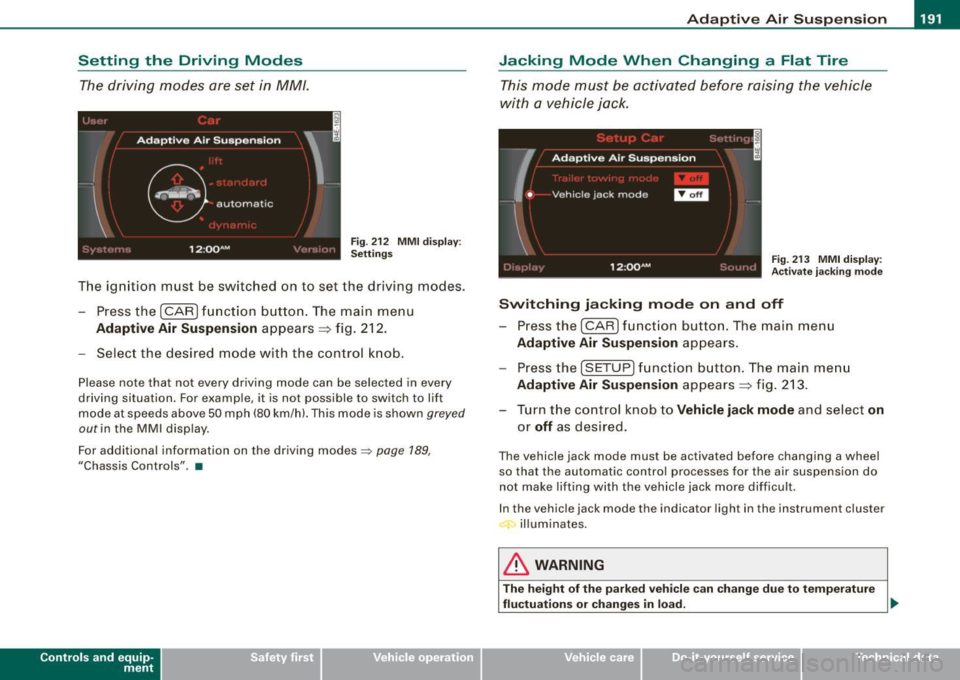
The driving modes are set in MM/.
Fig . 212 MMI display:
Settings
The ignition must be switched on to set the driv ing modes.
- Pressthe(CAR]fu nction button. The main menu
Adaptive Air Suspension appears => fig. 212.
- Select the desired mode with the control knob.
Please note that not every driving mode can be selected in every
driving situation. For example, it is not possible to switch to lift
mode at speeds above 50 mph (80 km/h). This mode is shown
greyed
out in the MMI display.
For additional information on the driving modes::;>
page 189,
"Chassis Controls" . •
Con tro ls and eq uip
ment
Jacking Mode When Changing a Flat Tire
This mode must be activated before raising the vehicle
with a vehicle jack.
Fig. 213 MMI display:
Activate jacking mode
Switching jacking mode on and off
- Press the (CAR] function button. The main menu
Adaptive Air Suspension appears.
Press the (SETUP) function button. The main menu
Adaptive Air Suspension appears => fig. 213.
- Turn the control knob to
Vehicle jack mode and select on
or off as desired.
The vehicle jack mode must be activated before changing a wheel
so that the automatic control processes for the air suspension do
not make lifting with the vehicle jack more difficult .
In the vehicle jack mode the indicator light in the instrument cluster
illuminates.
& WARNING
The height of the parked vehicle can change due to temperature
fluctuations or changes in load. _,,
Vehicle care I I irechnical data