2009 AUDI S6 wheel
[x] Cancel search: wheelPage 143 of 398

_____________________________________________ A_ d_a ...: p_ t_ i_ v _e_ C_ ru_ is_ e_ C_ o_n _ t_ r_o _ l _ __._
Ap plies to veh ic les: w ith Adapt ive Cru ise Co nt rol
Vehicles offset to one side
I IL
F==================;;;g
Fig. 138 Veh ic le tr av
e lin g a hea d outs ide th e
d etec tion r ange of the
ra dar se nso r
Vehicles moving up ahead but offset in the lane canno t be detected
by ACC until they are in sensor range. •
App lies to veh ic les: w ith A daptive Cru ise Contro l
Lane changes by other vehicles
Fig . 139 A veh icle
c ha ng es la n es
Veh icles that cut into you r lane a short distance in front of you
cannot be detec ted by ACC un til they are in sensor range .•
Con tro ls and eq uip
ment
A pp lies to veh ic les: w it h A dapt ive Crui se Contro l
Vehicles that are difficult to detect
I IL F==================-;g
Fig . 140 Two-wheeled
ve hicle dr iving ah ea d
Some vehic les moving up ahead in your lane of trave l are difficu lt to
detect , for example two-wheeled vehicles, vehicles with high
ground clearanc e, loads sticking out th e back. Vehicles like this a re
often detected la te or in s ome situations not at all. •
Applie s to v ehic le s: w ith A dapt iv e Crui se C ont rol
Stationary vehicles
I,;;-================--~
Vehicle care I I
8 ,; 0:, a,
Fig . 14 1 Turnin g and
stati ona ry v ehi cle
~
irechnical data
Page 145 of 398
Audi lane ass is t 11111 -----------------------------------
Audi lane assist
Lane assist
A pplies to veh icles : with lane assist
Description
Lane a ssist helps you keep y our vehicle in your lane .
Lane assist uses a camera to detect lane boundary lines. If the
system detects that your vehicle is about to leave a lane boundary
line, the steering wheel
vibrates to alert the driver. If lane assist
detects boundary lines on both sides of the vehicle's lane, the
system enters active standby mode, which is indicated by the green
indica tor light /: on the instrument cluster .
I f the system is in active standby mode and the turn signal is acti
vated before driving ov er the boundary line, the warning does not
occur since the sys tem allows for intenti onal lane changes.
The system is designed for driving on freeways and expanded high
ways and t hus works on ly at speeds of 40 mph (65 km/h) or mo re .
& WARNING
• Lane ass ist will not k eep your vehicle in your lane. The sy stem
only warns the d riv er w hen t he vehicle i s le av ing the lan e. The
driv er is alway s re spon sible for keeping the vehicle in the lane.
• The camera is not able to d ete ct all lane boundary lines and in
s o me cases might al so dete ct lane str ucture s or objects as
boundary lines . This c an le ad to in corre ct wa rning s or warnings
that fa il to go off at all .
• The camer a's visibili ty ca n be i mpaired by vehi cle s ahe ad of
you , for instan ce, or by rain , snow , h eavy spray or li ght shining into
th e cam era lens . Thi s can ca use lane as sis t to f ail to d ete ct
boundary line s. •
Con tro ls and eq uip
ment
Ap plies to vehi cles : wi th la ne assi st
Activating and deactivating
Fig . 14 3 Turn signal
l ev er: La ne assis t
butt on
F ig . 144 Win dshie ld:
L ane assist ca mera
v iewing win dow
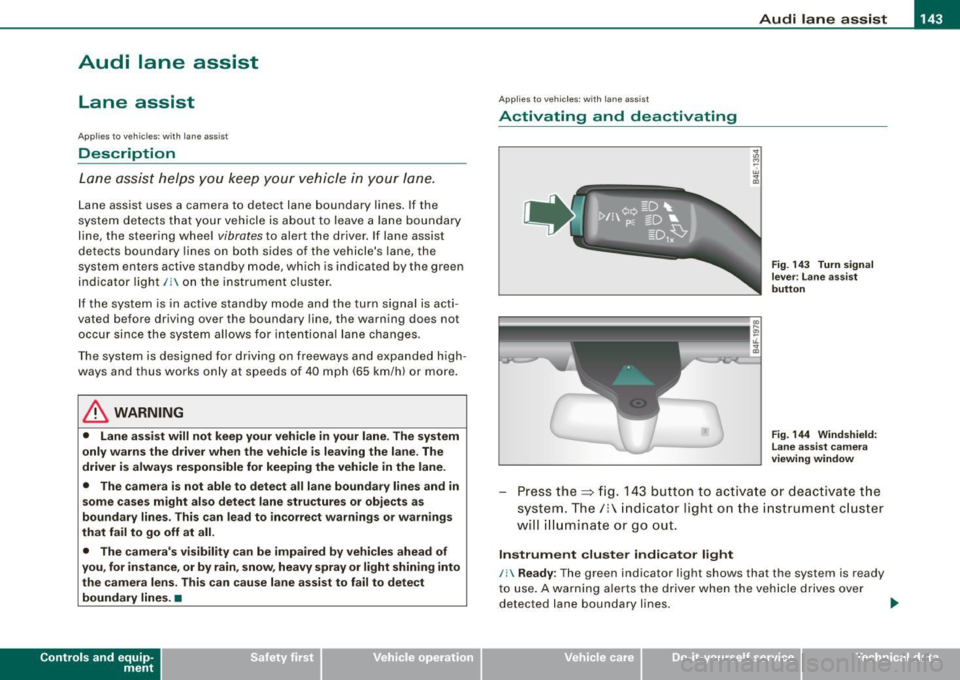
Press the :::> fig. 143 button to activa te or deactivate the
syst em . T he/ : in dica tor ligh t on t he i nstrument c luster
will illuminate or go out.
Instrument c lu ster indi ca tor light
/: Ready:
The green indicator light shows that the system is ready
to use . A warning a lerts the drive r when the veh icle drives over
dete cted lane boundary l ines. .,.
Vehicle care I I irechnical data
Page 146 of 398

• .___A_ u_ d _ i_l_a _n _ e_ a_ s_s _is _ t _________________________________________________ _
I Not ready: The yellow indicator light shows that the system is
turned on but unable to send a warn ing. This can be due to the
following:
• There are no boundary lines, or there is on ly one boundary line
present .
• The boundary lines are not detected (e.g. due to snow, dirt, wet
conditions or light shining into the camera lens).
• More than two boundary lines (such as at construction sites) are
located in the vehicle's lane.
• The vehicle's speed is below the speed needed to activate it,
which is about 40 mph (65 km/h).
• The lane is narrower than about 8 ft . (2.5 ml, or wider than about
16 ft. (5 ml.
• The curve is too sharp.
Notes on the instrument cluster display
When the lane assist turns off automatically, the instrument cluster
indicator goes out and one of the following messages appears on
the display:
Audi lane assist not available: Currently no sensor vision
This message appears when the camera can no longer function
because it cannot detect the boundary lines. This may be due to the
following :
• The exterior s ide of the camera viewing window=>
page 143,
fig. 144 is covered with dirt or ice. Clean this part of the windshield.
• The camera v iewing window is fogged up on the inside. In this
case, wait until the fog disappears before turning lane assist on
again.
• The system was unable to detect boundary lines over an
extended period of time due to road conditions (such as snow
covered lanes). Do not turn lane assist on again until the lines can
be more easily detected.
Audi lane assist not available
A temporary malfunction is preventing lane assist from operating .
Try turning on lane assist again a t a later time.
Audi lane assist: system fault
The system should be checked by an authorized Audi dealer or other
qualified workshop .
[ i ] Tips
• Make sure that the camera viewing window=> page 143, fig. 144
is not covered by stickers or similar objects .
• Always keep the camera viewing window clean. This can usually
be done by operating the windshield wipers. •
Applies to vehicles: with lane assist
MMI settings
You can use the MM/ to adjust the warning time and
steering wheel vibration.
Setting the warning time
Press the I CAR] function button.
- Select
Systems * in the CAR menu .
- Select
Audi lane assist.
Fig. 145 MMI Display:
Setting the warning
time and stee ring
wheel vibration
Page 147 of 398
___________________________________________________ A_u_ d_i_ l_ a _ n_ e_ a _ s_s _ i_s _t __ lffll
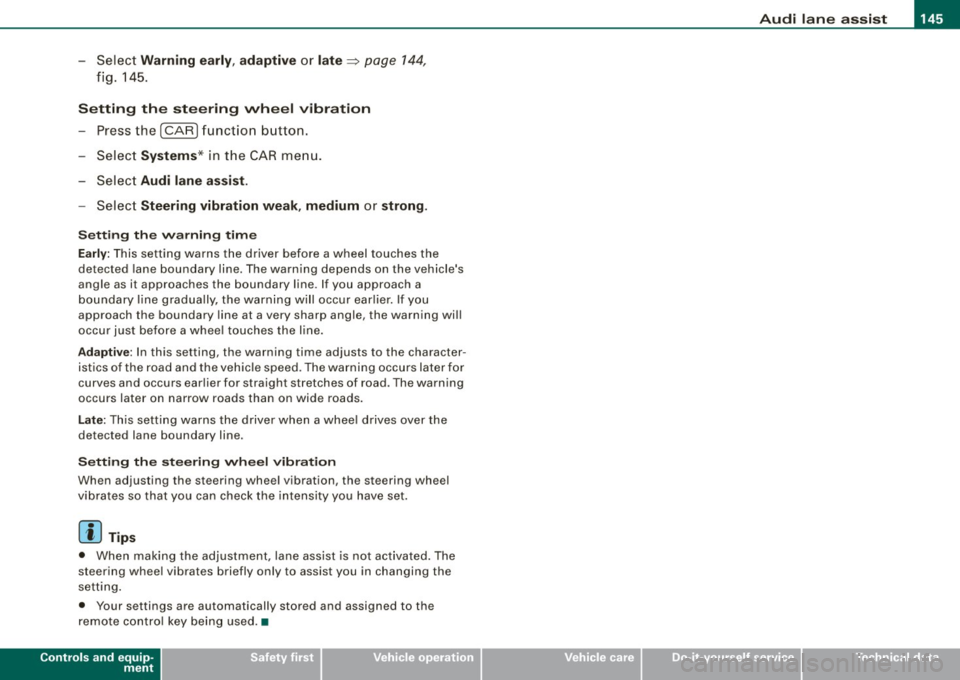
- Sele ct Warning early , adaptive or late ~ page 144,
fig. 145.
Setting th e st eering wheel vibration
- Press the
I CAR I function button.
- Selec t Sy stems ·* in t he CAR me nu.
- Selec t Audi lane a ssis t.
- Selec t Steering vibrat ion weak , medium or strong.
Setting th e warning tim e
Earl y:
This setting warns the driver before a wheel touches the
detected lane boundary line. The warning depends on the vehicle's
angle as it approaches the boundary line . If you approach a
boundary l ine gradua lly, the warning will occur ear lier. If you
approach the boundary line at a very sharp angle, the warning wi ll
occur just before a whee l touches the line.
Adapti ve : In this setting, the warning time adjusts to the character
istics of the road and the vehicle speed. The warning occurs later for
curves and occurs earlier for straight stretches of road . The warning
occurs later on narrow roads than on wide roads.
Late: This setting warns the driver when a whee l drives over the
detected lane boundary line.
Se ttin g th e steering wheel vibrat ion
When adjusting the steering wheel vibration, the steering wheel
v ibrates so that you can check the intensity you have set.
[ i ] Tips
• When making the adjustment, lane assist is not activated . The
steering whee l vibrates briefly only to assist you in changing the
setting .
• Your settings are automatically stored and assigned to the
remote contro l key being used. •
Controls and equip
ment I • •
Page 158 of 398

....... __ A_u_ t_o _m_ a_ t_ ic_ t_ r_a _ n_ s_m _ i_s _s _i_o _n ________________________________________________ _
The selector lever must be in Nor P. If one of the driving positions
is engaged a safety switch will prevent the engine from being
started. See also
=:> page 117.
Before you move the selector lever from the
P position, you must
always apply the brake pedal before and while depressing the
button in the handle of the selector lever .
& WARNING
• Unintended vehicle movement can cause serious injury .
- When the selector lever is in a driving position, the vehicle
may creep, even at idle speed . Therefore do not release the
parking brake or foot brake until you are ready to move,
because power is transmitted to the wheels as soon as a
driving position is engaged.
- Do not accelerate while selecting a driving position. At this
time the engine must be at idle speed so that undue stress is
not placed on the clutches in the transmission.
- Remember: -even when stopped briefly with the automatic
transmission in "D", "S" or "R", engine power is being trans
mitted to the wheels. Your vehicle could "creep" forward or
backward. When stopped, keep the brake pedal fully depressed
and use the parking brake if necessary to keep the vehicle from
rolling.
• If the selector lever is unintentionally moved into N while you
are driving, take your foot off the accelerator pedal and wait for
the engine to return to idle speed before selecting a driving posi
tion .
• Never shift into "R" or "P" when the vehicle is in motion.
• Never get out of the driver's seat when the engine is running .
• If you must get out of the vehicle, move the selector lever
securely into the P position and apply the parking brake firmly.
• If the engine must remain running , never have any driving posi
tion engaged when checking under the hood. Make sure the
selector lever has securely engaged and is locked in "P" with the
& WARNING (continued)
parking brake firmly set=> page 293, "Engine compartment".
Otherwise, any increase in engine speed may set the vehicle in
motion, even with the parking brake applied. •
App lies to vehicles: with 6-speed automatic t ransmission
Selector lever positions
This section describes the selector lever positions and
driving ranges.
Fig . 158 Display in the
instrument cluster:
selector lever in posi
tion D
The selector lever position engaged appears next to the selector
lever as well as in the instrument cluster display .
P -Park
In this selector lever position the transmission is mechanically
locked. Engage
P only when the vehicle is completely stopped=> &
in "Driving the automatic transmission" on page 155.
To shift in or out of position
P, you must first press and hold the
brake pedal and then press the release button in the selector lever
handle while moving the selector lever to or from
P. You can shift
out of this position only with the ignition on.
~
Page 162 of 398
• ..__A_ u_ t _o_ m_ a_ t_ i_ c _ t_r _a _n_ s_ m_ is_ s_i o _ n ________________________________________________ _
[ i J Tip s
• When you shift into the next lower gear, the transmission will
downshift only when there is no possibi lity of over -revving the
engine.
• When the kickdown comes on, the transmission will shift down
to a lower gear, depending on vehicle and engine speeds.
• tiptronic ® is inoperative when the transmission is in the fail -safe
mode .•
A pplies to vehicl es: with 6-s peed automatic transmission
Steering wheel with tiptronic ®
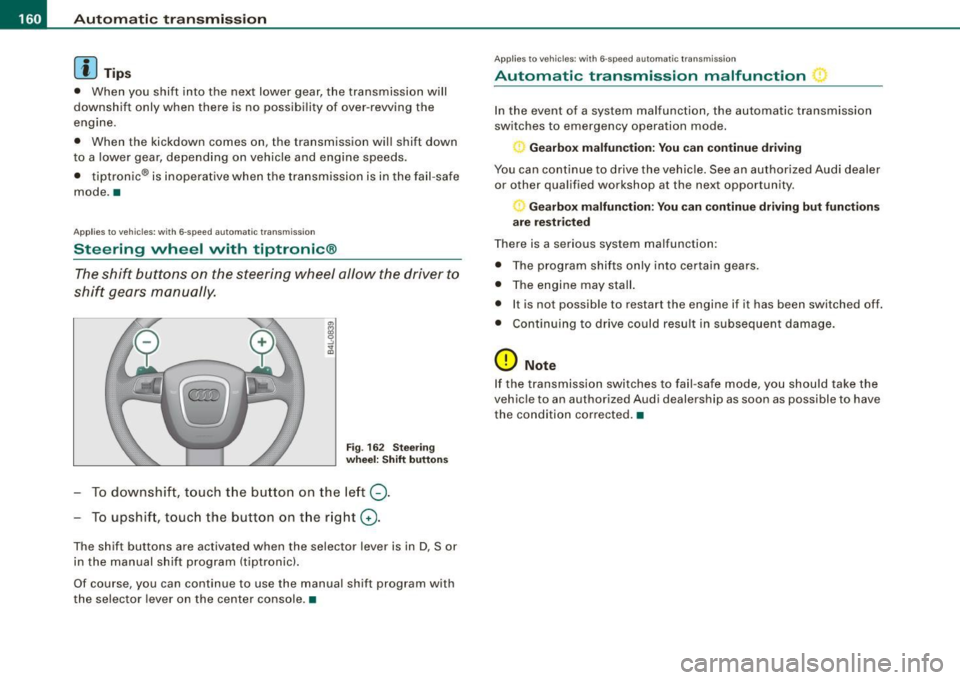
The shift buttons on the steering wheel allow the driver to
shift gears manually.
Fig . 16 2 Stee ring
w heel: Shift button s
To downshift, touch the button on the left Q.
To upshift, touch the button on the right G) .
The shift buttons are activated when the selector lever is in D, Sor
in the manual shift program (tiptronic).
Of course, you can continue to use the manual shift program with
the selec tor lever on the center console. •
Applie s to vehicle s: wi th 6-speed automatic transmiss ion
Automatic transmission malfunction
In the event of a system malfunction, the automatic transmission
switches to emergency operation mode.
Gearbox malfunction : You c an continue driving
You can continue to drive the vehicle. See an authorized Audi dealer
or other qualified workshop at the next opportunity.
Gearbox malfunction: You can continue driving but fun cti ons
a re re st ric ted
There is a serious system malfunction:
• The program shif ts only into certain gears.
• The engine may stall.
• It is not possib le to restart the engine if it has been switched off.
• Cont inuing to drive could result in subsequent damage.
0 Note
If the transmission switches to fail -safe mode, you should take the
vehic le to an authorized Audi dealership as soon as possible to have
the condition co rrected. •
Page 165 of 398

Automatic transmission 11'11 __________________________ ___;__:..;____;_ ______ _
& WARNING (continued )
-When the selector lever is in a driving position , the vehi cle
may creep , even at idle speed . Therefore do not release the
parking brake or foot brake until you are ready to move ,
because power is transmitted to the wheels as soon as a
driving position is engaged.
- Do not accelerate while selecting a driving position. At this
time the engine must be at idle speed so that undue stress is
not placed on the clutches in the transmission.
- Remember : - even when stopped briefly with the automatic
transmission in "D", "S" or "R" , engine power is being trans
mitted to the wheels . Your vehicle could "creep " forward or
backward . When stopped , keep the brake pedal fully depressed
and use the parking brake if necessary to keep the vehicle from
rolling .
- If the sele ctor lever is unintentionally moved into N while you
are driving , take your foot off the accelerator pedal and wait for
the engine to return to idle speed before selecting a driving
position .
- Never shift into "R " or "P " when the vehicle is in motion .
- Never get out of the driver's seat when the engine is running.
- If you must get out of the vehicle , move the selector lever
securely into the P position and apply the parking brake firmly .
- If the engine must remain running, never have any driving
position engaged when checking under the hood. Make sure
the selector lever has securely engaged and is locked in "P "
with the parking brake firmly set :::::,
page 293, "Engine
compartment ". Otherwise , any increase in engine speed may
set the vehicle in motion , even with the parking brake
applied .•
Controls and equip
ment
Ap plies to vehic les : wit h m ultit ron ic® Conti nuous ly Va riable Transm ission (CVT)
Selector lever positions
This sec tion des cribes th e sele ctor lev er positi ons an d
dr iv ing ra ng es.
Fig . 166 Display in the
instrument clu ster:
se lector lever in posi ·
tion D
Th e se lecto r le ver p ositi on engag ed app ear s ne xt to th e selec tor
lev er as well as in the instrument cluste r disp lay .
P -Park
In this s electo r lever position the transmission is mechanica lly
lo cke d.
Eng age P on ly when t he veh ic le is
completely stopped=> 11::::. in
" Dr ivin g th e multitroni c®" on
page 162
To s hift int o or out o f pos ition P , you m ust firs t press a nd h old the
brake peda l
and then press the release button in th e se lector lever
h an dle whi le m oving the sele ctor l ev er to P .
R - Reverse
The tra nsm issio n w ill automat ica lly se lect the lowest gear ratio
when you sh ift into reverse .
S ele ct R only wh en th e ve hicle is at a
fu ll sto p and t he engine is
running at id le speed :::::, 11::::. in "Driving t he multitron ic®" on
page 162.
I • •
Page 169 of 398
_______________________________________________ A_ u_t _o _m_ a_ t_ i_ c _ t_r _ a _n _s_ m_ i_ s _ s_ i_ o _ n _ ___._
[ i J Tips
• When you shift into the next lower gear, the engine will down
shift only when there is no possibility of over -revv ing.
• When the kick-down comes on , the transmission will shif t down
to a lower gear depending on vehicle and engine speeds.
• The tiptronic® is inopera tive when the t ransmission is in the fail
safe mode .•
Ap plies t o vehi cles: w it h mu lt it ro nic® Co ntin uou sly Va ria ble Tra nsm iss io n (CVT )
Steering wheel with tiptronic ®
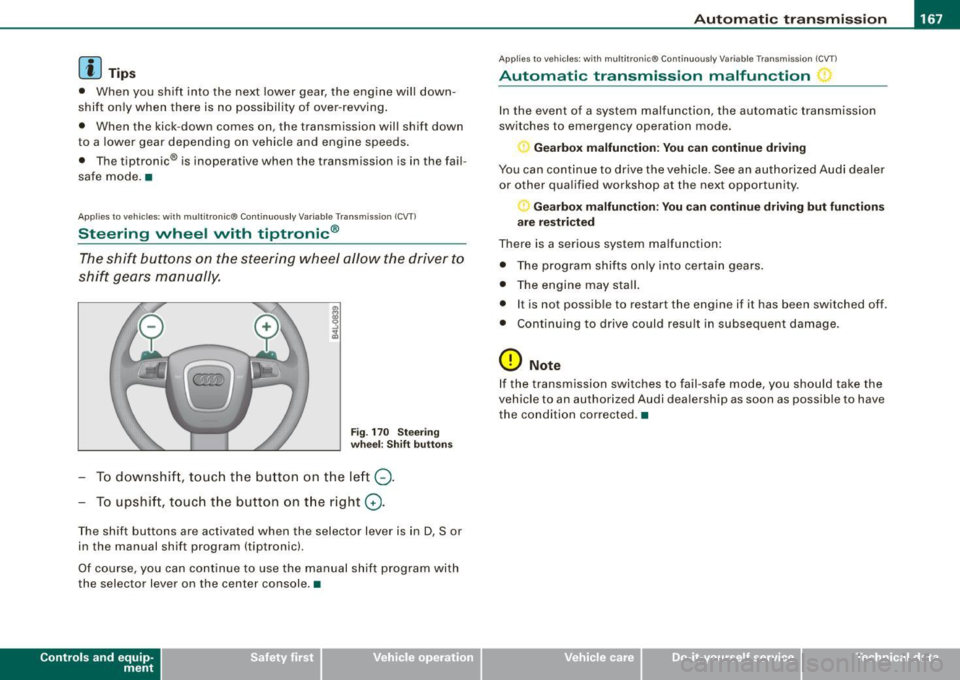
The shift buttons on the steering wheel allow the driver to
shift gears manually.
Fig . 170 Steering
wheel: Shift buttons
To downshift , touch the button on the left Q.
To upshift, touch the button on the right G).
The shift buttons are activated when the selector lever is in D, Sor
in the manual shift program (tiptron ic).
Of course, you can continue to use the manual shift program with
the selec tor lever on the center console .•
Con tro ls and eq uip
ment
A pp lies to vehicles: w it h muh it r on ic® Cont inuous ly Variable Transm iss ion ( CVT)
Automatic transmission malfunction
In the event of a system malfunction, the automatic transmission
switches to emergency operation mode.
Gearbox malfunction: You can continue driving
You can continue to drive the vehicle . See an authorized Audi dealer
or other qualified workshop at the next opportunity .
Gearbox malfunction: You can continue driving but functions
are restricted
There is a serious system malfunction:
• The program shifts only into certain gears.
• The engine may stall.
• It is not possible to res tar t t he engine i f it has been switched off .
• Continuing to drive could result in subsequent damage .
0 Note
If the transmission switches to fail -safe mode , you should take the
vehicle to an authorized Audi deale rship as soon as possible to have
the condition corrected .•
Vehicle care I I irechnical data