2009 AUDI S3 light
[x] Cancel search: lightPage 268 of 324

-Tire pressure monitoring system* __ ..:.._____:__..:...::....:..:..:..-=.:..: ..:..::.-=.:..~~.:.=.:..:.::...__ ____________________ _
-Inspect all tires.
- Change the tire if necessary~ page
272.
The warning light in the instrument cluster comes on when the
tire is significantly underinflated .
In addition, the tire symbol ,_, appears in the display together with
the message
Please check tire pressure=> page 265, fig. 185.
After a few seconds, the message disappears again. If you would
like to show the message again, press the Set/Check button
=>
page 8, fig. 2 @ .
[ i ] Tips
• In the case of an intentional loss of air pressure, such as when
readjusting tire pressure, the pressure must be stored again after
ward =>
page 266.
• Tire pressure must only be adjusted when the temperature of the
tires is about the same as ambient air temperature.
• The yellow symbol disappears when the tire pressure is
corrected and the new pressure is stored in the system=>
page 266.
• After changing a wheel or replacing a wheel with the spare tire
you have to adjust the tire pressures on all wheels. In addition, you must then initialize the new tire pressures in the tire pressure moni
toring system =>
page 267. •
Applies to vehicles: with tire pr essu re mon itoring system
Storing tire pressures
Correct storage of specified pressure is the basic require
ment for reliable tire pressure monitoring .
1 1 1 J
Fig. 186 Car: Tire pres
sure monitoring
system
In order for the tire pressure monitoring system to operate
appropriately, you have to re-save the specified pressures
whenever you adjust tire pressures, such as when the load condition of your vehicle changes. Proceed as follows:
Correcting tire pressure
- Check the pressure in the tires.
- Adjust air pressure as needed to comply with the infor- mation on the label located on the label located either on
the driver's side 8 -pillar or on the inside of the fuel filler
flap .
Saving tire pressures
-Turn on the ignition.
- Press the button~ fig. 186 for approximately 5 seconds.
You will hear a beep and the symbol in the instrument
cluster flashes three times. ..,.
Page 269 of 324

__________________________________________ T_i_re _ p =----r_e _s _ s_ u_ r_e _ m_ o_n_ i_ t _o _r_ i_n -=g =-- s....: y:.... s_ te_ m_ * __ !II
•
All pressure warning indicators in the display will be canceled.
Fo llowing each intent ional change in specified pressures, tire pres
sures must be saved again .
After the pressures are saved, the tire pressure monitoring system
measures the current tire pressures and saves them as the new
specified pressures.
[ i] Tips
• The tire pressure is shown on the tire pressure label. The tire
pressure label is located either on the driver's side B -pillar or on the
inside of the fuel filler flap. The tire pressure label lists the recom
mended cold tire inflation pressures for the vehicle at its maximum
capacity weight and the tires that were on your vehicle at the time
it was manufactured. For recommended tire pressures for normal
load conditions, please see chapter~
page 247.
• The tire pressure monitoring system helps the driver monitor tire
pressures, but the driver is still responsible for maintaining the
correct tire pressure. •
Applies to vehicles: with tir e pressure monitor ing system
Wheel change
If a wheel is changed, the wheels that were exchanged
have to be reprogrammed.
- Turn on the ignition.
- Press the button=>
page 266, fig. 186 for approximately 5
seconds. You will hear a beep and the symbol in the
button flashes three times.
Programming is necessary:
• after the tires have been rotated on the vehicle, or the spare tire
is used, •
if tires with new wheel sensors are used.
All pressure warning indicators in the display will be canceled. The
system malfunction error message will not disappear until the
vehicle is underway. With pressing the button~
page 266, fig. 186,
the reprogramming of the new sensors and storing of actual pres
sures starts . This learning phase can take up to 10 minutes driving
time.
During the learning process the tire pressure monitoring system is
not available. •
Applies to vehic les: with tir e pr essure monitor ing system
Malfunctions *
A malfunction can have various causes.
Fig. 187 Display:
System malfunction
If the '-warning light in the instrument cluster flashes for approxi
mately one minute and then remains continuously illuminated and
additionally the
~ f ig. 187 symbol appears in the display, the
tire pressure monitoring system is not available . This can have
various causes.
• If the message appears at the end of the learning process, the
system cannot recognize the wheels installed on the vehicle . This
can be because one or more wheels without a wheel sensor were
installed. .,,_
Vehicle care I t •
Page 270 of 324

___ T _i_r e_=- p_r_e _ s_ s_ u_r_ e _ m_ o_ n_i_t _o _r_ i _ n .,;:g ::;.._ s_ y=--- s_t _e _m_ * __________________________________________ _
• A wheel sensor or other component may have failed.
• During ini tializat ion the system has detected more tha n 4 wheels
on the vehicle, for example whi le driving next to another car with a
tire pressure monitoring system.
• A wheel change was made but the button
:=:, page 266, fig. 186
was not pressed.
• Audi Genuine Parts were not used for parts replacement .
• If snow chains are being used, system function can be compro
mised due to the shielding properties of the chains.
• The tire pressure monitoring system may not be avai lable
because of a radio malfunction.
• Transmitters with the same frequency, such as radio head
phones in the vehic le or radio equipment, can cause a temporary
disruption of the system through excessive electromagnetic fields .
• Eliminate the interference if possible and then proceed as
follows: Turn off the engine for 20 minutes. Then drive another 10
min. If the warning light comes on again, you shou ld con tact your
authorized Audi dealer immediately to have the prob lem corrected.
• Do not use commercially avai lab le tire sea lants . Otherwise, the
e lectrica l components of the tire pressure monitoring system wi ll
no longer work properly and the sensor for the tire p ressure moni
toring system wil l have to be rep laced by an authorized Audi dealer
or o ther qua lified workshop .•
Certification
This device complies with part 15 of the FCC rules and RSS -210.
Operation is subject to the following conditions:
• this device may not cause harmful interference, and
• this device must accept interference rece ived, including interfer
ence that may cause undesired operation.
The receiver 5WK49069 uses the same schematic, assemb ly, layout
and PCB as 5WK49097 . 5WK49097 is a multi channel receiver and 5WK49069 is a single channe
l receiver . They only differ in : SAW
Filter V1 _4 was changed from A2C00038979 to V1 _2 A2C00032378,
Inductor L5_3 and L6_233nH were changed to L5 _2 and L6 _247nH .
BAND PASS FILTER V3_2 was changed from A2C00038762 to V3_3
A2C00036085. V10 : ATIC75 C1, A2C000029505 was changed to V10 :
ATIC75 C2-Light, A2C000043220 . Q1 14.246MHz A2C00037710 was
changed to Q1 15.27MHz A2C00041280 . The BAND PASS FI LTER V2
is not populated .
These modifica tions were necessary to optimize the characteris tic
of the receiver.
Proof is shown with test report T30739 -00 -00KJ issued by Mikes
Testingpartners GmbH, Ohmstral5e 2-4 , 94342 Strasski rchen that
the receiver is be low the limit .•
Page 275 of 324

What do I do now? -__________________ __;__:....:....:..:: __ _
•
-All passengers should leave the car and move to a safe
location (for instance, behind the guardrail)~& .
- Apply the
parking brake firmly ~& .
- Move
selector lever to position Pon an automatic trans-
miss ion; put manual transmission in
first gear ~& .
-If you are towing a trailer : unhitch the trailer from your
vehicle.
- Take the
tool and the spare tire~ page 270 out of the
luggage compartment.
& WARNING
You or your passengers could be injured while changing a wheel if
you do not follow these safety precautions:
• If you have a flat tire, move a safe distance off the road. Turn off
the engine, turn the emergency flasher on and use other warning
devices to alert other motorists.
• Make sure that passengers wait
in a safe place away from the
vehicle and well away from the roadway and traffic.
• To help prevent the vehicle from moving suddenly and possibly
slipping off the jack, always fully set the parking brake and block
the wheel diagonally opposite the wheel being changed. When one
front wheel is lifted off the ground, placing the automatic trans
mission in "P" (Park), or engaging a gear in a manual transmission
will
not prevent the vehicle from moving.
• Before you change a wheel, be sure the ground is level and firm.
If necessary, use a sturdy board under the jack.
• After installing the spare wheel, make sure that you remount
the flat tire/wheel in its storage area properly and tighten the
knurled retaining screw securely. •
Changing a wheel
When you change a wheel, follow the sequence described
below step-by-step and exactly in that order.
1. Remove the decorative wheel cover*. For more details
see also
~ page 274, "Decorative wheel covers" or
~ page 275, "Wheels with cap-covered wheel bolts".
2. Loosen the
wheel bolts ~ page 276.
3. Locate the proper mounting point for the jack and align the jack below that point~
page 276.
4. Lift the car with the jack~ page 276.
5. Take the flat wheel off and then put the spare on
~ page 278.
6. Tighten all wheel bolts lightly .
7.
Lower the vehicle with the jack .
8. Use the wheel bolt wrench and
firmly tighten all wheel
bolts
~ page 276.
9. Put the decorative wheel cover* back on.
& WARNING
Always read and head all WARNINGS and information ::} & in
"Raising the vehicle" on
page 276 and ~ page 279. •
After changing a wheel
A wheel change is not complete without the following
actions.
- Store and secure the replaced wheel in the spare wheel
well. .,._
Do-it-yourself service
Page 280 of 324

11111...__W_ h_ a _ t_d_ o_ l _d _o_ n_ o_ vv_ ? ______________________________________________ _
Taking the wheel off /putt ing the spare on
Follow these instructions step-by-step for changing the
wheel
M
"' ;;; u.
1li
Fig . 197 Wheel
change : using the
screwdriver handle
(with the blade
removed) to turn the
bolts
Fig . 198 Wheel
change: alignment pin
inside the top hole
After you have loosened all wheel bolts and jacked the
vehicle off the ground, perform the following steps to
remove and replace the wheel:
Removing the wheel
- Use the hexagonal socket in the screwdriver handle to
completely turn out the topmost wheel bolt and set it
as ide on a
clean surface ~ fig. 197. - Screw the threaded end of the
alignment pin from the
tool kit hand-tight into the now vacant bolt hole
~ fig. 198.
- Then completely unscrew the other wheel bolts as
described above.
Take off the wheel leaving the alignment pin in the bolt
hole.
Putting on the spare
- Lift the spare wheel up and carefully slide it over the
alignment pin to guide it in place.
- Use the hexagonal socket in the screwdriver handle to
screw in and tighten all wheel bolts
slightly.
Unscrew the alignment pin and insert and tighten the
remaining wheel bolt slightly like the rest.
- Turn the handle on the jack counter -clockwise to lower
the vehicle until the jack is fully released.
- Use the wheel bolt wrench to tighten all wheel bolts firmly ~
page 276. Tighten them crosswise , from one
bolt to the (approximately) opposite one, to keep the
wheel centered.
[ i ] Tips
Never try and use the hexagonal socket in the handle of the screw
driver to loosen or tighten the wheel bolts.
• Pull the reversible blade from the screwdriver before you use the
hexagonal socket in the handle to turn the wheel bolts.
• When mounting tires with
unidirectional tread design make sure
the tread pattern is pointed the right way=>
page 279. ~
Page 284 of 324

11111.___F_ u_ s _ e_s _ a_n _ d_ b_ u_lb _ s _______________________________________________ _
Equipment Amps No. Equipment Amps
Manual headlight beam adjustment, automatic 14 Electronic Stabilization Program (ESP) (control
10
1 headlight beam adjustment, AFS control mod-
10 module),
shift gate automatic transmission
ule, engine components, light switch (switch
15 Interior lights, reading lights 10
lighting/illumination), diagnosis socket
Diagnostic connector, rain sensor, a ir condit ion-
!! Automatic transmission, control module for
16 ing (control module), tire pressure monitor dis- 10
CAN data transfer (gateway), electro -mechanical
play (control module)
steering, shift gate automatic transmission, 17 Anti-theft alarm warning system 5
2 engine relay, fuel tank control unit, engine con
-10
trol unit, brakes control (ABS), Electronic Stabili- 18 Terminal 15
5
zation Program (ESP), Anti -Slip Regulation
19 All Wheel Drive
10
(ASR), brake light switch
-20 Magnetic ride 5
3 Airbag
5
-21 Not used
Air -conditioning (pressure sensor, air quality
sensor), button for Electronic Stabilization Pro- 22
Blower fan 40
gram (ESP), Anti -Slip Regulat ion (ASRl, tire pres -
23 Driver's side power window, front 30
sure mon itor display, oil level sensor, back-up
4 light switch, front seat heating, parking aid, 5 24 Power outlet front
20
seat-occupancy recognition (on USA vehicles), 25 Rear window defogger 30
navigation, garage door opener, automatic mir- 26 Power outlet in luggage compartment 20
ror dimming, heated windshield washer noz-
zles, air conditioning (control module) 27 Fuel tank control module, fuel pump 15
5 AFS headlights (left side)
5 28 Power
window, rear
30
6 AFS headlights (r ight side) 5 29 Not used
7 Not used 30 Not used
8 Not used 31 Automatic transmission (vacuum pump)
20
9 Not used 32 Headlight washer system 30
10 Not used
33 Sliding/pop-up roof
20
1 1 Not used 34 Not used
12 Central locking (front doors} 10 35 Not used
13 Central locking (rear doors) 10
36 Lumbar
support 10
Page 286 of 324

IIJII Fuses and bulbs i,.__....;,___;:,,;_,;,,.:_;__;;:_.:.:..:..=-=;____ ______________________ _
No. UEquipment Amps I No. Equipment Amps
F6 Steering wheel electronics, instrument cluster
5 F28
Not used
F7 Transmission control module 30 Fuse assignment in the left-side instrument
F29 50
F8 Navigation system, radio system 15/25 panel (special equipment)
Navigation system, digital radio, cell phone, TV F30 Power supply relay terminal
15 50
F9 equipment 5
F10 Engine control module, main relay 5/10 Variation
(2) with 54 Plug-in Fuses
F11 Not used No. Equipment
Amps
Control module for CAN data transfer (gateway) 5 F1
Vehicle
electrical system control unit (right)
30
F13 Engine control module 15/25 F2
ESP valves, Anti
-lock brake system (ABS) valves
20/30
F14 Ignition coils 20 F3 Not used
F15 Tank diagnosis, oxygen sensor 5/10 F4
Battery voltage
5
F16 Vehicle electrical system control unit (right) 30 F5 Horn
15
F17 Horn
15 F6 Engine components, fuel pump 15
F18 Audio amplifier 30 F7
Not used
F19 Front windshield wiper system 30 F8
Not used
F20 Water return
-flow pump, volume regulator valve F9 Engine components
10
F21 Oxygen sensor, vacuum pump 15 F10
Fuel tank control, mass air flow sensor
10
F22 Clutch pedal switch, brake light switch 5 F11 Oxygen sensors, in front of catalytic converter 10
F23 Engine relays, engine components
5/10/15 F12 Oxygen sensors, behind catalytic converter
10
F24 Engine components, water return-flow pump 10 F13 Automatic transmission
15
F25 Pump (ESP/ABS), ABS valve 30/40 F14 Not used
F26 Vehicle electrical system control unit (left)
30 F15 Water return-flow pump
10
F27 Secondary air pump 40 F16 Volume control valve
20
F17 Steering wheel electronics, instrument cluster
5
F18 Audio amplifier 30
F19 Navigation system, radio system 15/25
Page 287 of 324
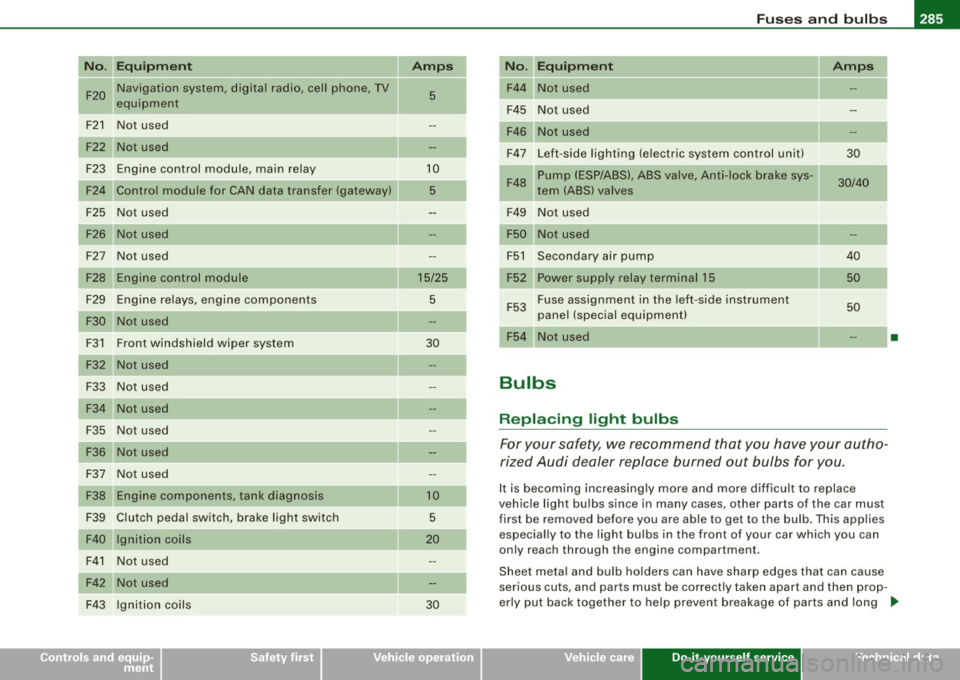
_________________________________________________ F_ u_ s_ e_s _ a_n _ d_ b_ u_lb _ s __ ffllll
N "E .
o . qu1pm ent Amps I No. Equ ipment Amps
F20 Navigation system, digital radio, cell phone, TV
5 F44 Not used
equipm ent
F45 Not used
-
F21 Not used F46 Not used
Not used F47 Left-side lighting (electric system control unit)
30
F23 Engine control module, main re lay 10
Pump (ESP/ABS), ABS valve, Anti-lock brake sys-
F48 30/40
F24 Control module for CAN data transfer (gateway) 5 tern (ABS) valves
F25 Not used F49
Not used
Not us ed Not used
F27 Not used F51 Secondary air pump 40
Engine control module 15/25 F52 Power supply relay terminal 15 50
F29 Engine relays, eng ine components 5
F53 Fuse assign
ment in the left -side instrument
50
F30 Not used panel (special equipment)
F3 1 F
ront windshield wiper system
30
F54 Not use d •
F32 Not us ed
F33 Not used
Bulbs
F3 4 Not used
F35 Not used
Replacing light bulbs
F36 Not used F or your safety, we recommend that you have your autho -
rized Audi dealer replace burned out bulbs for you.
Not used
F37
F38 Eng ine components, ta nk diag nosis 10 It is becom ing increasingly more and more difficult to replace
vehic le light bu lbs since in many cases, other parts of the car must
F39 Clutch pedal switch, brake light switch 5 first be removed before you are able to get to the bulb . This applies
F40 Ignition coils 20 especia lly to the light bu lbs i n the front of your car which you can
only reach through the engine compartment .
F41 Not used
F42 Not used Sheet meta
l and bulb holders can have sharp edges t hat ca n cause
serious cuts, and parts must be correctly taken apart and then prop -
F43 Ignit ion coils 30 erly put back together
to he lp prevent breakage of parts and long
...
• Do-it -yourself service