2009 AUDI Q7 light
[x] Cancel search: lightPage 111 of 426

________________________________________________ S_e_ a_ ts_ a_ n_d _ s_t _o _r_ a ....; g::;. e _ __.ffllll
• The two inner attaching eyes on the left and right in the seatback
~ fig. 108 (Dare not suitable for tying down cargo -risk of damage.
Only the luggage compartment cover should be attached here.
[ i J Tips
• You can use the luggage compartment cover to store light
weight clothing or articles but do not leave any heavy or sharp
objects in the pockets of the clothing.
• Remember that placing clothing or articles on the luggage
compartment cover can block the driver's vision in the rear view
mirror. This also applies especially when you have to transport large
objects.
• So that stale air can escape from the vehicle be sure not to cover
the ventilation slot between the rear lid and the luggage compart
ment cover. •
Protective liner
Dirty or wet objects can be transported under the cargo
floor in a protective tray.
Con tro ls and eq uip
ment
Fig . 110 Cargo floor:
folded upright Fig
. 111 Removing the
cargo floor
Setting up the cargo floor
- Open the rear lid.
- Set up cargo floor with the help of the handle ©
=> fig. 110 and adjust the outside edges in the recesses
@.
Lay the items in the protective tray.
Folding the cargo floor up
- Open the rear lid.
Fold the cargo floor up to the seatback with the help of
the handle @.
Removing the cargo floor, installing
- Open the rear lid.
- Fold the cargo floor up to the seatback with the help of
the handle @.
- To remove, pull the entire cargo floor out of the guides
-arrow-=> fig. 111 in the direction of the rear of the
vehicle.
t,.
Vehicle care I I irechnical data
Page 114 of 426

_L-_S::..:: e..:a :..:t:.:s :....:: a:.:.n .:.. d::....: s:.. t.:.. o::..:.. ra= g:..:e :...._ _____________________________________________ _
- Vehicles with 6 seats*: The ski sack has two straps with
hooks on the underside. Hang the hooks into the luggage
compartment by the rear fastening eyes and pull the
securing strap tight by the free end@.
Storage
- Release the securing strap for the sack.
- Pull the sack to the rear over the folded down seatback .
- Raise the seatback until it is securely latched.
- Fold up the empty sack.
- Stow the ski sack in the luggage compartment so that it
cannot slide around .
& WARNING
• The ski sack is intended only for the transportation of skis,
snowboards and other light objects. To reduce the risk of serious
personal injury never transport heavy or pointed objects in the ski
sack.
• When braking rapidly or during an accident the load could be
displaced and cause injury to occupants.
• Sharp edges on the load must be covered for protection.
Always fasten the belt tightly around the sack and its contents
=> page 111, fig . 114.
[ i] Tips
Never stow the ski sack away if it 's wet or damp (for example, snow
melting from skis). Let it dry completely before you stow it away. •
Roof rack
First things first
A roof rack can be fitted to carry additional luggage on
the roof.
Always read and follow the instructions provided by the
roof rack manufacturer when the roof rack system must
be installed.
If you are transporting luggage or other objects on the roof, please
note the following :
• Your vehicle has specially designed aerodynamic roof rails. Only
install a roof rack specifically designed for your model. Contact the
nearest authorized Audi dealer for information on approved
modular roof racks for your vehicle.
• These approved roof racks are the basis for a complete roof rack
system. Additional attachments for the basic roof rack are neces
sary to safely transport luggage, bicycles, surf boards, skis or small
boats . All necessary hardware for these systems is available at your
authori zed Audi dealer .
• We recommend that you keep the installation instructions for
your roof rack system together with your Owner's literature in the
vehicle.
When should the roof rack be removed?
• Before going through an automatic car wash (it is best to ask the
car wash operator for advice).
• When not in use , to reduce fuel consump tion, wind noise and to
guard against theft. _.,,
Page 119 of 426

________________________________________________ S_e_ a_ ts_ a_ n_d _ s_t _o _r_ a ....; g::;. e _ __._
To open ashtray
- Touch the l id to open the ashtray.
Removing ashtray insert
Press the front of the open lid downward in the direction
of the arrow=>
page 116, fig. 121 - the ashtray insert
pops out slightly.
- Lift the ashtray insert up and out.
Reinstalling ashtray insert
-Open the lid on the ashtray insert and press the insert
into the housing as far it can go.
& WARNING
Never put waste paper in the ashtray . Hot ashes or other hot
objects in the ashtray could set waste paper on fire. •
Cigarette lighter/socket
Ap plies t o ve hicles: w it h c ig arette ligh ter
Cig are tt e lighte r
Contro ls and eq uip
ment
Fig . 122 Open front
beverage storage
compartment with
cigarette lighter
Using the cigarette lighter
-Push the knob in.
- Wait until the cigarette lighter knob pops out.
- Remove the cigarette lighter immediately and use it.
- Reinsert cigarette lighter into the socket after use.
Connecting an appliance
- Remove cigarette lighter.
- Plug in appliance to be used.
The socket of the cigarette lighter may be used for 12-volt appli
ances with maximum consumption of up to 100 watts, such as a
flash light, small vacuum cleaner, etc .
Before you purchase any accessories, always read and follow the
information in~
page 403, "Additional accessories and parts
replacement" .
& WARNING
Improper use of the cigarette lighter can cause serious injury or
start a fire.
• Be careful when using the cigarette lighter . If you do not pay
attention to what you are doing when you are using the cigarette
lighter you can burn yourself .
• The cigarette lighter and socket remain functional even if the
ignition is switched off or the ignition key is removed . Never leave
children inside the vehicle without supervision.
0 Note
• To avoid damaging the socket , only use plugs that fit properly. _.,
Vehicle care I I Technical data
Page 120 of 426
• ..__S_ e_a _ t_ s_ a_ n_ d_ s_t _o _r_ a-' g==- e ________________________________________________ _
• Only use the cigare tte lighte r socket as a power source for elec
t rical accessories for short dura tions. Use the sockets in the vehicle
when a power source is needed for longer durations .
[ i ) Tip s
When the engine is off and accessor ies are s till plugged in and are
on, the vehicle battery can still be drained. •
Outlet
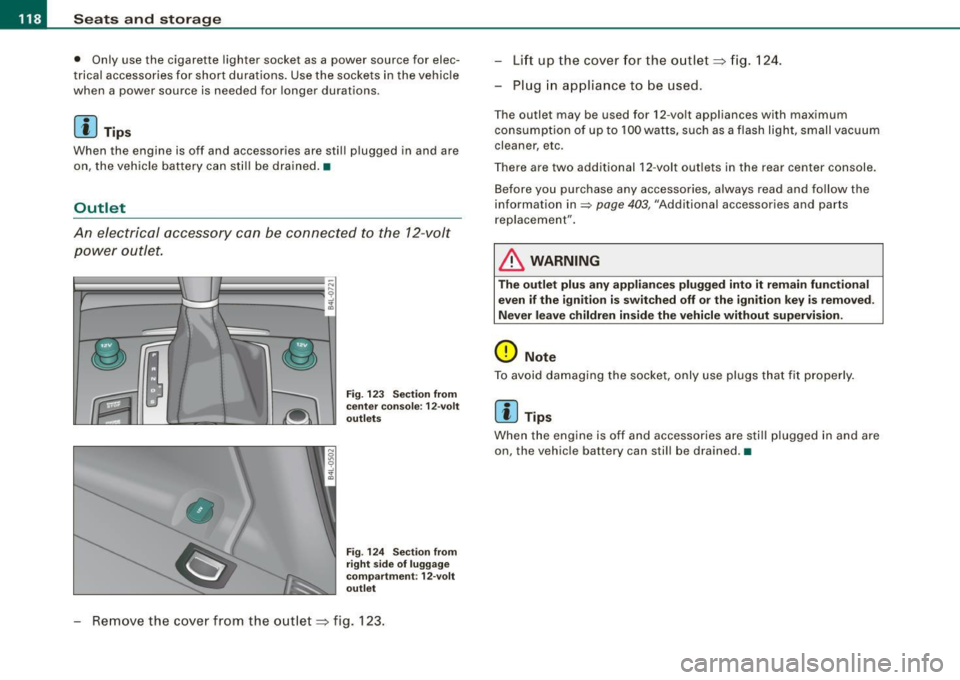
An electrical accessory can be connected to the 12-volt
power outlet.
Fig . 123 S ection from
ce nter co nso le : 1 2-vo lt
outl ets
F ig .
12 4 Sec tion from
righ t side o f luggage
co mp artm ent : 12-vo lt
o utle t
Remove the cover from the outlet~ fig. 123 . Lift up the cover
for the outlet ~ fig. 1 24.
- Plug in appliance to be used .
The outlet may be used for 12 -volt appliances with maximum
consumption of up to 100 watts, such as a flash light , small vacuum
cleaner, etc .
There are two additional 12 -volt out lets in the rear center console .
Before you purchase any accessories, always read and fo llow the
information in
~ page 403, "Additional accessories and parts
r ep lacement".
& WARNING
The outlet plu s any appliance s plugged into it remain fun ctional
even if the ignitio n is swit ched off o r the igniti on key is r emo ved .
Ne ver le ave childr en in sid e the vehicle without supervi sion.
0 Note
To avoid damaging the socket , only use pl ugs t hat fit properly .
[ i J Tips
When the engine is off and accessories are sti ll plugged in and are
on , the vehic le battery can stil l be drained .•
Page 121 of 426

________________________________________________ S_ e_ a _ t_ s _a_ n_d _ s_t _o _ r_ a...: g==-- e __ llll
Storage
General overview
There are numerous places to store items in your vehicle.
Glove compartment
Cooling box in glove compartment
Storage compartment in roof
Storage in the door panels
Storage net in footwell
Storage net in the front seat backs
Storage net in luggage compartment
Storage compartment beneath cargo
floor
& WARNING
=> page 119
=> page 120
=> page 121
=> page 121
=> page 122
=> page 122
=> page 109
• Always remove objects from the instrument panel. Any items
not stored could slide around inside the vehicle while driving or
when accelerating or when applying the brakes or when driving
around a corner.
• When you are driving make sure that anything you may have
placed in the center console or other storage locations cannot fall
out into the footwells. In case of sudden braking you would not be
able to brake or accelerate.
• Any articles of clothing that you have hung up must not inter
fere with the driver's view. The coat hooks are designed only for
lightweight clothing. Never hang any clothing with hard, pointed
or heavy objects in the pockets on the coat hooks. During sudden
braking or in an accident -especially if the airbag is deployed -
these objects could injure any passengers inside the vehicle. •
Controls and equip
ment
Glove compartment
To open glove compartment
Fig . 125 Unlocking
button for glove
compartment
Press the button :];,, ~ fig. 125 (arrow) -the lid opens
automatica I ly.
To close glove compartment
- Push the glove compartment lid up until the lock
engages.
In the glove compartment lid you will find a place to store a pen and
a pad of paper .
& WARNING
To reduce the risk of personal injury in an accident or sudden stop,
always keep the glove compartment closed while driving.
[ i] Tips
Should you not be able to open the glove compartment as
described, make sure the valet key function is not activated
=> page 51. •
I • •
Page 123 of 426

Seats and storage -
-----------------=-----'
Storage compartment in roof
Fig. 129 Storage
compartment in roof
To open the lid yo u have to touch the bar~ fig. 129
(Arrow) . The lid opens automat ically.
To close the lid, push it up until it engages.
& WARNING
Always keep the lid closed while driving to reduce the risk of injury
during a sudden braking maneuver or in the event of an accident. •
Coat hooks
Contro ls and eq uip
ment
Fig . 130 Coat hooks at
rear doors
& WARNING
• Hang clothes in such a way that they do not impair the driver's
VISIOn .
• The coat hooks must only be used for lightweight clothing . Do
not leave any heavy or sharp edged objects in the pockets which
may interfere with the side curtain airbag deployment and can
cause personal injury in a crash.
• Do not use coat hangers for hanging clothing on the coat hooks
as this can interfere with proper deployment of the side curtain
airbags in an accident.
• Do not hang heavy objects on the coat hooks, as they could
cause personal injury in a sudden stop. •
Storage in the door panels
There is a storage compartment in the interior door panel.
& WARNING
Fig. 131 Door panel
with storage compart
ment .
Use the storage compartments in the door panels only for holding
small objects , which do not protrude from the compartment, so
that the effective range of the side airbags is not compromised. •
Vehicle care
I I irechnical data
Page 125 of 426

Warm and cold -______________ ....:...:...:..:..;______
Warm and cold
Climate control
Description
The air conditioner is fully automatic and is designed to
maintain a comfortable and uniform climate inside the
vehicle.
We recommend the following settings:
- Set the temperature to 72 °F (+22 °C).
- Press the [AUTO
I button.
With this setting, you attain maximum comfort in the least amount
of time. Change this setting, as desired, to meet your personal
needs .
The climate controls are a combination of heating, ventilation and cooling systems, which automatically reduce humidity and cool the
air inside your vehicle.
The air temperature, air flow and air distribution are automatically
regulated to achieve and maintain the desired passenger compart
ment temperature as quickly as possible.
The system automatically compensates for changes in outside
temperature and for the intensity of the sunlight entering the
vehicle. We recommend you use the
Automatic mode:::::, page 126
for year -round comfort.
Please note the following:
Turn on the air conditioner to reduce humidity in the vehicle. This
also prevents the windows from fogging up.
When the outside temperature is high and the air is very humid,
condensation from the evaporator may drip under the vehicle . Th is
is normal and does not indicate a leak.
Controls and equip
ment
If the outside temperature is low, the fan normally only switches to
a higher speed once the engine coolant has warmed up sufficiently.
The air conditioner temporarily switches off when you drive off from
a standstill using full throttle to save engine power.
The compressor also switches off if the coolant temperature is too
high, so that the engine can be adequately cooled under extreme
loads.
Air pollutants filter
The air pollutants filter (a combined particle filter and activated
charcoal filter) reduces or prevents outside air pollution (dust, or
pollen) from entering the vehicle. The air is also filtered in air recir
culation mode.
The air pollutants filter must be changed at the intervals specified in your Warranty
& Maintenance booklet, so that the air conditioner
can properly work.
If you drive your vehicle in an area with high air pollution, the filter
may need to be changed more frequently than specified in your
Audi Warranty
& Maintenance booklet . If in doubt, ask your autho
rized Audi Service Advisor for advice.
Key coded settings
The air conditioner settings selected are automatically stored and assigned to the key being used. When the vehicle is started, the air
conditioner automatically selects the settings assigned to that key.
This way every driver will maintain his/her own personal settings
and does not have to reset them manually.
If a different driver uses your key and changes the air conditioner
settings, the latest adjustments will erase and replace the settings
you have stored. _.,
I • •
Page 127 of 426

Warm and cold -___________________ __:_:__: ___ _____,J
Controls
This overview will help you to familiarize yourself with the
air conditioning controls.
-
~ udi _cd _c !! anger
.. ECON 01'4/0FF
Fig. 135 Air conditioning control elements
-
The left display indicates the temperature selected for the driver's
side, the right display indicates the temperature selected for the
passenger's side .
If the settings for seat heating*, air distribution , or the air condi
tioning fan ar e changed, the relevant indicator w ill appear br iefly on
the MMI Display.
Each function is turned on or off by briefly pressing the corre
sponding button. The indicator light in the button illuminates when
the function is active .
Controls and equip
ment Button(s)
!
ECON ON /OFF]
!AUTO] Control knob
G)
[SETUP]
Residual heat Function
Page
Switch climate control on => page 726
and off,
switch cooling system on
and off
Automatic mode
Temperature selection
Seat heating*
Air distribution
Blower
Defrost
Manual recirculation
Heated rear window
Basic settings
=> page 126
=> page 127
=> page 136
=> page 127
=> page 128
=> page 727
=> page 128
=> page 129
=> page 134
With the ignition turned off, you can activate the residual heat func
tion by pressing the !E CON ON /OFF] but ton . The residual heat from
the coolant can be used to heat the vehicle interior. The residual
hea t function is turned off au tomatically after 30 minutes.
Synchronizing climate control
By pressing and holding th e control knob on the driver's side, the
temperature setting on the driver's side can be switched to the
passenger's side , and vice versa. The new temperature is shown in
the display.
Synchronizing four-zone automatic comfort air
conditioning*
By pressing and holding the control knob on the driver's side, the
temperature setting on the driver's side can be switched to the
~
Vehicle care I I Technical data