2009 AUDI Q7 mirror
[x] Cancel search: mirrorPage 179 of 426

_________________________________________________ A_ u_ d_ i _s _i_ d _e _ a_s_ s_ i_ s _t _ __._
When you look in the outside mirror, you can clea rly see the infor
mational s tage signal.
Ale rt sta ge sign al
When you ac tivate the turn signal, and side assist has detected a
vehic le in a notab le location on that particu lar sid e, the signal light
on this side mirror flashes brightly. The repea ted brief and bright
flash ing of the aler t stage signa l reminds you to carefully check
t raffic to the rear in the outside mirror and over your shoulder, so
that you can safely complete the lane change=>
& in "Safety tips"
on
page 182.
[ i ] Tips
T he brightness of the signal light on the outside mirrors can be
adjusted with the
MMI => page 180 . •
Con tro ls and eq uip
ment
A pp lies to veh ic les: with s ide ass ist
Driving situation : Fast approaching vehicles
Fig . 189 Side a ssist : Fas t ap pro achin g veh ic les
G) Sign al on outside mirror does not l ight up
No vehicle was detected by the sensors. The signa l on the outside
mirror does not light up=>
& in "Safety tips" on page 182.
0 Informa tio nal stage signal lights up
A fast approaching vehicle -in the left-hand lane for example -was
detected by the sensors. Although this vehicle is still far away, it
should be taken into account if you we re to change lanes , due to the
considerable difference in speed. The informational stage signal on
t he outside mirror lights up=>
page 176 .
© Alert stag e signal flashe s
If you activate your turn signal in driving situation @, the signal
briefly flashes repeated ly. Side assist is alerting you to a vehicle that
you may not have noticed .
~
Vehicle care I I irechnical data
Page 180 of 426

• ..__A_ u_ d_ i _s _i_d _e_ a_ s_ s _ is_ t __________________________________________________ _
[ i J Tips
• The faster a vehicle approaches from the rear, the sooner the
s ignal on the outside mirror lights up . Side assist will signal, at the
latest, when a detected vehicle enters your "blind spot".
• When vehicles approach very quickly, changing lanes can be
dangerous even if the signal on the outside mirror does not light
up. •
Applies to vehicles: with side assist
Driving situation : Slowly approaching
vehicles
Fig. 190 Side assist: Slowly approaching vehicles and vehicles in your blind
spot
(D Signal on outside mirror does not light up
A vehicle approaching slowly -in the left -hand lane for example -
was detected by the sensors. Because of the small difference in speed and the considerable distance from your vehicle, the signal
on
the outside mirror will not light up
~ & in "Safety tips" on
page 182.
© Informational stage signal lights up
The distance between your vehicle and that of the slowly
approaching vehicle has narrowed. The informational stage signal
on the outside mi rror lights up.
As soon as the difference in speed and distance is registered as notable if you were to change lanes, a signal on the mirror lights up .
Side assis t will signal a t the latest when a detected vehicle enters
your "blind spot".
© Alert stage signal flashes
If you activate your turn signal in driving situation©, the signal
light briefly flashes repeatedly . Side assist is alerting you of a
vehicle that you may not have noticed.
[ i J Tips
• The faster a vehicle approaches from the rear, the sooner the
signal on the outside mirror lights up . Side assist will signal , at the
latest, when a detected vehicle enters your "blind spot".
• When veh icles approach very quickly, changing lanes can be
dangerous even if the signal on the outside mirror does not light
up. •
Page 181 of 426

___________________________________________________ A_u_ d_i_ s_ id_e_ a_ s_s _i_s _t _ __.11111
Ap plies to vehicle s: with side assist
Driving situation : Vehicles dropping back
slowly
@
Fig. 191 Side assist: Vehicles dropping back slowly
G) Signal on outside mirror does not light up
The vehicle that you passed has not yet been detected by side assist.
The signal on the outside mirror does not light up~
& in "Safety
tips " on
page 182.
@ Informational stage signal lights up
A vehicle dropping back slowly on the right (difference in speed of
less than 9 mph, or 15 km/h) has been detected by side assist. The
informational stage signal on the outside mirror lights up.
G) Alert stage signal flashes
If you activate your turn signal in driving situation @, the signal
briefly flashes repeatedly . Side assist is alerting you of a vehicle that
you may not have noticed. •
Contro ls and eq uip
ment
Ap plies to vehi cle s: wi th si de a ssist
Driving situation : Vehicles dropping back
quickly
Fig. 192 Side assist: Vehicles dropping back quickly
G) Signal on outside mirror does not light up
The vehicle just passed has not yet been detected by side assist. The
signal on the outside mirror does not light up~
& in "Safety tips"
on
page 182.
@ Signal on outside mirror does not light up
The vehicle dropping back quickly on the right ( difference in speed
of more than 9 mph, or 15 km/h) has been detected by side assist,
but is not considered notable in the event of a lane change, because
it is dropping back so quickly. The signal on the outside mirror does
not light up~
& in "Safety tips" on page 182. ..,_
Vehicle care I I irechnical data
Page 182 of 426

• ..__A_ u_ d_ i _s _i_d _e_ a_ s_ s _ is_ t __________________________________________________ _
G) Signal on outside mirror does not light up
If you activate your turn signal in driving situation@, the signal still
does not ligh t up on the outside mirror::::;,
& in "Safety tips" on
page 782 . •
A pplies t o vehi cles : w it h side assist
MMI settings
The basic brightness setting of the signal on the outside
mirror can be adjusted via the MM/.
- Pressthe!CAR)function button.
Select Systems* in the
CAR menu.
Fig. 193 MMI Display:
Options menu
Fig . 194 MMI Display :
Adjusting signal
brightness
Select Audi side assist.
- Select Warning lamp: brightness .
Rotate the control knob to adjust the displayed bright
ness of the signal light on the outside mirrors:::::, fig. 194 .
The brightness of the signal light for both the informational and
alert stages is automatically adjusted to ambient light conditions . In
addition, you can adjust the
basic brightness separat ely, via th e
brightness function::::;, fig. 194.
While making the adjustment, the new brightness setting is displayed briefly. The brightness displayed is that of the informa
tional stage signal. The alert stage signal brightness is linked to the
informational stage signal brightness.
The informational stage signal brightness should be adjusted so
that you notice the signal illumination wh en you look in the outside
mirror, but not when you look forward through the windshield.
In very dark or light surroundings, the automatic brightness setting
adjusts signal light brightness to maximum or minimum intensity,
as needed . In circumstances such as these, you may not notice any
change in the brightness on the outside mirror when adjusting the
basic brightness.
You may not notice the change until lighting conditions are normal
again.
[ i ] Tips
• Side assist is not active when the basic brightness is adjusted.
The signal light comes on briefly to help you make the adjustment .
• Your settings are automatically stored and assigned to the
remote con trol key being used .•
Page 184 of 426

• .___A_ u_ d_ i_s_ i_ d _e_ a_ s_ s_is _ t __________________________________________________ _
objects (such as stic kers o r bicyc le rac ks) shou ld no t be attach ed to
th e ar ea on the rea r bump er where t he sen so rs ar e loca ted. I f side
assist functions are adve rsely aff ect ed, you will see this m essage in
th e ins trum ent clu ster dis pla y. Remove an ything that may be
blocking the sensors.
If no veh ic le is detected for a longer period of time while d riving,
s id e ass ist w ill a lso sw itc h off aut omat ica lly.
Audi side assist currently not available If th ere is a tem porary prob le m (such as the veh ic le 's battery char ge
being low), side ass ist cannot be activated tem porar ily .
Audi side assist: system fault H ave the sys te m chec ked by an a uthorize d A udi dea ler o r qua lified
wor ks h op.
Audi side assist not available when towing
T he radar sensor 's view is limited when towing a trailer . Fo r vehicles
wi th a fac tory insta lle d t owi ng hitc h or a tra ile r h it c h th at was
install ed later according to factory specificat ions, side assist is
a uto matica lly deact iva te d as so on as the e lect ric a l c onn ectio n to
t h e trai ler's elect rical soc ket is m ade, and th is sta tus m essage
a ppears in the instrument c luster disp lay . Deactivat ion cannot be
gua ra nte ed w hen usin g a retro fitted to wi ng hitch that was not
insta lled according to factory specifications .•
Ap plies to vehic les : w it h side assist
Safety tips
T he s ide ass is t de tect io n may be limited whe n drivi ng a round
narrow street corners, on hilly streets, and under poor weather
c o ndition s.
It is possibl e that the radar sensors may also detect other ob jects,
suc h as h igh or s tagge re d guar drails. S
ide assist does not measure actua l lane width . The sys tem
assumes a fixed la ne wid th. Dete cti on in th e le ft an d rig ht l anes is
based on this assumed lane width . When d riv ing on narrow roads or
w hen driving to t he left or right of the ce nte r of a travel la ne, it i s
possible that vehicles will be detected that are
not in th e lane next
to the lane yo u are us ing.
& WARNING
• Improper reliance on the side assist system can cause colli
sions and serious personal injury :
- Never rely only on side assist when changing lanes.
- Always check rear view mirrors to make sure that it is safe to
change lanes .
• Side assist cannot detect all vehicles under all conditions
danger of accident!
• Side assist cannot detect vehicles in time to alert you when
they approach from behind at very high speed , or fall drop back
very quickly .
• The radar sensor's
vision can be reduced or entirely blocked by
rain , snow , and heavy spray . This can result in side assist not
adequately detecting vehicles or , in some cases, not detecting
them at all . Always keep an eye on the direction you are traveling
and the relevant area around the vehicle .
• Please note that side assist indicates there are approaching
vehicles , or vehicles in your blind spot , only after your vehicle has
reached a driving speed of at least 19 mph (30 km /h).
• Side assist signal does not work around tight corners (turning
radius less than 328 feet , or 100 ml.
• Side assist is no replacement for the driver's full attention. The
driver alone is responsible for lane changes and similar driving
maneuvers . Always keep an eye on the direction you are traveling
and the relevant area around the vehicle. .,,_
Page 193 of 426
___________________________________________ A_ d_ v_ a_n _ c_ e_ d_ P_a _ r_ k_ i_n -=g=-- S_ yc..,_ s_t _ e _m _ __._
Advanced Parking System
Advanced Parking System with rear
view camera
Applies to veh icles : with Advanced Pa rking System with rear view camera
General information
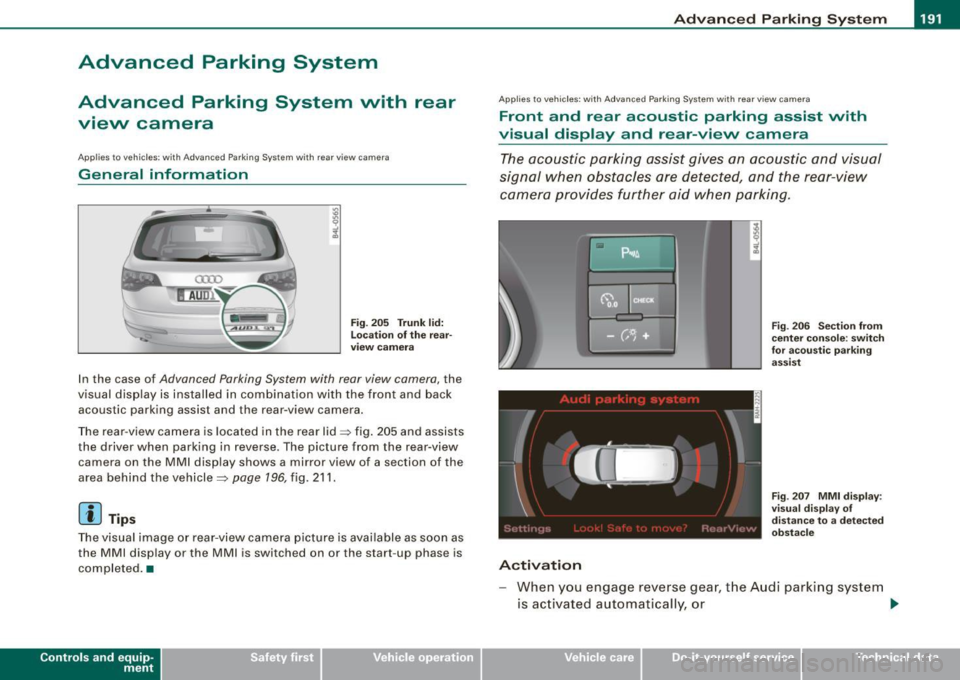
Fig. 205 Trunk lid:
Location of the rear
view camera
In the case of Advanced Parking System with rear view camera, the
visual display is installed in combination with the front and back acoustic parking assist and the rear-view camera.
The rear -view camera is located in the rear lid~ fig. 205 and assists
the driver when parking in reverse . The picture from the rear-view
camera on the MMI display shows a mirror view of a section of the
area behind the vehicle~
page 196, fig. 211.
[ i J Tips
The visual image or rear-view camera picture is available as soon as
the MMI display or the MMI is switched on or the start -up phase is
completed. •
Contro ls and eq uip
ment
App lies to vehicles: with Advanced Parking System w ith re ar view came ra
Front and rear acoustic parking assist with
visual display and rear-view camera
The acoustic parking assist gives an acoustic and visual
signal when obstacles are detected, and the rear-view
camera provides further aid when parking.
Activation
Fig. 206 Section from
center console: switch
for acoustic parking
assist
Fig . 207 MMI display :
visual display of
distance to a detected
obstacle
When you engage reverse gear, the Audi parking system
is activated automatically, or .,.
Vehicle care I I irechnical data
Page 195 of 426

____________________________________________ A_d_ v_ a_n_ c_ e_d _ P_a_ r_ k_ i_ n ..::g==-- S_ y=- s_t _e _m __ lllll
T he image in the visua l display can be switched off on the MMI
display ::::> page
203. The acoustic distance warning remains active.
If you press a function button on the MMI termina l, the visual
display disappears . Manually switching the parking assist on again
via the
p ,y 1 switch shows the visual image on the MM I display aga in.
Further information regarding the MMI terminal is included in the
MMI user's manual.
R ear-view camera (rear view )
The rear-view camera picture::::> page 196, fig. 2 12 appears on the
MM I display as a mirror image. The rear -view camera picture has
orientation lines and marked s urfaces projected into it as an aid to
the parking process ::::> page
194. The red line in the picture
::::> pag e
194, fig. 208 or ::::, page 194, fig. 209 indicates th e collis ion
area . You shou ld stop backing up, preferably before you reach this
point ::::>
&.
If your vehicle is close to an obstacle, the visual distance display
a lso appears in the picture from the rear -view camera . This superim
posed display is intended to help d isplay the relevan t critica l vehicle
area.
I f the visual d isplay is shown on the MMI display and you press the
control button with the Rear view function::::> page
191, fig. 207, the
pictu re from the rear -v iew came ra is displayed.
If the picture from the rear -view camera is s hown a nd you press the
control button w ith the Graphic function ::::, page
196, fig. 212, the
visual display is shown.
T he picture from the rear -view camera can be switched off on the
M MI display ::::, page
203 . The acoustic distance warn ing re mains
active.
I f you press a function button on the MMI te rmina l, the rear-view
camera p icture disappears. The rear -v iew came ra picture reappears
the next time you park. But the picture from the rear -view camera
can also be shown aga in on the MM I display by manually switching
off and on with the
P •1A switch . Further information regarding the
MMI terminal is included in the MM I user's ma nual.
Controls and equip
ment
& WARNING
• Sensor s have dead space s in which obje cts cannot be
detected. Be e spe cially careful to check for small children and
an imals before ba cking up . Small children and animals will not
always be detected by the sensors.
• The Audi parking system is not a substitute for being careful
and alert when backing up. Be e spe cially careful during parking
and similar maneuver s. A lways watch where you are dri ving and
make sure that nothing is in the way.
• Remember that low ob sta cles which have already been
s ignaled may pass below the system' s sen sing zone when the
v ehi cle is ba cking up . The fa ct that the signal stop s doe s not mean
that you have cleared the obstacle . When the signal stops , impact
is imminent . Obje cts su ch as trailer hit che s, chain s, narrow posts
or fences covered by a thin l ayer of paint may not always be
detected by the sy stem. They can still damage your vehicle
without warning .
• Alway s make sure that the volume and frequency of the chime s
is adjusted so that you can eas ily hear the acoustic distance signal
even if the radio is playing , the air -conditioner blower is on High or
there is a high level of out side noise .
- Check the setting s whenever someone else has dri ven the
vehicle before you.
• Improper relian ce on the Aud i parking sy stem can cau se colli
sions and serious per sonal injury .
- Never rely only on parking assi st when ba cking up .
- Always check rear view mirrors to make sure it is safe to back
up .
[ i ] Tips
• The rear -view camera picture is available as soon as the MMI
Disp lay or the MMI is swi tch ed o n, or the start -up phase is
completed.
I • •
Page 197 of 426

__________________________________________ A___;_ d_v _a_ n___;_ c __ e _d _ P_a_ r_ k_ i_n -=g ~ S_,y:... s_ t_ e_ m ___ llll
T he rear -v iew cam era can be turned on and off in the MMI
~ page 203 . The acous tic dista nce wa rning rem ains ac tive .
& WARNING
• The rear -view camera has blind spots, in which objects cannot
be detected . Be especially careful to check for small children and
animals before backing up. Small children and animals will not
always be detected by the sensors .
• The Audi parking system is not a substitute for being careful
and alert when backing up. Be especially careful during parking
and similar maneuvers . Always watch where you are driving and
make sure that nothing is in the way .
• Remember that low obstacles which have already been
signaled may pass below the system's sensing zone when the
vehicle is backing up . The fact that the signal stops does not mean
that you have cleared the obstacle. When the signal stops , impact
is imminent . Objects such as trailer hitches, chains , narrow posts
or fences covered by a thin layer of paint may not always be
detected by the system. They can still damage your vehicle
without warning .
• Always make sure that the volume and frequency of the chimes
is adjusted so that you can easily hear the acoustic distan ce signal
even if the radio is playing , the air-conditioner blower is on High or
there is a high level of outs ide noise .
- Check the settings whenever someone else has driven the
vehicle before you.
• Improper reliance on the Audi parking system can cause colli
sions and serious personal injury .
- Never rely only on parking assist when changing backing up.
- Always check rear view mirrors to make sure it is safe to back
up.
Controls and equip
ment
[ i ] Tips
• B efore par king w it h the rea r-view camera, the Adapti ve Ai r
S uspen sion * co mfort or automatic mode m ust be switched on
~ page 2 1.
• The rea r-vie w camera p ict ure i s avai la ble as soon as the M MI
Di sp lay or t he MMI is sw itched o n, o r the sta rt- up p hase is
completed.
• I n order for th e rear -view camera to function properly, the
came ra lens ~
page 191, fig. 205 mus t be ke pt clean, and free of
s n ow and ice . P lease fo llo w th e ad ditional notes on
~ p age 204.
• The camera c ove rage a ngle c hange s w hen the trun k lid is ope n.
Therefore, the rear -view camera picture is disp layed without orien
tati on lines an d without b lue s urfaces .
• Observe and fol low th e not es on towing mode * on~
page 201 . •
A pplies to vehic les : w it h Ad va nced Par kin g Sys te m with re ar view camer a
Rear-view camera coverage area
I • •
Fig. 210 Top view:
Rear-view camera
coverage area