Page 241 of 648

If you decide to purchase XM radio
service, contact XM
Radio at
,orat
1-800-852-9696. In Canada, contact , or call 1-877-438-
9677. You will need to give them
your radio I.D. number and your
credit card number. To get your
radio I.D. number, press the button, then turn the
selector knob until ‘‘CH 000’’ appears
in the display. Your I.D. will appear
in the display.
After you’ve registered with XM
Radio, keep your audio system in the
XM Radio mode while you wait f or
activation. This should take about 30
minutes.
Driving on a single lane road
alongside dense trees taller than
50 ft. (15 m) to the south of you.
If your XM Radio service has expired
or you purchased your vehicle f rom
a previous owner, you can listen to a
sampling of the broadcasts available
on XM Radio. With the ignition
switch in the ACCESSORY (I) or the
ON (II) position, press the
button. A variety of music
types and styles will play.
There may be other geographic
situations that could af f ect XM Radio
reception.
www.xmradio.com
www.xmradio.ca
As required by the FCC: Changes or modif ications not expresslyapproved by the party responsible f orcompliance could void the user’sauthority to operate the equipment.
Playing the XMRadio (Models without navigation system)
Receiving XM Radio Service
238
�\f���—�
���—�����y�
�\f��\f����\f���y���
�)� �����\f�\f�y�\f�������y
2009 TL
Page 242 of 648
While waiting f or activation, make
sure your vehicle remains in an open
area with good reception. Once your
audio system is activated,
‘‘CATEGORY’’ or ‘‘CHANNEL’’ will
appear in the display, and you’ll be
able to listen to XM radio broadcasts.
XM Radio will continue to send an
activation signal to your vehicle f or
at least 12 hours from the activation
request. If the service has not been
activated after 36 hours, contact
XM
Radio.
Playing the XMRadio (Models without navigation system)
Features
239
�\f���—�\f���—�����y�
����
��������y���
�)� �����\f�\f�y�\f�������y
2009 TL
Page 244 of 648
�µ
�µ
�µ
CONT INUED
You operate the disc changer with
the same controls used f or the radio.
To select the disc changer, press the
CD button. You will see ‘‘CD’’ in the
display. The disc and track numbers,
andtheelapsedtimeareshownin
the display. You can also select the
displayed inf ormation with the
TITLE button (see page ). The
system will continuously play a disc
until you change modes.The specif ications f or compatible
MP3 f iles are:
Sampling f requency:
32/44.1/48 kHz (MPEG1),
16/22.05/24 kHz (MPEG2)
Bitrate:
32/40/48/56/64/80/96/112/128/
160/192/224/256/320 kbps
(MPEG1), 8/16/24/32/40/48/56/
64/80/96/112/128/160 kbps
(MPEG2)
Compatible with variable bitrate
and multi-session.
Maximum layers
(including ROOT): 8 layers
To load or play discs, the ignition
switch must be in the ACCESSORY
(I) or ON (II) position.
This audio system can also play
CD-Rs and CD-RWs compressed in
MP3 or WMA f ormat. When playing
a disc in MP3, you will see ‘‘MP3’’ in
the display. In WMA f ormat, ‘‘WMA’’
will appear in the display. The disc,
f older and track numbers are
displayed. You can select up to 255
folders or tracks.
A disc compressed in AAC f ormat
cannot be played in this audio
system.
Video CDs and DVDs do not work in
this unit.
243
To Play a Disc
Playing Discs (Models without navigation system)
Features
241
Do not use discs with adhesive labels.
The label can curl up and cause the
disc to jam in the unit.
�\f���—�
���—�����y�
�\f��\f��������y���
�)� �����\f�\f�y�\f�������y
2009 TL
Page 252 of 648
Press the eject button ( ) to
remove the disc. If you eject the disc,
but do not remove it f rom the slot,
the system will automatically reload
the disc af ter 10 seconds and begin
playing.If you turn the system of f while a
disc is playing, either with the VOL/
knob or by turning of f the
ignition switch, the disc will stay in
the drive. When you turn the system
back on, the disc will begin playing
where it lef t of f .
To remove the disc currently in play,
press the eject button. When a disc is
removed f rom a slot, the system
automatically begins the load
sequence so you can load another
disc in that position. If you do not
remove the disc f rom the changer
within 10 seconds, the disc will
reload into the slot. Then the system
returns to the previous mode (AM,
FM, or XM Radio). For inf ormation on how to handle
and protect compact discs, see page
.
To remove a dif f erent disc f rom the
changer,firstselectitwiththe
appropriate preset button. When that
disc begins playing, press the eject
button. Continue pressing the eject
button to remove all the discs from
the changer.
You can also eject discs when the
ignition switch is of f . The disc that
was last selected is ejected f irst.
To play the radio when a disc is
playing, press the AM/FM or button. Press the AUX button
to switch to an appropriate audio unit
(if it is connected to the auxiliary
input jack or the USB adapter cable).
Press the CD button again to switch
back to the disc changer.
You can also eject the disc when the
ignition switch is of f .
To eject all discs, press and hold the
eject button until the f irst disc begins
to eject.
251
To Stop Playing a Disc
Protecting Discs
Removing Discs f rom t he In-dashDisc Changer
Playing Discs (Models without navigation system)
Features
249
�\f���—�\f���—�����y�
����
������
�y���
�)� �����\f�\f�y�\f�������y
2009 TL
Page 264 of 648

�Î
�Î
You can disconnect the iPod at any
time when you see ‘‘OK to
disconnect’’ message in the iPod
display. Always make sure you see
‘‘OK to disconnect’’ message in the
iPod display bef ore you disconnect it.
Make sure to f ollow the iPod’s
instructions on how to disconnect
the dock connector f rom the USB
adapter cable.If you see an error message in the
display, see page .
The displayed message may
vary on models or versions.
On some models, there is no
message to disconnect.
If you reconnect the same iPod, the
system may begin playing where it
lef t of f , depending on what mode the
iPod is in when it is reconnected.
To play the radio, press the AM/FM,
or button. Press the CD button
to switch to the disc mode (if a disc
is loaded). Press the AUX button to
switch the audio mode between the
Bluetooth
audio and iPod.
You can also press the MODE
buttononthesteeringwheelto
change modes. : 262
Disconnect ing an iPodT o Stop Playing Your iPod
iPodError Messages
Playing an iPod(Models without navigation system)
Features
261
�\f���—�\f���—�����y�
����
��������y���
�)� �����\f�\f�y�\f�������y
2009 TL
Page 280 of 648
Most audio system f unctions can still
be controlled by standard buttons,
dials, and knobs, but some f unctions
can only be accessed using the
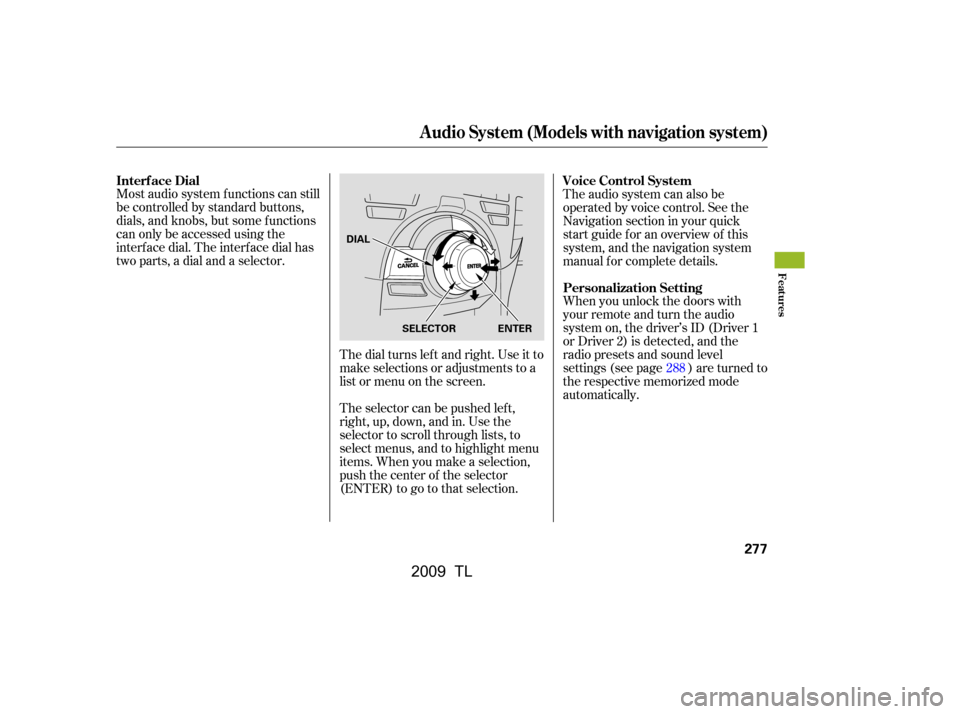
interf ace dial. The interf ace dial has
two parts, a dial and a selector.The dial turns lef t and right. Use it to
make selections or adjustments to a
list or menu on the screen.
The selector can be pushed lef t,
right, up, down, and in. Use the
selector to scroll through lists, to
select menus, and to highlight menu
items. When you make a selection,
push the center of the selector
(ENTER)togotothatselection.The audio system can also be
operated by voice control. See the
Navigation section in your quick
start guide f or an overview of this
system, and the navigation system
manual f or complete details.
When you unlock the doors with
your remote and turn the audio
system on, the driver’s ID (Driver 1
or Driver 2) is detected, and the
radio presets and sound level
settings (see page ) are turned to
the respective memorized mode
automatically.
288
Interf ace Dial
Voice Control System
Personalization Setting
Audio System (Models with navigation system)
Features
277
SELECTOR ENTER
DIAL
�\f���—�\f���—�����y�
����
��������y���
�)� �����\f�\f�y�\f�������y
2009 TL
Page 281 of 648
Playing the A M/FM Radio (Models with navigation system)
278
INTERFACE DIALVOL/ (VOLUME/POWER)
KNOB
TITLE BUTTON
AM/FM BUTTON
PRESET BUTTONS
CATEGORY BAR
TUNE BAR
AUDIO BUTTON (SOUND) BUTTON
NAVIGATION SCREEN
CENTER DISPLAY
SKIP BAR
SCAN/A.SEL (SCAN/
AUTO SELECT) BAR
�\f���—�\f���—�����y�
����
��������y���
�)� �����\f�\f�y�\f�������y
2009 TL
Page 282 of 648
CONT INUED
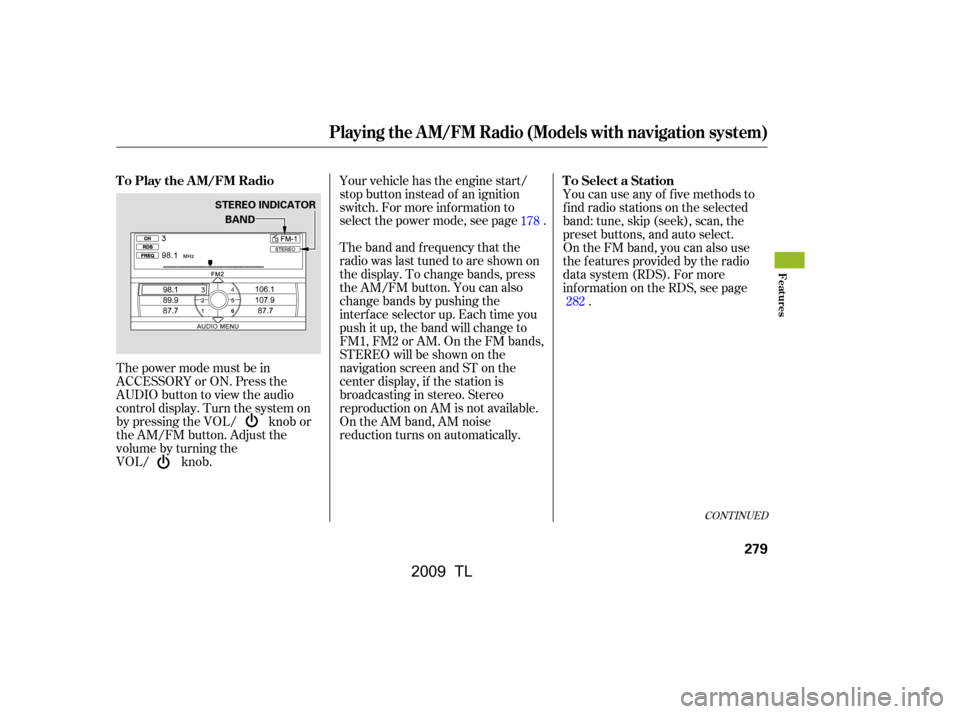
The power mode must be in
ACCESSORY or ON. Press the
AUDIO button to view the audio
control display. Turn the system on
by pressing the VOL/ knob or
the AM/FM button. Adjust the
volume by turning the
VOL/ knob.Your vehicle has the engine start/
stop button instead of an ignition
switch. For more inf ormation to
select the power mode, see page .
The band and f requency that the
radio was last tuned to are shown on
the display. To change bands, press
the AM/FM button. You can also
change bands by pushing the
interf ace selector up. Each time you
push it up, the band will change to
FM1, FM2 or AM. On the FM bands,
STEREO will be shown on the
navigation screen and ST on the
center display, if the station is
broadcasting in stereo. Stereo
reproduction on AM is not available.
On the AM band, AM noise
reduction turns on automatically.
You can use any of f ive methods to
f ind radio stations on the selected
band: tune, skip (seek), scan, the
preset buttons, and auto select.
On the FM band, you can also use
the f eatures provided by the radio
data system (RDS). For more
inf ormation on the RDS, see page
.
178
282
T o Play the A M/FM Radio
T o Select a Station
Playing the A M/FM Radio (Models with navigation system)
Features
279
BAND
STEREO INDICATOR
�\f���—�\f���—�����y�
����
��������y���
�)� �����\f�\f�y�\f�������y
2009 TL

