Page 84 of 560
�Û�Ý�Û�Ý
With the multi-information display
and the INFO ( / ) and SEL/
RESET buttons on the right side of
the steering wheel, you can
customize some vehicle control
settings f or ‘‘DRIVER 1’’ or
‘‘DRIVER 2’’. If ‘‘DRIVER 1’’ or
‘‘DRIVER 2’’ is not displayed,
customizing is not possible.
To have the driver’s ID detected,
make sure your remote is linked to
the system (see
on page ). Then use your
remote to unlock the doors (see on page
). To enter the customizing mode,
press and hold the INFO ( / )
button for more than 3 seconds while
the multi-information display is in its
normal mode.
If you turn the ignition switch to the
ACCESSORY (I) or the LOCK (0)
position, or move the shif t lever out
of Park, the display will change to
the normal screen.
When the multi-information
display does not show the driver’s
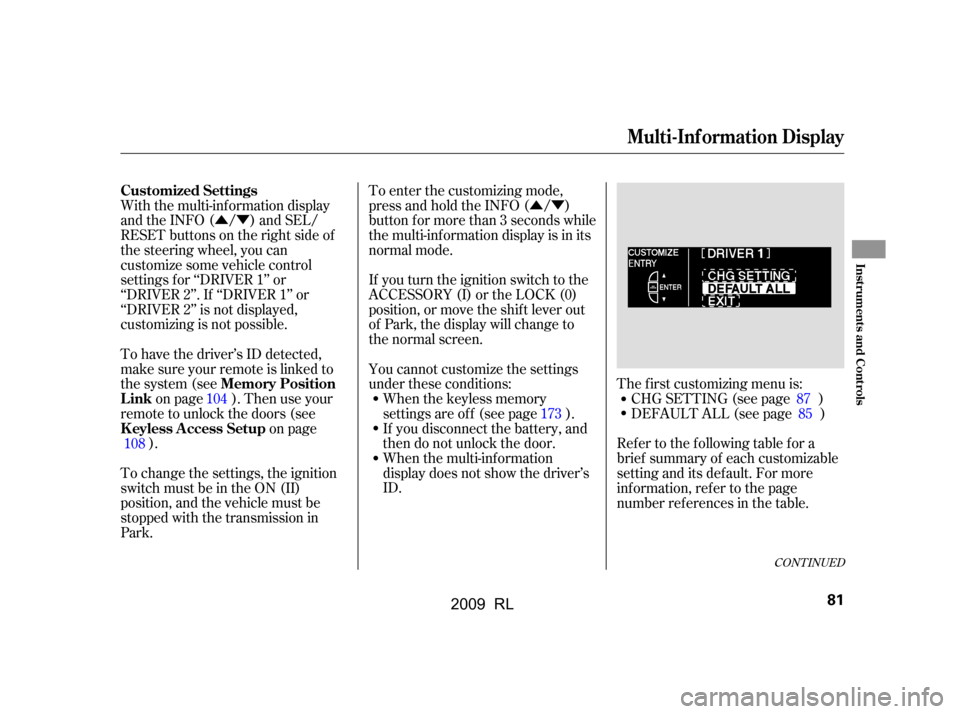
ID. The f irst customizing menu is:
CHG SETTING (see page )
If you disconnect the battery, and
then do not unlock the door.
When the keyless memory
settings are of f (see page ). DEFAULT ALL (see page )
You cannot customize the settings
under these conditions:
To change the settings, the ignition
switch must be in the ON (II)
position, and the vehicle must be
stopped with the transmission in
Park. Ref er to the f ollowing table f or a
brief summary of each customizable
setting and its default. For more
inf ormation, ref er to the page
number ref erences in the table.
104
108 87
85
173
CONT INUED
Customized Settings
Memory Position
Link
K eyless A ccess Setup
Multi-Inf ormation Display
Inst rument s and Cont rols
81
2009 RL
Page 88 of 560
�Û�Ý�Û�Ý
UsetheINFO( / )buttononthe
steering wheel to select the settings
and the SEL/RESET button to enter
your selections.
If you want the settings as they were
when the vehicle lef t the f actory,
select DEFAULT ALL, as described
on this page.
If you want to set the def ault settings,
press the INFO ( / ) button to
select DEFAULT ALL, then press
the SEL/RESET button.If you want to cancel DEFAULT
ALL, select CANCEL, then press the
SEL/RESET button. The screen
goes back to CUSTOMIZE ENTRY.
If you want to change any vehicle
control settings, select CHG
SETTING, then press the SEL/
RESET button.
CONT INUED
DEFAUL T AL L
Multi-Inf ormation Display
Inst rument s and Cont rols
85
2009 RL
Page 89 of 560
To set the def ault settings again,
select DEFAULT ALL, and press the
SEL/RESET button. Then select
SET, and press the SEL/RESET
button.When DEFAULT ALL is set, you will
see the above display for several
seconds, then the screen returns to
CUSTOMIZE ENTRY.
If DEFAULT ALL is not set, you will
see the above display for several
seconds, then the screen goes back
to the normal message mode. Repeat
the procedure to select DEFAULT
ALL.
Multi-Inf ormation Display
86
2009 RL
Page 90 of 560
�Û
�Ý
�Û�Ý
You can customize some of the
vehicle control settings to your
pref erence. Here are the settings
you can customize:
METER SETUP
ADAPTIVE CRUISE CONTROL
SETUP
POSITION SETUP
WIPER SETUP
DOOR/WINDOW SETUP
LIGHTING SETUP
KEYLESS ACCESS SETUPWhile CHG SETTING in the
CUSTOMIZE ENTRY is shown on
the multi-information display, press
the SEL/RESET button. The screen
changes to ACC SETUP in the
CUSTOMIZE GROUP.
Each time you press the INFO ( /
) button, the screen changes as
shownonthenextpage.Pressthe
INFO ( / ) button until you see
the setup you want to customize,
then press the SEL/RESET button
to enter your selection.
CONT INUED
Multi-Inf ormation Display
CHG SETTING
Inst rument s and Cont rols
87
2009 RL
Page 92 of 560
�Û�Ý�Û
�Ý
�Û�Ý
�Û�Ý
If equipped
Here are the two custom settings for
adaptive cruise control (ACC):PRE-RUNNING CAR DETECT
BEEP
ACC DISPLAY SPEED UNIT
While the multi-information display
is in the CUSTOMIZE GROUP
screen, select ACC SETUP by
pressing the INFO ( / ) button,
then press the SEL/RESET button.
Each time you press the INFO ( / ) button, the display changes as
shown in the illustration. Press the
INFO ( / ) button until you see
the setting you want to customize,
then press the SEL/RESET button
to enter your selection.
CONT INUED
A daptive Cruise Control Setup
Multi-Inf ormation Display
Inst rument s and Cont rols
89
seepage90
seepage92
Press the SEL/RESET button.
Press the or button.
2009 RL
Page 93 of 560
�Û�Ý
While the multi-information display
is in the ACC SETUP of the
CUSTOMIZE GROUP, press the
SEL/RESET button. The screen
changes to the above display. Press the SEL/RESET button. The
screen changes as shown above.
Select ON or OFF by pressing the
INFO ( / ) button, then press the
SEL/RESET button to enter your
selection.
When PRE-RUNNING CAR
DETECT BEEP is set to ON, one
beep sounds when the ACC detects a
vehicle in f ront of you. You also hear
a beep when that vehicle goes out of
the range of your vehicle’s radar
sensor.
Pre-Running Car Det ect Beep
Multi-Inf ormation Display
90
2009 RL
Page 94 of 560
�Û�Ý
When your choice is set, the display
changes to the screen shown above
f or several seconds, and then goes
back to CUSTOMIZE ENTRY. To exit PRE-RUNNING CAR
DETECT BEEP without changing
the current setting, select EXIT by
pressing the INFO ( / ) button,
then press the SEL/RESET button.
The screen goes back to
CUSTOMIZE MENU.
If you choice is not set, you will see
the above display f or several seconds,
then the screen goes back to
CUSTOMIZE SETUP. If this
happens, you need to repeat the pre-
running car detect beep setup.
CONT INUED
Multi-Inf ormation Display
Inst rument s and Cont rols
91
2009 RL
Page 95 of 560
�Û�Ý�Û�Ý
While the multi-information display
is in the ACC SETUP of the
CUSTOMIZE GROUP, press the
SEL/RESET button. The screen
changes to CUSTOMIZE MENU.
Press the INFO ( / ) button until
you see the above display. Press the SEL/RESET button. The
screen changes as shown above. The
highlighted unit, mph or km/h, is
the current setting. To change the
setting, press the INFO ( / )
button until the unit you want is
highlighted, then press the SEL/
RESET button.
To change the unit of measurement
f rom mph to km/h, do this:
A dapt ive Cruise Cont rol Display
Speed Unit
Multi-Inf ormation Display
92
2009 RL


