Page 235 of 433
�´
�µ
�´�µ �´
�µ
�´�µ
If you are playing CD, the system
skips to the beginning of the next
track (f ile in MP3/WMA mode)
each time you press the top ( ) of
the CH button. Press the bottom
( ) to return to the beginning of the
current track/file. Press it again to
return to the previous track/f ile.
To select a dif f erent disc (f older in
MP3/WMA mode), press and hold
the top ( ) or bottom ( ) of the
CH button until you hear a beep. If you are listening to XM Satellite
Radio, use the CH button to change
channels. Each time you press the
top ( ) of the button, the system
goes to the next preset channel.
Pressthebottom( )togobackto
the previous preset channel.
To go to the next channel of the
category you are listening to, press
and hold the top ( ) or bottom ( )
of the CH button until you hear a
beep.
Remote Audio Controls
Features
231
�\f���—�\f���—�
�
�y�
���������
�
�y���
�(�)� �����\f�y�\f�������y
2009 RDX
Page 236 of 433

Your vehicle’s audio system will
disable itself if it is disconnected
f rom electrical power f or any reason.
To make it work again, you must
enter a specif ic f ive-digit code with
the preset bars or buttons
(depending on models). Because
there are hundreds of number
combinations possible f rom the f ive
digits, making the system work
without knowing the exact code is
nearly impossible.
Youshouldhavereceivedacardthat
lists your audio system code number
and serial number. It is best to store
this card in a saf e place at home. In
addition, you should write the audio
system’s serial number in this owner’s
manual.
If you lose the card, you must obtain
the code number f rom your dealer.
To do this, you will need the audio
system’s serial number.If your vehicle’s battery is discon-
nected or goes dead, or the radio
f use is removed, the audio system
will disable itself . If this happens,
youwillsee‘‘ ’’onthecenter
or upper display (depending on
models) the next time you turn on
the system. Use the preset bars or
buttons (depending on models) to
enter the f ive-digit code. The code is
locatedontheradiocodecard
included in your owner’s manual kit.
When it is entered correctly, the
radio will start playing.
If you make a mistake entering the
code, do not start over; complete the
f ive-digit sequence, then enter the
correct code. You have ten tries to
enter the correct code. If you are
unsuccessful in ten attempts, you
must then leave the system on for 1
hour bef ore trying again.
The system will retain your AM and
FM presets even if power is
disconnected.
Radio T hef t Protection
232
�\f���—�\f���—�
�
�y�
���������
���y���
�(�)� �����\f�y�\f�������y
2009 RDX
Page 237 of 433

The security system automatically
sets 15 seconds after you lock the
doors, hood, and the tailgate. For the
system to activate, you must lock the
doorsandthetailgatefromthe
outside with the key, driver’s lock
tab, door lock master switch, or
remote transmitter. The security
system indicator on the instrument
panel starts blinking immediately to
show you the system is setting itself .
The security system helps to protect
your vehicle and valuables f rom thef t.
The horn sounds and a combination
of headlights, parking lights, side
marker lights, and taillights f lashes if
someone attempts to break into your
vehicleorremovetheradio.This
alarm continues f or 2 minutes, then
the system resets. To reset an
alarming system before the 2
minutes have elapsed, unlock the
driver’s door with the key or the
remote transmitter.Once the security system is set,
opening any door, the tailgate, or the
hood without using the key or the
remote transmitter, will cause it to
alarm. It also alarms if the radio is
removed f rom the dashboard or the
wiring is cut.Do not attempt to alter this system
or add other devices to it.To see if the system is set
af ter you exit the vehicle, press the
LOCK button on the remote
transmitter within 5 seconds. If the
system is set, a beep will sound.
The security system will not set if
the hood, tailgate, or any door is not
f ully closed. Bef ore you leave the
vehicle, make sure the doors,
tailgate, and hood are securely
closed.
The alarm will also be activated if a
passenger inside the locked vehicle
turns the ignition switch on.
Security System
Features
233
NOTE:SECURITY SYSTEM INDICATOR
�\f���—�\f���—�
�
�y�
�������������y���
�(�)� �����\f�y�\f�������y
2009 RDX
Page 241 of 433
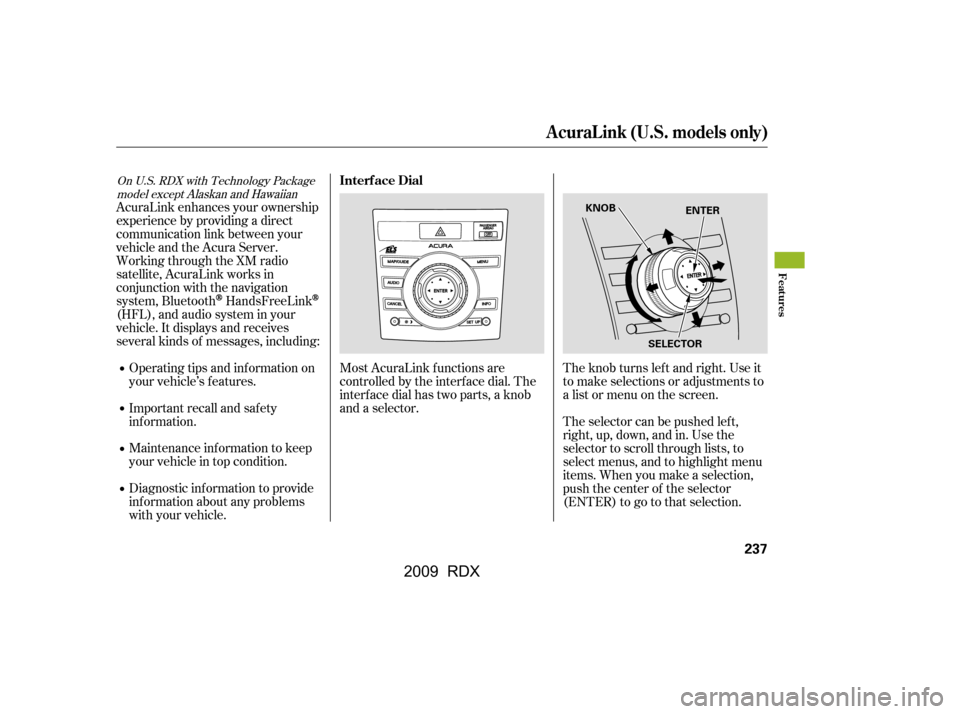
AcuraLink enhances your ownership
experience by providing a direct
communication link between your
vehicleandtheAcuraServer.
Working through the XM radio
satellite, AcuraLink works in
conjunction with the navigation
system, Bluetooth
HandsFreeLink
(HFL),andaudiosysteminyour
vehicle. It displays and receives
several kinds of messages, including:Operating tips and inf ormation on
your vehicle’s f eatures.
Important recall and safety
inf ormation.
Maintenance inf ormation to keep
your vehicle in top condition.
Diagnostic inf ormation to provide
inf ormation about any problems
with your vehicle. The selector can be pushed lef t,
right, up, down, and in. Use the
selector to scroll through lists, to
select menus, and to highlight menu
items. When you make a selection,
push the center of the selector
(ENTER)togotothatselection.
The knob turns lef t and right. Use it
to make selections or adjustments to
a list or menu on the screen.
Most AcuraLink f unctions are
controlled by the interf ace dial. The
interface dial has two parts, a knob
and a selector.
On U.S. RDX with Technology Package
model except Alaskan and HawaiianInterf ace Dial
A curaL ink (U.S. models only)
Features
237
ENTER
SELECTOR
KNOB
�\f���—�\f���—�
�
�y�
���������\f�\f�y���
�(�)� �����\f�y�\f�������y
2009 RDX
Page 285 of 433

Modif ying your vehicle, or installing
some non-Acura accessories, can
make your vehicle unsaf e. Bef ore
you make any modif ications or add
anyaccessories,besuretoreadthe
f ollowing inf ormation.
Your dealer has Acura accessories
that allow you to personalize your
vehicle. These accessories have
been designed and approved f or your
vehicle, and are covered by warranty.
Although non-Acura accessories may
f it on your vehicle, they may not
meet f actory specif ications, and
could adversely af f ect your vehicle’s
handling and stability.When properly installed, cellular
phones, alarms, two-way radios, and
low-powered audio systems should
not interf ere with your vehicle’s
computer controlled systems, such
as your airbags, anti-lock brakes, and
tire pressure monitoring system.Bef ore installing any accessory:
Make sure the accessory does not
obscure any lights, or interf ere
with proper vehicle operation or
perf ormance.
Be sure electronic accessories do
not overload electrical circuits
(see page ) or interf ere with
proper operation of your vehicle.
Bef ore installing any electronic
accessory, have the installer
contact your dealer for assistance.
If possible, have your dealer
inspect the f inal installation.
Do not install accessories on the
side pillars or across the rear
windows. Accessories installed in
theseareasmayinterferewith
proper operation of the side
curtain airbags. 386
A ccessories and Modif ications
A ccessories
Bef ore Driving
281
Improper accessories or
modifications can affect your
vehicle’s handling, stability, and
performance, and cause a
crash in which you can be hurt
or killed.
Follow all instructions in this
owner’s manual regarding
accessories and modifications.
�\f���—�\f���—�
�
�y�
������\f������y���
�(�)� �����\f�y�\f�������y
2009 RDX
Page 371 of 433
The navigation system will also
disableitself.Thenexttimeyouturn
on the ignition switch, the system
will require you to enter a PIN
bef ore it can be used. Ref er to the
navigation system manual.
If your vehicle’s battery is
disconnected or goes dead, the audio
system will disable itself . The next
timeyouturnontheradioyouwill
see ‘‘ ’’ in the f requency
display. Use the preset bars or preset
buttons (depending on models) to
enter the f ive-digit code (see page
).
If your vehicle’s battery is
disconnected, or goes dead, the time
setting will be reset to 1:00. To set
the time again, f ollow the setting
procedure (see page ).
188
232
On RDX with Technology Package model
On RDX models
Checking the Battery
Maint enance
367
�\f���—�\f���—�
�
�y�
������
������y���
�(�)� �����\f�y�\f�������y
2009 RDX
Page 391 of 433

CONT INUED
If you cannot drive the vehicle
without f ixing the problem, and you
do not have a spare fuse, take a fuse
of the same rating or a lower rating
f rom one of the other circuits. Make
sureyoucandowithoutthatcircuit
temporarily (such as the accessory
power socket or radio).
If you replace the blown f use with a
spare f use that has a lower rating, it
might blow out again. This does not
indicate anything wrong. Replace the
f use with one of the correct rating as
soon as you can.
Look f or a blown wire inside the
f use. If it is blown, replace it with
oneof thesparefusesof thesame
rating or lower. The spare f uses
are provided on the back of the
under-hood f use cover.
Check the smaller f uses in the
under-hood f use box and all the
fuses in the interior fuse box by
pulling out each one with the f use
pullerprovidedonthebackof the
primary under-hood f use box
cover.
4. 5.
Fuses
T aking Care of t he Unexpect ed
387
BLOWN
FUSE PULLER
�\f���—�\f���—�
�
�y�
�������������y���
�(�)� �����\f�y�\f�������y
2009 RDX
Page 393 of 433

�µ
�µ
�µ
�µ
No. No. Circuits ProtectedNo.
Circuits Protected
Amps. Amps. Amps. Circuits Protected
1
2
3
4
5
6
7
8
9
10
11
12
13
14
15 RR Wiper
OPDS
Meter
SRS
Right Headlight High
Left Headlight High
Small Lights (Interior)
Small Lights (Exterior) 16
17
18
19
20
21
22
23
24
25
26
27
28
29
30
31
32
33
34
35
36
37
38
SH-AWD
Fuel Pump
ACG
ABS/VSA
Heated Seat
FR Fog Lights
Driver’s Power Seat Lumbar
Support
7.5 A
20 A
15 A
7.5 A 15 A
20 A
7.5 A 10 A
7.5 A
7.5 A 10 A
10 A
10 A
7.5 A 15 A 15 A
15 A
20 A
20 A
7.5 A 30 A
20 A
20 A
20 A
15 A
15 A
20 A
20 A
20 A
20 A
7.5 A 10 A
7.5 A 30 A Right Headlight Low
Left Headlight Low
Headlight High Main
Small Lights Main
TPMS
Headlight Low Main
Not Used
Not Used
Moonroof
Door Lock
Driver’s Power Window
Not Used
Accessory Socket (Console
Compartment)
ACC
Passenger’s Power Window
Radio Amplifier
Right Rear Power Window
Left Rear Power Window
Not Used
Radio
HAC
Daytime Running Light
FR Wiper
Fuse Locations
T aking Care of t he Unexpect ed
389
INTERIOR FUSE BOX
�\f���—�\f���—�
�
�y�
�������������y���
�(�)� �����\f�y�\f�������y
2009 RDX

