Page 7 of 489
ꭧ: If equipped
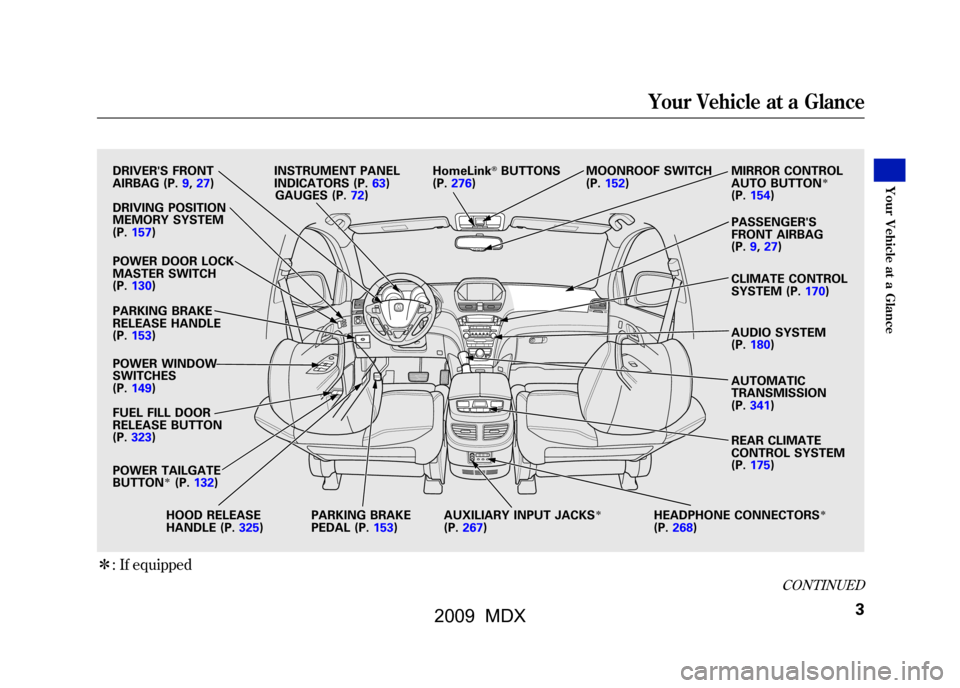
DRIVER'S FRONT
AIRBAG (P.9,27)
DRIVING POSITION
MEMORY SYSTEM
(P.157)
POWER DOOR LOCK
MASTER SWITCH
(P.130)
PARKING BRAKE
RELEASE HANDLE
(P.153)
POWER WINDOW
SWITCHES
(P.149)
FUEL FILL DOOR
RELEASE BUTTON
(P.323)
POWER TAILGATE
BUTTON
ꭧ(P. 132)
HOOD RELEASE
HANDLE (P.325) PARKING BRAKE
PEDAL (P.153)AUXILIARY INPUT JACKS
ꭧ
(P.
267) HEADPHONE CONNECTORS
ꭧ
(P.
268)
INSTRUMENT PANEL
INDICATORS (P.63)
HomeLink
®BUTTONS
(P.276) MOONROOF SWITCH
(P.152)MIRROR CONTROL
AUTO BUTTON
ꭧ
(P.
154)
PASSENGER'S
FRONT AIRBAG
(P.9,27)
CLIMATE CONTROL
SYSTEM (P.170)
AUDIO SYSTEM
(P.180)
AUTOMATIC
TRANSMISSION
(P.341)
REAR CLIMATE
CONTROL SYSTEM
(P.175)
GAUGES (P.72)
CONTINUED
Your Vehicle at a Glance
3
Your V ehicle at a Glance
08/06/06 16:58:07 09 ACURA MDX MMC North America Owner's M 50 31STX620 enu
2009 MDX
Page 66 of 489
ꭧ: If equipped
DRIVING POSITION
MEMORY SYSTEM
(P. 157)
POWER DOOR LOCK
MASTER SWITCH
(P. 130)
PARKING BRAKE
RELEASE HANDLE
(P. 153)
POWER WINDOW
SWITCHES
(P. 149)
FUEL FILL DOOR
RELEASE BUTTON
(P. 323)
POWER TAILGATE
BUTTON
ꭧ(P. 132)
HOOD RELEASE
HANDLE (P. 325)PARKING BRAKE
PEDAL (P.153)
AUXILIARY INPUT JACKS
ꭧ
(P.
267) HEADPHONE CONNECTORS
ꭧ
(P.
268) REAR CLIMATE
CONTROL SYSTEM
(P.
175)
AUTOMATIC
TRANSMISSION
(P.
341)
AUDIO SYSTEM
(P.
180)
CLIMATE CONTROL
SYSTEM (P.
170)
MIRROR CONTROL
AUTO BUTTON
ꭧ
(P.
154)
MOONROOF SWITCH
(P.
152)
HomeLink
®BUTTONS
(P. 276)
INSTRUMENT PANEL
INDICATORS (P.
63)
GAUGES (P. 72)
Control Locations6208/06/06 16:58:07 09 ACURA MDX MMC North America Owner's M 50 31STX620 enu
2009 MDX
Page 157 of 489

Auto Reverse
If the moonroof runs into any
obstacle while it is closing
automatically, it will reverse
direction, and then stop. To close the
moonroof, remove the obstacle, then
use the moonroof switch again.
Auto reverse stops sensing when the
moonroof is almost closed. You
should always check that all
passengers and objects are away
from the moonroof before closing it.
Opening or closing the
moonroof on someone's hands
or fingers can cause serious
injury.
Make sure all hands and fingers
are clear of the moonroof
before opening or closing it.You can open and close the
moonroof for up to 10 minutes after
you turn off the ignition switch.
Opening either front door cancels
this function.
If you try to open the moonroof in
below-freezing temperatures, or when it
is covered with snow or ice, you can
damage the moonroof panel or its
motor.
Parking Brake
To apply the parking brake, push the
pedal down with your foot. To
release it, pull the release handle
fully. The parking brake indicator on
the instrument panel should go out
when the parking brake is fully
released (see page65).
You will also see a
‘‘RELEASE
PARKING BRAKE ’’message on the
multi-information display (see page
81).
RELEASE HANDLE
PARKING BRAKE PEDAL
CONTINUED
Moonroof, Parking Brake
153
Inst rument s and Cont rols
08/06/06 16:58:07 09 ACURA MDX MMC North America Owner's M 50 31STX620 enu
2009 MDX
Page 343 of 489

6. Check the adjustment of the insideand outside mirrors (see page
154).
7. Check the steering wheel adjustment (see page 124).
8. Make sure the doors and tailgate are securely closed and locked.
9. Fasten your seat belt. Check that your passengers have fastened
their seat belts (see page 15).
10. When you start the engine, check the gauges and indicators in the
instrument panel, and the
messages on the multi-information
display (see pages 63,72and 81). Starting the Engine
Your vehicle's starting system has an
auto control mode. When you turn
the ignition switch to the START (III)
position, this feature keeps the
engine's starter motor running until
the engine starts. Follow these
instructions to start the engine:
1. Apply the parking brake.
2. In cold weather, turn off all
electrical accessories to reduce the
drain on the battery.
3. Make sure the shift lever is in Park. Press on the brake pedal.
4. Without touching the accelerator pedal, turn the ignition switch to
the START (III) position, then
release the ignition switch. You do
not need to hold the ignition
switch in the START (III) position
to start the engine. Depending on
the outside temperature, the
starter motor runs for about 6 to 9
seconds until the engine starts. If you hold the ignition switch in
the START (III) position for more
than 7 seconds, the starter motor,
depending on the outside
temperature, runs for about 10 to
25 seconds until the engine starts.
If the engine does not start, wait at
least 10 seconds before trying
again.
The immobilizer system protects your
vehicle from theft. If an improperly-
coded key (or other device) is used, the
engine's fuel system is disabled. For
more information, see page
128.
CONTINUED
Preparing to Drive, Starting the Engine
339
Driving
08/06/06 16:58:07 09 ACURA MDX MMC North America Owner's M 50 31STX620 enu
2009 MDX
Page 350 of 489

Drive (D
3)- This position is similar
to D, except only the first three gears
are selected. Use D
3when towing a
trailer in hilly terrain, or to provide
engine braking when going down a
steep hill. D
3can also keep the
transmission from cycling between
third, fourth, and fifth gears in stop-
and-go driving.
For faster acceleration when in D
3or
D, you can get the transmission to
automatically downshift by pushing
the accelerator pedal to the floor.
The transmission will shift down one,
two, or three gears, depending on
your speed. Engine Speed Limiter
If you exceed the maximum speed
for the gear you are in, the engine
speed will enter into the
tachometer's red zone. If this occurs,
you may feel the engine cut in and
out. This is caused by a limiter in the
engine's computer controls. The
engine will run normally when you
reduce the rpm below the red zone.
Before downshifting, make sure the
engine will not go into the
tachometer's red zone.
Shift Lock Release
This allows you to move the shift
lever out of Park if the normal
method of pushing on the brake
pedal and pressing the release button
does not work.
1. Set the parking brake.
2. Remove the key from the ignition
switch.
Automatic Transmission34608/06/06 16:58:07 09 ACURA MDX MMC North America Owner's M 50 31STX620 enu
2009 MDX
Page 442 of 489

U.S. Canada
The brake system
indicator normally
comes on when you turn the ignition
switch to the ON (II) position, and as
a reminder to check the parking
brake. It will stay on if you do not
fully release the parking brake.
If the brake system indicator comes
on while driving, the brake fluid level
is probably low. Press lightly on the
brake pedal to see if it feels normal. If
it does, check the brake fluid level
the next time you stop at a service
station (see page401).
You will also see a ‘‘LOW BRAKE
FLUID ’’message on the multi-
information display (see page81). If the fluid level is low, take your
vehicle to a dealer, and have the
brake system inspected for leaks or
worn brake pads.
However, if the brake pedal does not
feel normal, you should take
immediate action. A problem in one
part of the system's dual circuit
design will still give you braking at
two wheels. You will feel the brake
pedal go down much farther before
the vehicle begins to slow down, and
you will have to press harder on the
pedal.
You will also see a
‘‘CHECK BRAKE
SYSTEM ’’message on the multi-
information display (see page81). Slow down by shifting to a lower
gear, and pull to the side of the road
when it is safe. Because of the long
distance needed to stop, it is
hazardous to drive the vehicle. You
should have it towed, and repaired as
soon as possible (see
Emergency
Towing on page446).
If you must drive the vehicle a short
distance in this condition, drive
slowly and carefully.
If the ABS indicator and the VSA
system indicator come on with the
brake system indicator, have your
vehicle inspected by your dealer
immediately.
Brake System Indicator43808/06/06 16:58:07 09 ACURA MDX MMC North America Owner's M 50 31STX620 enu
2009 MDX