Page 73 of 489

Message Indicator
This indicator comes on when there
is a system message on the multi-
information display. Press the INFO
button on the steering wheel (see
page73)to see the message (see
page81).
Most of the time, this indicator
comes on along with other indicators
in the instrument panel such as the
seat belt reminder indicator, SRS
indicator, VSA system indicator, etc.
Super Handling-All
Wheel Drive (SH-AWD)
Indicator
This indicator normally comes on for
a few seconds when you turn the
ignition switch to the ON (II)
position. If this indicator comes on at
any other time, there is a problem in
the SH-AWD system. You will also
see a ‘‘CHECK SH-AWD SYSTEM ’’
message on the multi-information
display (see page82).Take your
vehicle to a dealer to have it checked.
For more information, see page348. If the indicator blinks while driving,
it indicates the differential
temperature is too high.
You will also see a
‘‘SH-AWD DIFF
TEMP. HIGH ’’message on the multi-
information display (see page82).
Pull to the side of the road when it is
safe, shift to Park, and let the engine
idle until the indicator goes out.
Continuing to drive with the SH-AWD
indicator blinking may cause serious
damage to the system.
CONTINUED
Instrument Panel Indicators
69
Inst rument s and Cont rols
08/06/06 16:58:07 09 ACURA MDX MMC North America Owner's M 50 31STX620 enu
2009 MDX
Page 77 of 489
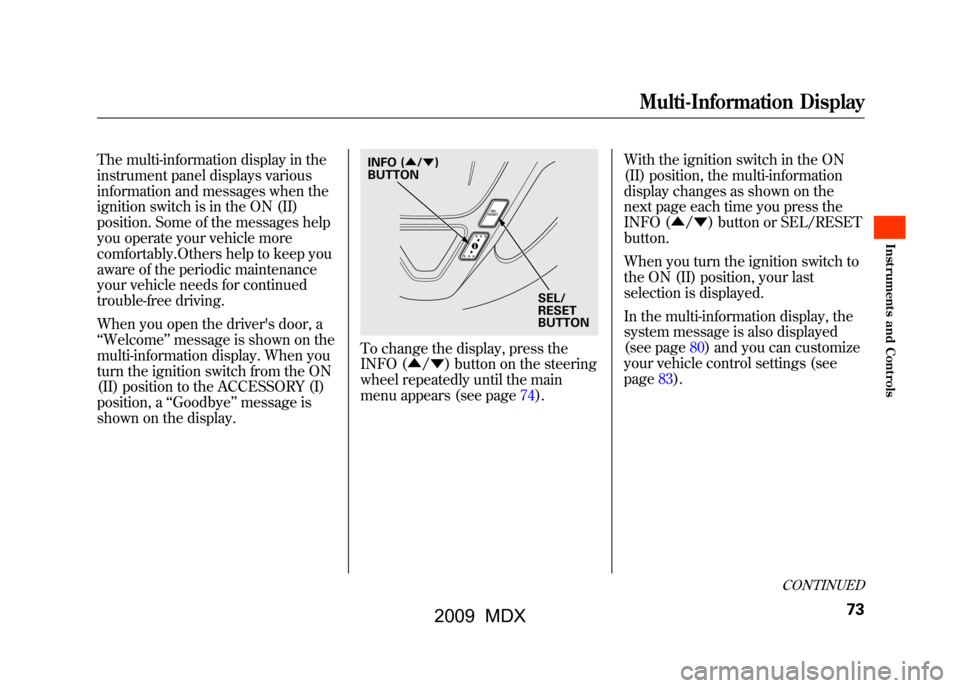
The multi-information display in the
instrument panel displays various
information and messages when the
ignition switch is in the ON (II)
position. Some of the messages help
you operate your vehicle more
comfortably.Others help to keep you
aware of the periodic maintenance
your vehicle needs for continued
trouble-free driving.
When you open the driver's door, a
‘‘Welcome ’’message is shown on the
multi-information display. When you
turn the ignition switch from the ON
(II) position to the ACCESSORY (I)
position, a ‘‘Goodbye ’’message is
shown on the display.
To change the display, press the
INFO (▲ /▼ ) button on the steering
wheel repeatedly until the main
menu appears (see page74). With the ignition switch in the ON
(II) position, the multi-information
display changes as shown on the
next page each time you press the
INFO (▲
/▼ ) button or SEL/RESET
button.
When you turn the ignition switch to
the ON (II) position, your last
selection is displayed.
In the multi-information display, the
system message is also displayed
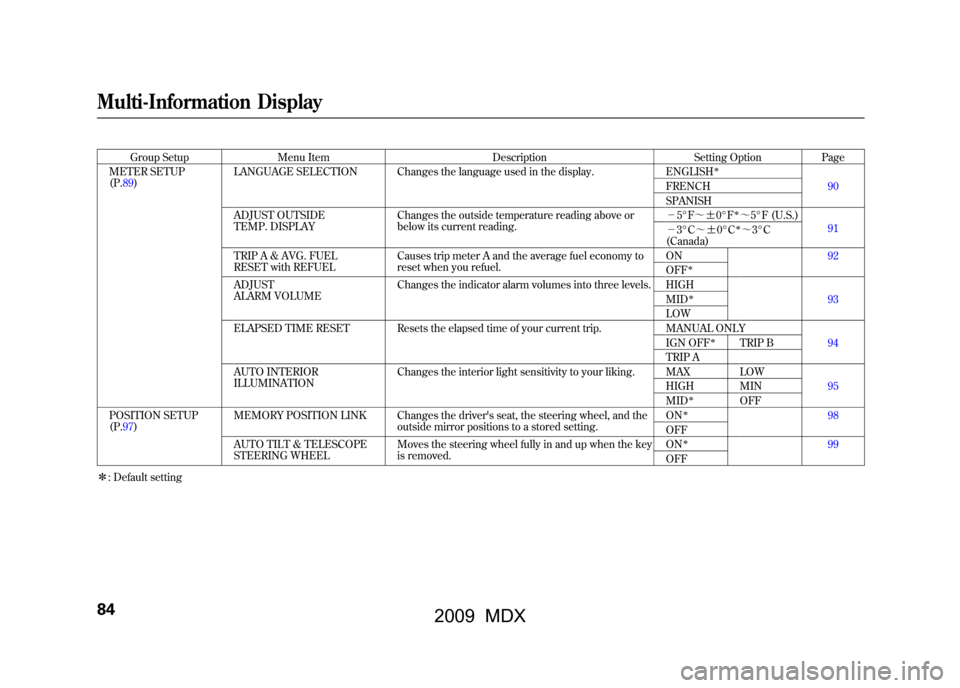
(see page80)and you can customize
your vehicle control settings (see
page83).
SEL/
RESET
BUTTON
INFO (
▲/▼ )
BUTTON
CONTINUED
Multi-Information Display
73
Inst rument s and Cont rols
08/06/06 16:58:07 09 ACURA MDX MMC North America Owner's M 50 31STX620 enu
2009 MDX
Page 84 of 489

System MessagesIf there is a problem with your
vehicle, for example, the engine oil
level is low or a door is not fully
closed, the multi-information display
will show you the problem. It does
this by interrupting the current
display with one or more messages.The system message(s) triggers the
appropriate indicator(s) on the
instrument panel, including the
system message indicator, to come
on. The system message indicator
does not go off until the problem(s)
is corrected.
You will also hear a beep when the
system message comes on for the
first time.
Most of the messages are displayed
for about 5 seconds, and then the
normal display returns. If there are
several system messages to be
shown, the display switches these
messages every 5 seconds.
To cancel the message(s) before 5
seconds elapsed, press the INFO
(▲
/▼ ) button on the steering
wheel.
Even if you press the INFO (▲ /▼ )
button, some messages stay on or
come on again at regular intervals
until the problem is corrected.
You can see the message(s) again by
pressing the INFO (▲/ ▼) button
repeatedly if the system message
indicator remains lit on the
instrument panel.
Here is a list of all messages:
SYSTEMMESSAGE INDICATOR
Multi-Information Display8008/06/06 16:58:07 09 ACURA MDX MMC North America Owner's M 50 31STX620 enu
2009 MDX
Page 88 of 489
Group SetupMenu Item DescriptionSetting OptionPage
METER SETUP
(P.89) LANGUAGE SELECTION Changes the language used in the display.
ENGLISH
ꭧ
90
FRENCH
SPANISH
ADJUST OUTSIDE
TEMP. DISPLAY Changes the outside temperature reading above or
below its current reading. -
5°F ~ꭗ0°F
ꭧ~5°F (U.S.)
91
- 3°C ~ꭗ0°Cꭧ~3°C
(Canada)
TRIP A & AVG. FUEL
RESET with REFUEL Causes trip meter A and the average fuel economy to
reset when you refuel. ON92
OFF
ꭧ
ADJUST
ALARM VOLUMEChanges the indicator alarm volumes into three levels. HIGH
93
MID
ꭧ
LOW
ELAPSED TIME RESET Resets the elapsed time of your current trip. MANUAL ONLY 94
IGN OFF
ꭧ
TRIP B
TRIP A
AUTO INTERIOR
ILLUMINATION Changes the interior light sensitivity to your liking. MAX LOW
95
HIGH MIN
MID
ꭧ
OFF
POSITION SETUP
(P.97) MEMORY POSITION LINK Changes the driver's seat, the steering wheel, and the
outside mirror positions to a stored setting. ON
ꭧ
98
OFF
AUTO TILT & TELESCOPE
STEERING WHEEL Moves the steering wheel fully in and up when the key
is removed. ON
ꭧ
99
OFF
ꭧ : Default setting
Multi-Information Display8408/06/06 16:58:07 09 ACURA MDX MMC North America Owner's M 50 31STX620 enu
2009 MDX
Page 101 of 489
Position Setup
Here are the two custom settings for
the position setup:●MEMORY POSITION LINK●AUTO TILT & TELESCOPE
STEERING WHEEL
While ‘‘POSITION SETUP ’’is
shown, press the SEL/RESET button
to enter the customize mode.
Each time you press the INFO
(▲ /▼ ) button, the screen changes
as shown in the illustration. Press the
INFO (▲ /▼ ) button until you see
the setting you want to customize,
then press the SEL/RESET button to
enter your selection.
SEL/RESET
BUTTON
NFO ( ▲or▼ )
BUTTON
CONTINUED
Multi-Information Display
97
Inst rument s and Cont rols
08/06/06 16:58:07 09 ACURA MDX MMC North America Owner's M 50 31STX620 enu
2009 MDX
Page 102 of 489
Memory Position LinkIf‘‘MEMORY POSITION LINK ’’is
set to ‘‘ON, ’’the driver's seat, the
steering wheel, and outside mirror
positions move to the position stored
in the memory when you open the
driver's door, using the remote
transmitter.
You can choose this customize item
from ‘‘POSITION SETUP ’’by
pressing the INFO (▲ /▼ ) button
repeatedly.
Press the SEL/RESET button to see
the selections.
Select ON or OFF by pressing the
INFO (▲ /▼ ) button, then enter
your selection by pressing the SEL/
RESET button.
When your selection is successfully
completed, the display changes as
shown above, and then goes back to
the customize item screen.
If the ‘‘SETTING INCOMPLETE ’’
message appears, go back to
‘‘ MEMORY POSITION LINK ’’and
repeat the procedure again.
Multi-Information Display9808/06/06 16:58:07 09 ACURA MDX MMC North America Owner's M 50 31STX620 enu
2009 MDX
Page 103 of 489
Auto Tilt & Telescope Steering WheelWhen‘‘AUTO TILT & TELESCOPE
STEERING WHEEL ’’is set to ‘‘ON, ’’
the steering wheel automatically
moves fully in and up when you turn
the ignition switch to the LOCK (0)
position and remove the key.
You can choose this customize item
from ‘‘POSITION SETUP ’’by
pressing the INFO (▲ /▼ ) button
repeatedly.
Press the SEL/RESET button to see
the selections.
Select ON or OFF by pressing the
INFO (▲ /▼ ) button, then enter
your selection by pressing the SEL/
RESET button.
When your selection is successfully
completed, the display changes as
shown above, and then goes back to
the customize item screen.
If the ‘‘SETTING INCOMPLETE ’’
message appears, go back to ‘‘AUTO
TILT & TELESCOPE STEERING
WHEEL ’’and repeat the procedure
again.
CONTINUED
Multi-Information Display
99
Inst rument s and Cont rols
08/06/06 16:58:07 09 ACURA MDX MMC North America Owner's M 50 31STX620 enu
2009 MDX
Page 119 of 489

ꭧ1: If equipped
ꭧ 2: To use the horn, press the center pad of the steering wheel.
HEADLIGHT WASHER
SWITCH
ꭧ 1
(P. 117)
VEHICLE STABILITY
ASSIST SYSTEM
OFF SWITCH
(P. 360)
MIRROR CONTROLS
(P. 155)
DRIVING POSITION
MEMORY SYSTEM
(P. 157)
POWER DOOR LOCK
MASTER SWITCH
(P. 130)
POWER WINDOW
SWITCHES
(P. 149)
FUEL FILL DOOR
RELEASE BUTTON
(P. 323)
POWER TAILGATE
BUTTON
ꭧ 1(P. 132) HEADLIGHT/TURN SIGNAL/
FRONT FOG LIGHTS
(P.
118)
HOOD RELEASE
HANDLE (P. 325)STEERING WHEEL
ADJUSTMENTS (P.
124)CRUISE CONTROL
BUTTONS (P.
270)
STEERING WHEEL
AUDIO CONTROLS
(P.
233) WINDSHIELD
WIPERS/WASHERS
(P.
116) INSTRUMENT PANEL
BRIGHTNESS
(P.
123)
PASSENGER AIRBAG
OFF INDICATOR
(P. 34)
HAZARD WARNING
BUTTON
(P. 122)
REAR WINDOW
DEFOGGER
(P. 122)
ACCESSORY POWER
SOCKETS
(P. 166)
SEAT HEATER
SWITCHES
(P. 148)
ACTIVE DAMPER
SYSTEM SWITCH
ꭧ 1
(P. 361)
HORN
ꭧ
2
Controls Near the Steering Wheel
115
Inst rument s and Cont rols
08/06/06 16:58:07 09 ACURA MDX MMC North America Owner's M 50 31STX620 enu
2009 MDX


