Page 61 of 230
5. Current speed in miles per hour (Canadian models only)
This function provides the driver with an instantaneous conversion of the vehicle's current speed from km/h to mph.
65 02 Instruments and controls
Trip computer
NOTE
Trip computer readings may vary slightly depending on the circumference of the tires on the vehicle and driving style.
66 02 Instruments and controls
Cruise control
The cruise control panel is located on the left side of the steering wheel hub and may differ in appearance, depending on
the model.
Engaging cruise control
Press the CRUISE button. CRUISE will be displayed in the information window in the instrument panel.
NOTE
This does not set the vehicle's speed.
Setting speed
Press + or - to set the current speed. CRUISE-ON will be displayed in the information window in the instrument panel.
ProCarManuals.com
Page 62 of 230

Increasing or decreasing speed
Use + or - in the following ways to increase or decrease the vehicle's speed
Press and hold down + or - until the vehicle reaches the desired speed.
Press + or - for approximately a half second and release the button to increase or decrease vehicle speed by
approximately 1 mph (1.6 km/h).
NOTE
Cruise control will not function at speeds below approximately 20 mph (30 km/h).
67 02 Instruments and controls
Cruise control
Braking
Cruise control is automatically disengaged when the brake pedal is depressed. The currently set speed is stored in
memory.
Pressing resume will return the vehicle to the previously set speed.
Acceleration
Momentary acceleration, such as when passing another vehicle, does not affect cruise control operation. The vehicle will
automatically return to the previously set speed when you release the accelerator pedal.
Disengaging cruise control
To disengage cruise control, press the CRUISE button. CRUISE or CRUISE-ON will no longer be displayed in the
information window in the instrument panel.
NOTE
Cruise control is automatically disengaged if:
the engine is switched off
the gear selector is placed in (N)eutral
the wheels start to spin or lock
if an increase in speed is maintained for more than one minute
if the vehicle's speed falls below approximately 20 mph (30 km/h).
Temporarily disengaging cruise control
ProCarManuals.com
Page 63 of 230

Press 0 to temporarily disengage cruise control. CRUISE will be displayed in the information window in the
instrument panel.
Press the brake pedal.
Press "resume"
to return to the previously set speed.
WARNING
Cruise control should not be used in heavy traffic or when driving on wet or slippery roads, or when driving on
unpaved or uneven road surfaces. Cruise control may not maintain set speed on steep downgrades.
68 02 Instruments and controls
Parking brake
The parking brake lever is located between the front seats.
NOTE
The indicator light will light up even if the parking brake has only been partially applied.
When applying the parking brake
1. Press firmly on the brake pedal.
2. Pull the parking brake lever up firmly to its full extent.
3. Release the brake pedal and ensure that the vehicle is at a standstill.
4. If the vehicle rolls, the parking brake lever must be pulled more firmly.
5. When parking a vehicle always put the gear selector in first gear (for manual transmission) or P (for automatic
transmission).
Parking on a hill
If the vehicle is pointing uphill, turn the front wheels so that they point away from the curb.
If the vehicle is pointing downhill, turn the front wheels so that they point toward the curb.
Releasing the parking brake
1. Press firmly on the brake pedal.
ProCarManuals.com
Page 85 of 230
2 0 0 8
VOLVO S60
90 04 Interior
Front seats 92
Interior lighting97
Storage compartments99
Rear seat and trunk103
Spare wheel, tools and jack106
91 04 Interior
92 04 Interior
Front seats
Manually adjusted front seats
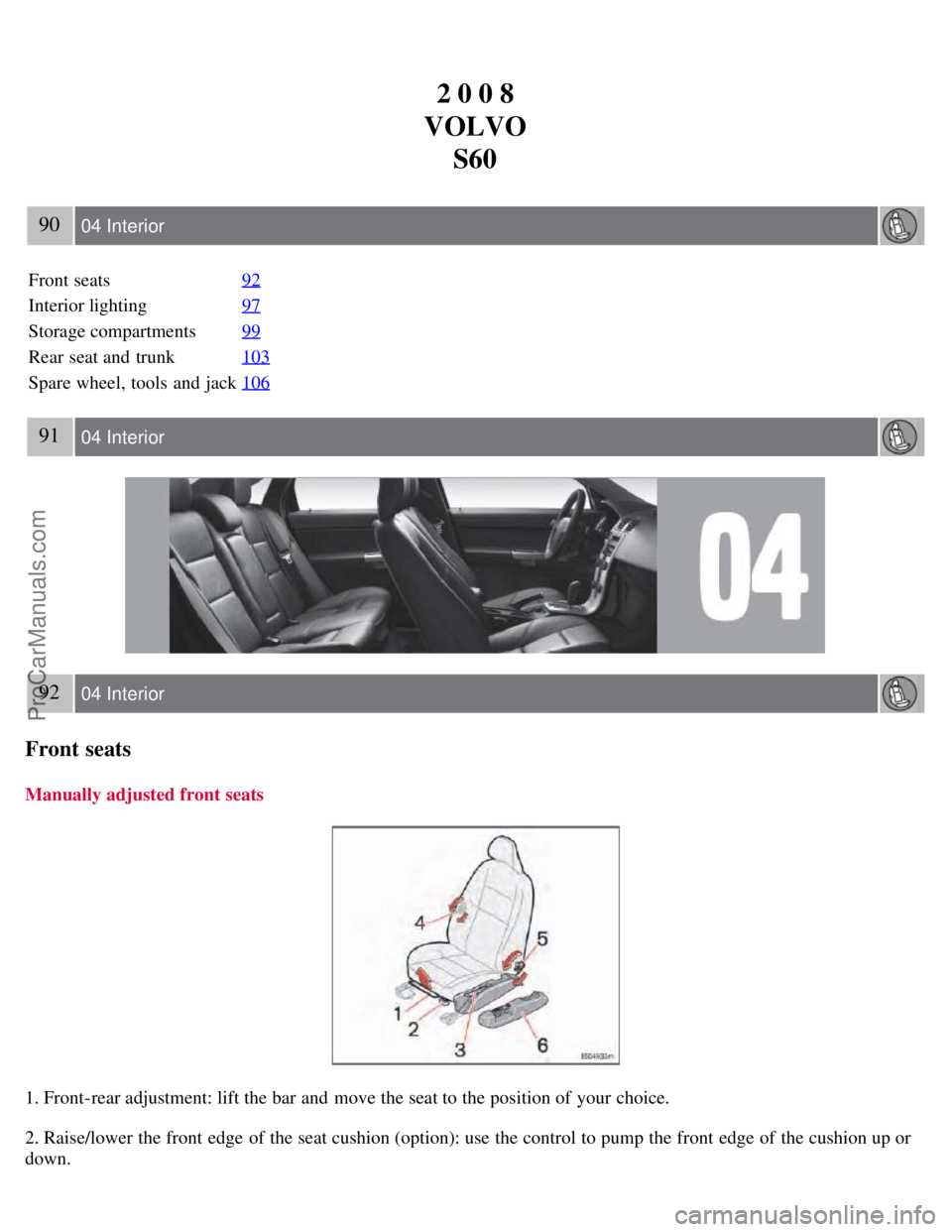
1. Front-rear adjustment: lift the bar and move the seat to the position of your choice.
2. Raise/lower the front edge of the seat cushion (option): use the control to pump the front edge of the cushion up or
down.
ProCarManuals.com
Page 97 of 230
Rear seat and trunk
Center head restraints
The center head restraint can be adjusted according to the passenger's height. The restraint should be carefully adjusted
to support the occupant's head.
The head restraint can be raised by pulling straight up or lowered by pressing the catch at the base of the left head
restraint support and pushing down.
WARNING
The center rear seat head restraint should only be in its lowest position when this seat is NOT occupied. When the
center position is occupied, the head restraint should be correctly adjusted to the passenger's height.
106 04 Interior
Spare wheel, tools and jack
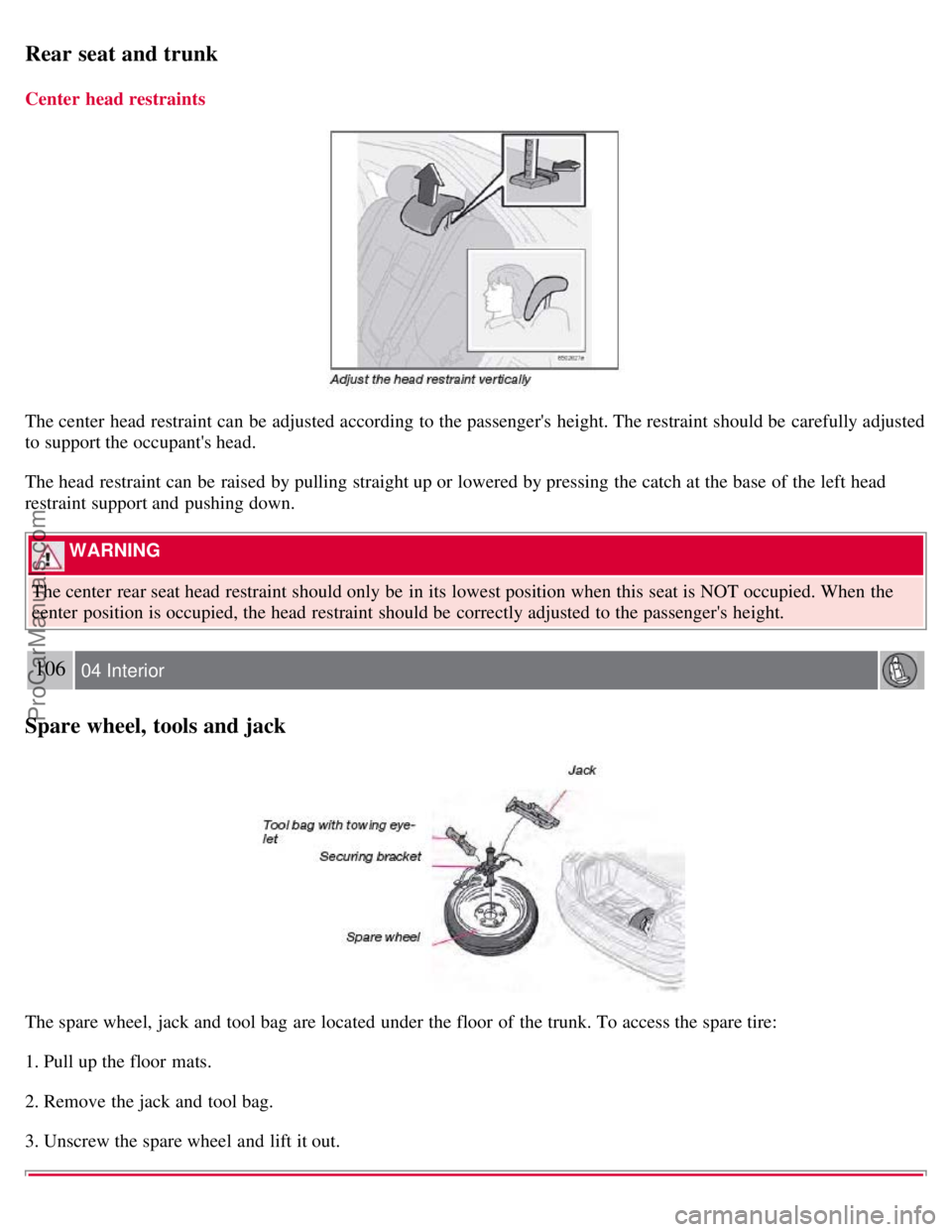
The spare wheel, jack and tool bag are located under the floor of the trunk. To access the spare tire:
1. Pull up the floor mats.
2. Remove the jack and tool bag.
3. Unscrew the spare wheel and lift it out.
ProCarManuals.com
Page 105 of 230

will then remain locked until a door in opened from the inside or if all of the doors are unlocked from the control
panel in the driver's door.
This function can be activated/deactivated from the control panel in the driver's door.
Activating/deactivating automatic locking
1. Turn the ignition key to position I or II.
2. Press the READ button on the left-side steering wheel lever to erase any messages that may be displayed in the
information display.
3. Depress the central locking button on the control panel until a new message about the locking status is displayed.
The message AUTOLOCK ON (the doors will be locked when the vehicle begins to move) or AUTOLOCK OFF will
be displayed.
Unlocking the trunk lid with the master key
The master key should only be used to unlock the trunk lid in emergencies (if the remote control is not working or the
vehicle is without power). Open the trunk lid as follows:
1. Insert the master key into the upper or lower part of the plug covering the lock.
2. Twist upward or downward to remove the plug.
3. Unlock the trunk lid.
116 05 Locks and alarm
Locking and unlocking
NOTE
If the trunk is opened with the master key, the alarm will sound. To turn off the alarm, unlock the driver's door with
the master key.
Opening/locking the trunk lid with the remote control
Do as follows to unlock the trunk lid only:
1. Press the "Open trunk" button on the remote control twice.
ProCarManuals.com
Page 111 of 230
2 0 0 8
VOLVO S60
120 06 Starting and driving
General information 122
Fuel requirements124
Refueling125
Starting the vehicle127
Economical driving129
Handling and road holding130
Manual transmission131
Automatic transmission (option)132
All Wheel Drive (option)136
Brake system137
Stability system139
Towing141
Jump starting143
Towing a trailer144
Detachable trailer hitch146
Load carriers (accessory)147
Cold weather precautions149
Before a long distance trip150
Front/rear park assist (option/accessory)151
121 06 Starting and driving
122 06 Starting and driving
General information
Engine oil
ProCarManuals.com
Page 116 of 230

Before starting, check that the seat, steering wheel and mirrors are adjusted properly. Make sure the brake pedal can
be depressed completely. Adjust the seat if necessary. See pages 92 and 94
.
2. Apply the parking brake (hand brake) if not already set. The gear selector (automatic transmission) is locked in the
( P )ark position ( SHIFTLOCK ). Manual transmission: the clutch must be fully depressed.
3. Without touching the accelerator pedal, turn the ignition key
1 to the starting position. Allow the starter to operate for
up to 10 seconds. Release the key as soon as the engine starts. If the engine fails to start, repeat this step.
1If two of the keys to your vehicle are close together, e.g. on the same key ring, when you try to start the vehicle, this could cause interference in
the immobilizer system and result in the vehicle not starting. If this should occur, remove one of the keys from the key ring before trying to start
the vehicle again.
NOTE
If the key blade section of the remote is not fully folded out when starting the vehicle, the immobilizer function
may make it impossible to start the engine.
After a cold start, idle speed may be noticeably higher than normal for a short period. This is done to help bring
components in the emission control system to their normal operating temperature as quickly as possible, which
enables them to control emissions and help reduce the vehicle's impact on the environment.
To release the gear selector from the P position, the engine must be running (or the ignition key must be in
position II) and the brake pedal must be depressed.
Select the desired gear. The gear engages after a very slight delay which is especially noticeable when selecting R.
NOTE
Your vehicle is equipped with a KEYLOCK system (automatic transmission). When the engine is switched off, the
gear selector must be in the P position before the key can be removed from the ignition switch.
When starting in cold weather, the transmission may shift up at slightly higher engine speeds than normal until the
automatic transmission fluid reaches normal operating temperature.
WARNING
An extra mat on the driver's floor can cause the accelerator pedal to catch. Check that the movement of the
accelerator pedal is not impeded. No more than one protective floor covering may be used at one time.
WARNING
Always place the gear selector in Park or in reverse on models with a manual transmission, and apply the parking
brake before leaving the vehicle. Never leave the vehicle unattended with the engine running.
Always open garage doors fully before starting the engine inside a garage to ensure adequate ventilation. The exhaust
gases contain carbon monoxide, which is invisible and odorless but very poisonous
128 06 Starting and driving
Starting the vehicle
CAUTION
ProCarManuals.com