2008 VOLVO S40 trunk
[x] Cancel search: trunkPage 3 of 239

Personal settings77
HomeLink® Universal Transceiver
(option)80
3 Contents
03 Climate
General information
86
Air vents88
Manual climate control89
Electronic Climate Control (ECC) -
option92
Air distribution
95
04 Interior
Front seats98
Interior lighting101
Storage compartments103
Rear seat107
Trunk109
05 Locks and alarm
Remote control and key blade 112
Valet locking116
Keyless drive (option as
available)118
Locking and unlocking
122
Locking the glove compartment,
Child safety locks123
Alarm
124
4 Contents
06 Starting and driving
General information128
Fuel requirements132
Ignition switch/Steering wheel
lock135
Starting the vehicle
136
Starting the car with keyless drive
(option)138
Manual transmission, 5-speed
139
Manual transmission, 6-speed140
Automatic transmission141
Shiftlock override145
All Wheel Drive (option)146
Brake system147
Stability system149
Towing151
Jump starting153
Towing a trailer154
Detachable trailer hitch156
Transporting loads157
Blind Spot Information System
(BLIS)-option158
07 Wheels and tires
General information
168
Tire inflation170
Tire designations174
Glossary of tire terminology176
Vehicle loading177
Uniform tire quality gradings179
Snow chains, snow tires, studded
tires180
Temporary spare
181
Wheel nuts182
Tire rotation183
Changing a wheel184
Tire Pressure Monitoring System
(TPMS)187
08 Car care
Washing and cleaning the car
192
Paint touch up196
ProCarManuals.com
Page 27 of 239
Do not use child safety seats or child booster cushions/backrests in the front passenger's seat. We also recommend
that children under 4 feet 7 inches (140 cm) in height who have outgrown these devices sit in the rear seat with the
seat belt fastened.
Keep vehicle doors and trunk locked and keep keys out of a child's reach. Unsupervised children could lock
themselves in an open trunk and risk injury. Children should be taught not to play in vehicles.
On hot days, the temperature in the trunk or vehicle interior can rise very quickly. Exposure to these high
temperatures for even a short period of time can cause heat-related injury or death. Small children are particularly at
risk.
32 01 Safety
Child safety
Automatic Locking Retractor/Emergency Locking Retractor (ALR/ELR)
To make child seat installation easier, each seat belt (except for the driver's belt) is equipped with a locking mechanism
to help keep the seat belt taut.
When attaching the seat belt to a child seat:
Attach the seat belt to the child seat according to the child seat manufacturer's instructions.
Pull the seat belt out as far as possible.
Insert the seat belt latch plate into the buckle (lock) in the usual way.
Release the seat belt and pull it taut around the child seat.
A sound from the seat belt retractor will be audible at this time and is normal. The belt will now be locked in place.
This function is automatically disabled when the seat belt is unlocked and the belt is fully retracted.
WARNING
Do not use child safety seats or child booster cushions/backrests in the front passenger's seat. We also recommend
that children who have outgrown these devices sit in the rear seat with the seat belt properly fastened.
Volvo's recommendations
Why does Volvo believe that no child should sit in the front seat of a car? It's quite simple really. A front airbag is a
very powerful device designed, by law, to help protect an adult.
Because of the size of the airbag and its speed of inflation, a child should never be placed in the front seat, even if he
or she is properly belted or strapped into a child safety seat. Volvo has been an innovator in safety for over seventy-
five years, and we'll continue to do our part. But we need your help. Please remember to put your children in the back
seat, and buckle them up.
Volvo has some very specific recommendations:
Always wear your seat belt.
Airbags are a SUPPLEMENTAL safety device which, when used with a three-point seat belt can help reduce
serious injuries during certain types of accidents. Volvo recommends that you do not disconnect the airbag system in
your vehicle.
Volvo strongly recommends that everyone in the vehicle be properly restrained.
Volvo recommends that ALL occupants (adults and children) shorter than 4 feet 7 inches (140 cm) be seated in the
back seat of any vehicle with a front passenger side airbag.
Drive safely!
ProCarManuals.com
Page 47 of 239

6. Generator warning light
If the light comes on while the engine is running, have the charging system checked by an authorized Volvo workshop.
1On certain engines, this symbol is not used to indicate low oil pressure. Instead, a text warning is provided in the information display, see also
page 206
.
55 02 Instruments and controls
Symbols - instrument panel
7. Brake failure warning light
If this light comes on while driving or braking, stop the car as quickly as possible in a safe place, open the hood, and
check the brake fluid level in the reservoir. See page 204
for the location of the reservoir.
NOTE
Canadian models are equipped with the second symbol.
WARNING
If the fluid level is below the MIN mark in the reservoir or if a "Brake failure - Service urgent" message is displayed
in the information display: DO NOT DRIVE . Have the car towed to a trained and qualified Volvo service technician
and have the brake system inspected.
If the BRAKE and ABS warning lights come on at the same time, this could indicate a fault in the
brake system.
In this case:
1.Stop the car in a suitable place and switch off the engine.
2. Restart the engine.
3. If both warning lights go off, no further action is required and the car can be driven.
4. If both lights remain on after the engine has been restarted, switch off the engine again and check the brake fluid
level. See page 204
for the location of the reservoir.
Door open warning
The driver will be alerted if one of the doors, the hood, or the trunk lid are open or ajar.
ProCarManuals.com
Page 48 of 239

At low speeds
If the car is moving at a speed of less than approximately 3 m.p.h. (5 km/h), the Information symbol in the instrument
panel will light up and a message will be shown in the information display indicating which door(s), etc is not
completely closed.
At higher speeds
If the car is moving at a speed above approximately 6 m.p.h. (10 km/h), the Warning symbol in the instrument panel
will light up and a message will be shown in the information display indicating which door(s), etc is not completely
closed.
Hood and trunk
If the hood and/or trunk lid is not completely closed, the Information symbol in the instrument panel will light up and a
message will be displayed, regardless of the vehicle's speed.
56 02 Instruments and controls
Information display
Messages
When an indicator or warning light in the instrument panel comes on, a message is also shown in the information
display. To read a message:
1. Press the READ button (1).
2. Pressing READ repeatedly enables you to scroll to any other messages that may be stored.
NOTE
If a message is displayed when e.g. you are using the trip computer, this message must be read before you can access
the trip computer.
57 02 Instruments and controls
ProCarManuals.com
Page 71 of 239

To access the menu and adjust settings:
1. Press MENU (B).
2. Scroll to "Car Settings" using the menu navigation control (E).
3. Press ENTER (D).
4. Select an alternative using the menu navigation control (E).
5. Confirm your selection by pressing ENTER.
To exit the menu:
Press EXIT (C).
Available settings
Clock adjust
To set the time:
1. Use the number keys or the up/down arrow keys on the navigation control (E) to change the hour or minute.
2. Select hour(s) or minute(s) to be changed with the left/right arrow keys.
3. Press ENTER to start the clock.
NOTE
If you are currently using the 12-hour time setting, use the up/down arrow keys to select AM/PM after the minute-
setting has been adjusted.
Lock confirmation light
When the car is locked/unlocked with the remote control, the direction indicators can be selected to flash to confirm
the action. The alternatives On/Off are available for both locking and unlocking.
78 02 Instruments and controls
Personal settings
Autolock
When the car starts to move, the doors and trunk can be locked automatically. The alternatives On/Off are available.
NOTE
Pulling the handle twice on a door unlocks and opens that door.
Unlock
There are two alternatives for unlocking:
1. Global (All doors) - unlocks all doors and the trunk with one press on the remote control.
2. Two Step (Two-stage unlocking) - This alternative unlocks the driver's door with one press on the remote control. A
second press unlocks the passenger's door and the trunk.
ProCarManuals.com
Page 72 of 239

Operating side windows
The following alternatives can be selected for opening and/or closing all side windows at the same time by pressing
and holding the Lock/Unlock switch in either of the front doors (see also page 122
for additional information) 1.
Auto close all windows On/Off
Auto open all windows On/Off
1This menu alternative also makes it possible to open all side windows by pressing and holding the Unlock button on the remote control for several
seconds.
NOTE
The ignition key must be in position I or higher (see page 135
) before all side windows can be opened/closed using
the switches in the front doors.
Approach lighting
This alternative determines the length of time for which the car's lights will remain on when the Approach light button
on the central locking system's remote control is pressed. Intervals of 30/60/90 seconds may be selected. See page 113
for more information.
Home safe lighting
This alternative determines the length of time for which the car's lights will remain on when the high beam lever on the
steering column is pulled toward the wheel with the ignition switched off. Intervals of 30/60/90 seconds may be
selected. See page 62
for information on using this function.
Information
VIN number - The VIN (Vehicle Identification Number) is the car's unique identity number.
Number of Keys - the number of keys registered for the car is displayed here.
Climate functions
Blower speed in AUTO mode - the blower speed can be set to AUTO mode in models equipped with ECC. Choose
between "Low", "Normal" and "High".
Timer for recirculation - when the timer is active, the air recirculates in the car for 3-12 minutes depending on the
ambient temperature. Select On/Off depending on whether the recirculation timer is to be active or not.
Keyless locking and unlocking (option as available)
The following alternatives can be selected for locking and unlocking the doors and trunk:
All doors - all doors are locked or unlocked at the same time.
Doors on the same side - front and rear doors on the same side are unlocked together.
Both front doors - both front doors are unlocked together.
One front door - either of the front doors can be unlocked separately2.
2Factory default
79 02 Instruments and controls
Personal settings
Reset to factory settings
Use this alternative to return to the default climate system settings.
ProCarManuals.com
Page 88 of 239

2 0 0 8
VOLVO S40
96 04 Interior
Front seats 98
Interior lighting101
Storage compartments103
Rear seat107
Trunk109
97 04 Interior
98 04 Interior
Front seats
Manual seat adjustment
The driver's and passenger's seats can be adjusted in a number of ways to provide a comfortable driving and sitting
position.
1. Forward-rearward: Pull the lever up and slide the seat to the position of your choice.
ProCarManuals.com
Page 100 of 239
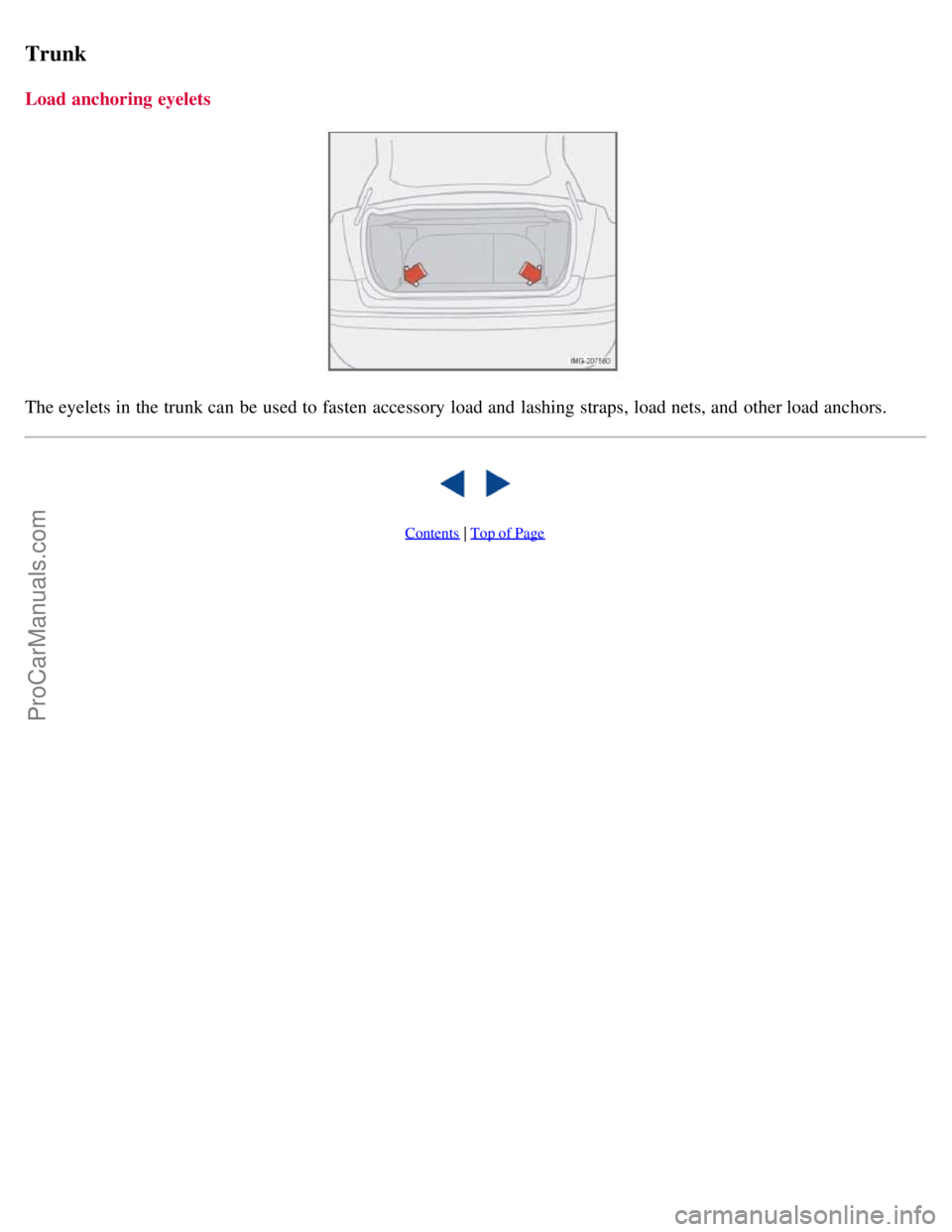
Trunk
Load anchoring eyelets
The eyelets in the trunk can be used to fasten accessory load and lashing straps, load nets, and other load anchors.
Contents | Top of Page
ProCarManuals.com