Page 83 of 239
NOTE
On certain markets, the defrost function may remain on longer than 20 minutes in cold weather to help keep the rear
window free from ice or condensation.
91 03 Climate
Manual climate control
9. Temperature selector
The knob with the thermometer symbol is used to select cooling or heating for both the driver's and passenger's sides
of the car.
92 03 Climate
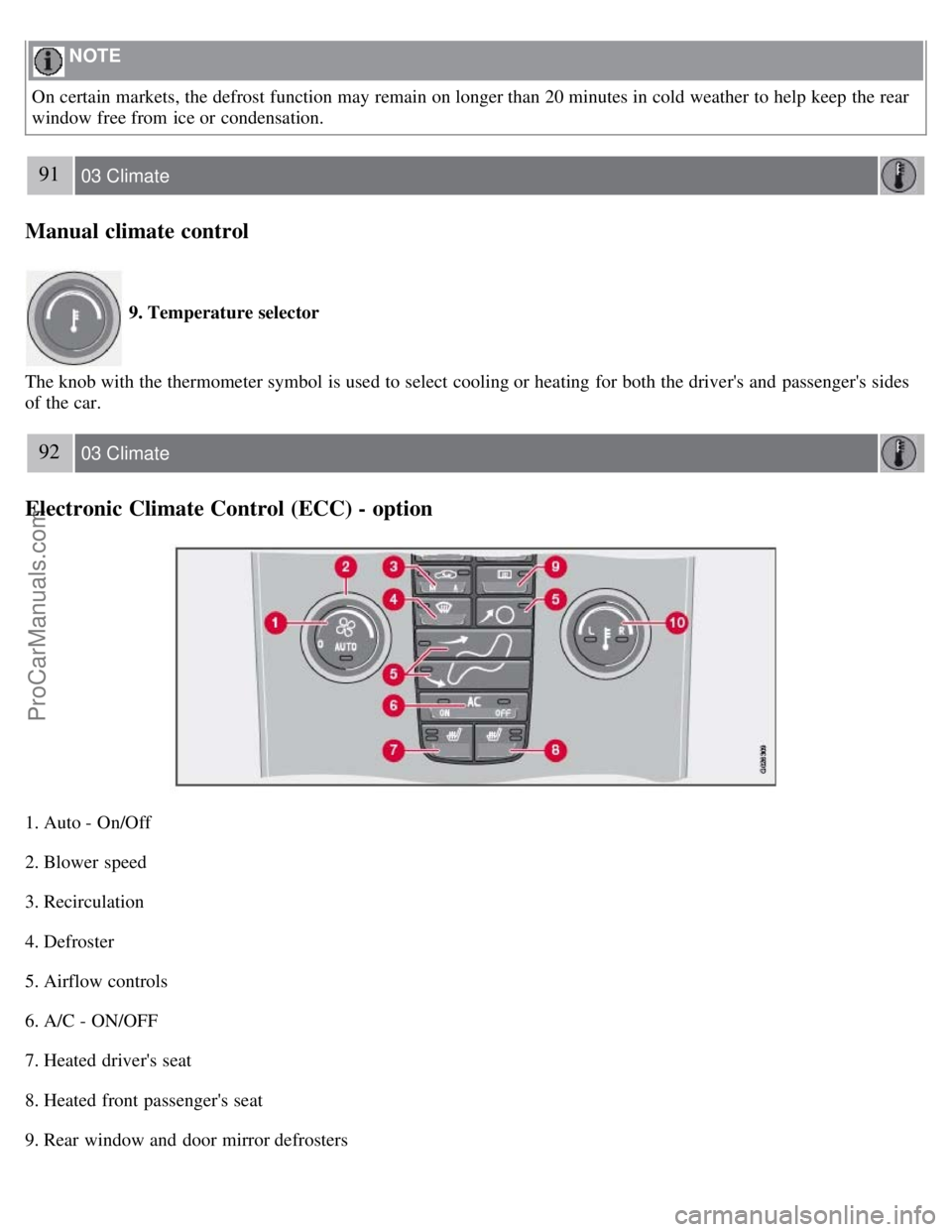
Electronic Climate Control (ECC) - option
1. Auto - On/Off
2. Blower speed
3. Recirculation
4. Defroster
5. Airflow controls
6. A/C - ON/OFF
7. Heated driver's seat
8. Heated front passenger's seat
9. Rear window and door mirror defrosters
ProCarManuals.com
Page 85 of 239

4. Defroster
Directs airflow to the windshield and side windows and increases blower speed. When the defroster is activated:
Air flows to the windows at high blower speed.
The LED in the defroster button lights up when this function is activated. The air conditioning system is controlled
to provide maximum air dehumidification.
The air conditioning is automatically switched on (can be switched off by pressing button 6).
The air is not recirculated.
5. Airflow controls
Press one of the three buttons in the illustration to activate the selected airflow. A symbol in the display above the
climate control panel and a lit LED in the selected button indicate that the manual function has been selected. With
manually selected airflow both warm and cool air can be selected. See also the table on page 95
.
6. Air conditioning On/Off
ON: The air conditioning system is engaged when the ON light is lit and is controlled automatically by the system to
maintain the selected temperature.
OFF: The system is disengaged when the OFF lights up.
When OFF is selected and the OFF LED is lit, the air conditioning system is deactivated. Other functions are still
controlled automatically.
When Defroster (4) is selected, the air conditioning system is activated for maximum dehumidifying.
94 03 Climate
Electronic Climate Control (ECC) - option
7 and 8. Heated front seats (option)
Maximum heating: Press the button once - both LEDs light up.
Reduced heating: Press the button a second time -one LED lights up.
Seat heating off: Press the button a third time - no LEDs are lit.
9. Rear window and door mirror defrosters
Press to defrost the rear window and door mirrors.
The rear window and door mirrors are defrosted simultaneously if the switch is pressed once. The defrost function is
active if the LED in the switch is illuminated.
The function can be switched off manually by pressing the button.
ProCarManuals.com
Page 91 of 239
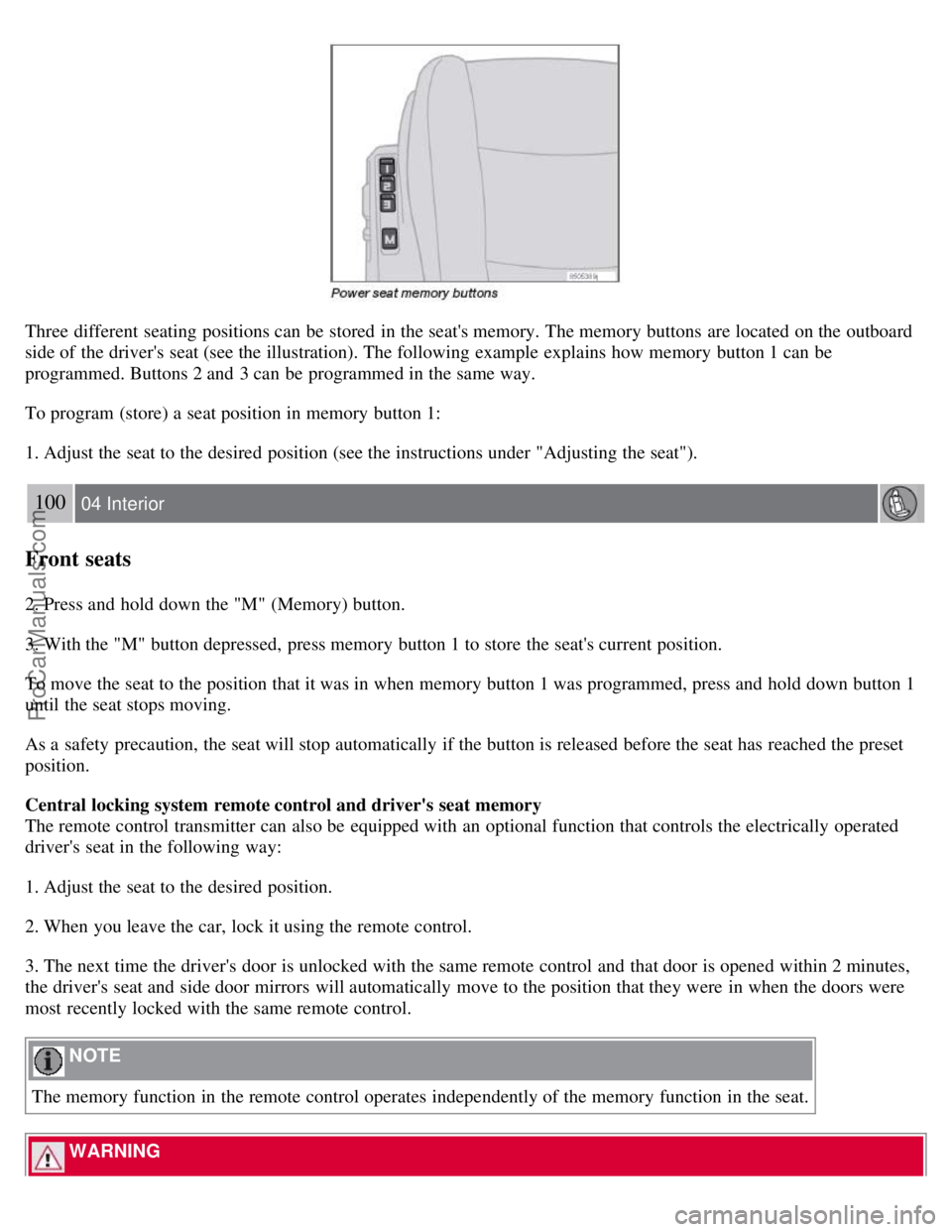
Three different seating positions can be stored in the seat's memory. The memory buttons are located on the outboard
side of the driver's seat (see the illustration). The following example explains how memory button 1 can be
programmed. Buttons 2 and 3 can be programmed in the same way.
To program (store) a seat position in memory button 1:
1. Adjust the seat to the desired position (see the instructions under "Adjusting the seat").
100 04 Interior
Front seats
2. Press and hold down the "M" (Memory) button.
3. With the "M" button depressed, press memory button 1 to store the seat's current position.
To move the seat to the position that it was in when memory button 1 was programmed, press and hold down button 1
until the seat stops moving.
As a safety precaution, the seat will stop automatically if the button is released before the seat has reached the preset
position.
Central locking system remote control and driver's seat memory
The remote control transmitter can also be equipped with an optional function that controls the electrically operated
driver's seat in the following way:
1. Adjust the seat to the desired position.
2. When you leave the car, lock it using the remote control.
3. The next time the driver's door is unlocked with the same remote control and that door is opened within 2 minutes,
the driver's seat and side door mirrors will automatically move to the position that they were in when the doors were
most recently locked with the same remote control.
NOTE
The memory function in the remote control operates independently of the memory function in the seat.
WARNING
ProCarManuals.com
Page 233 of 239
conserving electrical current130
maintenance209
replacement210
specifications256
Battery replacement, remote control114
Bi -Xenon® headlights59, 212, 214
Black box (Vehicle Event Data)200
Blind Spot Information System (BLIS)158 - 160
Booster cushion accessory40
Brake fluid207
Brake lights60
Bulbs
list of257
replacing211
C
Capacities, fluids252
Cargo area lighting, replacing218
Catalytic converter, three-way258
CD
changer241
changer menu (option)245
eject241
files with MP3 or WMA format242
menu245
pause242
player241
single player241
Central locking system, remote controls112
Changing oil205
Charge air cooler255
Child restraint anchors41, 42
Child restraints33
recalls and registration43
Child safety30
Child safety locks123
Clock setting77
Cold weather precautions129
Compact disc care243
Compass, rear view mirror (option)73
Convertible seats37
Coolant206
Courtesy lighting101
Crash mode29
Cup holders106
ProCarManuals.com