2008 VOLVO S40 keyless
[x] Cancel search: keylessPage 108 of 239
The buttons on the keyless drive remote control can also be used to lock and unlock the vehicle. See page 113 for
more information.
Both of the remote controls provided with the vehicle have the keyless function, and additional remotes can be
ordered. The system can accommodate up to six keyless drive remote controls.
NOTE
The number of doors that are unlocked at the same time can be set in the Personal settings menu. See page 77
for
additional information.
1. A keyless drive remote control must be on the same side of the vehicle as the door to be opened, and be within 5
feet (1.5 meters) of the lock or the trunk opening control (see the shaded areas in the illustration).
2. Pull a door handle to unlock and open the door or press the trunk opening control on the trunk lid.
Locking the vehicle
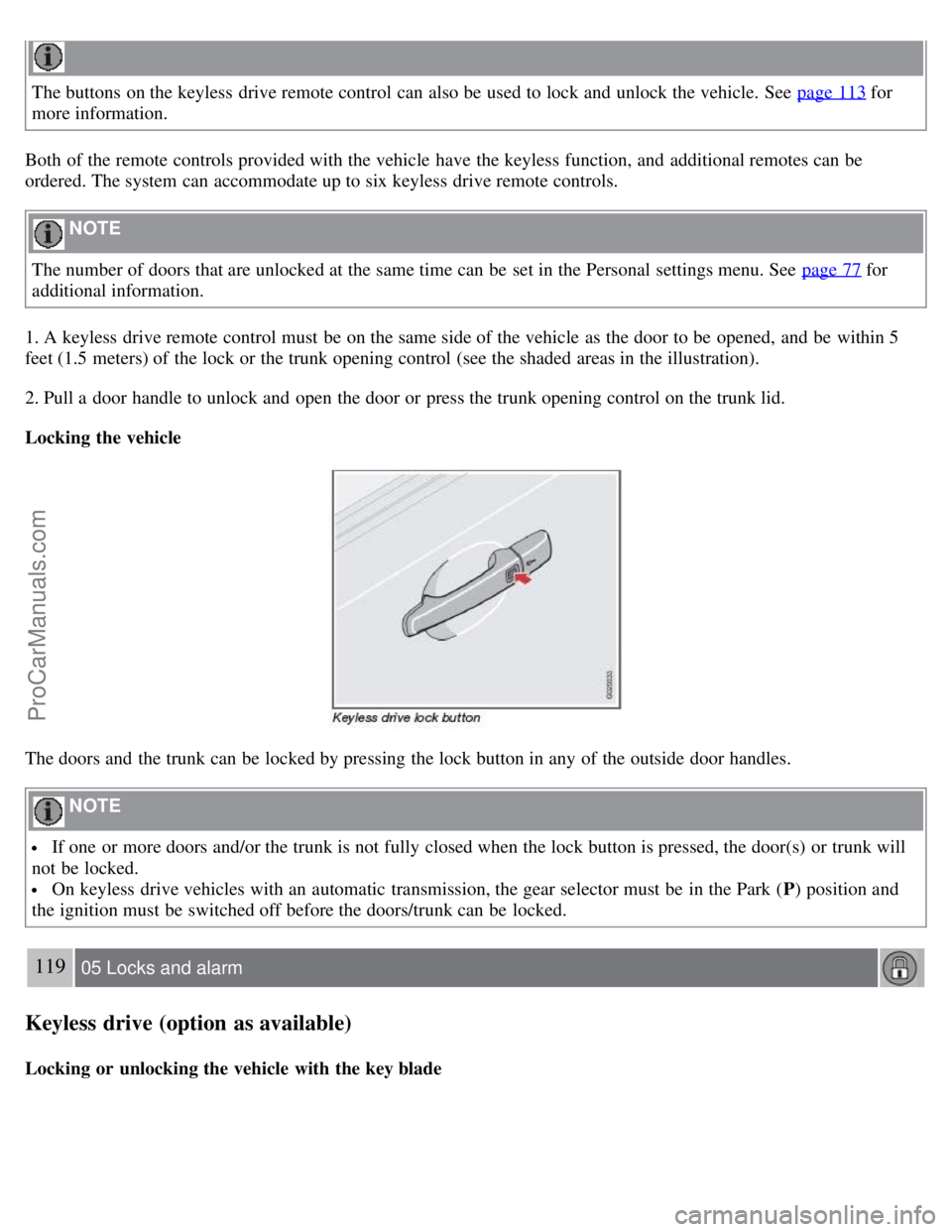
The doors and the trunk can be locked by pressing the lock button in any of the outside door handles.
NOTE
If one or more doors and/or the trunk is not fully closed when the lock button is pressed, the door(s) or trunk will
not be locked.
On keyless drive vehicles with an automatic transmission, the gear selector must be in the Park ( P) position and
the ignition must be switched off before the doors/trunk can be locked.
119 05 Locks and alarm
Keyless drive (option as available)
Locking or unlocking the vehicle with the key blade
ProCarManuals.com
Page 109 of 239

The driver's door on vehicles equipped with keyless drive can be locked or unlocked with the remote control's
detachable key blade if necessary. See page 115
for information on removing the key blade from the remote control.
To access the keyhole in the driver's door:
1. Pry off the keyhole cover by inserting the key blade or a small screwdriver in the hole on the underside of the cover
(indicated by the arrow in the inset illustration).
2. Insert the key blade as far as possible in the driver's door lock. Turn the key blade clockwise approximately one
quarter turn to unlock the driver's door only. This will trigger the alarm.
Disabling the alarm: Press the Unlock button on the keyless drive remote control. If the batteries in the remote are
weak, remove the keyless drive start control from the ignition switch by pressing the catch (see the illustration on page
138) and pulling the control out of the ignition switch. Insert the ignition key section of a keyless drive remote control
in the ignition switch.
Keyless drive remote control and driver's seat memory
This function is only available on vehicles equipped with the optional power driver's seat.
When you leave the car with a keyless drive remote control in your possession and lock any door, the position of
the driver's seat will be stored in the seat's memory.
The next time a door is opened by a person with the same remote control in his/her possession, the driver's seat will
automatically move to the position that it was in when the door was most recently locked.
NOTE
If several people carrying keyless drive remote controls approach the vehicle at the same time, the driver's seat will
assume the position it was in for the person who opens a door first.
120 05 Locks and alarm
Keyless drive (option as available)
Keyless drive information messages
If anyone leaves the vehicle with the only keyless drive remote control in his or her possession while the ignition is
switched on, a message will be shown in the information display and an audible signal will sound.
NOTE
This message will only be displayed if the start control is in position I or II.
ProCarManuals.com
Page 110 of 239

The message will be erased from the display and the audible signal will stop when the remote control has been
returned to the vehicle and one of the following has occurred:
A door has been opened and closed
The start control has been turned to position 0
The READ button (see page 56 for the location of this button) has been pressed.
CAUTION
Keyless drive remote controls should never be left in the vehicle. In the event of a break-in, a remote found in the
vehicle could make it possible to start the engine.
Electromagnetic fields or metal obstructions can interfere with the keyless drive system. Avoid placing the remote
control near cellular phones, metallic objects or e.g., in a metal briefcase.
Canada - IC:267T- 5WK48952, 267T- 5WK48964, 267T-5WK48891
NOTE
This device complies with RSS -210 of Industry Canada. Operation is subject to the following two conditions: (1)
This device may not cause harmful interference, and (2) this device must accept interference received, including
interference that may cause undesired operation.
CAUTION
Changes or modifications not expressly approved by the manufacturer could void the user's authority to operate the
equipment.
USA - FCC ID:KR55WK48952, KR55WK48964
NOTE
This device complies with part 15 of the FCC Rules. Operation is subject to the following two conditions: (1) This
device may not cause harmful interference, and (2) this device must accept interference received, including
interference that may cause undesired operation.
CAUTION
Changes or modifications not expressly approved by the manufacturer could void the user's authority to operate the
equipment.
Siemens VDO
5WK48891
Tested To Comply With FCC Standards For Automobile Use
121 05 Locks and alarm
Keyless drive (option as available)
Location of the keyless drive antennas
ProCarManuals.com
Page 111 of 239
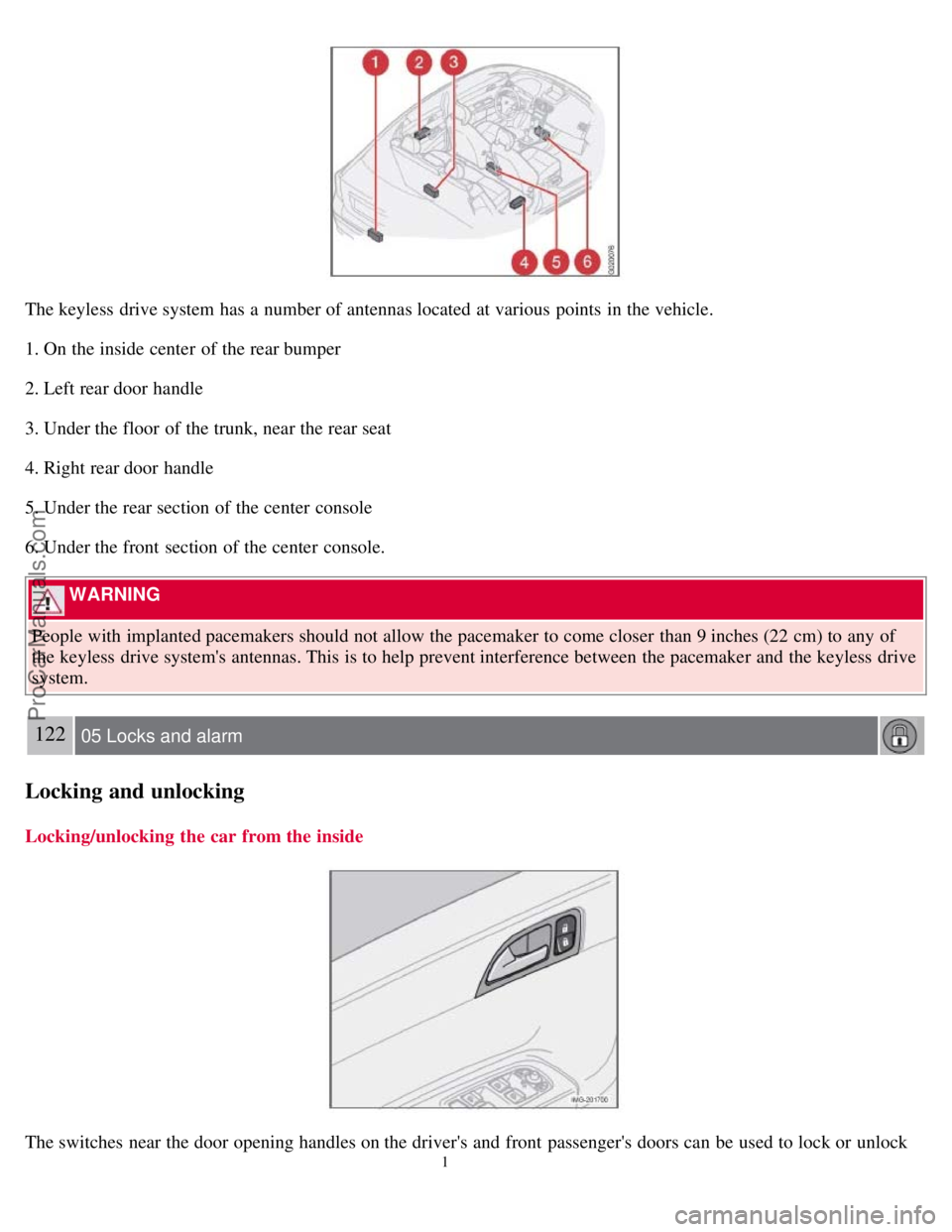
The keyless drive system has a number of antennas located at various points in the vehicle.
1. On the inside center of the rear bumper
2. Left rear door handle
3. Under the floor of the trunk, near the rear seat
4. Right rear door handle
5. Under the rear section of the center console
6. Under the front section of the center console.
WARNING
People with implanted pacemakers should not allow the pacemaker to come closer than 9 inches (22 cm) to any of
the keyless drive system's antennas. This is to help prevent interference between the pacemaker and the keyless drive
system.
122 05 Locks and alarm
Locking and unlocking
Locking/unlocking the car from the inside
The switches near the door opening handles on the driver's and front passenger's doors can be used to lock or unlock
1
ProCarManuals.com
Page 115 of 239

Turning off (stopping) the alarm
If the alarm is sounding, it can be stopped by pressing the UNLOCK button on the remote control or by inserting the
key in the ignition
1On vehicles with the optional keyless drive, press in the start control in the ignition switch.
125 05 Locks and alarm
Alarm
switch. The driver's door must first be unlocked with the key blade.
NOTE
On vehicles equipped with the optional keyless drive, the start control must be removed from the ignition switch
before the key can be inserted. See page 138
for instructions.
Audible/visual alarm signal
An audible alarm signal is given by a battery powered siren. The alarm cycle lasts for 30 seconds.
NOTE
The visual alarm signal is given by flashing all turn signals and turning on the interior lighting for approximately 5
minutes.
Temporarily turning off the accessory alarm sensor(s)
In certain situations it may be desirable to turn off the accessory inclination and movement alarm sensors if, for
example, you drive your vehicle onto a ferry where the rocking of the boat could trigger the alarm or if a pet is left in
the vehicle with the doors locked.
1. From position II or higher, turn the ignition key to 0 and remove it from the ignition switch
1
2. Press the button (1). The LED in the button will remain on for one minute after the key has been removed from the
ignition switch or until the car is locked.
1
ProCarManuals.com
Page 116 of 239

The optional keyless drive start control does not need to be removed.
CAUTION
The accessory sensors are automatically reconnected to the alarm system the next time the vehicle is unlocked and
then locked again.
This function will not turn off the vehicle's standard alarm
U.S.A. FCC ID: MAYDA 5823(3)
This device complies with part 15 of the FCC rules. Operation is subject to the following conditions: (1) This device
may not cause harmful interference, and (2) this device must accept any interference received, including interference
that may cause undesired operation.
Canada IC: 4405A-DA 5823(3)
Movement sensor DA5823 by Dynex Operation is subject to the following conditions: (1) this device may not cause
interference, and (2) this device must accept any interference, including interference that may cause undesired
operation of the device.
Contents | Top of Page
ProCarManuals.com
Page 117 of 239
2 0 0 8
VOLVO S40
126 06 Starting and driving
General information 128
Fuel requirements132
Ignition switch/Steering wheel lock135
Starting the vehicle136
Starting the car with keyless drive (option)138
Manual transmission, 5-speed139
Manual transmission, 6-speed140
Automatic transmission141
Shiftlock override145
All Wheel Drive (option)146
Brake system147
Stability system149
Towing151
Jump starting153
Towing a trailer154
Detachable trailer hitch156
Transporting loads157
Blind Spot Information System (BLIS)-option158
Park assist (Option/accessory)162
127 06 Starting and driving
128 06 Starting and driving
General information
Economical driving conserves natural resources
ProCarManuals.com
Page 125 of 239

I - Intermediate position2
Certain accessories, radio, etc. on, daytime running lights off.
1Automatic transmission: the gear selector must be in the Park position. The optional keyless drive start control does not need to be removed.
2Please be aware that leaving the key in this positions I or II will increase battery drain.
II - Drive position
The key's position when driving. The vehicle's entire electrical system is activated.
III - Start position
Turn the key to this position and release it immediately. The key returns automatically to the Drive position.
A chime will sound if the key is left in the ignition and the driver's door is opened (does not apply to vehicles with the
optional keyless drive).
Steering wheel lock
When the key is removed from the ignition, the steering wheel locks so that it cannot be turned.
NOTE
The steering wheel lock is activated when the driver's door is opened on vehicles with the optional keyless drive.
Releasing the steering wheel lock
If the front wheels are hard up against a curb, the steering wheel lock may be under too much tension to unlock.
If so, the key will turn in the ignition switch but the car will not start.
At the same time, a message "Steering locked turn wheel" will appear in the information display.
If this happens:
1. Remove the key
3 from the ignition.
2. Turn the steering wheel slightly and hold it to release pressure on the lock mechanism.
3. Reinsert the key and start the vehicle.
The steering should immediately unlock. If not, try again.
NOTE
ProCarManuals.com