Page 35 of 239
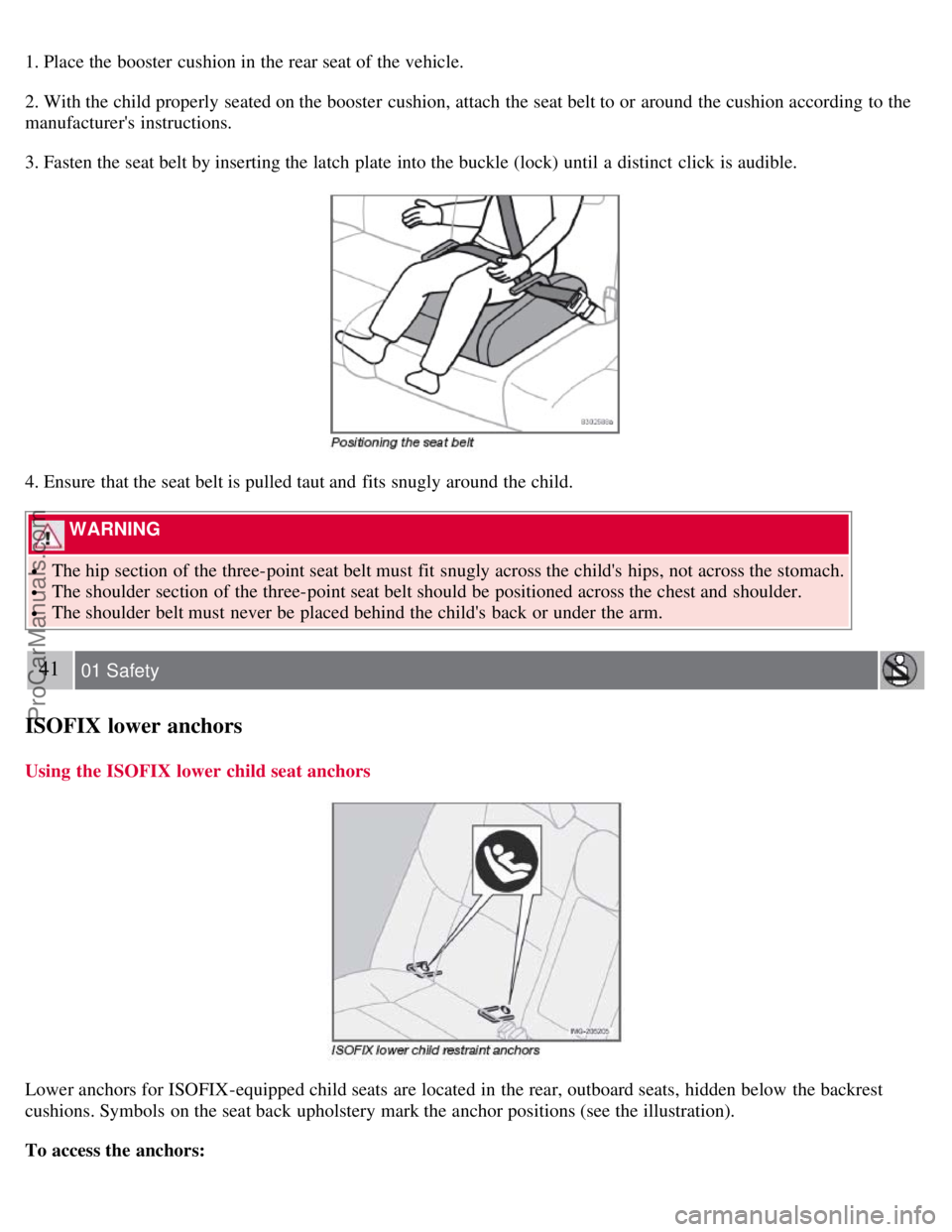
1. Place the booster cushion in the rear seat of the vehicle.
2. With the child properly seated on the booster cushion, attach the seat belt to or around the cushion according to the
manufacturer's instructions.
3. Fasten the seat belt by inserting the latch plate into the buckle (lock) until a distinct click is audible.
4. Ensure that the seat belt is pulled taut and fits snugly around the child.
WARNING
The hip section of the three-point seat belt must fit snugly across the child's hips, not across the stomach.
The shoulder section of the three-point seat belt should be positioned across the chest and shoulder.
The shoulder belt must never be placed behind the child's back or under the arm.
41 01 Safety
ISOFIX lower anchors
Using the ISOFIX lower child seat anchors
Lower anchors for ISOFIX-equipped child seats are located in the rear, outboard seats, hidden below the backrest
cushions. Symbols on the seat back upholstery mark the anchor positions (see the illustration).
To access the anchors:
ProCarManuals.com
Page 37 of 239
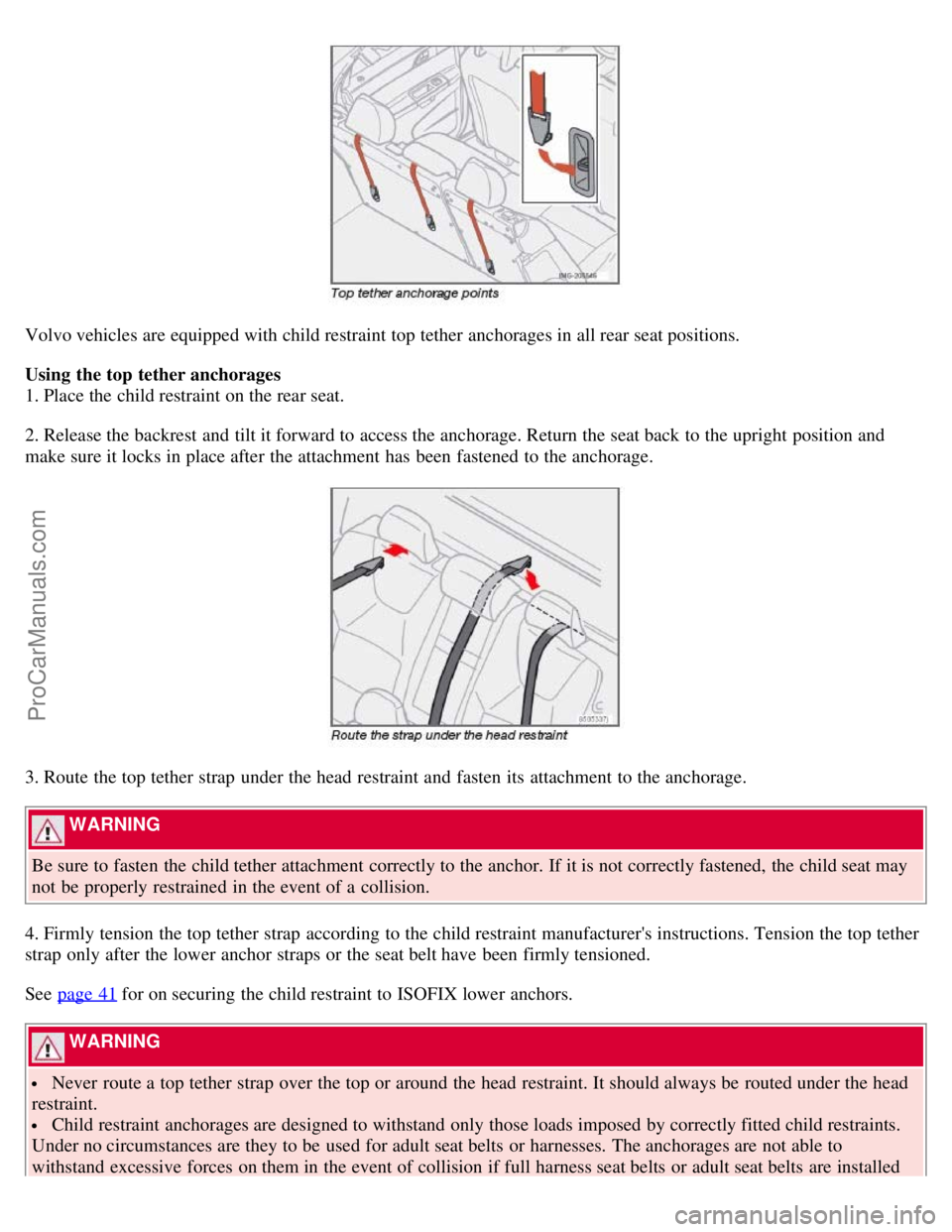
Volvo vehicles are equipped with child restraint top tether anchorages in all rear seat positions.
Using the top tether anchorages
1. Place the child restraint on the rear seat.
2. Release the backrest and tilt it forward to access the anchorage. Return the seat back to the upright position and
make sure it locks in place after the attachment has been fastened to the anchorage.
3. Route the top tether strap under the head restraint and fasten its attachment to the anchorage.
WARNING
Be sure to fasten the child tether attachment correctly to the anchor. If it is not correctly fastened, the child seat may
not be properly restrained in the event of a collision.
4. Firmly tension the top tether strap according to the child restraint manufacturer's instructions. Tension the top tether
strap only after the lower anchor straps or the seat belt have been firmly tensioned.
See page 41
for on securing the child restraint to ISOFIX lower anchors.
WARNING
Never route a top tether strap over the top or around the head restraint. It should always be routed under the head
restraint.
Child restraint anchorages are designed to withstand only those loads imposed by correctly fitted child restraints.
Under no circumstances are they to be used for adult seat belts or harnesses. The anchorages are not able to
withstand excessive forces on them in the event of collision if full harness seat belts or adult seat belts are installed
ProCarManuals.com
Page 63 of 239
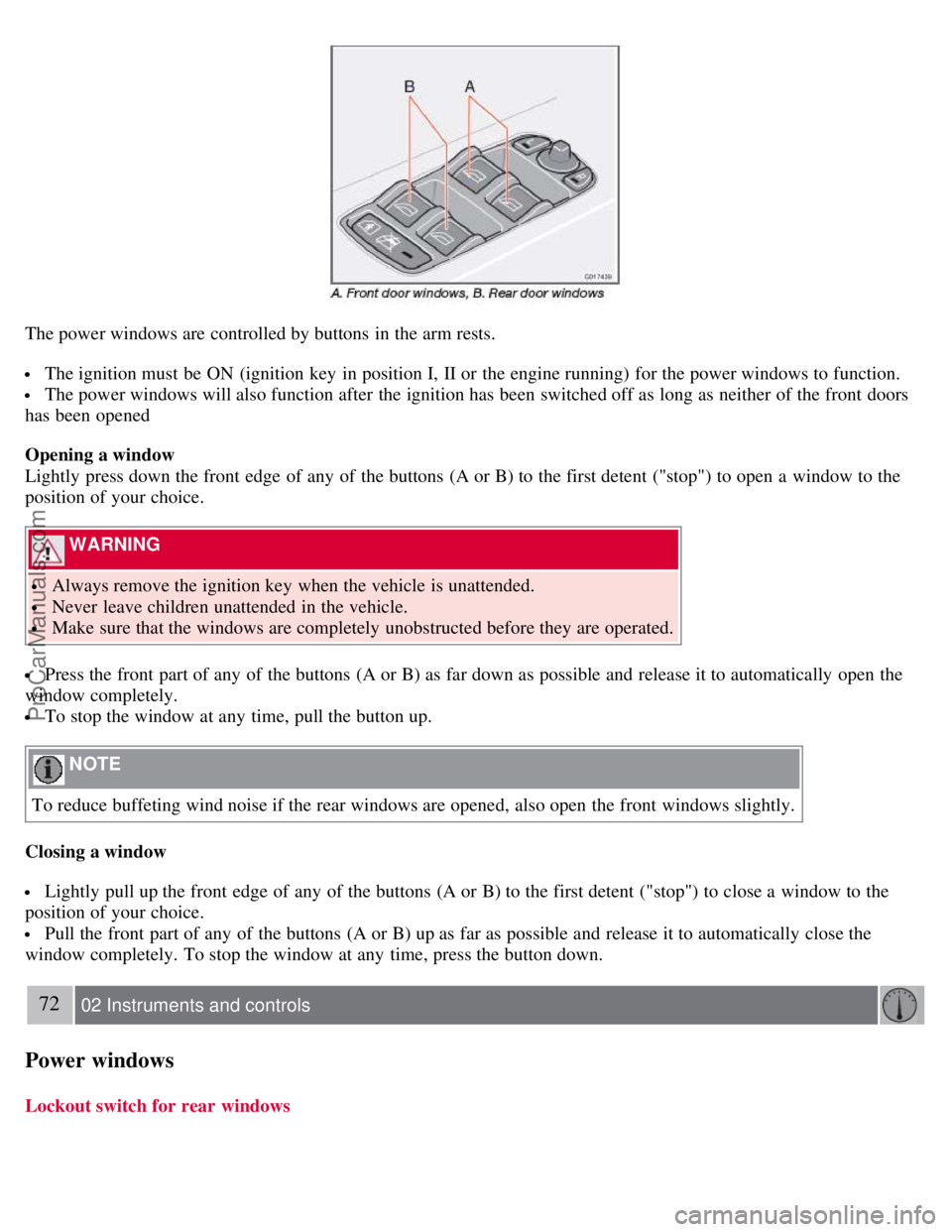
The power windows are controlled by buttons in the arm rests.
The ignition must be ON (ignition key in position I, II or the engine running) for the power windows to function.
The power windows will also function after the ignition has been switched off as long as neither of the front doors
has been opened
Opening a window
Lightly press down the front edge of any of the buttons (A or B) to the first detent ("stop") to open a window to the
position of your choice.
WARNING
Always remove the ignition key when the vehicle is unattended.
Never leave children unattended in the vehicle.
Make sure that the windows are completely unobstructed before they are operated.
Press the front part of any of the buttons (A or B) as far down as possible and release it to automatically open the
window completely.
To stop the window at any time, pull the button up.
NOTE
To reduce buffeting wind noise if the rear windows are opened, also open the front windows slightly.
Closing a window
Lightly pull up the front edge of any of the buttons (A or B) to the first detent ("stop") to close a window to the
position of your choice.
Pull the front part of any of the buttons (A or B) up as far as possible and release it to automatically close the
window completely. To stop the window at any time, press the button down.
72 02 Instruments and controls
Power windows
Lockout switch for rear windows
ProCarManuals.com
Page 92 of 239
Because the driver's seat can be adjusted with the ignition off, children should never be left unattended in the car.
Movement of the seat can be STOPPED at any time by pressing any button on the power seat control panel.
Do not adjust the seat while driving. The seat should be adjusted so that the brake pedal can be depressed fully. In
addition, position the seat as far rearward as comfort and control allow.
The seat rails on the floor must not be obstructed in any way when the seat is in motion.
101 04 Interior
Interior lighting
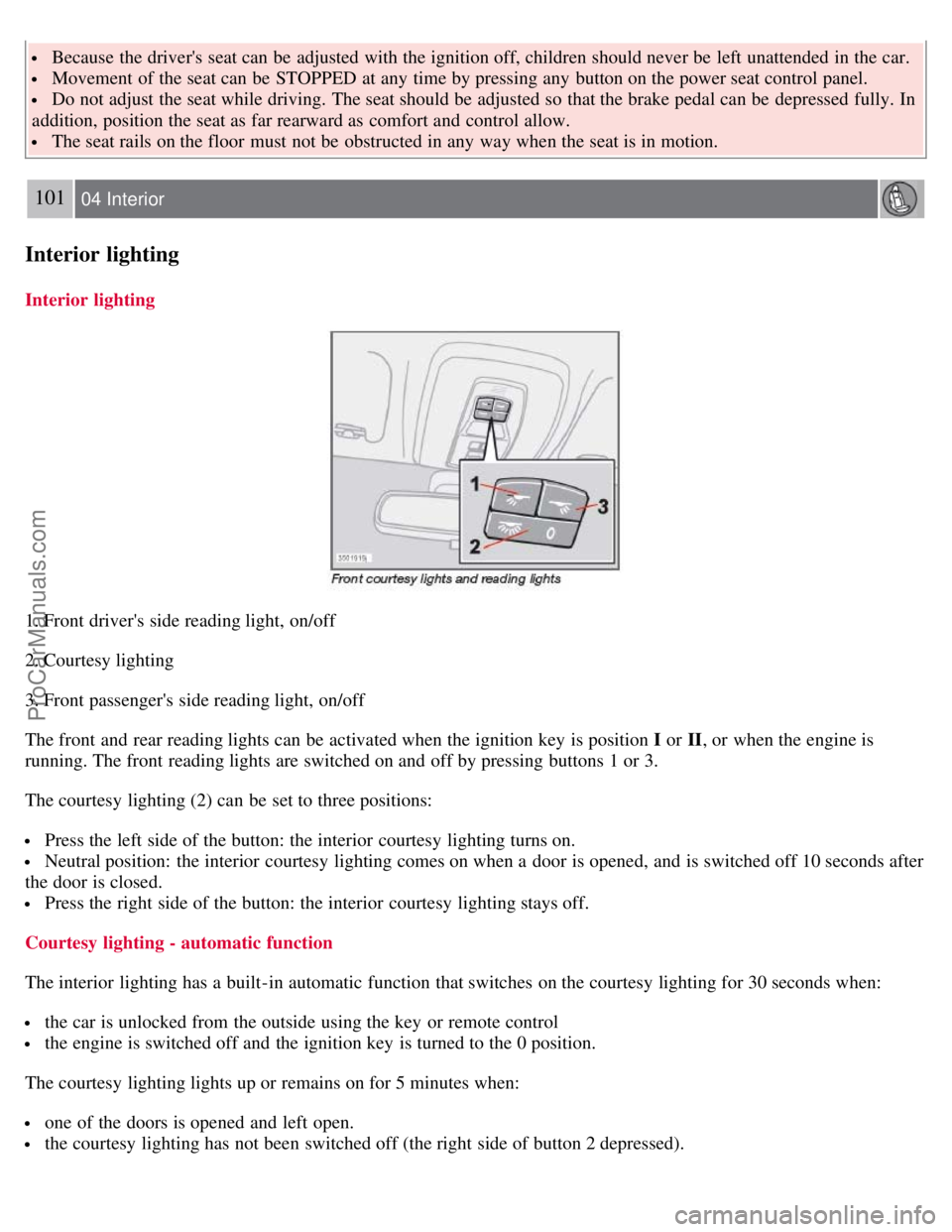
Interior lighting
1. Front driver's side reading light, on/off
2. Courtesy lighting
3. Front passenger's side reading light, on/off
The front and rear reading lights can be activated when the ignition key is position I or II, or when the engine is
running. The front reading lights are switched on and off by pressing buttons 1 or 3.
The courtesy lighting (2) can be set to three positions:
Press the left side of the button: the interior courtesy lighting turns on.
Neutral position: the interior courtesy lighting comes on when a door is opened, and is switched off 10 seconds after
the door is closed.
Press the right side of the button: the interior courtesy lighting stays off.
Courtesy lighting - automatic function
The interior lighting has a built-in automatic function that switches on the courtesy lighting for 30 seconds when:
the car is unlocked from the outside using the key or remote control
the engine is switched off and the ignition key is turned to the 0 position.
The courtesy lighting lights up or remains on for 5 minutes when:
one of the doors is opened and left open.
the courtesy lighting has not been switched off (the right side of button 2 depressed).
ProCarManuals.com
Page 101 of 239
2 0 0 8
VOLVO S40
110 05 Locks and alarm
Remote control and key blade 112
Valet locking116
Keyless drive (option as available)118
Locking and unlocking122
Locking the glove compartment, Child safety locks123
Alarm124
111 05 Locks and alarm
112 05 Locks and alarm
Remote control and key blade
Remote controls
Two remote controls that also function as ignition keys are provided with your car. The remote controls contain
detachable metal key blades for manually locking or unlocking the driver's door and the glove compartment.
USA - FCC ID: LTQVO315TX
This device complies with part 15 of the FCC rules. Operation is subject to the following conditions: (1) This device
may not cause harmful interference, and (2) this device must accept any interference received, including interference
that may cause undesired operation.
Canada - IC: 3659AVO315TX
Operation is subject to the following conditions: (1) this device may not cause interference, and (2) this device must
accept any interference, including interference that may cause undesired operation of the device.
Loss of a remote control
ProCarManuals.com
Page 112 of 239
all doors and the trunk, open or close the side windows, and to set the alarm.
Unlocking:
Press in the upper section in the lock switch. A long press (for several seconds) also opens all the side windows.
Locking:
Press in the lower section of the lock switch.
1This function must be set to On in the Personal settings menu. See page 78.
A long press (for several seconds) also closes all the side windows.
NOTE
The ignition key must be in position I or higher (see page 135) before all side windows can be opened/closed using
the switches in the front doors.
The doors cannot be opened by pulling up the lock button.
Each door can also be locked manually using the lock button on that particular door. This applies only if the car
has not been locked from the outside.
The doors can also be unlocked (and the door opened) by pulling the handle in the door twice.
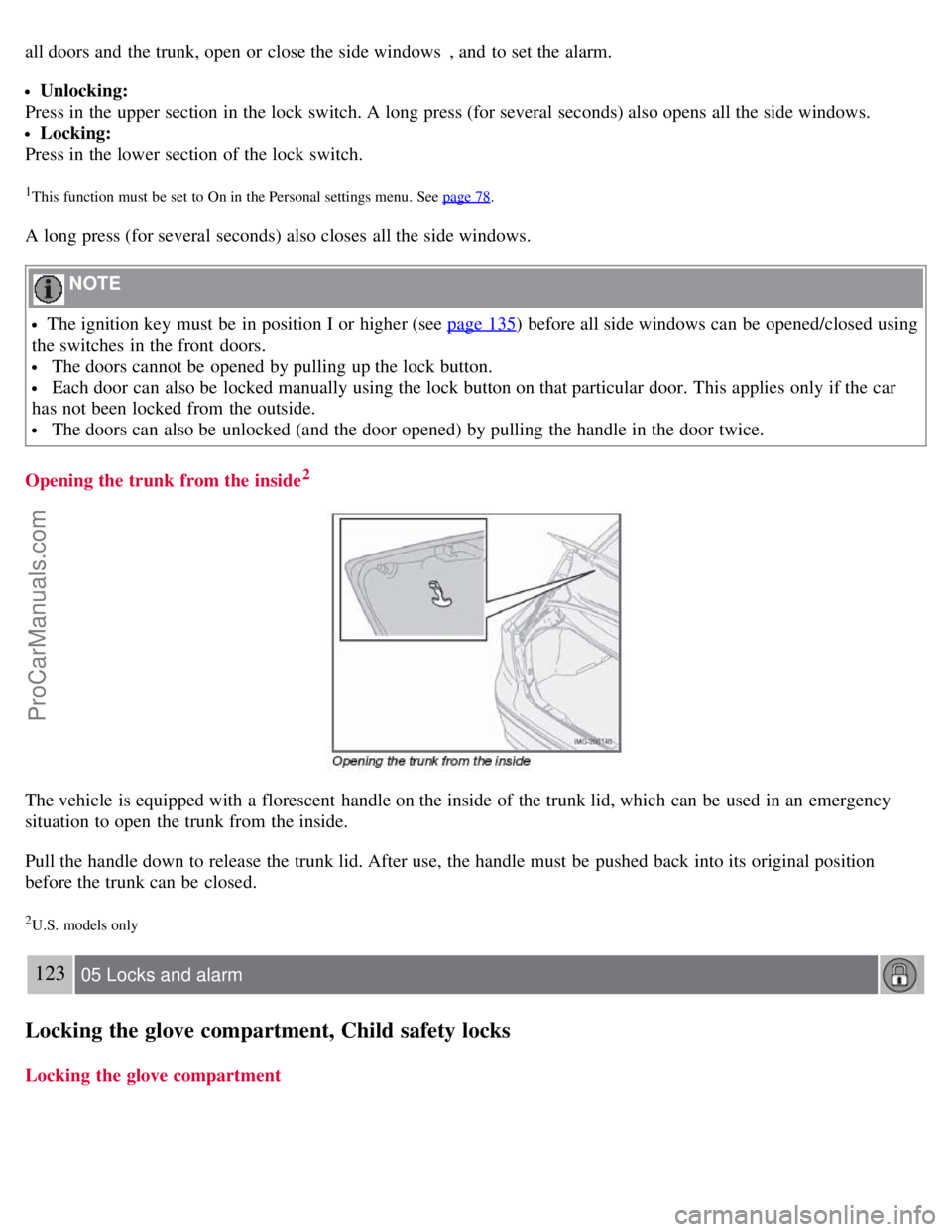
Opening the trunk from the inside
2
The vehicle is equipped with a florescent handle on the inside of the trunk lid, which can be used in an emergency
situation to open the trunk from the inside.
Pull the handle down to release the trunk lid. After use, the handle must be pushed back into its original position
before the trunk can be closed.
2U.S. models only
123 05 Locks and alarm
Locking the glove compartment, Child safety locks
Locking the glove compartment
ProCarManuals.com
Page 113 of 239
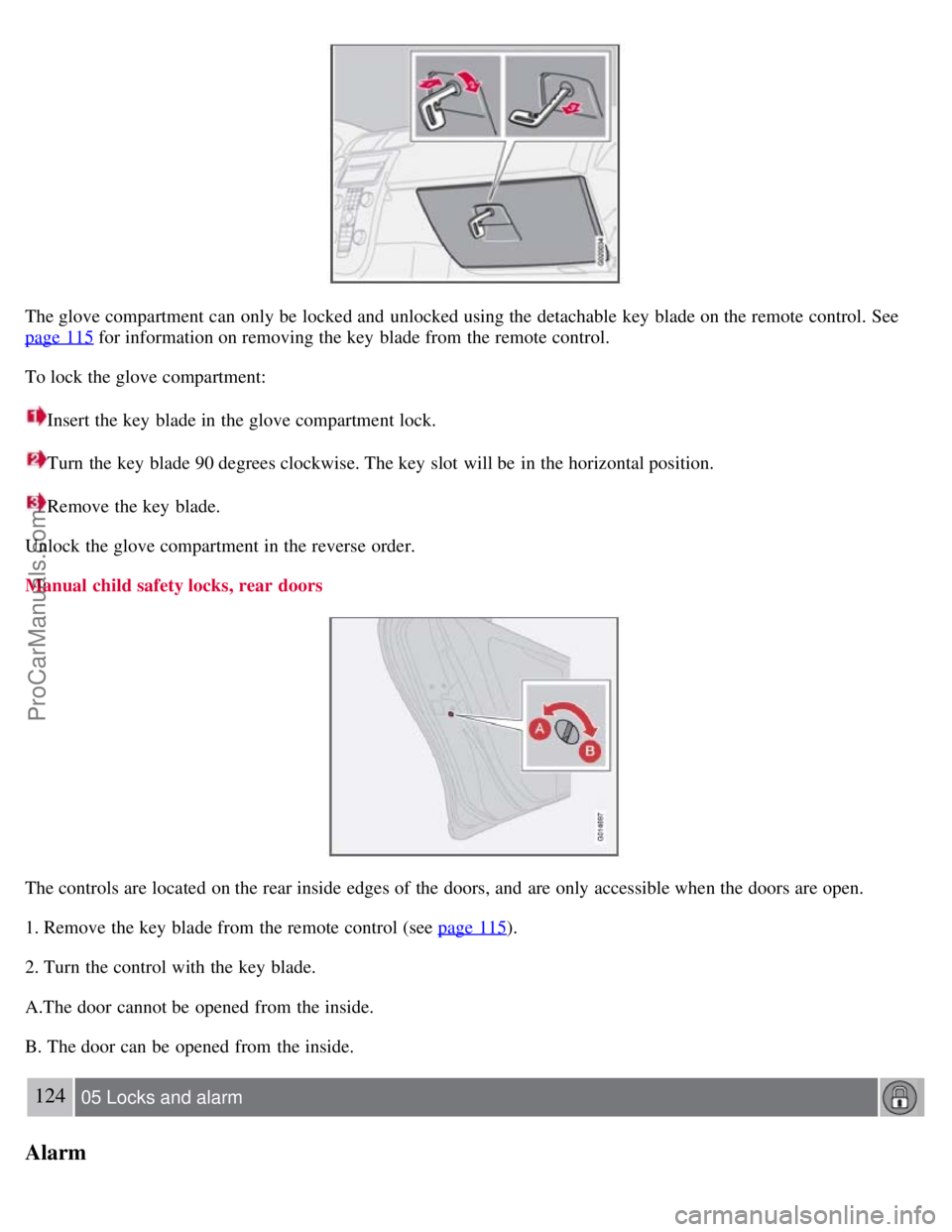
The glove compartment can only be locked and unlocked using the detachable key blade on the remote control. See
page 115
for information on removing the key blade from the remote control.
To lock the glove compartment:
Insert the key blade in the glove compartment lock.
Turn the key blade 90 degrees clockwise. The key slot will be in the horizontal position.
Remove the key blade.
Unlock the glove compartment in the reverse order.
Manual child safety locks, rear doors
The controls are located on the rear inside edges of the doors, and are only accessible when the doors are open.
1. Remove the key blade from the remote control (see page 115
).
2. Turn the control with the key blade.
A.The door cannot be opened from the inside.
B. The door can be opened from the inside.
124 05 Locks and alarm
Alarm
ProCarManuals.com
Page 233 of 239
conserving electrical current130
maintenance209
replacement210
specifications256
Battery replacement, remote control114
Bi -Xenon® headlights59, 212, 214
Black box (Vehicle Event Data)200
Blind Spot Information System (BLIS)158 - 160
Booster cushion accessory40
Brake fluid207
Brake lights60
Bulbs
list of257
replacing211
C
Capacities, fluids252
Cargo area lighting, replacing218
Catalytic converter, three-way258
CD
changer241
changer menu (option)245
eject241
files with MP3 or WMA format242
menu245
pause242
player241
single player241
Central locking system, remote controls112
Changing oil205
Charge air cooler255
Child restraint anchors41, 42
Child restraints33
recalls and registration43
Child safety30
Child safety locks123
Clock setting77
Cold weather precautions129
Compact disc care243
Compass, rear view mirror (option)73
Convertible seats37
Coolant206
Courtesy lighting101
Crash mode29
Cup holders106
ProCarManuals.com