2008 VOLVO C30 door lock
[x] Cancel search: door lockPage 4 of 234

09 Maintenance and servicing
Volvo maintenance198
Maintaining your car199
Hood201
Engine compartment202
Engine oil203
Fluids205
Wiper blades207
Battery208
Bulbs210
Replacing bulbs211
Fuses219
10 Audio
Audio functions 228
Radio functions233
Sirius satellite radio(option)235
CD player/CD changer (option)239
Audio menu243
11 Specifications
Label information246
Dimensions and weights248
Fluid capacities250
Engine oil251
Engine specifications253
Electrical system255
Three-way catalytic converter257
Volvo programs258
5 -
cont. Contents
12 Index
Index 260
6 Introduction
General information
Shiftlock (automatic transmission)
When your vehicle is parked, the gear selector is locked in the ( P)ark position. To release the selector from this
position, turn the ignition key to position II (or start the engine), depress the brake pedal, press the button on the front
side of the gear selector and move the selector from ( P)ark.
Keylock (automatic transmission)
When the ignition is switched off, the gear selector must be in the ( P)ark position before the key can be removed from
the ignition switch.
Anti-lock Brake System (ABS)
The ABS system in your vehicle performs a self -diagnostic test when the vehicle first reaches the speed of
approximately 12 mph (20 km/h). The brake pedal will pulsate several times and a sound may be audible from the
ABS control module. This is normal.
Fuel filler door
Press the button on the light switch panel when the vehicle is at a standstill to open the fuel filler door.
Fuel filler cap
After refueling, close the fuel filler cap by turning it clockwise until it clicks into place. If this cap is not closed tightly
or if the engine is running when the vehicle is refueled, the Malfunction Indicator Lamp ("Check Engine" light) may
indicate a fault.
Points to keep in mind
Page 21 of 234
National Customer Service
175 Gordon Baker Road
North York, Ontario M2H 2N7
1-800-663-8255
WARNING
No objects that add to the total weight on the seat should be placed on the front passenger's seat. If a child is
seated in the front passenger's seat with any additional weight, this extra weight could cause the OWS system to
enable the airbag, which might cause it to deploy in the event of a collision, thereby injuring the child.
The seat belt should never be wrapped around an object on the front passenger's seat. This could interfere with the
OWS system's function.
The front passenger's seat belt should never be used in a way that exerts more pressure on the passenger than
normal. This could increase the pressure exerted on the weight sensor by a child, and could result in the airbag being
enabled, which might cause it to deploy in the event of a collision, thereby injuring the child.
WARNING
Keep the following points in mind with respect to the OWS system. Failure to follow these instructions could
adversely affect the system's function and result in serious injury to the occupant of the front passenger's seat:
The full weight of the front seat passenger should always be on the seat cushion. The passenger should never lift
him/herself off the seat cushion using the armrest in the door or the center console, by pressing the feet on the floor,
by sitting on the edge of the seat cushion, or by pressing against the backrest in a way that reduces pressure on the
seat cushion. This could cause OWS to disable the passenger's side front airbag.
Do not place any type of object on the front passenger's seat in such a way that jamming, pressing, or squeezing
occurs between the object and the front seat, other than as a direct result of the correct use of the Automatic Locking
Retractor/Emergency Locking Retractor (ALR/ELR) seat belt (see page 32
).
No objects should be placed under the front passenger's seat. This could interfere with the OWS system's function.
25 01 Safety
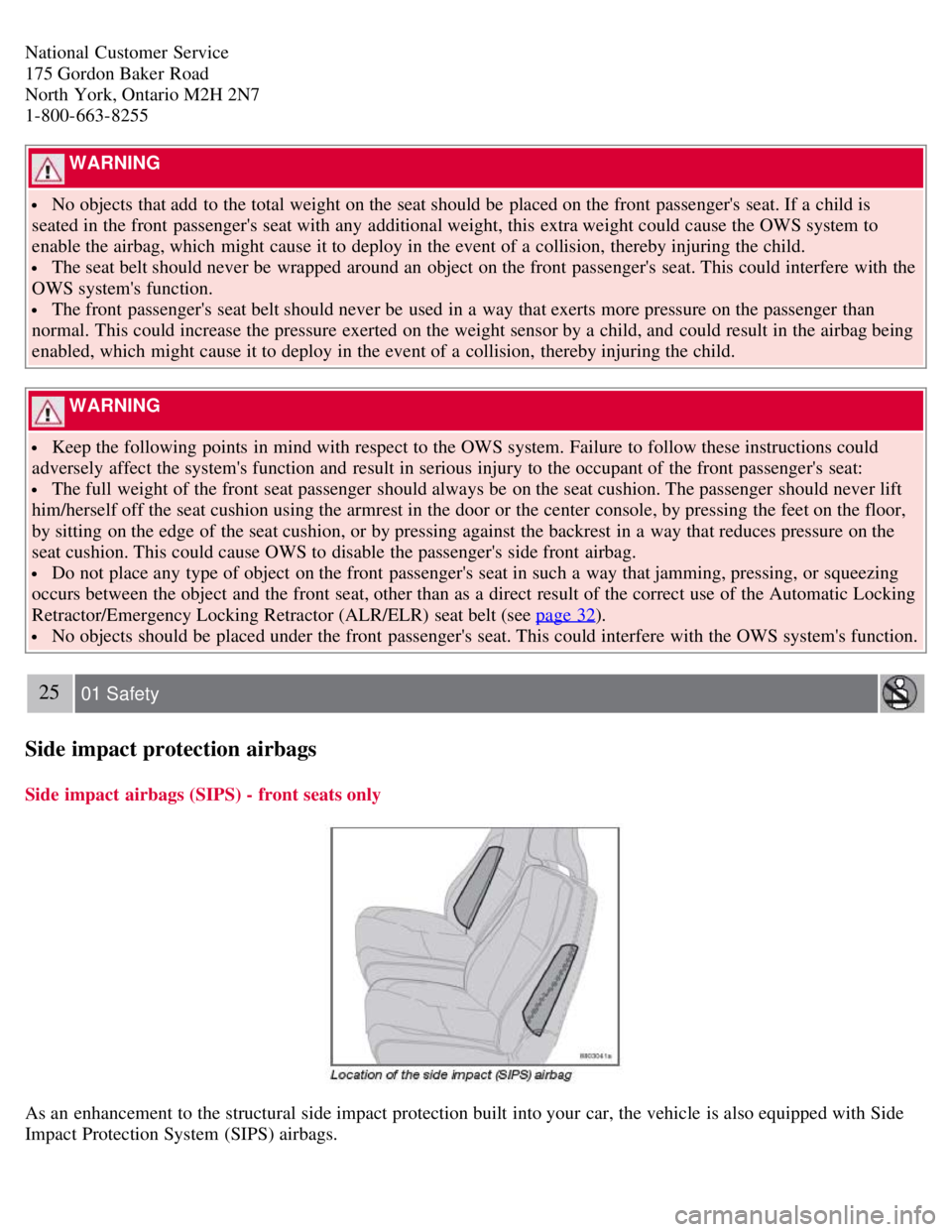
Side impact protection airbags
Side impact airbags (SIPS) - front seats only
As an enhancement to the structural side impact protection built into your car, the vehicle is also equipped with Side
Impact Protection System (SIPS) airbags.
Page 41 of 234

47 02 Instruments and controls
Instrument overview
1. Steering wheel adjustment68
2. Hood opener201
3. Controls in driver's door(see inset illustration on next page)
4. Turn signals, high beams, trip computer60
5. Lighting panel, fuel filler door opener58
6. Door open handle, and locking button126
7. Climate system air vent88
8. Side window air vent-
9. Cruise control 66
10. Horn, airbag19
11. Main instrument panel49
12. Audio controls228
13. Wipers/washers63
14. Ignition switch139
15. Moonroof controls75
16. Not in use
17. Movement detector (option), alarm sensor129
18. Courtesy lighting switch102
19. Driver's side reading light102
20. Passenger's side reading light102
21. Seat belt reminder and Occupant Weight Sensor indicator16
22. Rear-view mirror72
23. Display for climate control and audio system77
Page 42 of 234

24. Audio system228
25. Controls for climate system, audio system and personal settings77
26. Climate system89/92
27. Gear selector, manual 144
Gear selector, automatic145
28. Hazard warning flashers68
29. Door open handle, and locking button126
30. Glove compartment105
31. Parking brake69
32. 12-volt socket70
33. Not in use
34. Button for optional equipment
48 02 Instruments and controls
Instrument overview
Control panel in driver's door
1. Power windows71
2. Door mirror button, driver's side74
3. Door mirror adjustment control74
4. Door mirror button, passenger's side74
49 02 Instruments and controls
Instrument panel
Instrument panel
Page 52 of 234
1. Turn the ignition key or optional keyless drive start control to position II.
2. Press button 5 to turn on the rear fog light.
59 02 Instruments and controls
Lighting panel
An indicator light in the button illuminates when the rear fog light is on.
NOTE
The rear fog light is considerably brighter than the normal taillights and should be used only when conditions such as
fog, rain, snow, smoke or dust reduce visibility for other vehicles to less than 500 ft. (150 meters).
Instrument panel lighting
The instrument panel lighting illuminates when the ignition is in position II and the light switch (1) is in either position
or .
Move the thumb wheel (2) up to increase brightness or down to decrease brightness.
NOTE
To make it easier to read the odometer, trip odometer, clock, and ambient temperature, these gauges illuminate when the
vehicle is unlocked and when the key has been removed from the ignition switch. The lighting will go out when the
vehicle is locked.
Unlocking the fuel filler door
With the ignition switched off, press button 4 to unlock the fuel filler door. Please note that the fuel filler door will remain
unlocked until the vehicle begins to move forward.
An audible click will be heard when the fuel filler door re-locks.
60 02 Instruments and controls
Left-side steering wheel lever
Lever positions
Page 54 of 234

of the car.
1. Remove the key from the ignition switch.
2. Pull the direction indicator lever as far as possible towards the steering wheel (to position 4) and release it.
3. Exit the vehicle and lock the doors.
The headlights and parking lights will illuminate and remain on for 30
1, 60 or 90 seconds. The time interval can be
changed according to your preferences by using the Personal Settings function, see page 78
for more information.
1Factory setting
61 02 Instruments and controls
Trip computer (option)
The trip computer stores information gathered from several systems in your vehicle and has five menus (six on Canadian
models) that can be shown in the information display.
MILES TO EMPTY TANK
AVERAGE (average fuel consumption)
INSTANTANEOUS (current fuel consumption)
AVERAGE SPEED
ACTUAL SPEED (current speed in m.p.h., Canadian models only)
DSTC (see page 150)
NOTE
Warning messages from the car's monitoring systems will override the trip computer function.
If a warning message is shown in the information display while you are using the trip computer:
1. Acknowledge the message by pressing the READ button (A).
2. Press button A again to return to the trip computer function.
Controls
The trip computer functions can be accessed by twisting INFO (B) one step at a time in either direction. Twisting a final
time returns you to the original function.
Page 71 of 234

Available settings
Clock adjust
To set the time:
1. Use the number keys or the up/down arrow keys on the navigation control (E) to change the hour or minute.
2. Select hour(s) or minute(s) to be changed with the left/right arrow keys.
3. Press ENTER to start the clock.
NOTE
If you are currently using the 12-hour time setting, use the up/down arrow keys to select AM/PM after the minute-
setting has been adjusted.
Lock confirmation light
When the vehicle is locked/unlocked with the remote control, the direction indicators can be selected to flash to confirm
the action. The alternatives On/Off are available for both locking and unlocking.
78 02 Instruments and controls
Personal settings
Autolock
When the vehicle starts to move, the doors and rear liftgate can be locked automatically. The alternatives On/Off are
available.
NOTE
Pulling the handle twice on a door unlocks and opens that door.
Unlock
There are two alternatives for unlocking:
Global (both doors)
Unlocks both doors and the rear liftgate with one press on the remote control.
Two Step (Two-stage unlocking)
This alternative unlocks the driver's door with one press on the remote control. A second press unlocks the passenger's
door and the rear liftgate.
Operating side windows
The following alternatives can be selected for opening and/or closing both side windows at the same time by pressing and
holding the Lock/Unlock switch in either of the front doors (see also page 126
for additional information) 1.
Auto close all windows On/Off
Auto open all windows On/Off
NOTE
Page 72 of 234

The ignition key must be in position I or higher (see page 139) before all side windows can be opened/closed using the
switches in the front doors.
1 This menu alternative also makes it possible to open all side windows by pressing and holding the Unlock button on the remote control for several
seconds.
Approach lighting
This alternative determines the length of time for which the car's lights will remain on when the Approach light button on
the central locking system's remote control is pressed. Intervals of 30/60/90 seconds may be selected. See page 78
for
more information.
Home safe lighting
This alternative determines the length of time for which the car's lights will remain on when the high beam lever on the
steering column is pulled toward the wheel with the ignition switched off. Intervals of 30/60/90 seconds may be selected.
See page 78
for information on using this function.
Information
VIN number:
The VIN (Vehicle Identification Number) is the car's unique identity number.
Number of Keys:
The number of keys registered for the vehicle is displayed here.
Climate functions
Blower speed in AUTO mode:
The blower speed can be set to AUTO mode in models equipped with ECC. Choose between "Low", "Normal" and
"High".
Timer for recirculation:
When the timer is active, the air recirculates in the vehicle for 3-12 minutes depending on the ambient temperature. Select
On/Off depending on whether the recirculation timer is to be active or not.
Keyless locking and unlocking (option as available)
The following alternatives can be selected for locking and unlocking the doors and rear liftgate:
All doors
All doors are locked or unlocked at the same time.
One front door
79 02 Instruments and controls
Personal settings
Either of the front doors can be unlocked separately1.
Reset to factory settings
Use this alternative to return to the default climate system settings.