2008 VOLVO C30 light
[x] Cancel search: lightPage 93 of 234

Press the right side of the button: the interior courtesy lighting stays off.
Courtesy lighting - automatic function
The interior lighting has a built-in automatic function that switches on the courtesy lighting for 30 seconds when:
the vehicle is unlocked from the outside using the key or remote control
the engine is switched off and the ignition key is turned to the 0 position.
The courtesy lighting lights up or remains on for 5 minutes when:
one of the doors is opened and left open.
the courtesy lighting has not been switched off (the right side of button 2 depressed).
The automatic lighting goes out when:
the engine is started
the vehicle is locked from the outside using the key or remote control.
If the courtesy lighting is not switched off manually, it will be turned off automatically 5 minutes after the engine has
been switched off.
Rear lighting
The cargo area lighting consists of a light on the driver's side of the cargo area.
The courtesy lighting and cargo area lighting illuminate when the rear liftgate is opened, and remain on for 5 minutes.
The lighting is turned off when:
the rear liftgate is closed
if button 2 is put in position 0 (off).
103 04 Interior
Interior lighting
Vanity mirror
Page 94 of 234

Raise the cover to switch on the light.
104 04 Interior
Storage compartments
105 04 Interior
Storage compartments
1. Compartment in door panel
2. Compartment in front edge of front seat cushion
3. Jacket hanger (intended for light garments only)
4. Glove compartment
Page 95 of 234

5. Storage compartment for e.g., CDs and cup holders
6. Compartment in rear side panels, with space for up to three beverage cans
7. Compartment on rear side of front seat backrests
WARNING
Anchor any heavy objects to prevent them from moving during sudden stops.
Packages on the rear parcel shelf can obscure vision and may become dangerous projectiles in the event of a
sudden stop or an accident.
Glove compartment
The owners manual and maps can be stored here. There are also holders for coins, pens and fuel cards. The glove
compartment can only be locked and unlocked using the detachable key blade from the central locking system's remote
control. See page 120
for information on removing the key blade from the remote control, and page 127 for
information on locking the glove compartment.
Jacket hanger
The jacket hanger is located on the inboard side of the front passenger's seat head restraint. It is only intended for
hanging light garments.
106 04 Interior
Storage compartments
Storage under the front, center armrest
Page 99 of 234
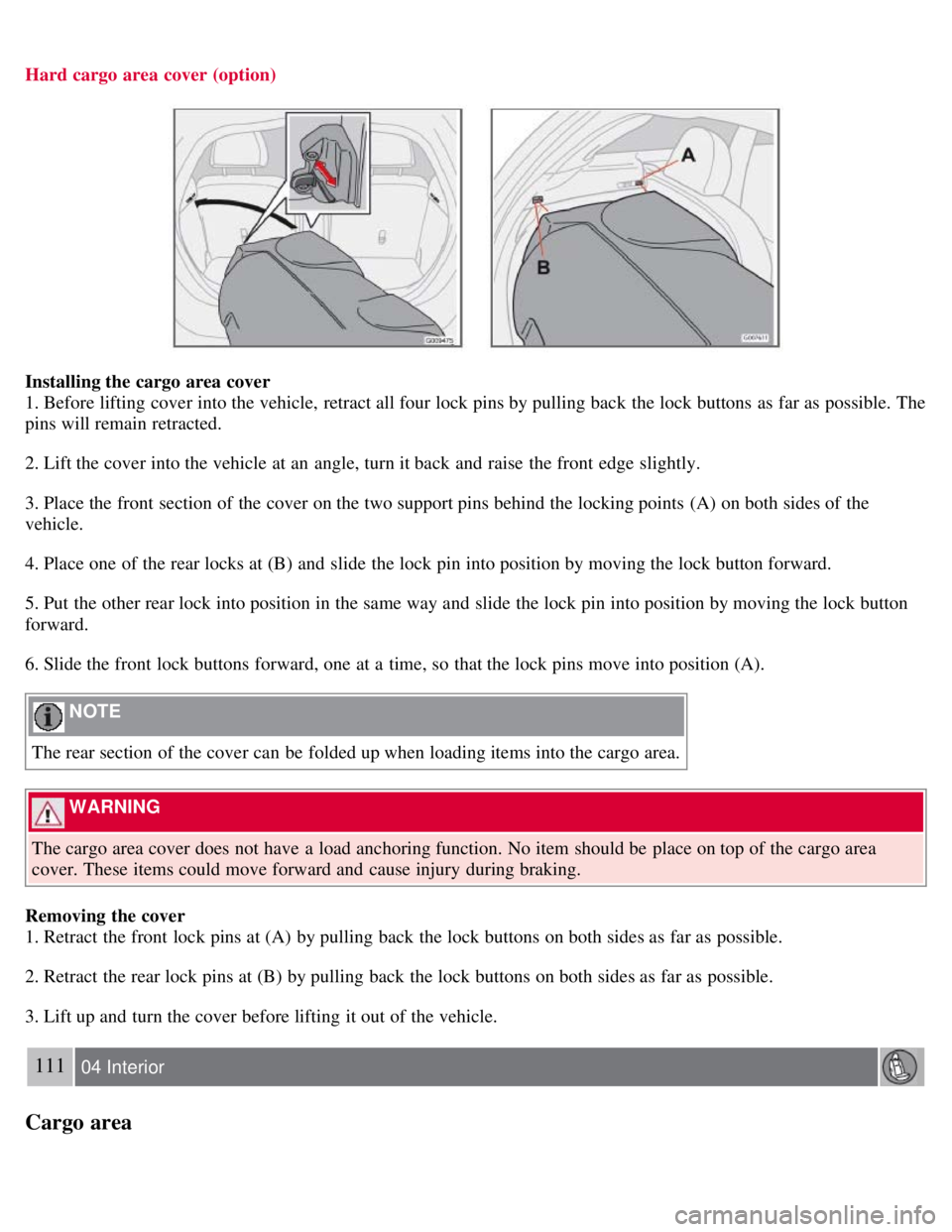
Hard cargo area cover (option)
Installing the cargo area cover
1. Before lifting cover into the vehicle, retract all four lock pins by pulling back the lock buttons as far as possible. The
pins will remain retracted.
2. Lift the cover into the vehicle at an angle, turn it back and raise the front edge slightly.
3. Place the front section of the cover on the two support pins behind the locking points (A) on both sides of the
vehicle.
4. Place one of the rear locks at (B) and slide the lock pin into position by moving the lock button forward.
5. Put the other rear lock into position in the same way and slide the lock pin into position by moving the lock button
forward.
6. Slide the front lock buttons forward, one at a time, so that the lock pins move into position (A).
NOTE
The rear section of the cover can be folded up when loading items into the cargo area.
WARNING
The cargo area cover does not have a load anchoring function. No item should be place on top of the cargo area
cover. These items could move forward and cause injury during braking.
Removing the cover
1. Retract the front lock pins at (A) by pulling back the lock buttons on both sides as far as possible.
2. Retract the rear lock pins at (B) by pulling back the lock buttons on both sides as far as possible.
3. Lift up and turn the cover before lifting it out of the vehicle.
111 04 Interior
Cargo area
Page 105 of 234

2. Unlock - Press the Unlock button on the remote once to unlock the driver's door. The turn signals will flash twice to
confirm unlocking.
After a short pause, press the Unlock button a second time within 10 seconds to unlock the other doors and the rear
liftgate.
NOTE
The turn signals flash to confirm that the vehicle has been correctly locked/unlocked with the remote control or
the optional keyless drive. When locking the vehicle, the turn signals will flash a confirmation only if all the doors
are securely closed and locked. Flashing confirmation for locking and unlocking may be customized in the vehicle's
Personal settings menu. See page 78
for more information.
The two-step unlocking function can be changed so that one press of the Unlock button unlocks all of the doors
and the rear liftgate. See Personal settings on page 78
for more information.
Automatic relocking: If the doors are unlocked, the locks will automatically reengage (re-lock) and the alarm
(option) will rearm after 2 minutes unless a door or the rear liftgate has been opened.
Automatic locking : When the vehicle starts to move, the doors and rear liftgate can be locked automatically. When
the doors have been locked in this way, they can be unlocked by: pulling twice on one of the inside door opening
handles, or by pressing an unlock button located near the door opening handle.This feature can be turned on or off, see
Personal settings on page 78
for more information.
Airbag deployment will automatically attempt to unlock the doors.
3. Approach lighting - As you approach the car:
Press the button on the remote control to illuminate the area around the car in dark conditions.
Pressing the button once lights up the interior lighting, parking lights, and license plate lighting. These lights will
switch off automatically after 30, 60 or 90 seconds. See the Personal settings on page 78
for information about
adjusting the time setting.
4. Unlock rear liftgate - Press the button once to disarm the alarm system (option) and unlock only the rear liftgate.
After closing, the rear liftgate will not automatically relock. Press Lock to relock it and rearm the alarm.
NOTE
This function will not open the rear liftgate.
If the rear liftgate is opened when the other doors are locked, it will remain unlocked after it has been closed. It
must be locked with the Lock button on the remote control.
118 05 Locks and alarm
Remote control and key blade
5. Panic alarm : - This button can be used to attract attention during emergency situations.
To activate the panic alarm, press and hold the red button for at least 3 seconds or press it twice within 3 seconds.
The turn signals and horn will be activated.
The panic alarm will stop automatically after 30 seconds.
To deactivate, wait approximately 5 seconds and press the red button again.
NOTE
This button will NOT unlock the car.
Page 106 of 234

Weak battery in the remote control
When the battery begins to lose its charge, the Information symbol in the instrument panel (see page 51) lights up and
REMOTE BATTERY LOW VOLTAGE is shown in the information display.
Replacing the battery in the remote control
If the range of the transmitter is noticeably reduced, this indicates that the battery (type CR 2450, 3V) is weak and
should be replaced. To replace the battery:
1. Place the remote control with the keypad downward. Pry open the cover with a small slotted screwdriver.
2. Remove the cover.
3. Note how the + and - sides of the battery are positioned on the inside of the cover (see the underside of the cover).
CAUTION
When replacing the battery, avoid touching the electrical circuitry in the other half of the remote control.
4. Pry out and replace the battery. Avoid touching the battery and its contact surfaces with your fingers.
5. Press the cover back into place.
The old battery should be disposed of properly at a recycling center or by a trained and qualified Volvo service
technician.
119 05 Locks and alarm
Remote control and key blade
Key blade
Page 114 of 234

The battery is disconnected (while the alarm is armed).
The siren is disconnected when the alarm is disarmed.
The alarm indicator light
The status of the alarm system is indicated by the indicator light on at the top of the dashboard (see illustration):
Indicator light off - the alarm is not armed
The indicator light flashes every two seconds - the alarm is armed
The indicator light flashes rapidly before the ignition is switched on - the alarm has been triggered. The message
"ALARM TRIGGERED, CHECK CAR" will also be displayed.
Fault in the alarm system: If a fault has been detected in the alarm system, a message will be shown in the
information display. Contact a trained and qualified Volvo service technician to have the alarm system inspected and
repaired if necessary.
Arming the alarm
Press the LOCK button on the remote control, or press the central lock button on one of the front doors with the door
open. One long flash of the turn signals will confirm that the alarm is armed.
Disarming the alarm
Press the UNLOCK button on the remote control or insert the key in the ignition
1 to disarm the alarm. Two short
flashes from the car's direction indicators confirm that the alarm has been deactivated and that all doors are unlocked.
Turning off (stopping) the alarm
If the alarm is sounding, it can be stopped by pressing the UNLOCK button on the remote control or by inserting the
key in the ignition switch.
1On vehicles with the optional keyless drive, press in the start control in the ignition switch.
129 05 Locks and alarm
Alarm (option)
NOTE
On vehicles equipped with the optional keyless drive, the start control must be removed from the ignition switch
before the key can be inserted. See page 143
for instructions.
Audible/visual alarm signal
Page 115 of 234

An audible alarm signal is given by a battery powered siren. The alarm cycle lasts for 30 seconds.
NOTE
The visual alarm signal is given by flashing all turn signals and turning on the interior lighting for approximately 5
minutes.
Temporarily turning off the accessory alarm sensor(s)
In certain situations it may be desirable to turn off the accessory inclination and movement alarm sensors if, for
example, you drive your vehicle onto a ferry where the rocking of the boat could trigger the alarm or if a pet is left in
the vehicle with the doors locked.
1. From position II or higher, turn the ignition key to 0 and remove it from the ignition switch
1.
2. Press the button (1). The LED in the button will remain on for one minute after the key has been removed from the
ignition switch or until the vehicle is locked.
1 The optional keyless drive start control does not need to be removed.
CAUTION
The accessory sensors are automatically reconnected to the alarm system the next time the vehicle is unlocked and
then locked again.
This function will not turn off the vehicle's standard alarm
U.S.A. FCC ID: MAYDA 5823(3)
This device complies with part 15 of the FCC rules. Operation is subject to the following conditions: (1) This device
may not cause harmful interference, and (2) this device must accept any interference received, including interference
that may cause undesired operation.
Canada IC: 4405A-DA 5823(3)
Movement sensor DA5823 by Dynex Operation is subject to the following conditions: (1) this device may not cause
interference, and (2) this device must accept any interference, including interference that may cause undesired
operation of the device.