2008 VOLVO C30 lights
[x] Cancel search: lightsPage 53 of 234

1. Turn signals, lane change position
2. Turn signals, position for normal turns
3. High beam flash
4. Toggle between high and low beams, Home Safe lighting
Turn signals
When turning
Move the lever as far up or down as possible (to position 2) to start the turn signals.
The turn signals will be cancelled automatically by the movement of the steering wheel, or the lever can be returned to its
initial position by hand.
When changing lanes
The driver can automatically flash the turn signals 3 times by:
Moving the turn signal lever up or down to position 1 and releasing it.
Moving the lever up or down to position 2 and immediately back to its original position.
NOTE
This automatic flashing sequence can be interrupted by immediately moving the lever in the opposite direction.
If the turn signal indicator flashes faster than normal, check for a burned-out turn signal bulb.
High/low beam headlights
Continuous high beams
1. Turn the ignition key or optional keyless drive start control to position II.
2. With the light switch (1) in position
, (see page 59) pull the turn signal lever toward the steering wheel (position 4)
to toggle between high and low beams.
High beam flash
1. Turn the ignition key or optional keyless drive start control to position II.
2. Pull the turn signal lever to position 3. The high beams will remain on until the lever is released.
Home safe lighting
When you leave your vehicle at night, you can make use of the home safe lighting function to illuminate the area in front
Page 54 of 234

of the car.
1. Remove the key from the ignition switch.
2. Pull the direction indicator lever as far as possible towards the steering wheel (to position 4) and release it.
3. Exit the vehicle and lock the doors.
The headlights and parking lights will illuminate and remain on for 30
1, 60 or 90 seconds. The time interval can be
changed according to your preferences by using the Personal Settings function, see page 78
for more information.
1Factory setting
61 02 Instruments and controls
Trip computer (option)
The trip computer stores information gathered from several systems in your vehicle and has five menus (six on Canadian
models) that can be shown in the information display.
MILES TO EMPTY TANK
AVERAGE (average fuel consumption)
INSTANTANEOUS (current fuel consumption)
AVERAGE SPEED
ACTUAL SPEED (current speed in m.p.h., Canadian models only)
DSTC (see page 150)
NOTE
Warning messages from the car's monitoring systems will override the trip computer function.
If a warning message is shown in the information display while you are using the trip computer:
1. Acknowledge the message by pressing the READ button (A).
2. Press button A again to return to the trip computer function.
Controls
The trip computer functions can be accessed by twisting INFO (B) one step at a time in either direction. Twisting a final
time returns you to the original function.
Page 57 of 234
When the lever has been pulled, high pressure jets mounted in the bumper will spray the headlights.
The following applies to conserve washer fluid (see page 58
for information on the light switch positions):
Low/high beam headlights on
The headlights will be washed the first time the windshield is washed. Thereafter, the headlights will only be washed once
for every five times the windshield is washed within a 10-minute period.
64 02 Instruments and controls
Right-side steering wheel lever
Parking lights on
Optional Bi -Xenon® headlights will be washed once for every five times the windshield is washed.
Normal halogen headlights will not be washed.
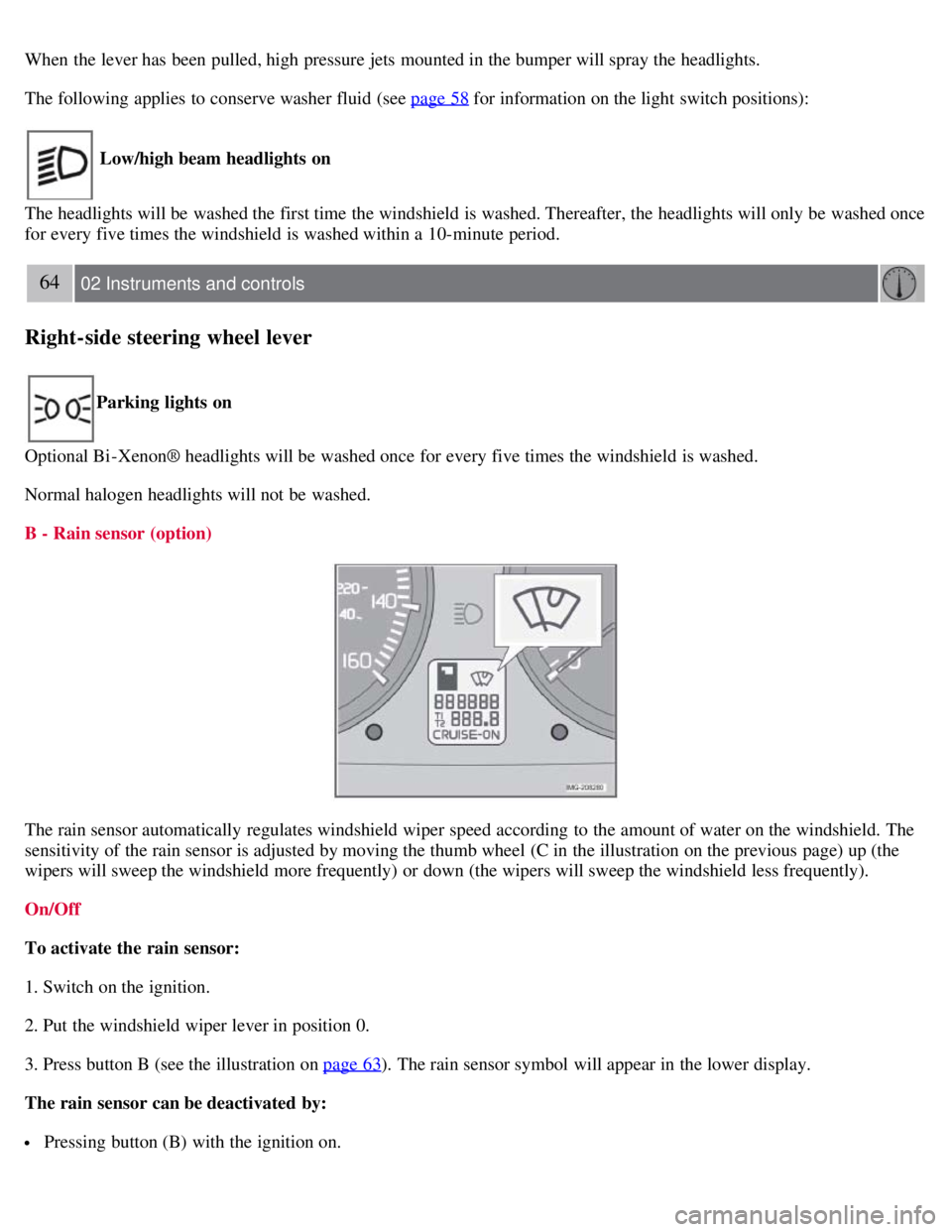
B - Rain sensor (option)
The rain sensor automatically regulates windshield wiper speed according to the amount of water on the windshield. The
sensitivity of the rain sensor is adjusted by moving the thumb wheel (C in the illustration on the previous page) up (the
wipers will sweep the windshield more frequently) or down (the wipers will sweep the windshield less frequently).
On/Off
To activate the rain sensor:
1. Switch on the ignition.
2. Put the windshield wiper lever in position 0.
3. Press button B (see the illustration on page 63
). The rain sensor symbol will appear in the lower display.
The rain sensor can be deactivated by:
Pressing button (B) with the ignition on.
Page 65 of 234

Night position
To reduce glare from the headlights of following vehicles, use control (1) to switch between the normal and night-driving
positions.
2. Normal position
3. Night position, reduces glare from following traffic
Auto-dim function (option)
An optional integrated sensor reacts to headlights from following traffic and automatically reduces glare.
Rearview mirror with compass (option)
The upper right-hand corner of the rearview mirror has an integrated display that shows the compass direction toward
which the vehicle is pointing. Eight different directions can be displayed: N, NE, E, SE, S, SW, W and NW. The display
shows your car's orientation with respect to true north.
Calibrating the compass
Page 72 of 234

The ignition key must be in position I or higher (see page 139) before all side windows can be opened/closed using the
switches in the front doors.
1 This menu alternative also makes it possible to open all side windows by pressing and holding the Unlock button on the remote control for several
seconds.
Approach lighting
This alternative determines the length of time for which the car's lights will remain on when the Approach light button on
the central locking system's remote control is pressed. Intervals of 30/60/90 seconds may be selected. See page 78
for
more information.
Home safe lighting
This alternative determines the length of time for which the car's lights will remain on when the high beam lever on the
steering column is pulled toward the wheel with the ignition switched off. Intervals of 30/60/90 seconds may be selected.
See page 78
for information on using this function.
Information
VIN number:
The VIN (Vehicle Identification Number) is the car's unique identity number.
Number of Keys:
The number of keys registered for the vehicle is displayed here.
Climate functions
Blower speed in AUTO mode:
The blower speed can be set to AUTO mode in models equipped with ECC. Choose between "Low", "Normal" and
"High".
Timer for recirculation:
When the timer is active, the air recirculates in the vehicle for 3-12 minutes depending on the ambient temperature. Select
On/Off depending on whether the recirculation timer is to be active or not.
Keyless locking and unlocking (option as available)
The following alternatives can be selected for locking and unlocking the doors and rear liftgate:
All doors
All doors are locked or unlocked at the same time.
One front door
79 02 Instruments and controls
Personal settings
Either of the front doors can be unlocked separately1.
Reset to factory settings
Use this alternative to return to the default climate system settings.
Page 82 of 234

risk of condensation forming on the insides of the windows, especially in winter.
Timer
The timer function minimizes the risk of misting, or stale air when the recirculation function is selected. See page 78
for information on setting the recirculation timer. Recirculation is always disengaged when you select Defroster (3).
3. Defroster
Directs airflow to the windshield and side windows and increases blower speed.
When the defroster is activated:
Air flows to the windows at high blower speed.
The LED in the defroster button lights up when this function is activated. The air conditioning system is controlled
to provide maximum air dehumidification.
The air conditioning is automatically switched on (can be switched off by pressing button 5).
The air is not recirculated.
4. Airflow controls
Press one of the three buttons in the illustration to activate the selected airflow. A symbol in the display above the
climate control panel and a lit LED in the selected button indicate that the manual function has been selected. With
manually selected airflow both warm and cool air can be selected. The desired temperature is selected using control 9.
5. Air conditioning - On or Off
ON: The air conditioning system is engaged when the ON LED is lit.
OFF: The system is disengaged when the OFF lights up. If Defroster ( 3) is activated the air conditioning is always
engaged.
6/7. Heated front seats (option)
Maximum heating : Press the button once - both LEDs light up.
Reduced heating : Press the button a second time - one LED lights up.
Seat heating off : Press the button a third time - no LEDs are lit.
8. Heated rear window and door mirrors
Press to defrost the rear window and door mirrors.
The rear window and door mirrors are defrosted simultaneously if the switch is pressed once. The defrost function is
active if the LED in the switch is illuminated.
The function can be switched off manually by pressing the button,
Page 85 of 234

windows.
4. Defroster
Directs airflow to the windshield and side windows and increases blower speed.
When the defroster is activated:
Air flows to the windows at high blower speed.
The LED in the defroster button lights up when this function is activated. The air conditioning system is controlled
to provide maximum air dehumidification.
The air conditioning is automatically switched on (can be switched off by pressing button 6).
The air is not recirculated.
5. Airflow controls
Press one of the three buttons in the illustration to activate the selected airflow. A symbol in the display above the
climate control panel and a lit LED in the selected button indicate that the manual function has been selected. With
manually selected airflow both warm and cool air can be selected. See also the table on page 95
.
6. Air conditioning On/Off
ON: The air conditioning system is engaged when the ON light is lit and is controlled automatically by the system to
maintain the selected temperature.
OFF: The system is disengaged when the OFF lights up.
When Defroster (4) is selected, the air conditioning system is activated for maximum dehumidifying.
94 03 Climate
Electronic Climate Control (ECC) - option
7 and 8. Heated front seats (option)
Maximum heating : Press the button once - both LEDs light up.
Reduced heating : Press the button a second time - one LED lights up.
Seat heating off : Press the button a third time - no LEDs are lit.
9. Rear window and door mirror defrosters
Page 92 of 234

1. Adjust the seat to the desired position.
2. When you leave the car, lock it using the remote control.
3. The next time the driver's door is unlocked with the same remote control and that door is opened within 2 minutes,
the driver's seat and side door mirrors will automatically move to the position that they were in when the doors were
most recently locked with the same remote control.
NOTE
The memory function in the remote control operates independently of the memory function in the seat.
WARNING
Because the driver's seat can be adjusted with the ignition off, children should never be left unattended in the car.
Movement of the seat can be STOPPED at any time by pressing any button on the power seat control panel.
Do not adjust the seat while driving. The seat should be adjusted so that the brake pedal can be depressed fully. In
addition, position the seat as far rearward as comfort and control allow.
The seat rails on the floor must not be obstructed in any way when the seat is in motion.
102 04 Interior
Interior lighting
Interior lighting
1. Front driver's side reading light, on/off
2. Courtesy lighting
3. Front passenger's side reading light, on/off
The front and rear reading lights can be activated when the ignition key is position I or II, or when the engine is
running. The front reading lights are switched on and off by pressing buttons 1 or 3.
The courtesy lighting (2) can be set to three positions:
Press the left side of the button: the interior courtesy lighting turns on.
Neutral position: the interior courtesy lighting comes on when a door is opened, and is switched off 10 seconds after
the door is closed.