2008 VOLVO C30 buttons
[x] Cancel search: buttonsPage 85 of 234

windows.
4. Defroster
Directs airflow to the windshield and side windows and increases blower speed.
When the defroster is activated:
Air flows to the windows at high blower speed.
The LED in the defroster button lights up when this function is activated. The air conditioning system is controlled
to provide maximum air dehumidification.
The air conditioning is automatically switched on (can be switched off by pressing button 6).
The air is not recirculated.
5. Airflow controls
Press one of the three buttons in the illustration to activate the selected airflow. A symbol in the display above the
climate control panel and a lit LED in the selected button indicate that the manual function has been selected. With
manually selected airflow both warm and cool air can be selected. See also the table on page 95
.
6. Air conditioning On/Off
ON: The air conditioning system is engaged when the ON light is lit and is controlled automatically by the system to
maintain the selected temperature.
OFF: The system is disengaged when the OFF lights up.
When Defroster (4) is selected, the air conditioning system is activated for maximum dehumidifying.
94 03 Climate
Electronic Climate Control (ECC) - option
7 and 8. Heated front seats (option)
Maximum heating : Press the button once - both LEDs light up.
Reduced heating : Press the button a second time - one LED lights up.
Seat heating off : Press the button a third time - no LEDs are lit.
9. Rear window and door mirror defrosters
Page 89 of 234

2. Use this control to raise or lower the front edge of the seat cushion.
3. Use this control to raise or lower the rear edge of the seat cushion.
4. Turn this knob (option on some passenger's seats) to adjust the firmness of the lumbar support
1.
5. Turn this knob to adjust the backrest tilt.
6. Control panel for power seats.
WARNING
Do not adjust the seat while driving.
Adjust the driver's seat and seat belt (see page 14) before driving. The seat should be adjusted so that the brake
pedal can be depressed fully.
Position the seat as far rearward as comfort and control allow.
1Also applies to the optional power seat.
Accessing the rear seat
Seat access buttons (power seat shown)
Manual seat
Moving the seat forward:
1. Remove the seat belt from its guide (see page 17
).
2. Pull up control 1 (see the illustration), hold it up, and fold the backrest forward until it locks in position.
3. Slide the seat forward.
Moving the seat rearward:
1. With the backrest folded forward in the locked position , slide the seat rearward to its original position.
2. Pull up control 1, hold it up, and fold up the backrest to the upright position.
3. Return the seat belt to its guide.
99 04 Interior
Front seats
Power seats
Page 91 of 234

2. Move the control forward/rearward to move the seat forward or rearward.
3. Move this section of the control up or down to raise/lower the rear section of the seat cushion.
4. Backrest tilt.
NOTE
The power seats have an overload protector that activates if a seat is blocked by any object. If this occurs, switch off
the ignition (key in position 0) and wait for approximately 20 seconds before operating the seat again.
Emergency stop
If the seat inadvertently begins to move, press any of the buttons to stop the seat.
Programming the seat memory, driver's seat only (option)
Three different seating positions can be stored in the seat's memory. The memory buttons are located on the outboard
side of the driver's seat (see the illustration). The following example explains how memory button 1 can be
programmed. Buttons 2 and 3 can be programmed in the same way.
To program (store) a seat position in memory button 1:
1. Adjust the seat to the desired position (see the instructions under "Adjusting the seat").
101 04 Interior
Front seats
2. Press and hold down the "M" (Memory) button.
3. With the "M" button depressed, press memory button 1 to store the seat's current position.
To move the seat to the position that it was in when memory button 1 was programmed, press and hold down button 1
until the seat stops moving.
As a safety precaution, the seat will stop automatically if the button is released before the seat has reached the preset
position.
Central locking system remote control and driver's seat memory
The remote control transmitter can also be equipped with an optional function that controls the electrically operated
driver's seat in the following way:
Page 92 of 234

1. Adjust the seat to the desired position.
2. When you leave the car, lock it using the remote control.
3. The next time the driver's door is unlocked with the same remote control and that door is opened within 2 minutes,
the driver's seat and side door mirrors will automatically move to the position that they were in when the doors were
most recently locked with the same remote control.
NOTE
The memory function in the remote control operates independently of the memory function in the seat.
WARNING
Because the driver's seat can be adjusted with the ignition off, children should never be left unattended in the car.
Movement of the seat can be STOPPED at any time by pressing any button on the power seat control panel.
Do not adjust the seat while driving. The seat should be adjusted so that the brake pedal can be depressed fully. In
addition, position the seat as far rearward as comfort and control allow.
The seat rails on the floor must not be obstructed in any way when the seat is in motion.
102 04 Interior
Interior lighting
Interior lighting
1. Front driver's side reading light, on/off
2. Courtesy lighting
3. Front passenger's side reading light, on/off
The front and rear reading lights can be activated when the ignition key is position I or II, or when the engine is
running. The front reading lights are switched on and off by pressing buttons 1 or 3.
The courtesy lighting (2) can be set to three positions:
Press the left side of the button: the interior courtesy lighting turns on.
Neutral position: the interior courtesy lighting comes on when a door is opened, and is switched off 10 seconds after
the door is closed.
Page 97 of 234

2. Press down the rear edge of the cup holder.
To close the sliding cover, grasp the underside of the front edge and pull.
107 04 Interior
Storage compartments
Storage compartment behind the gear lever
If the buttons for optional equipment are not installed, the recess behind the gear lever can be used as a storage
compartment.
108 04 Interior
Rear seat
Folding down the rear seat backrests
Both sections of the rear seat backrest can be folded down, together or separately, to enable you to transport long
objects.
To fold down one or both sections:
1. Pull the catch on the upper outboard edge of the backrest upward and forward to release the backrest lock. A red
lock indicator (A) is visible when the backrest is not locked in the upright position.
2. Fold the backrest down.
Page 99 of 234
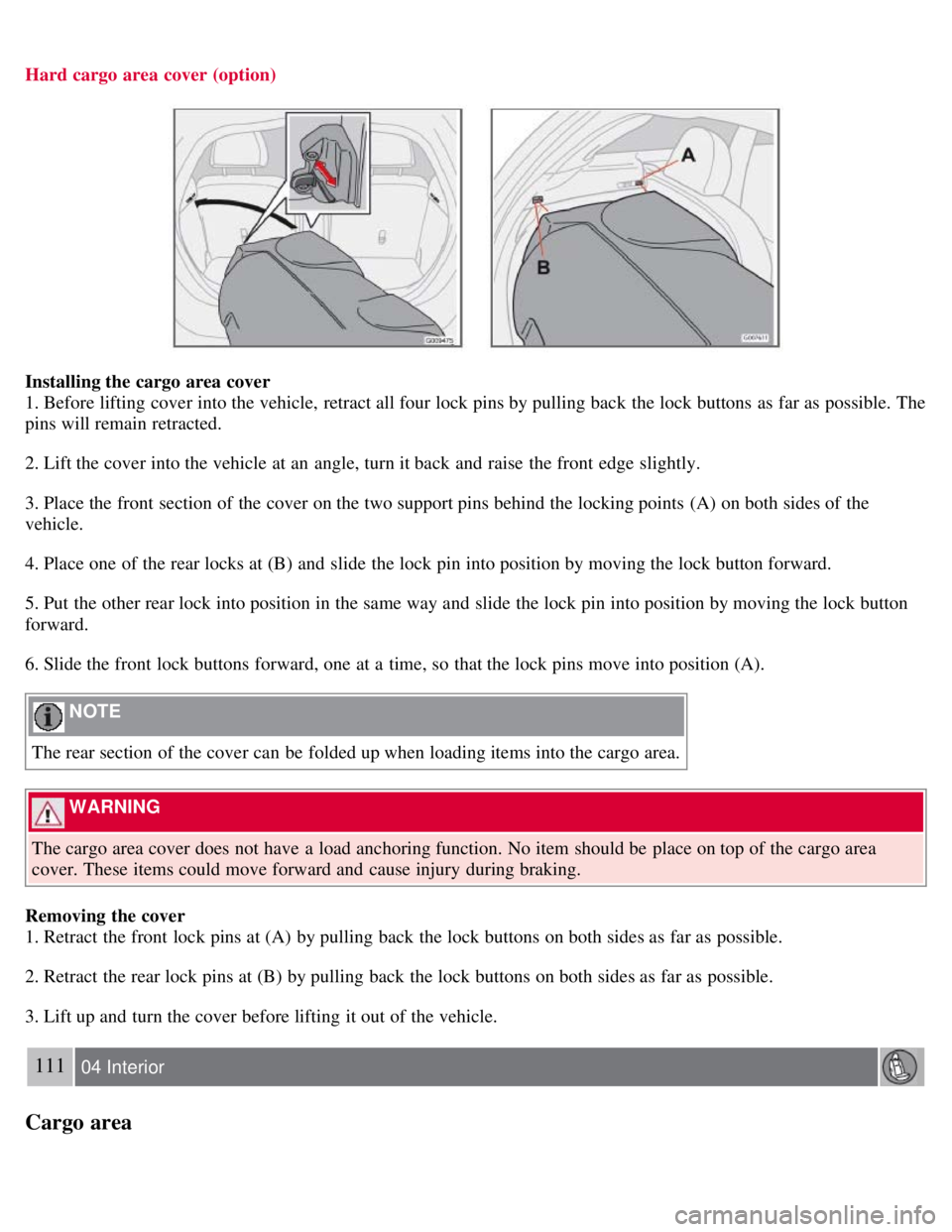
Hard cargo area cover (option)
Installing the cargo area cover
1. Before lifting cover into the vehicle, retract all four lock pins by pulling back the lock buttons as far as possible. The
pins will remain retracted.
2. Lift the cover into the vehicle at an angle, turn it back and raise the front edge slightly.
3. Place the front section of the cover on the two support pins behind the locking points (A) on both sides of the
vehicle.
4. Place one of the rear locks at (B) and slide the lock pin into position by moving the lock button forward.
5. Put the other rear lock into position in the same way and slide the lock pin into position by moving the lock button
forward.
6. Slide the front lock buttons forward, one at a time, so that the lock pins move into position (A).
NOTE
The rear section of the cover can be folded up when loading items into the cargo area.
WARNING
The cargo area cover does not have a load anchoring function. No item should be place on top of the cargo area
cover. These items could move forward and cause injury during braking.
Removing the cover
1. Retract the front lock pins at (A) by pulling back the lock buttons on both sides as far as possible.
2. Retract the rear lock pins at (B) by pulling back the lock buttons on both sides as far as possible.
3. Lift up and turn the cover before lifting it out of the vehicle.
111 04 Interior
Cargo area
Page 108 of 234

Unlocking the doors with the detached key blade
1. Insert the key blade as far as possible in the driver's door lock. Turn the key blade clockwise approximately one -
quarter turn to unlock the driver's door only.
To disable the alarm:
1. Press the Unlock button on the remote control, or insert the key in the ignition switch.
Locking the doors with the detached key blade
1. Lock the rear doors and the front passenger's door by pressing the lock button on each door.
NOTE
After unlocking the driver's door with the key blade, opening the door will trigger the alarm.
121 05 Locks and alarm
Remote control and key blade
2. Turn the key blade one -quarter turn counter-clockwise to lock the driver's door.
NOTE
This does not arm the alarm or lock the rear liftgate.
122 05 Locks and alarm
Keyless drive (option as available)
Keyless locking and unlocking
This system makes it possible to unlock and lock the vehicle without having to use the remote control. It is only
necessary to have a keyless drive remote control in your possession to operate the central locking system.
NOTE
The buttons on the keyless drive remote control can also be used to lock and unlock the vehicle. See page 117 for
Page 113 of 234

The doors cannot be opened by pulling up the lock buttons.
127 05 Locks and alarm
Glove compartment
Locking the glove compartment
The glove compartment can only be locked and unlocked using the detachable key blade on the remote control. See
page 119
for information on removing the key blade from the remote control.
To lock the glove compartment:
Insert the key blade in the glove compartment lock.
Turn the key blade 90 degrees clockwise. The key slot will be in the horizontal position.
Remove the key blade.
Unlock the glove compartment in the reverse order.
128 05 Locks and alarm
Alarm (option)
The alarm system
The alarm is automatically armed whenever the vehicle is locked with the remote control.
When armed, the alarm continuously monitors a number of points on the car. The following conditions will trigger the
alarm:
The hood is forced open.
The rear liftgate is forced open.
A door is forced open.
The ignition switch is tampered with.
An attempt is made to start the vehicle with a non-approved key (a key not coded to the car's ignition).
If there is movement in the passenger compartment (if the vehicle is equipped with the optional movement sensor).
The vehicle is lifted or towed (if the vehicle is equipped with the optional inclination sensor)