2008 VOLVO C30 ECU
[x] Cancel search: ECUPage 37 of 234
WARNING
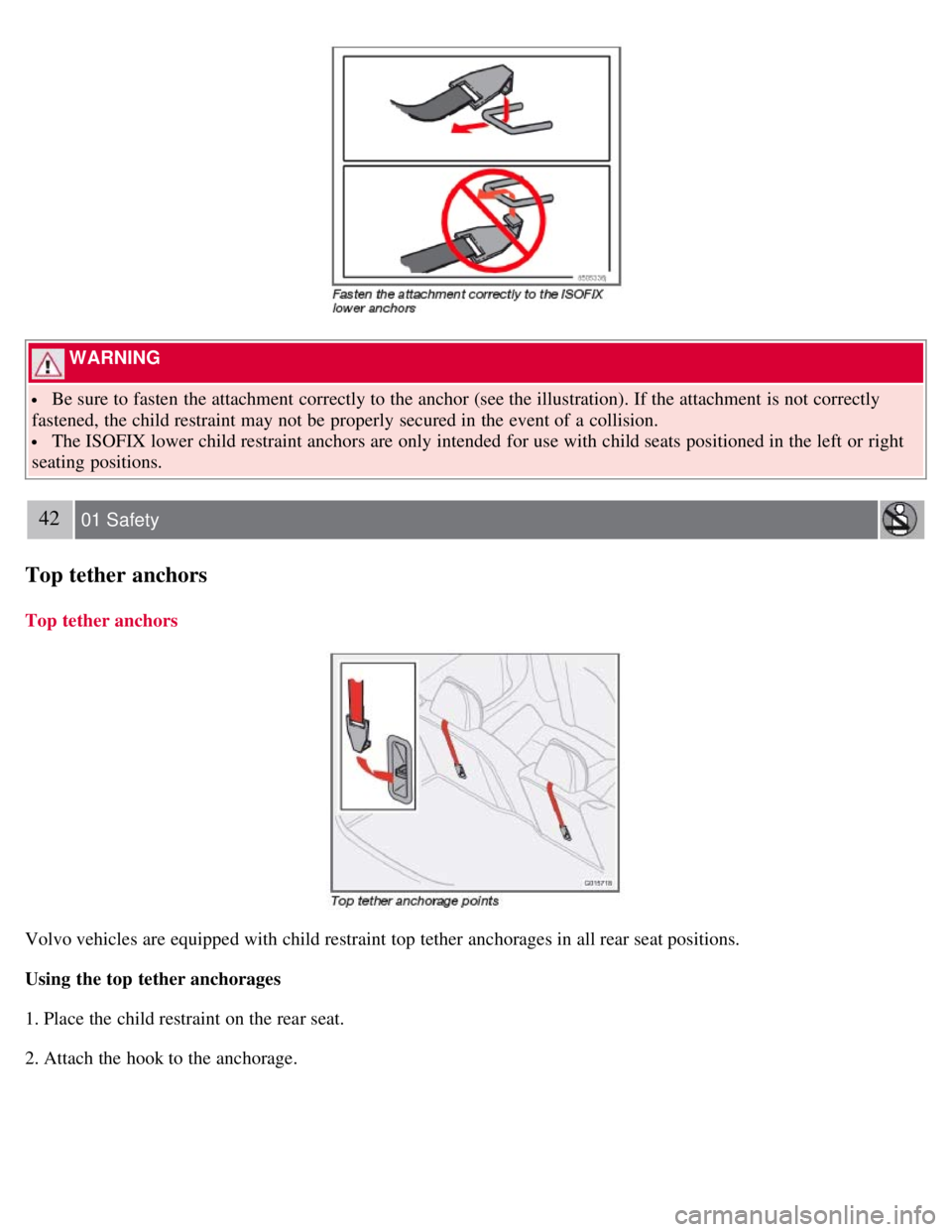
Be sure to fasten the attachment correctly to the anchor (see the illustration). If the attachment is not correctly
fastened, the child restraint may not be properly secured in the event of a collision.
The ISOFIX lower child restraint anchors are only intended for use with child seats positioned in the left or right
seating positions.
42 01 Safety
Top tether anchors
Top tether anchors
Volvo vehicles are equipped with child restraint top tether anchorages in all rear seat positions.
Using the top tether anchorages
1. Place the child restraint on the rear seat.
2. Attach the hook to the anchorage.
Page 38 of 234
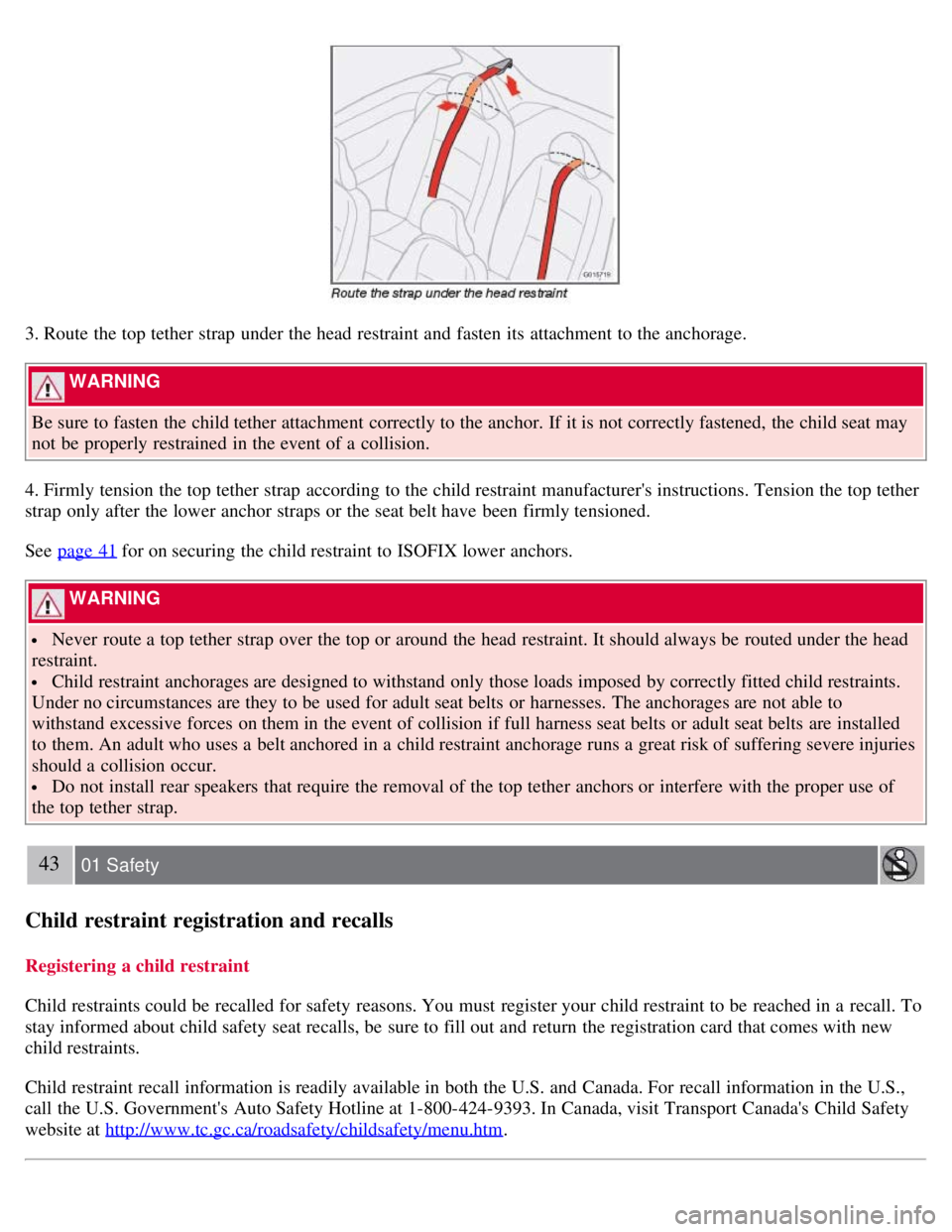
3. Route the top tether strap under the head restraint and fasten its attachment to the anchorage.
WARNING
Be sure to fasten the child tether attachment correctly to the anchor. If it is not correctly fastened, the child seat may
not be properly restrained in the event of a collision.
4. Firmly tension the top tether strap according to the child restraint manufacturer's instructions. Tension the top tether
strap only after the lower anchor straps or the seat belt have been firmly tensioned.
See page 41
for on securing the child restraint to ISOFIX lower anchors.
WARNING
Never route a top tether strap over the top or around the head restraint. It should always be routed under the head
restraint.
Child restraint anchorages are designed to withstand only those loads imposed by correctly fitted child restraints.
Under no circumstances are they to be used for adult seat belts or harnesses. The anchorages are not able to
withstand excessive forces on them in the event of collision if full harness seat belts or adult seat belts are installed
to them. An adult who uses a belt anchored in a child restraint anchorage runs a great risk of suffering severe injuries
should a collision occur.
Do not install rear speakers that require the removal of the top tether anchors or interfere with the proper use of
the top tether strap.
43 01 Safety
Child restraint registration and recalls
Registering a child restraint
Child restraints could be recalled for safety reasons. You must register your child restraint to be reached in a recall. To
stay informed about child safety seat recalls, be sure to fill out and return the registration card that comes with new
child restraints.
Child restraint recall information is readily available in both the U.S. and Canada. For recall information in the U.S.,
call the U.S. Government's Auto Safety Hotline at 1-800-424-9393. In Canada, visit Transport Canada's Child Safety
website at http://www.tc.gc.ca/roadsafety/childsafety/menu.htm
.
Page 73 of 234

1Factory default
80 02 Instruments and controls
Home Link® Universal Transceiver (option)
Introduction
HomeLink1 is an optional system that can be programmed to learn the codes of three different remote controlled-devices
(for example, a garage door opener, remote lighting, entry gate). HomeLink's sun visor-mounted transceiver, powered by
your car's electrical system, may then be used in place of your hand -held remote controls. The HomeLink transceiver
consists of three programmable buttons and an indicator light.
1 HomeLink is a registered trademark of Johnson Controls, Intl.
© JCI, All rights reserved
NOTE
For your security, the HomeLink Universal Transceiver is designed to not function if you lock your vehicle from the
outside.
Retain the original transmitter(s) for future programming procedures (for example, if you purchase a new vehicle).
For your own security, erase all programmed buttons on the HomeLink Universal Transceiver when you sell your
vehicle.
Metallic sun protection films should not be used on any windows in a vehicle equipped with HomeLink Universal
Transceiver. This could interfere with the transceivers function.
Operating the HomeLink Universal Transceiver
Once programmed, the HomeLink Universal Transceiver can be used in place of your handheld transmitters.
NOTE
The HomeLink universal transceiver will function for 30 minutes after the driver's door has been opened without
switching on the vehicle's ignition.
Press the programmed HomeLink button to activate the garage door, driveway gate, security lightning, home security
system etc.
Your original hand -held transmitters may, of course, be used at any time.
Page 90 of 234

Easy entry is only intended to be used when the front seat in unoccupied.
Moving the seat forward:
1. Remove the seat belt from its guide (see page 17
).
2. Pull up control 1, hold it up, and fold the backrest forward until it locks in position.
3. Press and hold button 2 while the seat moves forward.
Moving the seat rearward:
1. With the backrest folded forward in the locked position , press and hold down button 2 until the seat has returned
to its original position.
2. Pull up control 1, hold it up, and fold up the backrest to the upright position.
3. Return the seat belt to its guide.
WARNING
After the seat has been returned to its original position, be sure that the backrest is securely locked in the upright
position.
100 04 Interior
Front seats
Power seats (option)
The power driver's seat can be adjusted:
If the ignition key is in position I or II.
During a 10 minute period after the doors have been unlocked if the door remains open.
If the door is closed and the ignition key is not yet in the ignition, or if the key is in position 0, the seat can be
adjusted or during a period of 40 seconds. The power passenger's seat can only be adjusted if the ignition key is in
position I or II, or if the engine is running.
Adjusting the seat
Seat adjustment controls 1, 2, 3, and 4 on the side of the seat can be used to move the seat to the position of your
choice.
1. Move this section of the control up or down to raise/lower the front section of the seat cushion.
Page 98 of 234
WARNING
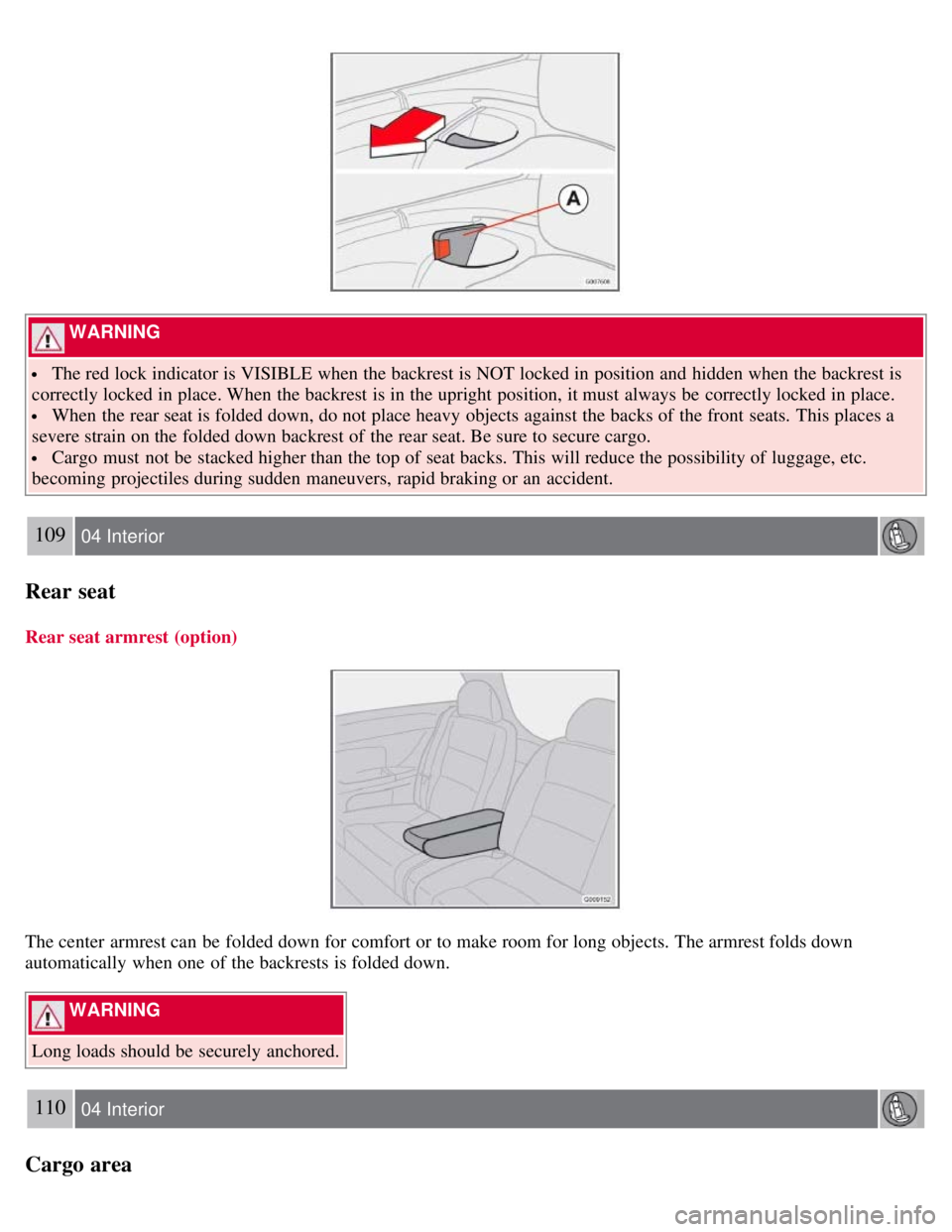
The red lock indicator is VISIBLE when the backrest is NOT locked in position and hidden when the backrest is
correctly locked in place. When the backrest is in the upright position, it must always be correctly locked in place.
When the rear seat is folded down, do not place heavy objects against the backs of the front seats. This places a
severe strain on the folded down backrest of the rear seat. Be sure to secure cargo.
Cargo must not be stacked higher than the top of seat backs. This will reduce the possibility of luggage, etc.
becoming projectiles during sudden maneuvers, rapid braking or an accident.
109 04 Interior
Rear seat
Rear seat armrest (option)
The center armrest can be folded down for comfort or to make room for long objects. The armrest folds down
automatically when one of the backrests is folded down.
WARNING
Long loads should be securely anchored.
110 04 Interior
Cargo area
Page 101 of 234

Cargo area net (option)
The cargo area net can be placed behind the front seat backrests.This net is only intended to be used when the rear seat
backrests are folded down.
Installing the net
1. Fold down the rear seat backrests (see page 108
).
2. Attach the cargo net to the upper mounting brackets near the ceiling.
3. Attach the cargo net's hooks in the eyelets near the seat belts floor anchorages on opposite sides of the vehicle.
4. Pull the cargo net's bands taut if necessary.
WARNING
Be sure that the net is securely attached in the mounting brackets and eyelets.
Cargo should be properly secured even when the net is in use.
Removing the cargo net
1. Release the pressure on the bands.
2. Remove the hooks from the eyelets near the floor.
3. Remove the net from the ceiling mounting brackets.
4. Fold the net and keep it in its storage bag.
Load anchoring eyelets
Page 105 of 234

2. Unlock - Press the Unlock button on the remote once to unlock the driver's door. The turn signals will flash twice to
confirm unlocking.
After a short pause, press the Unlock button a second time within 10 seconds to unlock the other doors and the rear
liftgate.
NOTE
The turn signals flash to confirm that the vehicle has been correctly locked/unlocked with the remote control or
the optional keyless drive. When locking the vehicle, the turn signals will flash a confirmation only if all the doors
are securely closed and locked. Flashing confirmation for locking and unlocking may be customized in the vehicle's
Personal settings menu. See page 78
for more information.
The two-step unlocking function can be changed so that one press of the Unlock button unlocks all of the doors
and the rear liftgate. See Personal settings on page 78
for more information.
Automatic relocking: If the doors are unlocked, the locks will automatically reengage (re-lock) and the alarm
(option) will rearm after 2 minutes unless a door or the rear liftgate has been opened.
Automatic locking : When the vehicle starts to move, the doors and rear liftgate can be locked automatically. When
the doors have been locked in this way, they can be unlocked by: pulling twice on one of the inside door opening
handles, or by pressing an unlock button located near the door opening handle.This feature can be turned on or off, see
Personal settings on page 78
for more information.
Airbag deployment will automatically attempt to unlock the doors.
3. Approach lighting - As you approach the car:
Press the button on the remote control to illuminate the area around the car in dark conditions.
Pressing the button once lights up the interior lighting, parking lights, and license plate lighting. These lights will
switch off automatically after 30, 60 or 90 seconds. See the Personal settings on page 78
for information about
adjusting the time setting.
4. Unlock rear liftgate - Press the button once to disarm the alarm system (option) and unlock only the rear liftgate.
After closing, the rear liftgate will not automatically relock. Press Lock to relock it and rearm the alarm.
NOTE
This function will not open the rear liftgate.
If the rear liftgate is opened when the other doors are locked, it will remain unlocked after it has been closed. It
must be locked with the Lock button on the remote control.
118 05 Locks and alarm
Remote control and key blade
5. Panic alarm : - This button can be used to attract attention during emergency situations.
To activate the panic alarm, press and hold the red button for at least 3 seconds or press it twice within 3 seconds.
The turn signals and horn will be activated.
The panic alarm will stop automatically after 30 seconds.
To deactivate, wait approximately 5 seconds and press the red button again.
NOTE
This button will NOT unlock the car.
Page 127 of 234

WARNING
Volvo's floor mats are specially manufactured for your car. They must be firmly secured in the clips on the floor so
that they cannot slide and become trapped under the pedals on the driver's side.
CAUTION
Automatic transmission: The engine should be idling when you move the gear selector. Never accelerate until after
you feel the transmission engage! Accelerating immediately after selecting a gear will cause harsh engagement and
premature transmission wear. Selecting P or N when idling at a standstill for prolonged periods of time will help
prevent overheating of the automatic transmission fluid.
WARNING
Always place the gear selector in Park (manual transmission: first or reverse gear) and apply the parking brake
before leaving the vehicle. Never leave the vehicle unattended with the engine running.
Always open garage doors fully before starting the engine inside a garage to ensure adequate ventilation. The
exhaust gases contain carbon monoxide, which is invisible and odorless but very poisonous.
143 06 Starting and driving
Starting the vehicle (keyless drive)
Starting a vehicle with keyless drive (option as available)
Keyless drive makes it possible to unlock, start and lock the vehicle without using a remote control.
A start control is fitted in the ignition switch on vehicles equipped with the optional keyless drive. This control is used
in the same way as the ignition key to start the engine. See also page 141
for general information on starting the
engine.
NOTE
A keyless drive remote control must be in the passenger's compartment in order to start the engine.
1. Press the brake pedal (the clutch pedal must also be fully depressed on models with a manual transmission).