2008 VOLKSWAGEN JETTA Com
[x] Cancel search: ComPage 206 of 477

Booklet 3.1 Controls and Equipment
help you t o fami liarize yo urself the control s and displays
quickly.
Re lease hand le
Central locking button
Light switc h ............ •... ..•.
A ir out le ts
Th um b whee l for ope nin g and
cl osing th e air outl et
T urn sig n al a nd high beam head-
li ght lever ..................... .
In strum ent clu ste r:
Inst rum ents ...... ........... .
Display s .... .... ........ .... .
Warn ing lights ............... .
Lever for win dshi eld wipe r and
was her an d for Mu lti-fun ctio n
indicator. ............ ......... . .
Sto rage compartm ent or ai r outlet
fo r in di rec t ve ntilation .......... .
Emerge ncy flas her sw itch ... ... . .
Warni ng light fo r fro nt passe nger
a irbag switched off 2.1 ,
c h ap te r "Mo nitoring th e advan ced
a irb ag sys te m "
Fron t passe nge r a irb ag 2.1, c hap te r "Airbag
sys tem"
Openi ng leve r and lock for glove
co mp artm ent
Fuel fi ller flap release b utton
= bo okle t 3.2, cha pter "F illing
Hea r lid releas e butt on and overr ide
lock .... .. .... ....... ....... ... .
Power w indow switch es ..... ... .
Sw it c h for adj ust ing the pow er mir rors ................. .
Engine hood re lease leve r 3.2. cha pte r "Op ening the
e ngi ne
In strument cluster illumin atio n
49
5
7
20
53 .9
48
37
sw itch . . . . . . . . . . . . . . . . . . . . . . . . . .
C rui se contr ol leve r
Driv era irha g 2.1 , cha pter
"A irb ag
I lorn {wo rks onl y whe n the ig ni tio n
is on)
L eve r for adjustable steering
co lumn ...... ................. .
Ig niti on lock ................... .
Thumb w hee l fo r l eft se at heati ng
Co ntr ols for
Hea tin g and ve ntilat ion . ..... .
Clima tic ........ ..... ....... .
Clima troni c ................. .
Ad ditional storage comp artme nt
Powe r outl et . ............ ... .
ON/OFF b utton fo r Elec tronic Sta
b ili za tion Pr ogram {ESP) or Ant i
sli p regu latio n (ASH)
Park ing brak e re lease leve r ...... .
Cup hold er ... .... .... .........•
Levers in the center conso le
Sh ift le ver (ma nual
t ra nsmi ssio n) ....... .... .
Se lec tor le ve r (A utomatic tran s-
111i ssio n / Dir ect shi ft gearbox)
Thu111b whee l for r ight seat
heat ing .. .... ..... .... ........ .
So un d sys te111 =book le t
Tips
90
93
80
8 1
84
73
73
104
• Some feature s m en tion ed arc s ta nd ard
e quip111en t o n so me m od els on ly and opti ons on
o th ers.
• For tec hn ica l reasons, t he
of
t h e sw itches and indica tor/warn ing lig h ts ma y
di ffer. T he
factor is t he sy mbol o n th e
sw itch its elf.
Instrument panel 3
Page 209 of 477

Booklet 3.1 Controls and Equipment
Tachometer
The tachomete r display s the engi ne s pee d in rev olutions p er minute (rpm).
If, fo r examp le, the n eedle is di rec 1ly ove r 1h e 2.
this corre sp on ds 10 a n eng in e sp ee d of2000 rpm
( r evo lution s per minut e).
T he red zone on the dial indi ca tes 1he m ax imum
e n gin e spee d th at may be use d brie fly w hen the
e n gin e is warm an d aft er it has bee n b roken in
properly. However . it is ad visa ble 10 up sh if1 or
m ove 1he se lec 1o r lev er 1 0
D (or take yo ur fool ofT
th e acce le rator pedal 10 slow down ) b efo re I h e
n eed le rea ches the red zo ne.
Engine coolant tempera ture gauge
Th.i s gaug e sh ow s the en gi ne coola nt tem peratur e.
Fi g. 4 Sect ion of th e i nstrument cluster: engine
coola nt tempe ra tu re gauge
Engine cold
Avoid high en gin e s pee ds and heavy en gin e
l o ad s
nee dle
s h ould b e in th e middl e of the ga uge. The lem
pe rat ur e ma y also rise whe n the en gin e is
work ing hard, espec iall y at high out sid e te mp er
a tur es. D o no t worry if th e wa rning light and a
warning message does not appea r in th e displa y.
I f th e sy mbol
Jc: and a wa rning text app ear th e
d is pla y, eith er the coo la n1 t emp eratur e is
hi gh or the coo la nt l eve l is 100 low "Tips a nd Advice", c hapte r "Coo lant."
6 Instrument panel
N ee dle in warning zon e©
If need le is in the warning zo ne, the symb ol wi ll light up. If yo ur vehicle is equi pp ed wit h
1hc m essage displa y feature, an in forma tion tex t
wi ll al so appea r in the display . See yo ur a uth o
rize d Volksw age n dea le r fo r m ore inform atio n .
the coo la nt 1e mp erature is too high, or th e
coo lanl le vel loo low . Stop the vehicle and
ofT the e ngine. Check the coo la nt leve l "Ti ps and Advice", c hapter
Do not cont inue driving if th e coo lant level is
c orre ct and yo u have wa rnin g in th e in stru
ment clus1e r te llin g yo u th ere is a prob le m. Con-
the nea res t auth orized Volk swagen dea le r
fo r ass is ta nce.
WARNING
Stop! Before working in the en gin e co mpart
ment, alwa ys read a nd heed all WARNI NGS
"Tips and Advice", c hapter
"Wo rking in th e en gi ne compartment. " The
e ngin e co mpartm ent of any motor veh icle is a
potentiall y dang erou s area and can ca use se
riou s pers onal injury .
of th e air inlet red uce the
coo ling efTec1 of th e coo la nt. If is ho1 out sid e drive high e ngin e loads, th ere is a
ri sk of the en gin e ove rhea tin g. .,
Page 220 of 477
Booklet 3.1 Controls and Equipment
Opening the Lights & Vision menu
Select Set up from the main m enu
12a nd pr ess the button 14,
ll @ underthe wind shi eld wip er leve l.
Or
Ugh ts & Visio n
Pre ss button 13, fig . on the
multi fun cti on stee ring whee l
until th e
Set up menu i s dis pl aye d.
Selec t th e sub -m enu Lights Visio n.
An ex ampl e of how to use th e menu 13 o r 14.
Fun cti on
Coming Home Her e yo u ca n dete rmi ne how long the light s should remain on aft er
yo u h ave loc ked th e ve hicle 47.
Leavin g Home Here yo u ca n dete rmin e how l ong th e lig ht s s ho uld on when
y o u unlo ck th e veh icl e.
Fo otwe ll light
Comfort i nd ic. 13rightn ess of th e footwell ligh ting when t he doo rs are op en.
Th e tum sig nal w ill fla sh at leas t thr ee tim es if the turn sign al lever
i s o pera ted to chan ge lan es
49
Fact ory sett ing
Bac k Rese ts th e funct io ns in thi s m enu to th e fa cto ry se tting s.
Yo u will return to th e Se ttings m enu .
Tip s
The menu s shown in the dis pla y depend s on the
ve hicl e elec tron ics and th e opti on l evel of yo ur
Convenience functions m enu
ve hicle. If yo u ar e no t sur e. ask your aut ho ri ze d
Vo lkswagen deal er fo r ass is ta nce. '4
The con venien ce is used to make th e sett ings fo r the conve 11 ie n ce function s
in the
Opening the Convenience menu
Select Set up from the m ain m enu
12an d pr ess the but ton 14,
11 und er th e w indsh ie ld wipe r leve r.
Or
Where ap plicable
Wher e app licable
P ress bu lion 13, fig. o n th e
mu lt ifun ctio n stee rin g w hee l
unt il th e
set up m enu i s di spl ayed .
Selec t th e sub-m enu Convenience .
An exa mpl e of h ow to use th e 13 o r 14.
Instrument panel 17
Page 221 of 477

Booklet 3.1 Controls and Equipment
Func tion
Co nven ience
Door open The vehicl e lock s all door s w he n th e vehicle is mov ing and unl ocks
th e door s w hen key is re mo ved fr om ignition loc k.
ATA con firm The activati on of ala rm sys te m ca n be confirmed if re
quir ed .
Co nv. mode Co nve nien ce opera tio n of powe r w ind ows: dete rm in es if dri ver's door wi ndow, all w indows o r no window all sh ould h e
o p en ed when ve hicle is unlo cked. Thi s fun ctio n ca n o nly be ac
t ivated via dr iver's door.
Mirrors odjust The pa sse nger mir ror will be adju ste d au to mati cally wit h dri ve r's mirror if thi s fun cti o n is on.
Factory setting
Bo ck fun ctio n s in thi s m en u factory sellin gs.
Y o u w ill
m enu .
Tip s
T he m enu s show n in
displ ay depends on ve hicl e elec troni cs and o pti on l eve l of yo ur v
ehicl e. If
arc s ur e, ask yo ur authori zed
Vo lk sw age n dealer for assis ta nce .
Applies lo vehicles: wi th Hig hline ins trument cluster and compass
Compa ss
Th e ve hicle c ompa ss displa ys diff ere nt dir ect of trave l
The com pass is a n extremely ac curat e comput er di spl ays veh icle hea di ng s of N, NW . W, SW ,
S , SE , and NE. Th e m enu "Co mpa ss" can b e
op en ed wit h th e mu lti-fun cti on stee ring w hee l
bu H ons.
Ti ps
W hen dri vi ng in und erg round garages, throug h
or nea r subwa y stat ions o r rail roads·· - -"
app ear in displa y in stead of tr ave l
di rec tio n. If
m enu Compa ss is op en ed by
u sing w ind shi eld wipe r lever or multi-func
tion stee rin g w hee l butto ns Co m
pa ss avai lable prese nt" wi ll in dis p lay. Once imerfer cn ce cause dis appears. co mp ass rea ding will re app ear in d isp lay.
Applies to vehicles: with instrument cluster and compass
Calibrating the compass
vehicle compass must be calibrated time install aclditionnl i te m s
your vehicle, i.e. a roof ra ck.
Opening the Compass menu
Se lec t Set up the ma in
1 2 and press the bu11on
und er th e windsh ie ld wiper leve r o r th e
button on the multi-func tion steer ing
18 Instrument panel
wheel 13, fig . IO
Selec t th e sub-m enu Composs and
pr ess
button.
Page 222 of 477
Booklet 3.1 Controls and Equipm ent
Calibrat ing the compas s
-Ma rk the m enu ent ry Calibra tion and
pr ess
butt on. The fo llow ing m es
sage will be di sp layed To calib rate drive
round a comp lete circle.
- Drive t he ve hicle in circl es a t 5 mph (10
km/h) or less until th e disp lay indica tes
th at th e ca libra tio n process has bee n com
pl eted. • Durin g th e ca libration process or the cali
b ra tio n process is not su ccess rully accom
pli sh ed th e word "CA I."
will ap pear in the dis
p la y in stead or the directio n.
• 1r "CAL" ap pea rs in the dis p lay instead of the trave l di rectio n th e co mpa ss mu st be ca librat ed.
• While calib ratin g th e co mpass do no t drive
w ith the rea r lid ope n or the rea r seatback un
l o ck ed to avoid ina ccurate
Adjusting the compass variance zone
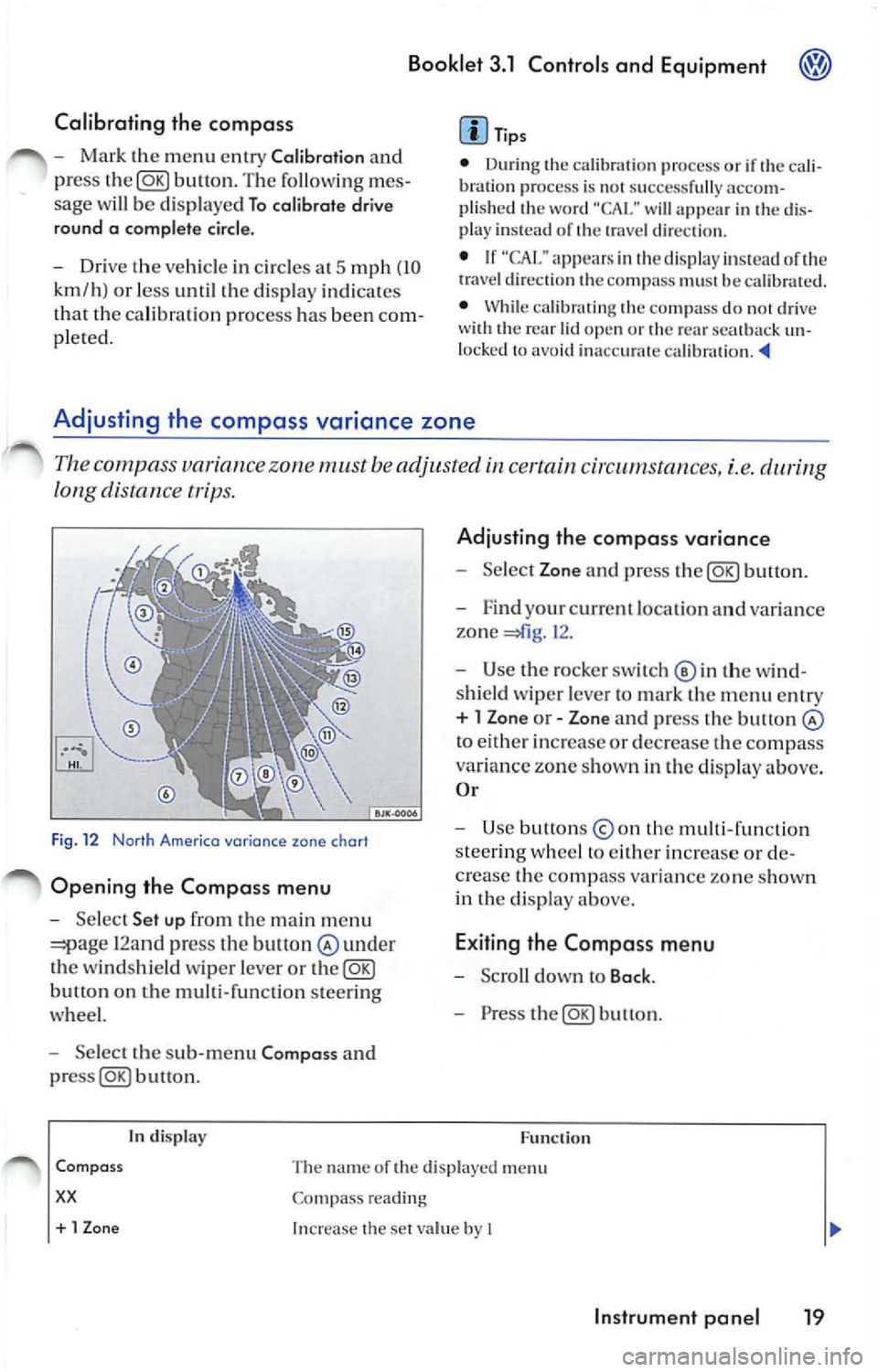
Th e c ompa ss variance zone must be adjusted certain cir cums tances, i.e.
long distance tr ips.
F ig . 12 Norlh Americo variance zone chort
Opening the Compa ss menu
- Se lec t Set up fr om the main m enu
12and press the bult on under
th e winds hield wiper leve r or the@g)
butt on on the multi-function steer ing
whee l.
- Select the sub -m enu Compa ss and
buu on .
tn disp lay
Adju sting th e compass variance
- Select Zone and press button.
- F ind your cur rent loca tio n an d varia nce
zone
1 2 .
- Use the rock er switch© in th e wi nd
s hi eld wiper leve r to ma rk th e m enu entr y
+ l Zon e or - Zone and press the button
to eith er in crease or decrease the compass
variance zone sh own in th e d isplay above.
O r
- Use button s
the multi -fun ction
s tee rin g w hee l to eith er increase o r de
c rea se the comp ass va ria n ce zone s how n
in th e di sp lay above.
E xiting the Compa ss menu
- Scro ll down to Back .
- Press the@g)button.
F u nc tion
Com pass
xx
The name or the di sp layed menu
Co mpass reading
+ 1 Zon e Increase the se t va lue by I
In strument pan el 19
Page 223 of 477
® Booklet 3.1 Controls and Equipment
In display Function
-1 Z
one
Ba ck Dec
reases the se t va lue by I
Th e Compass m enu is cl osed and the last displayed menu is ope ned.
Tips
The menu s sho wn in the disp lay dep end s on th e
ve hicl e electro nics and the o ption leve l of your
Warning lights
Overview of the warning lights
vehicle. If yo u are no t s ure, ask your authorize d
Vo lkswage n dealer for
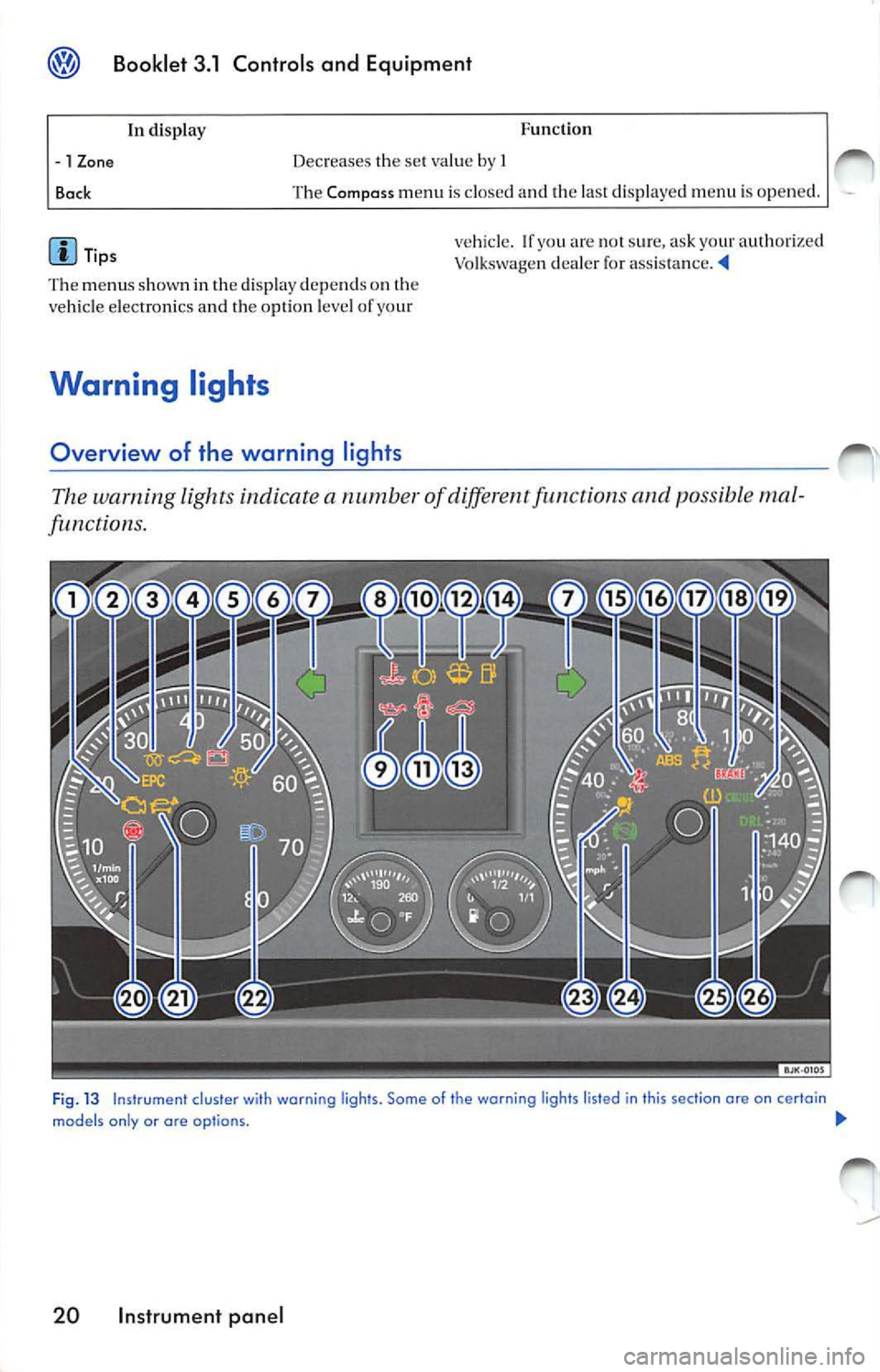
The warning light s indicate a numb er of diff ere n t functions and possibl e mal
functions.
Fi g. 13 Instrument cluster wi th warning ligh ts. Some of the warning lights listed in this section ore on certain
models only or are op tio ns. !JI,,
20 Instrument panel
Page 225 of 477

Booklet 3.1 Controls and Equipment
It em Symbol Meaning of warning Lights Fur ther informa tion
. Fue l fi lle r ca p not prop erl y clo sed 29
Hi gh beam 29
Ai rba g or b elt t en sio ner sys te m 2. 1. ch apt er "Mo nitorin g the m alfun cti on o r airb ag disabl ed
vanced airbag system"
Depress pedal 30
Tire press ure m onitorin g syste m 30
(TPMSJ
or
Day time running lights
WARNING
Failur e to heed warn ing l ig ht s and o ther im
por tan t ve hicle informatio n can lead to a
b rea kdow n in
coll is io n an d se rio us
p erso nal injur y.
• Neve r ign ore w arn ing lig ht s and warn ing
t ex ts !
• Whe neve r sta ll ed o r sto pp ed for re pa ir,
move the vehicle a safe dis ta nce ofT the road ,
s top the en gine, and turn on th e emergency
na sher and u se other warn ing device s to
approac hin g
Tip s
• Some warn ing lig hts ar e also displ aye d in th e
instru ment cluster. The pri orit y of malfun ctio ns
i s di spl ayed w ith red and yellow sy mbo ls and
d isp laye d with addition al in for mat ion.
• I f o n e o f th e ligh ts mark ed wit h
comes o n
wh ile yo u are driving , mo ve a safe dista n ce off
th e road. Turn off the en gine , turn the e mer
ge ncy flas her o n and use o ther
devices
t o alert ot her motorists. Go to listed page in yo ur
book let fo r ex planations.
• Some fea tures menti oned are
eq uipment on some models options on
This warning light exh aust system.
W arnin g lig ht
flashe s:
Mi sfiring
damage th e co nverter .
Red uce sp ee d and drive caref ull y to the neares t
au thorized Vo lkswage n dea le rs hip . I lave the e n
g in e c hecke d.
T he follow in g tex t is di spla yed in th e ins trument
clu ster disp lay: Emissions workshop !
22 Instrument pan el
Wa rnin g li g ht i s illumin ated:
A malfun cti on ha s deve loped d urin g driving
w hi ch ha s red uced the qualit y of th e ex haust
e mi ssio n s.
spe ed an d dri ve c arefull y to
th e nearest a uthorized Vo lk swage n deale rs h ip.
H ave the engi ne checke d.
The fo llow ing tex t is displayed i n the instrum ent
cl uste r display: Emissio ns
Page 228 of 477
Booklet 3.1 Controls and Equipment
If the warning light ligh ts up again after d rivi ng
o n for a sh o rt dis tan ce, stop the vehicle and
swi tch off the engine. C onta ct an authorized
V olk swa gen deal er or a qualifi ed wor ksh op.
WARNING
Stop! Before working in the engine compart
ment, always read and heed all WARNINGS
3.2 "Working in the engine com
partment. " The engine compartment of any
motor vehicle is a pot entially dangerou s area
and can cause serious personal injury.
WARNING
Hot steam or coo lant can cause serious burns.
• Never open the engine hood if you sec
steam or coo lant escapi ng from the engine
compartment. Always wa it until you no longer
sec or hea r steam or coo lant escap ing from the
engi ne.
• Always let the en gi ne to cool down com
pletely before carefully open ing the engine
h ood. Hot components w ill burn skin on co n
tact.
• When the engine has cooled down and you
are ready to open the engine hood:
R emove the key from the ignition.
Engine oil pressure 9=:7:
WARNING (continued)
Apply the parking brake firmly and put
the selector in P (Park, automatic trans
mis sion) or Neutral (manual transmis
s ion) .
Keep c hildren a nd oth ers away from the
vehicle.
• Never reach into the area around or touch
the radiato r fan. Contact with the blades can
re sult in serious persona l injury.
• Alway s remember that the radiator fan is
temperature-contro lled and can t urn on sud
den ly - even when the engine has been
switched
for a longer period of tim e and the
k ey has been removed from the ignition.
• Never unscrew the coolant expansio n tank
ca p when the engine is hot. A hot engine will
h eat the coolant and put it under pressure . Re
moving a ca p that is under pressure can result
in serious personal injury and/or burns.
• Alw ays protect face, hands and arms from
h ot escap ing coo lant or steam by cover ing the
cap w ith a large, thick rag.
• Turn the cap slowly and very carefully in a
co unt er-clockwise direction while applying
light downward pres sure on the top of the cap.
• Never sp ill antifreeze or coo lant on the ex
haust system or hot engine parts. Under some
co ndit ions, the ethylene g lyco l in engine
coo lant can catch fire.
This warning symbol indicat es that the en gin e oil pressure is low.
I f thi s wa rning symbo l s tart s to flas h. an d thr ee
w arning s sound , sw itch th e e ngin e and ch ec k
th e oi l leve l. Top off with en gin e oil if necessary
3.2 "Tip s an d Adv ic e" , ch ap te r "E n
g in e o il."
The follo win g inform ation text is disp la ye d:
ST OP Oil p ressure Engin e off Owner 's manual!.
If th e sy mb ol fl as hes eve n though the oil l eve l is
co rrec t, do 11 01 drive on. D o not le t th e engine
idl e. Co nta ct a n authori zed Vo lksw age n d eale r
or a qua lified wo rksh op .
Tip s
Th e oil pre ssure wa rnin g symbol is not an oil
l eve l ga uge. Check the o il leve l reg ularl y, pre fe r
a bl y every time you get gas .
Instrument panel 25