Page 40 of 381

Function Using the buttons on the remote control vehicle
key ⇒ fig. 23
Unlock the vehicle. Press the 0 button.
Lock the vehicle. Press the 1 button.
Unlock the luggage compartment lid. Press the q button.
Note: Depending on the settings for the power locking system in the Convenience submenu, it may be necessary to press the 0 button on the remote control vehicle key twice to unlock all doors and the luggage compartment lid, Volkswagen Information System.
The vehicle key unlocks or locks the vehicle only when the battery in the remote control vehicle key has enough power, and the remote control vehicle key is within a few yards/meters of the vehicle.
x All turn signals flash once and the horn beeps once to confirm that the vehicle has been locked. The horn beep can be disabled by deactivating the ATA confirm feature in the Convenience submenu Volkswagen Information System.
x All turn signals flash twice to confirm that the vehicle has been unlocked.
If the turn signals do not flash to confirm locking, one or more doors or the luggage compartment lid is not locked.
If the driver door is open, the vehicle cannot be locked with the remote control vehicle key.
If the vehicle was unlocked with the remote control vehicle key and the door or the luggage compart-ment lid has not been opened within a few seconds, the vehicle is automatically locked again. This feature helps prevent you from leaving the vehicle unlocked unintentionally.
NOTICE
Check to make sure that the windows go down slightly when you unlock the vehicle. Otherwise the windows and seals could be damaged when opening the door.
Unlocking or locking the vehicle from the inside
Fig. 24 In the vehicle doors: Power locking button.
Page 41 of 381

Press button ⇒ fig. 24:
1 Lock the vehicle.
The power locking button works whether the ignition is switched on or off but only when all doors are closed.
If the vehicle is locked with the vehicle key, the power locking button is deactivated.
If the vehicle is locked with the power locking button:
x The yellow indicator light W in the power locking button comes on to indicate that all doors are locked.
x If the vehicle is equipped with an anti-theft alarm, the system is not turned on.
x Opening doors or the luggage compartment lid from the outside is not possible, at a traffic light, for example.
x Doors can be unlocked and opened separately from inside the vehicle by pulling the door handle to open the door. The indicator light W goes out. The unopened doors and luggage compartment lid remain locked and cannot be opened from the outside.
x An open driver door will not be locked. This helps keep the driver from being locked out of the vehicle.
The vehicle is unlocked if you push the 0 button while the vehicle is standing still. Depending on the settings in the Convenience submenu, Convenience submenu, it may also be unlocked when you switch off the ignition and open a door from inside the vehicle (Auto unlock). On vehicles with automatic transmission, the doors will also unlock when the selector lever is in Park (P) and the igni-tion is switched off.
Unlocking or locking the vehicle with Keyless Access
Fig. 25 Ranges of the Keyless Access locking and starting system. Outside the vehicle: Unlocking range. Inside the vehicle: Starting range.
Page 42 of 381
Fig. 26 Keyless Access locking and starting system: Sensor for unlocking A on the inside of the front door handles. Sensor for locking B on the outside of the door handles.
Page 43 of 381

Open and close the luggage compartment lid as you would a standard luggage compartment lid, Luggage compartment lid
The luggage compartment lid locks automatically when it is closed except in the following situations:
x The vehicle is completely unlocked.
x When an authorized remote control vehicle key is inside the vehicle.
Locking with a second vehicle key
If a remote control vehicle key is inside the passenger compartment, the vehicle can be locked from the outside only if a second valid remote control vehicle key is within range.
When the vehicle is locked from the outside, the keyless go (starting) function of any keys left in the passenger compartment will be deactivated, Starting and stopping the engine. A key that was inside the vehicle when it was locked from the outside is reactivated by pressing the 0 button on the deac-
tivated key ⇒ fig. 23.
Automatic deactivation of sensors
If the vehicle has not been unlocked or locked for a longer period of time, the proximity sensors in the passenger door are automatically deactivated.
If a sensor on the door handle of a locked vehicle is activated too often, for instance by a bush or hedge that rubs against the vehicle, the sensors in the door handle on that side of the vehicle are switched off for a short time.
The door handle sensors become active again if one of the following events occurs:
x A short time has passed.
x OR: The vehicle is unlocked using the 0 button in the remote control vehicle key.
x OR: The luggage compartment lid is opened.
Convenience features
The settings in the Settings – Convenience menu, Volkswagen Information System determine which doors open when the door handle unlocking surface is grasped.
NOTICE
The door handle sensor surfaces can be activated by a strong stream of water or steam if a valid vehicle key is within range of the vehicle.
The door may not open if the outside and inside door handles are used at the same time.
If the vehicle battery or the battery in the remote control vehicle key is weak or dead, it might not be possible to unlock and lock the vehicle using Keyless Access. The vehicle can still be manually locked or unlocked with the key bit, Emergency closing and opening.
The driver message Key not in range appears in the instrument cluster display if there is no remote control vehicle key inside the vehicle or if the system does not recognize the remote control vehicle key. The key may not be recognized, for example, if it is covered by something that interferes with the signal (such as a briefcase), or if the remote control vehicle key battery is weak. Electronic devices such as mobile phones can also interfere with the signal.
Dirt on the door handles that contains a lot of salt (especially in winter) can affect the way the door handle sensors work. Cleaning the door handles can help with this problem, Exterior care and cleaning.
Page 46 of 381
If a door is not closed properly, the vehicle icon appears in the instrument cluster display showing an
open door ⇒ fig. 12, ⇒ fig. 13.
Depending on your vehicle's equipment and options, the icon may still be displayed even after the ignition is switched off as long as the key has not been taken out of the ignition. The icon in the in-strument cluster display goes out about 15 seconds after the vehicle has been locked.
Page 49 of 381
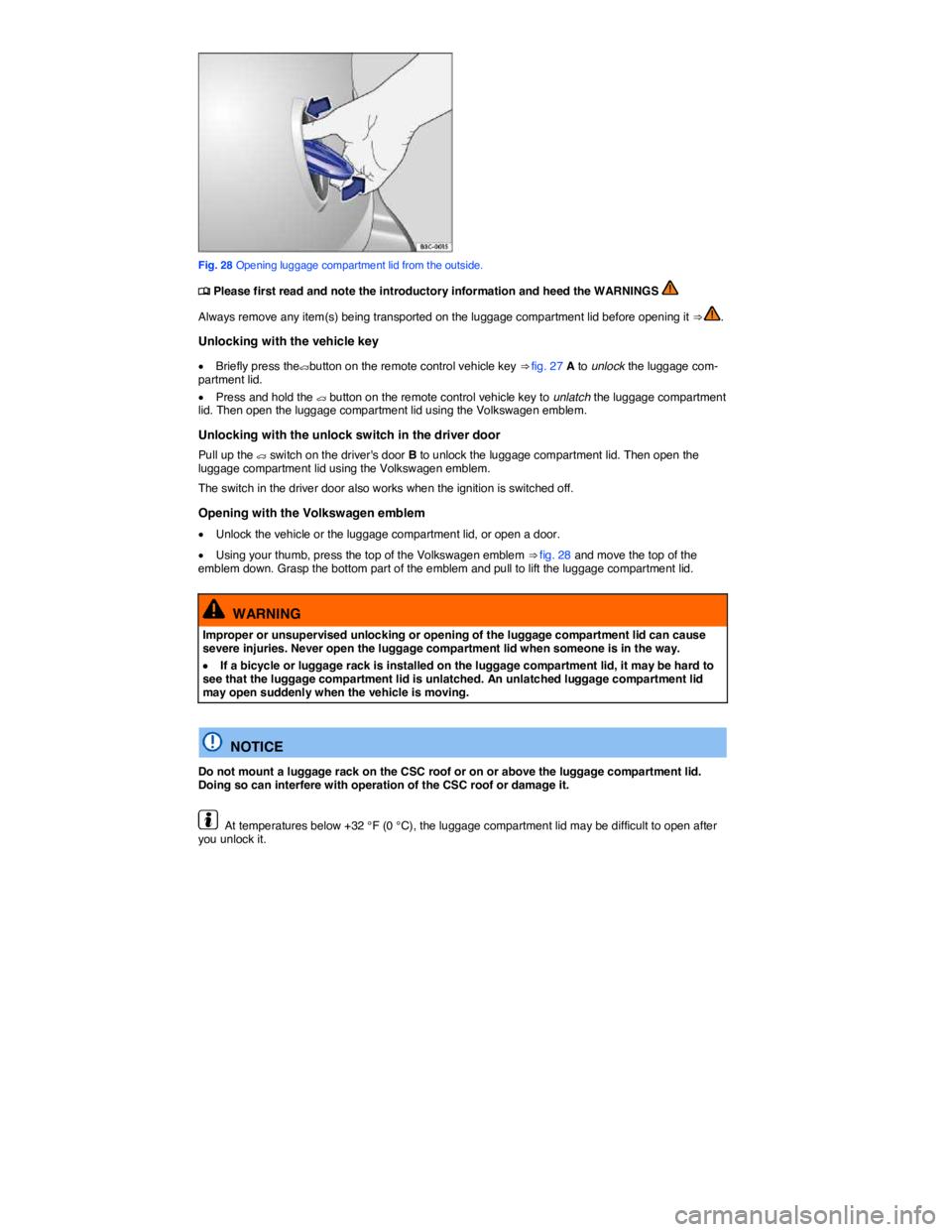
Fig. 28 Opening luggage compartment lid from the outside.
Page 50 of 381
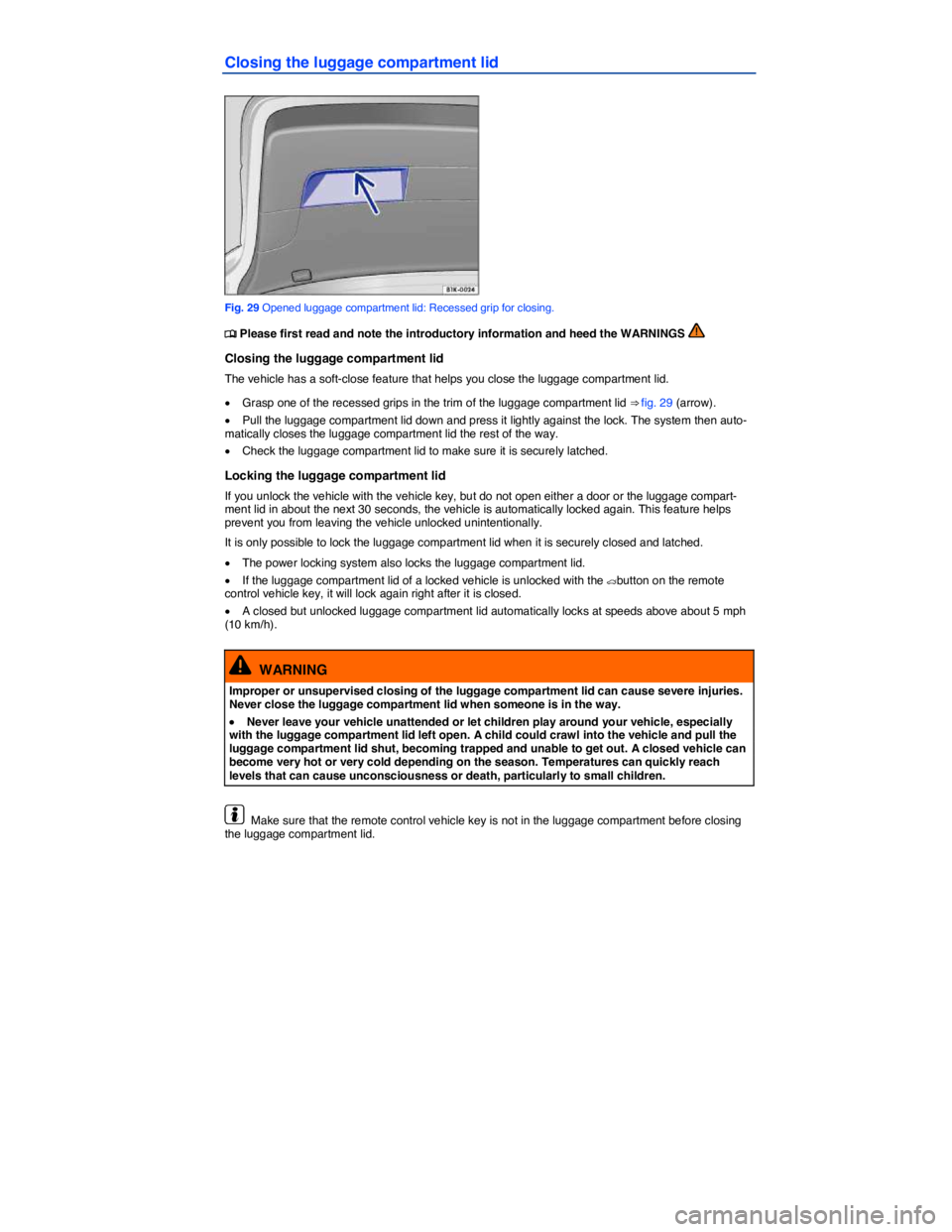
Closing the luggage compartment lid
Fig. 29 Opened luggage compartment lid: Recessed grip for closing.
Page 52 of 381
Switches in the driver door
Key to fig. 30:
(1) To open or close all windows at the same time.
(2) For the windows in the doors.
(3) For the rear side windows.
Opening or closing windows
Function Action
Opening: Press the switch.
Closing: Pull the switch.
Open all windows: Press the - switch.
Close all windows: Pull the - switch.
Stopping automatic movement: Press/pull the respective switch again.
You can still use the power windows for several minutes after the ignition is switched off as long as the driver or passenger door has not been opened. When the vehicle key has been removed from the ignition and the driver door has been opened, the power windows cannot be opened or closed.
A separate button for controlling the window is located in the front passenger door.
Power windows – features