2008 VOLKSWAGEN BEETLE Tail
[x] Cancel search: TailPage 64 of 138

Downloaded from www.Manualslib.com manuals search engine "Coming Home"
Switching on
Switching off
"Leaving Home"
Switch ing on
Switc h ing off
I Action
------Swit c h off the ignit io n .
- Operate the headlight flashe r for approximately one second ~page 106.
The Coming Home lights are switched on when the driver door is opened . The
swi tc h-off de lay starts when the last vehicle door or the tailgate has been closed
-Occurs automatica lly once the set switch-off delay has elapsed .
-Occurs automatica lly if another ve h icle door or the tailgate is opened within ap-
proximately 30 seco nds of it being swit ched on.
- Turn the
ligh t switc h to positio n 0.
- Swit ch o n the ignition .
Action
-Unl ock the vehicle when the ligh t senso r is in position AUTO and the twilight sen
sor that it is d ar k.
- Occ urs autom atically once the switch-off delay has elapsed .
- Lo ck
the vehicle.
-Turn the light switc h to positi on 0.
-Switch on the ignition .
Surround lighting in the exterior mirrors m The length of the switch-off delay can be ad
L!:J justed , o r the function can be switched on
and off, u sing the
(ill) button and the~ and (Light)
functio n buttons in the infota inment system
=:.page 31.
Th e surround lighting in the exterior mirrors ligh ts
up the area directly around
the doors while you are
ente ring or ex iting the vehicle . lt is sw itc h ed on
when th e ve hi cle is unlo cked, when opening the
driver door or wh en
the Coming Home or Leav ing
Hom e lighting function is ac tiv e .
If the veh icle is
eq uipp ed with a ligh t sensor , the surround lighting
i n th e exterior mirrors
will only be switched on
wh en it is dark.
m When the Com ing Home function is switched .
L!:J on, no acoustic warning will sound when the t
driver d oor is opened to remind you that a light is
still switched on.
Headlight range control, instrument and switch lighting
Fig. 83 Nex t to the stee ring wheel: head light
ra nge contr ol
CD and in strum ent and swit ch lighting
co ntr ol@
r-('n First read and observe the introductory
~ information and safety warnings ~ on
page 105.
112 Bofore the journey
Headlight range control
D epending on what level it is se t to, the head light
rang e co ntrol
:::.Fig . 83 CD adjusts the position of
the light cones in the head lights according to the
load that the vehi cle is carrying. This gives the driv·
er the best visibilit y possible and means that on
coming traffic
will not be dazzle d :::. &.
The hea dlights ca n on ly be adjust ed when the dip-
ped beam headlights are switched on. ~
t
Page 68 of 138

Downloaded from www.Manualslib.com manuals search engine Windscreen wiper lever
@
c©
c@
C@
~®
B5K ~18
Fig. 87 Operating the rear window wiper
Fig. 86 Operating the front windscreen wiper
[Q] First read and observe the introductory information and safety warnings£ on page 117.
Move the lever into the required position ~CD:
® OFF Switches off the windscreen wiper.
® INT Interval wipe for the windscreen.
© LOW Slow wipe .
@ HIGH Fast wipe.
® 1x Flick wipe - wipes briefly. Push and hold the lever down for longer to wipe more quickly .
®
............. Pulling the lever activates the wash and wipe system for cleaning the windscreen . \V
© [\J
Interval wipe for the rear window. The windscreen wiper will wipe the window approxi-
mately every 6 seconds .
®
............
Pushing the lever activates the wash and wipe system for cleaning the rear window . ~ -
G)
.. ''
Set the interval lengths with the switch (vehicles without rain sensor) or adjust the sensi-
tivity of the rain sensor.
If the ignition is switched off while the wind
screen wiper is switched on, the windscreen
wiper will continue to wipe on the same setting
when the ignition is switched on again. Frost,
snow and other obstructions on the wind
screen can cause damage to the windscreen
wipers and wiper motor.
• Remove any snow and ice from the wipers
before setting off.
• Carefully detach wiper blades that have be
come frozen onto the windscreen. Volkswagen
recommends using a de-icer spray for this.
118 f Before the journey
Do not switch on the windscreen wipers when
the window is dry. Using the wiper blades when
the rear windscreen is dry could cause damage
to the rear windscreen .
r:l The windscreen wipers will only function
lJJ when the ignition is switched on and the bon·
net and tailgate are closed.
r:l The interval wipe for the windscreen depe.nds
l!:J on the speed of the vehicle . The wipers will , ;
· taster. · w1pe more frequently as the vehicle moves
i I
Page 86 of 138

Downloaded from www.Manualslib.com manuals search engine -•
parkPilot
COl Introduction
This chapter contains information on the following
subjects:
Operating ParkPilot . . . . . . . . . . . . . . . . . . . . . . 202
parkPilot display
. . . . . . . . . . . . . . . . . . . . . . . . 204
ParkPilot menu . . . . . . . . . . . . . . . . . . . . . . . . . 206
Vehicle path display . . . . . . . . . . . . . . . . . . . . . 207
Towing a trailer . . . . . . . . . . . . . . . . . . . . . . . . . . 208
The ParkPilot assists the driver when manoeuvring
and parking . If the vehicle is approaching an obsta
cle located in the range of the ultrasound sensors ,
an intermittent acoustic warning is sounded , de
pending on the distance . The shorter the distance ,
the shorter the intervals . The acoustic warning will
sound continuously if the obstacle is very close .
The ultrasound sensors in the bumpers transmit
and receive ultrasound waves. The system uses
the time difference between the ultrason ic waves
(i.e. between the transmission and reflection from
obstacles and the point of reception) to continu
ously calculate the distance between the bumper
and the obstacle.
Additional information and warnings:
• Exterior views ~page 6
• lnfotainment system ~page 31
• Braking , stopping and parking ~page 179
• Reverse assist system (Rear Assist)
~page 209
• Park
assist system (Park Assist) ~page 213
• Cleaning and caring for the vehicle exterior
~page 294
• Accessories , modificat ions , repairs and renewal
of parts ~page 320
A WARNING
The ParkPilot cannot replace the full concen
tration of the driver.
• Unintentional vehicle movements can
cause serious injury.
• Always adapt your speed and driving style
to suit visibility, weather, road and traffic con
ditions.
• Ultrasound sensors have blind spots in
Which obstacles and people cannot be detec
ted '--.
A WARNING (Continued) ~-
• Always monitor the area around the vehi
cle as the ultrasound sensors will not always
detect infants, animals and objects.
• Certain surfaces of objects and clothes
cannot reflect the signals from the ultrasound
sensors. The system is unable to detect
these objects or people wearing this type of
clothing, or they may be detected incorrectly.
• External sources of sound can affect the
signals of the ultrasound sensors. In certain
circumstances, the system may not recog
nise people or objects.
A WARNING ~-.
Automatic activation of the ParkPilot only oc
curs at very low speeds. An inappropriate
driving style can cause accidents and serious
injuries.
• Always bear in mind the time delay be
tween the signals.
• The ultrasound sensors may not always be
able to detect objects such as trailer drawbars,
thin rails, fences, posts, trees and open or
opening tailgates. This can result in damage to
your vehicle.
• If the ParkPilot has detected an obstacle
and issued a warning, the obstacle may move
out of the detection range of the sensors as the
vehicle approaches it, particularly if the object
is very high or very low. These objects are no
longer registered.
• The vehicle can sustain considerable dam
age if the warning given by the ParkPilot is ig
nored.
• The ultrasound sensors in the bumper can
be displaced or damaged through impacts, e.g.
when parking.
• The ultrasound sensors in the bumpers
must be kept clean and free of ice and snow
and not be covered up by stickers or other
items, as these may prevent the system from
working properly.
Driver assist systems 2o1
Page 94 of 138
Downloaded from www.Manualslib.com manuals search engine ~ ; ) J
Reverse assist system (Rear Assist)
eo Introduction
ThiS c hflp t r co nlc:tln s Informa tio n on th e fo llowing
subjor.ts :
G 11 rat Infor m ation . . . . . . . . . . . . . . . . . . . . . . 210
Parking ....... ········· ....... . ........ 2 12
A cam era in th e ta il g a te he lp s th e driver when re
ve rsing o r m an o e uv ring the ve hi cle . The came ra
picture and th e o rienta tio n lin e s projecte d by the
syste m are di sp la ye d o n the s creen of th e facto ry
littcd ra d io or n avi gatio n sy ste m .
Additional information and warnings:
• Exte rio r v ie ws ~p age 6
• Accessories, modifica tio ns , re pai rs a nd re ne w al
of parts ::>p ag e 32 0
•
=>Bookle t R ad io o r ~Booklet N av iga tio n sy s
te m
A WARNING
Using cameras to estimate the distance from
obstacles (persons, vehicle etc. ) is inaccurate
and can cause accidents and severe injuries.
• The camera lens enlarges and distorts the
field of vision and makes objects on the
screen appear to be different and imprecise.
• Certain objects, for example narrow posts
or grids , may be difficult or impossible to see
on the screen because of its low resolution or
poor light conditions.
• The camera has blind spots within which
obstacles and people cannot be detected.
• Keep the camera lens clean, free of snow
and ice and do not cover it.
A WARNING
~------------~--------~~~------~ The technology of the Rear Assist system
cannot overcome the laws of physics or sys
tem-related vehicle limitations. Careless or
unintentional use of the Rear Assist system
can cause accidents and severe injuries. The
system is not a substitute for the full concen
tration of the driver.
• Adapt your speed and driving style to suit
visibility, weather, road and traffic conditions.
• Keep looking to check the direction in
which you are parking and the relevant area
around the vehicle. The front of the vehicle
swings out more than the rear of the vehicle.
•
Do not allow the images shown on the
screen to distract you from the traffic around
you.
• Always monitor the area around the vehi
cle as the cameras will not always detect in
fants, animals and objects.
• The system may not be able to d isplay all
areas clearly.
• The Rear Assist system should only be
used when the tailgate is fully closed.
• The camera only shows two-dimensional
images on the screen. The lack of depth of field
means that recesses and protruding objects on
the ground may only be detected with difficulty,
or may not be detected at all.
• The camera may not always be able to de
tect objects such as thin rails, fences, posts,
trees etc. This can result in damage to your ve
hicle.
Driver assist systems 209
Page 96 of 138
Downloaded from www.Manualslib.com manuals search engine 1) The Roar A
ss is t s y ste m should not be used in the following situations:
-If the rear of the ve hi cle is heavily loaded.
-If tl'e driv er is no t famili a r with the sy s tem .
-If the pos ition or angl e of the cam era has changed, e.g . following a rear-end collision. The system
sh ould be checked by a qualifi ed workshop.
2) Optica l deception by the camera :
The Rear Ass is t r eve rs ing camera only supplies two-dimen sional image s. Due to the lack of depth of field
on the sc ree n, potho les and dips in the ground , protruding parts on another ve hicle or protruding objects
on the gro und may be difficult or impossible to see on the image .
Objects or other ve hicles m ay appear closer or further away on the screen than they actually are.
-If you d rive from a le ve l surface onto an upward or downward slope.
-If you drive from an upward or downward slope onto a level surface .
-If the rear of th e ve hi cle is hea vily loaded .
-
Whe n app roac hing protruding objects. Su ch obje cts can leave the camera 's field of vision while you are
r e ve rs
ing.
Cleaning the camera lens
Keep the cam era le ns clean and free of ice and
s n o w :
• Switch o n the ignition .
• Switch on the electronic parking brake.
• Selec t re ve rse gea r.
• Moisten the le ns with a commercially available
alcohol- b ase d glass clea ner and clean the le ns
with a dry clot h ~CD.
• Remove snow with a brush .
• Remove ice with a de -ice r spray ~CD.
• Never use an abrasive cleaning product to
clean the lens.
•
Never use warm or hot water to remove
snow and ice from the lens of the camera . The
lens could otherwise be damaged.
m lt is not possible to open the tailgate if the
W V olkswagen badge is folded out.
m Volkswagen reco mmends that you practise
W parking with the rear assist system in a traf
fic-calmed area or car park with good vision and
we ather conditions .
In this way you can become
familiar with the system and the orientation lines in
a safer environment.
m The rear assist system cannot be switched
W on if the tailgate is open . <1
Driver assist systems
Page 98 of 138

Downloaded from www.Manualslib.com manuals search engine park Assist system
WJl Introduction
is c ha pt er contain s information on th e following
5 bJects :
par in g using the Park Assist system . . . . . . . 214
Driv in g out of a parkin g space with the Park
Assist s y stem (only parking spaces paralle l to
s id e of
road) . . . . . . . . . . . . . . . . . . . . . . . . . . . . 216
A
toma ti c brak e intervention . . . . . . . . . . . . . . 216
; e Park As sist s y stem helps the driver in findi ng
su·table park in g spaces, when parking in suitable
p a ra
lle l or perpend icu lar parking spaces and whe n
get ·n g o ut of para lle l parking spaces.
T
e Park Ass ist system has certa in system-rela ted
limitations and th e driver should be particularly
carefully when using the Park Assist system => 4::,..
One element of the Park Assi st system is the Park
Pilo~ which is des igned to provide assist an ce
when parkin g.
In vehicles w ith ParkP ilot optical display the scan
ned area to the front , rear and to the sides of the
vehicle will be shown on the screen of the radio or
the navigat ion sys tem. W ith in the scope permitted
by the sys tem , the pos it ion of obstacles w ill be
s
hown in rel at ion to the vehicle .
T he
Park Ass is t system cannot be sw itched on if
the factory -fitted towing bracket is e lectrically co n
n e
cted to the trailer.
Additional information and warnings:
• Exterior views =>page 6
• Braking , stopp ing and parking =>page 179
• ParkPilo t =>page 201
•
C leaning and caring for the vehicle exterior
~page 294
• Accessor ies, mod ificatio ns, repairs and renew al
of Parts =>page 320
..._A W ARN ING
D o not le t the extra convenience afforded by
the Park Assist system tempt you into taking
any risks when driving-this can cause acci
dents. The system is not a substitute for the
full concentration of the driver.
• Un intentional vehicle movements can
cause serious injury.
A WARNING (Continuec;f) -
• Always adapt your speed and driving style
to suit visibility, weather, road and traffic con
ditions.
• The surface of certain objects, including
clothing, as well as external noise sources do
not reflect the signals from the Park Assist
system or the parking distance warning sen
sors or can cause the system to fail to detect
objects or persons.
• Sensors have blind spots in which obsta
cles and people cannot be detected.
• Always monitor the area around the vehi
cle as the sensors will not always detect in
fants, animals and objects.
..
A WARNING .. p k
When driving into or out of a parking space
using the Park Assist system, the steering
wheel will automatically make quick turning
movements. You could be injured if you at
tempt to touch the steering wheel spokes.
• The Park Assist system uses parked vehi
cles, the kerb and other objects as guidance.
Please ensure that the wheels and tyres are not
damaged when parking the vehicle. If necessa
ry, stop the parking procedure in good time to
prevent damage to the vehicle.
• The sensors may not always be able to de
tect objects such as trailer drawbars, thin rails,
fences, posts, trees and open or opening tail
gates. This can result in damage to your vehi
cle.
•
If the ParkPilot has detected an obstacle
and issued a warning, the obstacle may move
out of the detection range of the sensors as the
vehicle approaches it, particularly if the object
is very high or very low. These objects are no
longer registered. The vehicle can sustain con
siderable damage if the warning given by the
ParkPilot is ignored. The same applies to the
Park Assist system, for example when parking
behind a lorry o r a motorbike. Therefore, al
ways check the space in front of and behind
the vehicle and stop the vehicle in good time if
necessary.
I D•ive• assist systems 12t3
~~------------------~-~! ----------------~~@~-~· ~---J~-
Page 110 of 138

Downloaded from www.Manualslib.com manuals search engine Adaptive cruise control (ACC)
Introduction
Th1s chapter contatns tnformat1on on the followtng
subjects
01spla y. wammg and •nd•catOf lamps 22
Radarsensor 228
Operating adaptive crwse COP r-cY (ACC) ,g
Sw1tch off the adapt ve ens se CO"tro' \ACC
temporanly tn he follow f'l9 S ua~ ""S 3
S I ~~ pec1a dnv ng St ua:10ns ~
The adapt.rve cru'se con··ol (ACC combtn
cruise control and d •s nee control ~
ThG dn r 1
m s ag tn •
rng br l In
page 227
A dd1t1onal informat•on od ar mg :
• Extel'l()( ~ e s ~ pag -
• Vo s agen in!orma~ s rS:e 5
• lnfota.nme t sys:e'n ::. p.aoJ~ 3
• Crurse Co tr04 s.,-s•em CCS :;:) pa,;_ 2i 3
•
Speed I m1ter ~page 222
• Area mon toong SJSte (Front s:s.)
~page 235
• lane departure wa'Tl "'9 sys:e,.., La AssiS~)
~page 240
• AccessofleS mod rca:~ns. repatrS and rene..-aJ
ot parts ~page 320
A WARNING
The intelligent t chnology of th daptive
crul e control (ACC) c nnot ovorcom the
la of phy ic or yst m-r lat d v h1cl hrn.
itation . Cnr I or unlnt ntlon I u of tht
adapttv crui control (ACC) c n c u tiCC•·
dent nd I ad to criou Injury. Th y tem
'i
not ub t
itut forth full cone ntr t1on
of th dn or.
• A
dapt your p d nd d• t ne from tht
ehlclc h nd to uit v i iblltty, w • thcr , r~
nd traffic condition .
• Do not u e th ACC In poor vi 1blllty , on '
steoep or winding ro d , or on ltpp ry ro•d
surfaces e.g . on snow, Ieo , wet road . loo •
chippings or flooded road .
I • Never use the ACC otf-"'oa d or on oon ur·
faced roads. The ACC de ign d for u • on
urface
acle , .g . the tail end of tr ff1c J m . I ..
hicl that ha broken down. or v htcl w.t ,t ·
tng t trnHlc light
1 • Th ACC do not r et t o r on . ant--
mat nd vch cl cro ing or ppr03chm9
r mu t be pr~~r•d to t~t~• '~ 1
htcl (by cc t r ltng ot b,~
------------------------------
Swt eh off lh ACC 1 you u p4t<:t t '~~ ,..,tJJ
s.ensor ha be.tn d mag d . Th• c n h lp ~
pre ent urt.h()r damage. H v• the r dar ,.
realigned
Page 136 of 138
Downloaded from www.Manualslib.com manuals search engine First aid kit, warning triangle and fire extinguisher
r-~-~-~3
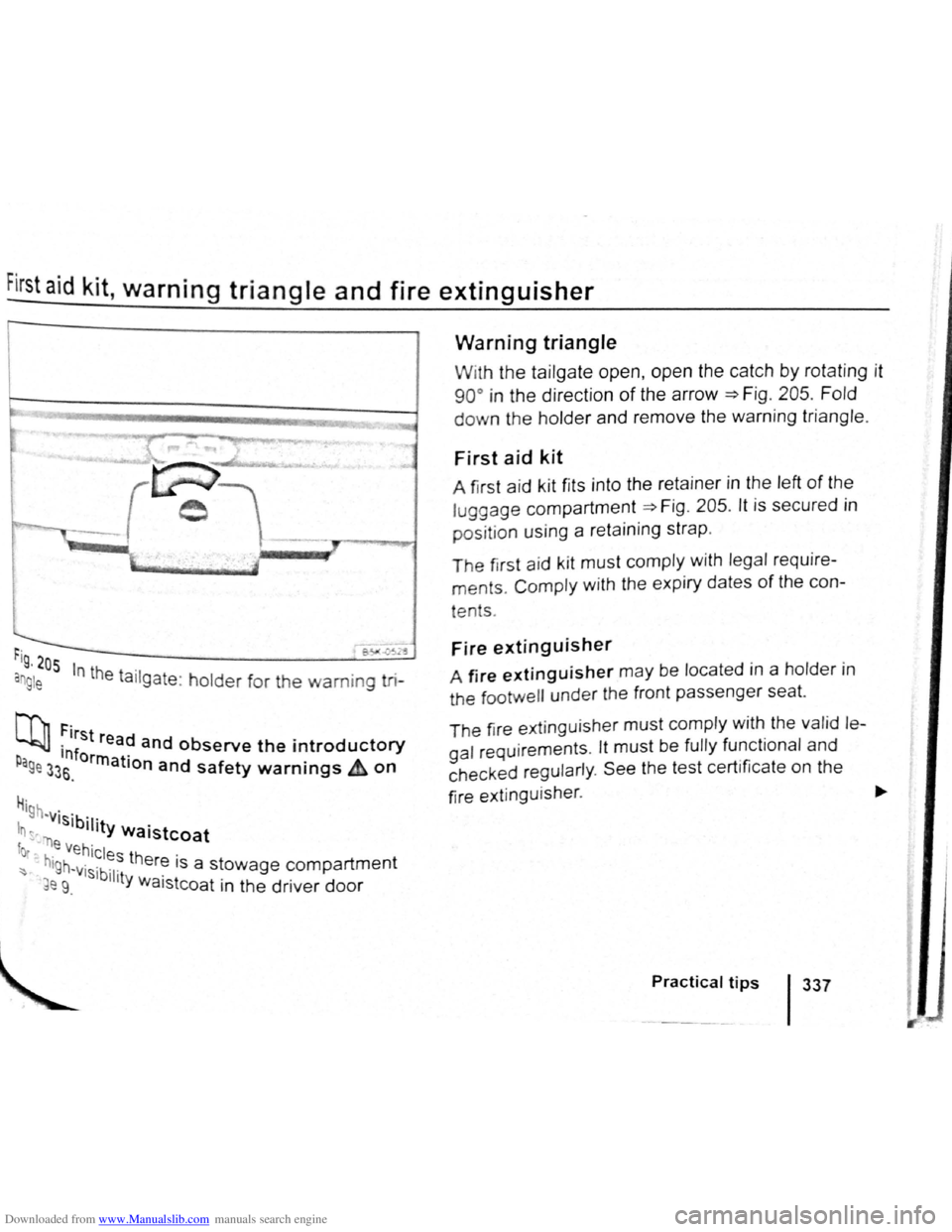
rig , 205
an g le In the ta ilgate : holder for the warning tri-
N'l, First re d L..bJJ ·1nf a and observe the introductory p orrn r age 33s. a IOn and safety warnings & on
H· '9h -visib· .
In ~-"r) '11ty Waistcoat
fot .e Vehicles th .
~ hlgh~visibl er~ 1s a stowage compartment
~e 9. 11ty Waistcoat in the driver door
Warning triangle
With the tailgate open, open the catch by rotat ing it
90° in the direction of the arrow =>F ig . 205 . Fold
down the holder and remove the warning triangle.
First aid kit
A first aid k it fits into the retainer in the left of the
luggage compartment =>Fig . 205 . lt is secured in
positio n using a reta ining strap .
The first aid k it must comply with legal require
ments. Comply with the expiry dates of the con-
tents .
Fire extinguisher
A fire extinguisher may be located in a holder i n
the tootwell under the front passenger seat.
T he fir e ext inguisher
must comply with the valid le
gal requirements . lt must be fully functional and
c h ecked regul
arly . See the test certificate on the
fire e
xtinguisher . ~
Practical tips 1337