Page 3 of 384
1
OVERVIEW
FEATURES/OPERATIONS
SAFETY AND EMERGENCY FEATURES
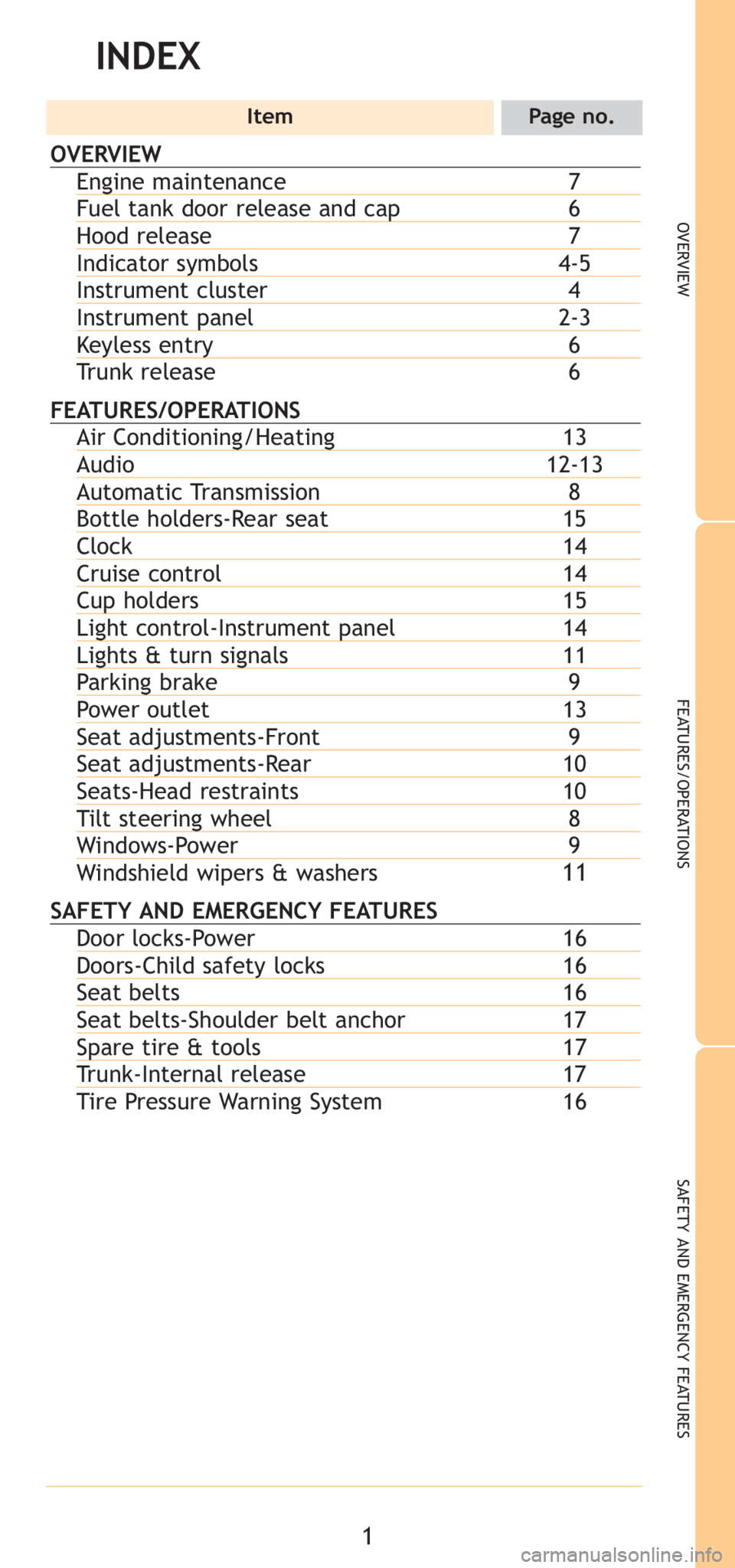
INDEX
ItemPage no.
OVERVIEW
Engine maintenance7Fuel tank door release and cap6Hood release 7Indicator symbols4-5Instrument cluster 4Instrument panel2-3Keyless entry 6
Trunk release 6
FEATURES/OPERATIONSAir Conditioning/Heating 13Audio 12-13 Automatic Transmission 8Bottle holders-Rear seat15Clock 14Cruise control14Cup holders15Light control-Instrument panel14Lights & turn signals11Parking brake9Power outlet 13Seat adjustments-Front 9Seat adjustments-Rear10Seats-Head restraints 10Tilt steering wheel8Windows-Power 9
Windshield wipers & washers11
SAFETY AND EMERGENCY FEATURESDoor locks-Power 16Doors-Child safety locks16Seat belts16Seat belts-Shoulder belt anchor17Spare tire & tools17Trunk-Internal release 17
Tire Pressure Warning System 16
Page 7 of 384
5
OVERVIEW
FEATURES/OPERATIONS
SAFETY AND EMERGENCY FEATURES
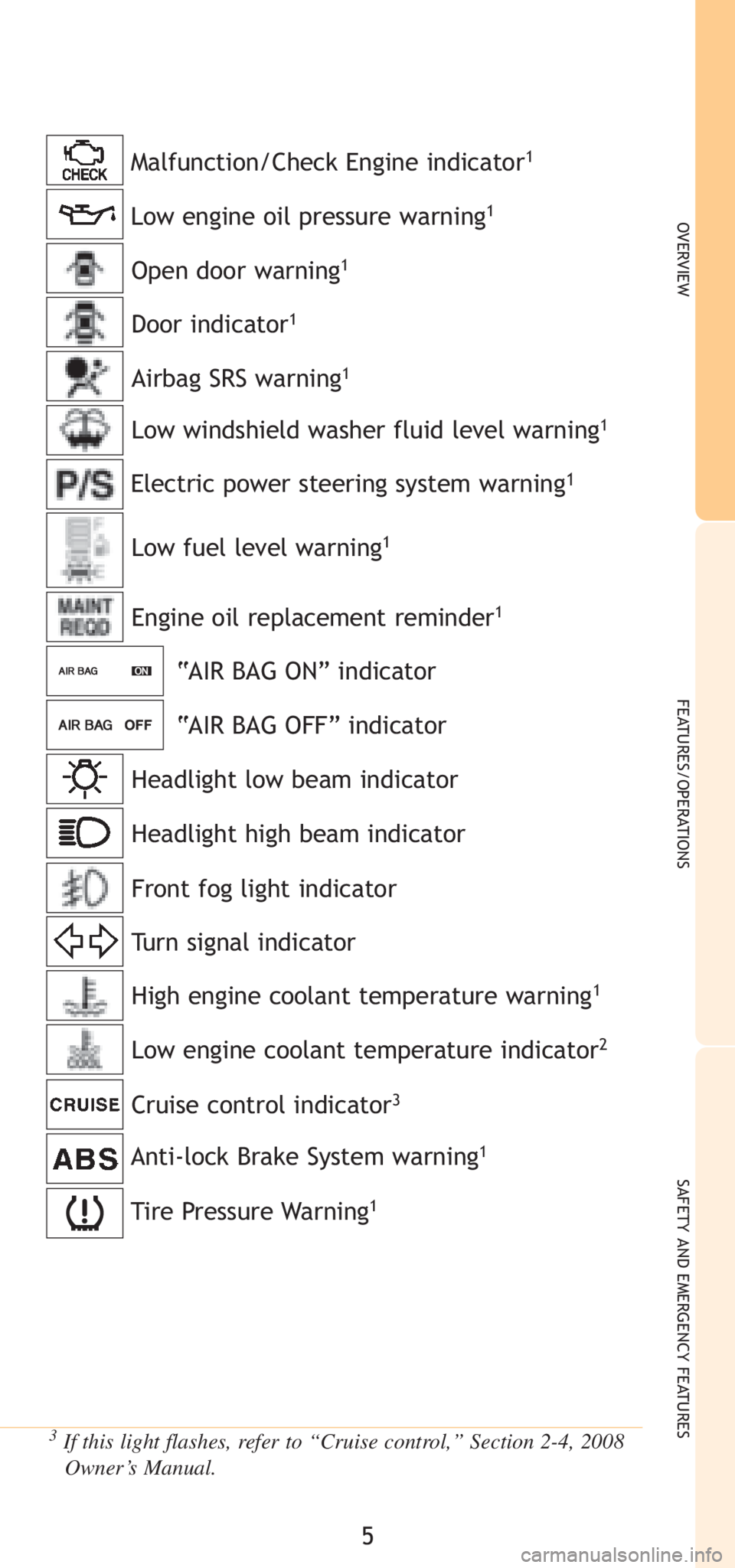
Low engine oil pressure warning1
Anti-lock Brake System warning1
Malfunction/Check Engine indicator1
3If this light flashes, refer to “Cruise control,” Section 2-4, 2008Owner’s Manual.
Open door warning1
Low windshield washer fluid level warning1
Engine oil replacement reminder1
“AIR BAG ON” indicator
“AIR BAG OFF” indicator
Headlight low beam indicator
Turn signal indicator
High engine coolant temperature warning1
Low engine coolant temperature indicator2
Headlight high beam indicator
Cruise control indicator
3
Front fog light indicator Airbag SRS warning
1
Low fuel level warning1
Door indicator1
Electric power steering system warning1
Tire Pressure Warning1
Page 16 of 384
14
FEATURES/OPERATIONS
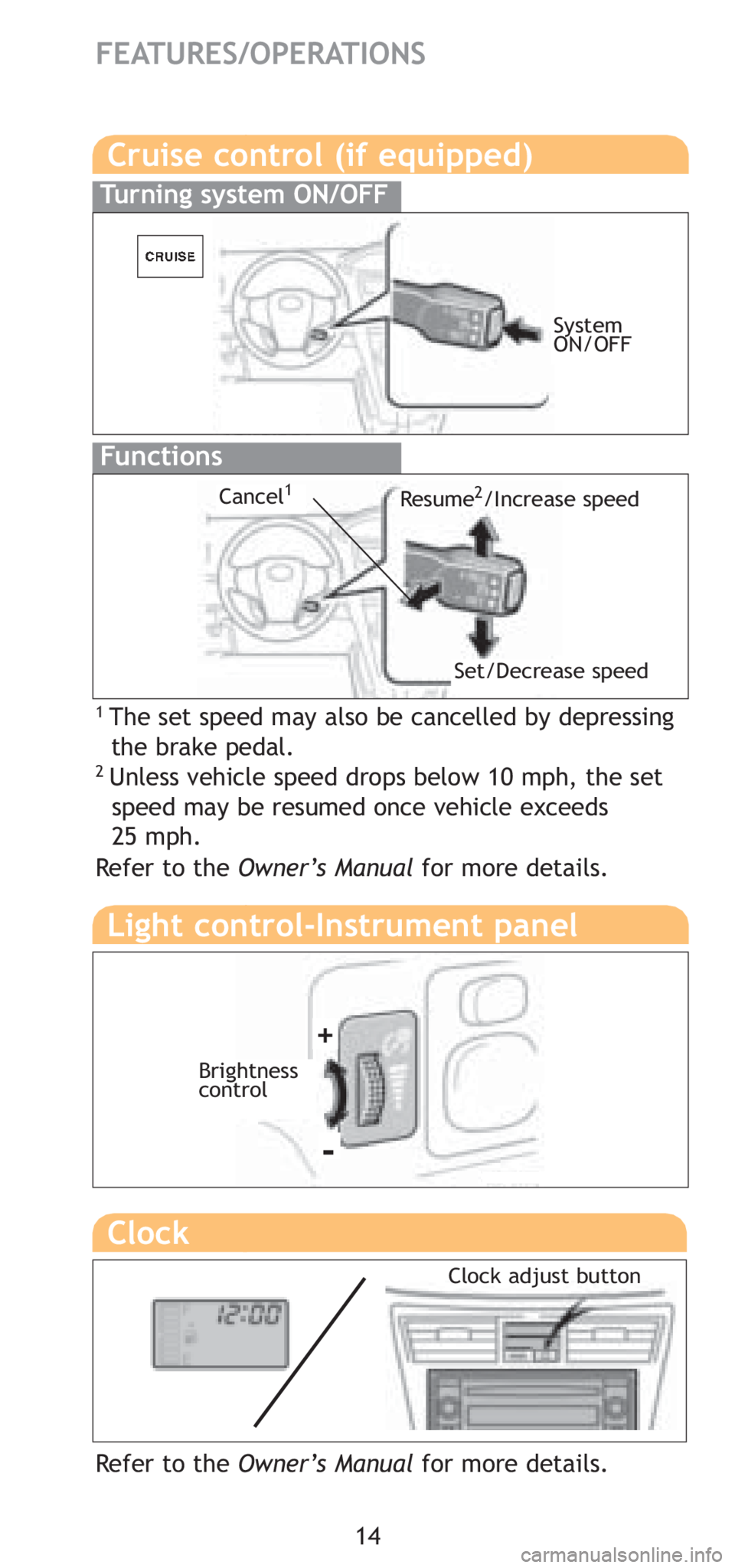
Cruise control (if equipped)
1 The set speed may also be cancelled by depressing the brake pedal.
2 Unless vehicle speed drops below 10 mph, the set speed may be resumed once vehicle exceeds
25 mph.
Turning system ON/OFF
Functions
Resume2/Increase speed
Set/Decrease speed
Cancel1
Refer to the Owner’s Manual for more details.
System
ON/OFF
Clock
Refer to the Owner’s Manual for more details.
Light control-Instrument panel
Brightness
control
+
-
Clock adjust button
Page 23 of 384

17
Installation of a mobile two-way radio system
As the installation of a mobile two-way radio system in your vehicle could
affect electronic systems such as the multiport fuel injection system/sequen-
tial multiport fuel injection system, cruise control system, anti-lock brake sys-
tem, SRS airbag system and seat belt pretensioner system, be sure to check
with your Toyota dealer for precautionary measures or special instructions
regarding installation.
Scrapping your Toyota
The SRS airbag and seat belt pretensioner devices in your Toyota contain
explosive chemicals. If the vehicle is scrapped with the airbags and seat belt
pretensioners left as they are, this may cause an accident such as fire. Be
sure to have the systems of the SRS airbag and seat belt pretensioner
removed and disposed of by a qualified service shop or by your Toyota
dealer before you scrap your vehicle.
Perchlorate Material
Special handling may apply,
See www.dtsc.ca.gov/hazardouswaste/perchlorate.
Your vehicle has components that may contain perchlorate. These compo-
nents may include airbag, seat belt pretensioners, and wireless remote con-
trol batteries.
Page 37 of 384
15
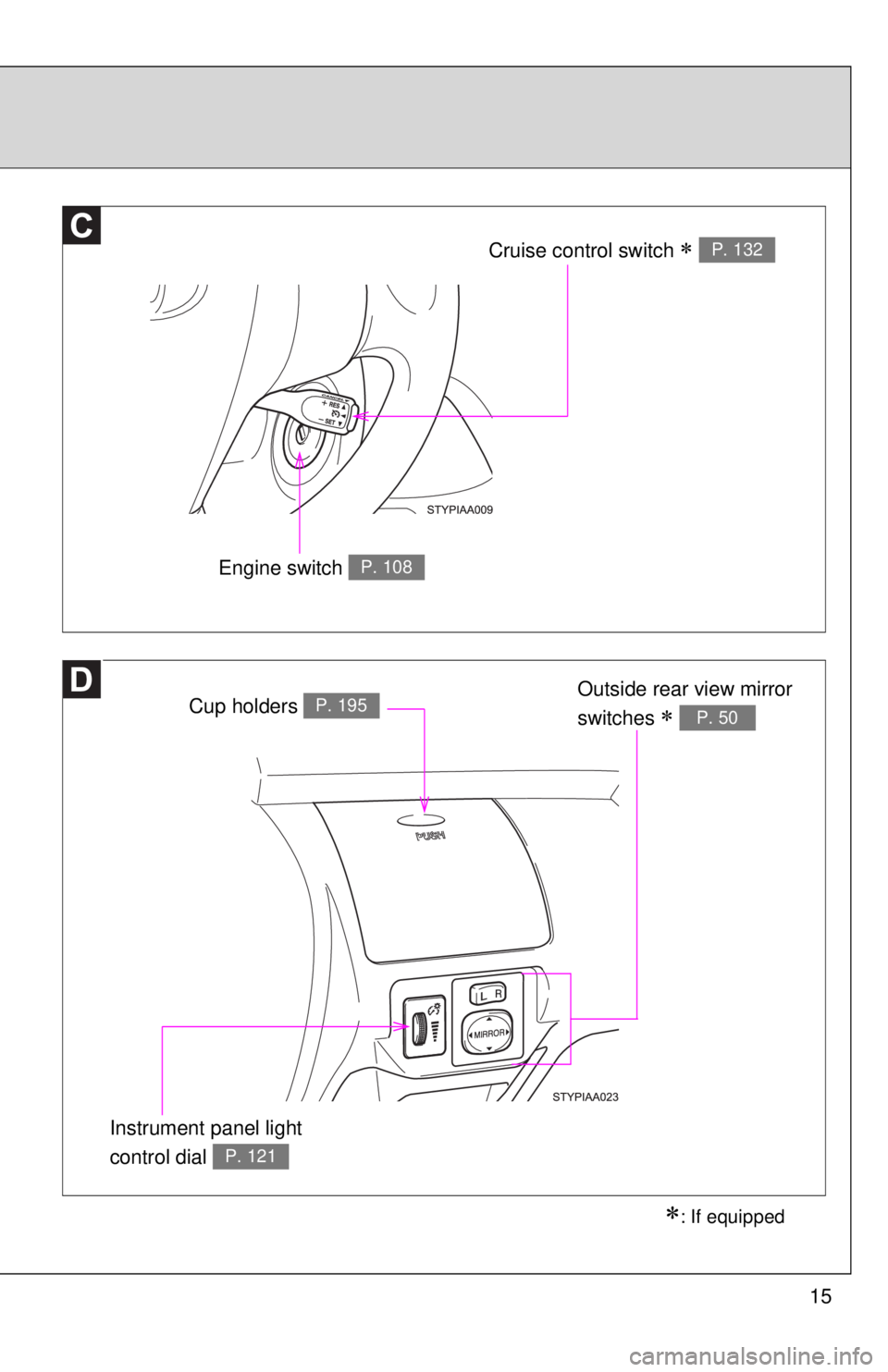
Cruise control switch ∗ P. 132
Engine switch P. 108
∗: If equipped
Instrument panel light
control dial
P. 121
Cup holders P. 195Outside rear view mirror
switches
∗ P. 50
Page 128 of 384
113
2-1. Driving procedures
2
When driving
n
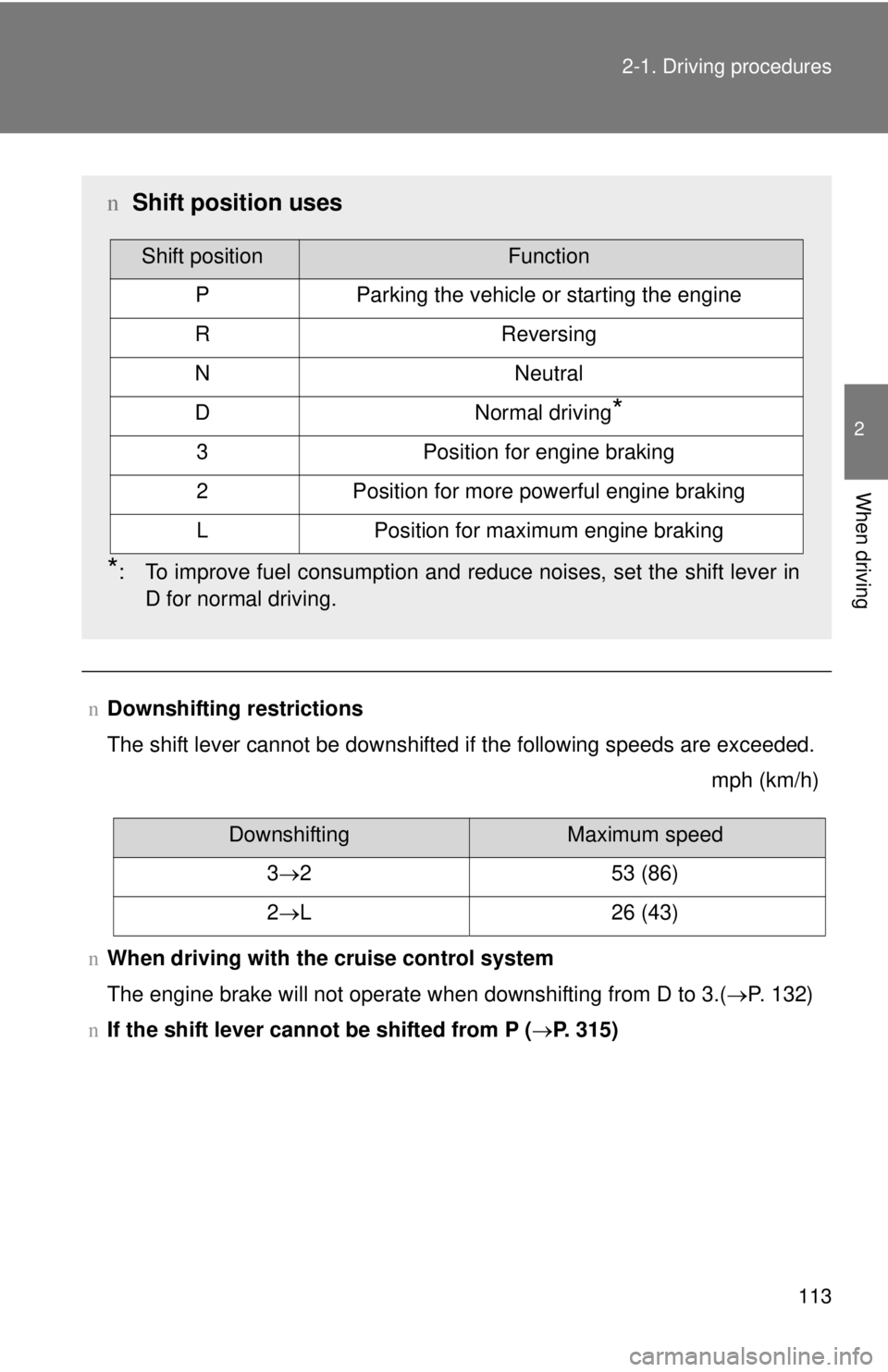
Downshifting restrictions
The shift lever cannot be downshifted if the following speeds are exceeded.
mph (km/h)
n When driving with the cruise control system
The engine brake will not operate when downshifting from D to 3.( →P. 132)
n If the shift lever cannot be shifted from P (→P. 315)
nShift position uses
*: To improve fuel consumption and reduce noises, set the shift lever in
D for normal driving.
Shift positionFunction
PParking the vehicle or starting the engine
RReversing
NNeutral
DNormal driving*
3Position for engine braking
2Position for more powerful engine braking
LPosition for maximum engine braking
DownshiftingMaximum speed
3 →2 53 (86)
2 →L 26 (43)
Page 140 of 384
125
2-2. Instrument cluster
2
When driving
n
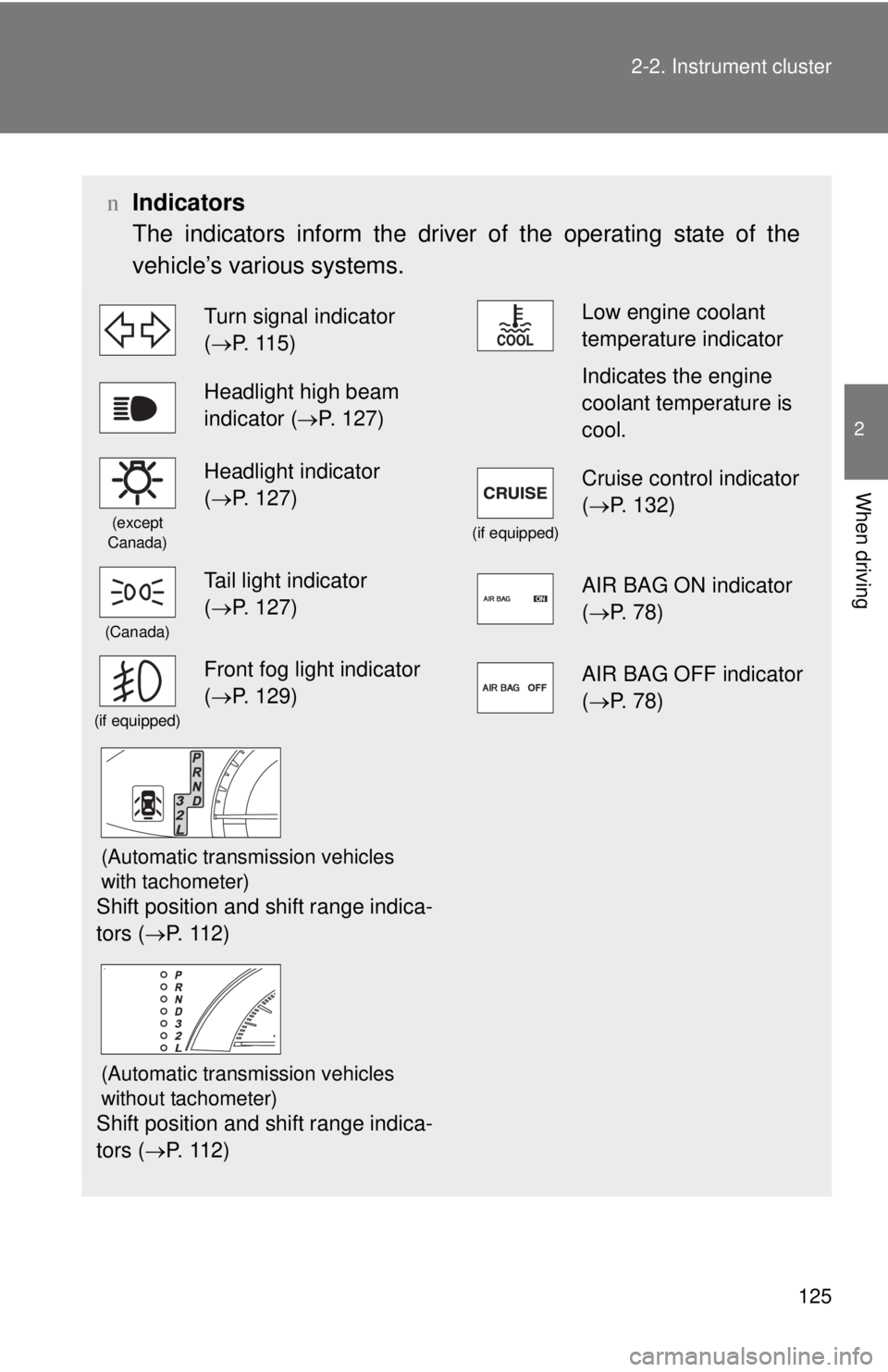
Indicators
The indicators inform the driver of the operating state of the
vehicle’s various systems.
Turn signal indicator
(→P. 115)Low engine coolant
temperature indicator
Headlight high beam
indicator ( →P. 127)Indicates the engine
coolant temperature is
cool.
(except
Canada)
Headlight indicator
( →P. 127)
(if equipped)
Cruise control indicator
( →P. 132)
(Canada)
Tail light indicator
(→P. 127)AIR BAG ON indicator
( →P. 78)
(if equipped)
Front fog light indicator
(→P. 129)AIR BAG OFF indicator
( →P. 78)
(Automatic transmission vehicles
with tachometer)
Shift position and shift range indica-
tors ( →P. 112)
(Automatic transmission vehicles
without tachometer)
Shift position and shift range indica-
tors (→P. 112)
Page 147 of 384
132
2-4. Using other driving systems
Cruise control (if equipped)
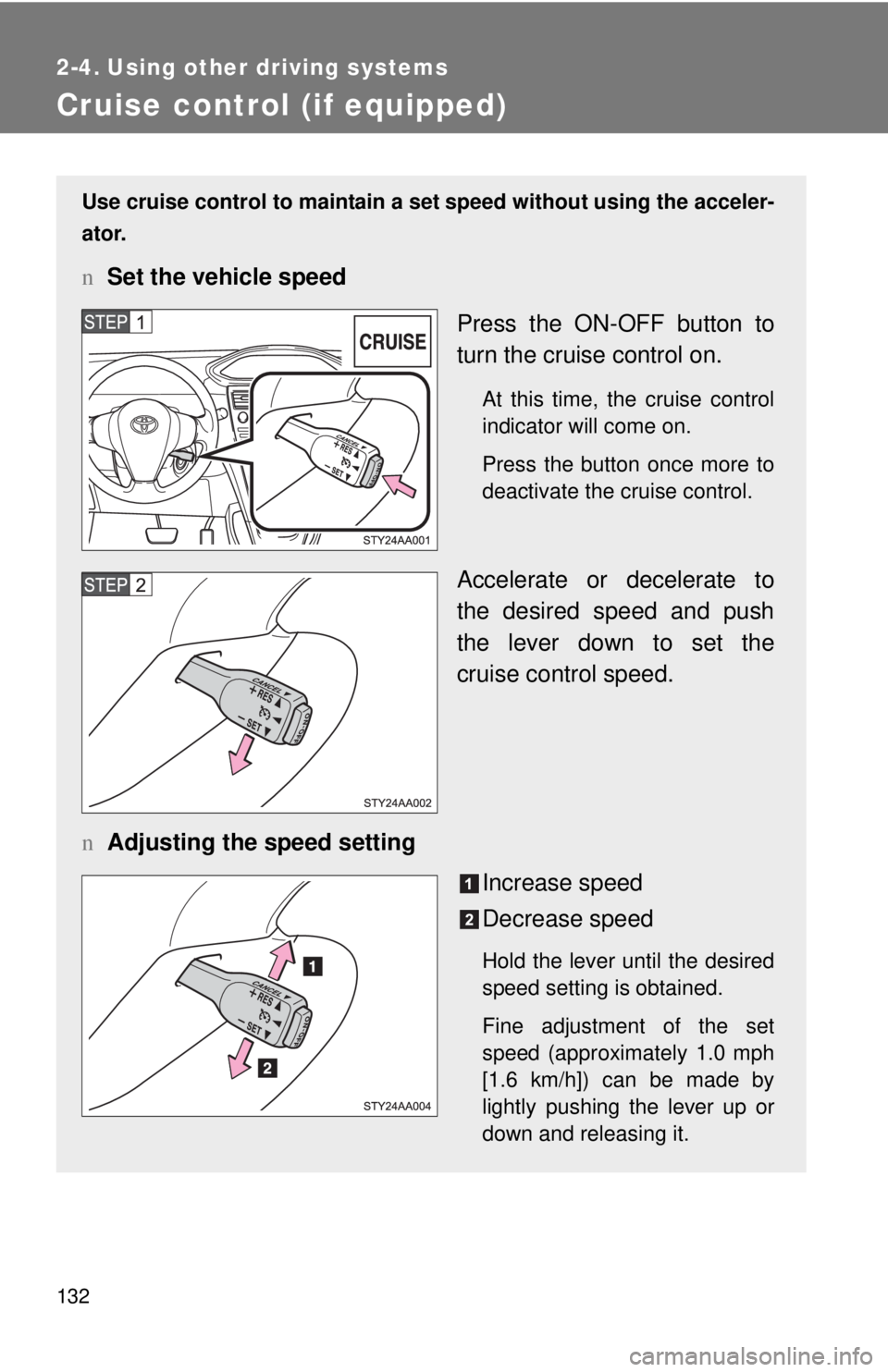
Use cruise control to maintain a set speed without using the acceler-
ator.
n Set the vehicle speed
Press the ON-OFF button to
turn the cruise control on.
At this time, the cruise control
indicator will come on.
Press the button once more to
deactivate the cruise control.
Accelerate or decelerate to
the desired speed and push
the lever down to set the
cruise control speed.
n Adjusting the speed setting
Increase speed
Decrease speed
Hold the lever until the desired
speed setting is obtained.
Fine adjustment of the set
speed (approximately 1.0 mph
[1.6 km/h]) can be made by
lightly pushing the lever up or
down and releasing it.