Page 157 of 572
08 SIENNA_U (L/O 0801)
149
2008 SIENNA from Aug. ’08 Prod. (OM45455U)
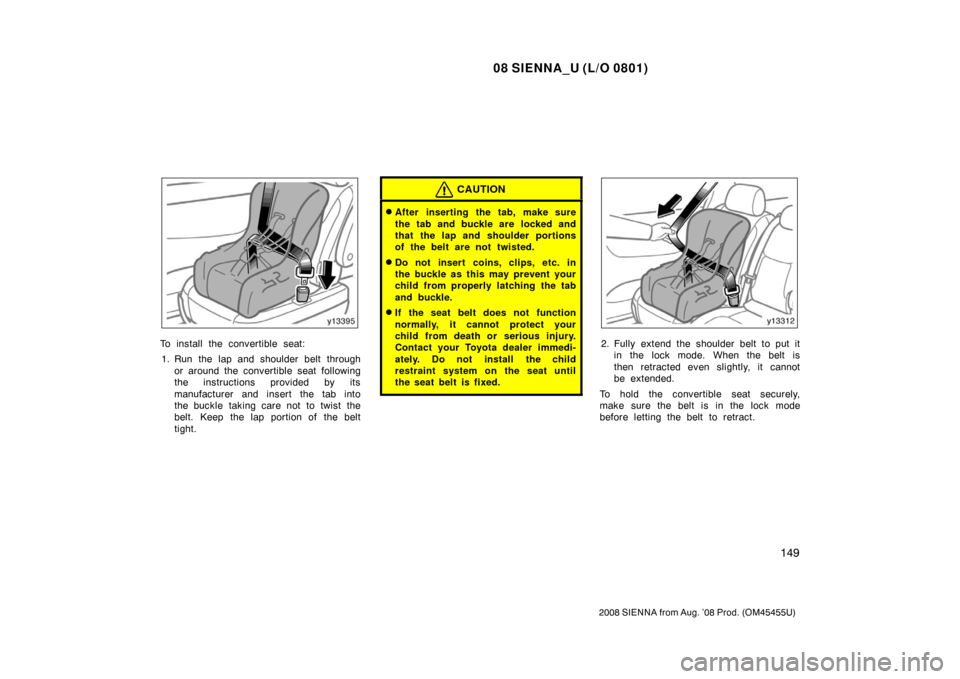
To install the convertible seat:1. Run the lap and shoulder belt through or around the convertible seat following
the instructions provided by its
manufacturer and insert the tab into
the buckle taking care not to twist the
belt. Keep the lap portion of the belt
tight.
CAUTION
�After inserting the tab, make sure
the tab and buckle are locked and
that the lap and shoulder portions
of the belt are not twisted.
�Do not insert coins, clips, etc. in
the buckle as this may prevent your
child from properly latching the tab
and buckle.
�If the seat belt does not function
normally, it cannot protect your
child from death or serious injury.
Contact your Toyota dealer immedi-
ately. Do not install the child
restraint system on the seat until
the seat belt is fixed.
2. Fully extend the shoulder belt to put itin the lock mode. When the belt is
then retracted even slightly, it cannot
be extended.
To hold the convertible seat securely,
make sure the belt is in the lock mode
before letting the belt to retract.
Page 160 of 572
08 SIENNA_U (L/O 0801)
152
2008 SIENNA from Aug. ’08 Prod. (OM45455U)
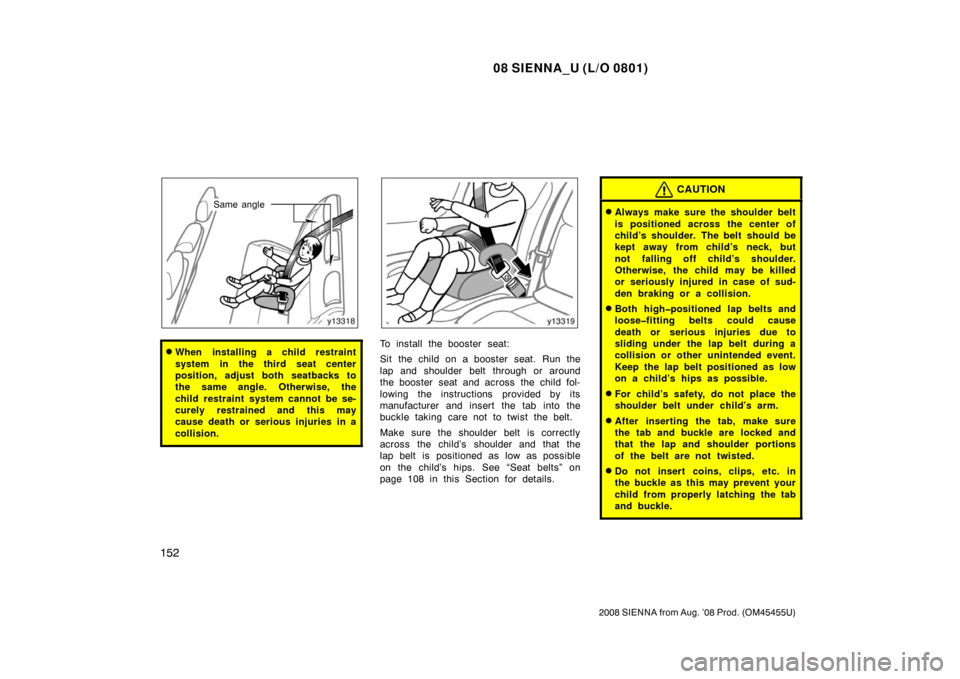
Same angle
�When installing a child restraint
system in the third seat center
position, adjust both seatbacks to
the same angle. Otherwise, the
child restraint system cannot be se-
curely restrained and this may
cause death or serious injuries in a
collision.To install the booster seat:
Sit the child on a booster seat. Run the
lap and shoulder belt through or around
the booster seat and across the child fol-
lowing the instructions provided by its
manufacturer and insert the tab into the
buckle taking care not to twist the belt.
Make sure the shoulder belt is correctly
across the child’s shoulder and that the
lap belt is positioned as low as possible
on the child’s hips. See “Seat belts” on
page 108 in this Section for details.
CAUTION
�Always make sure the shoulder belt
is positioned across the center of
child’s shoulder. The belt should be
kept away from child’s neck, but
not falling off child’s shoulder.
Otherwise, the child may be killed
or seriously injured in case of sud-
den braking or a collision.
�Both highpositioned lap belts and
loosefitting belts could cause
death or serious injuries due to
sliding under the lap belt during a
collision or other unintended event.
Keep the lap belt positioned as low
on a child’s hips as possible.
�For child’s safety, do not place the
shoulder belt under child’s arm.
�After inserting the tab, make sure
the tab and buckle are locked and
that the lap and shoulder portions
of the belt are not twisted.
�Do not insert coins, clips, etc. in
the buckle as this may prevent your
child from properly latching the tab
and buckle.
Page 166 of 572
08 SIENNA_U (L/O 0801)
158
2008 SIENNA from Aug. ’08 Prod. (OM45455U)
1st lock
position
5th lock
position
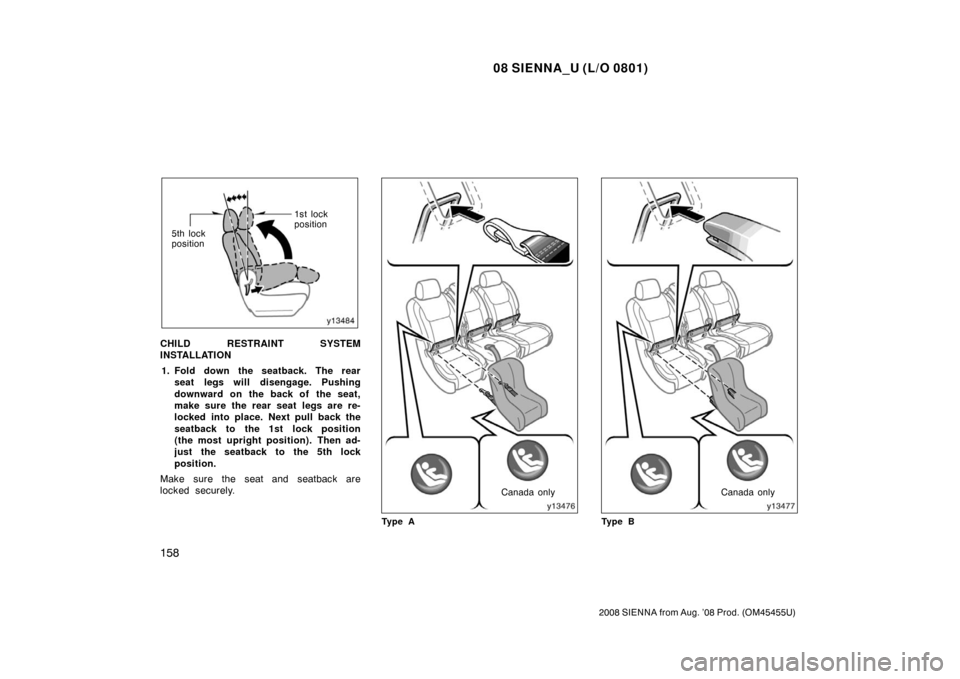
CHILD RESTRAINT SYSTEM
INSTALLATION
1. Fold down the seatback. The rear seat legs will disengage. Pushing
downward on the back of the seat,
make sure the rear seat legs are re-
locked into place. Next pull back the
seatback to the 1st lock position
(the most upright position). Then ad-
just the seatback to the 5th lock
position.
Make sure the seat and seatback are
locked securely.
Canada only
Ty p e ACanada only
Ty p e B
Page 167 of 572
08 SIENNA_U (L/O 0801)
159
2008 SIENNA from Aug. ’08 Prod. (OM45455U)
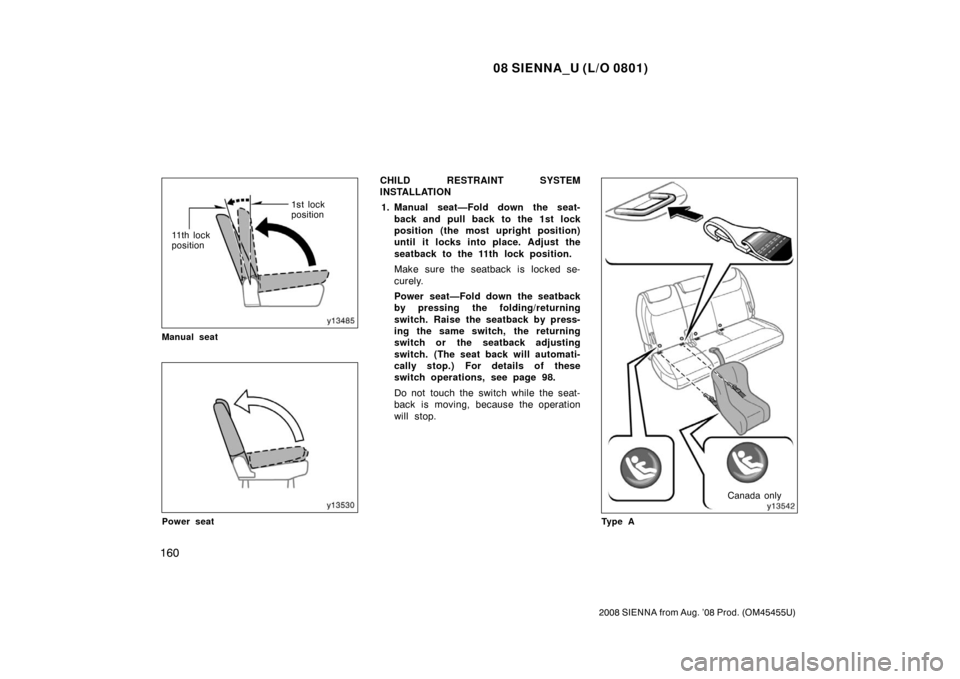
2. Turn up the covers for the lower an-chorages. Confirm the position of
the lower anchorages near the but-
ton in the seat cushion.
3. Type A—Latch the hooks of lower straps onto the anchorages and
tighten the lower straps.
Type B—Latch the buckles onto the
anchorages.
For owners in Canada— The symbol on
a child restraint system indicates the pres-
ence of a lower connector system.
If your child restraint system has a top
strap, it should be anchored. (For the
installation of the top strap, see “—Using
a top strap (for second seats)” on page
153 in this Section.)
For installation details, refer to the instruc-
tion manual equipped with each product.CAUTION
�When using the lower anchorages
for the child restraint system, be
sure that there are no irregular ob-
jects around the anchorages or that
the seat belt is not caught.
�Push and pull the child restraint
system in different directions to be
sure it is secure. Follow all the
installation instructions provided by
its manufacturer.
�When using the lower anchorages
for the child restraint system, en-
sure that the seat is moved to the
rearmost position, with the seat-
back close to the child restraint
system.
�After securing the child restraint
system, never slide or recline the
seat.
�Do not install a child restraint sys-
tem on the second seat if it inter-
feres with the lock mechanism of
the front seats. Otherwise, the child
or front seat occupant(s) may be
killed or seriously injured in case
of sudden braking or a collision.
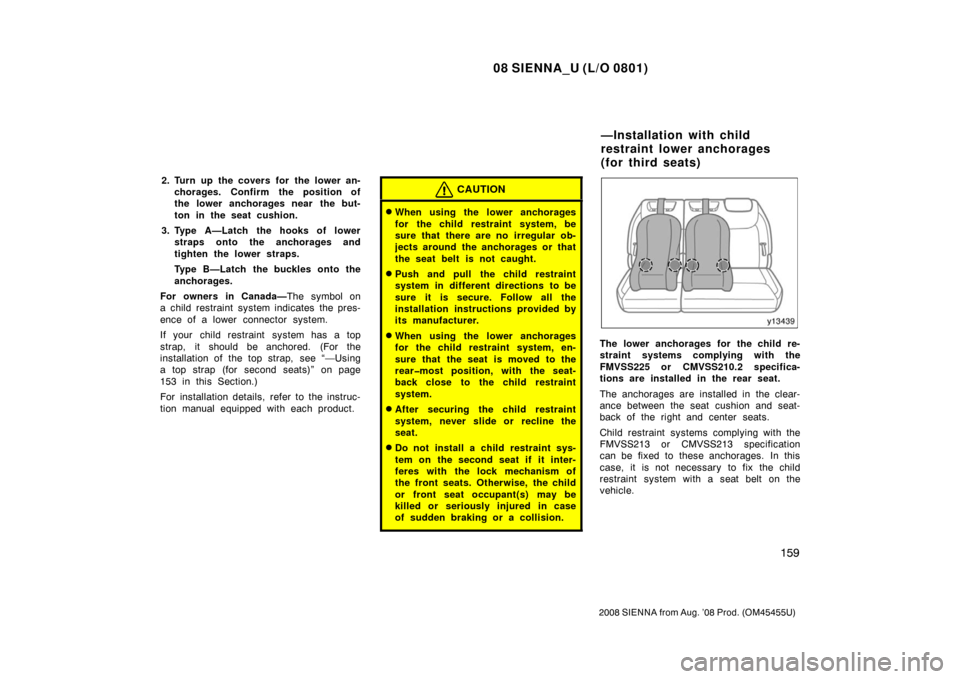
The lower anchorages for the child re-
straint systems complying with the
FMVSS225 or CMVSS210.2 specifica-
tions are installed in the rear seat.
The anchorages are installed in the clear-
ance between the seat cushion and seat-
back of the right and center seats.
Child restraint systems complying with the
FMVSS213 or CMVSS213 specification
can be fixed to these anchorages. In this
case, it is not necessary to fix the child
restraint system with a seat belt on the
vehicle.
—Installation with child
restraint lower anchorages
(for third seats)
Page 168 of 572
08 SIENNA_U (L/O 0801)
160
2008 SIENNA from Aug. ’08 Prod. (OM45455U)
1st lock
position
11 t h l o c k
position
Manual seat
Power seat
CHILD RESTRAINT SYSTEM
INSTALLATION 1. Manual seat—Fold down the seat- back and pull back to the 1st lock
position (the most upright position)
until it locks into place. Adjust the
seatback to the 11th lock position.
Make sure the seatback is locked se-
curely.
Power seat—Fold down the seatback
by pressing the folding/returning
switch. Raise the seatback by press-
ing the same switch, the returning
switch or the seatback adjusting
switch. (The seat back will automati-
cally stop.) For details of these
switch operations, see page 98.
Do not touch the switch while the seat-
back is moving, because the operation
will stop.
Canada only
Ty p e A
Page 169 of 572
08 SIENNA_U (L/O 0801)
161
2008 SIENNA from Aug. ’08 Prod. (OM45455U)
Canada only
Ty p e B
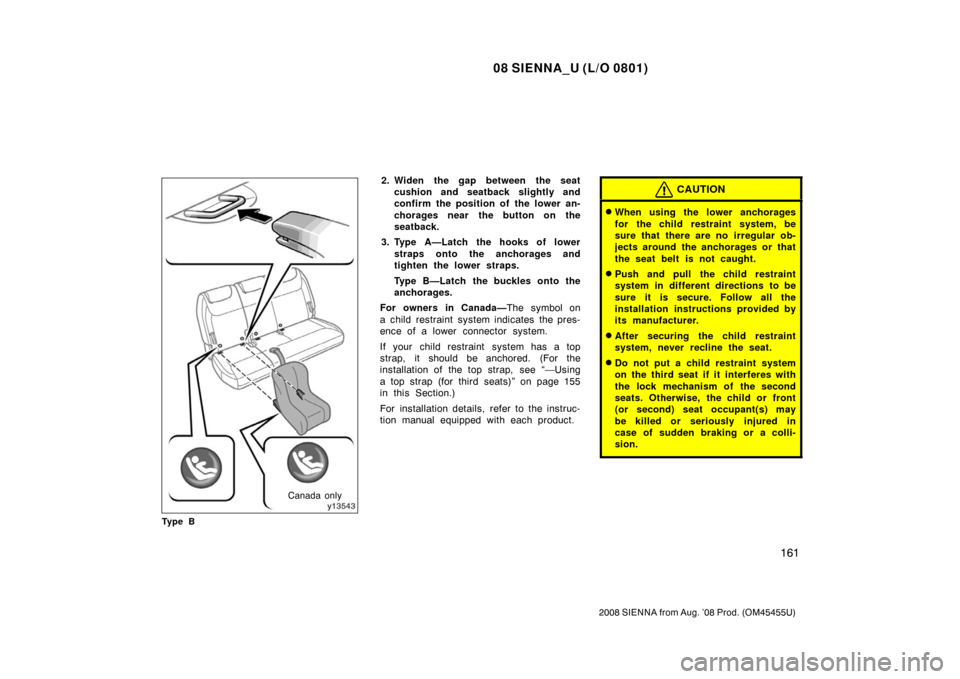
2. Widen the gap between the seat cushion and seatback slightly and
confirm the position of the lower an-
chorages near the button on the
seatback.
3. Type A—Latch the hooks of lower straps onto the anchorages and
tighten the lower straps.
Type B—Latch the buckles onto the
anchorages.
For owners in Canada— The symbol on
a child restraint system indicates the pres-
ence of a lower connector system.
If your child restraint system has a top
strap, it should be anchored. (For the
installation of the top strap, see “—Using
a top strap (for third seats)” on page 155
in this Section.)
For installation details, refer to the instruc-
tion manual equipped with each product.CAUTION
�When using the lower anchorages
for the child restraint system, be
sure that there are no irregular ob-
jects around the anchorages or that
the seat belt is not caught.
�Push and pull the child restraint
system in different directions to be
sure it is secure. Follow all the
installation instructions provided by
its manufacturer.
�After securing the child restraint
system, never recline the seat.
�Do not put a child restraint system
on the third seat if it interferes with
the lock mechanism of the second
seats. Otherwise, the child or front
(or second) seat occupant(s) may
be killed or seriously injured in
case of sudden braking or a colli-
sion.
Page 288 of 572
08 SIENNA_U (L/O 0801)
280
2008 SIENNA from Aug. ’08 Prod. (OM45455U)
The audio system controls in the instru-
ment panel allow the operation of the rear
seat entertainment system by rear seat
passengers to be disabled.
Turning on the rear system lock prevents
small children from using the remote con-
troller or operation panel of the DVD play-
er unit to operate the rear seat entertain-
ment system during driving.
Turn the audio system on. Push the
“AUDIO CONTROL” knob repeatedly until
“RSE” is displayed. Then, turn the “AUDIO
CONTROL” knob until “ON” is displayed,
and then push the “AUDIO CONTROL”
knob.
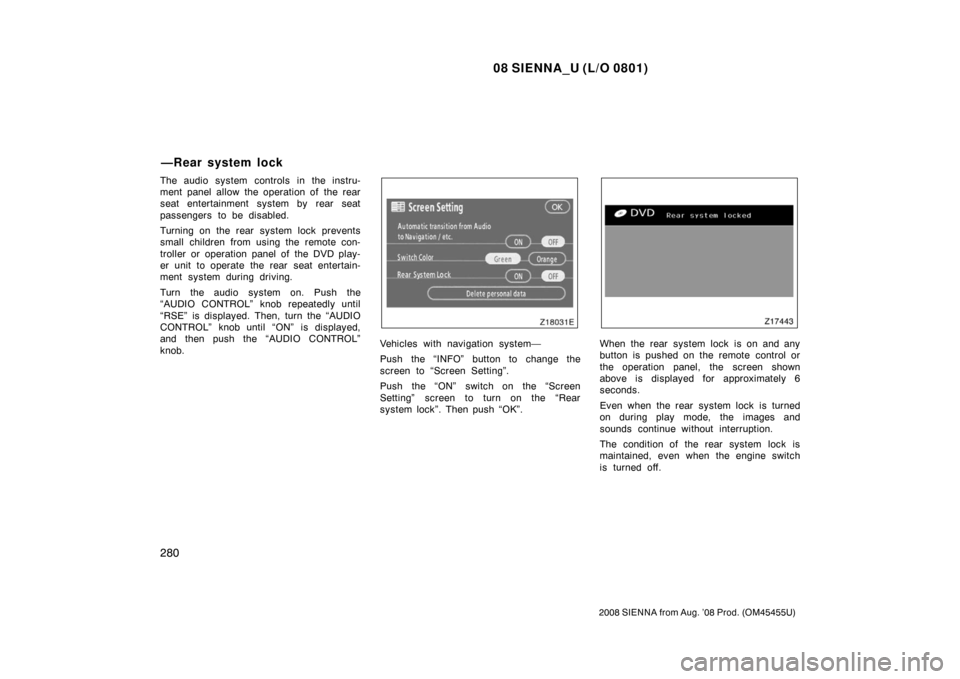
Vehicles with navigation system—
Push the “INFO” button to change the
screen to “Screen Setting”.
Push the “ON” switch on the “Screen
Setting” screen to turn on the “Rear
system lock”. Then push “OK”.When the rear system lock is on and any
button is pushed on the remote control or
the operation panel, the screen shown
above is displayed for approximately 6
seconds.
Even when the rear system lock is turned
on during play mode, the images and
sounds continue without interruption.
The condition of the rear system lock is
maintained, even when the engine switch
is turned off.
—Rear system lock
Page:
< prev 1-8 9-16 17-24